Sponsored

Scheduled Charging

tjrivian

Well-Known Member
Joined
Oct 4, 2024
Threads
9
Messages
211
Reaction score
184
Location
san diego
Vehicles
Tesla Model X
Just got my Gen1 R1S. Is there a way to set a different schedule for weekdays vs. weekends? It seems like the choices in the app are "weekdays" or "daily". I assume that daily will follow the same schedule all 7 days of the week, whereas weekdays will follow the schedule on weekdays but will charge all 24 hours during the weekends. Is that correct? The whole point of scheduling charging is to take advantage of the lowest TOU rates. My provider(SDGE) has just as high peak rates on weekends that it does on weekdays, it's just that the hours are different.

Also, there must be hundreds of settings are controlled via the settings app on the screen in the car. But this scheduled charging setting seems to only be controlled via the app, can't do it from the screen in the car. Is that true? If so, seems like a very strange design decision to me.
Sponsored
 

R1T Preds Fan

Well-Known Member
First Name
Ryan
Joined
Feb 17, 2023
Threads
0
Messages
178
Reaction score
120
Location
Nashville, TN
Vehicles
R1T
Occupation
TN Oncology Supply Team Manager
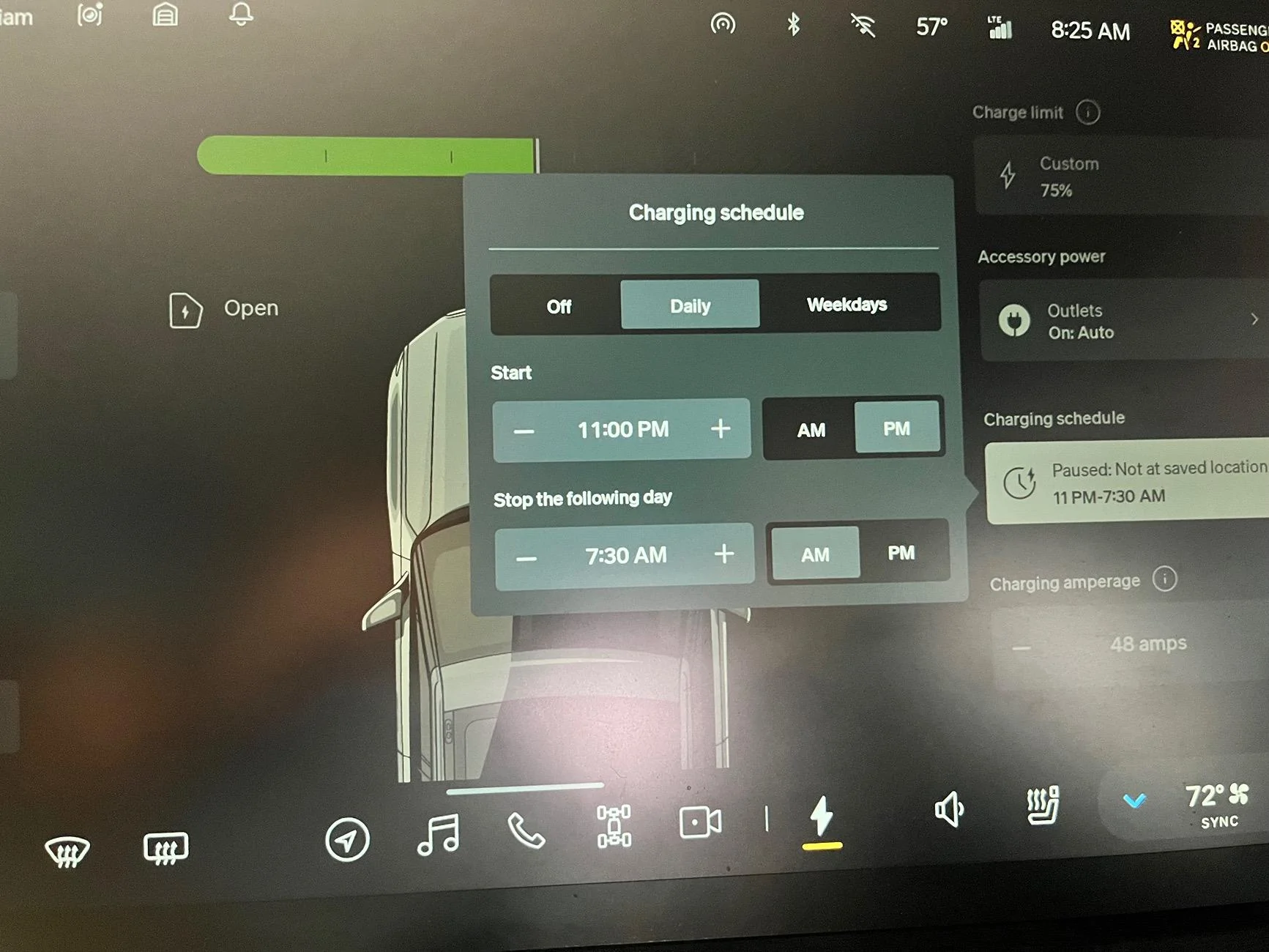
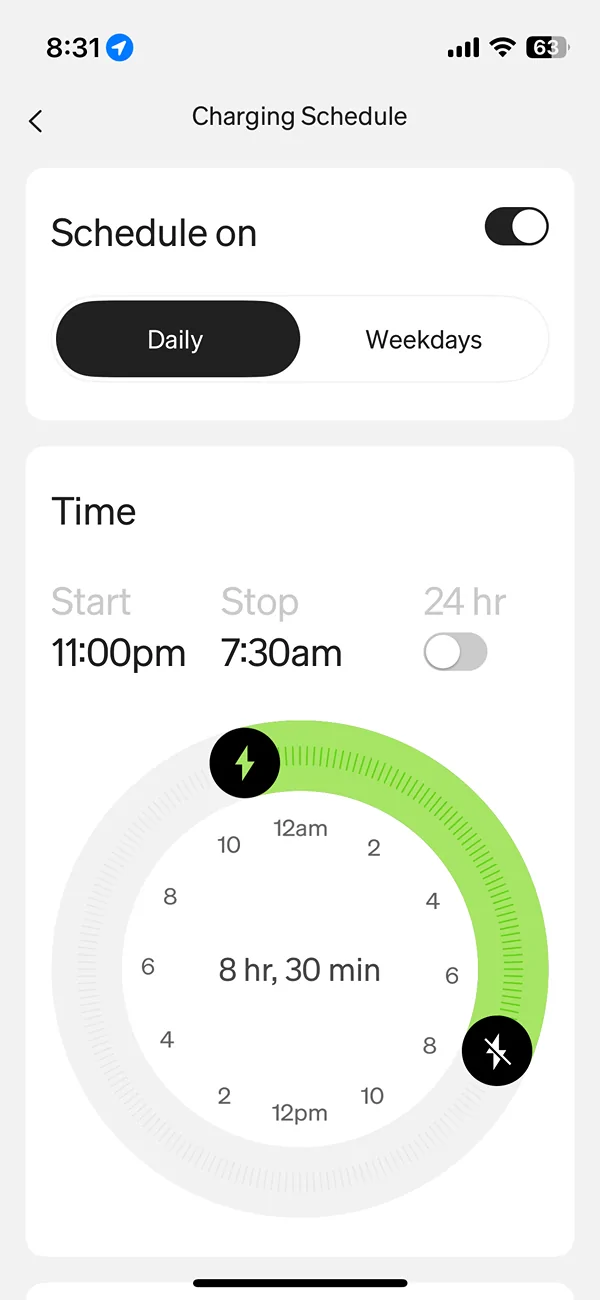
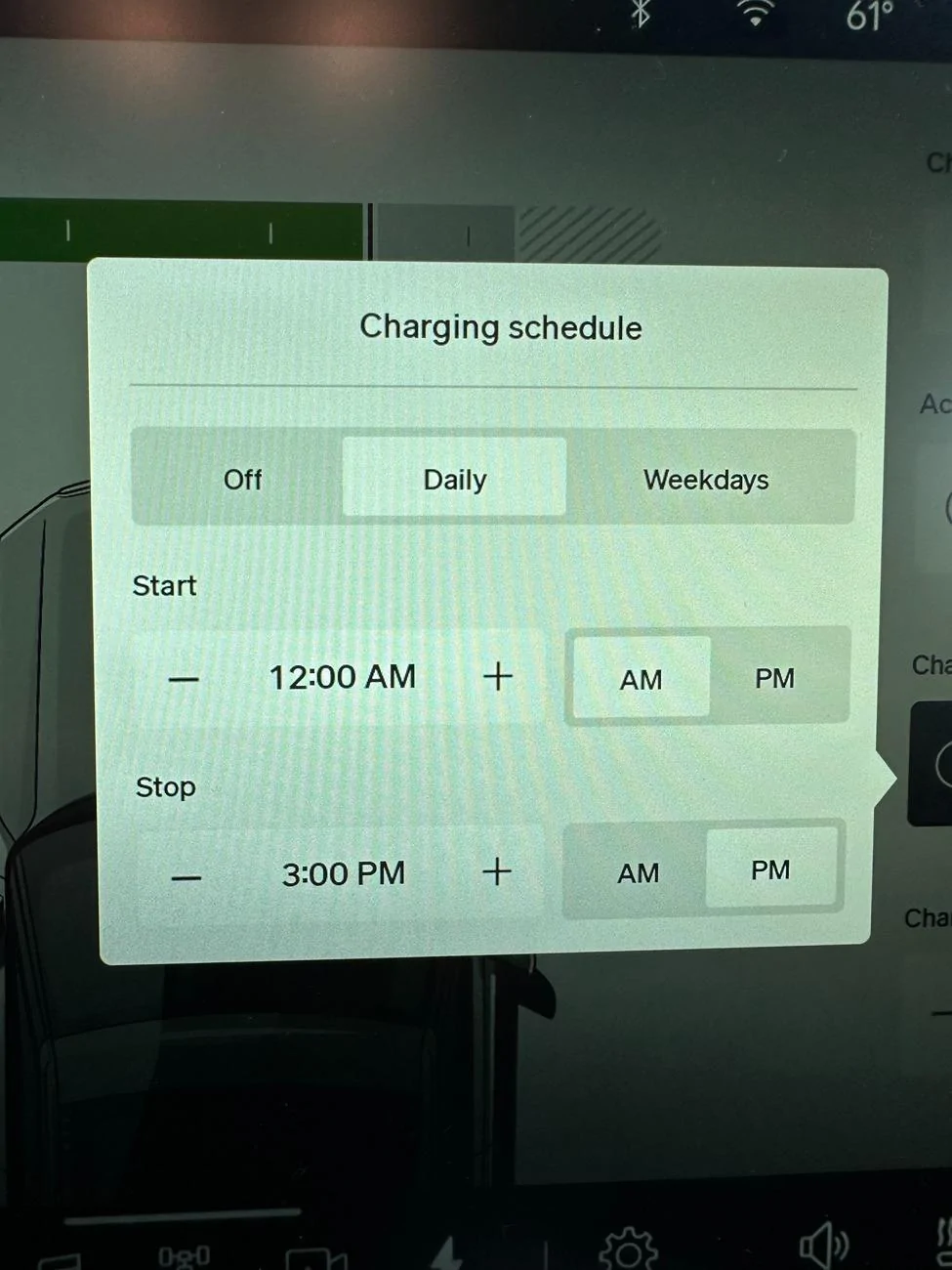
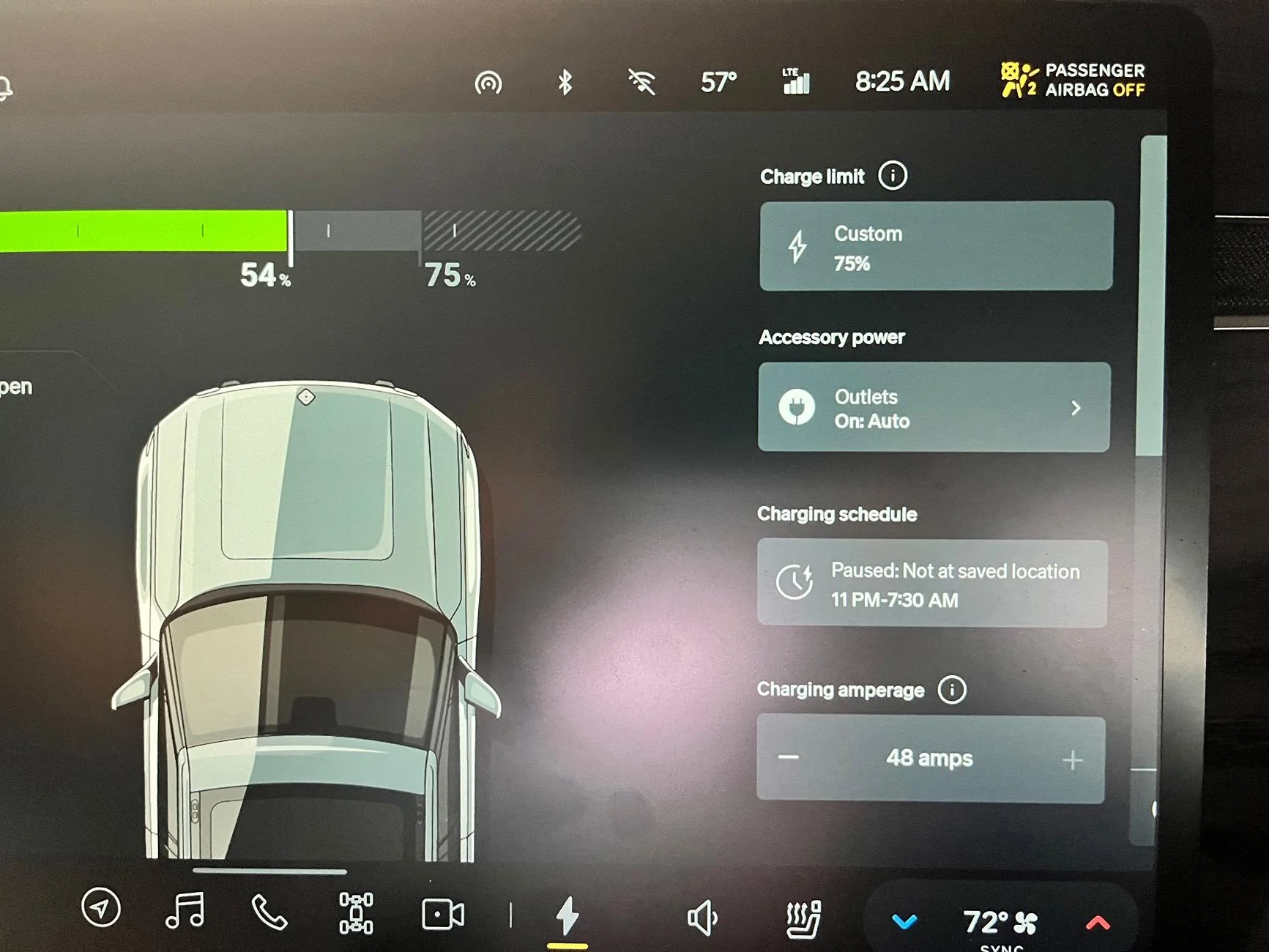
In my Gen 1 I can set scheduled charging from the truck (right side of screen) or the app. In the app select weekday(M-F)/daily(Every Day) and highlight the time if the UOT hours differ… This should get you set… Hopefully they will update it soon like the climate schedule settings where you can actually select the exact days and highlight them. That would be more ideal for most users!

Rivian R1T R1S Scheduled Charging IMG_8358


Rivian R1T R1S Scheduled Charging IMG_8359


Rivian R1T R1S Scheduled Charging IMG_8360
 
Last edited:

Dbl-J

Active Member
First Name
James
Joined
Feb 25, 2024
Threads
1
Messages
37
Reaction score
13
Location
Norfolk, VA
Vehicles
R1T
Occupation
Coast Guard
Clubs
 
Please advise, I need to change the location for scheduled charging.
the app doesn’t allow me to change it by simply tapping on the map area in the schedule charging section of the app. Since I can’t adjust the location, it won’t charge on any scheduled time.
 

R1T Preds Fan

Well-Known Member
First Name
Ryan
Joined
Feb 17, 2023
Threads
0
Messages
178
Reaction score
120
Location
Nashville, TN
Vehicles
R1T
Occupation
TN Oncology Supply Team Manager
You set this on the charging screen in the truck it has to be done there for it to work properly…
 
OP
OP

tjrivian

Well-Known Member
Joined
Oct 4, 2024
Threads
9
Messages
211
Reaction score
184
Location
san diego
Vehicles
Tesla Model X
In my Gen 1 I can set scheduled charging from the truck (right side of screen) or the app. In the app select weekday(M-F)/daily(Every Day) and highlight the time if the UOT hours differ… This should get you set… Hopefully they will update it soon like the climate schedule settings where you can actually select the exact days and highlight them. That would be more ideal for most users!

IMG_8358.jpeg


IMG_8359.jpeg


IMG_8360.png
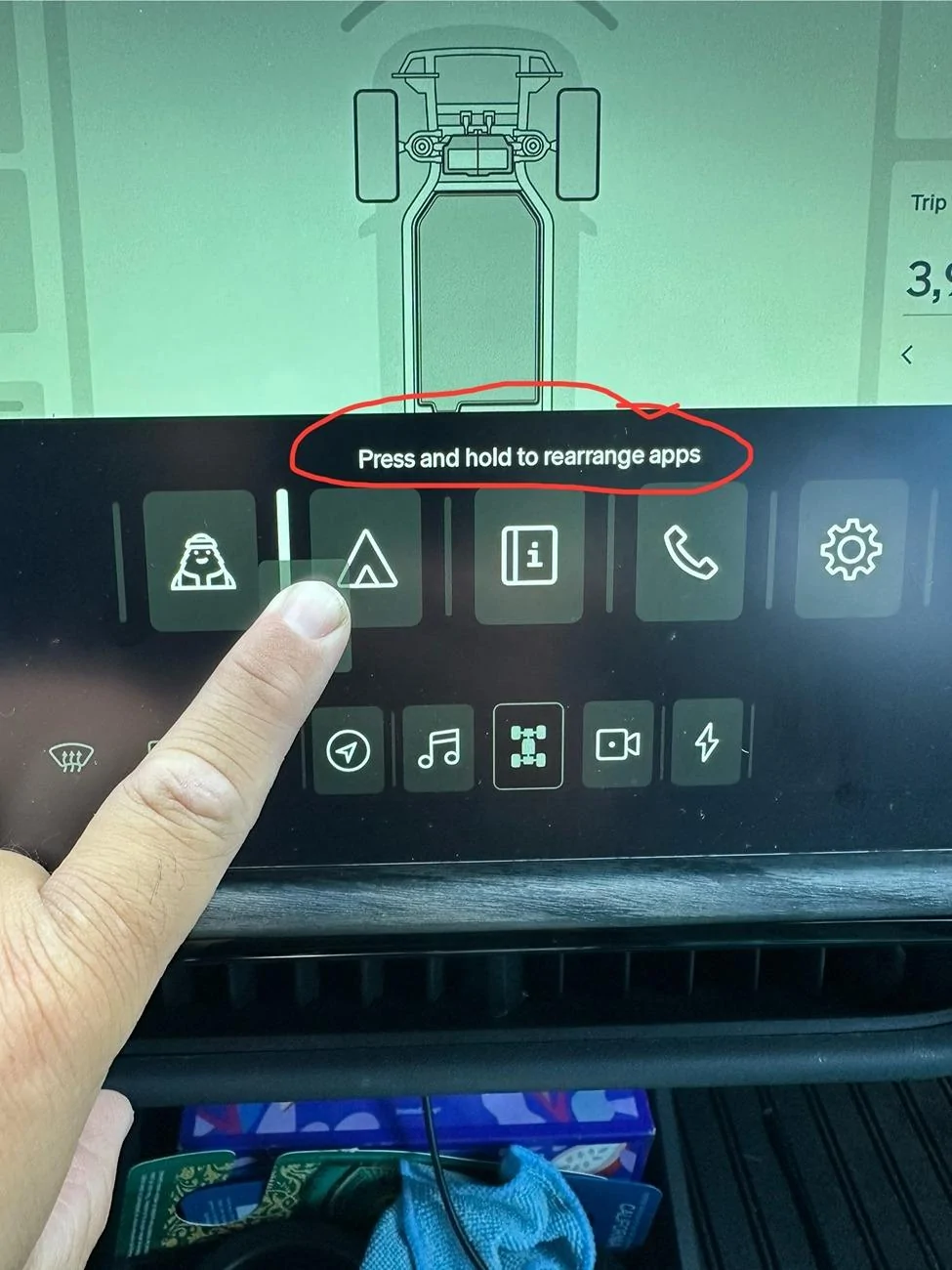
Where do you find that on the screen in the car? I've looked all over and can not seem to find it. Looks like you have a lightning bolt in the bottom dock in your screen. I don't have that on mine, and don't know how to get it there.
 

Sponsored

DeanB1452

Well-Known Member
First Name
Dean
Joined
Jun 12, 2023
Threads
12
Messages
395
Reaction score
622
Location
Milpitas, CA
Vehicles
'22 R1T LE/LG/BM
Occupation
IT Administrator
Clubs
 
Where do you find that on the screen in the car? I've looked all over and can not seem to find it. Looks like you have a lightning bolt in the bottom dock in your screen. I don't have that on mine, and don't know how to get it there.
Swipe up from the bottom of the screen to access all the apps. You can drag and drop apps to the bottom dock too. Up to 5 permanent apps and one floater in the bottom dock. Move them around to rearrange them too.

Rivian R1T R1S Scheduled Charging 509138a2-ea29-4055-880e-018b54277c7f
 
Last edited:

Dbl-J

Active Member
First Name
James
Joined
Feb 25, 2024
Threads
1
Messages
37
Reaction score
13
Location
Norfolk, VA
Vehicles
R1T
Occupation
Coast Guard
Clubs
 
You set this on the charging screen in the truck it has to be done there for it to work properly…
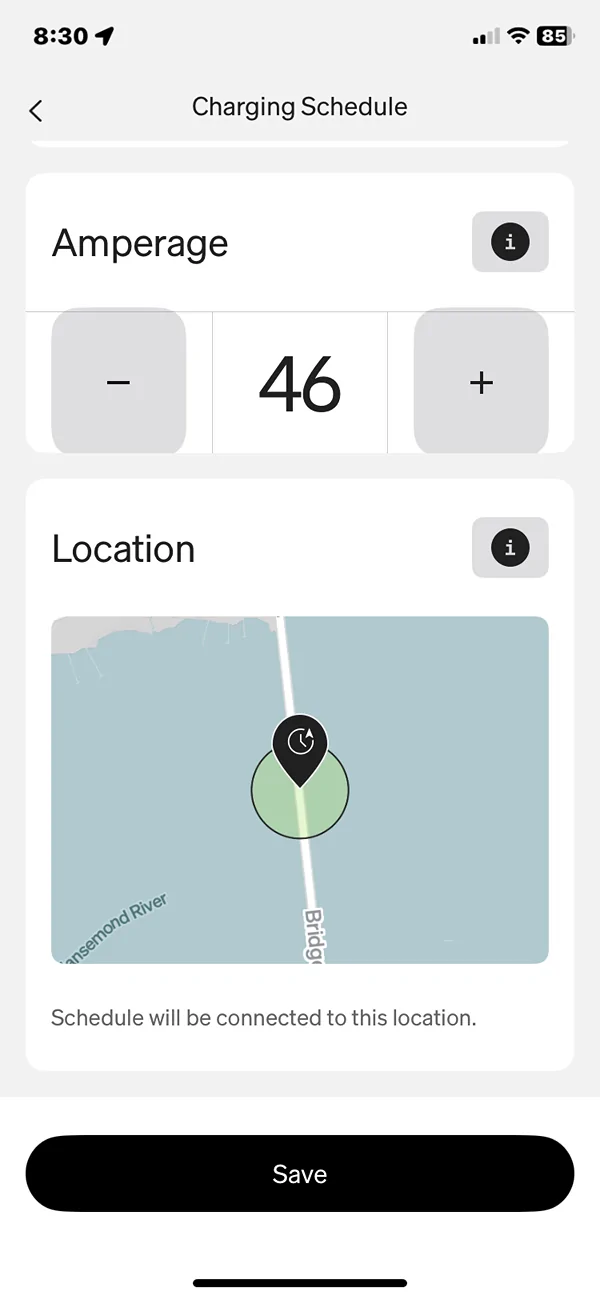
I set the charging schedule in the truck to mirror the same time. The problem is, in the app location for scheduled charging is in the middle of a bridge. That’s about 4 miles from my home. But I need to do is change the location of where I can do the scheduled charging. But I change location in the app by touching screen, nothing happens.
 

Erik+

Well-Known Member
First Name
Erik
Joined
Sep 2, 2024
Threads
5
Messages
362
Reaction score
557
Location
Colorado
Vehicles
2023 R1T
Occupation
Engineering
Swipe up from the bottom of the screen to access all the apps. You can drag and drop apps to the bottom dock too. Up to 5 permanent apps and one floater in the bottom dock. Move them around to rearrange them too.

509138a2-ea29-4055-880e-018b54277c7f.jpg
Very patient and detailed response, with a solid graphic depiction to! Then I saw it says you are an IT admin. Many props, the rest of minions would have just told the OP to read their vehicle manual.
 

DeanB1452

Well-Known Member
First Name
Dean
Joined
Jun 12, 2023
Threads
12
Messages
395
Reaction score
622
Location
Milpitas, CA
Vehicles
'22 R1T LE/LG/BM
Occupation
IT Administrator
Clubs
 
I set the charging schedule in the truck to mirror the same time. The problem is, in the app location for scheduled charging is in the middle of a bridge. That’s about 4 miles from my home. But I need to do is change the location of where I can do the scheduled charging. But I change location in the app by touching screen, nothing happens.
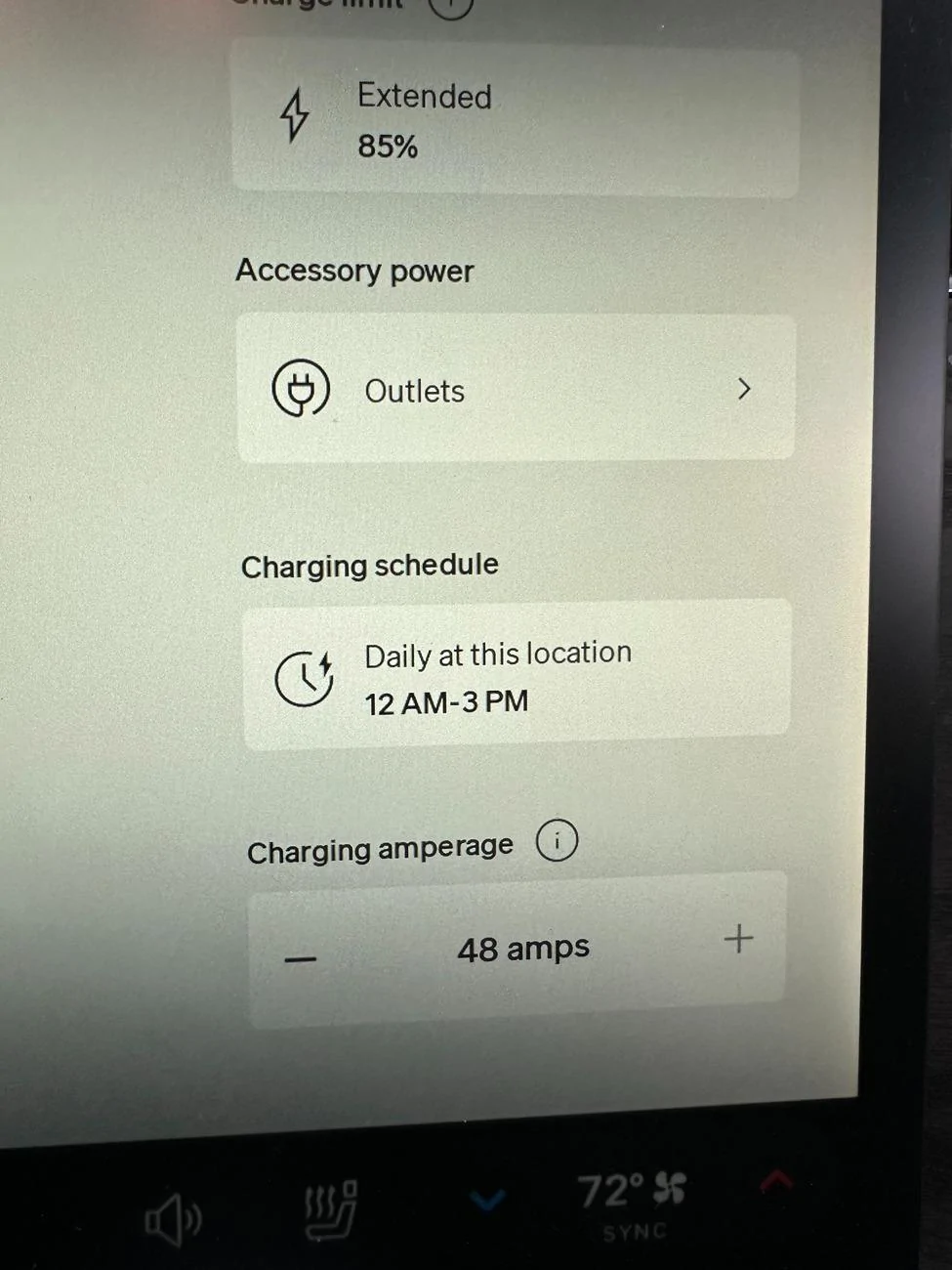
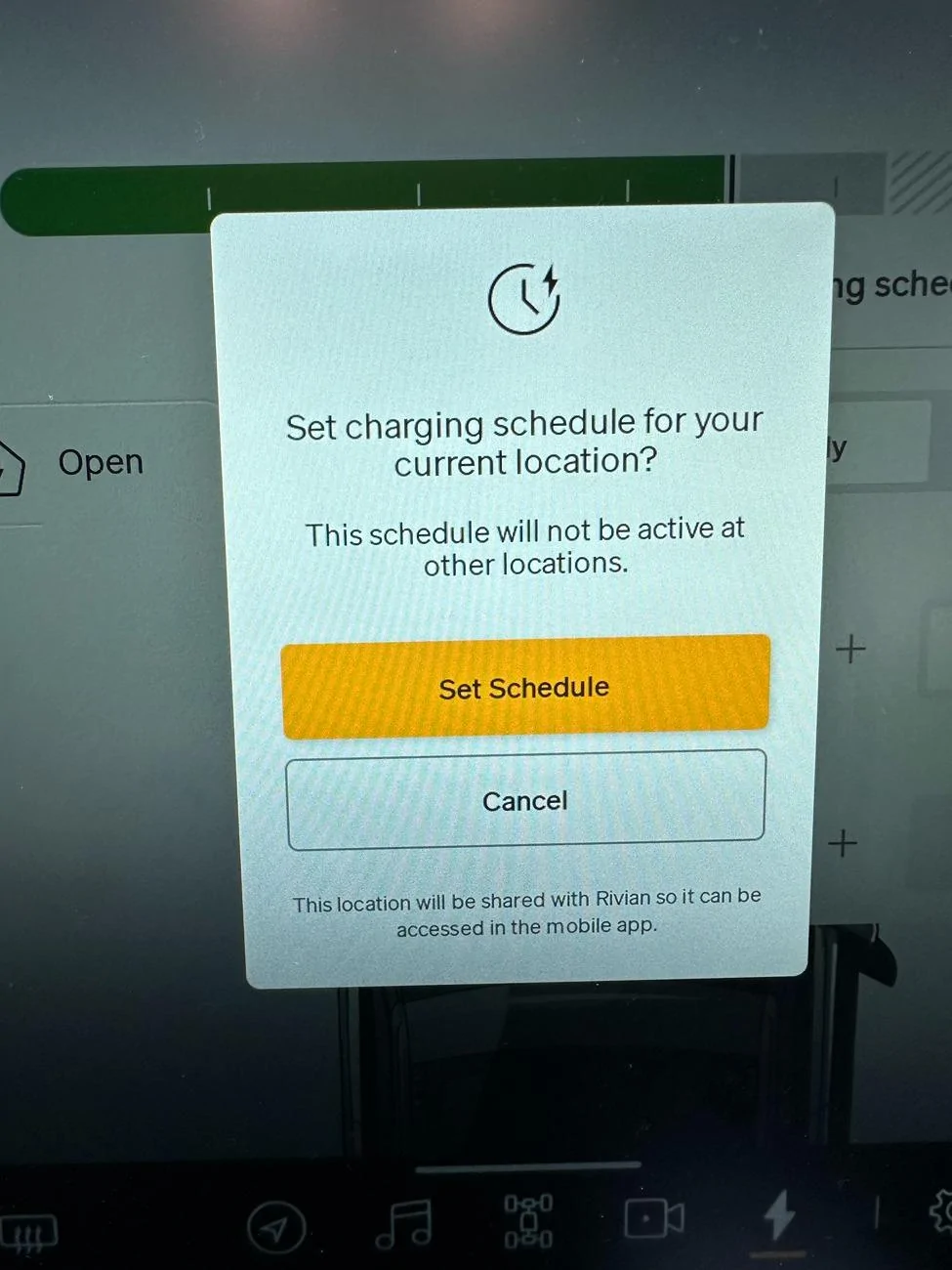
I did some troubleshooting. You can't change location in the app, only in the vehicle. Go to the location that you want to set for scheduled charging. Select charging schedule on the charging screen. If it is already set, select Off on the charging schedule. This will reset everything. Then select Daily or Weekdays and set the times. A pop-up will come up to confirm setup at current location. The next time you look at your app, it will show the new location in the map.
Rivian R1T R1S Scheduled Charging IMG_4219
Rivian R1T R1S Scheduled Charging IMG_4220
Rivian R1T R1S Scheduled Charging IMG_4218
 

Sponsored

mclark2112

Well-Known Member
First Name
Matthew
Joined
Jan 4, 2023
Threads
13
Messages
131
Reaction score
188
Location
NJ
Vehicles
Rivian R1S
Occupation
Finance
Would love to see Rivian implement the way Tesla does it, by setting the time you want to leave. Then it times the charging to end right before you leave. I think that would be better than sitting on a charged battery for hours each night. And it is warmed up for the drive.,
 

Dbl-J

Active Member
First Name
James
Joined
Feb 25, 2024
Threads
1
Messages
37
Reaction score
13
Location
Norfolk, VA
Vehicles
R1T
Occupation
Coast Guard
Clubs
 
Ok,
I did some troubleshooting. You can't change location in the app, only in the vehicle. Go to the location that you want to set for scheduled charging. Select charging schedule on the charging screen. If it is already set, select Off on the charging schedule. This will reset everything. Then select Daily or Weekdays and set the times. A pop-up will come up to confirm setup at current location. The next time you look at your app, it will show the new location in the map.
IMG_4219.webp
IMG_4220.webp
IMG_4218.webp

nope, this did not change the location in the app. I will shut down the app overnight & see if truck’s software runs the scheduled charge in the AM

Rivian R1T R1S Scheduled Charging IMG_3700
 

R1T Preds Fan

Well-Known Member
First Name
Ryan
Joined
Feb 17, 2023
Threads
0
Messages
178
Reaction score
120
Location
Nashville, TN
Vehicles
R1T
Occupation
TN Oncology Supply Team Manager
If it doesn’t work you may need to submit a ticket on it to have service check into it…
 
OP
OP

tjrivian

Well-Known Member
Joined
Oct 4, 2024
Threads
9
Messages
211
Reaction score
184
Location
san diego
Vehicles
Tesla Model X
Swipe up from the bottom of the screen to access all the apps. You can drag and drop apps to the bottom dock too. Up to 5 permanent apps and one floater in the bottom dock. Move them around to rearrange them too.

509138a2-ea29-4055-880e-018b54277c7f.jpg
Thanks. I'm sure I would have found it eventually, but your help allowed me to find it more quickly!

IMHO, swiping up from the bottom of the screen is a non-intuitive place to find things like this.

And IMHO again, charging should just be another item in the settings menu.

And IMHO for a 3rd time - when the car only has a total of 10 "apps", and already allows you to place 6(5 permanent, 1 floater) in the dock and there's plenty of unused real estate around the dock it would make more sense to just show all 10 apps at all times rather than hiding 4 of them behind a swipe-up gesture.
 

RivianXpress

Well-Known Member
Joined
Nov 17, 2020
Threads
90
Messages
813
Reaction score
1,468
Location
West Coast
Vehicles
R1T, Sprinter, KTM 250 XC-W, R1250GSA, Husky 501, 890R, KTM 350 EXC-F, IBEX 450
Occupation
Retired Engineer
I'm having the same issue with SDGE rates.

Lowest rates are Super Off Peak:
Weekdays Super Off peak hours - 12AM to 6AM
Weekends Super Off Peak hours - 12AM to 2PM

Why doesn't the Rivian app just have a selection for Weekends?

I set the 'Weekdays' schedule to 12AM to 6AM. If I set the 'Daily' schedule to 12AM to 2PM does that mean it will or won't override the "Weekdays' schedule?
Sponsored


Top