Sponsored

Spotify app is a mess

DJG

Well-Known Member
Joined
Apr 13, 2022
Threads
12
Messages
1,006
Reaction score
1,108
Location
TX
Vehicles
Various
Spotify is bad. Rivian‘s integration is poor. Alexa is downright garbage.

I could live with the poo Spotify. But Alexa not letting me request songs/artists is easily the worst part of my truck.
I'd follow up with support about it, because it's definitely something to do with your setup/settings. It works flawlessly in mine every time so it's definitely capable. Everything syncs to my other devices, even Amazon Music played through Alexa.

Also, in case you're not aware, you can push Amazon Music to the Rivian from the app on your phone, and I'm not talking BT. When you play Amazon Music through Alexa in the Rivian, it is "casting" it to the truck, which just means it's using another device/app to tell the truck what to stream/download and play. In the same way you would cast a You Tube video to your TV, you can cast an Amazon Music playlist, station, album, etc. to the Rivian. It will then progress through the songs and you can follow along on your phone or tablet screen (since you can't on the Rivian screen). It works both ways too, so if you play something through Alexa, it will show up on your phone app screen in the same fashion. As others have suggested, if you try to use the app to see what quality/bit rate you are playing at, it says that is not possible while casting.

I had Amazon Music as a native "app" on my eTron, but it was just terrible. The UI of it was text only, slow and didn't provide access to everything. It didn't sync well at all with anything done on the app. The CarPlay app was only marginally better, but was still limited in functionality vs. the full app on your phone. Alexa was also natively available in the Audi, but it took typically 10+ seconds to execute a command, so I never used it. I find the integration, even only partial through Alexa, to be better in the Rivian than either.

I have a sneaking suspicion/speculation that Nationwide is providing attractive insurance rates for Rivian's because their infotainment is voice control (and the best/fastest I've ever seen) biased and/or the Spotify app is infinitely easier to navigate than any stock system music apps, or even CarPlay/AA apps. The amount time spent looking at the screen to play music in the Rivian has been a small fraction of what it took in the Audi.
Sponsored

 
Last edited:
CommodoreAmiga

Well-Known Member
Joined
Dec 30, 2020
Threads
39
Messages
4,104
Reaction score
7,729
Location
INACTIVE
Vehicles
INACTIVE
I'd follow up with support about it, because it's definitely something to do with your setup/settings. It works flawlessly in mine every time so it's definitely capable. Everything syncs to my other devices, even Amazon Music played through Alexa.
Support is aware. Currently they have no additional troubleshooting steps or ideas on how to resolve.

Also, in case you're not aware, you can push Amazon Music to the Rivian from the app on your phone, and I'm not talking BT. When you play Amazon Music through Alexa in the Rivian, it is "casting" it to the truck, which just means it's using another device/app to tell the truck what to stream/download and play. In the same way you would cast a You Tube video to your TV, you can cast an Amazon Music playlist, station, album, etc. to the Rivian. It will then progress through the songs and you can follow along on your phone or tablet screen (since you can't on the Rivian screen). It works both ways too, so if you play something through Alexa, it will show up on your phone app screen in the same fashion. As others have suggested, if you try to use the app to see what quality/bit rate you are playing at, it says that is not possible while casting.
I do not use Amazon Music. I do not want to use Amazon Music. I certainly will not pay for Amazon Music.

I already pay for Apple Music, and with my R1T delivery I was effectively forced to buy Spotify Premium, too. I am not going to add a third music service that doesn't sync with anything else!

Rivian is FORCING Alexa + Spotify, so they need to FIX IT.
 

DJG

Well-Known Member
Joined
Apr 13, 2022
Threads
12
Messages
1,006
Reaction score
1,108
Location
TX
Vehicles
Various
I do not use Amazon Music. I do not want to use Amazon Music. I certainly will not pay for Amazon Music.

I already pay for Apple Music, and with my R1T delivery I was effectively forced to buy Spotify Premium, too. I am not going to add a third music service that doesn't sync with anything else!

Rivian is FORCING Alexa + Spotify, so they need to FIX IT.
Ok then. Well, like I said, Alexa and Spotify work near flawlessly, so it's not about the Rivian in general, it's something specific to you. Gonna take some old fashioned sleeve rolling and initiative.

Just my two cents, by I also paid for Apple Music, but cancelled it when I got the Rivian, because it didn't make sense to pay for something I couldn't use in my vehicle...Sometimes it's easier to just swim downstream than up it.
 

Mysta

Well-Known Member
First Name
Matt
Joined
Jan 30, 2021
Threads
9
Messages
486
Reaction score
554
Location
SC
Vehicles
Taycan 4S, Polestar 2, Miata ND2 RF
Maybe try re-logging in? Mine works fine, actually one of the better implementations, better than carplay(Spotify specifically) for sure.(probably mostly due to size)
 

CommodoreAmiga

Well-Known Member
Joined
Dec 30, 2020
Threads
39
Messages
4,104
Reaction score
7,729
Location
INACTIVE
Vehicles
INACTIVE
Ok then. Well, like I said, Alexa and Spotify work near flawlessly, so it's not about the Rivian in general, it's something specific to you. Gonna take some old fashioned sleeve rolling and initiative.
What exactly do you suggest I do?

I've logged out/in Alexa.
I've logged out/in Spotify.
I've disabled/enabled Spotify skill in Alexa.
I've unlinked/linked Spotify to Alexa.

Alexa, Spotify, and Rivian do not give me any information about what is wrong. So I "roll up my sleeves" what initiative are you suggesting I take?

Just my two cents, by I also paid for Apple Music, but cancelled it when I got the Rivian, because it didn't make sense to pay for something I couldn't use in my vehicle...Sometimes it's easier to just swim downstream than up it.
1. If Spotify/Alexa worked then maybe. But it doesn't.
2. It is not reasonable for me to dictate to my family that they must all change their music streaming app because I bought a truck.
3. In every non-R1T use case, even if I assume Alexa+Spotify will eventually be fixed, Apple Music has better sound quality, a more extensive library, lower battery usage, and better integration.
 

Sponsored

endress14

Well-Known Member
Joined
Oct 17, 2021
Threads
17
Messages
248
Reaction score
447
Location
CO
Vehicles
Grand Cherokee, XC 90 recharge
Occupation
TBD
Ok then. Well, like I said, Alexa and Spotify work near flawlessly, so it's not about the Rivian in general, it's something specific to you. Gonna take some old fashioned sleeve rolling and initiative.

Just my two cents, by I also paid for Apple Music, but cancelled it when I got the Rivian, because it didn't make sense to pay for something I couldn't use in my vehicle...Sometimes it's easier to just swim downstream than up it.

mine works great as well. sucks that some people are having these issues. much like anything else it is likely that a small number of people are having issues and it is a low priority for Rivian with everything else on the agenda. definitely not a priority for Alexa or Spotify
 

cbuckley

Well-Known Member
Joined
Jun 24, 2022
Threads
2
Messages
291
Reaction score
337
Location
Texas
Vehicles
Rivian R1T
What exactly do you suggest I do?

I've logged out/in Alexa.
I've logged out/in Spotify.
I've disabled/enabled Spotify skill in Alexa.
I've unlinked/linked Spotify to Alexa.

Alexa, Spotify, and Rivian do not give me any information about what is wrong. So I "roll up my sleeves" what initiative are you suggesting I take?


1. If Spotify/Alexa worked then maybe. But it doesn't.
2. It is not reasonable for me to dictate to my family that they must all change their music streaming app because I bought a truck.
3. In every non-R1T use case, even if I assume Alexa+Spotify will eventually be fixed, Apple Music has better sound quality, a more extensive library, lower battery usage, and better integration.
I'm in the same boat as far as using Alexa commands to play Spotify. Fortunately, I prefer to use my phone as the source of whatever I am listening to, but it is annoying that it won't work as it is supposed to. I have also tried pairing/unpairing and deleting/reinstalling everything.
 

fotoflux

Well-Known Member
Joined
Nov 3, 2021
Threads
6
Messages
233
Reaction score
498
Location
US
Vehicles
Onewheel
welcome to aglie development and the minimum viable product. You get all the benefits of saying you released something with half the customer experience of the full-fledged working product. The most famous example was the first apple iPhone not supporting pictures in text messages, whereas most other high end phones supported that feature. Apple claimed to have released a revolutionary phone with messaging support. Customers bought in, and then found out that they couldn't share pictures of their cat with their grandmother anymore.

The good news is that Apple released support for pictures in text messages months later and the rest was lost in history. Spotify will be improved on the Rivian. Just not today.
 

cc84

Well-Known Member
Joined
May 3, 2019
Threads
3
Messages
405
Reaction score
750
Location
East TX
Vehicles
2022 Rivian R1T, 2000 GMC Sierra
What exactly do you suggest I do?

I've logged out/in Alexa.
I've logged out/in Spotify.
I've disabled/enabled Spotify skill in Alexa.
I've unlinked/linked Spotify to Alexa.

Alexa, Spotify, and Rivian do not give me any information about what is wrong. So I "roll up my sleeves" what initiative are you suggesting I take?......
Mine is exactly the same as yours. The previous update worked flawlessly. This update broke the communication between Alexa and Spotify. I have even deregistered Rivian from Alexa and re-registered. I have updated Alexa and Spotify, on my mobile apps. Signed in and signed out of Alexa in the Rivian and Spotify everywhere I can. Restarted my wi-fi.

Best I can tell, Spotify can't be downloaded, or updated directly in Rivian. I can play Spotify manually, but Alexa can't communicate with the Rivian to play specific songs, or a playlist, the way I could in the previous update.

I get the same messages as you, to either download the Spotify app, or update.

I also have the Premium Plan. I get the same messages, whether the wake word is enabled, or not.

@DJG, @Mysta, and @endress14 , do all of you have the Premium Plan Spotify and if you do, are you able to ask Alexa to play a specific song from Spotify, or a playlist in Spotify and it will?

1.)
The Premium Plan is what @CommodoreAmiga and I have in common.

2.) My last update is 2022.23.5
 

kylealden

Well-Known Member
First Name
Kyle
Joined
Feb 25, 2021
Threads
20
Messages
1,458
Reaction score
4,461
Location
Seattle
Vehicles
2022 Rivian R1T LE (QM/L), 2024 Zero DSR/X
Occupation
Product Management
Spotify is bad. Rivian‘s integration is poor. Alexa is downright garbage.

I could live with the poo Spotify. But Alexa not letting me request songs/artists is easily the worst part of my truck.
Well this thread has been a surprise for me. Spotify app and Alexa have both been 100% reliable for me so far. Knock on wood. (I have premium, but now that I think of it I'm not 100% sure I've used Alexa for Spotify since getting 2022.23.5 last Thursday, though I've listened to a lot. I'll have to try that on my way home today.)
 

Sponsored

cc84

Well-Known Member
Joined
May 3, 2019
Threads
3
Messages
405
Reaction score
750
Location
East TX
Vehicles
2022 Rivian R1T, 2000 GMC Sierra
Well this thread has been a surprise for me. Spotify app and Alexa have both been 100% reliable for me so far. Knock on wood.
Kyle, do you have a plan with Spotify, or use the free version?
 

kylealden

Well-Known Member
First Name
Kyle
Joined
Feb 25, 2021
Threads
20
Messages
1,458
Reaction score
4,461
Location
Seattle
Vehicles
2022 Rivian R1T LE (QM/L), 2024 Zero DSR/X
Occupation
Product Management

cc84

Well-Known Member
Joined
May 3, 2019
Threads
3
Messages
405
Reaction score
750
Location
East TX
Vehicles
2022 Rivian R1T, 2000 GMC Sierra
Premium plan.
Thanks. I should have asked also, if you can ask Alexa to play a specific song and a playlist, from Spotify and it will play them. Not from Amazon music, but from Spotify. Are you using version 2022.23.5 ?

My Alexa works and my Spotify works.....they just won't communicate with each other. If yours does, then the Premium Plan is not the problem.
 

NooterIA

Well-Known Member
Joined
May 3, 2021
Threads
8
Messages
220
Reaction score
246
Location
Iowa
Vehicles
was a 2019 Ram
Occupation
IT Stuff
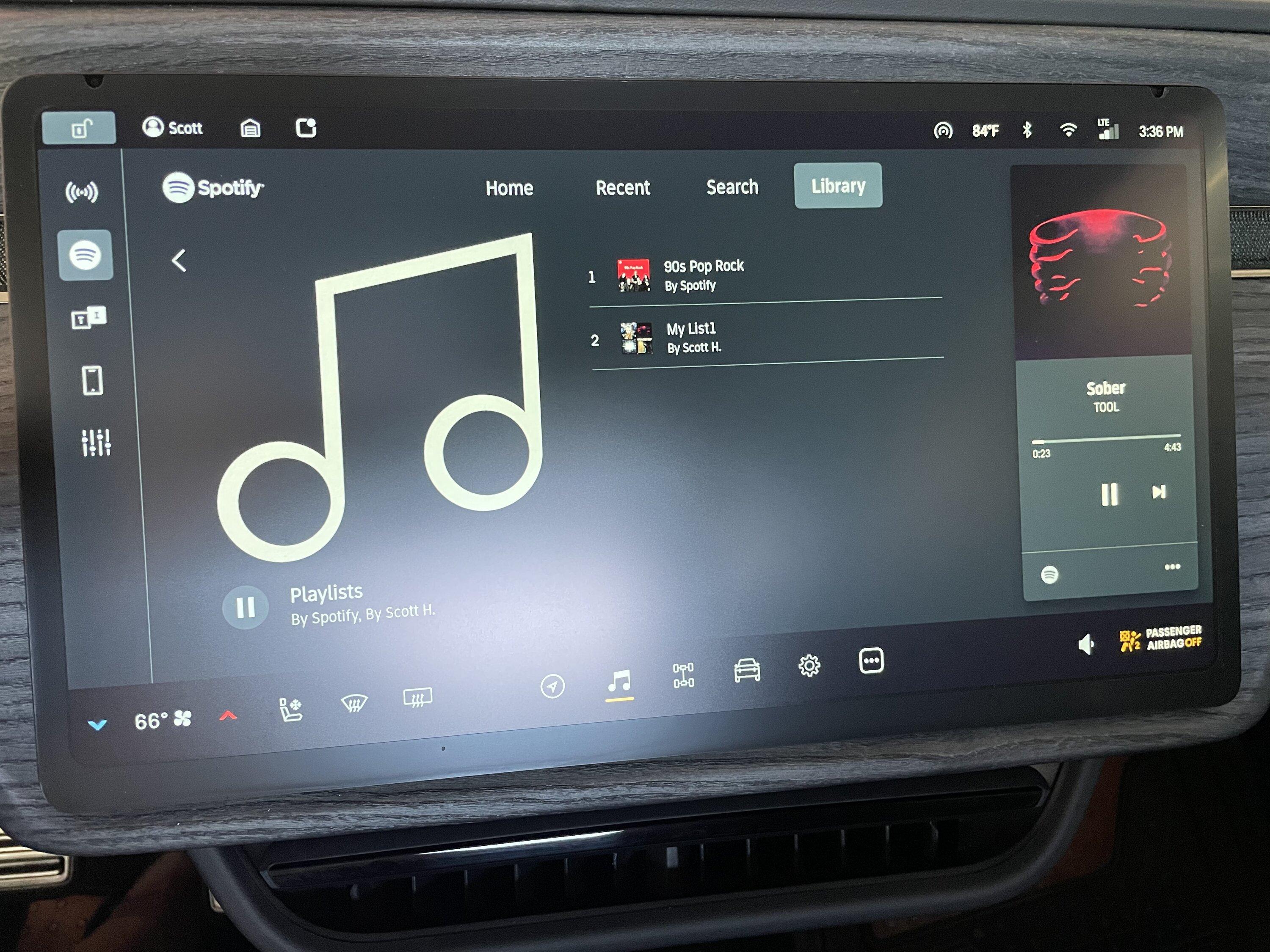
Is it just me or can anyone else go select a playlist and see all the songs on that playlist displayed or only see something like this? When I got the truck three weeks ago I could open a playlist and see each song on there. That’s gone now. On 2022.23.05. For example there’s 25 songs on this “My List1” and all I can see of them is the current song playing…

Rivian R1T R1S Spotify app is a mess 39986716-5926-4FCD-9711-6E0969E0F0AE
 

DJG

Well-Known Member
Joined
Apr 13, 2022
Threads
12
Messages
1,006
Reaction score
1,108
Location
TX
Vehicles
Various
Mine is exactly the same as yours. The previous update worked flawlessly. This update broke the communication between Alexa and Spotify. I have even deregistered Rivian from Alexa and re-registered. I have updated Alexa and Spotify, on my mobile apps. Signed in and signed out of Alexa in the Rivian and Spotify everywhere I can. Restarted my wi-fi.

Best I can tell, Spotify can't be downloaded, or updated directly in Rivian. I can play Spotify manually, but Alexa can't communicate with the Rivian to play specific songs, or a playlist, the way I could in the previous update.

I get the same messages as you, to either download the Spotify app, or update.

I also have the Premium Plan. I get the same messages, whether the wake word is enabled, or not.

@DJG, @Mysta, and @endress14 , do all of you have the Premium Plan Spotify and if you do, are you able to ask Alexa to play a specific song from Spotify, or a playlist in Spotify and it will?

1.)
The Premium Plan is what @CommodoreAmiga and I have in common.

2.) My last update is 2022.23.5
I do have Premium, and it is required to ask Alexa to perform specific tasks like play a specific song, album or playlist (just like Amazon Music Unlimited is required to do the same). It worked in the previous update, but just got the new one and haven't tried it yet, but will.
Sponsored


Top