Sponsored

Update 46 digital key issue

badger4149

Well-Known Member
First Name
Jeff
Joined
Mar 2, 2025
Threads
3
Messages
112
Reaction score
78
Location
USA
Vehicles
R1S (gen 2)
Occupation
Adventurer
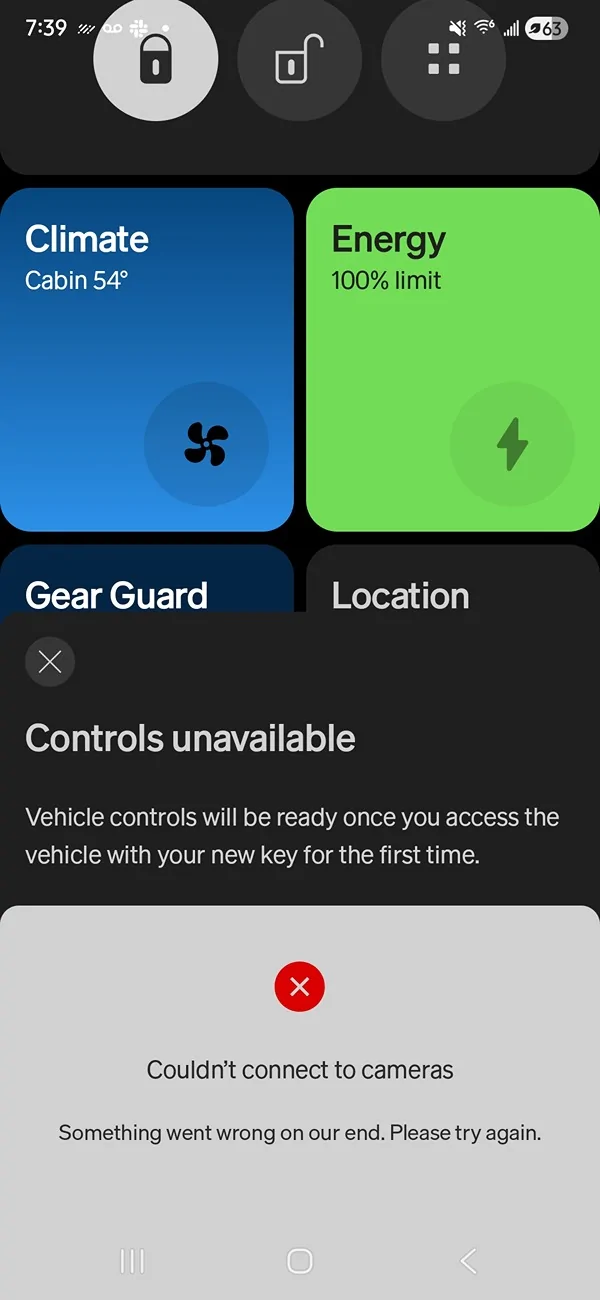
I have a gen 2 R1S. After installing update 46, I successfully created a digital key (note, I am a Samsung user). After doing so, my original phone key was removed. With the digital key, proximity locking/unlocking works, but the remote access stuff is no longer working in the Rivian app. Remote lock/unlock, climate/comfort settings, open/close hood, lift gate, and charge port door are all inoperative now. It acts like it is performing the selected function, but nothing happens. Also, it seems that I cannot revert to the old style phone key. I have the latest Rivian app version, and I have power cycled my phone. Anyone else experiencing this? Any solutions?
Sponsored
 

BTOR

Well-Known Member
First Name
Brad
Joined
Dec 2, 2024
Threads
14
Messages
222
Reaction score
136
Location
Oregon
Vehicles
2023 Bolt, 2025 R1S
Thank you for all of the FYI's on this new digital key. I appreciate everyone on the forum that has posted their first hand experiences using it.

I'm still waiting for Rivian to push me the .46 update. I'm usually one of the last to receive updates (not a C+ subscriber). I'm actually thankful for that. I get to learn from others on which features seem to work and which ones tend to be problematic.

So many subscribers seemed so anxious to have the "digital key" capability. I'm still trying to understand why? Maybe I'm just old school. In my 30 years of owning a mobil phone, my battery has only died on me once and that was when I was on my bike (my phone connects to my bike computer via BT which is an energy hog). So the "dead phone battery" situation that many express as a "big concern" is not a concern for me. The BT app key was a little clumsy or quirky at first but I now have it dialed in and know what I need to do each time I approach the vehicle to make it work reliably.

I'm hoping I can just ignore the digital key "upgrade" notices for the or turn them off and stay with the app key, at least a bit longer after I download the .46 update. It seems like Rivian needs a little more time to work through all of the kinks. Same with the Tesla wall charger issue limiting energy delivery. My G2 R1S seems like a prime candidate for this issue (Dual motor, Max Battery) and we own the Tesla Universal wall unit.
 

mmbmca

Well-Known Member
Joined
Jul 12, 2024
Threads
6
Messages
120
Reaction score
53
Location
Bay Area, CA
Vehicles
Rivian 24 R1T Dual Large, 26 R1S Dual Perf Max,, Toyota Highlander
The digital key creation is almost forcefully done. I didn't even have the option to lock/unlock the icons they literally were overridden by Get Digital Key. I just used my wife's account to check on the car it works just fine. Ever-since I got the key remote viewing is gone. Another service ticket.
 

AFineOldWine

Member
First Name
Hal
Joined
Oct 4, 2025
Threads
5
Messages
19
Reaction score
11
Location
Oakland
Vehicles
R1S
Clubs
 
Also, it seems that I cannot revert to the old style phone key
While you can't revert that key, you may have luck (and extra work) by setting up another Rivian account (non-owner), and never inviting it to use a digital key. However, you will have to reset all your personalization settings if you go this route. And you'll log in and out of your old (assuming it's the owner account) and new accounts in the app several times to complete the transfer of any NFC cards or fobs.

I've gone this route, and appear to have my "old" functionality back. Summarizing:
  • Owner account: no keys assigned anymore
  • New account:
    • NFC key transferred
    • No digital key invite sent
    • PaaK works as old bluetooth key
(see also this thread)
 

Sponsored

BTOR

Well-Known Member
First Name
Brad
Joined
Dec 2, 2024
Threads
14
Messages
222
Reaction score
136
Location
Oregon
Vehicles
2023 Bolt, 2025 R1S
Hmmm, so once you download the update, it sounds like you’re pretty much stuck going the digital key route?
 
OP
OP
badger4149

badger4149

Well-Known Member
First Name
Jeff
Joined
Mar 2, 2025
Threads
3
Messages
112
Reaction score
78
Location
USA
Vehicles
R1S (gen 2)
Occupation
Adventurer
Hmmm, so once you download the update, it sounds like you’re pretty much stuck going the digital key route?
I don't think so. You choose to install the digital key, but once you've done that then you're stuck with it.
 
OP
OP
badger4149

badger4149

Well-Known Member
First Name
Jeff
Joined
Mar 2, 2025
Threads
3
Messages
112
Reaction score
78
Location
USA
Vehicles
R1S (gen 2)
Occupation
Adventurer
Yup, nothing remote works even though I've used the key already.

Screenshot_20251225_073935_Rivian.webp
Thanks for sharing your similar experience. Please report to Rivian via "Feedback" in the app.
 

Sponsored

mmbmca

Well-Known Member
Joined
Jul 12, 2024
Threads
6
Messages
120
Reaction score
53
Location
Bay Area, CA
Vehicles
Rivian 24 R1T Dual Large, 26 R1S Dual Perf Max,, Toyota Highlander
Out of curiosity, are you Apple, or Samsung?
Samsung Galaxy S25 Ultra. I do have a 2nd phone and Samsung Galaxy S24 Ultra I can use with a 2nd number that still has my account. This is a pain though opposite of the convenience.
 

RivianPL

Member
First Name
Eric
Joined
Jul 15, 2025
Threads
0
Messages
10
Reaction score
10
Location
Pleasanton
Vehicles
2025 R1S Tri
Just got the update the other day but based on all the posts I’ve seen I’m going to hold off on the digital key feature. I e left my phone in my R1S many times so no thank you on dealing with that situation. Hard pass.
Sponsored


Top