Sponsored

Android music apps that 'play nice' with Rivian infotainment

cgsmith

Member
First Name
Chris
Joined
May 17, 2025
Threads
1
Messages
14
Reaction score
4
Location
Massachusetts
Vehicles
'22 Rivian R1T
I recently upgraded from my Pixel 8 to a new Android device (Oneplus 15). I prefer to play the music which is local to my phone and, after setting Bluetooth AVRCP to v1.6, I can see the song info and album art. However, since moving to the new phone, I have no queue/playlist info on the main screen (only the currently playing song).

I tried my wife's Pixel 9 and it still works as my 8 did using Musicolet. I also tried a Samsung Galaxy S25 Ultra which, as with the OP15, only displays the current song. A caveat being that the included Samsung music app DOES (kinda) work: it will show the now & next info of the current queue/playlist, but only up to a certain number (I didn't count). At best, it's a pretty basic player and even if I wanted to go that route, it won't install on non-Samsung devices.

I've tried a fair number music apps/players but so far no joy. Has anyone stumbled across any apps, on non-Pixel devices, that can display queues/playlists, on the Rivian's screen? I'm not interested in streaming or moving to the Apple ecosystem so fingers crossed someone found something that works. Otherwise it's back to waiting for Rivian to care.

Thanks!
Sponsored

 

SwampNut

Well-Known Member
First Name
Carlos
Joined
Apr 22, 2024
Threads
52
Messages
3,574
Reaction score
3,798
Location
Peoria AZ
Vehicles
2022 R1T Launch Edition
Occupation
Geek
Clubs
 
Welcome to the fragmented and impossible to fully support Android ecosystem. I assume you're aware that you can add Android Auto to your Rivian via either EVplay or various add-on screens? I went with a CarPodGo add on screen to get CarPlay.
 

loqueid

Well-Known Member
First Name
Mike
Joined
Dec 11, 2025
Threads
3
Messages
153
Reaction score
172
Location
Caldwell, ID
Vehicles
Gen2 R1T
I recently upgraded from my Pixel 8 to a new Android device (Oneplus 15). I prefer to play the music which is local to my phone and, after setting Bluetooth AVRCP to v1.6, I can see the song info and album art. However, since moving to the new phone, I have no queue/playlist info on the main screen (only the currently playing song).

I tried my wife's Pixel 9 and it still works as my 8 did using Musicolet. I also tried a Samsung Galaxy S25 Ultra which, as with the OP15, only displays the current song. A caveat being that the included Samsung music app DOES (kinda) work: it will show the now & next info of the current queue/playlist, but only up to a certain number (I didn't count). At best, it's a pretty basic player and even if I wanted to go that route, it won't install on non-Samsung devices.

I've tried a fair number music apps/players but so far no joy. Has anyone stumbled across any apps, on non-Pixel devices, that can display queues/playlists, on the Rivian's screen? I'm not interested in streaming or moving to the Apple ecosystem so fingers crossed someone found something that works. Otherwise it's back to waiting for Rivian to care.

Thanks!
Serves you right for leaving the Pixel family! ;)
 

iamnid

Well-Known Member
Joined
Aug 10, 2023
Threads
7
Messages
655
Reaction score
842
Location
California
Vehicles
Mercedes EQE, Rivian R1S
It's probably the bluetooth AVRCP settings on the phone that isn't showing you the info you want. Enable developer options and change that setting to 1.6 and reboot your phone. Google instructions for the above. It's simple and that's probably the difference between your two phones.
 
OP
OP

cgsmith

Member
First Name
Chris
Joined
May 17, 2025
Threads
1
Messages
14
Reaction score
4
Location
Massachusetts
Vehicles
'22 Rivian R1T
Welcome to the fragmented and impossible to fully support Android ecosystem. I assume you're aware that you can add Android Auto to your Rivian via either EVplay or various add-on screens? I went with a CarPodGo add on screen to get CarPlay.
I hate to admit it, but I tried both.

Based on your posts I first tried the Carpodgo T3 Pro. I wasn't happy with the extra device/screen because I was thinking of adding the Comma3/4; was worried about the clutter above the main display. Sadly, I let a buddy 'try' it. I don't think I'm getting it back.

Based on that, I got the EVPlay. Even after working with Alex I could never get the (old) Pixel to work 100% with it: Music and phone playback would always get 'confused'. That and the call quality was awful via mic that came with it. I ended up removing it because my main screen was getting replaced under warranty and I didn't want any pushback about it. Realistically, I'm not putting it back.

Starting to consider going back to the Carpodgo - pound-for-pound it seems like the best (available) solution.

It's absurd the hoops I'm jumping through for the simplest of functionality! I know, it's a 'me' thing. :facepalm:
 
Last edited:

Sponsored

OP
OP

cgsmith

Member
First Name
Chris
Joined
May 17, 2025
Threads
1
Messages
14
Reaction score
4
Location
Massachusetts
Vehicles
'22 Rivian R1T
Serves you right for leaving the Pixel family! ;)
I know, I know... But you can't make me go back to that Tensor chip (and dreadful modems)! :CWL:

Snapdragon 4 life!
 
Last edited:
OP
OP

cgsmith

Member
First Name
Chris
Joined
May 17, 2025
Threads
1
Messages
14
Reaction score
4
Location
Massachusetts
Vehicles
'22 Rivian R1T
It's probably the bluetooth AVRCP settings on the phone that isn't showing you the info you want. Enable developer options and change that setting to 1.6 and reboot your phone. Google instructions for the above. It's simple and that's probably the difference between your two phones.
AVRCP set to 1.6 was the very first thing I did/tried (mentioned that). Album artwork wouldn't work without it, even on the Pixel.
 

SwampNut

Well-Known Member
First Name
Carlos
Joined
Apr 22, 2024
Threads
52
Messages
3,574
Reaction score
3,798
Location
Peoria AZ
Vehicles
2022 R1T Launch Edition
Occupation
Geek
Clubs
 
I hate to admit it, but I tried both.

Based on your posts I first tried the Carpodgo T3 Pro. I wasn't happy with the extra device/screen because I was thinking of adding the Comma3/4; was worried about the clutter above the main display. Sadly, I let a buddy 'try' it. I don't think I'm getting it back.

Based on that, I got the EVPlay. Even after working with Alex I could never get the (old) Pixel to work 100% with it: Music and phone playback would always get 'confused'. That and the call quality was awful via mic that came with it. I ended up removing it becaue my main screen was getting replaced under warranty and I didn't want any pushback about it. Realistically, I'm not putting it back.

Starting to consider going back to the Carpodgo - pound-for-pound it seems like the best (available) solution.

It's absurd the hoops I'm jumping through for the simplest of functionality! I know, it's a 'me' thing. :facepalm:
Jesus. This is why my company has a policy of making one attempt to fix Android issues with our systems, and then the user is on their own.

I have a question though; EVplay can't use the Rivian microphone? That's just...ridiculous. Or is it just another Android issue? My T3 Pro is just a screen, not involved in audio of any kind in any way.

As to "clutter," only you can judge your preferences, I think it's fine. I put the screen on the left end of the main screen and as low as possible, on a custom mount. With a Comma 4 nothing is in my way as far as visibility.
 

2kwik4u

Well-Known Member
First Name
Michael
Joined
Jan 8, 2025
Threads
11
Messages
854
Reaction score
1,104
Location
Western NY State
Vehicles
2024 Rivian R1T ; 2018 Nissan Rogue
As to "clutter," only you can judge your preferences, I think it's fine. I put the screen on the left end of the main screen and as low as possible, on a custom mount. With a Comma 4 nothing is in my way as far as visibility.
Definitely a preference thing.

Am I reading this right, you have (2) additional screens in the truck beyond the (2) it comes with? Safe to assume a phone mount as well? That feels busy in my mental image of what that would look like. Can you share a picture?

I've always been a "less is more" kind of person. Spent a LOT of time getting a decent phone mount into my '12 Focus. Ended up with something from RAM that put it down and to the right, which wasn't bad. Had a RAM ball on a Proclip in my Sierra. Nothing in the Q7, and now nothing in the Rivian.

It does suck you need (4.5) screens to get the functionality you want.

To answer @cgsmith though, I use Spotify. Much like personal preference for screens, personal preference for monthly subscriptions is quite polarizing. It works on my Pixel 5 (with about 4 different BT devices), my TV at home, my Rivian, and my PC at the office. I'm honeslty not sure what we even pay for it now to be honest. $25/mo or something like that. 4 accounts and unlimited streaming. It just works, so I just pay.
 
OP
OP

cgsmith

Member
First Name
Chris
Joined
May 17, 2025
Threads
1
Messages
14
Reaction score
4
Location
Massachusetts
Vehicles
'22 Rivian R1T
I have a question though; EVplay can't use the Rivian microphone? That's just...ridiculous. Or is it just another Android issue?...
Yeah, IIRC, EVPlay can't use the vehicle mic for AA so an external one is included (may be a Gen1 thing). I tried it in a few locations but people always said I sounded horrible on phone calls. I've seen other posts in the forums about it so I wasn't the only one.

The Display Only Bluetooth mode that Carpodgo uses is, IMHO, the better approach. Aside from Rivian software adequately supporting phone and/or USB playback, of course. ;)

"...I put the screen on the left end of the main screen and as low as possible, on a custom mount. With a Comma 4 nothing is in my way as far as visibility.
Good to know! I was using the 'edited' mount you linked/posted. I'm intrigued by new T4 and its magnetic base. Just have to determine when to say enough is enough throwing $$ at this.
 

Sponsored

SwampNut

Well-Known Member
First Name
Carlos
Joined
Apr 22, 2024
Threads
52
Messages
3,574
Reaction score
3,798
Location
Peoria AZ
Vehicles
2022 R1T Launch Edition
Occupation
Geek
Clubs
 
Am I reading this right, you have (2) additional screens in the truck beyond the (2) it comes with? Safe to assume a phone mount as well?
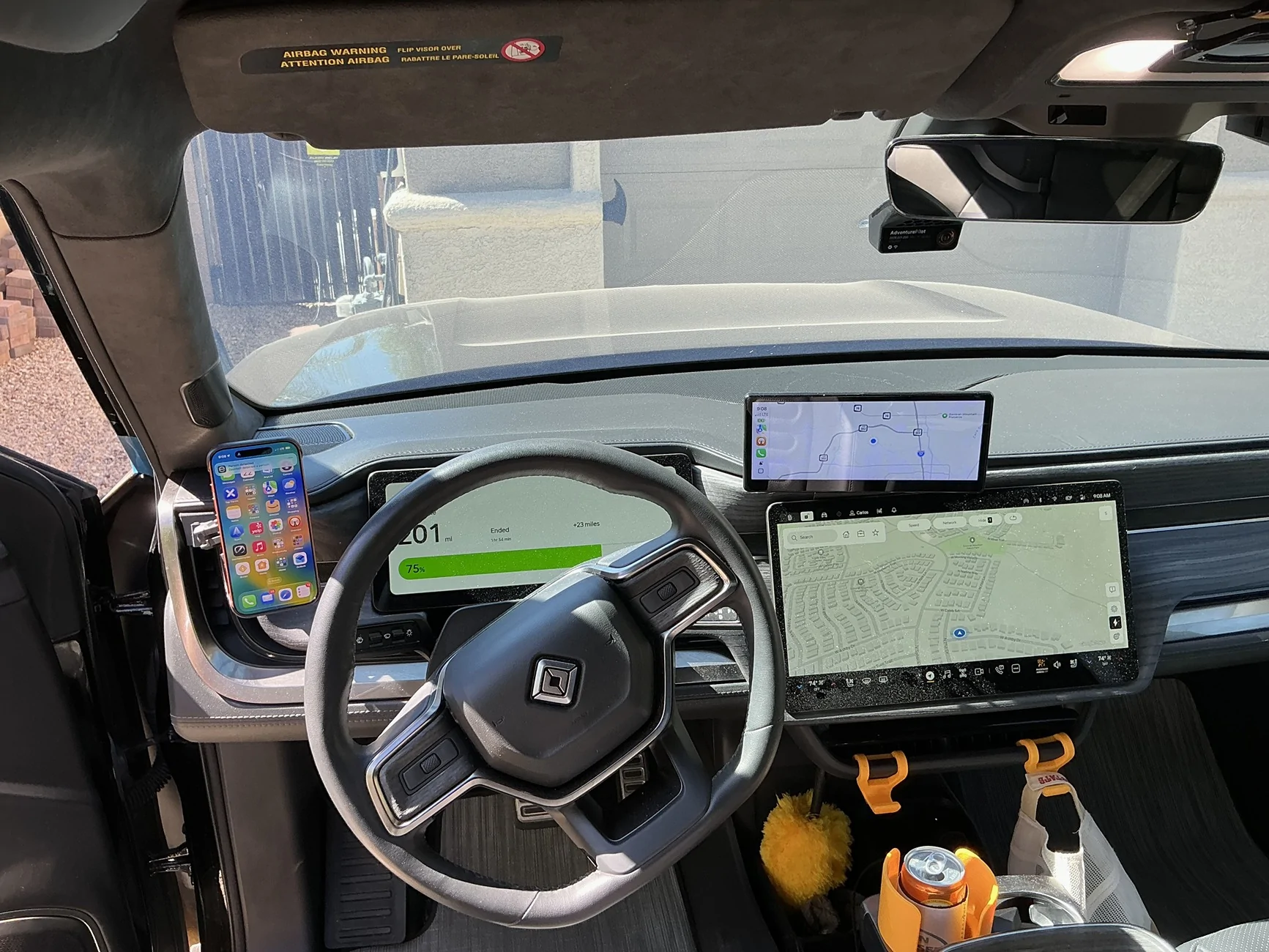
Yes, all of that, plus a Comma 4. It has a much smaller screen and body than the C3, which I thought was too huge. I don't really care about number of screens as long as they are not in the way. The C3 was in the way for some views and annoying. Would I prefer my CarPlay to be on the main screen? Of course, mostly because it can do a lot of integrated things if it's actually in the car versus an add-on.

Rivian R1T R1S Android music apps that 'play nice' with Rivian infotainment 1782144812348-y0


Damn, I need to clean the interior, dusty.

Just have to determine when to say enough is enough throwing $$ at this.
LOL, same here! The microphone thing cured my desire for the EVplay.
 
OP
OP

cgsmith

Member
First Name
Chris
Joined
May 17, 2025
Threads
1
Messages
14
Reaction score
4
Location
Massachusetts
Vehicles
'22 Rivian R1T
To answer @cgsmith though, I use Spotify. Much like personal preference for screens, personal preference for monthly subscriptions is quite polarizing. It works on my Pixel 5 (with about 4 different BT devices), my TV at home, my Rivian, and my PC at the office. I'm honeslty not sure what we even pay for it now to be honest. $25/mo or something like that. 4 accounts and unlimited streaming. It just works, so I just pay.
I appreciate the reply. It's good to know there's something that 'just works'. That said, I'm pretty steadfast with wanting to play 'my' music. My typical commutes usually see cell service drop no less than 3 times. Having my stuff 'local' makes it somewhat less infuriating that the vehicle and/or phone are so reliant on it.
 
Last edited:

2kwik4u

Well-Known Member
First Name
Michael
Joined
Jan 8, 2025
Threads
11
Messages
854
Reaction score
1,104
Location
Western NY State
Vehicles
2024 Rivian R1T ; 2018 Nissan Rogue
Yes, all of that, plus a Comma 4. It has a much smaller screen and body than the C3, which I thought was too huge. I don't really care about number of screens as long as they are not in the way. The C3 was in the way for some views and annoying. Would I prefer my CarPlay to be on the main screen? Of course, mostly because it can do a lot of integrated things if it's actually in the car versus an add-on.

1782144812348-y0.webp
Is the comma 4 the thing on the windshield?

What does the carplay screen over the main screen do? Like, what functionality does it provide that either the phone or the main stack doesnt?

Not judging, just curious.

That's too much/many screens for me, but I can see how they are kind of not in the way-ish. Also, of all the shit I complain about on this truck, the tech stack feels relatively stable and useful, so I'm not longing for functionality that would require the additional screens either.
 

loqueid

Well-Known Member
First Name
Mike
Joined
Dec 11, 2025
Threads
3
Messages
153
Reaction score
172
Location
Caldwell, ID
Vehicles
Gen2 R1T
Yes, all of that, plus a Comma 4. It has a much smaller screen and body than the C3, which I thought was too huge. I don't really care about number of screens as long as they are not in the way. The C3 was in the way for some views and annoying. Would I prefer my CarPlay to be on the main screen? Of course, mostly because it can do a lot of integrated things if it's actually in the car versus an add-on.

1782144812348-y0.webp


Damn, I need to clean the interior, dusty.


LOL, same here! The microphone thing cured my desire for the EVplay.
Does the Carpodgo T3 Pro plug into the ODB2 port? I did a search and can't seem to find an answer.
Sponsored


Top