Sponsored

Connect Rivian charger to Orbi router via Wifi

summer

Well-Known Member
Joined
Apr 13, 2022
Threads
7
Messages
47
Reaction score
38
Location
Seattle
Vehicles
Tesla M3
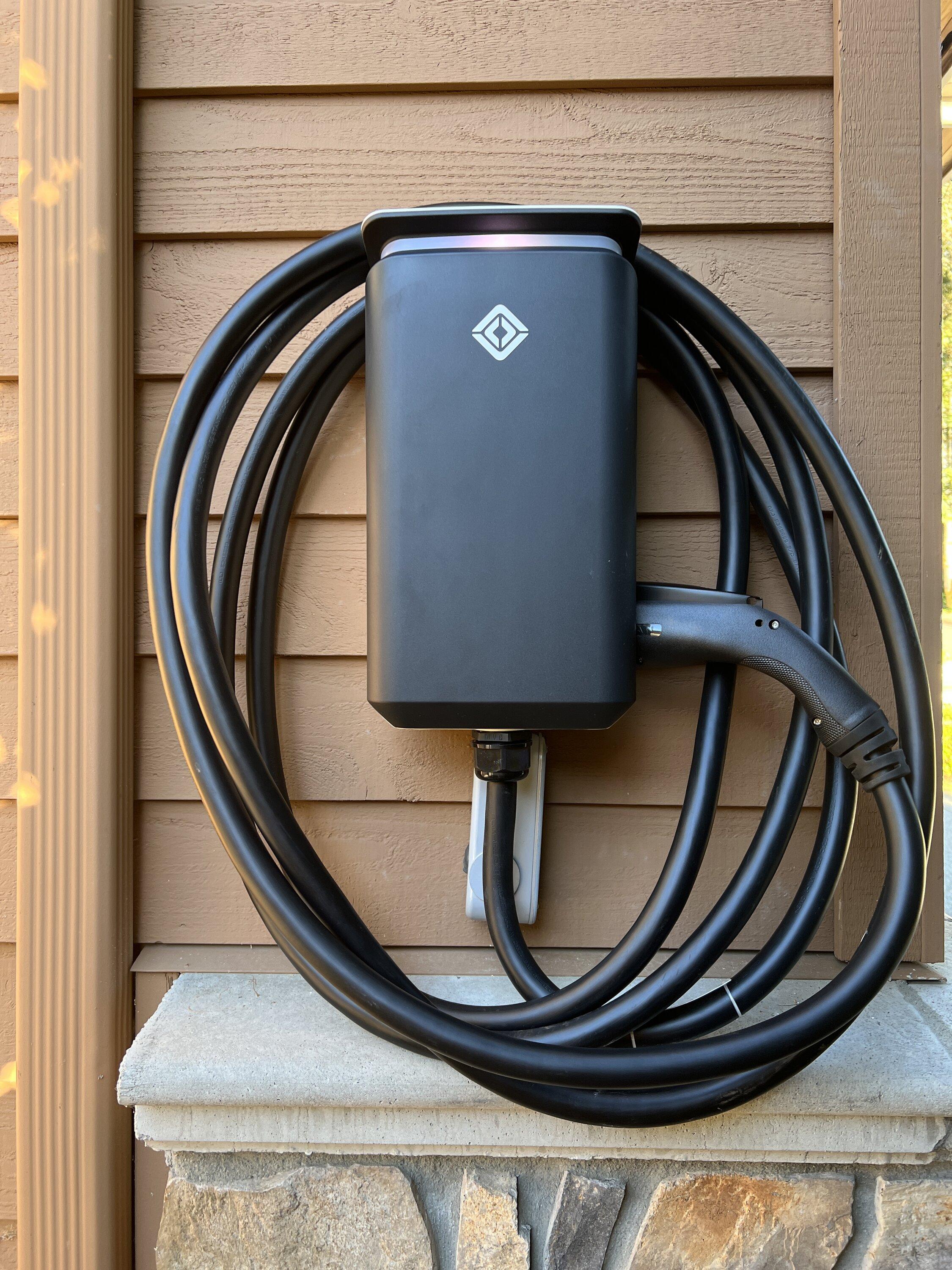
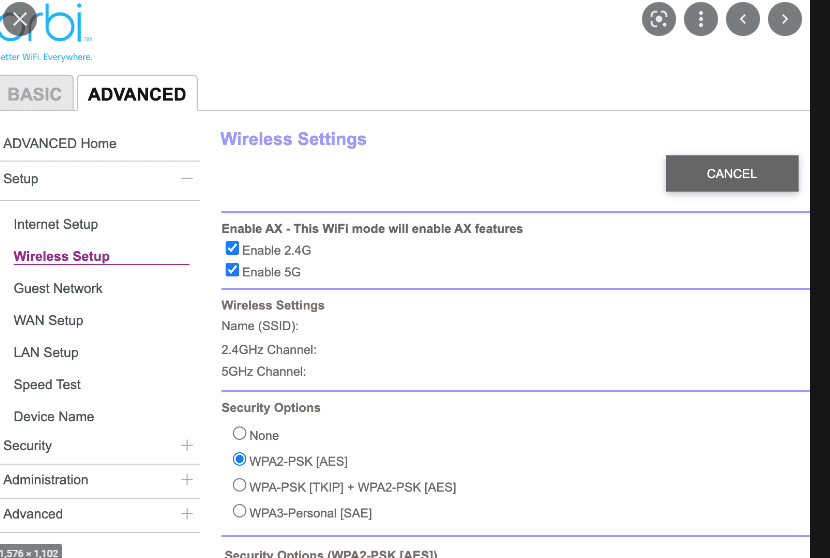
Installed the Rivian charger today, i noticed it could not find the Wi-Fi ssid of my Orbi router. After switching off 5ghz signal in Orbi wireless configuration, the charger could detect the Wi-Fi and finish the paring step without any issue. Turn the 5ghz back on, charger still connected.

If you run into Wi-Fi connecting issue, probably could try this.

Rivian R1T R1S Connect Rivian charger to Orbi router via Wifi 8BD652FA-C898-454D-9BA4-FD82BB4D8FC7
Sponsored


Lysdexic

Well-Known Member
First Name
Scott
Joined
Oct 1, 2021
Threads
3
Messages
260
Reaction score
254
Location
North Carolina
Vehicles
04 Tundra
Good to know. I use an Orbi router as well and you may have saved a big head scratcher. Thanks
 

LivingInKaos

Well-Known Member
Joined
Jun 30, 2022
Threads
19
Messages
970
Reaction score
1,909
Location
Oregon
Vehicles
R1T Launch Green Forest Edge
Occupation
Own Fabrication Company / VP of Portland Rivian Club
Clubs
 
Most newer routers blend the 2.4 and 5 ghz bands. Most peripherals (wifi lights, simple cameras, etc) are set to connect to the 2.4 and cannot use blended connections, so you have to do what you mention. Also, the Rivian wall charger does not like SSID's with spaces in them. What I tend to do is turn on the guest mode for 2.4 only with it's own ssid and connect those kinds of things to it.
 

rraj2k81

Well-Known Member
Joined
Apr 25, 2021
Threads
68
Messages
786
Reaction score
1,163
Location
Burlington, Ontario.
Vehicles
2022 Tesla Model S LR
The Orbi has a Blended Wi-Fi network for 2.4 GHz and 5 GHz. It does not have the ability to have dedicated SSIDs for 2.4 GHz SSID and 5 GHz.

Technically this should not cause an issue, as a 2.4 GHz client should be able to negotiate and connect on the 2.4 GHz frequency, but this has never been the case in my experience when it comes to blended Wi-Fi networks, which many of these MESH wifi devices come with.

So, either you can set the Orbi to 2.4GHz only and lose the data transfer speed advantage of the 5GHz or grab a cheap Wi-Fi router with 2.4GHz and set it up as an access point so the Rivian charger can connect to.

I personally have gotten rid of many client/devices that are 2.4GHz only and cannot auto negotiate to the Orbi.
 

nc10

Well-Known Member
Joined
Sep 24, 2021
Threads
35
Messages
532
Reaction score
575
Location
South Carolina
Vehicles
R1T LE, EV6 GT Line
Occupation
Engineer
The Orbi has a Blended Wi-Fi network for 2.4 GHz and 5 GHz. It does not have the ability to have dedicated SSIDs for 2.4 GHz SSID and 5 GHz.
Thats the way my several years old Orbi appears to be. I had trouble at first, but had a space in my SSID. I created a guest account on the router w/o a space in the name and it connected ok.

I don't see that many smart devices that say they can connect to either 2.4 or 5 ghz. Very hard to recognize and eliminate the 2.4 ghz only ones at this point....

I've gotten every smart and wifi device I've purchased to connect to my Orbi router, but a few older WEMO plugs have seriously tested my patience.... (The orbi app says I've connected 166 devices, w 62 active, I may have a problem...)
 
Last edited:

Sponsored

OP
OP
summer

summer

Well-Known Member
Joined
Apr 13, 2022
Threads
7
Messages
47
Reaction score
38
Location
Seattle
Vehicles
Tesla M3
For Orbi, the workaround is temporarily suspend 5 Ghz ONLY during paring step, then bring it back as I posted. Thus you don't lose advantage of 5 Ghz higher bandwidth. I used this way to setup many IOT devices which can't handle mixed 2.4G/5Ghz properly.
 
Last edited:

nc10

Well-Known Member
Joined
Sep 24, 2021
Threads
35
Messages
532
Reaction score
575
Location
South Carolina
Vehicles
R1T LE, EV6 GT Line
Occupation
Engineer
For Orbi, the workaround is temporarily suspend 5 Ghz ONLY during paring step, then bring it back as I posted. My current Orbi fireware doesn't allow to create new SSDI with 2.5 Ghz only without going to debug mode, so I feel the workaround is more convenient.
I agree, IF you have the option to suspend 5 ghz.

Where to you find that option? On the mobile app, or the web interface for the router or....
 
Last edited:
OP
OP
summer

summer

Well-Known Member
Joined
Apr 13, 2022
Threads
7
Messages
47
Reaction score
38
Location
Seattle
Vehicles
Tesla M3
I'm using the web interface, under Advanced/Wireless Setup, looks like this

Rivian R1T R1S Connect Rivian charger to Orbi router via Wifi 1659633457029


I agree, IF you have the option to suspend 5 ghz.

Where to you find that option? On the mobile app, or the web interface for the router or....
 

Autolycus

Well-Known Member
Joined
May 2, 2021
Threads
15
Messages
2,234
Reaction score
3,430
Location
ATL
Vehicles
ICE only :(
I had this problem with my Orbi and my RecTeq pellet smoker's wifi connection. That can only use 2.4Ghz. I ended up having to set up a different wifi network that's 2.4Ghz only just for the smoker because my Orbi's firmware doesn't have the option to turn off 5Ghz. It's a really stupid limitation on the Orbis, honestly. I'm glad that it looks like some of their devices do allow it.

(I guess later when I'm not working and can handle no internet for a bit, I will see if there's a newer firmware version)
Sponsored


Top