Sponsored

Driver+ Availability Issues

Marchin_MTB

Well-Known Member
First Name
Marcin
Joined
Jun 25, 2022
Threads
14
Messages
1,508
Reaction score
1,975
Location
Colorado
Vehicles
2015 i3, 2011 Honda CRV.
Occupation
Aerospace Engineer turned Space Physicist
Clubs
 
Our Driver+ is constantly either unavailable or intermittently available. It is very inconsistent to where I could drive the same road multiple times, similar weather and time of day, and get different results. Sometimes, Driver+ will be briefly available going one direction on the freeway, but not on the other. This has been going for about one year through multiple OTA’s.

Strangely, this issue does not affect any other AXM (nav and autonomy module) functions. Lane departure warning and collision warnings seem to work fine as does ACC.

The last service visit to try and address this took about one week and involved replacing the AXM and the GPS antenna. The latter meant that the spoiler had to be removed and re-attached. The theory was that a degraded GPS signal meant that the AXM thought it was in the wrong place and therefore not in a mapped location. This did not really address the problem but may have made Driver+ slightly more available.

So now I have another appointment scheduled to address this but have little confidence that it can be fixed. After all, it’s an intermittent issue and those are really hard to troubleshoot. Furthermore, the next step is to replace the cable that connects the GPS antenna to the AXM. That means that a bunch of the cab will have to be taken apart, which I’m not very excited about to say the least.

On one hand, I am motivated to get this addressed to have full functionality of the truck, and because I believe Driver+ will improve with time, and because of the resale value. On the other hand, I don’t want the truck taken half way apart in an attempt (which may not succeed anyway) to fix a feature that I rarely use. I also don’t want to be without the truck for who knows how long.

I thought I would throw this out to the brain trust here. What do you think? Anyone else experience this on their R1? Thanks for hearing me out and sorry for the long post!
Sponsored

 

SANZC02

Well-Known Member
First Name
Bob
Joined
Feb 11, 2021
Threads
50
Messages
7,418
Reaction score
12,710
Location
California
Vehicles
Tesla Model S, LE - R1S
Occupation
Retired
Our Driver+ is constantly either unavailable or intermittently available. It is very inconsistent to where I could drive the same road multiple times, similar weather and time of day, and get different results. Sometimes, Driver+ will be briefly available going one direction on the freeway, but not on the other. This has been going for about one year through multiple OTA’s.

Strangely, this issue does not affect any other AXM (nav and autonomy module) functions. Lane departure warning and collision warnings seem to work fine as does ACC.

The last service visit to try and address this took about one week and involved replacing the AXM and the GPS antenna. The latter meant that the spoiler had to be removed and re-attached. The theory was that a degraded GPS signal meant that the AXM thought it was in the wrong place and therefore not in a mapped location. This did not really address the problem but may have made Driver+ slightly more available.

So now I have another appointment scheduled to address this but have little confidence that it can be fixed. After all, it’s an intermittent issue and those are really hard to troubleshoot. Furthermore, the next step is to replace the cable that connects the GPS antenna to the AXM. That means that a bunch of the cab will have to be taken apart, which I’m not very excited about to say the least.

On one hand, I am motivated to get this addressed to have full functionality of the truck, and because I believe Driver+ will improve with time, and because of the resale value. On the other hand, I don’t want the truck taken half way apart in an attempt (which may not succeed anyway) to fix a feature that I rarely use. I also don’t want to be without the truck for who knows how long.

I thought I would throw this out to the brain trust here. What do you think? Anyone else experience this on their R1? Thanks for hearing me out and sorry for the long post!
I would try to pay more attention to where it does and does not work. Mine is very predictable when I use it. Coming up on toll booths it usually ask for you to take over, they tend to err on the overly safe side, when roads narrow it usually ask to take over. In construction zones, even like ones here in OC that have been under construction for several years it is not mapped and will not work.

If it sounds like it is behaving more random than that at some point you probably will want it looked at as it sounds like it may be bad hardware.
 
OP
OP
Marchin_MTB

Marchin_MTB

Well-Known Member
First Name
Marcin
Joined
Jun 25, 2022
Threads
14
Messages
1,508
Reaction score
1,975
Location
Colorado
Vehicles
2015 i3, 2011 Honda CRV.
Occupation
Aerospace Engineer turned Space Physicist
Clubs
 
I would try to pay more attention to where it does and does not work. Mine is very predictable when I use it. Coming up on toll booths it usually ask for you to take over, they tend to err on the overly safe side, when roads narrow it usually ask to take over. In construction zones, even like ones here in OC that have been under construction for several years it is not mapped and will not work.

If it sounds like it is behaving more random than that at some point you probably will want it looked at as it sounds like it may be bad hardware.
That is correct. The issue is not the “disengage condition” but that it doesn’t believe it is on a mapped highway when it very clearly is. I’ve been trying to pay more attention to where the icon shows up as available for Driver+ but it is fairly unpredictable and inconsistent so far.
 

diehlryan

Well-Known Member
First Name
Ryan
Joined
Mar 8, 2022
Threads
2
Messages
182
Reaction score
266
Location
North Potomac, MD
Vehicles
2022 R1T, 2023 R1S
My driver+ has never really worked. It randomly, and not very often, become available. I can engage it when it does but after about 10 seconds it tells me to take over because "Road Information Unavailable." The wife's R1S is flawless and works everywhere mine has issues so its not a mapped highway thing. Scheduled service in June.
 

Dark-Fx

Well-Known Member
First Name
Brian
Joined
Jul 15, 2020
Threads
148
Messages
13,580
Reaction score
27,419
Location
Michigan
Vehicles
R1T, R1S, Livewire One, Sierra EV, R1S
Occupation
Engineering
Clubs
 
Typically before they improved the messaging, mine wasn't working because of steering alignment being off. What exactly are the messages you're getting?

Is it all highways or just particular ones? Could just be that they need to be remapped.

Do you know anyone else that lives in your area that could test out with you those sections of road?
 

Sponsored

OP
OP
Marchin_MTB

Marchin_MTB

Well-Known Member
First Name
Marcin
Joined
Jun 25, 2022
Threads
14
Messages
1,508
Reaction score
1,975
Location
Colorado
Vehicles
2015 i3, 2011 Honda CRV.
Occupation
Aerospace Engineer turned Space Physicist
Clubs
 
My driver+ has never really worked. It randomly, and not very often, become available. I can engage it when it does but after about 10 seconds it tells me to take over because "Road Information Unavailable." The wife's R1S is flawless and works everywhere mine has issues so its not a mapped highway thing. Scheduled service in June.
Thanks. I’m really curious to see what they find for you. Sounds like it may be a similar issue. I’m in for service next week in Denver.
 
OP
OP
Marchin_MTB

Marchin_MTB

Well-Known Member
First Name
Marcin
Joined
Jun 25, 2022
Threads
14
Messages
1,508
Reaction score
1,975
Location
Colorado
Vehicles
2015 i3, 2011 Honda CRV.
Occupation
Aerospace Engineer turned Space Physicist
Clubs
 
Typically before they improved the messaging, mine wasn't working because of steering alignment being off. What exactly are the messages you're getting?

Is it all highways or just particular ones? Could just be that they need to be remapped.

Do you know anyone else that lives in your area that could test out with you those sections of road?
All good points.
-the message is always “not available on this road”. But that availability changes for the same stretch of road if driven on a different day. It doesn’t seem to correlate with road conditions at all.
-it’s all highways. every single one.
-I’ve reached out on the forum to ask which Denver area highways people see as mapped and was able to try a few of those with no success.
 

sacramentoelectric

Well-Known Member
Joined
Sep 4, 2021
Threads
14
Messages
538
Reaction score
1,138
Location
sacramento
Vehicles
BMW iX, BMW i3
Clubs
 
All good points.
-the message is always “not available on this road”. But that availability changes for the same stretch of road if driven on a different day. It doesn’t seem to correlate with road conditions at all.
-it’s all highways. every single one.
-I’ve reached out on the forum to ask which Denver area highways people see as mapped and was able to try a few of those with no success.
I have this exact same problem. Driver+ Highway assistance is virtually never available regardless of the highway, speed, or weather conditions. Sometimes it will say it's available for a few moments then it stops. If I engage in the brief moments when it says it's available, it will say Road Information Unavailable after a few moments then disengages. It seems completely random as to when it will or won't engage. It will never stay engaged for more than a few seconds.
 
OP
OP
Marchin_MTB

Marchin_MTB

Well-Known Member
First Name
Marcin
Joined
Jun 25, 2022
Threads
14
Messages
1,508
Reaction score
1,975
Location
Colorado
Vehicles
2015 i3, 2011 Honda CRV.
Occupation
Aerospace Engineer turned Space Physicist
Clubs
 
I have this exact same problem. Driver+ Highway assistance is virtually never available regardless of the highway, speed, or weather conditions. Sometimes it will say it's available for a few moments then it stops. If I engage in the brief moments when it says it's available, it will say Road Information Unavailable after a few moments then disengages. It seems completely random as to when it will or won't engage. It will never stay engaged for more than a few seconds.
I am sorry to hear it. So far service has replaced my AXM and the gps antenna. If that didn’t work, and it didnt, then their next step is the cable that connects them, which unfortunately snakes through the cab. I got a bit of a shrug off at my last visit but the rep suggested that we set up a mobile service and have them drive the local roads. We did this, I actually drove a nearby (major) freeway while the service tech had the scanner plugged into his laptop at my suggestion. I am glad we did this because he was able to detect and document two faults. Apparently the GPS signal is still getting scrambled and this is likely the result of a faulty cable.

Furthermore, driver+ is also tripping on an airbag leak fault. This is likely a bad sensor because the truck has never reported this to me nor had we had any air suspension issues in our one year with the truck. Just to be sure, the mobile tech spent a couple hours inspecting the air suspension on the wheel in question.

I recommend that you request mobile service to do something similar with you so that they can document your specific HA related faults and also validate that it’s a hardware problem and not a mapping/software issue.

our next service appointment is coming up and I will let you know if that finally fixes it. Fingers crossed.
 

sacramentoelectric

Well-Known Member
Joined
Sep 4, 2021
Threads
14
Messages
538
Reaction score
1,138
Location
sacramento
Vehicles
BMW iX, BMW i3
Clubs
 
I am sorry to hear it. So far service has replaced my AXM and the gps antenna. If that didn’t work, and it didnt, then their next step is the cable that connects them, which unfortunately snakes through the cab. I got a bit of a shrug off at my last visit but the rep suggested that we set up a mobile service and have them drive the local roads. We did this, I actually drove a nearby (major) freeway while the service tech had the scanner plugged into his laptop at my suggestion. I am glad we did this because he was able to detect and document two faults. Apparently the GPS signal is still getting scrambled and this is likely the result of a faulty cable.

Furthermore, driver+ is also tripping on an airbag leak fault. This is likely a bad sensor because the truck has never reported this to me nor had we had any air suspension issues in our one year with the truck. Just to be sure, the mobile tech spent a couple hours inspecting the air suspension on the wheel in question.

I recommend that you request mobile service to do something similar with you so that they can document your specific HA related faults and also validate that it’s a hardware problem and not a mapping/software issue.

our next service appointment is coming up and I will let you know if that finally fixes it. Fingers crossed.
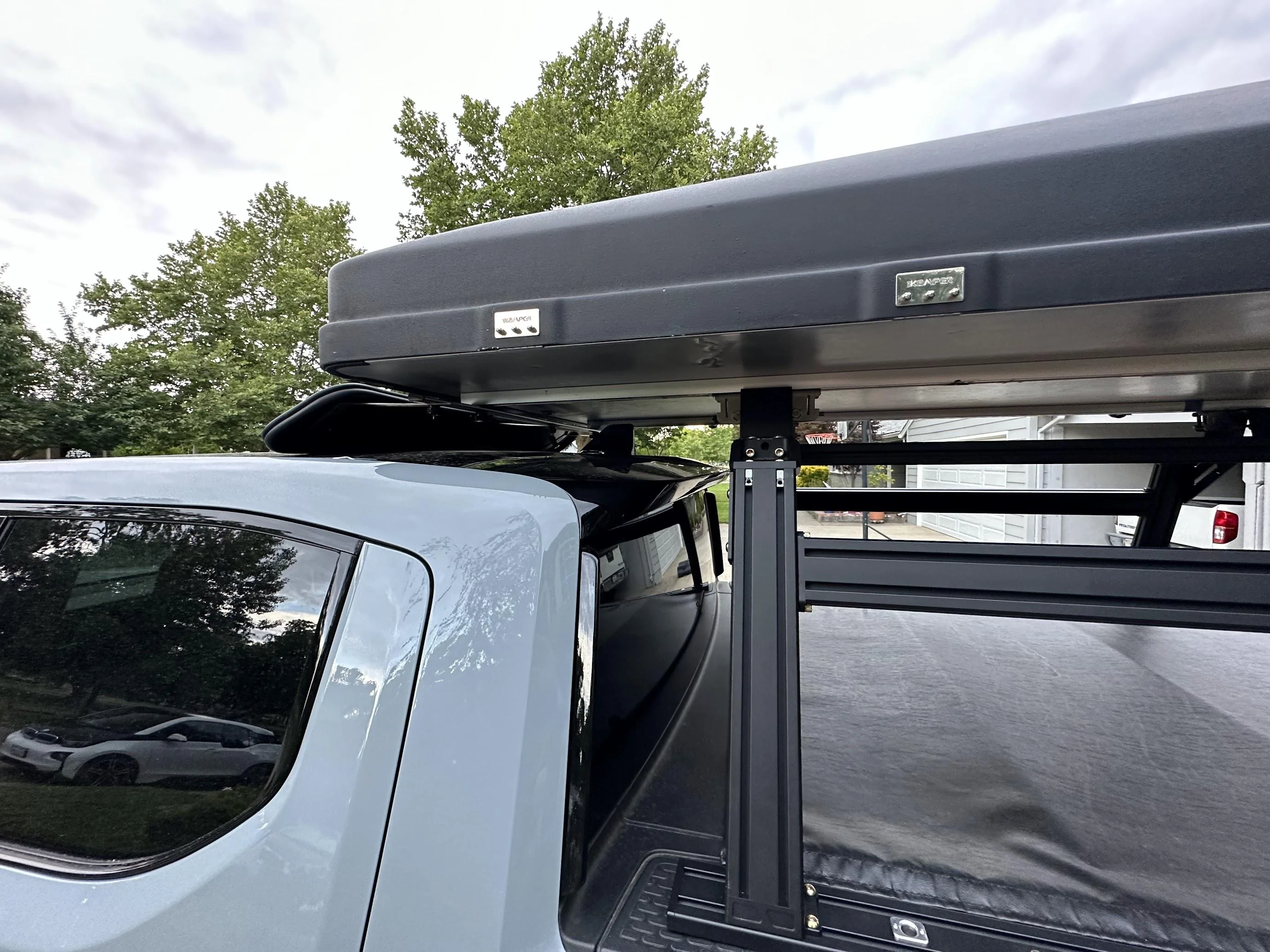
That sounds like a huge pain. I hope they get it sorted for you. I don't think that's what wrong with mine though. As soon as you mentioned your GPS antenna, I had a feeling I knew what was wrong with mine. It's my fault. I installed a cab height rack and roof top tent that obscures the antenna. It never occurred to me that it would interfere with the Highway Assist. Navigation still works fine. I checked with another user who has a similar setup and he reported problems with his Highway Assist as well. Looks like this kind of setup is incompatible with HA. I'm going to slide my tent back behind the antenna to see if it fixes the issue.

Rivian R1T R1S Driver+ Availability Issues IMG_4586
 

Sponsored

OP
OP
Marchin_MTB

Marchin_MTB

Well-Known Member
First Name
Marcin
Joined
Jun 25, 2022
Threads
14
Messages
1,508
Reaction score
1,975
Location
Colorado
Vehicles
2015 i3, 2011 Honda CRV.
Occupation
Aerospace Engineer turned Space Physicist
Clubs
 
That sounds like a huge pain. I hope they get it sorted for you. I don't think that's what wrong with mine though. As soon as you mentioned your GPS antenna, I had a feeling I knew what was wrong with mine. It's my fault. I installed a cab height rack and roof top tent that obscures the antenna. It never occurred to me that it would interfere with the Highway Assist. Navigation still works fine. I checked with another user who has a similar setup and he reported problems with his Highway Assist as well. Looks like this kind of setup is incompatible with HA. I'm going to slide my tent back behind the antenna to see if it fixes the issue.

IMG_4586.jpg
Thanks! This is a good theory. You might find that even with the tent off to the back, that the HA is degraded from GPS multi path caused by the nearby metal structure sitting above the antenna plane.
 

sacramentoelectric

Well-Known Member
Joined
Sep 4, 2021
Threads
14
Messages
538
Reaction score
1,138
Location
sacramento
Vehicles
BMW iX, BMW i3
Clubs
 
Thanks! This is a good theory. You might find that even with the tent off to the back, that the HA is degraded from GPS multi path caused by the nearby metal structure sitting above the antenna plane.
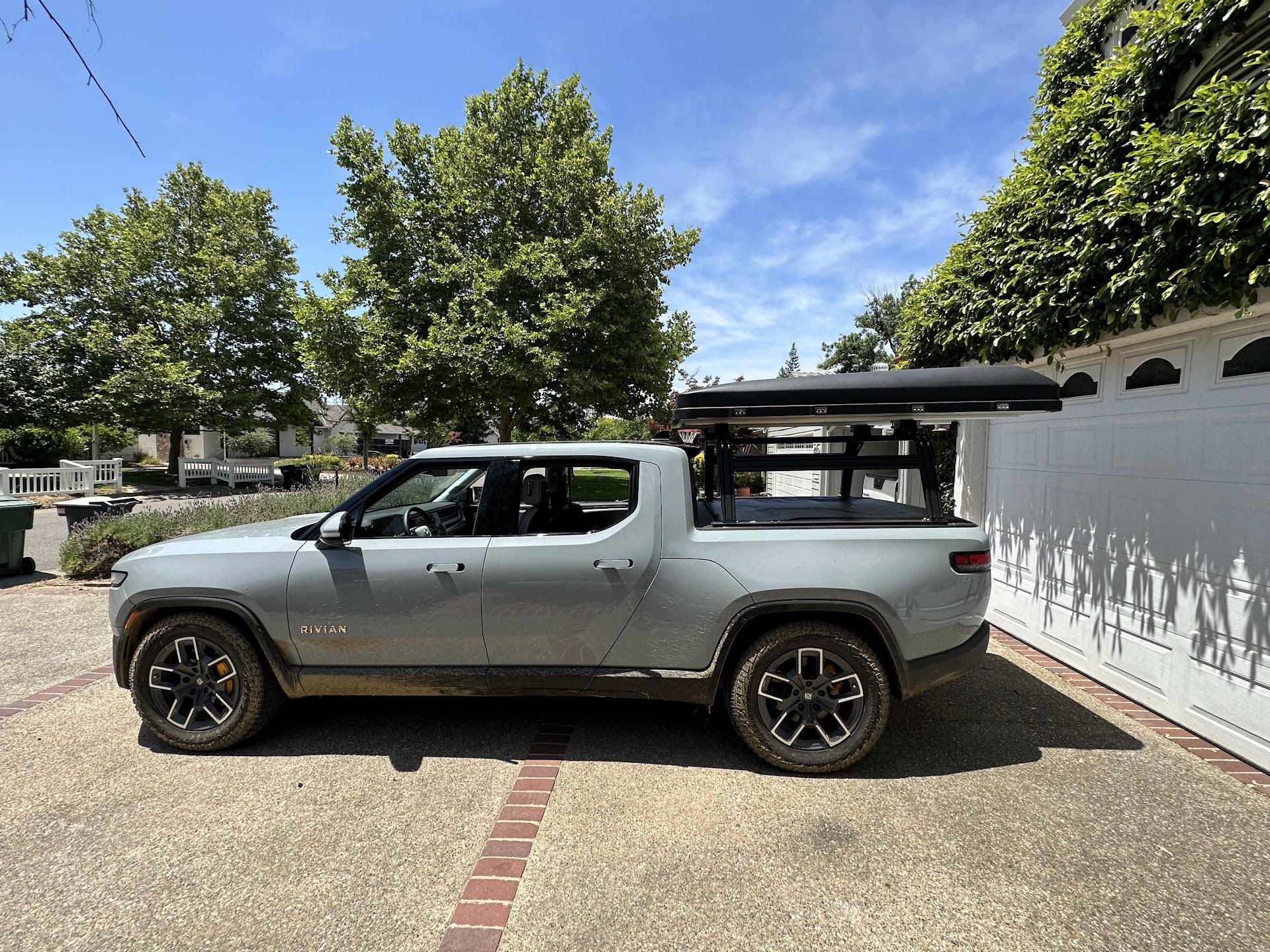
I slid the tent back behind the antenna, ditched the wind deflector, and took a short test drive. Started working again immediately. I did get one disengagement so it may not be solved 100%. I'm taking a longer road trip this weekend which should provide a more comprehensive test.

Rivian R1T R1S Driver+ Availability Issues IMG_4641
 

Wefty

Well-Known Member
First Name
Robert
Joined
Mar 3, 2022
Threads
5
Messages
168
Reaction score
153
Location
Chicago
Vehicles
R1T, 2008 Fit
OP, I have the same issues. Sometimes it will engage sometimes it won't. It will also turn off seemingly randomly. Recently it did a hard brake for some unknown reason and it was pretty dangerous.
 
OP
OP
Marchin_MTB

Marchin_MTB

Well-Known Member
First Name
Marcin
Joined
Jun 25, 2022
Threads
14
Messages
1,508
Reaction score
1,975
Location
Colorado
Vehicles
2015 i3, 2011 Honda CRV.
Occupation
Aerospace Engineer turned Space Physicist
Clubs
 
I slid the tent back behind the antenna, ditched the wind deflector, and took a short test drive. Started working again immediately. I did get one disengagement so it may not be solved 100%. I'm taking a longer road trip this weekend which should provide a more comprehensive test.

IMG_4641.jpg
Good to hear. It’s actually somewhat encouraging that our symptoms are so similar and can both be traced to GPS signal degradation, even if that’s caused by different things.
 
OP
OP
Marchin_MTB

Marchin_MTB

Well-Known Member
First Name
Marcin
Joined
Jun 25, 2022
Threads
14
Messages
1,508
Reaction score
1,975
Location
Colorado
Vehicles
2015 i3, 2011 Honda CRV.
Occupation
Aerospace Engineer turned Space Physicist
Clubs
 
OP, I have the same issues. Sometimes it will engage sometimes it won't. It will also turn off seemingly randomly. Recently it did a hard brake for some unknown reason and it was pretty dangerous.
Sorry to hear it. For us, the duty cycle for HA availability is much less than 5% for any supposedly mapped freeway. I would guess that Rivian would want to solve any HA issues quickly since they tied it into their insurance product.

has Service looked into your issue?
Sponsored


Top