Sponsored

Unable to Fast Charge - Anyone seen this before?

Tango45

Well-Known Member
First Name
Erik
Joined
Feb 15, 2021
Threads
6
Messages
596
Reaction score
1,494
Location
Northern VA
Vehicles
Ioniq 5, R1S
Clubs
 
Hey all, I ran into this issue a few days ago and worked with Rivian service chat and (tried to work with) EA's phone support to try and identify the issue. When attempting to fast charge, the charger indicates that it is unable to communicate with the vehicle and fails to initiate charging. Between the two support sources we tried initiating through the EA app, on screen instructions and "from [the support person's] side". There was also rebooting of the vehicle and the charger. I tried other chargers in that bank of EA chargers and then went to a nearby EVGo charger with no success. I was able to capture some kind of electrical/mechanical servo-ish sound at the port (video below), which Rivian support asserted implied that the problem was on the vehicle side and we set up a service appointment at the Richmond SC (Richmond had earlier availability). It still charges fine on the level 2 at home, but I wanted to see if any of y'all have experienced this and are sitting on some combination of inputs/cheat code that could magically fix this...

Sponsored

 

Cosmacelf

Well-Known Member
Joined
Nov 11, 2020
Threads
20
Messages
442
Reaction score
530
Location
San Diego, CA
Vehicles
Rivian R1S, Tesla Model X
Occupation
Software
IIRC there was a software interaction issue between the Rivian’s software and some EA chargers in that the EA charger would do something that the Rivian didn’t like and it would end up locking the Rivian software into a permanent no fast charge mode until reset by service techs.
 

jjswan33

Well-Known Member
First Name
Joshua
Joined
Sep 17, 2021
Threads
135
Messages
4,455
Reaction score
9,880
Location
Sandy, OR
Vehicles
Rivian R1T LE, Hyundai Ioniq 5 Limited
Occupation
Engineer
Clubs
 
Sleep cycle, if that doesn’t work then Rivian service is your only option.
 
OP
OP
Tango45

Tango45

Well-Known Member
First Name
Erik
Joined
Feb 15, 2021
Threads
6
Messages
596
Reaction score
1,494
Location
Northern VA
Vehicles
Ioniq 5, R1S
Clubs
 
@Cosmacelf , @jjswan33 Thank you for your responses. I appreciate your efforts to help.

IIRC there was a software interaction issue between the Rivian’s software and some EA chargers in that the EA charger would do something that the Rivian didn’t like and it would end up locking the Rivian software into a permanent no fast charge mode until reset by service techs.
Do you know if there was some way to confirm if this was the case? I'm assuming optimistic that Rivian would be able to check that remotely and determine that this is (hopefully) something that can be done in a mobile tech visit... I'll say that I thought I saw something, somewhere that charging it on a level 2 would do something that would then allow me to fast charge again, but that might have just been a drunken fever dream. Also, do you know if it was only EA chargers doing this? If so, then I might try it on a different company's charger after doing the sleep cycle test...

Sleep cycle, if that doesn’t work then Rivian service is your only option.
Oh gawd, what was the sleep cycle thing again... and the search button is your friend. I'll unplug the flash drive I use for video and lock in the garage this evening and see if that did anything.

Thanks again to both.
 

UnsungZero_OldTimeAdMan

Well-Known Member
First Name
Barnum
Joined
Mar 20, 2023
Threads
68
Messages
8,763
Reaction score
12,013
Location
SoCal
Vehicles
'23 GW Quad-Large R1T "Ghost"
Occupation
Advertising Circus
Typical EA sucking. Usually when their billing system is having hiccups. Like when they have problems adding your auto-reload amount to your account.
 

Sponsored

OP
OP
Tango45

Tango45

Well-Known Member
First Name
Erik
Joined
Feb 15, 2021
Threads
6
Messages
596
Reaction score
1,494
Location
Northern VA
Vehicles
Ioniq 5, R1S
Clubs
 
Typical EA sucking. Usually when their billing system is having hiccups. Like when they have problems adding your auto-reload amount to your account.
I'll report back when/if I find out the cause of the problem and the eventual solution. The Rivian service person made no indication that it was an EA issue (which also doesn't rule out the proposed theory above) and stated that the sound in the video implied a problem on the vehicle's side.

Not that EA is perfect, but I can't add this to their sins until I know better...
 

rmalzo

Well-Known Member
First Name
Ray
Joined
May 1, 2023
Threads
4
Messages
79
Reaction score
36
Location
Prescott Az
Vehicles
2022 f1t
Occupation
Retired
Hey all, I ran into this issue a few days ago and worked with Rivian service chat and (tried to work with) EA's phone support to try and identify the issue. When attempting to fast charge, the charger indicates that it is unable to communicate with the vehicle and fails to initiate charging. Between the two support sources we tried initiating through the EA app, on screen instructions and "from [the support person's] side". There was also rebooting of the vehicle and the charger. I tried other chargers in that bank of EA chargers and then went to a nearby EVGo charger with no success. I was able to capture some kind of electrical/mechanical servo-ish sound at the port (video below), which Rivian support asserted implied that the problem was on the vehicle side and we set up a service appointment at the Richmond SC (Richmond had earlier availability). It still charges fine on the level 2 at home, but I wanted to see if any of y'all have experienced this and are sitting on some combination of inputs/cheat code that could magically fix this...

Yes they needed to replace my honored charging module it was a task
 

garylchandler

New Member
First Name
Gary
Joined
Aug 11, 2022
Threads
0
Messages
3
Reaction score
6
Location
Pocatello ID
Vehicles
Rivian R1T
Occupation
Retired
Clubs
 
Thjs happe.ed to me and it had to go to service where they had to replace the DC charging module
 
OP
OP
Tango45

Tango45

Well-Known Member
First Name
Erik
Joined
Feb 15, 2021
Threads
6
Messages
596
Reaction score
1,494
Location
Northern VA
Vehicles
Ioniq 5, R1S
Clubs
 
@garylchandler @rmalzo Thanks for sharing! Was that an inpatient or outpatient procedure? In other words, how long did it take?
 

Sponsored

shrink

Well-Known Member
Joined
Feb 16, 2021
Threads
102
Messages
1,392
Reaction score
2,715
Location
Phoenix, AZ and Kailua-Kona, HI
Vehicles
'23 R1S Quad x 2; '26 Gen 2 R1T Quad Launch; '25 Ioniq 5; '24 Jeep Cherokee
Clubs
 
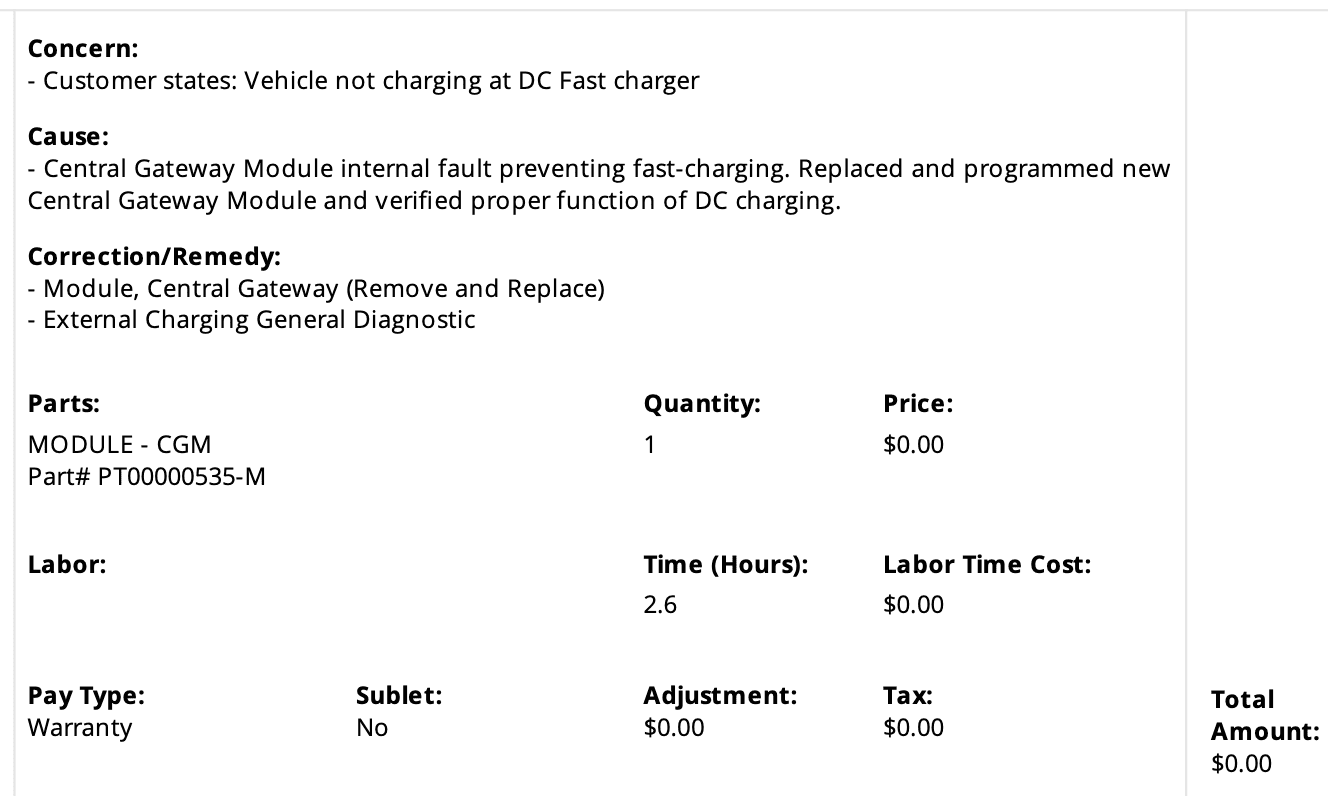
Could be a central gateway module failure.

Rivian R1T R1S Unable to Fast Charge - Anyone seen this before? 1697491788554
 

Cosmacelf

Well-Known Member
Joined
Nov 11, 2020
Threads
20
Messages
442
Reaction score
530
Location
San Diego, CA
Vehicles
Rivian R1S, Tesla Model X
Occupation
Software
I'll report back when/if I find out the cause of the problem and the eventual solution. The Rivian service person made no indication that it was an EA issue (which also doesn't rule out the proposed theory above) and stated that the sound in the video implied a problem on the vehicle's side.

Not that EA is perfect, but I can't add this to their sins until I know better...
So what did you learn?
 
OP
OP
Tango45

Tango45

Well-Known Member
First Name
Erik
Joined
Feb 15, 2021
Threads
6
Messages
596
Reaction score
1,494
Location
Northern VA
Vehicles
Ioniq 5, R1S
Clubs
 
So what did you learn?
Nothing yet. Some might say nothing, ever.

I haven't tried to fast charge yet. I'm lazy, but your gentle poke will get me to go give it a try today or tomorrow.

I fully expect it to be the charging module thingee like others have said. My service appointment is on November 22, unless they can fit me in earlier.
 
OP
OP
Tango45

Tango45

Well-Known Member
First Name
Erik
Joined
Feb 15, 2021
Threads
6
Messages
596
Reaction score
1,494
Location
Northern VA
Vehicles
Ioniq 5, R1S
Clubs
 
So what did you learn?
Well, aint that something! I went to the EVGo nearby and it started right up! Double-checked with the EA station around the corner... and there was an error message on the screen. On the stall next to it, however, it started right up again! I'm back in business... which is to say that I was never really out of business since I wasn't doing any road trips. I could see how this could have severely impacted me if I was in the middle of one.

So, something over the last week-ish cleared up the issue. That could have been the sleep cycle, charging on my level 2 at home, the recent update getting installed, or the power of positive thinking. I spoke with Rivian Service and they said that it very could have been the sleep cycle that resolved the issue, although she left open the possibility that the update also could have fixed it. She didn't have the data to be able to diagnose remotely.

My biggest concern (and my reason for starting this thread in the first place) is that this happens to me or someone else while in the middle of a road trip with a family in the vehicle and such. While this was a minor inconvenience to me, it would be different in such a situation. She stated that there are instances where the charger software isn't talking properly to the vehicle and the vehicle gets confused. In those cases, customers will call/chat with Rivian Service and the charger company and they are usually able to resolve the problem between those three parties. I would just recommend in that situation to also consider the sleep cycle process - it's the only thing in this situation that would have been an option (albeit not a fun one) were I in the middle of a roadtrip. Oh, also, positive thinking.

Thanks to all who contributed!
Sponsored


Top