Sponsored

DayTripping

Well-Known Member
First Name
Timothy
Joined
Sep 12, 2024
Threads
13
Messages
1,544
Reaction score
2,133
Location
DFW
Vehicles
Gen1 R1T QM, S Plaid, Highland 3 Perf, 3 Long Range, R2 on order
Occupation
Consultant
It will be pretty accurate even if you don't do this. you don't have to do one continuous charge but I would encourage you to drive it as soon as you can after you charge it to 90%. A high SoC (state of charge) is not good for the battery in your Tri.

So do it when you plan to take a trip or drive enough miles to get it back under 80%. I typically keep mine in the 50-60% range to minimize degradation. It's definitely helped with my Teslas.
Sponsored
 

hammick

Well-Known Member
First Name
Stormy
Joined
Sep 8, 2024
Threads
26
Messages
587
Reaction score
536
Location
Montana
Vehicles
25 R1S Tri; '22 F150 Lightning Lariat ER
Occupation
retired
It will be pretty accurate even if you don't do this. you don't have to do one continuous charge but I would encourage you to drive it as soon as you can after you charge it to 90%. A high SoC (state of charge) is not good for the battery in your Tri.

So do it when you plan to take a trip or drive enough miles to get it back under 80%. I typically keep mine in the 50-60% range to minimize degradation. It's definitely helped with my Teslas.
Thanks. We are leaving on a long road trip on March 1st. I had planned to charge to 80% the night before but I'll take it to 90% just for Teslafi accuracy. Our plan for daily community it to charge it to 50% every night. Wife's commute is about 25 miles round trip.

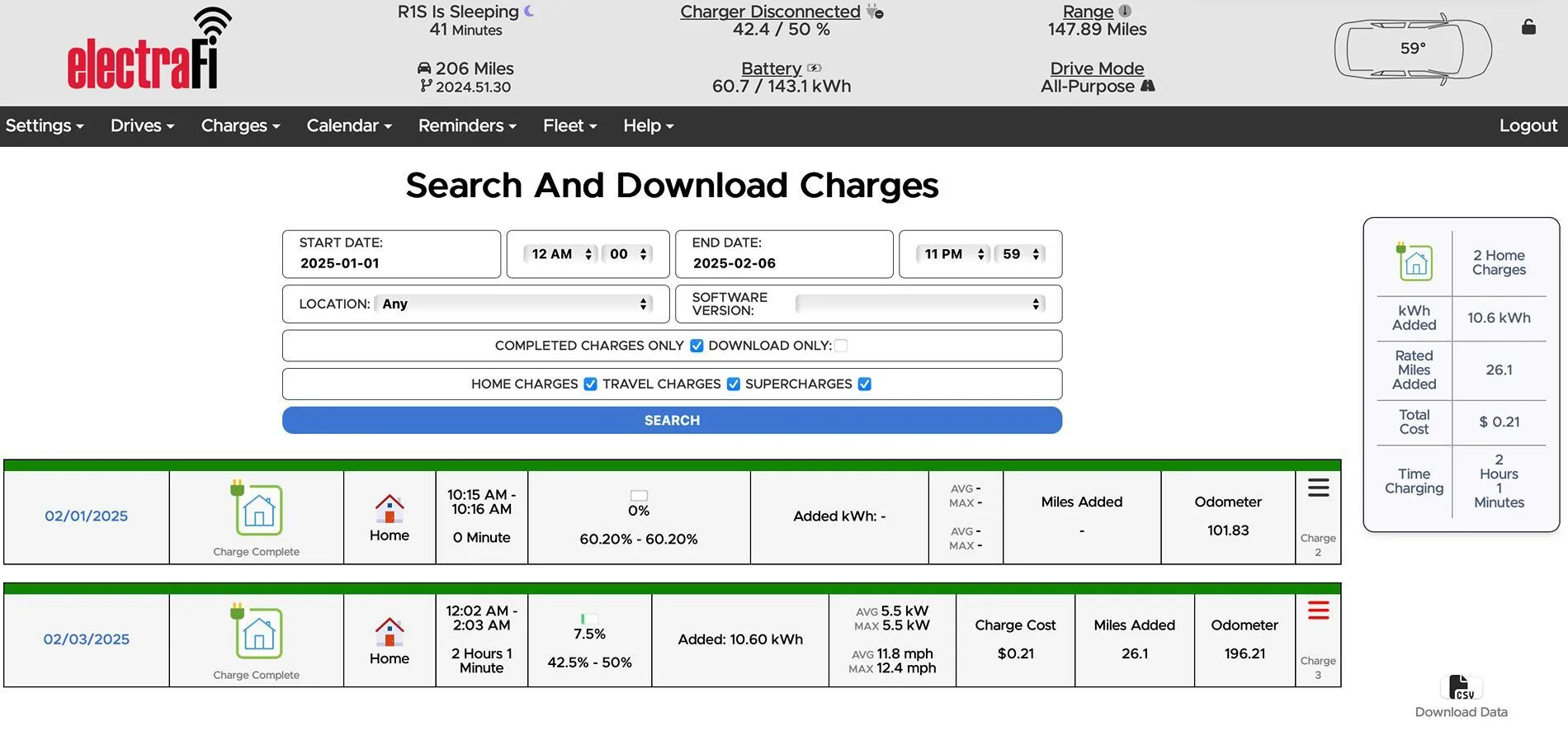
Another question if you don't mind. I've done two charges on our Tri so far. One at a Supercharger where I added 21.6 kWh and one on our L2 home charger where I added 10.6 kWh. The home charger shows up in Teslafi but the Supercharger session does not. I'm assuming DCFC is supposed to be logged?
 

mudito

Well-Known Member
First Name
Aldo
Joined
Jul 30, 2024
Threads
18
Messages
1,010
Reaction score
1,413
Location
Texas
Vehicles
Rivian R1T
Thanks. We are leaving on a long road trip on March 1st. I had planned to charge to 80% the night before but I'll take it to 90% just for Teslafi accuracy. Our plan for daily community it to charge it to 50% every night. Wife's commute is about 25 miles round trip.

Another question if you don't mind. I've done two charges on our Tri so far. One at a Supercharger where I added 21.6 kWh and one on our L2 home charger where I added 10.6 kWh. The home charger shows up in Teslafi but the Supercharger session does not. I'm assuming DCFC is supposed to be logged?
Charge to 100% one night for proper calibration and use the truck normally. It won't hurt to charge to 100% every once in a while.

Even if you do that daily, still it'll take years to degrade to a noticeable point. I wouldn't recommend doing that but it's not the end of the world.

My wife charges her tesla to 100% everytime she charges it since she's lazy to mess with charge limits and very often (once a week at least) she really needs a full battery (Realtor in Texas, she cover distances...). Three years on and battery is 95% from its original state.
 

DayTripping

Well-Known Member
First Name
Timothy
Joined
Sep 12, 2024
Threads
13
Messages
1,544
Reaction score
2,133
Location
DFW
Vehicles
Gen1 R1T QM, S Plaid, Highland 3 Perf, 3 Long Range, R2 on order
Occupation
Consultant
Thanks. We are leaving on a long road trip on March 1st. I had planned to charge to 80% the night before but I'll take it to 90% just for Teslafi accuracy. Our plan for daily community it to charge it to 50% every night. Wife's commute is about 25 miles round trip.

Another question if you don't mind. I've done two charges on our Tri so far. One at a Supercharger where I added 21.6 kWh and one on our L2 home charger where I added 10.6 kWh. The home charger shows up in Teslafi but the Supercharger session does not. I'm assuming DCFC is supposed to be logged?
Both charges should be logged. The caveat to that is sometimes if whatever is being measure is too short of a time to match Electrafi's polling period it doesn't seem to log it. An example of this is I did a hard acceleration run to the speed limiter.

Electrafi never said I went over 70 mph. So I assume from the time it sampled the data 1 time and until the next, I had accelerated to triple digits and slowed back down enough to either read the 70 mph speed on the way up or possibly on the way down. Anyway, that is my assumption. Maybe your DCFC charging wasn't long enough.
 

hammick

Well-Known Member
First Name
Stormy
Joined
Sep 8, 2024
Threads
26
Messages
587
Reaction score
536
Location
Montana
Vehicles
25 R1S Tri; '22 F150 Lightning Lariat ER
Occupation
retired
Charge to 100% one night for proper calibration and use the truck normally. It won't hurt to charge to 100% every once in a while.

Even if you do that daily, still it'll take years to degrade to a noticeable point. I wouldn't recommend doing that but it's not the end of the world.

My wife charges her tesla to 100% everytime she charges it since she's lazy to mess with charge limits and very often (once a week at least) she really needs a full battery (Realtor in Texas, she cover distances...). Three years on and battery is 95% from its original state.
Thanks. It was at 100% when it was delivered last week so we are good there. Immediately hit the highway to get it below 70%. Not sure the NMC packs need to go to 100% to calibrate so our Tri probably won't see 100% again.

I'm pretty anal about battery care on our '22 Lightning. It's had a lot of DCFC but when not road trippin' I charge it to 60% overnight (50% in summer) and then power our house with it from morning to bedtime. Rinse and repeat. It's at 98% SOH according to Carscanner.
 

Sponsored

hammick

Well-Known Member
First Name
Stormy
Joined
Sep 8, 2024
Threads
26
Messages
587
Reaction score
536
Location
Montana
Vehicles
25 R1S Tri; '22 F150 Lightning Lariat ER
Occupation
retired
Both charges should be logged. The caveat to that is sometimes if whatever is being measure is too short of a time to match Electrafi's polling period it doesn't seem to log it. An example of this is I did a hard acceleration run to the speed limiter.

Electrafi never said I went over 70 mph. So I assume from the time it sampled the data 1 time and until the next, I had accelerated to triple digits and slowed back down enough to either read the 70 mph speed on the way up or possibly on the way down. Anyway, that is my assumption. Maybe your DCFC charging wasn't long enough.
Thanks. Makes sense. The SC was a 9 minute session and the home session was 2 hours. What doesn't make sense is I plugged it in briefly at home to make sure L2 charging worked. This was about a 20 second charge and Teslafi logged it.


Rivian R1T R1S Electrafi (Teslafi) now available for Rivian Screenshot 2025-02-05 at 9.14.46 PM
 

mudito

Well-Known Member
First Name
Aldo
Joined
Jul 30, 2024
Threads
18
Messages
1,010
Reaction score
1,413
Location
Texas
Vehicles
Rivian R1T
Thanks. It was at 100% when it was delivered last week so we are good there. Immediately hit the highway to get it below 70%. Not sure the NMC packs need to go to 100% to calibrate so our Tri probably won't see 100% again.

I'm pretty anal about battery care on our '22 Lightning. It's had a lot of DCFC but when not road trippin' I charge it to 60% overnight (50% in summer) and then power our house with it from morning to bedtime. Rinse and repeat. It's at 98% SOH according to Carscanner.
Every now and then, going 0 to a 100 is good for proper BMS calibration. Otherwise of course you'll have longer lifespan the way you use it. I'm anal but práctica myself. If the difference between not going 100%.and going (let's say) once a year would be that I would brick my battery in three years, I might be more careful ☺

But every report so far keeps insisiting that batteries tend to last longer than expected. So I wouldn't hold myself for going 100% every now and then when needed.
 

DayTripping

Well-Known Member
First Name
Timothy
Joined
Sep 12, 2024
Threads
13
Messages
1,544
Reaction score
2,133
Location
DFW
Vehicles
Gen1 R1T QM, S Plaid, Highland 3 Perf, 3 Long Range, R2 on order
Occupation
Consultant
That is odd. I'd try another fast charging session. I've used it for years with Teslas and 4 months with my Rivian and I don't ever recall having it miss a charging session. Sometimes it is so annoying when it captures one where I just plugged the truck in and it started charging while I was trying to set the schedule for another time.
 

SANZC02

Well-Known Member
First Name
Bob
Joined
Feb 11, 2021
Threads
50
Messages
7,397
Reaction score
12,680
Location
California
Vehicles
Tesla Model S, LE - R1S
Occupation
Retired
Charge to 100% one night for proper calibration and use the truck normally. It won't hurt to charge to 100% every once in a while.

Even if you do that daily, still it'll take years to degrade to a noticeable point. I wouldn't recommend doing that but it's not the end of the world.

My wife charges her tesla to 100% everytime she charges it since she's lazy to mess with charge limits and very often (once a week at least) she really needs a full battery (Realtor in Texas, she cover distances...). Three years on and battery is 95% from its original state.
What Tesla does she have? It might have LFP batteries and they can be charged to 100% with no issues, it is the Lithium-Ion that you do not want to leave at hi or low states of charge.

In my 9 years with a Tesla and 2 years with my R1S normally charging to 80% is not an issue.
 

mudito

Well-Known Member
First Name
Aldo
Joined
Jul 30, 2024
Threads
18
Messages
1,010
Reaction score
1,413
Location
Texas
Vehicles
Rivian R1T
What Tesla does she have? It might have LFP batteries and they can be charged to 100% with no issues, it is the Lithium-Ion that you do not want to leave at hi or low states of charge.

In my 9 years with a Tesla and 2 years with my R1S normally charging to 80% is not an issue.
It's an NMC chemistry long range.

Also LFP has the same issues as NMC when charged at 100% ,it just that the BMS needs to the battery to be cahrged to 100% often to maintain proper calibration. ?
Check Engineering Explained video on that subject. Its perfect.
 

Sponsored

mkhuffman

Well-Known Member
First Name
Mike
Joined
Nov 9, 2020
Threads
14
Messages
2,833
Reaction score
3,193
Location
Virginia
Vehicles
2025 R1T Tri-Max, Jeep GC-L, VW Jetta
Has anyone sent a request to Teslafi to add battery temperature to the data interface? Interior temperature is useful, but from an efficiency perspective, battery temperature is very important.
 

scottf200

Well-Known Member
First Name
Scott
Joined
Nov 25, 2019
Threads
6
Messages
432
Reaction score
296
Location
WNC
Vehicles
Past Ford Exped; curr TMX 100D; future BEV truck/SUV
Occupation
sw engineer
Has anyone sent a request to Teslafi to add battery temperature to the data interface? Interior temperature is useful, but from an efficiency perspective, battery temperature is very important.
Was there anything the Rivian data feed? eg. equivalent to belows post earlier in this thread

>>>>>>
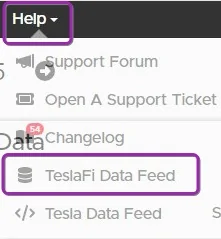
Lots of details in the TeslaFI and Tesla data feed areas assuming you have the same.You can edit the columns shown. Very handy for creating your own graphs to test something out.

Lot of graphs hidden behind things too like a charging entry. The legends often work like a toggle to turn things in the graph on and off.
<<<<<<
Rivian R1T R1S Electrafi (Teslafi) now available for Rivian 2wdbhvt-jpg-jpg
 

mkhuffman

Well-Known Member
First Name
Mike
Joined
Nov 9, 2020
Threads
14
Messages
2,833
Reaction score
3,193
Location
Virginia
Vehicles
2025 R1T Tri-Max, Jeep GC-L, VW Jetta
Was there anything the Rivian data feed? eg. equivalent to belows post earlier in this thread

>>>>>>
Lots of details in the TeslaFI and Tesla data feed areas assuming you have the same.You can edit the columns shown. Very handy for creating your own graphs to test something out.

Lot of graphs hidden behind things too like a charging entry. The legends often work like a toggle to turn things in the graph on and off.
<<<<<<
2wdbhvt-jpg-jpg.jpg
Thanks Scott! Unfortunately, I cannot find battery temperature in the long list of available columns. I think some of the columns are not Rivian specific, and they contain no values. For example, the outside temperature field is always blank. Driver temp setting is blank. And there is no battery temperature field.

I know it is available because it is displayed in ABRP when checking vehicle data. But ABRP does not record battery temperature during a trip. Or at least if it does, I don't see where it is recorded. It just shows current battery temperature.
 

scottf200

Well-Known Member
First Name
Scott
Joined
Nov 25, 2019
Threads
6
Messages
432
Reaction score
296
Location
WNC
Vehicles
Past Ford Exped; curr TMX 100D; future BEV truck/SUV
Occupation
sw engineer
Thanks Scott! Unfortunately, I cannot find battery temperature in the long list of available columns. I think some of the columns are not Rivian specific, and they contain no values. For example, the outside temperature field is always blank. Driver temp setting is blank. And there is no battery temperature field.

I know it is available because it is displayed in ABRP when checking vehicle data. But ABRP does not record battery temperature during a trip. Or at least if it does, I don't see where it is recorded. It just shows current battery temperature.
I would ask their help system which I've had good luck with. Especially if ABRP has access to that. Also ask them about the columns that contain no values. It would seem odd to me that they would not have dumped all that data to verify it was available. Sometimes, manufacturers do change things and break 3rd party products too.
 

DayTripping

Well-Known Member
First Name
Timothy
Joined
Sep 12, 2024
Threads
13
Messages
1,544
Reaction score
2,133
Location
DFW
Vehicles
Gen1 R1T QM, S Plaid, Highland 3 Perf, 3 Long Range, R2 on order
Occupation
Consultant
They include the Tesla fields as well.
Sponsored


Top