Sponsored

Kwh data reading wrong, Gen2, anyone else?

krb1183

Well-Known Member
Joined
Mar 2, 2022
Threads
4
Messages
226
Reaction score
167
Location
Huntsville, AL
Vehicles
2025 R1S
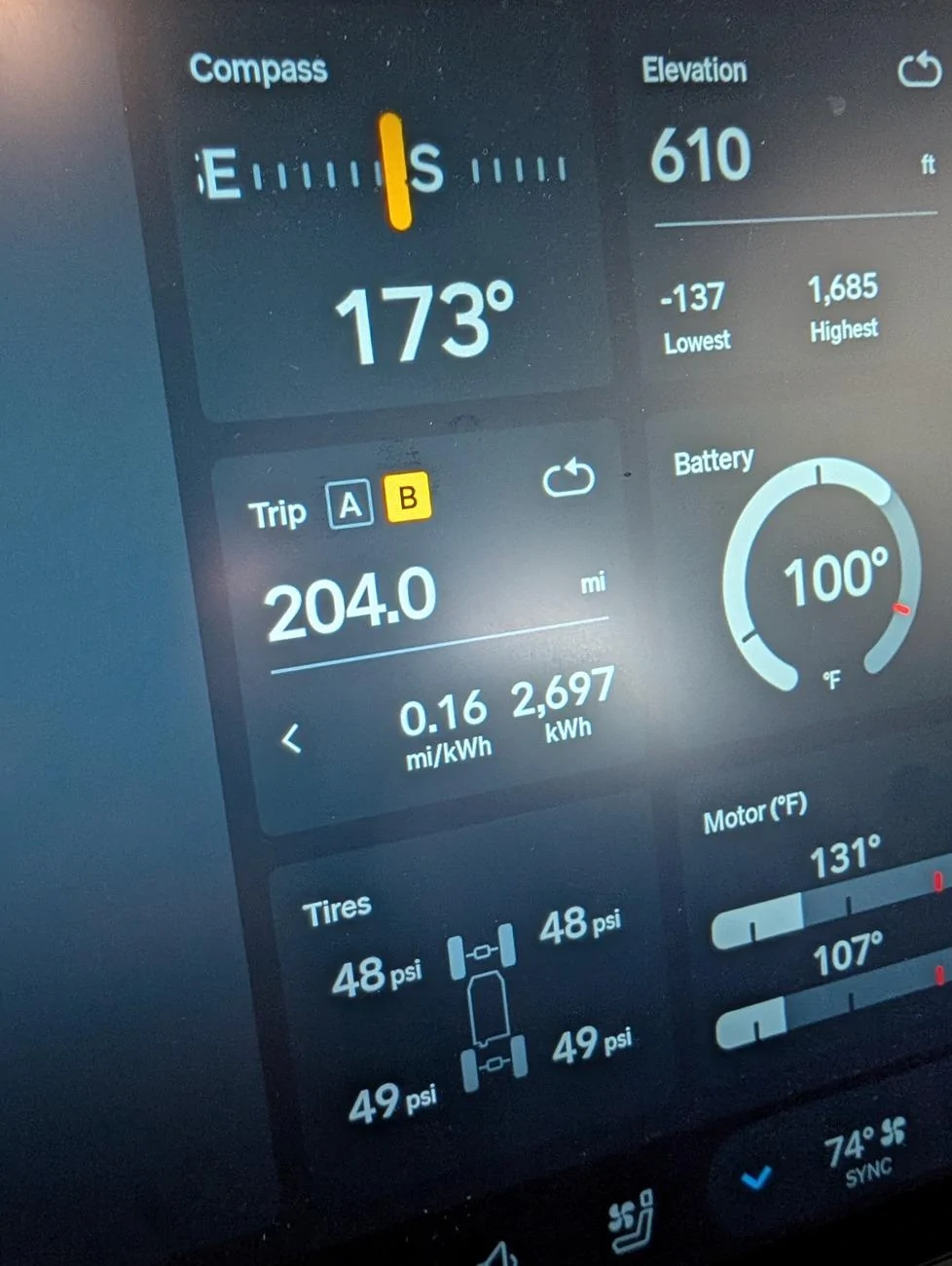
I never reset trip 'A' but over the last month I've noticed my overall efficiency decreasing, oddly so. I set trip 'B' last week, and noticed over the miles I've driven, it's registering an abnormally high kwh used. I have a mobile service ticket out a month from now and added this to it. Just curious if anyone else noticed this as well?

Rivian R1T R1S Kwh data reading wrong, Gen2, anyone else? PXL_20250724_231010698
Sponsored


Polar

Well-Known Member
First Name
Scott
Joined
Feb 16, 2022
Threads
33
Messages
1,098
Reaction score
2,039
Location
WA
Vehicles
C40, LE CY R1S
Occupation
IT
Clubs
 
And I thought my efficiency was bad

Have you done a soft or hard reset yet?
 

RivianRiverRat

Well-Known Member
First Name
Greg
Joined
Mar 9, 2022
Threads
12
Messages
659
Reaction score
864
Location
Chattanooga TN
Vehicles
2022 Rivian R1T
Occupation
Civil Engineer
My efficiency is ok but doesn’t match between trip A and B
It doesn’t match because the kWh used for the mileage/energy used doesn’t match between trip A and B
 
OP
OP

krb1183

Well-Known Member
Joined
Mar 2, 2022
Threads
4
Messages
226
Reaction score
167
Location
Huntsville, AL
Vehicles
2025 R1S
And I thought my efficiency was bad

Have you done a soft or hard reset yet?
I have, I did a hard reset after the last software update a week or so ago.

Yeah, funny my energy screen is reading normal, avg about 2.5 mi/kw doing any daily driving
 

mikehmb

Well-Known Member
First Name
Mike
Joined
Jan 12, 2022
Threads
154
Messages
2,303
Reaction score
5,223
Location
SF Bay Area
Vehicles
My name is Mike, and I have a (car) problem
Average speed: 384mph
Tires: 42" ATs @ 6 PSI
Towing: the Space Shuttle
 

Sponsored

iowa_don

Well-Known Member
First Name
Don
Joined
Mar 31, 2025
Threads
2
Messages
76
Reaction score
38
Location
Arizona
Vehicles
R1S Gen 2
Occupation
Retired
I never reset trip 'A' but over the last month I've noticed my overall efficiency decreasing, oddly so. I set trip 'B' last week, and noticed over the miles I've driven, it's registering an abnormally high kwh used. I have a mobile service ticket out a month from now and added this to it. Just curious if anyone else noticed this as well?

PXL_20250724_231010698.jpg
I haven't noticed a difference between Trip A and Trip B. However I have noticed a difference between Trip A and the new energy screen. I always reset Trip A before a drive and I keep track of the Mi/lWh. It NEVER matches what shows up for a "drive" on the energy screen (and the trip meter has a limit of 4.00 which is irritating, the energy screen does not have that limit nor does the last 15 minute energy display on the driver binnacle though the plot is clipped at 4.00). It's tricky to compare the milage, as they don't show tenths on the energy screen, but it is often off by more than 1 or even 2 miles. Also, their definition of a "drive" can include short periods (no idea how long before it is considered a new "drive") when the car is actually parked.
 

SRO

Well-Known Member
First Name
Steve
Joined
Mar 21, 2023
Threads
3
Messages
299
Reaction score
142
Location
Carson City nv
Vehicles
R1T
Occupation
retired
I never reset trip 'A' but over the last month I've noticed my overall efficiency decreasing, oddly so. I set trip 'B' last week, and noticed over the miles I've driven, it's registering an abnormally high kwh used. I have a mobile service ticket out a month from now and added this to it. Just curious if anyone else noticed this as well?

PXL_20250724_231010698.webp
I do the opposite. I never reset trip B. So my trip A shows the same thing. 0.16 M/Kwh. Ever since the last update. Gen 2.
 

NTinkle

Active Member
First Name
Nate
Joined
Jun 29, 2024
Threads
0
Messages
30
Reaction score
23
Location
Texas
Vehicles
R1S & Model Y
Occupation
Business Owner
I haven't noticed a difference between Trip A and Trip B. However I have noticed a difference between Trip A and the new energy screen. I always reset Trip A before a drive and I keep track of the Mi/lWh. It NEVER matches what shows up for a "drive" on the energy screen (and the trip meter has a limit of 4.00 which is irritating, the energy screen does not have that limit nor does the last 15 minute energy display on the driver binnacle though the plot is clipped at 4.00). It's tricky to compare the milage, as they don't show tenths on the energy screen, but it is often off by more than 1 or even 2 miles. Also, their definition of a "drive" can include short periods (no idea how long before it is considered a new "drive") when the car is actually parked.
So which one is accurate? Or most accurate?
 

Dark-Fx

Well-Known Member
First Name
Brian
Joined
Jul 15, 2020
Threads
147
Messages
13,522
Reaction score
27,291
Location
Michigan
Vehicles
R1T, R1S, Livewire One, Sierra EV, R1S
Occupation
Engineering
Clubs
 
Units are possibly wrong during recording and it's getting converted? Would be a really strange bug.
 

Mathme

Well-Known Member
First Name
Matt
Joined
Jul 25, 2022
Threads
3
Messages
1,376
Reaction score
1,808
Location
Los Altos, CA
Vehicles
R1T: El Cap, OC, 20AT, Off road package
Occupation
High Tech
Mine have been inconsistent in that the drivers display will be reading higher than the trip computer. I've attributed this to it being hot outside and having Pet Mode keeping my bestie comfy while I've been running errands.
 

Sponsored

COMtnEV

Well-Known Member
First Name
Lee
Joined
Jan 14, 2025
Threads
0
Messages
64
Reaction score
86
Location
Colorado
Vehicles
2025 R1T Dual Performance Max, 2025 GMC Sierra EV; 2022 Hyundai Ioniq 5
I'm seeing the same thing on my Gen2 max pack. I thought maybe the drop in efficiency was due to the upgrade causing a massive increase in the size of my battery and hence weight :oops:. Have done two hard resets, and still seeing the same thing. I keep a mileage/charging log (odometer reading, start and end charge %, efficiency reported by the truck, kW added). I went back and did some quick hand calculations using the % battery used x 1.4 (assuming I have roughly 140kW accessible in the battery). I found that before February, the Rivian efficiency and my hand calculated efficiency match with 10%, but since February, there were disagreements of up to 30% on some charges. With the latest software update, the calculated efficiency is totally haywire. Also seeing the energy screen as being normal.
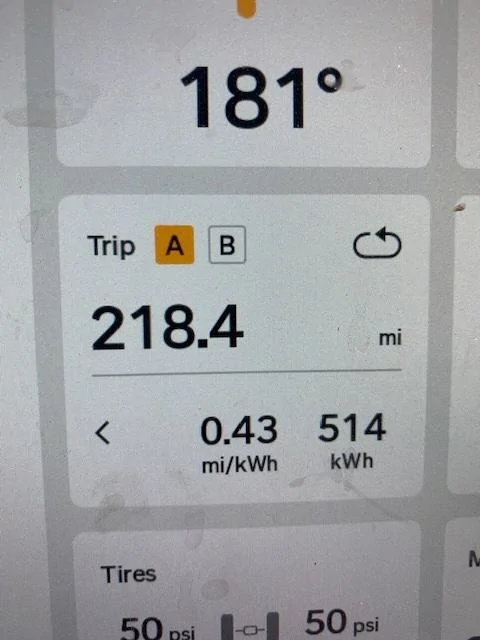
Please post anything you find out from Rivian/resolution.

Rivian R1T R1S Kwh data reading wrong, Gen2, anyone else? IMG_0394
 

iowa_don

Well-Known Member
First Name
Don
Joined
Mar 31, 2025
Threads
2
Messages
76
Reaction score
38
Location
Arizona
Vehicles
R1S Gen 2
Occupation
Retired
So which one is accurate? Or most accurate?
WELL . . . That is what I would like to know. I use the trip meter because I trust the milage values, but I have been tracking both (but using the trip meter milage values) since the Energy Screen was introduced. I have seen the Energy Screen have Mi/kWh values as high as 50% better AND I have seen it have Mi/kWh values as low as 50% worse. I have trouble understanding why they don't agree. Apparently they are using different sets of numbers and, of course they have a hard limit on the Trip Meter of 4.00 which I find completely unnecessary. I also understand that the Energy screen has a limit of 10.02 I just learned today.
 
OP
OP

krb1183

Well-Known Member
Joined
Mar 2, 2022
Threads
4
Messages
226
Reaction score
167
Location
Huntsville, AL
Vehicles
2025 R1S
I haven't noticed a difference between Trip A and Trip B. However I have noticed a difference between Trip A and the new energy screen. I always reset Trip A before a drive and I keep track of the Mi/lWh. It NEVER matches what shows up for a "drive" on the energy screen (and the trip meter has a limit of 4.00 which is irritating, the energy screen does not have that limit nor does the last 15 minute energy display on the driver binnacle though the plot is clipped at 4.00). It's tricky to compare the milage, as they don't show tenths on the energy screen, but it is often off by more than 1 or even 2 miles. Also, their definition of a "drive" can include short periods (no idea how long before it is considered a new "drive") when the car is actually parked.
yeah it's not a difference between trip a and trip b, it's really i just reset trip b to see more directly what is happening, the kwh used on trip 'a' are ticking up as well. it's just i've never reset trip 'a' since delivery...11k+ miles ago
 

iowa_don

Well-Known Member
First Name
Don
Joined
Mar 31, 2025
Threads
2
Messages
76
Reaction score
38
Location
Arizona
Vehicles
R1S Gen 2
Occupation
Retired
yeah it's not a difference between trip a and trip b, it's really i just reset trip b to see more directly what is happening, the kwh used on trip 'a' are ticking up as well. it's just i've never reset trip 'a' since delivery...11k+ miles ago
I'm using Trip B as an overall Mi/kWh measure which includes not just driving but all of the vampire drain while parked, the A/C used while parked, etc.
 

riverie

Well-Known Member
Joined
May 12, 2025
Threads
3
Messages
69
Reaction score
151
Location
Erie, PA
Vehicles
2025 R1S TriMotor
I have this issue also. Gen 2, Trimotor. Definitely started after the last update.
I have never reset Trip B, which now shows that I have used 1718 kWh. But my charging history total is 1530 kWh.
Also my trip A now says I have used 195 kWh in the last 89 miles. I have not been to the drag strip, and I have not been towing the space shuttle.

UPDATE...I drove another 5 miles and now my trip A is over 2000kWh used. Maybe the vampire drain calculation has a decimal in the wrong spot.
Sponsored

 
Last edited:


Top