Sponsored

Strange calibration issue on gen2 Max Pack - service has not seen this before

kxev

Active Member
Joined
Jan 23, 2026
Threads
1
Messages
30
Reaction score
28
Location
OR
Vehicles
Gen2 R1S Dual Max Performance
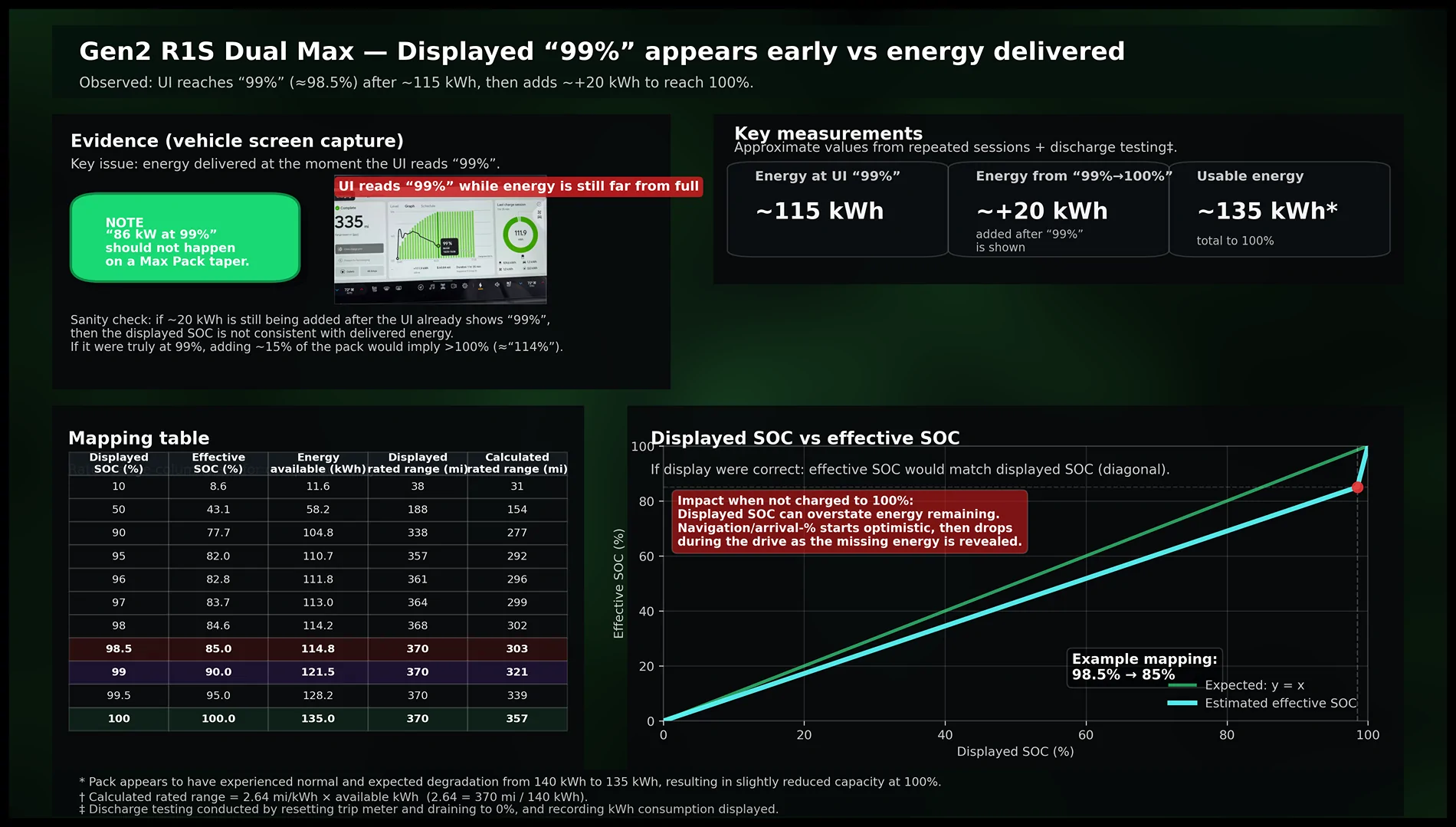
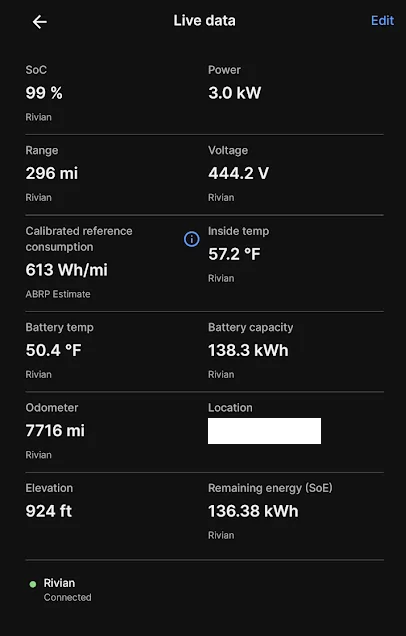
My gen2 R1S Dual Max Performance adds only about 115kWh to get from zero to an indicated "99%", where it shows "370 miles" (gen2 Max Pack is specced for 140kWh.) If I drive from there, my nav estimates are usually WAY off. I've had a 23% estimate turn into 2%, even slowing down and drafting a truck with HVAC off.

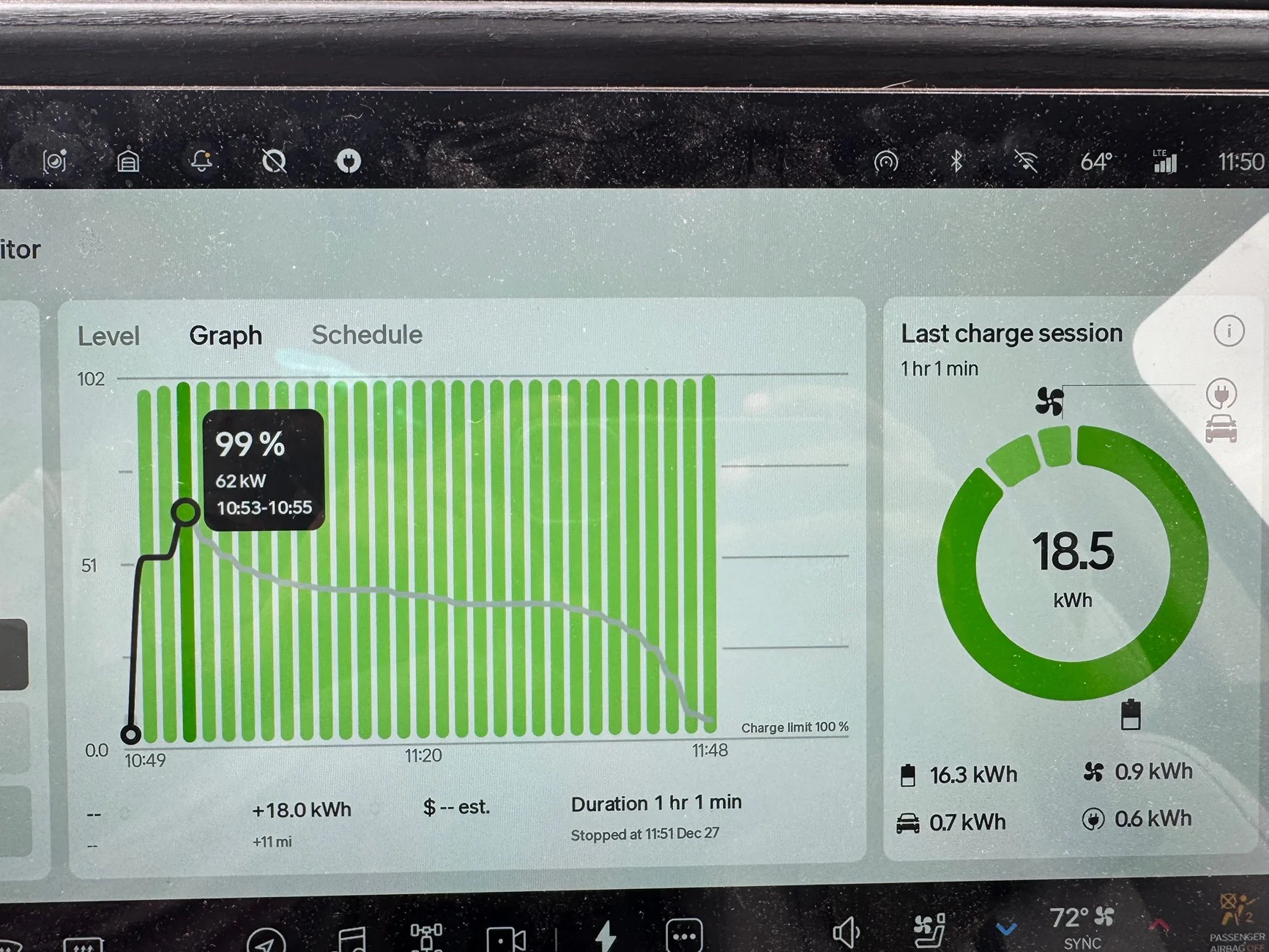
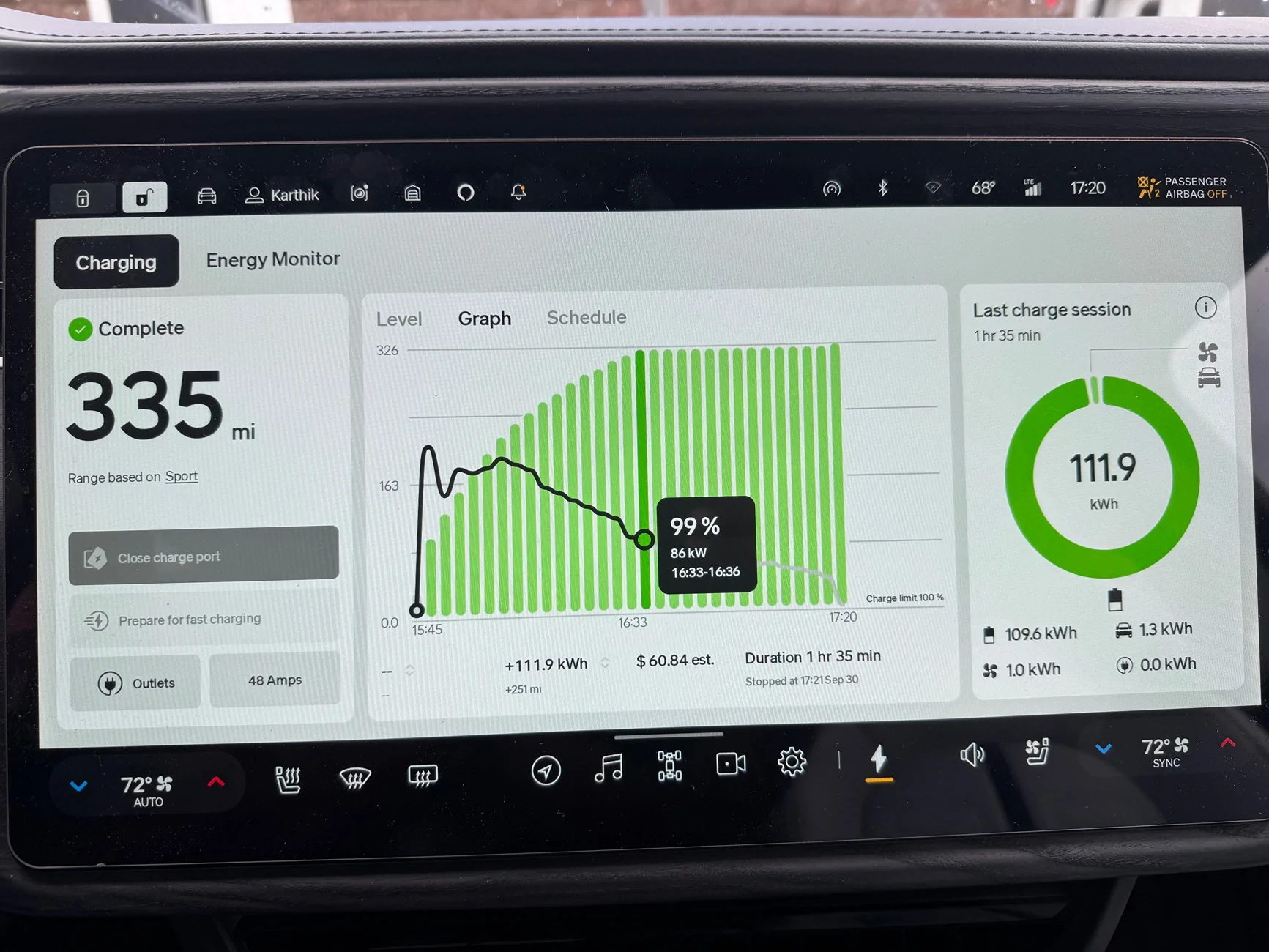
But then the vehicle adds another ~20kWh to get to 100%, still showing "370 miles". And it takes up to an hour to get from 99% to 100%, on a fast charger. It's sometimes at 85+kW when it hits "99%". Nav estimates work fine if I fully charge to 100%, which is of course a slow process and not optimal for pack health.

I'm curious whether anyone else has experienced this issue. My vehicle was fine until late July last year, then the behavior suddenly changed, per ElectraFi data. My vehicle is driven quite heavily, I'm at 45k miles with 10k of that towing a travel trailer, and tons of fast charging. I also get occasional fast charging errors that interrupt my session, not sure if they're related.

I went into service twice a few months ago, and they told me they found nothing wrong with range estimates / pack calibration. I did have lots of other issues fixed, including HVAC recharging and five-way valve issues that were causing pack overheating. But the calibration issue persisted.

Then I went to a different service center a couple weeks ago, and they again found nothing wrong and were ready to return my vehicle, after fixing other issues. So I created the infographic below and showed it to the lead tech at pickup, along with Energy screen graphs and ElectraFi + Rivian Roamer data, and he finally agreed that this is not normal. The SC opened a new appointment and kept the vehicle for now.

The vehicle was drained and taken to a RAN station a couple days ago, and they verified the issue with a 100% charge. The diagnostics escalation team has now also verified that the behavior is abnormal. Will update after they figure out the cause and how to fix it.
Rivian R1T R1S Strange calibration issue on gen2 Max Pack - service has not seen this before rivian_soc_issue_infographic_final_v27
Rivian R1T R1S Strange calibration issue on gen2 Max Pack - service has not seen this before IMG_7600
Rivian R1T R1S Strange calibration issue on gen2 Max Pack - service has not seen this before IMG_6470
Sponsored

 
OP
OP

kxev

Active Member
Joined
Jan 23, 2026
Threads
1
Messages
30
Reaction score
28
Location
OR
Vehicles
Gen2 R1S Dual Max Performance
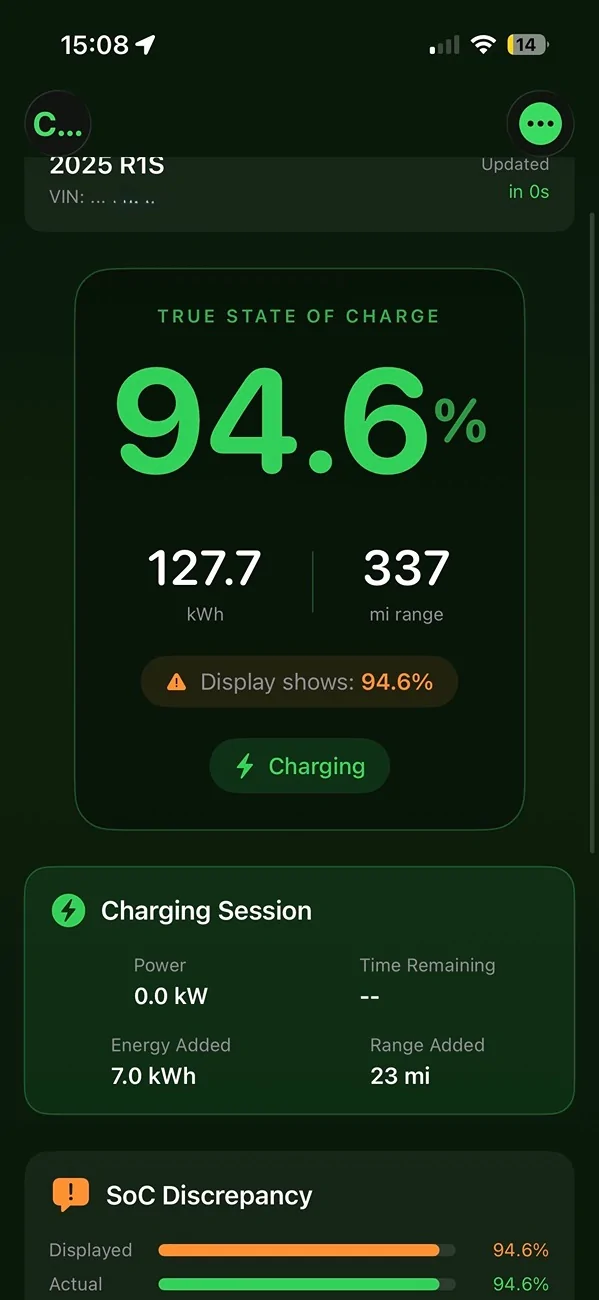
As a temporary workaround, I used Claude to build an iOS app that monitors my Rivian SoC via API, and calculates the correct value in real time. The behavior is different charging vs discharging (it doesn't just hang out at 99%, it drains normally), and depends on how low I drain before recharging, so the app has much more complex logic than the chart above.

It only has one data point in the screenshot below, so it can't calculate deviation yet. The vehicle went into service before I could finish debugging.
Rivian R1T R1S Strange calibration issue on gen2 Max Pack - service has not seen this before IMG_8025
 
OP
OP

kxev

Active Member
Joined
Jan 23, 2026
Threads
1
Messages
30
Reaction score
28
Location
OR
Vehicles
Gen2 R1S Dual Max Performance
A senior service manager called me back with an update. They charged a brand new gen2 Max Pack at the RAN as well. It has the SAME issue! Nobody was expecting that.

They have determined that this is a firmware issue and may be affecting all (gen2?) Max Packs. Senior engineering leadership has been looped in, and this has been prioritized for a fix in an upcoming software release.

The manager was very apologetic about the difficulty I had in communicating this issue, and emphasized that they considered this a serious issue.

Other Max Pack owners may want to keep arrival estimates at 25% or higher when driving through areas with no alternate chargers, or charge to 100%, until there is a fix. Time to finish my app so that I can see a corrected SoC value until then.
 

Largo72

Member
First Name
John
Joined
Jan 10, 2025
Threads
1
Messages
13
Reaction score
17
Vehicles
2025 R1T
Occupation
Landscape Architect
Great posts and thanks for sharing!
 

Dark-Fx

Well-Known Member
First Name
Brian
Joined
Jul 15, 2020
Threads
147
Messages
13,528
Reaction score
27,306
Location
Michigan
Vehicles
R1T, R1S, Livewire One, Sierra EV, R1S
Occupation
Engineering
Clubs
 
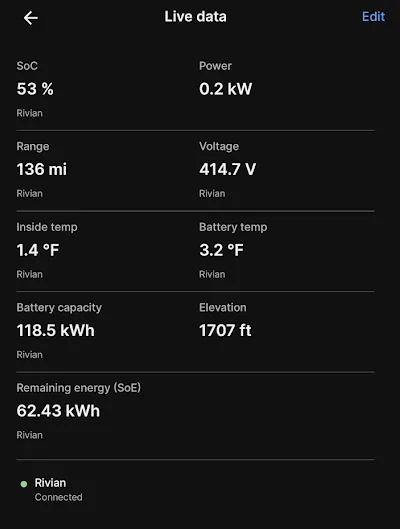
I've observed ABRP reporting dramatically different battery capacities when the battery is exceptionally cold. That doesn't look like what you're seeing though, since it looks like it's still warm where you are.

Rivian R1T R1S Strange calibration issue on gen2 Max Pack - service has not seen this before 1769789885244-69
Rivian R1T R1S Strange calibration issue on gen2 Max Pack - service has not seen this before 1769789792341-yz
 

Sponsored

ElGuano

Well-Known Member
Joined
Oct 9, 2024
Threads
47
Messages
857
Reaction score
1,217
Location
Cali
Vehicles
R1T Trimax - Storm Blue, Driftwood, Sport Dark
I've never seen this on my Gen2, but I rarely every charge to 100, which could be part of the reason. Definitely disconcerting to have wildly inaccurate range readings.
 
OP
OP

kxev

Active Member
Joined
Jan 23, 2026
Threads
1
Messages
30
Reaction score
28
Location
OR
Vehicles
Gen2 R1S Dual Max Performance
I've observed ABRP reporting dramatically different battery capacities when the battery is exceptionally cold. That doesn't look like what you're seeing though, since it looks like it's still warm where you are.
Yeah, that appears to be a separate effect. Mine similarly drops in the cold as well, though I haven't had the battery below about 20F and haven't seen nearly as big a drop as yours. Your drop seems pretty high for cold-locking, but maybe that's normal at that temperature. If I ever get my battery down close to 0F, I'll report back.

The problem I'm running into occurs in all conditions. The pack can start at 30F or 130F, and it still stalls at 99% for an hour while adding 20kWh.

I suspect that if other vehicles are suffering from this bug, it's not as bad as mine. The problem has gotten worse over time, initially it was 10kWh after 99%. My theory is that my battery has more degradation and that makes the problem worse.
 
First Name
Murphy
Joined
Dec 30, 2025
Threads
0
Messages
8
Reaction score
4
Location
California
Vehicles
2025 Rivian R1T
Occupation
transportation
KXEV-Please keep the R1T Gen2 max battery fan club updated on future problems and solutions. Yours has peak my interest. Pay more attention to my charging for any issues/problems. Thanks!
 

Vik

Well-Known Member
Joined
Oct 24, 2021
Threads
1
Messages
114
Reaction score
106
Location
Midwest
Vehicles
R1S | Model S LR | Model Y Perf
I have 12k miles on my Gen 2 Max pack and have charged to 100% around 8-10 times. My 80% SOC is reading 326 miles which seems about right.
 
OP
OP

kxev

Active Member
Joined
Jan 23, 2026
Threads
1
Messages
30
Reaction score
28
Location
OR
Vehicles
Gen2 R1S Dual Max Performance
I've never seen this on my Gen2, but I rarely every charge to 100, which could be part of the reason. Definitely disconcerting to have wildly inaccurate range readings.
The problem also doesn't occur in the same way on L2, I should've been more clear about that. It adds about 5kWh for me from 99% to 100%, on an L2. Vs 20kWh on an L3.

It also appears to be normal for Max Packs to add ~3 - 4kWh extra in that top 1%...there seems to be a bit of extra capacity when new on many vehicles.
 

Sponsored

OP
OP

kxev

Active Member
Joined
Jan 23, 2026
Threads
1
Messages
30
Reaction score
28
Location
OR
Vehicles
Gen2 R1S Dual Max Performance
My 80% SOC is reading 326 miles which seems about right.
If you're trying to see if you're affected by this bug, you can't tell by comparing SoC and rated range in miles.

What you need to do is fast charge from < 10% to 100%. Keep an eye on when it flips to "99%", and check how many kWh have been added. And then check again at 100%.

Also watch how long it takes to get from 99% to 100% on an L3. It should take about 15 minutes, maybe a little longer if a lot of balancing is needed. I was at 15 minutes, then when the bug appeared (on July 21 of last year), it started always taking 35 - 40 minutes, and now it takes 50 - 60 minutes.
 

Vik

Well-Known Member
Joined
Oct 24, 2021
Threads
1
Messages
114
Reaction score
106
Location
Midwest
Vehicles
R1S | Model S LR | Model Y Perf
If you're trying to see if you're affected by this bug, you can't tell by comparing SoC and rated range in miles.

What you need to do is fast charge from < 10% to 100%. Keep an eye on when it flips to "99%", and check how many kWh have been added. And then check again at 100%.

Also watch how long it takes to get from 99% to 100% on an L3. It should take about 15 minutes, maybe a little longer if a lot of balancing is needed. I was at 15 minutes, then when the bug appeared (on July 21 of last year), it started always taking 35 - 40 minutes, and now it takes 50 - 60 minutes.
Intertesting. I have never L3 charged my R1S to 100% only L2.
 

KootenayEV

Well-Known Member
First Name
Andrew
Joined
Sep 22, 2021
Threads
28
Messages
614
Reaction score
589
Location
Nelson, BC
Vehicles
R1T, Tesla Model 3
Occupation
Environmental Engineer
The problem also doesn't occur in the same way on L2, I should've been more clear about that. It adds about 5kWh for me from 99% to 100%, on an L2. Vs 20kWh on an L3.

It also appears to be normal for Max Packs to add ~3 - 4kWh extra in that top 1%...there seems to be a bit of extra capacity when new on many vehicles.
My Gen1 still has extra capacity at the top (albeit a bit less) after 100,000km and 2.5yrs! Still reads full rated range too.
 

mkhuffman

Well-Known Member
First Name
Mike
Joined
Nov 9, 2020
Threads
14
Messages
2,849
Reaction score
3,205
Location
Virginia
Vehicles
2025 R1T Tri-Max, Jeep GC-L, VW Jetta
@kxev - I am 90% sure this is a BMS calibration issue due to the way you are driving and charging. I can't be 100% sure because I am not a Rivian tech, and this is a social forum without complete information. But what you describe is exactly what will happen if the BMS gets out of calibration.

This is how you calibrate the BMS:

1. Charge it to 100%. True 100%, meaning it is completed the charge and stopped. 99% and still charging is NOT completed. At 99% it is still balancing the cells and topping all of them off. You need to let it complete that process.

2. Let it sit at 100% for a few hours.

3. Discharge the battery to 10%.

4. Let it sit at 10% for a few hours. This is important as all the cells cool and stabilize, the BMS can really determine what the bottom level of your pack is. I have heard it is good to let it sit there for 8 hours, but I imagine four is fine. It needs to rest at that charge for a while, though.

5. Charge it back to 100%. True 100%, not 99%. Let it sit there for a few hours.

6. Drive as usual.

This should straighten out your BMS. If it does not, then there is a BMS or battery pack problem with your truck. It is not a bug. I do not have this issue, and as far as I have seen on the forum, nobody else does either.

Let me know how the calibration goes.

Edit: the BMS gets out of calibration if you have a lot of 40 to 80% charges. You need to charge to 100% once and a while, and discharge to 10%, otherwise the BMS looses track of the top and bottom of the pack. LFP packs are much worse in this regard, and need to be charged to 100% regularly to keep the BMS calibrated.

Edit 2: OOS Kyle ran into this issue when on one of his road trip tests. He was DCF charging a lot, which is typically 20 to 80%. He ran out of charge even when the battery said 10% because the BMS was way out of calibration.

Edit 3: I should have said you may need to do the BMS calibration procedure again if you still have issues. If you have done it a few times and still have an issue, then it is probably a truck problem. The BMS may need more than just one 100% to 10% to 100% charge to get calibrated.
 
Last edited:
OP
OP

kxev

Active Member
Joined
Jan 23, 2026
Threads
1
Messages
30
Reaction score
28
Location
OR
Vehicles
Gen2 R1S Dual Max Performance
@kxev - I am 90% sure this is a BMS calibration issue due to the way you are driving and charging. I can't be 100% sure because I am not a Rivian tech, and this is a social forum without complete information. But what you describe is exactly what will happen if the BMS gets out of calibration.

This is how you calibrate the BMS:

1. Charge it to 100%. True 100%, meaning it is completed the charge and stopped. 99% and still charging is NOT completed. At 99% it is still balancing the cells and topping all of them off. You need to let it complete that process.

2. Let it sit at 100% for a few hours.

3. Discharge the battery to 10%.

4. Let it sit at 10% for a few hours. This is important as all the cells cool and stabilize, the BMS can really determine what the bottom level of your pack is. I have heard it is good to let it sit there for 8 hours, but I imagine four is fine. It needs to rest at that charge for a while, though.

5. Charge it back to 100%. True 100%, not 99%. Let it sit there for a few hours.

6. Drive as usual.

This should straighten out your BMS. If it does not, then there is a BMS or battery pack problem with your truck. It is not a bug. I do not have this issue, and as far as I have seen on the forum, nobody else does either.

Let me know how the calibration goes.
I have done this a few times, though not 100% to your spec. I frequently charge to true 100% on both L2 and L3, often 4 - 5x/week. I occasionally let it sit at 100% and go to sleep after charging, so that it can get an unloaded voltage reading.

And I've drained from 100% to ~5% and let it sleep for an hour or two, but not as long as you suggest. I've also drained from 100% all the way to 0% more than once (then plugged in immediately.)

It also got multiple 100% charges, sleep cycles, and drains with the HVAC while at the service center for 3 weeks last month. And I'm still having the problem. I did a couple more 100% -> <10% cycles since then. Next time I have the opportunity, I'll let it sit for longer as you suggest.

Rivian Service did deep pack and BMS diagnostics, and escalated this up within their diagnostics team. So I trust them that this isn't just a pack/BMS issue or fixable by calibration. They told me the fix will be in a software update. My vehicle has actually been approved for a buyback, due to 4x visits for this issue and it now being deemed "unfixable" until a software fix is produced. So if there was some calibration fix, I suspect they would've done that instead.

They claim this affects all Max Packs. My theory is mine is worse affected due to my high mileage and likely higher degradation. (The problem was much more subtle at first, and got worse over time.)

I agree your logic would make sense for some types of calibration issues. E.g. if I was only charging to 99% all the time and never went to 100%, it would make sense to try that process. But this appears to be some deeper edge case issue due to a code bug, per Rivian's own investigation, and doesn't seem fixable in the same way.
Sponsored


Top