Sponsored

Strange calibration issue on gen2 Max Pack - service has not seen this before

Rivian Roamer

Well-Known Member
Joined
Jul 18, 2024
Threads
2
Messages
470
Reaction score
658
Location
Seattle, WA
Website
rivianroamer.com
Vehicles
2024 R1S Quad Large, 2025 R1T Tri Max
Occupation
Adventurer
If anyone is willing or wants me to they can DM me link to their charging session and I can share the data in this thread. But looking at @kxev's session both the SOC and Range numbers stopped incrementing once they hit 99%.
Sponsored

 
OP
OP

kxev

Active Member
Joined
Jan 23, 2026
Threads
1
Messages
30
Reaction score
28
Location
OR
Vehicles
Gen2 R1S Dual Max Performance
When you say Rivian Roamer merges the records, can you explain what you mean by this?
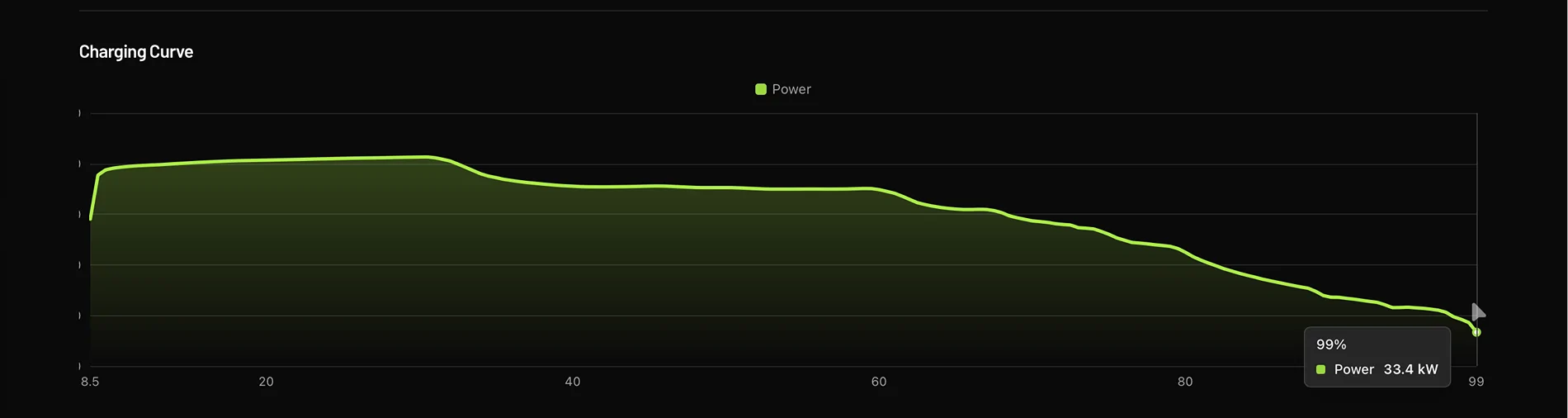
What I mean is that RR shows just a single "99%" datapoint, see the graph below from the same session as the ElectraFi screenshots above. Immediately to the left is "98.5%".

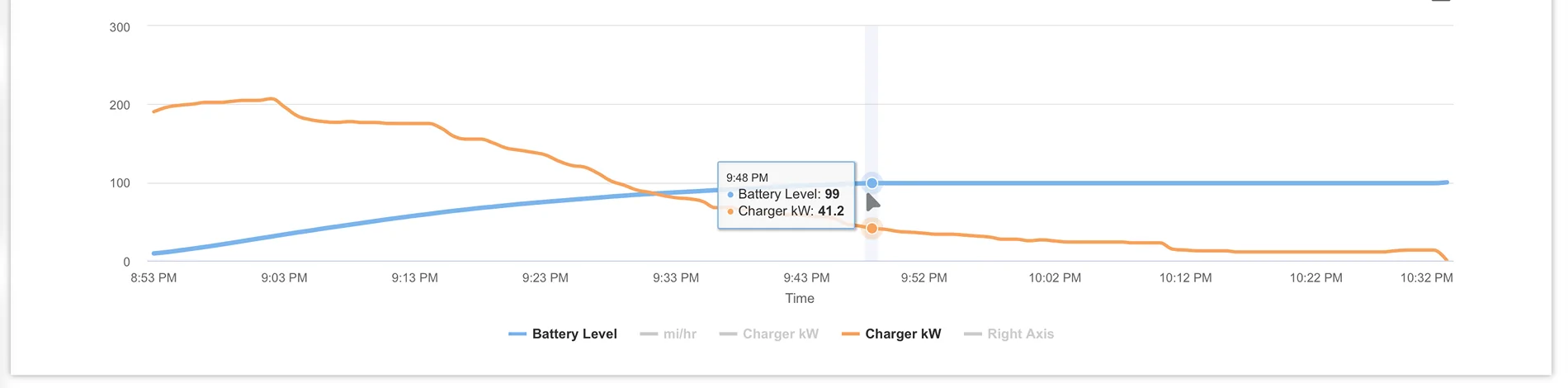
I also pasted the ElectraFi graph for this session. You can see it shows "99%" at the middle of the graph, and then there are dozens of additional "99%" datapoints after that. Since my vehicle spends up to an hour at "99%", it makes sense to graph all of this.

RR seems to compress all of these extra "99%" datapoints into one point on the graph.

To be clear, I don't think RR is doing anything wrong! It's just that how you present the data hides the bug, if present. You're showing the charge curve by %, rather than showing charging power over time. Whereas if you used time as the X axis, my graph would have a ton more data points and the problem would be more obvious. Your method is fine for a normal vehicle.

I think you have all that data, since it's in the csv you emailed me, but it doesn't show on the website dashboard for me. Is there a way to see this, without bugging you? A graph of charging power over time, or just the raw data?

Rivian R1T R1S Strange calibration issue on gen2 Max Pack - service has not seen this before 1770512970170-2i
Rivian R1T R1S Strange calibration issue on gen2 Max Pack - service has not seen this before 1770513154937-96
 

Rivian Roamer

Well-Known Member
Joined
Jul 18, 2024
Threads
2
Messages
470
Reaction score
658
Location
Seattle, WA
Website
rivianroamer.com
Vehicles
2024 R1S Quad Large, 2025 R1T Tri Max
Occupation
Adventurer
What I mean is that RR shows just a single "99%" datapoint, see the graph below from the same session as the ElectraFi screenshots above. Immediately to the left is "98.5%".

I also pasted the ElectraFi graph for this session. You can see it shows "99%" at the middle of the graph, and then there are dozens of additional "99%" datapoints after that. Since my vehicle spends up an hour at "99%", it makes sense to graph all of this.

To be clear, I don't think RR is doing anything wrong! It's just that how you present the data hides the bug, if present. You're showing the charge curve by %, rather than showing charging power over time. Whereas if you used time as the X axis, my graph would have a ton more data points and the problem would be more obvious. Your method is fine for a normal vehicle.

I think you have all that data, since it's in the csv you emailed me, but it doesn't show on the website dashboard for me. Is there a way to see this, without bugging you? A graph of charging power over time, or just the raw data?

1770512970170-2i.webp
1770513154937-96.webp
Oh, I understand now.

Yes – the data is there this is a display quirk.

Many said for DCFC sessions they didn't want to see battery level and preferred to see the curve where the X axis was the charge % instead of time. Given your battery was pegged at 99% this creates a strange display issue.

I'll think about how I can make this better so you can identify issues like this in the future, perhaps a toggleable display mode.

I'm working on the data export part of this now.

The biggest issue there is I stream the data live from Rivian at high-speed and high-precision. Rivian streams sparse data. This means you'll have one row with battery level, another with charger state. That's not what most people want and it would cause them headaches. Collating that into a single row is technically inaccurate as well. So, I want to be mindful before I allow people to download the data into something that would be overly confusing. Though for power uses I may still offer the option to. For the session you sent the raw data is about 89 MB.
 
OP
OP

kxev

Active Member
Joined
Jan 23, 2026
Threads
1
Messages
30
Reaction score
28
Location
OR
Vehicles
Gen2 R1S Dual Max Performance
When it hits 99%, all that remains should be balancing the cells. If it adds that much power, that means the cells are really, really unbalanced. So weird Rivian Service says your pack is OK. Maybe the DCF charging process is hosed.
I really thought it was a cell balance issue, I kept insisting that they do balancing tests until they did, and supposedly everything is normal. I actually have rock sliders that I've been waiting to install for almost a year, because I kept thinking that my battery pack must have some cell issue and that the SC wouldn't want to lift it with the sliders.

This really seems to be some bug around how capacity or voltage calibration works. The vehicle sets the point for when it expects to be at "99%" way too low (115kWh in my vehicle, even though it's consistently ~134kWh from true 99%), and it gets there sooner than expected, and has to hang out at "99%" while it adds the rest.

I think they're doing some bad math or using the wrong variable or something like that, in at least one place in their BMS-related code. There are other issues, like degradation doesn't seem to be taken into account for the rated range calculation, only temperature fluctuations. (I think THAT bug may be stacked on top of getting to "99%" too early...and then the second bug makes it treat the 115kWh at the start of "99%" as the same as 134kWh at the end of "99%".)

If it showed the proper rated range, this would be less of a big deal, even if it was pegged at "99%". But it shows "370 miles" both at 115kWh and 134kWh, and I think the nav system uses that value and that causes my % estimates to drop unexpectedly.
 

Rivian Roamer

Well-Known Member
Joined
Jul 18, 2024
Threads
2
Messages
470
Reaction score
658
Location
Seattle, WA
Website
rivianroamer.com
Vehicles
2024 R1S Quad Large, 2025 R1T Tri Max
Occupation
Adventurer
I really thought it was a cell balance issue, I kept insisting that they do balancing tests until they did, and supposedly everything is normal. I actually have rock sliders that I've been waiting to install for almost a year, because I kept thinking that my battery pack must have some cell issue and that the SC wouldn't want to lift it with the sliders.

This really seems to be some bug around how capacity or voltage calibration works. The vehicle sets the point for when it expects to be at "99%" way too low (115kWh in my vehicle, even though it's consistently ~134kWh from true 99%), and it gets there sooner than expected, and has to hang out at "99%" while it adds the rest.

I think they're doing some bad math or using the wrong variable or something like that, in at least one place in their BMS-related code. There are other issues, like degradation doesn't seem to be taken into account for the rated range calculation, only temperature fluctuations. (I think THAT bug may be stacked on top of getting to "99%" too early...and then the second bug makes it treat the 115kWh at the start of "99%" as the same as 134kWh at the end of "99%".)

If it showed the proper rated range, this would be less of a big deal, even if it was pegged at "99%". But it shows "370 miles" both at 115kWh and 134kWh, and I think the nav system uses that value and that causes my range estimate issues.
You know what.

I wonder if your vehicles were originally Large packs that had them swapped out. Or Large+ that had the cap removed.

I have quite a few folks on Rivian Roamer that have Standard or Large pack vehicles that have a Max pack installed in them but software limited. This almost looks like the software thinks it has a Large.

When Large+ first launched I worked with someone who exhibited the exact same behavior you're seeing because Rivian forgot to cap the charging. This sounds eerily similar to that. I don't think this is a BMS issue.
 

Sponsored

OP
OP

kxev

Active Member
Joined
Jan 23, 2026
Threads
1
Messages
30
Reaction score
28
Location
OR
Vehicles
Gen2 R1S Dual Max Performance
You know what.

I wonder if your vehicles were originally Large packs that had them swapped out. Or Large+ that had the cap removed.

I have quite a few folks on Rivian Roamer that have Standard or Large pack vehicles that have a Max pack installed in them but software limited. This almost looks like the software thinks it has a Large.

When Large+ first launched I worked with someone who exhibited the exact same behavior you're seeing because Rivian forgot to cap the charging. This sounds eerily similar to that. I don't think this is a BMS issue.
The tech who finally diagnosed the issue had that as a theory, when I was first chatting with him. They looked into that, it doesn't seem to be the case.

I also didn't have the problem when the vehicle was new. It started a couple days after the 2025.22.30 update, so hypothetically a module could've been mis-flashed then (this was the tech's theory.)

And the problem also got worse gradually over time...it was 10kWh after 99% first, then it crept up to 15kWh, now closer to 20kWh on average. This took months, it wasn't just a quick recalibration.

I also note that Rivian took a brand new, pre-delivery gen2 Max Pack to a RAN alongside my vehicle, and it exhibited similar behavior. I don't have that graph unfortunately, it may have had a milder version like I did initially.

It may be that almost nobody has seen this because my vehicle is affected worse, due to degradation and/or heavy DCFC activity. It could also be that others are "affected" in that they'll develop the problem in the future if it's not fixed, but very few vehicles could be actively impacted.

I would be surprised if there were more than a couple other gen2 Max Packs in the fleet that have had as much heavy 100% DCFC activity as mine, over almost 50k miles, with 10k of that being long-distance towing at ~0.9mi/kWh, and lots of draining to 0%, plus dozens of nights of car camping (and powering the trailer too.) So my vehicle could be expected to discover bugs like this much sooner than others, perhaps.

 

Rivian Roamer

Well-Known Member
Joined
Jul 18, 2024
Threads
2
Messages
470
Reaction score
658
Location
Seattle, WA
Website
rivianroamer.com
Vehicles
2024 R1S Quad Large, 2025 R1T Tri Max
Occupation
Adventurer
The tech who finally diagnosed the issue had that as a theory, when I was first chatting with him. They looked into that, it doesn't seem to be the case.

I also didn't have the problem when the vehicle was new. It started a couple days after the 2025.22.30 update, so hypothetically a module could've been mis-flashed then (this was the tech's theory.)

And the problem also got worse gradually over time...it was 10kWh after 99% first, then it crept up to 15kWh, now closer to 20kWh on average. This took months, it wasn't just a quick recalibration.

I also note that Rivian took a brand new, pre-delivery gen2 Max Pack to a RAN alongside my vehicle, and it exhibited similar behavior. I don't have that graph unfortunately, it may have had a milder version like I did initially.

It may be that almost nobody has seen this because my vehicle is affected worse, due to degradation and/or heavy DCFC activity. It could also be that others are "affected" in that they'll develop the problem in the future if it's not fixed, but very few vehicles could be actively impacted.

I would be surprised if there were more than a couple other gen2 Max Packs in the fleet that have had as much heavy 100% DCFC activity as mine, over almost 50k miles, with 10k of that being long-distance towing at ~0.9mi/kWh, and lots of draining to 0%, plus dozens of nights of car camping (and powering the trailer too.) So my vehicle could be expected to discover bugs like this much sooner than others, perhaps.
I think this actually may confirm my hypothesis. I've had a few support emails on RR from customers who had issues pop up after updates where a config was mis-flashed, or when changing wheel/tire combos (Which does the same thing).

I'll send this along to someone at Rivian.
 

mkhuffman

Well-Known Member
First Name
Mike
Joined
Nov 9, 2020
Threads
14
Messages
2,830
Reaction score
3,192
Location
Virginia
Vehicles
2025 R1T Tri-Max, Jeep GC-L, VW Jetta
The tech who finally diagnosed the issue had that as a theory, when I was first chatting with him. They looked into that, it doesn't seem to be the case.

I also didn't have the problem when the vehicle was new. It started a couple days after the 2025.22.30 update, so hypothetically a module could've been mis-flashed then (this was the tech's theory.)

And the problem also got worse gradually over time...it was 10kWh after 99% first, then it crept up to 15kWh, now closer to 20kWh on average. This took months, it wasn't just a quick recalibration.

I also note that Rivian took a brand new, pre-delivery gen2 Max Pack to a RAN alongside my vehicle, and it exhibited similar behavior. I don't have that graph unfortunately, it may have had a milder version like I did initially.

It may be that almost nobody has seen this because my vehicle is affected worse, due to degradation and/or heavy DCFC activity. It could also be that others are "affected" in that they'll develop the problem in the future if it's not fixed, but very few vehicles could be actively impacted.

I would be surprised if there were more than a couple other gen2 Max Packs in the fleet that have had as much heavy 100% DCFC activity as mine, over almost 50k miles, with 10k of that being long-distance towing at ~0.9mi/kWh, and lots of draining to 0%, plus dozens of nights of car camping (and powering the trailer too.) So my vehicle could be expected to discover bugs like this much sooner than others, perhaps.
So cool you actually use every bit of what the truck has to offer, from range to towing capacity.

It reminds me of the Lowe's guys who said they laugh when people don't want to mess up their new trucks. Here I was, loading a pallet of mulch into the truck bed and I literally just brought it home a few days prior. They loved it. Trucks should do truck things.

As I posted before, I have never gone below 10% SoC. It freaks me out a little, because I am not sure how much buffer my truck has. In my Mach-e, 0% arrival at home was just fine. I never worried. I need to get there with my T.

Have you ever had an issue running it down to 0%?
 
OP
OP

kxev

Active Member
Joined
Jan 23, 2026
Threads
1
Messages
30
Reaction score
28
Location
OR
Vehicles
Gen2 R1S Dual Max Performance
I think this actually may confirm my hypothesis. I've had a few support emails on RR from customers who had issues pop up after updates where a config was mis-flashed, or when changing wheel/tire combos (Which does the same thing).

I'll send this along to someone at Rivian.
Interesting that wheel/tire changes could trigger similar issues. I actually swapped to aftermarket ATs (Toyo SLs, so same efficiency anyways) a month prior to when I started having issues, but it was fine for a while. I don't know if that could be related. I also assume the other vehicle they tested with had OEM tires. Feel free to share my VIN with them if it's helpful. Thanks for looking into this!
 

Rivian Roamer

Well-Known Member
Joined
Jul 18, 2024
Threads
2
Messages
470
Reaction score
658
Location
Seattle, WA
Website
rivianroamer.com
Vehicles
2024 R1S Quad Large, 2025 R1T Tri Max
Occupation
Adventurer
Interesting that wheel/tire changes could trigger similar issues. I actually swapped to aftermarket ATs (Toyo SLs, so same efficiency anyways) a month prior to when I started having issues, but it was fine for a while. I don't know if that could be related. I also assume the other vehicle they tested with had OEM tires. Feel free to share my VIN with them if it's helpful. Thanks for looking into this!
Well, the reason it can trigger it is the way Rivian setup wheel/tire swaps.

If you notice it has a very long reboot. It's because it's re-installing the software. I think they legit build the software when installing or something and bake the configuration of the vehicle into that build. Maybe for security to avoid people being able to modify it at runtime.

Either way, this means it re-flashes modules too.
 

Sponsored

OP
OP

kxev

Active Member
Joined
Jan 23, 2026
Threads
1
Messages
30
Reaction score
28
Location
OR
Vehicles
Gen2 R1S Dual Max Performance
Have you ever had an issue running it down to 0%?
I've found the behavior highly variable. I try not to go below 10 - 15% with the trailer, 5% without it.

I've been down to an indicated "0%" maybe 3 times on the road (just once past "true zero" where it shows "!" for range, drove about a mile), twice in my garage. 1 - 3% maybe a couple dozen times. Lots of 2% warnings, turtle mode a couple times, but it made it every time.

One time, it was severely restricting power and I struggled to maintain 45mph on a slight uphill (no trailer) even at 4 - 5%. Another time, I was at 2% WITH the trailer, and had almost no power restriction and maintained 60mph on a slight uphill.

If it's restricting power at all at 10%, I'll be extra cautious and drive slowly. If I make it to 5% with no power restriction, I might speed up a little the last few miles and aim for 2%.

It definitely drains faster below 10%, esp with the trailer...I think a combo of extra battery heat from lower voltage/increased amps, and just poor correlation of the %s vs available kWh. (Each 1% has a bit less energy near the bottom of the pack than the top for me.)
 

mkhuffman

Well-Known Member
First Name
Mike
Joined
Nov 9, 2020
Threads
14
Messages
2,830
Reaction score
3,192
Location
Virginia
Vehicles
2025 R1T Tri-Max, Jeep GC-L, VW Jetta
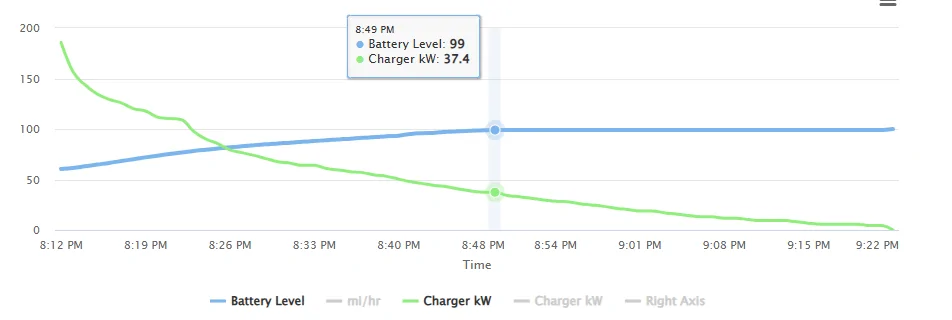
I charged from 8% to 100% on an EA DCFC yesterday. Unfortunately, I forgot I had my charge limit set to 60% so it was interrupted for a few minutes when it hit 60% and I had to go back out to the truck to start it back up again.

It was at 99% for 33 minutes and during that time the truck accepted 9.87 kWh.

The chart below is marked at the point it hit 99%.

Rivian R1T R1S Strange calibration issue on gen2 Max Pack - service has not seen this before 1770926270038-co


This seems normal to me. It make sense that all 10 kWh is needed to balance the cells, and that it took 33 minutes to do it. When L2 charging, it takes longer at 99%, which also makes sense.

Sorry, but it appears my truck does not have the same issue as your truck. When it hit 99% and sat there for a while I began to think I had the same problem. But then it completed and it didn't drag on like it first looked like it would.
 
OP
OP

kxev

Active Member
Joined
Jan 23, 2026
Threads
1
Messages
30
Reaction score
28
Location
OR
Vehicles
Gen2 R1S Dual Max Performance
It was at 99% for 33 minutes and during that time the truck accepted 9.87 kWh.

The chart below is marked at the point it hit 99%.

1770926270038-co.webp


This seems normal to me. It make sense that all 10 kWh is needed to balance the cells, and that it took 33 minutes to do it. When L2 charging, it takes longer at 99%, which also makes sense.

Sorry, but it appears my truck does not have the same issue as your truck. When it hit 99% and sat there for a while I began to think I had the same problem. But then it completed and it didn't drag on like it first looked like it would.
I think this IS the issue. When I first saw the problem, it presented like yours w 10kWh added. Prior to 2025.22.30, it added 5kWh after 99%, then it went up to 10kWh after the update, then it slowly creeped up to the current 20kWh.

10kWh is ~7% of a 140kWh pack, a lot to be stuffed into a single %. Mine is 15% of the pack in 1%. It should adjust the 99% point if the vehicle can consistently add that much, this is part of the issue.

It doesn't matter if the additional capacity past that comes from normal charging or balancing, if it can always be added (and drains back out in the expected way) then the % level should reflect that.

I think if you conducted the full test (tracking drain with the trip meter), you'd see ~130kWh from where it flips to "99%", and ~140kWh at 100%. Does this make sense? Shouldn't ~130kWh show up as 93% instead? And you'll also see the rated range (in miles) is the same at both points.

I suspect that Max Packs with less mileage and/or less DCFC may be at a baseline 10kWh now (given that Rivian saw "unexpected behavior" on a brand new Max Pack), and that other vehicles will likely creep up over time if this problem isn't fixed.
 

Rivian Roamer

Well-Known Member
Joined
Jul 18, 2024
Threads
2
Messages
470
Reaction score
658
Location
Seattle, WA
Website
rivianroamer.com
Vehicles
2024 R1S Quad Large, 2025 R1T Tri Max
Occupation
Adventurer
I think this IS the issue. When I first saw the problem, it presented like yours w 10kWh added. Prior to 2025.22.30, it added 5kWh after 99%, then it went up to 10kWh after the update, then it slowly creeped up to the current 20kWh.

10kWh is ~7% of a 140kWh pack, a lot to be stuffed into a single %. Mine is 15% of the pack in 1%. It should adjust the 99% point if the vehicle can consistently add that much, this is part of the issue.

It doesn't matter if the additional capacity past that comes from normal charging or balancing, if it can always be added (and drains back out in the expected way) then the % level should reflect that.

I think if you conducted the full test (tracking drain with the trip meter), you'd see ~130kWh from where it flips to "99%", and ~140kWh at 100%. Does this make sense? Shouldn't ~130kWh show up as 93% instead? And you'll also see the rated range (in miles) is the same at both points.

I suspect that Max Packs with less mileage and/or less DCFC may be at a baseline 10kWh now (given that Rivian saw "unexpected behavior" on a brand new Max Pack), and that other vehicles will likely creep up over time if this problem isn't fixed.
The nominal gross capacity of a max pack is 150 kWh. There is the real possibility this is a bug in Rivians secret reservation they do. My Gen 1 large stops increasing range at 97%.

it seems Rivian sets aside a buffer so that as a battery degrades it didn’t show in the range until a certain degradation amount has happened.
Sponsored


Top