
-
👉 R2 Orders ➡ Add Your R2 Orders / VIN / Delivery Info 📊
Sponsored
2024.51.0 spotted
- Thread starter Noplacelikeloam
- Start date
- Watchers 45

godfodder0901
Well-Known Member
- First Name
- Jared
- Joined
- Mar 12, 2019
- Threads
- 27
- Messages
- 5,798
- Reaction score
- 10,194
- Location
- Washington
- Vehicles
- 2022 Rivian R1T LE
Nope. No Gen 1s have ever had it.Interesting - there was a video that called this out specifically as a Gen 2 change. And I have a couple friends with gen 1 trucks and they regularly get caked with snow. Maybe it was only in early builds or something?
As for Gen 2 I can confirm that it's not active. I've been caked with snow/ice multiple times

HapticWagon
Well-Known Member
Updating to 2024.51.30 now! C+ sub.
Glad too bc I was experiencing all the autonomy bugs!
Glad too bc I was experiencing all the autonomy bugs!
RivAW
Well-Known Member
Assume you mean that the hotspot won’t stay on? The WiFi signal is what it is and disconnects when you drive away from your WiFi (it may switch off in Drive).Does this "infotainment stability" include solid internet connectivity? I still can't get my internet to stay on when I start a drive. I have it for about 10-15 minutes and then it leaves and doesn't return. I'm paying for connect+ and I have LTE. Yet all internet dependent items in the car are useless after 15 minutes into a drive. Getting to be very annoying.
if your hotspot isn’t working (and you have LTE (and pay for connect +), then either try a reset or submit a service ticket because something is wrong with your vehicle…

captainjp
Well-Known Member
- First Name
- John
- Joined
- Oct 18, 2024
- Threads
- 9
- Messages
- 1,263
- Reaction score
- 1,899
- Location
- New Jersey
- Vehicles
- Gen 2 R1T
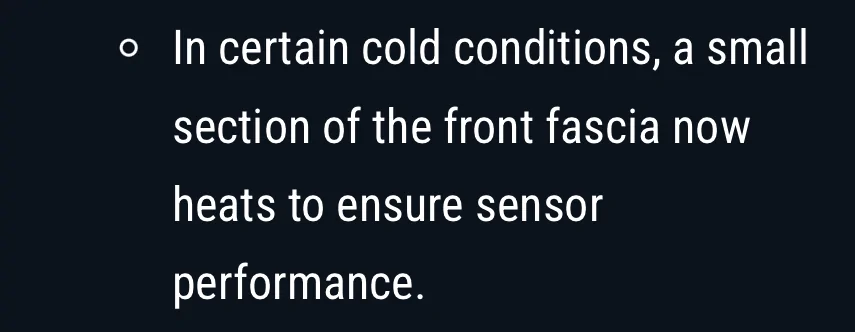
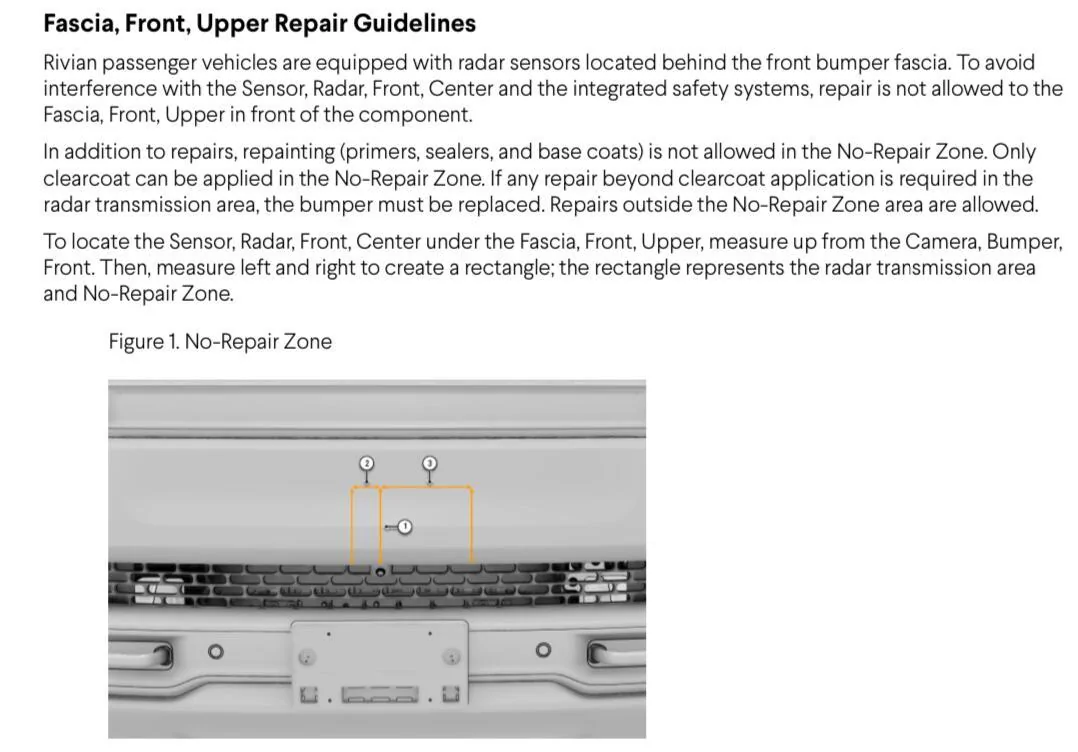
IMO this may not be exactly what you think it is. It will take a significant heat source and power to melt snow and ice off the front fascia, and it specifically says a small section to ensure sensor performance. I suspect this is more likely to keep only the front center radar (which is used for Driver plus) warm from erroneous operation.
There is a bulletin “RCI-52-23-001-1: Fascia, Front” that expresses repair concerns about this area.
This is good for me for now. Anything that mitigates accumulation on sensors that affect any of the systems is a step in the right direction.


Sponsored
Supratachophobia
Well-Known Member
Update did not fix gen2 key fob error where it won't finish pairing.
RivAW
Well-Known Member
Soft reset is infotainment only. Try a hard reset. It won't hurt anything and it may fix your (Rivian-related) issues.....My whole system is extremely glitchy. Coming from Tesla, I’m fairly disappointed in the Rivian. The Gen2 was supposed to have a blazingly fast CPU, which, at least in my car is not the case. Or maybe just the graphics side of things. I have to do a soft reset almost every day.
RivAW
Well-Known Member
It mostly varies on how picky the owner is. People also come to complain publicly before they bother trying a hard-reset......which fixes a lot of issues (there are perfectly happy owners who do a hard reset after every update or even more often. We are driving big computers after-all....(I reset my laptop and my phone regularly....why would it be any different)...You're hearing just a lot of anecdotal stuff. The infotainment computer is nearly identical between the two.
Owners of both generations have been complaining about the laggy infotainment on the last update. And the complaints range from "Once in a while it has a hiccup but that typically involves maybe a 1/4 second wait" to "My whole system is extremely glitchy" depending on what you're doing and how picky the owner is ha ha.
So yes, the new zonal architecture is a huge step up in a lot of ways. But it unfortunately doesn't really help infotainment responsiveness. That part is almost identical
Erik+
Well-Known Member
Update came in and installed last night. Drove this morning and everything seems to be functioning as it should.Updating now but I’m not overly optimistic about it. Really not a whole lot there.
nrcooled
Member
I've been having a lot of issues with my PaaK on Android 15 working. I'm hoping that the stability of the PaaK is improved with an app update and truck update.
I'm updating my truck now and I'm hoping that it fixes my issue.
Edit: nothing has changed. I guess I'll just have to keep rebooting my phone to get into or drive my truck.
My issue: PaaK worked perfectly on Android 14. After updating, it seems like the app loses access to either Bluetooth or NFC permissions and it will not work at at. Proximity unlocking won't work, getting in the truck and stepping on the brake just gets me a prompt of "no key detected". As soon as I reboot my phone it works again. Then it's stops after an undetermined amount of time. I've tried multiple phones and everyone I've tried (three in total) that's on Android 15 had the same issue. I did have one phone still on 14 and it worked as intended. I upgraded it, then had the exact same issue.
I'm assuming Google changed something in it's permissions set that has broken PaaK for my devices ?
I'm updating my truck now and I'm hoping that it fixes my issue.
Edit: nothing has changed. I guess I'll just have to keep rebooting my phone to get into or drive my truck.
My issue: PaaK worked perfectly on Android 14. After updating, it seems like the app loses access to either Bluetooth or NFC permissions and it will not work at at. Proximity unlocking won't work, getting in the truck and stepping on the brake just gets me a prompt of "no key detected". As soon as I reboot my phone it works again. Then it's stops after an undetermined amount of time. I've tried multiple phones and everyone I've tried (three in total) that's on Android 15 had the same issue. I did have one phone still on 14 and it worked as intended. I upgraded it, then had the exact same issue.
I'm assuming Google changed something in it's permissions set that has broken PaaK for my devices ?
Last edited:
Sponsored

Marchin_MTB
Well-Known Member
Installed this afternoon. No issues on our Gen 1 R1T. Reverse throttle does seem more gentle. Infotainment stability seems good.

tate16t
Well-Known Member
I installed this evening, changed my charge limit and charging start time and it held the setting. When it started charging it was definitely faster climbing to the standard 11.0kw on my home charger.
webfootdawg
Well-Known Member
- First Name
- Paul
- Joined
- May 31, 2022
- Threads
- 15
- Messages
- 293
- Reaction score
- 398
- Location
- Portland, OR
- Vehicles
- Q5, A4
Jingle bells sound like they are gone. ?
iamnid
Well-Known Member
- Joined
- Aug 10, 2023
- Threads
- 7
- Messages
- 683
- Reaction score
- 906
- Location
- California
- Vehicles
- Mercedes EQE, Rivian R1S
It's probably a battery saving setting. I don't know what specific phone you have but I'm running a pixel 9 on android 14 and it works flawlessly for me. Check in the specific app settings for the Rivian app. I bet it's set to kill off the app after a certain amount of time and that's why it's not working.I've been having a lot of issues with my PaaK on Android 15 working. I'm hoping that the stability of the PaaK is improved with an app update and truck update.
I'm updating my truck now and I'm hoping that it fixes my issue.
Edit: nothing has changed. I guess I'll just have to keep rebooting my phone to get into or drive my truck.
My issue: PaaK worked perfectly on Android 14. After updating, it seems like the app loses access to either Bluetooth or NFC permissions and it will not work at at. Proximity unlocking won't work, getting in the truck and stepping on the brake just gets me a prompt of "no key detected". As soon as I reboot my phone it works again. Then it's stops after an undetermined amount of time. I've tried multiple phones and everyone I've tried (three in total) that's on Android 15 had the same issue. I did have one phone still on 14 and it worked as intended. I upgraded it, then had the exact same issue.
I'm assuming Google changed something in it's permissions set that has broken PaaK for my devices ?
tate16t
Well-Known Member
After the above I woke this morning and found my limit set to 63%. It was set to 83% but charged to 84%. ?I installed this evening, changed my charge limit and charging start time and it held the setting. When it started charging it was definitely faster climbing to the standard 11.0kw on my home charger.
Sponsored
Similar threads

- Replies
- 4
- Views
- 703


- Replies
- 15
- Views
- 4,364

- Replies
- 180
- Views
- 40,666


