Sponsored

Apple iOS Text/Messaging Integration

chrengel

Member
First Name
chris
Joined
Nov 13, 2025
Threads
4
Messages
19
Reaction score
3
Location
Baltimore
Vehicles
R1S
I am on the 2026.15.30 update and have never been able to get text messages to appear on my screen. I have all the settings enabled on my R1S and on my phone, have reset my R1S and phone, have tried everything and there is absolutely NO integration with my iOS with regards to texting/messages. Has anyone gotten this to work?
Sponsored

 

carsly

Well-Known Member
Joined
Apr 19, 2023
Threads
48
Messages
787
Reaction score
1,096
Location
Princeton, NJ
Vehicles
LR Defender, Tesla Model S
I've had my 2025 R1S for a year and a half, no text message integration is one of the big drawbacks with RIvian. Supposedly you can use Rivian Assistant to read/respond to messages but I haven't found a way to get them to display. Wish it was as seamless as Tesla.
 

SANZC02

Well-Known Member
First Name
Bob
Joined
Feb 11, 2021
Threads
50
Messages
7,522
Reaction score
12,902
Location
California
Vehicles
Tesla Model S, LE - R1S
Occupation
Retired
I am on the 2026.15.30 update and have never been able to get text messages to appear on my screen. I have all the settings enabled on my R1S and on my phone, have reset my R1S and phone, have tried everything and there is absolutely NO integration with my iOS with regards to texting/messages. Has anyone gotten this to work?
It has worked since the update came out on my G1 R1S, Both our phones work, an iPhone 17 Pro Max and an iPhone 14 Pro Max.
 
OP
OP

chrengel

Member
First Name
chris
Joined
Nov 13, 2025
Threads
4
Messages
19
Reaction score
3
Location
Baltimore
Vehicles
R1S
Bob, do you mind sharing y
It has worked since the update came out on my G1 R1S, Both our phones work, an iPhone 17 Pro Max and an iPhone 14 Pro Max.
Bob, thanks for sharing. I don't believe there are any hidden settings so I guess I'll open a support request with Rivian and see what they come up with.
 

cmyhero

New Member
Joined
Jul 3, 2026
Threads
0
Messages
2
Reaction score
0
Location
Texas
Vehicles
2010 Camaro SS
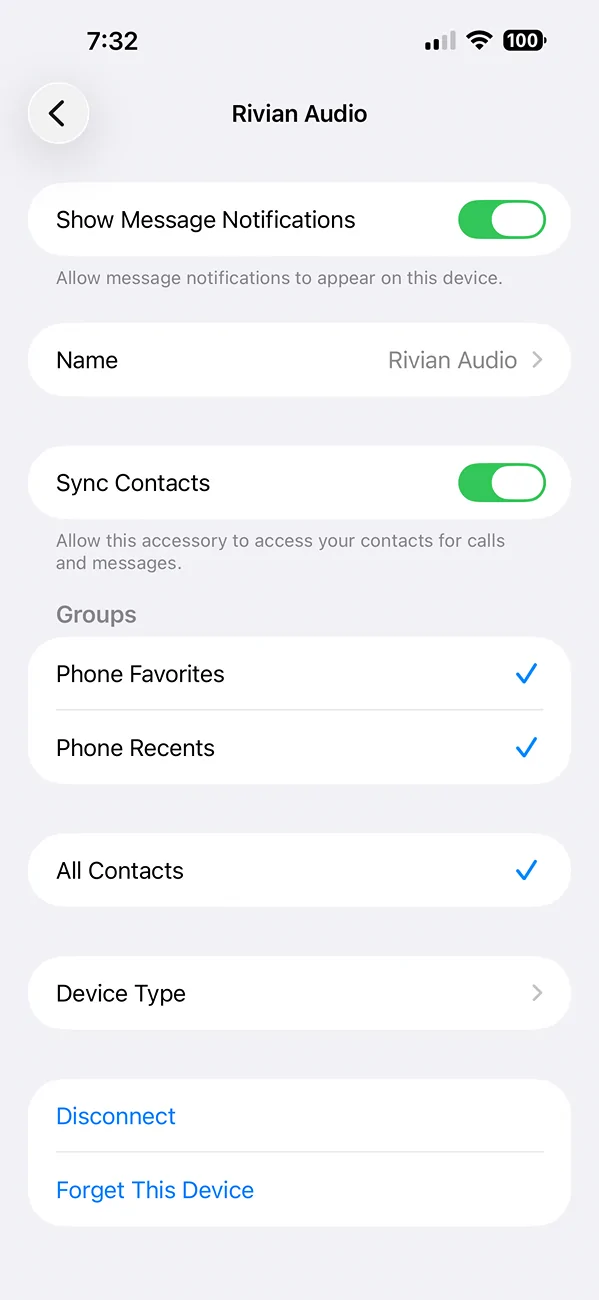
I don't have a Rivian yet (set to order the R2 end of this year), but I do see a post on reddit regarding the option of it not being seen. Looks like within the bluetooth settings you need to find the option for Rivian audio. Click on it and then enable the option that says "show message notifications". Hope this helps.
 

Sponsored

Blitzjb

Well-Known Member
Joined
Mar 8, 2024
Threads
0
Messages
62
Reaction score
101
Location
Long Island
Vehicles
2021 Ford Bronco
Make sure all of your notification setting are turned on.... Setting>messages>notifications
 

morph860

Well-Known Member
Joined
May 30, 2026
Threads
1
Messages
48
Reaction score
45
Location
NSB, FL
Vehicles
‘24 Wrangler 4xe, '24 Grand Cherokee 4xe, Rivian R2 reservation
I've had my 2025 R1S for a year and a half, no text message integration is one of the big drawbacks with RIvian. Supposedly you can use Rivian Assistant to read/respond to messages but I haven't found a way to get them to display. Wish it was as seamless as Tesla.
Did Tesla fix their "group chat" bug? I have a few friends and family members that have Model Y's. Whenever they respond to a group text from their Tesla, it used to only respond directly to the person that sent the last message instead of posting the response to the group thread.
 

carsly

Well-Known Member
Joined
Apr 19, 2023
Threads
48
Messages
787
Reaction score
1,096
Location
Princeton, NJ
Vehicles
LR Defender, Tesla Model S
Did Tesla fix their "group chat" bug? I have a few friends and family members that have Model Y's. Whenever they respond to a group text from their Tesla, it used to only respond directly to the person that sent the last message instead of posting the response to the group thread.
That's a challenge with Bluetooth MAP.

As for me, I don't respond to group texts via voice in the car.
 

SANZC02

Well-Known Member
First Name
Bob
Joined
Feb 11, 2021
Threads
50
Messages
7,522
Reaction score
12,902
Location
California
Vehicles
Tesla Model S, LE - R1S
Occupation
Retired
160750[/ATTACH]29060"]
Bob, do you mind sharing y

Bob, thanks for sharing. I don't believe there are any hidden settings so I guess I'll open a support request with Rivian and see what they come up with.
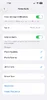
My guess is on the phone, once in the vehicle look for the Rivian Audio bluetooth connection that connects. Click on the connection make sure the top entry Show Message Notifications is selected. That was the only change I made.

Rivian R1T R1S Apple iOS Text/Messaging Integration IMG_1935
 

Attachments

OP
OP

chrengel

Member
First Name
chris
Joined
Nov 13, 2025
Threads
4
Messages
19
Reaction score
3
Location
Baltimore
Vehicles
R1S
I don't have a Rivian yet (set to order the R2 end of this year), but I do see a post on reddit regarding the option of it not being seen. Looks like within the bluetooth settings you need to find the option for Rivian audio. Click on it and then enable the option that says "show message notifications". Hope this helps.
I've done all that, but thank you.
 

Sponsored

cmyhero

New Member
Joined
Jul 3, 2026
Threads
0
Messages
2
Reaction score
0
Location
Texas
Vehicles
2010 Camaro SS
I've done all that, but thank you.
Ahh. Sorry it wasn't helpful. While a stretch, do you have another person with an iphone that you can try to see if you can get to connect/sync? This should at least help drill down if it's something to your phone vs the Rivian software?
 
OP
OP

chrengel

Member
First Name
chris
Joined
Nov 13, 2025
Threads
4
Messages
19
Reaction score
3
Location
Baltimore
Vehicles
R1S
Ahh. Sorry it wasn't helpful. While a stretch, do you have another person with an iphone that you can try to see if you can get to connect/sync? This should at least help drill down if it's something to your phone vs the Rivian software?
I don't but that's not a bad idea. I'll find someone who can help me test this.
 

lefkonj

Well-Known Member
First Name
Jeff
Joined
Feb 6, 2021
Threads
37
Messages
1,474
Reaction score
2,646
Location
New Jersey
Vehicles
Gen2 R1S Tri, I4-m50
Clubs
 
Works fantastic for me. Use it all the time. You have to switch from Alexa to the Rivian assistant and allow a few settings on the phone but then it works like a champ. On par with Siri/Carplay
 

jrmbadger

Well-Known Member
Joined
Jul 16, 2025
Threads
8
Messages
203
Reaction score
329
Location
USA
Vehicles
R1S (Gen 1)
The notification on the Rivian when you get a text is pretty easy to miss. It’s a small box on the drivers display that you then need to press one of the steering wheel buttons to get it to read the message. I think it plays a sound but its real quiet.
Sponsored


Top