Sponsored

Lighting settings - auto vs no auto

irvineboy

Well-Known Member
Joined
Mar 13, 2021
Threads
110
Messages
470
Reaction score
121
Location
Orange County
Vehicles
R1S
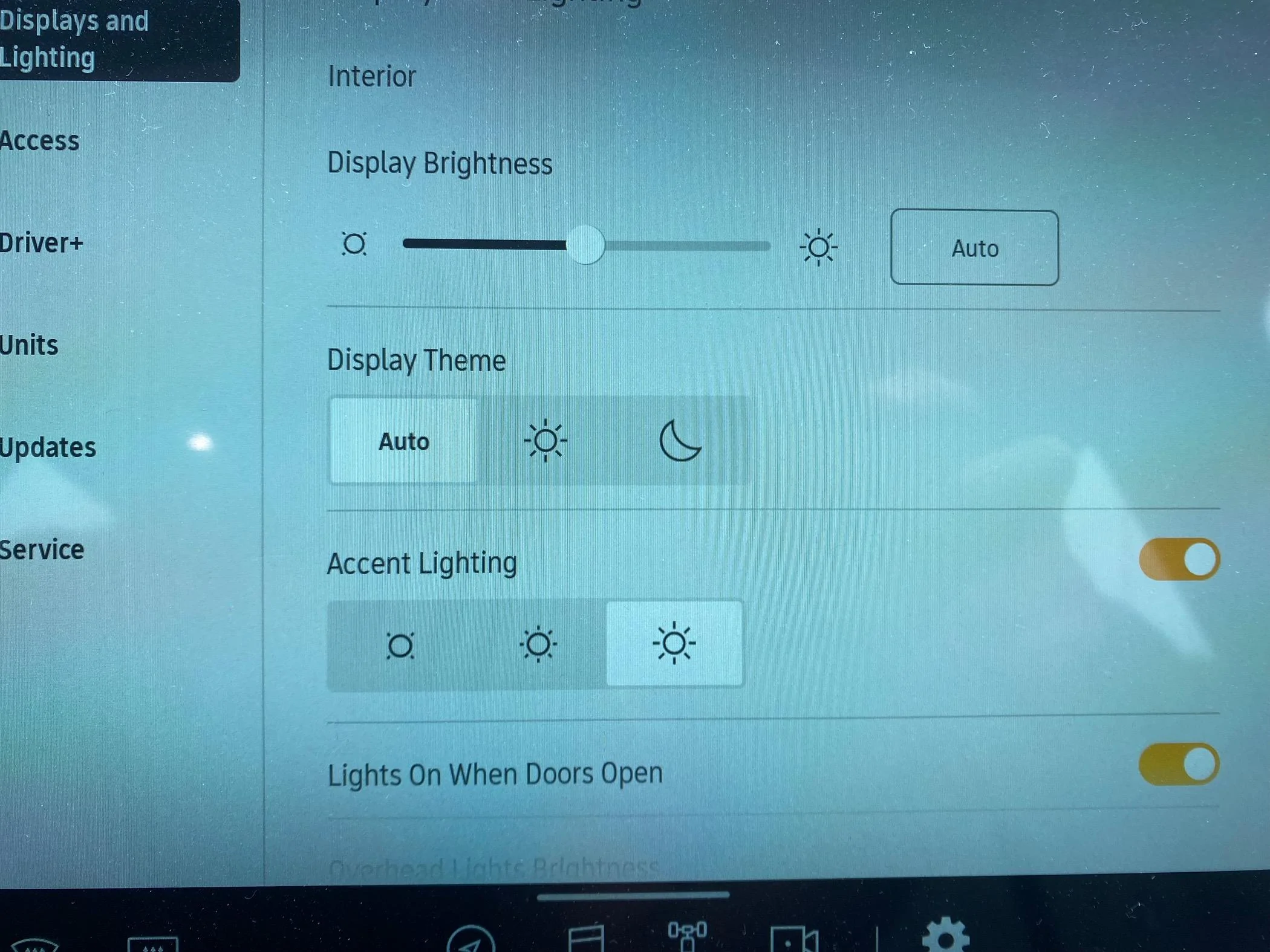
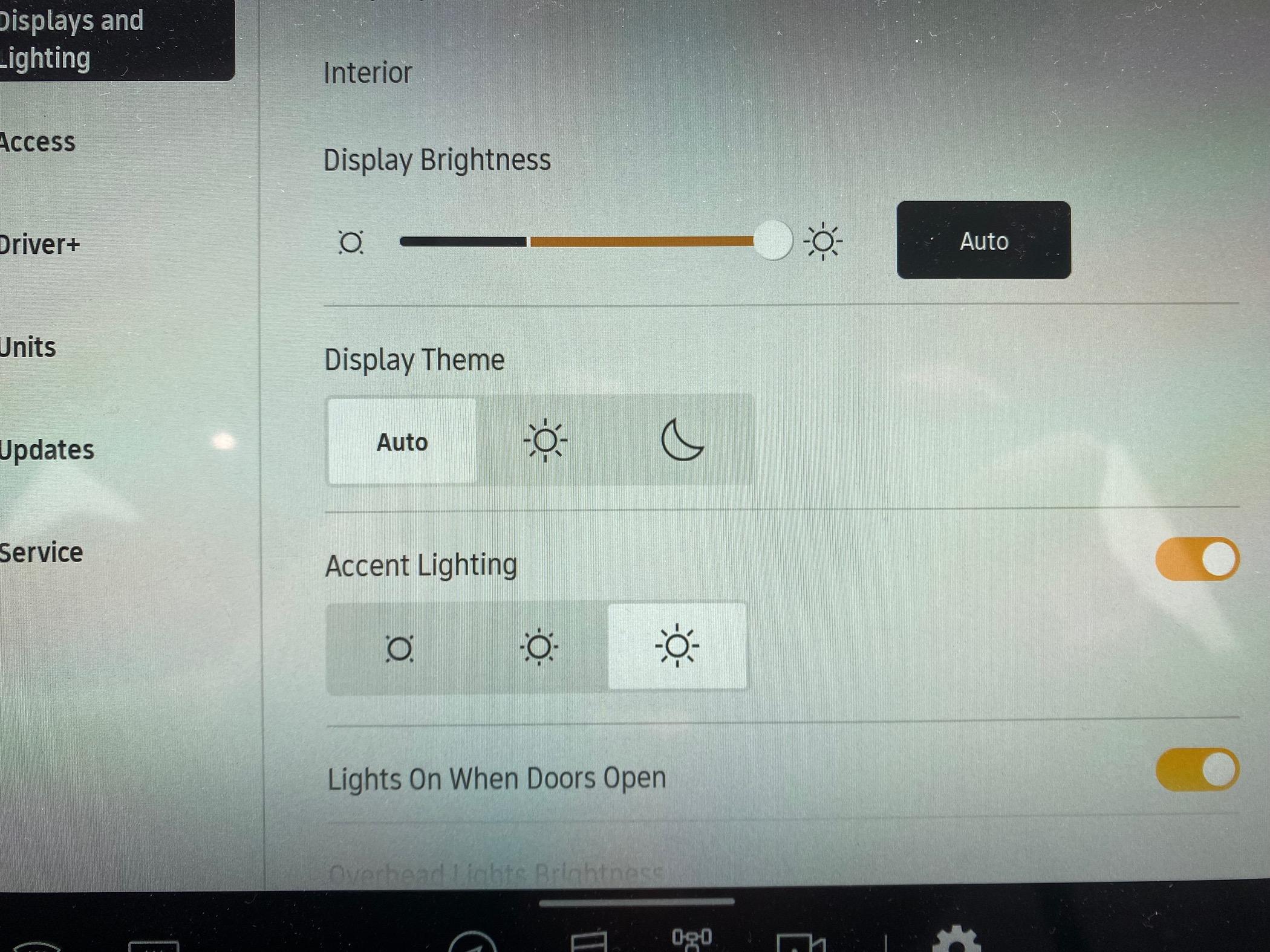
I don’t really understand enabling the “auto” vs not having “auto”

I thought auto meant it senses how light or dark the outside is an automatically adjusted the screen brightness. It just defaults to whatever I set it at. So if I select “auto” and bring it to the brightest, it will stay there. If I deselect “auto” and move it to the middle, it will stay there.

Rivian R1T R1S Lighting settings - auto vs no auto IMG_1426


Rivian R1T R1S Lighting settings - auto vs no auto IMG_1425
Sponsored


RivAW

Well-Known Member
First Name
Alex
Joined
Mar 9, 2023
Threads
1
Messages
871
Reaction score
852
Location
MA
Vehicles
R1T, Glacier White, Black Mountain, Black AT 20s,
Clubs
 
The auto setting just changes it from light to dark as a setting depending on the outside brightness… It has nothing to do with the brightness of the display
 
OP
OP

irvineboy

Well-Known Member
Joined
Mar 13, 2021
Threads
110
Messages
470
Reaction score
121
Location
Orange County
Vehicles
R1S
The auto setting just changes it from light to dark as a setting depending on the outside brightness… It has nothing to do with the brightness of the display
You are referring to “auto” under “display theme”. I’m referring to the “auto” above it under “display brightness”
 

Noplacelikeloam

Well-Known Member
First Name
Andy
Joined
Feb 18, 2024
Threads
42
Messages
555
Reaction score
1,074
Location
Portland
Vehicles
R1T
Occupation
Creative management
Clubs
 
I thought it was a relative setting. So if you want it to generally be brighter then slide it to the right. Then even when it gets darker, it will still be fairly bright.
 

Glembi2

Well-Known Member
First Name
Chris
Joined
Dec 3, 2023
Threads
1
Messages
736
Reaction score
818
Location
Vienna, Virginia
Vehicles
R1S, Genesis GV70, Civic
Occupation
Patent attorney
Clubs
 
I interpreted the Auto next to the slider as a reset button.

I’m now wondering whether it means automatically adjusting the brightness based on the ambient light. Not the theme . But the brightness. So driving at night in a city with lots of street lamps will make the display brighter while in the dark theme. Driving at night in a neighborhood with no lights will dim the display while also in the dark theme.
 

Sponsored

OP
OP

irvineboy

Well-Known Member
Joined
Mar 13, 2021
Threads
110
Messages
470
Reaction score
121
Location
Orange County
Vehicles
R1S
But when “auto” is enabled, the brightness does NOT seem to adjust based on night or day. For me, “auto” just goes to whatever last brightness setting I saved it under. In this case, it will go to maximum brightness. Even if it is daylight, you would think it would decrease the brightness level down. Doesn’t seem to adjust based on outside ambient light.
 

cjbot3000

Well-Known Member
First Name
Chris
Joined
May 23, 2022
Threads
20
Messages
173
Reaction score
236
Location
tucson, az
Vehicles
2022 R1T
Clubs
 
I'm not super clear on the logic of the auto setting, but without it the dark theme is still blinding at night because I have to crank up the brightness during the day

Auto setting allows night theme to be reasonably dark and daylight theme to be bright enough to combat the ball of hellfire in the sky that Rivian so kindly refused to block from above with sheet metal
 

Glembi2

Well-Known Member
First Name
Chris
Joined
Dec 3, 2023
Threads
1
Messages
736
Reaction score
818
Location
Vienna, Virginia
Vehicles
R1S, Genesis GV70, Civic
Occupation
Patent attorney
Clubs
 
But when “auto” is enabled, the brightness does NOT seem to adjust based on night or day. For me, “auto” just goes to whatever last brightness setting I saved it under. In this case, it will go to maximum brightness. Even if it is daylight, you would think it would decrease the brightness level down. Doesn’t seem to adjust based on outside ambient light.
I'm not super clear on the logic of the auto setting, but without it the dark theme is still blinding at night because I have to crank up the brightness during the day

Auto setting allows night theme to be reasonably dark and daylight theme to be bright enough to combat the ball of hellfire in the sky that Rivian so kindly refused to block from above with sheet metal
So both of these comments mean we need to leave Auto on?

I am never quite sure when Auto is selected or not. I end up moving the slider and clicking auto until something happens.

Because Auto does not disengage when the slider is moved, I think this means auto adjustment is on but biased high or low. My old infiniti did something similar
 

SSteveEV

Well-Known Member
First Name
Spencer
Joined
Nov 3, 2022
Threads
7
Messages
1,320
Reaction score
1,795
Location
Michigan
Vehicles
R1T, etc
Clubs
 
I'd still like a "90s" mode where the screens go full dark beside the bare minimum required info. Like when that update failed ?

Will have to play with my settings, I don't have a clue how that slider works either.

But then I also struggle with cycling auto headlights on and off which is what I thought this thread would be about
 

MountainBikeDude

Well-Known Member
First Name
Adam
Joined
Jun 20, 2019
Threads
54
Messages
3,336
Reaction score
7,094
Location
Vancouver
Vehicles
2023 El Cap Quad Motor R1T (Selling the Xterra)
Clubs
 
But when “auto” is enabled, the brightness does NOT seem to adjust based on night or day. For me, “auto” just goes to whatever last brightness setting I saved it under. In this case, it will go to maximum brightness. Even if it is daylight, you would think it would decrease the brightness level down. Doesn’t seem to adjust based on outside ambient light.
I'm fairly certain the auto setting varies depending on if the screen is on daytime setting or night.

Daytime with auto brightness, you slide the slider for your minimum threshold. example it's daytime but gloomy, but you set your screen brightness to "Highest" the screen won't dim below that.

Nighttime auto brightness, same as above, you set your minimum brightness threshold (how dark the screen will go while in auto) lengthy night driving, it's nice to have really low, but if navigating, can make the streets etc a little too hard to see.

Auto day night change just adjusts between the two depending on ambient light thresholds.

Thanks for reading my word salad. ?
 

Sponsored

defcon888

Well-Known Member
First Name
Keith
Joined
May 23, 2023
Threads
6
Messages
1,227
Reaction score
926
Location
Auburn, Ca
Vehicles
2023 R1T, 2021 Toyota RAV4 Prime
Occupation
Making money
Clubs
 
I don’t really understand enabling the “auto” vs not having “auto”

I thought auto meant it senses how light or dark the outside is an automatically adjusted the screen brightness. It just defaults to whatever I set it at. So if I select “auto” and bring it to the brightest, it will stay there. If I deselect “auto” and move it to the middle, it will stay there.
IMG_1426.jpeg


IMG_1425.jpeg
Auto does exactly what it says. WHen I am driving home in the evening and with the traffic sometimes It will stop under a overpass......my screen will change from the white to black. As soon as I get in more light, it goes back.

I leave for work when it is dark outside and and the screen is black background and when I getto work, it has changed to white...automatically.
 
OP
OP

irvineboy

Well-Known Member
Joined
Mar 13, 2021
Threads
110
Messages
470
Reaction score
121
Location
Orange County
Vehicles
R1S
Auto does exactly what it says. WHen I am driving home in the evening and with the traffic sometimes It will stop under a overpass......my screen will change from the white to black. As soon as I get in more light, it goes back.

I leave for work when it is dark outside and and the screen is black background and when I getto work, it has changed to white...automatically.
What you are describing is the “auto” feature under the “Display Theme” not the “auto” feature (right side with sliding bar) above it under the “Display Brightness”.
 

defcon888

Well-Known Member
First Name
Keith
Joined
May 23, 2023
Threads
6
Messages
1,227
Reaction score
926
Location
Auburn, Ca
Vehicles
2023 R1T, 2021 Toyota RAV4 Prime
Occupation
Making money
Clubs
 
What you are describing is the “auto” feature under the “Display Theme” not the “auto” feature (right side with sliding bar) above it under the “Display Brightness”.
Mine is on Auto and will adjust based on what I have the slider at. When it gets darker, it will automatically change the brightness to what I have it set at.
Sponsored


Top