Sponsored

Newbie Question re: Using Tesla Membership Plan

gyphon

Member
Joined
Dec 31, 2022
Threads
2
Messages
16
Reaction score
15
Location
Bay Area, CA
Vehicles
2025 R1S Tri Max / 2023 BMW iX M60
Apologies in advance if this has been answered before, I searched and could not find anything. Also, for context, I am not a new EV owner, I have been using non-Tesla DCFC for years and have used Tesla Superchargers on Tesla rentals.

Yesterday, I signed up for the Tesla Membership plan and went to charge my ā€˜25 R1S for the first time. I opened the Tesla app, selected the appropriate stall and connected to the vehicle exactly as the Tesla app states to do. A few moments later, charging initiated and I thought nothing of it, I went and did some shopping. After the charge session, however, I realized that I was charged by Rivian and not Tesla. It used the CC I have on file with my Rivian account and charged me the full non-Tesla charging rate.

I checked the Rivian owner’s manual to see if there is some way to stop the auto-charging upon plug-in feature and did not see anything mentioned. I know from reading other threads on here that to use the Tesla membership, the charging session must be handled by the Tesla app. But, my question is, how do I use the app to initiate the charging session without the vehicle initiating it first?
Sponsored

 

tbinmd

Well-Known Member
Joined
May 3, 2025
Threads
1
Messages
157
Reaction score
175
Location
MD
Vehicles
R1T Dual Max
Sounds like you plugged in before using the app.
 

UnsungZero_OldTimeAdMan

Well-Known Member
First Name
Barnum
Joined
Mar 20, 2023
Threads
68
Messages
8,683
Reaction score
11,914
Location
SoCal
Vehicles
'23 GW Quad-Large R1T "Ghost"
Occupation
Advertising Circus
Like others said, you probably plugged in moments before handshake completed and before the app told you to plug in. The other possibility is you wiggled or plugged in with hesitation and it registered as two attempts, where on the second it defaulted to plug-and-charge (which is billed through your Rivian account).
 

2kwik4u

Well-Known Member
First Name
Michael
Joined
Jan 8, 2025
Threads
11
Messages
834
Reaction score
1,082
Location
Western NY State
Vehicles
2024 Rivian R1T ; 2018 Nissan Rogue
Like others said, you probably plugged in moments before handshake completed and before the app told you to plug in. The other possibility is you wiggled or plugged in with hesitation and it registered as two attempts, where on the second it defaulted to plug-and-charge (which is billed through your Rivian account).
Mine has done this a couple times. Been very diligent about using the app for the discount, but still have a couple "plug and charge" events a year. That's with a road trip every other month or so.
 

Sponsored

OP
OP

gyphon

Member
Joined
Dec 31, 2022
Threads
2
Messages
16
Reaction score
15
Location
Bay Area, CA
Vehicles
2025 R1S Tri Max / 2023 BMW iX M60
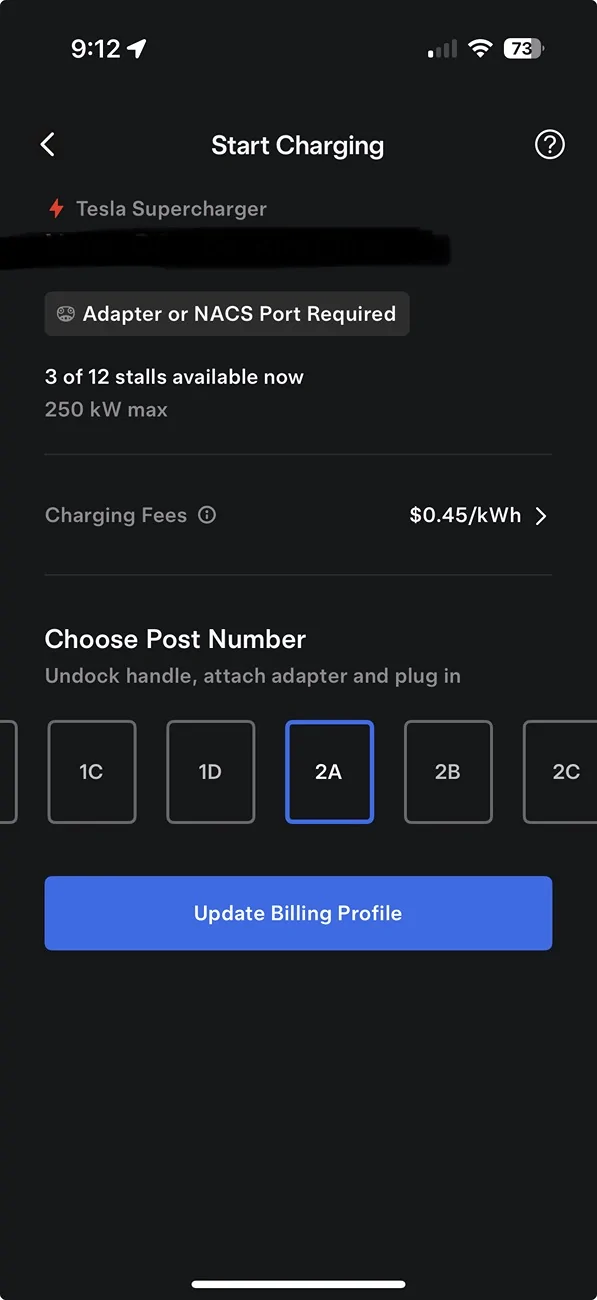
Thanks everyone for the input. Like I said in my original post, I opened the app and did what it said. Here’s what it looks like to me:
Rivian R1T R1S Newbie Question re: Using Tesla Membership Plan IMG_4730


So, it says 1) choose a post number, 2) undock the handle, 3) attach adapter, and 4) plug in. Is everyone saying that I need to pause between steps 3 & 4 and wait for the app to display something different?
 

UnsungZero_OldTimeAdMan

Well-Known Member
First Name
Barnum
Joined
Mar 20, 2023
Threads
68
Messages
8,683
Reaction score
11,914
Location
SoCal
Vehicles
'23 GW Quad-Large R1T "Ghost"
Occupation
Advertising Circus
Thanks everyone for the input. Like I said in my original post, I opened the app and did what it said. Here’s what it looks like to me:
IMG_4730.webp


So, it says 1) choose a post number, 2) undock the handle, 3) attach adapter, and 4) plug in. Is everyone saying that I need to pause between steps 3 & 4 and wait for the app to display something different?
You need to wait and plug in after the app screen tells you to, it should show 3 steps of instructions. The screen after you select post number then tap ā€œstart changingā€.

This is their way of telling you: handshake is complete.
 
Last edited:

CosmicRivian

Well-Known Member
First Name
Cosmic
Joined
May 8, 2024
Threads
25
Messages
199
Reaction score
507
Location
PDX | OR
Vehicles
2023 R1S LE Green Quad | 2024 Tesla MY (until our R2 arrives)
Occupation
Running from Smokey
Clubs
 
You need to wait and plug in after the app screen tells you to, it should show 3 steps of instructions. The screen after you select post number then tap ā€œstart changingā€.
I have used the Tesla Superchargers a bunch with the subscription and this is the key to making sure it's going through Tesla billing and not Rivian. It's easy to plug in a second or two early, but you get into the habit of waiting for the Tesla app to give you the green light after you've been charged by Rivian at the normal rate for a long charging session. Ask me how I know.
 

UnsungZero_OldTimeAdMan

Well-Known Member
First Name
Barnum
Joined
Mar 20, 2023
Threads
68
Messages
8,683
Reaction score
11,914
Location
SoCal
Vehicles
'23 GW Quad-Large R1T "Ghost"
Occupation
Advertising Circus
Thanks everyone for the input. Like I said in my original post, I opened the app and did what it said. Here’s what it looks like to me:
IMG_4730.webp


So, it says 1) choose a post number, 2) undock the handle, 3) attach adapter, and 4) plug in. Is everyone saying that I need to pause between steps 3 & 4 and wait for the app to display something different?
Also, you can undock the plug and attach adapter to plug before you do anything with app. It doesn’t matter. You just don’t insert into vehicle until the Tesla app tells you to. Otherwise, handshake is not complete, it defaults to plug-and-charge and you are billed ~20% higher, the normal non-Tesla rate, because it doesn’t know you have membership since you interrupted handshake before it was completed. The handshake is the critical step that positively ID you as a member.

Supercharger network rarely glitch. Most failures are due to user error and not following instructions in app.
 
Last edited:

waitingonanr1s

Well-Known Member
Joined
May 18, 2023
Threads
22
Messages
755
Reaction score
1,156
Location
Colorado
Vehicles
2025 Tri-Max R1S (CA Dune Edition), 2023 QM R1S (Traded in May 2025)
Thanks everyone for the input. Like I said in my original post, I opened the app and did what it said. Here’s what it looks like to me:
IMG_4730.webp


So, it says 1) choose a post number, 2) undock the handle, 3) attach adapter, and 4) plug in. Is everyone saying that I need to pause between steps 3 & 4 and wait for the app to display something different?
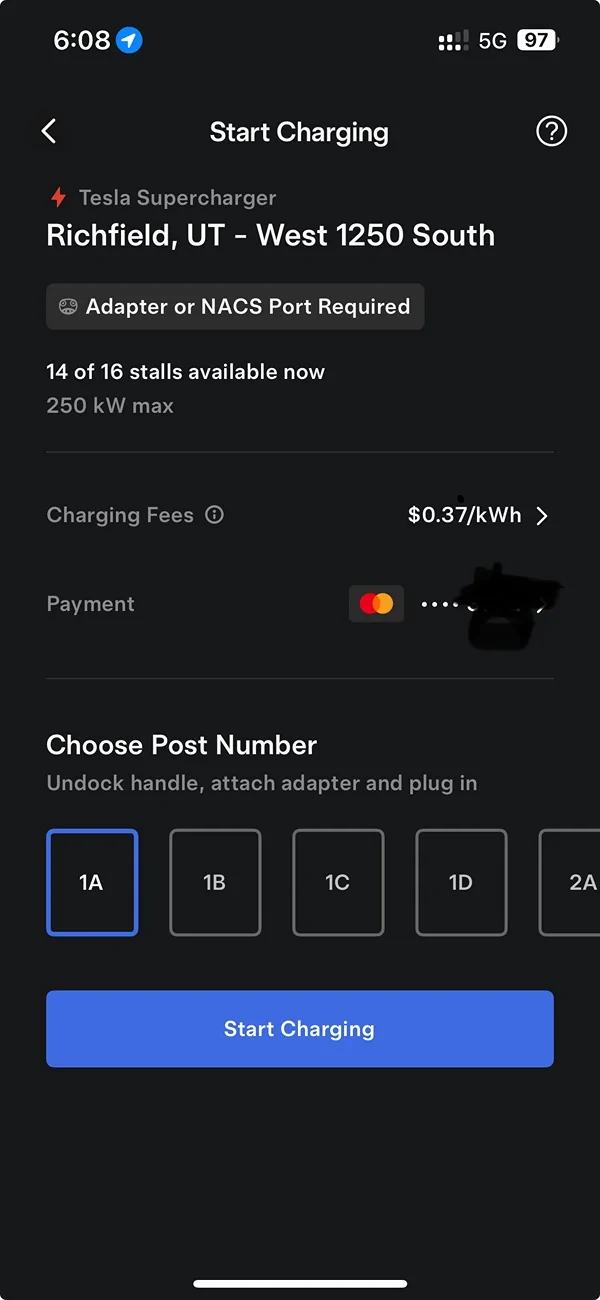
Looks like you need to update and/or confirm your credit card number for charging. The button that says "update billing profile" should say "start charging". You select post number, hit start charging and then it will tell you to connect. Also, your selected payment method should be displayed below the rate. That's absent on your screen.

You will see the live charging session active in the Tesla app if it's successful.

Rivian R1T R1S Newbie Question re: Using Tesla Membership Plan IMG_0505
 
Last edited:

Sponsored

OP
OP

gyphon

Member
Joined
Dec 31, 2022
Threads
2
Messages
16
Reaction score
15
Location
Bay Area, CA
Vehicles
2025 R1S Tri Max / 2023 BMW iX M60
Looks like you need to update and/or confirm your credit card number for charging. The button that says "update billing profile" should say "start charging". You select post number, hit start charging and then it will tell you to connect. Also, your selected payment method should be displayed below the rate. That's absent on your screen.

You will see the live charging session active in the Tesla app if it's successful.

IMG_0505.jpg
Bingo, that was the piece of the puzzle I was missing. So obvious in retrospect. Thank you Waiting and everyone else for the help with this.
 

Epicloop

Well-Known Member
First Name
Ray
Joined
Jun 3, 2023
Threads
11
Messages
541
Reaction score
378
Location
British Columbia
Vehicles
R1S
Occupation
Electrical Contractor
So I have a question regarding supercharging.
I have the original large pack and was charged for 29kwh but it only added 17%.
29kw is over 21% of the battery, what gives?
 

UnsungZero_OldTimeAdMan

Well-Known Member
First Name
Barnum
Joined
Mar 20, 2023
Threads
68
Messages
8,683
Reaction score
11,914
Location
SoCal
Vehicles
'23 GW Quad-Large R1T "Ghost"
Occupation
Advertising Circus
So I have a question regarding supercharging.
I have the original large pack and was chaged for 29kwh but it only added 17%.
29kw is over 21% of the battery, what gives?
Look at your energy screen? While charging, the battery isn’t the only system consuming electricity; climate, infotainment and coolant pump to control battery temp. There’s also energy lost to heat.
 
Last edited:

Epicloop

Well-Known Member
First Name
Ray
Joined
Jun 3, 2023
Threads
11
Messages
541
Reaction score
378
Location
British Columbia
Vehicles
R1S
Occupation
Electrical Contractor
Look at your energy screen? While charging, the battery isn’t the only system consuming electricity; climate, infotainment and coolant pump to control battery temp. There’s also energy lost to heat.
Yes but that should not account for nearly 20% of the consumption.
Sponsored


Top