Sponsored

Rear Display USB Port Question

schlosrat

Well-Known Member
First Name
Steve
Joined
Jun 23, 2024
Threads
6
Messages
191
Reaction score
179
Location
Vancouver, WA
Vehicles
2024 R1T Dual Large
Occupation
Engineer
Are the USB-C ports in the rear display compatible with an Apple MagSafe charger? Are they rated for 20W or more?

I ask this because when I picked up my 2024 R1T I brought a genuine Apple MagSafe charger to test the USB-C ports. Neither my guide nor I got my iPhone to charge using that charger when plugged into either of the rear display's USB-C ports. This arrangement worked fine in all the other USB-C ports. I tested this situation again when I got home and it was still not working, so I made a service request.

This past Friday was my SC appointment. A few hours after dropping my truck off I got a message indicating that the tech could not find a fault in the electrical system and could get those ports to work with a genuine Apple cable. This got me thinking. Apple recommends a 20W power source for their MagSafe charger, but what if those ports don't supply 20W? The SC report only indicated they used a genuine Apple USB-C cable, and not what type other than that. I've never tested those ports with anything other than an Apple MagSafe Charger. If they supply less than 20W, then perhaps an ordinary cable works but a MagSafe charger doesn't.

I got the message from the SC too late on Friday to ask them about it, and they don't open up for service until tomorrow (Monday). Before I drive 1.5 hours back to pick up my truck I thought I'd ask here to see if anyone knows about the specific power rating for those ports or could test to see if they work with an ordinary cable but perhaps not with a MagSafe charger. If they don't work with a MagSafe charger by design, then that's one thing; but if they should work and for me they don't then I'll want to ask the SC to dig a little deeper.
Sponsored

 

dradam

Well-Known Member
Joined
Sep 18, 2022
Threads
23
Messages
425
Reaction score
518
Location
Maryland
Vehicles
2023 R1S OC LA Silver 21 as of 23xxx Nov 3, 2023 !!
My wife does not have MagSafe iphone but frequently charges with a cable in the rear center console with a USB C to lightning cable.
 

COdogman

Well-Known Member
First Name
Brian
Joined
Jan 21, 2022
Threads
33
Messages
11,641
Reaction score
34,494
Location
CO
Vehicles
2023 R1T
Occupation
Cyber defender
Clubs
 
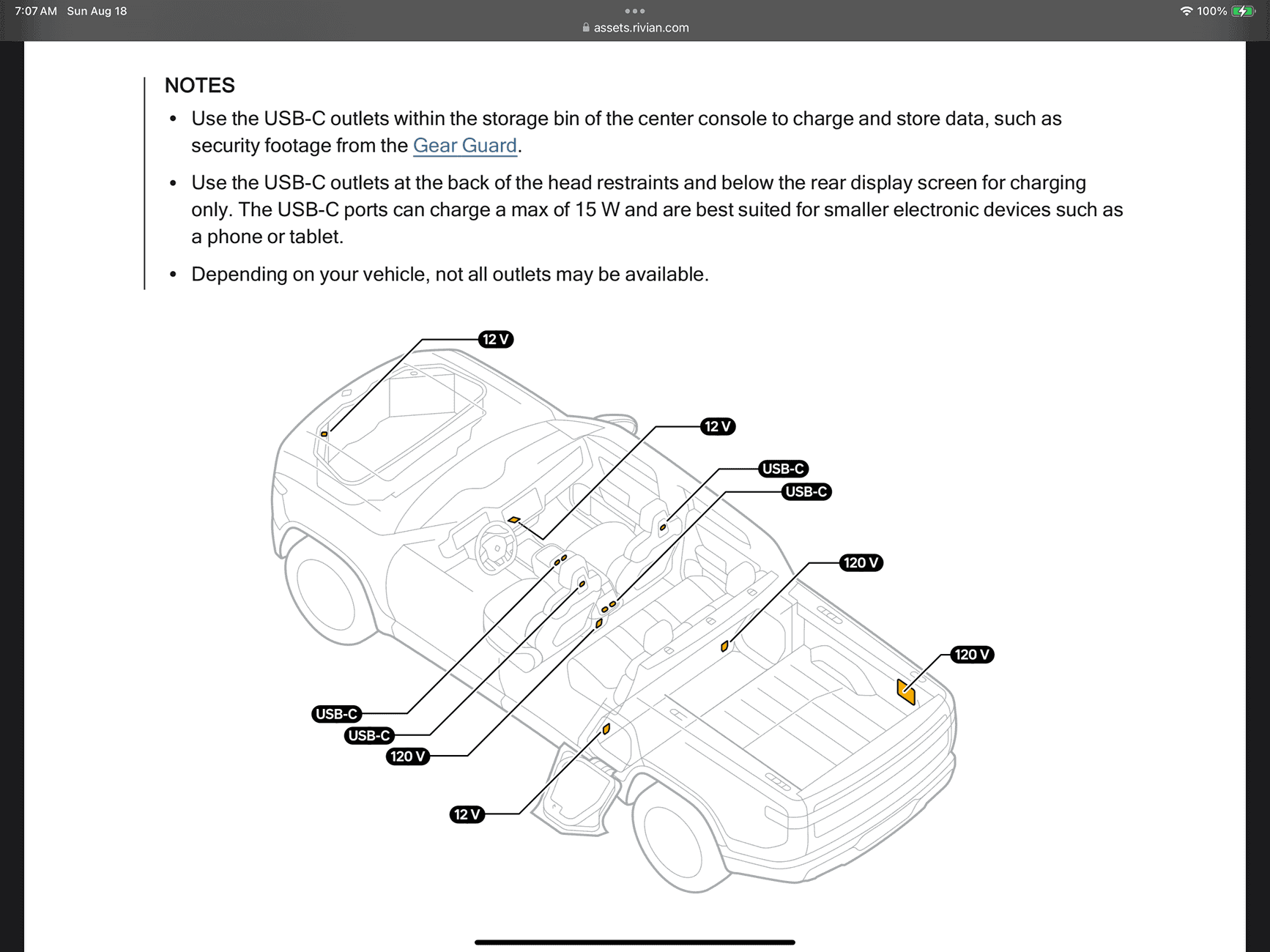
Those are rated at 15w, but it also says they should work for a phone or tablet. This is from the current owners guide but they never removed the 12v outlets under the dash and in the frunk that no longer exist in the vehicles.

Rivian R1T R1S Rear Display USB Port Question IMG_0154
 
OP
OP
schlosrat

schlosrat

Well-Known Member
First Name
Steve
Joined
Jun 23, 2024
Threads
6
Messages
191
Reaction score
179
Location
Vancouver, WA
Vehicles
2024 R1T Dual Large
Occupation
Engineer
Those are rated at 15w, but it also says they should work for a phone or tablet. This is from the current owners guide but they never removed the 12v outlets under the dash and in the frunk that no longer exist in the vehicles.

IMG_0154.png
Well that's interesting. This seems to indicate that all of the USB-C ports may be 15W, or at the least all of the rear seat accessible ports are. If that's the case, then I wonder why the other USB-C ports all do work with my MagSafe charger, but not the ones on the rear display?

EDIT: I did some internet sleuthing and found a few sources that indicate a MagSafe charger should work if attached to 12W or more, but you should expect better performance if plugged into a 20W source. Verizon says this "The MagSafe Charger needs a power adapter of at least 12 watts. For quicker charging, use a 20-watt adapter or greater." https://www.verizon.com/support/kno...er needs a power adapter of at least 12 watts.
 
Last edited:

COdogman

Well-Known Member
First Name
Brian
Joined
Jan 21, 2022
Threads
33
Messages
11,641
Reaction score
34,494
Location
CO
Vehicles
2023 R1T
Occupation
Cyber defender
Clubs
 
Well that's interesting. This seems to indicate that all of the USB-C ports may be 15W, or at the least all of the rear seat accessible ports are. If that's the case, then I wonder why the other USB-C ports all do work with my MagSafe charger, but not the ones on the rear display?

EDIT: I did some internet sleuthing and found a few sources that indicate a MagSafe charger should work if attached to 12W or more, but you should expect better performance if plugged into a 20W source. Verizon says this "The MagSafe Charger needs a power adapter of at least 12 watts. For quicker charging, use a 20-watt adapter or greater." https://www.verizon.com/support/knowledge-base-235816/#:~:text=The MagSafe Charger needs a power adapter of at least 12 watts.
That is very odd. Especially since service said it worked for them…. The only time I’ve ever used those outlets was the first couple weeks I owned my T and I ran an Apple cable from one to the wireless charging pad area to plug in my phone before I chose a dashboard phone mount. It worked for me then.

I’m lucky enough to have gotten one of the last Rivians with the 12v under the dash so I use that now.

The only thing I could suggest is to maybe try a different magsafe charger?
 

Sponsored

OP
OP
schlosrat

schlosrat

Well-Known Member
First Name
Steve
Joined
Jun 23, 2024
Threads
6
Messages
191
Reaction score
179
Location
Vancouver, WA
Vehicles
2024 R1T Dual Large
Occupation
Engineer
The only thing I could suggest is to maybe try a different magsafe charger?
I can try that when I pick up the truck. I'll also ask the SC to try the ports with a MagSafe charger if possible before I drive back.

Still curious if anyone else can confirm if a MagSafe charger works or not with those ports on their R1. That would be useful data as well.
 

Scottm

Well-Known Member
First Name
Scott
Joined
Feb 22, 2023
Threads
3
Messages
134
Reaction score
210
Location
Eugene, OR
Vehicles
Toyota 4Runner, Tesla Model Y
Occupation
physician
I can try that when I pick up the truck. I'll also ask the SC to try the ports with a MagSafe charger if possible before I drive back.

Still curious if anyone else can confirm if a MagSafe charger works or not with those ports on their R1. That would be useful data as well.
I just confirmed MagSafe does not work on my 2023 R1T on the rear display usb c ports. It does work on ports behind the headrest.

Edit: just measured the power output. I get 14 watts out of the headrest ports and 7 watts out of the rear display ports.
 
OP
OP
schlosrat

schlosrat

Well-Known Member
First Name
Steve
Joined
Jun 23, 2024
Threads
6
Messages
191
Reaction score
179
Location
Vancouver, WA
Vehicles
2024 R1T Dual Large
Occupation
Engineer
I just confirmed MagSafe does not work on my 2023 R1T on the rear display usb c ports. It does work on ports behind the headrest.

Edit: just measured the power output. I get 14 watts out of the headrest ports and 7 watts out of the rear display ports.
Mystery solved! No wonder it didn't work with my MagSafe charger. 7 W is way too low.

Thanks for the detailed checking!
 

DeafPug

Well-Known Member
Joined
Oct 20, 2021
Threads
6
Messages
567
Reaction score
843
Location
Kansas
Vehicles
'18 Model 3, '22 R1T
On Amazon, do a search for “usb power meter”. These are $5-20 devices that plug in-line between the USB port and your charging cable. They display in realtime what the voltage, amperage, and wattage is of what’s flowing through the cable. Variants of these meters include USB-A and/or USB-C ports, and the size of the text on the display. For us old farts, get one with a larger display and text.

These are great for diagnosing issues like this. USB-A ports are generally stuck at 5V, so is limited to something like 12 Watts. Most USB-C ports have PowerDelivery or similar that lets the device ask for higher voltage (and wattage). There’s a good chance that the port you used is limited to 5 Volts. I have a Satechi USB hub under my Mac mini and its USB-C ports are limited to only 5V/1A/5W. I stopped using those ports for charging when I discovered that, now just for USB drives.

Not that it was the problem here, but toss all those old janky 5 & 10 Watt power adapters in the eWaste. Don’t tempt yourself with a slow charge! :)
 
OP
OP
schlosrat

schlosrat

Well-Known Member
First Name
Steve
Joined
Jun 23, 2024
Threads
6
Messages
191
Reaction score
179
Location
Vancouver, WA
Vehicles
2024 R1T Dual Large
Occupation
Engineer
@Electrified Outdoors I think there's some info here that could help improve your otherwise excellent delivery checklist.

I didn't realize there was this difference, or that you could pick up a USB power meter so inexpensively. Consequently, I prepared for my pickup by bringing the handiest USB-C cable I had, which happened to be an Apple MagSafe charger. My guide and I didn't pick up on this and so concluded that the rear display USB-C ports were unpowered.

I think Rivian service needs to be more aware of this, too. If they had been more aware of this situation they could have asked me how I tested them and saved me a trip to the SC, and them an unnecessary car rental over a weekend plus tying up a service tech for however long it took them to diagnose this.

In the end, I'm delighted that my brand new R1T was apparently in 100% perfect condition when it was delivered to me and that this wasn't something that Rivian QC should have caught at the factory.
Sponsored


Top