Sponsored

Marchin_MTB

Well-Known Member
First Name
Marcin
Joined
Jun 25, 2022
Threads
14
Messages
1,508
Reaction score
1,974
Location
Colorado
Vehicles
2015 i3, 2011 Honda CRV.
Occupation
Aerospace Engineer turned Space Physicist
Clubs
 
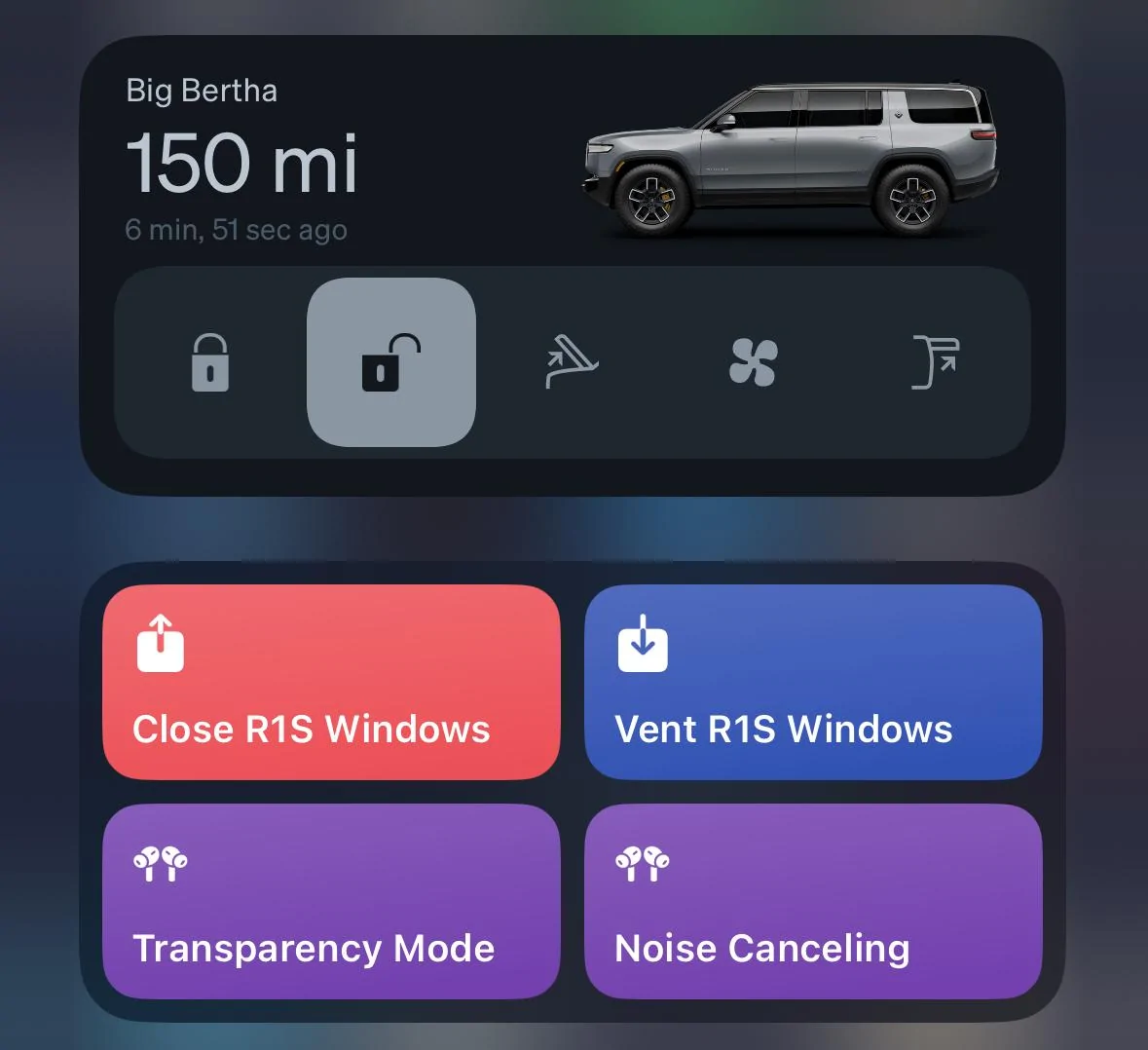
I added the widget for my wife and noticed that it looks very different for her than for me. It only shows status without the action buttons. I am wondering if it’s because she’s behind on iOS updates or just different versions of the iPhone or both. Possible that she also has app permissions set differently. Will troubleshoot more tonight.
Sponsored
 

EarlyAdptr

Well-Known Member
First Name
Scott
Joined
Feb 17, 2021
Threads
17
Messages
429
Reaction score
579
Location
Seattle
Vehicles
Toyota Sequoia
Occupation
Consultant
Sweet!!
 

Wing

Well-Known Member
First Name
James
Joined
Oct 27, 2023
Threads
11
Messages
401
Reaction score
334
Location
Ottawa
Vehicles
R1T Launch Edition LG/OC 20-inch
Very cool, but could Rivian allow us to edit/disable some buttons on the widget? I'm paranoid about accidentally opening the tailgate and have it crash against a closed garage door.
Does it not ask / confirm like the in app one?

I'll have to test this later....
 

Wing

Well-Known Member
First Name
James
Joined
Oct 27, 2023
Threads
11
Messages
401
Reaction score
334
Location
Ottawa
Vehicles
R1T Launch Edition LG/OC 20-inch
Oh wait mine doesn't have tailgate.
Windows, frunk, climate and unlock
 

Sponsored

IGR

Well-Known Member
Joined
Jul 7, 2023
Threads
8
Messages
360
Reaction score
506
Location
SoCal
Vehicles
Rivian R1S
Occupation
I make things
Clubs
 
I am not sure if these shortcuts were added in this version or earlier, but this is much needed function for me as I enjoy driving with windows open or vented:

Rivian R1T R1S Rivian App updated version released for iOS and Android IMG_8546


And now with one touch to close them all, thank you Rivian for listening.
 

Ronimal

Well-Known Member
First Name
Ron
Joined
Apr 6, 2022
Threads
0
Messages
79
Reaction score
143
Location
MN
Vehicles
R1T, Jeep Wagoneer
I am not sure if these shortcuts were added in this version or earlier, but this is much needed function for me as I enjoy driving with windows open or vented:

IMG_8546.webp


And now with one touch to close them all, thank you Rivian for listening.
Whoa this is huge for Apple Watch users!

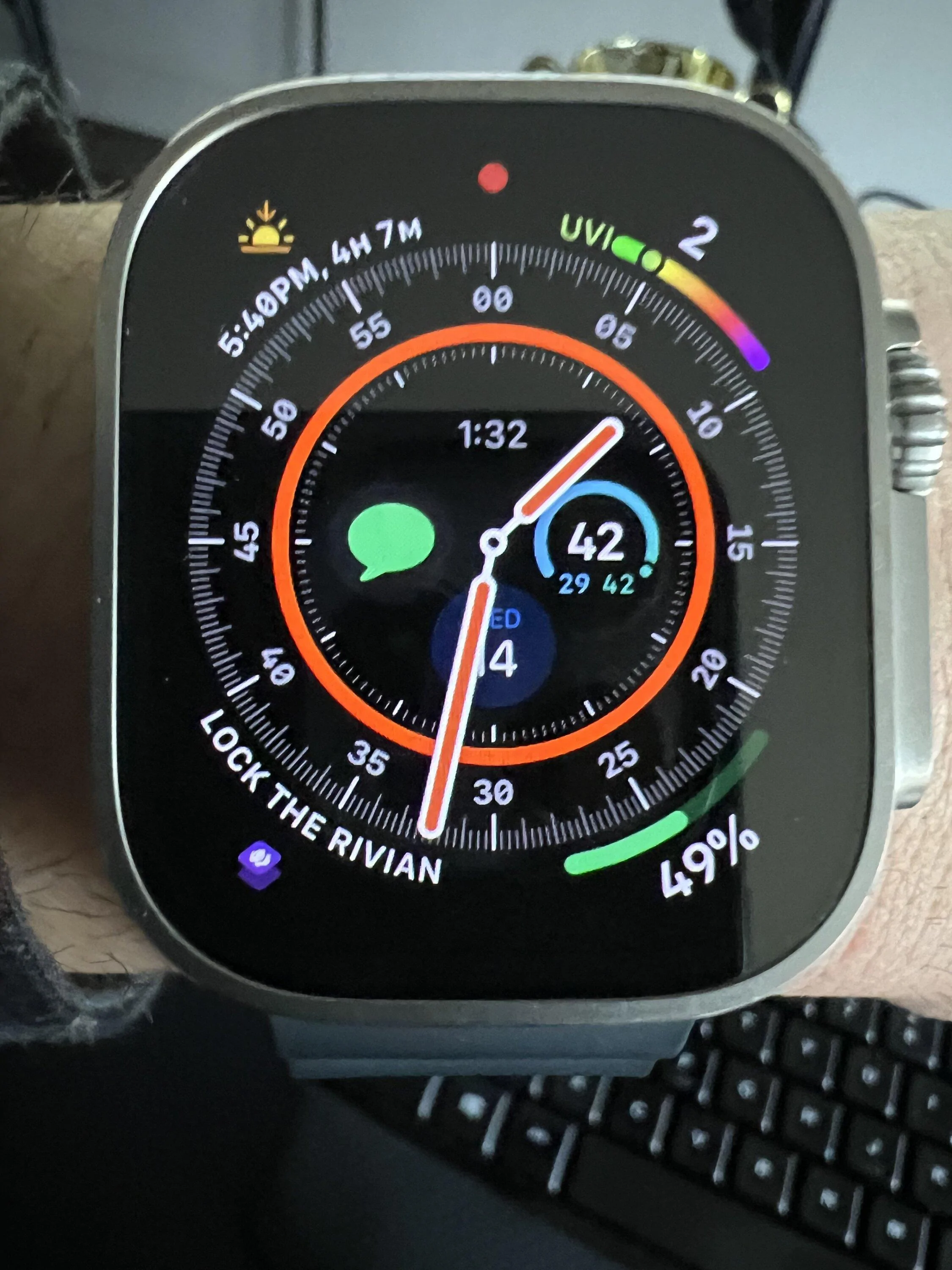
You can access these shortcuts via Siri on the watch or add the shortcut's complication on the watch face. Cool!

EDIT: Tested and it works!

Rivian R1T R1S Rivian App updated version released for iOS and Android IMG_2419
 
Last edited:

shap

Well-Known Member
Joined
Nov 18, 2021
Threads
16
Messages
870
Reaction score
765
Location
Austin,TX
Vehicles
BMW 45e, R1T
Clubs
 
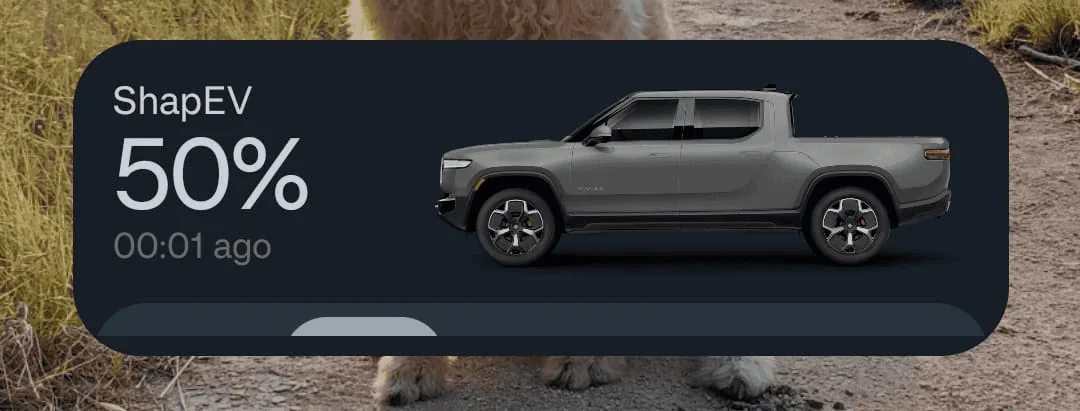
Does anybody use the OnePlus Android phone? I added the widget but it is not resizable and the buttons are not shown...

Rivian R1T R1S Rivian App updated version released for iOS and Android 1707939191641
 

zefram47

Well-Known Member
First Name
Aaron
Joined
Feb 6, 2022
Threads
18
Messages
2,750
Reaction score
4,512
Location
Denver, CO
Vehicles
Rivian R1T, Alfa Romeo 4C
Occupation
Software Engineer
I don't know if it's just me, but I was shocked after installing the widget (iOS 17 / iPhone 13) yesterday at how responsive - bordering on instantaneous - my R1S locked and unlocked when tapping the appropriate button on the widget. I woke up this morning and tested out again - instantaneous. And I've NEVER had that happen before. I then tested it out on the app, and it was still quicker than it was before, but not completely instantaneous.
Careful...I added the widget last night and my truck wouldn't go to sleep until I killed the app and turned off bluetooth, as seen via ElectraFi. Not sure what they did, but the truck seems even less likely to go to sleep now if I'm anywhere near it (parked in garage at home, 50-80ft away at work, etc).
 

EarlyAdptr

Well-Known Member
First Name
Scott
Joined
Feb 17, 2021
Threads
17
Messages
429
Reaction score
579
Location
Seattle
Vehicles
Toyota Sequoia
Occupation
Consultant
Whoa this is huge for Apple Watch users!

You can access these shortcuts via Siri on the watch or add the shortcut's complication on the watch face. Cool!

EDIT: Tested and it works!
Can you describe how you added to your iWatch face?
 

Sponsored

Ramble On Rivian

Well-Known Member
First Name
Paul
Joined
Oct 30, 2023
Threads
10
Messages
54
Reaction score
87
Location
Glendale
Vehicles
R1T
Occupation
Photographer
Clubs
 

IGR

Well-Known Member
Joined
Jul 7, 2023
Threads
8
Messages
360
Reaction score
506
Location
SoCal
Vehicles
Rivian R1S
Occupation
I make things
Clubs
 
Whoa this is huge for Apple Watch users!

You can access these shortcuts via Siri on the watch or add the shortcut's complication on the watch face. Cool!

EDIT: Tested and it works!
This is odd but Rivian shortcuts do not show up on my apple watch(option is enabled, i checked), other shortcuts do however.
Maybe its because I have Series 3 still...
 

Ronimal

Well-Known Member
First Name
Ron
Joined
Apr 6, 2022
Threads
0
Messages
79
Reaction score
143
Location
MN
Vehicles
R1T, Jeep Wagoneer
Can you describe how you added to your iWatch face?
Sure...It takes a few steps:

Part 1: Create the Shortcut on your iPhone
  1. On your iPhone, open the Shortcuts app (download from app store if you don't have it)
  2. Hit the + sign in the top right
  3. On the top bar, you will see something like "New Shortcut 1" click the down arrow next to it
  4. Click Rename. Rename it to the command you want to use with Siri, and also this is what will appear on your watch face. So something like "Unlock R1T"
  5. Click "+ Add Action" Button near the top
  6. Type "Rivian" in the search bar
  7. Select the action you want your Shortcut to perfrom, such as "Unlock doors".
  8. in the very bottom bar tap the circled "i". Toggle on "Show on Apple Watch"
Part 2: Add to Apple Watch face
  1. On the Apple Watch, go to the face you want to add the shortcut
  2. Long press on the watch face, Select "Edit"
  3. swipe right until you are on "Complications"
  4. Click the area you want your command to show up on
  5. If you had a command there already, you may have to click the little back arrow to get to the top menu of commands.
  6. Select Shortcuts
  7. Find your newly created shortcut. *If your shortcut is not there, back out of this and open the shortcuts app on the watch (find it by by pushing in the wheel). This should refresh the list of available shortcuts. I had to do this step to see my new Rivian shortcuts. Go back to step 1 of the Watch part, and try again.
DISCLAIMER: I would heed the warnings others have mentioned about inadvertently unlocking or opening your tailgate due to a mis-press on the watch!
 

LeDiable

Well-Known Member
Joined
May 17, 2022
Threads
2
Messages
136
Reaction score
103
Location
Ankeny, IA
Vehicles
R1T Adventure
Occupation
Software Engineer
Clubs
 
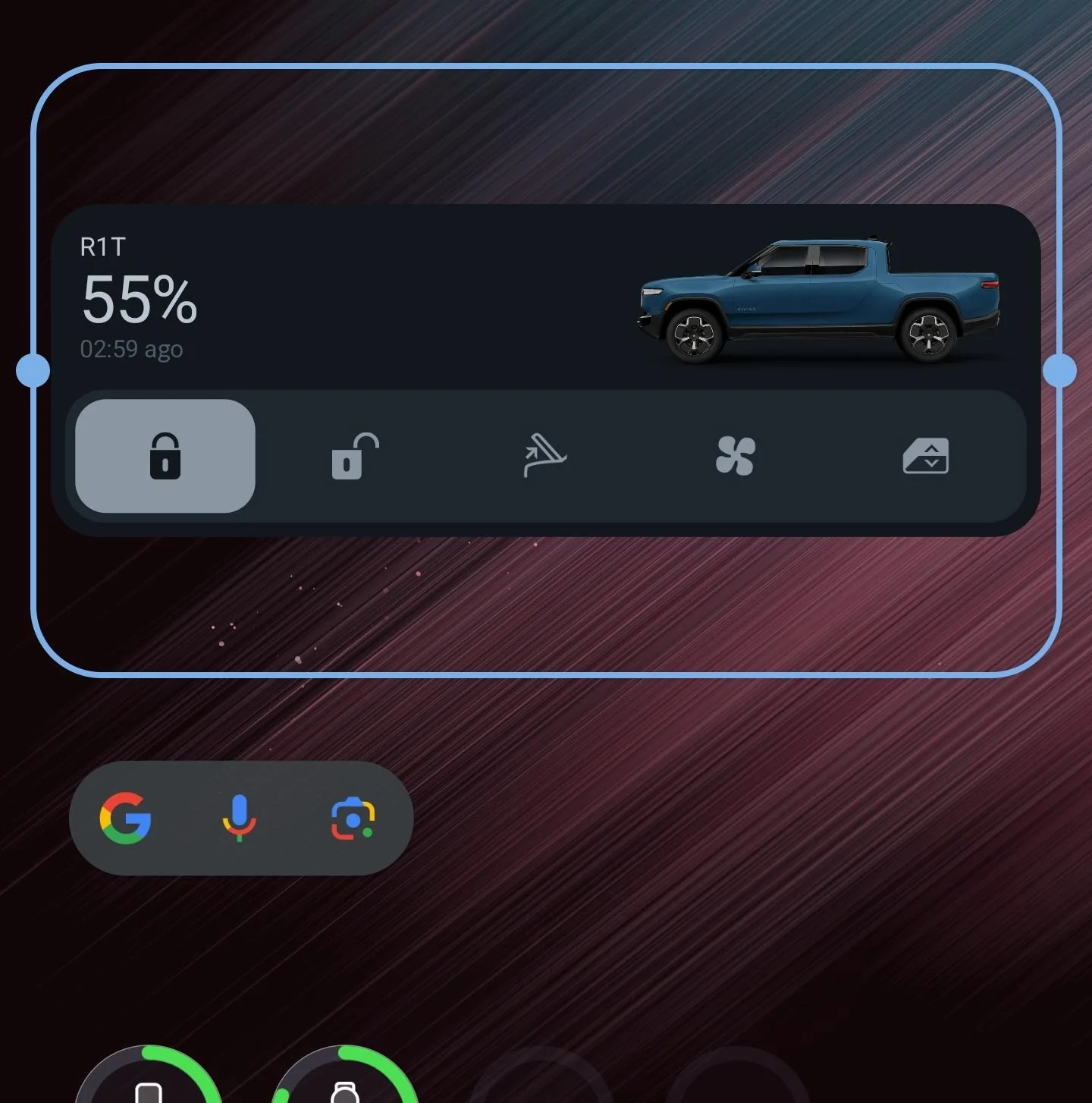
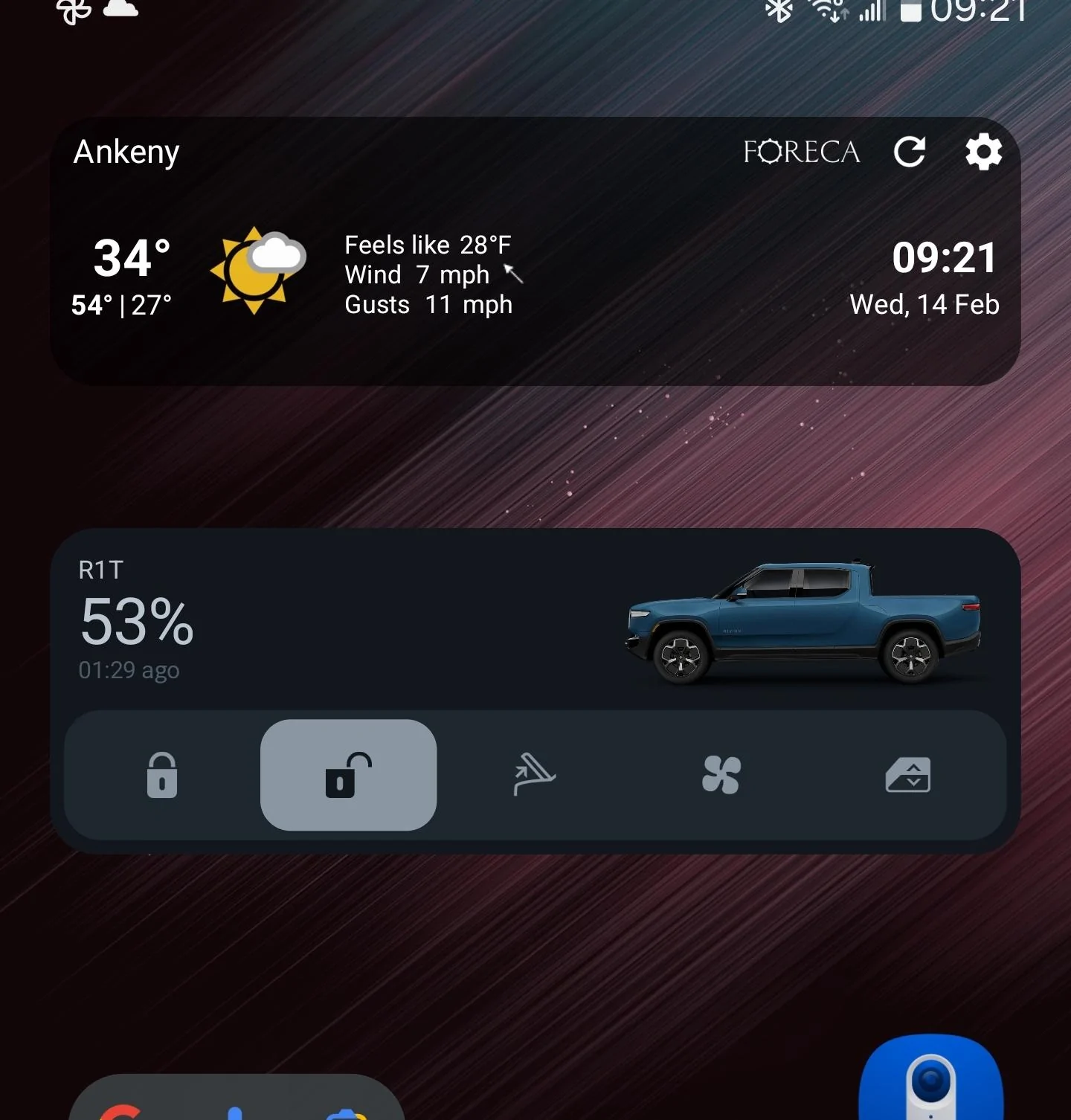
I'm on Android (Galaxy S22 Ultra) and while I like the widget, the vertical size doesn't make a lot of sense to me. It takes two rows of screen layout, which is fine, but why is there so much wasted space here?
Rivian R1T R1S Rivian App updated version released for iOS and Android 1000008963


And for a comparison, here it is with a 1-row widget from Foreca. They're nearly the same height:
Rivian R1T R1S Rivian App updated version released for iOS and Android 1000008970


Since the Rivian widget has buttons to interact with, I think 2 rows is good, but I'd like to see it use up a little more of that space.
Sponsored


Top