Sponsored

Road trip nav help -

Tucker74

Well-Known Member
First Name
Tucker
Joined
Sep 20, 2022
Threads
17
Messages
409
Reaction score
509
Location
Austin, TX
Vehicles
2023 R1T
Occupation
Engineer
This isn’t a complaint post, but I could use some future help. On a road trip today, nav mapped me to an EVGo with 4 stations that were full. Super annoying since it was out of the way and not a preferred network. While I was waiting I pulled up Tesla app and see there is a Supercharger 7 miles away with 11/16 chargers open. I’m at 29%, so I manually searched on nav a new trip and found location, but it doesn’t show up as a charger (even though called Tesla Supercharger). Said whatever and drove there, hit precondition manually when I left and started charging no problem once there (Tesla states if open to your vehicle in app).

I could not for the life of me get it to forget previous route when I tried to create a new route, or tell me how long I needed to charge to make trip home. Ended up adding charge times of new trip it mapped backtracking to original EVGo and then to a second (different) Tesla stop 80 miles away, but was a bad experience (tried both in vehicle and in app, would not forget original stop).

1) if you plan a trip, how to you edit/choose different charging stop?
2) if sitting at charger, how can you calculate time you need to charge (if wasn’t pre-calculated with trip)?

Made due with the annoying multi-stop addition + Tesla + ABRP + Apple Maps … but this should just work somehow?

Any help?
Sponsored

 

azbill

Well-Known Member
First Name
Bill
Joined
Jun 8, 2020
Threads
17
Messages
1,695
Reaction score
1,976
Location
Arizona
Vehicles
Escalade IQ, Mach E, Hummer EV SUT
Occupation
Retired
I have not done this in my Rivian, since the Google maps update, but I had this situation on a recent trip in my GM vehicle with Google. I was heading to an EA station and on their app it was full, so I had a Tesla charger about 50 miles away I could go to. I selected the EA station waypoint as it was displayed on the route, then Google gave me the option to replace that charging stop. It brought up a list of other chargers and I selected the Tesla one that I wanted. It gave me the new arrival and target SoCs for the new stop.

I am not sure the Rivian implementation works the same, it has quite a few differences from the GM implementation. I would have to try it in my truck.
 

Brian-MS90D

Well-Known Member
First Name
Brian
Joined
Mar 19, 2024
Threads
3
Messages
130
Reaction score
141
Location
Cincinnati, OH
Vehicles
Rivian R1S (Dual Motor, Max pack, LA Silver)
I road trip quite a bit around Michigan, Indiana, Missouri, Ohio, Kentucky, Pennsylvania, New York, and down to Florida and back. I recommend avoiding EVGo. In most cases there are few stalls resulting in a much higher likelihood of them being occupied. Additionally, many of the sites only have 1 or 2 fast charging stalls and the other stalls are much slower. I nearly exclusively use Tesla Superchargers because they are plentiful in location, plentiful in stall count, and easy.

Exception to the rule: I do like EVGo at the Ultium branded charging stations in gas stations. And, now you can set up your EVGo and Rivian for automatic charging/payment (like Tesla & Rivian).

Even if you're opposed to the CEO of Tesla's political activity, I recommend putting that aside for de minimis purchases like charging. Gas station companies and oil companies are terrible too, but we all patronize them.

On the Nav screen at the top there are multiple buttons you can press to expand menus for charging station brand and speed preferences. I set up mine to only show me Tesla. Otherwise, I have experienced what you're describing where the Nav just can't figure out what you're trying to modify charging-wise.

You can also press the little pencil icon and edit the stops manually. But even this is not perfect if you have all charger brands enabled. The Nav loves to switch up the plan mid-trip and send us from a perfectly good original Tesla stop to some tiny EVGo location in a mall with 3 stalls located near a busy entrance (increasing ICE'd probability).
** Remember, the Nav and Charging apps have no way to know if a spot is ICE'd

Don't even get me started on Electrify America. Every time I try one I regret it greatly as I arrive to full stations with a queue of Chevy Bolts waiting.
 

VSG

Well-Known Member
Joined
Oct 3, 2022
Threads
4
Messages
3,208
Reaction score
6,004
Location
WA
Vehicles
R1T LE/RB/OC/20
I manually searched on nav a new trip and found location, but it doesn’t show up as a charger
You need to check your filters in your app and in your car to make sure that the "Avoid adapters" setting is turned off. There's also a "Hide incompatible" setting and a "Hide Adapter needed" setting. The software doesn't know if you have an adapter or not - you have to tell it. If you have your software configured correctly you should be able to see the exact same compatible Tesla chargers as you see in the Tesla app because Rivian pulls that data from Tesla in real time.

As for the rest, I can't really figure out how you're using the trip planning. I don't have any of those problems. The nav and app will show you the number of chargers occupied (except for Electrify America, where you have to use the EA app) as well as the grade. I always check the charger before I get there to make sure it's not full, and I've never had to wait at a DCFC. I avoid chargers with a low grade. And I almost always do my route planning at home with ABRP before I leave, because then I can choose chargers near where I am planning on stopping anyway, rather than stopping in some random place and doing nothing while waiting for my charging to finish.
 

akc5247

Well-Known Member
First Name
AKC
Joined
Dec 28, 2023
Threads
5
Messages
320
Reaction score
252
Location
NJ
Vehicles
2023 Subaru Ascent Touring, 2024 R1S dual motor
Occupation
Engineer
Clubs
 
Passed check your settings if you have chosen to hide sites that need an adapter. I also please check if you have applied that setting always, or if it was only for the specific time you looked for a stop.

Doing a road trip currently and all the DCFC stations I got to worked reliably and were not full. Of course, the most number of available options was in Tesla stations.

(Tesla charging stations have never failed in any locations that i tried in the many many states i tried)
 

Sponsored

OP
OP
Tucker74

Tucker74

Well-Known Member
First Name
Tucker
Joined
Sep 20, 2022
Threads
17
Messages
409
Reaction score
509
Location
Austin, TX
Vehicles
2023 R1T
Occupation
Engineer
I’ll check the settings for hiding adapter filter, still can’t understand why when I’m plugged in and charging it would route me back and then to another station instead of telling me how long to charge. I only had Rivian selected as preferred, but also get EVGo recommended an inordinate amount of the time.

When I plan a route, and it adds a charging stop, how do I delete or modify that? I can add a stop, but there is no remove and it doesn’t seem to calculate correctly when that stop is a charger.

I admit I don’t road trip a ton in the Rivian, and when I have in the past I did a ton of planning with ABRP (which seems less functional now BTW). This was a highly covered route with Chargepoint/EA/EVGo/MB/Shell/Tesla chargers along the way so I hadn’t done a lot of planning 🫤
 

Deacon

Well-Known Member
First Name
Ernie
Joined
Aug 25, 2021
Threads
8
Messages
318
Reaction score
382
Location
North Carolina
Vehicles
Subaru Forester, Rivian R1T
Occupation
Retired
Clubs
 
This isn’t a complaint post, but I could use some future help. On a road trip today, nav mapped me to an EVGo with 4 stations that were full. Super annoying since it was out of the way and not a preferred network. While I was waiting I pulled up Tesla app and see there is a Supercharger 7 miles away with 11/16 chargers open. I’m at 29%, so I manually searched on nav a new trip and found location, but it doesn’t show up as a charger (even though called Tesla Supercharger). Said whatever and drove there, hit precondition manually when I left and started charging no problem once there (Tesla states if open to your vehicle in app).

I could not for the life of me get it to forget previous route when I tried to create a new route, or tell me how long I needed to charge to make trip home. Ended up adding charge times of new trip it mapped backtracking to original EVGo and then to a second (different) Tesla stop 80 miles away, but was a bad experience (tried both in vehicle and in app, would not forget original stop).

1) if you plan a trip, how to you edit/choose different charging stop?
2) if sitting at charger, how can you calculate time you need to charge (if wasn’t pre-calculated with trip)?

Made due with the annoying multi-stop addition + Tesla + ABRP + Apple Maps … but this should just work somehow?

Any help?
After putting my destination in the NAV I request the NAV to eliminate all charging stops. I then pick out the chargers I want along the route (get info from plug share and or Tesla app). Depending on where I am going, I may want to arrive with a high SOC or may want to arrive with low SOC. I have my NAV filter set to show only RAN, & Tesla. I wish the system would add IONNA to the menu. I will use other networks if I have too but a lot of them only have 2 chargers which can make is dicey if one is out or they are full. EA tends to have too many locals doing "free" charging.
 
OP
OP
Tucker74

Tucker74

Well-Known Member
First Name
Tucker
Joined
Sep 20, 2022
Threads
17
Messages
409
Reaction score
509
Location
Austin, TX
Vehicles
2023 R1T
Occupation
Engineer
Ya - honestly pretty silly to even have RAN on the list in TX, will fix. Also not seeing some of the newer networks (MB HPC/Shell Recharge), hopefully these are added soon -
 

azbill

Well-Known Member
First Name
Bill
Joined
Jun 8, 2020
Threads
17
Messages
1,695
Reaction score
1,976
Location
Arizona
Vehicles
Escalade IQ, Mach E, Hummer EV SUT
Occupation
Retired
You need to check your filters in your app and in your car to make sure that the "Avoid adapters" setting is turned off. There's also a "Hide incompatible" setting and a "Hide Adapter needed" setting. The software doesn't know if you have an adapter or not - you have to tell it. If you have your software configured correctly you should be able to see the exact same compatible Tesla chargers as you see in the Tesla app because Rivian pulls that data from Tesla in real time.

As for the rest, I can't really figure out how you're using the trip planning. I don't have any of those problems. The nav and app will show you the number of chargers occupied (except for Electrify America, where you have to use the EA app) as well as the grade. I always check the charger before I get there to make sure it's not full, and I've never had to wait at a DCFC. I avoid chargers with a low grade. And I almost always do my route planning at home with ABRP before I leave, because then I can choose chargers near where I am planning on stopping anyway, rather than stopping in some random place and doing nothing while waiting for my charging to finish.
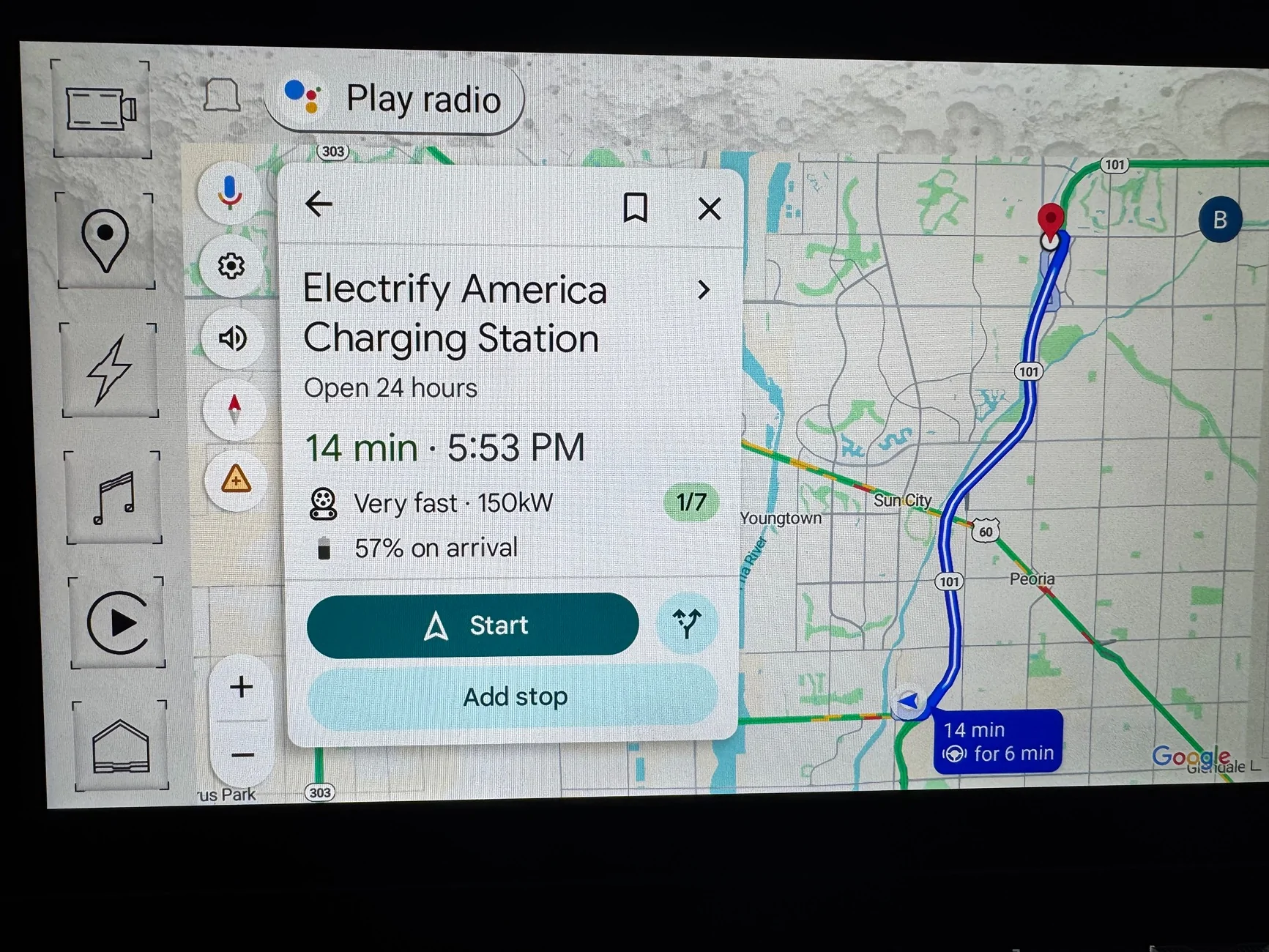
Google just got access to EA live status, I noticed it on my phone. Not sure when Rivian will display this, but my Hummer now has it. Maps in the Hummer update every 2 weeks.

Rivian R1T R1S Road trip nav help - IMG_1503
 

Brian-MS90D

Well-Known Member
First Name
Brian
Joined
Mar 19, 2024
Threads
3
Messages
130
Reaction score
141
Location
Cincinnati, OH
Vehicles
Rivian R1S (Dual Motor, Max pack, LA Silver)
Google just got access to EA live status, I noticed it on my phone. Not sure when Rivian will display this, but my Hummer now has it. Maps in the Hummer update every 2 weeks.

IMG_1503.webp
I actually tried this today out of curiosity. Tried stopping at the EA at IKEA in Columbus (if it didn't work the Supercharger is 5 min away). EA app and Google Maps showed 1 of 6 available. When I got there, they were all full and charging. I checked the app and Maps again and it still showed 1 of 6 available. The feature doesn't work. Don't rely on it (yet?).
 

Sponsored

azbill

Well-Known Member
First Name
Bill
Joined
Jun 8, 2020
Threads
17
Messages
1,695
Reaction score
1,976
Location
Arizona
Vehicles
Escalade IQ, Mach E, Hummer EV SUT
Occupation
Retired
I actually tried this today out of curiosity. Tried stopping at the EA at IKEA in Columbus (if it didn't work the Supercharger is 5 min away). EA app and Google Maps showed 1 of 6 available. When I got there, they were all full and charging. I checked the app and Maps again and it still showed 1 of 6 available. The feature doesn't work. Don't rely on it (yet?).
I think there is a delay, but not sure what that time delay is. I do think that Google keeps up with the EA app, but not sure how often they are pinging the sites. I have seen Tesla sites be off in their app, usually by one vehicle, but so many Teslas are coming and going from those all the time.

I was on a road trip this past weekend and an EA site I was going to indicated full (Indio CA), and I have seen lines at that station many times. I diverted to a station that indicated 3 of 6 available, and upon arrival 4 were available. But two other cars pulled up to charge just as I got there.

I was headed to Quartzsite AZ, which has EA, Tesla and RAN, but I was using the Tesla site so that the EA site would be available for 800V vehicles (I was driving my Mach E, and while the RAN there is open to all EVs, it is super expensive). A few miles out the EA site indicated 1 available, but as I drove by it 2 stalls were open.
 

iamnid

Well-Known Member
Joined
Aug 10, 2023
Threads
7
Messages
614
Reaction score
761
Location
California
Vehicles
Mercedes EQE, Rivian R1S
Did this over the weekend on a trip to and from Vegas. I didn't like the chargers it picked so I hit the "+" and added the station to the route. Once I added it, it got rid of the other charge stop
 

Brian-MS90D

Well-Known Member
First Name
Brian
Joined
Mar 19, 2024
Threads
3
Messages
130
Reaction score
141
Location
Cincinnati, OH
Vehicles
Rivian R1S (Dual Motor, Max pack, LA Silver)
I think there is a delay, but not sure what that time delay is. I do think that Google keeps up with the EA app, but not sure how often they are pinging the sites. I have seen Tesla sites be off in their app, usually by one vehicle, but so many Teslas are coming and going from those all the time.

I was on a road trip this past weekend and an EA site I was going to indicated full (Indio CA), and I have seen lines at that station many times. I diverted to a station that indicated 3 of 6 available, and upon arrival 4 were available. But two other cars pulled up to charge just as I got there.

I was headed to Quartzsite AZ, which has EA, Tesla and RAN, but I was using the Tesla site so that the EA site would be available for 800V vehicles (I was driving my Mach E, and while the RAN there is open to all EVs, it is super expensive). A few miles out the EA site indicated 1 available, but as I drove by it 2 stalls were open.
Yeah, I'm sure there is a delay. They should add a healthy handicap to it, IMO. Of course, the main problem is as you and I noted previously, that nearly all fast charger brands/locations outside of Tesla simply do not have anywhere near enough stalls. The small stall count is looney given the longer "refueling" duration for EV's.
 

azbill

Well-Known Member
First Name
Bill
Joined
Jun 8, 2020
Threads
17
Messages
1,695
Reaction score
1,976
Location
Arizona
Vehicles
Escalade IQ, Mach E, Hummer EV SUT
Occupation
Retired
Yeah, I'm sure there is a delay. They should add a healthy handicap to it, IMO. Of course, the main problem is as you and I noted previously, that nearly all fast charger brands/locations outside of Tesla simply do not have anywhere near enough stalls. The small stall count is looney given the longer "refueling" duration for EV's.
I was able to do a test today with my Hummer at a fairly busy EA site. Pulled up with it showing 1 of 4 available and that matched. I plugged in and started charging, it took the Google maps status in the truck 3 minutes to update. I stayed until each of the other three cars left, each time it took 2 minutes from them unplugging to see the status update.

I did not have a chance to see a case where one unplugged and another plugged in right away.
 

Brian-MS90D

Well-Known Member
First Name
Brian
Joined
Mar 19, 2024
Threads
3
Messages
130
Reaction score
141
Location
Cincinnati, OH
Vehicles
Rivian R1S (Dual Motor, Max pack, LA Silver)
I was able to do a test today with my Hummer at a fairly busy EA site. Pulled up with it showing 1 of 4 available and that matched. I plugged in and started charging, it took the Google maps status in the truck 3 minutes to update. I stayed until each of the other three cars left, each time it took 2 minutes from them unplugging to see the status update.

I did not have a chance to see a case where one unplugged and another plugged in right away.
It's not even really the speed of update. When road tripping, one has set their intended fast charging stop 30 to 120 minutes out. EA has no way to know what traffic is inbound to their sight. It could be 4 of 4 available, but if 6 cars are going to arrive in the next 15 minutes at nearly the same time the 4 of 4 open is a worthless stat. EA doesn't have the ability to add inbound cars to their availability algorithm like Tesla does (and there probably isn't an algorithm at all).

And, the main point is that for road tripping fast charging sites need lots of stalls.10 to 20 stalls is what they should be installing at each site to be meaningful as a road trip charging point.
Sponsored


Top