Sponsored

Undocumented Changes in 2025.06

CO-Ed

Well-Known Member
First Name
Edward
Joined
Oct 28, 2022
Threads
4
Messages
71
Reaction score
142
Location
81624
Vehicles
2022 Rivian R1T / CY / BM / 21
Occupation
retired
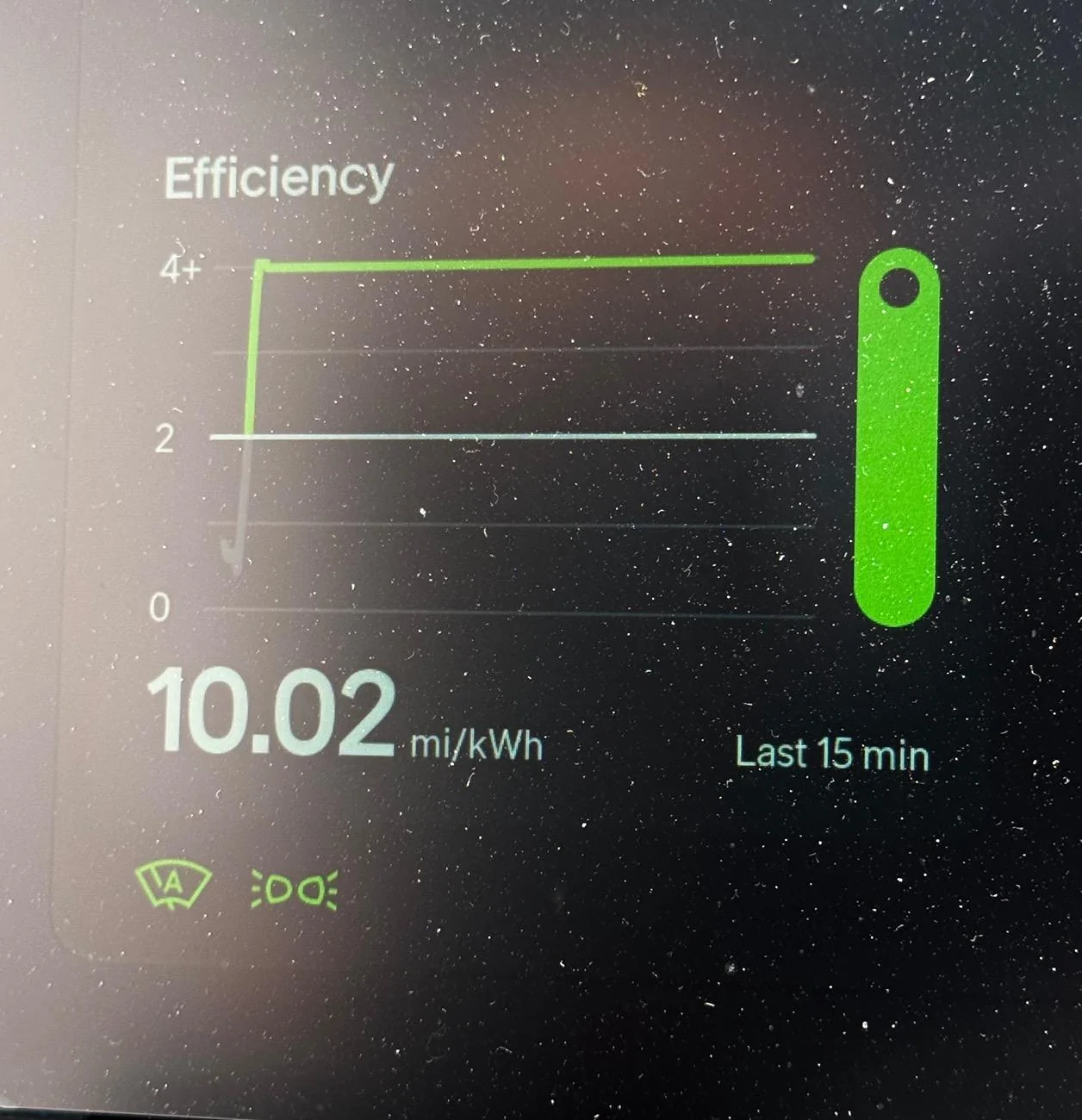
This. The “graph” - the actual sqiggly line - won’t go above 4, no matter what the number shown bottom left displays. The original post didn’t say it did or didn’t and some of us (me included) assumed the squiggly line scaled to reflect the number at the bottom. This led to wondering if Gen 2 vehicles scaled the graph, because Gen 1 vehicles clearly do not.
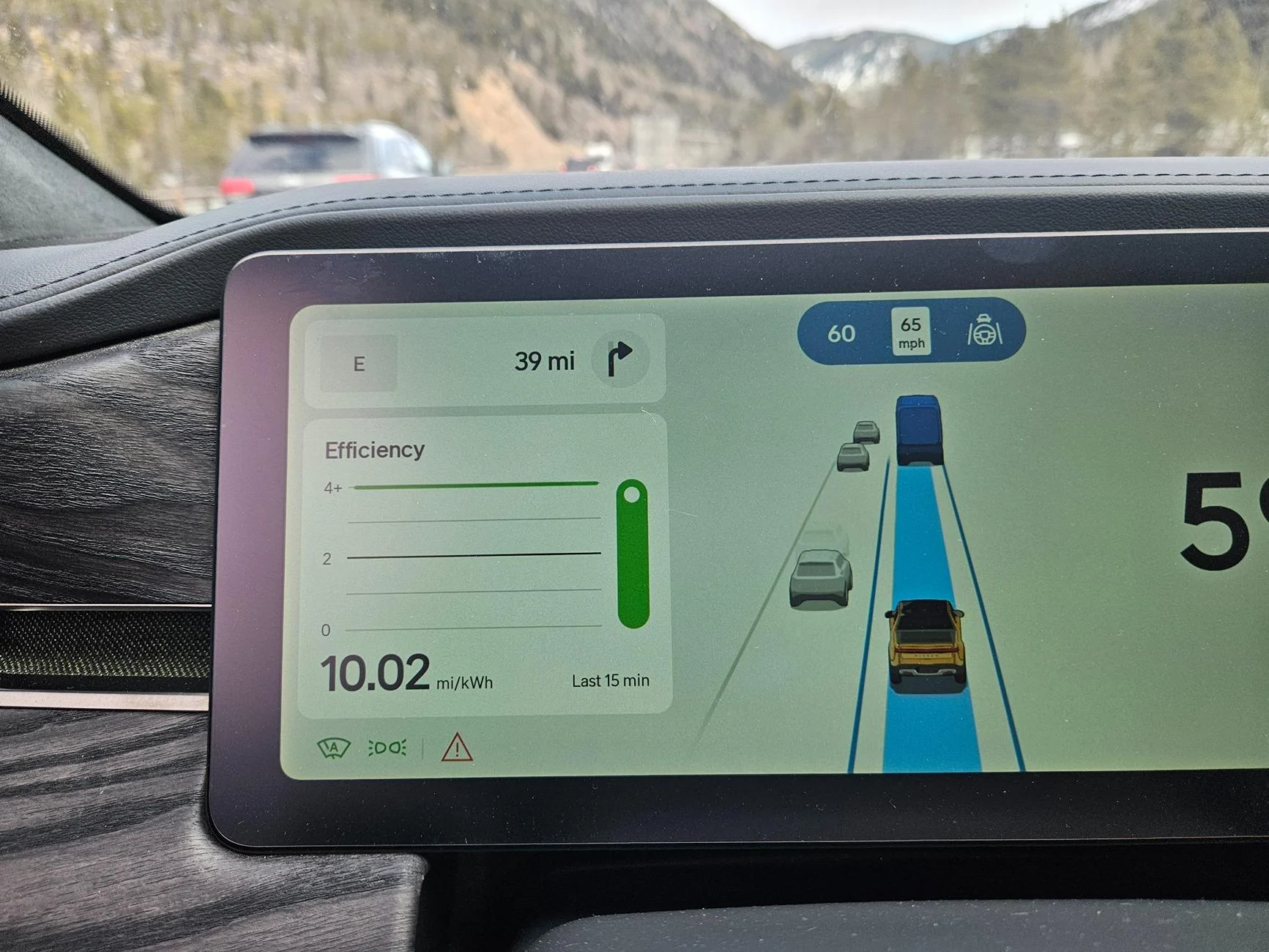
I should have noted in my first reply. The efficiency window in the driver's displayed shows a number and a line. The line does NOT go above 4.0, like @kevinhanff said. The number in that display previously showed no higher than 4, however, since installing 2025.06, my display now shows the number up to 10.02 (but, again, no change to the graph). I think 10.02 is the highest it goes as I captured this image driving east of the E/J tunnels on I70 - long downhill. The display hit 10.02 long before getting to the bottom of the hill and that's as high as it went. Picture was in my 2022 G1 R1T QM with 21s.

Rivian R1T R1S Undocumented Changes in 2025.06 20250316_144130
Sponsored


TomServo2112

Well-Known Member
Joined
Aug 13, 2024
Threads
2
Messages
163
Reaction score
214
Location
Southern California
Vehicles
Gen 2 R1S DPM, Large Pack, R2 res holder
I should have noted in my first reply. The efficiency window in the driver's displayed shows a number and a line. The line does NOT go above 4.0, like @kevinhanff said. The number in that display previously showed no higher than 4, however, since installing 2025.06, my display now shows the number up to 10.02 (but, again, no change to the graph). I think 10.02 is the highest it goes as I captured this image driving east of the E/J tunnels on I70 - long downhill. The display hit 10.02 long before getting to the bottom of the hill and that's as high as it went. Picture was in my 2022 G1 R1T QM with 21s.

20250316_144130.jpg
10.02 max is what I’m seeing as well.
Rivian R1T R1S Undocumented Changes in 2025.06 IMG_8002
 

goldburger

Well-Known Member
Joined
Feb 5, 2022
Threads
18
Messages
1,729
Reaction score
2,032
Location
Los Angeles
Vehicles
2022 R1T
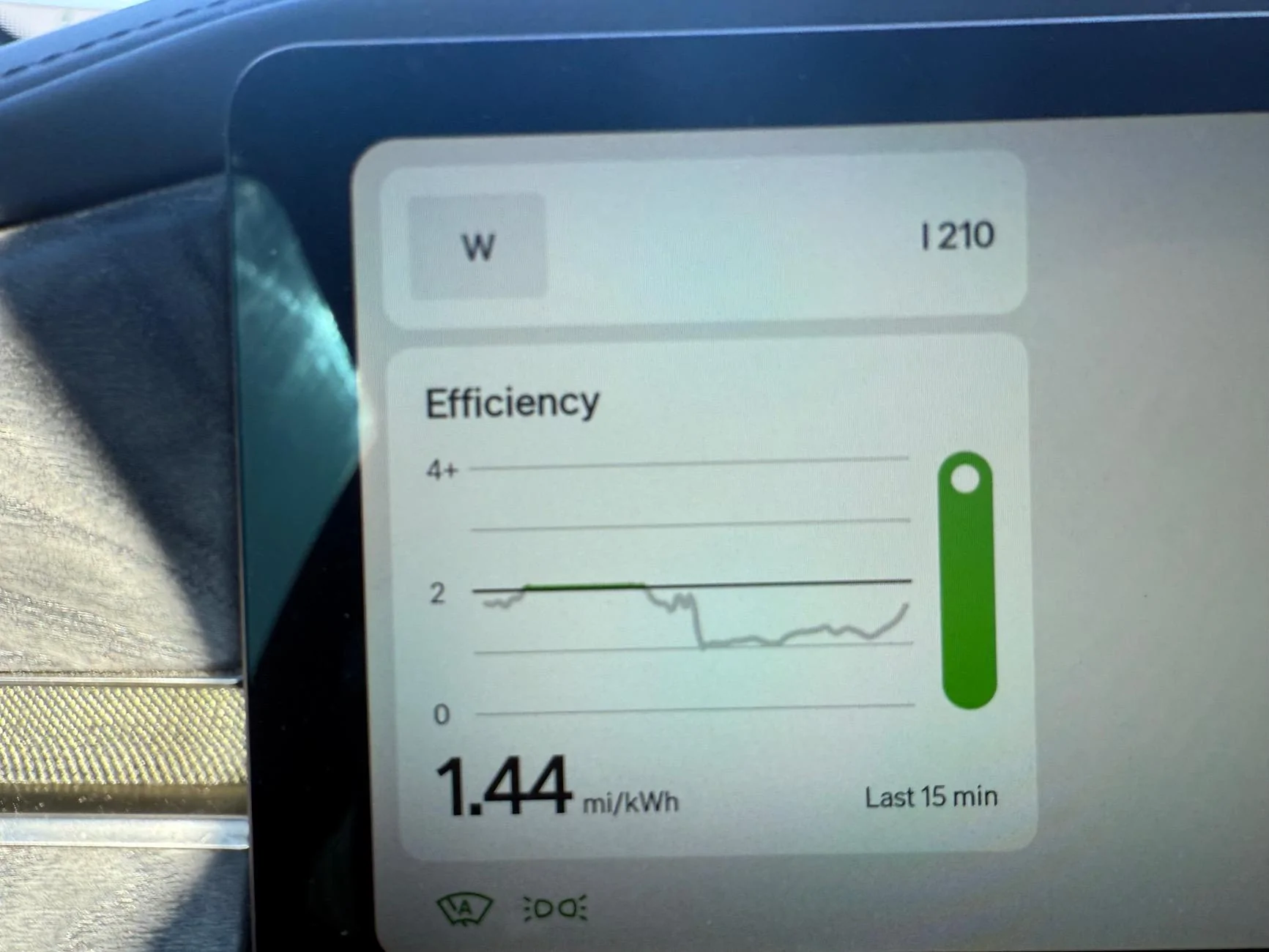
The little efficiency ball moves independently of the graph now and responds much faster. While it’s still inside of an obnoxiously too wide green/grey bar, it actually seems to have a purpose for existing now.
Rivian R1T R1S Undocumented Changes in 2025.06 IMG_5945

mine crashed out today lol.
 

Whale Blubber

Well-Known Member
Joined
May 2, 2023
Threads
4
Messages
396
Reaction score
553
Location
Austin
Vehicles
2019 BMW X3 3.0si, 2021 Toyota RAV4 XLE
Don't know if anyone else had this issue or if it's been mentioned in this thread, but prior to the update I was experiencing serious lag issues when seeking to finger-scroll the navigation screen, and also when flipping between apps on the screen (e.g., music - navigation - settings, etc.)

Since the update, the lag is far less. The navigation is scrollable again without the seriously annoying skips and glitches. No idea if that is a result of efficiency improvements in the update, or because the system reset and cleared out whatever might have been clogging the memory. Either way, the UI is much smoother now.
 

krb1183

Well-Known Member
Joined
Mar 2, 2022
Threads
4
Messages
226
Reaction score
167
Location
Huntsville, AL
Vehicles
2025 R1S
I just finished a 1200 mile trip. During the drive up to my destination the Enhanced assist worked very well, when it worked. It very clearly needs a database update as soon as possible. As soon as I hit the CA/NV border, into NV, it shut off right away. It didn't announce its availability again until I was in Las Vegas, then lasted until just after I left. On the way back the reverse was true. WIthin a quarter-mile of passing. from NV into CA it became available again. There are some tighter, windier canyons where it stayed active when I expected it not to. Driving home from the trip, the most impressive part for me was that It stayed active and in control for maybe 60 of the last 80 miles, even navigating through the 15S to the 210W interchange. That took me by surprise.

However, it does not detect my eyes very well. It became quite an annoyance to be staring straight ahead on the road and the car yelling at me telling me I don't have my eyes on the road. A reset seemed to clear it up but it did come back again. Hopefully Rivian can fine-tune that. It was bad enough that I would just keep my hand on the wheel for long stretches, rather than tempt the wrath
Thanks for the update. I have yet to get mine to work on any part of I565 outside of Huntsville. So not sure if it's just not a mapped area. Regular highway assist works fine, but not the hands free option.
 

Sponsored

EV4sure

Active Member
Joined
Sep 15, 2023
Threads
0
Messages
36
Reaction score
40
Location
NJ
Vehicles
Rivian R1S, BMW i4
Don't know if anyone else had this issue or if it's been mentioned in this thread, but prior to the update I was experiencing serious lag issues when seeking to finger-scroll the navigation screen, and also when flipping between apps on the screen (e.g., music - navigation - settings, etc.)

Since the update, the lag is far less. The navigation is scrollable again without the seriously annoying skips and glitches. No idea if that is a result of efficiency improvements in the update, or because the system reset and cleared out whatever might have been clogging the memory. Either way, the UI is much smoother now.
I still have several seconds of lag whenever I tap the climate icon before it shows up. Really annoying when I want to turn off my heated steering wheel but leave my heated seat unchanged.
 

R1Thor

Well-Known Member
First Name
Joe
Joined
Aug 9, 2023
Threads
8
Messages
1,531
Reaction score
2,411
Location
Lancaster, PA
Vehicles
23QM R1T, Limestone + Ocean Coast, 21" & UBS
Occupation
Mechanical Engineering Lead
Clubs
 
My undocumented change anecdote:

Highway Assist has improved in Gen1 Vehicles, in 2 ways:
1- The slowdown for curves is MUCH less aggressive *and* only occurs 1/4 of the time it used to. On my commute, I typically have this feature active (with the chevrons) much to my chagrin on 4 different curves. Yesterday I noticed on my way home, it triggered once. And again this morning coming the opposite direction, but in the same stretch of highway (arc radius of highway curve) is now the only time during my commute this is triggered. That's awesome.

2- The interpolation of 'bad road' curves is much better.
What do I mean by this?
- Historically, if the road curve was inconsistent (multi-radial), the vehicle would make some choppy corrections to keep me centered. Which was annoying and frequently caused the auto-steering to cut out because the resistance from my hands on the wheel made the truck think I was trying to take over. Where it was just so egregious that I inadvertently deactivated it. But in fairness, with the choppiness of bouncing back and forth, it was annoying anyway and probably not great for people around me to think I was being predictable.
- Now: it's much smoother, maintaining a more consistent and well interpolated arc, with one or two corrections overall, instead of multiple smaller corrections. Much smoother, much more refined, much more natural, and more confidence-inspiring.
 

Yossarian

Well-Known Member
Joined
Oct 20, 2020
Threads
45
Messages
934
Reaction score
922
Location
SE Pennsylvania
Vehicles
R1T,Telluride, Wee-Strom, Lynskey Cooper
Yes.
It's exactly what I did to configure my Nokian Outpost nATs in 275/60R20.

If I recall correctly, there are a LOT of options enabled when you select for aftermarket tires. I should've taken a photo. There's obviously all-seasons, all-terrains, off-road, snow. There might be others. I stopped looking when I selected my all-terrains :)
Perhaps user error on my part, but I found only one option for 20" aftermarket tires for my 2024 G1 R1T.

I switched out the stock 275/65R20 AT Scorpions for General HTS60 AS's in the same width but smaller aspect ratio (275R60.) The diameter of the new combo is very close to that of the stock 21" wheels with the OEM Scorpion Verde AS, 33 inches, and the 60 series Generals not only provide a bit more range, but are much quieter than the Scorpions.

The only aftermarket tire option in the menu that I saw however was for Goodyear Wranger 275/60R20 All Terrain's. Perhaps it's because the 20" wheel option is one that oriented toward off-roading but it is a bit surprising to that there is only one aftermarket choice and that it is an All Terrain tire. Of course, since the Goodyear option will also result in a 33" overall diameter, it will not really matter in terms of mileage and speed error.

I have not driven my R1T since the update, so I do not know how the change actually impacts the existing speedo error of about 3%. What I'm reading in this thread is that there is a designed-in error of (+)2%, and if so, the change may have only a very modest impact.
 

R1Thor

Well-Known Member
First Name
Joe
Joined
Aug 9, 2023
Threads
8
Messages
1,531
Reaction score
2,411
Location
Lancaster, PA
Vehicles
23QM R1T, Limestone + Ocean Coast, 21" & UBS
Occupation
Mechanical Engineering Lead
Clubs
 
Perhaps user error on my part, but I found only one option for 20" aftermarket tires for my 2024 G1 R1T.

I switched out the stock 275/65R20 AT Scorpions for General HTS60 AS's in the same width but smaller aspect ratio (275R60.) The diameter of the new combo is very close to that of the stock 21" wheels with the OEM Scorpion Verde AS, 33 inches, and the 60 series Generals not only provide a bit more range, but are much quieter than the Scorpions.

The only aftermarket tire option in the menu that I saw however was for Goodyear Wranger 275/60R20 All Terrain's. Perhaps it's because the 20" wheel option is one that oriented toward off-roading but it is a bit surprising to that there is only one aftermarket choice and that it is an All Terrain tire. Of course, since the Goodyear option will also result in a 33" overall diameter, it will not really matter in terms of mileage and speed error.

I have not driven my R1T since the update, so I do not know how the change actually impacts the existing speedo error of about 3%. What I'm reading in this thread is that there is a designed-in error of (+)2%, and if so, the change may have only a very modest impact.
There's a non-oem option (aftermarket) for any wheel profile you select. I think you just had to scroll down further.

Then you simply select your tire type (In my case All-Terrains. In your case, All-Seasons). They're generic--not attached to any particular tire. I wouldn't select a specific tire unless you're either using it, or you know that the characteristics of your aftermarket option are very close to the Rivian efficiency profile.

But that's just like, my opinion, man!

I will have my nATs on for a few more weeks (doing some off-roading in early April). When I switch back to my 21 OEs, I'll try to get some snapshots or maybe some video if someone hasn't already gotten around to it by then.

The process isn't super complicated, but it's less intuitive than it should be, in my amateur opinion. That said, I'm very grateful we can make this change now. So, I'm not going to poopoo it either :)

EDIT: I should add: I don't think you've done anything wrong by taking this approach, being that you've selected a tire with the same 275/60R20 profile as your current setup. You are simply going to be seeing a different efficiency graph (likely) than the tire profile you have chosen. Not that it's any different than maintaining your 'stock' profile and not changing anything at all is any better ;)
 

Cascadian

Well-Known Member
First Name
Steve
Joined
Apr 19, 2023
Threads
12
Messages
327
Reaction score
323
Location
Seattle
Vehicles
Volt, Outback
Clubs
 
I noticed that for the first time ever the FM radio would be on when returning to my Gen 1 S every time, no matter how long it was parked.

However, there is a bug. It starts on the previously listened station for a few seconds then switches to another random station, requiring a retune.
 

Sponsored

Patrick87

Well-Known Member
First Name
Patrick
Joined
Mar 22, 2024
Threads
2
Messages
96
Reaction score
113
Location
Knoxville, TN
Vehicles
2015 Jeep Grand Cherokee Limited, 2x Jeep XJ's
Occupation
Sales/Management
My undocumented change anecdote:

Highway Assist has improved in Gen1 Vehicles, in 2 ways:
1- The slowdown for curves is MUCH less aggressive *and* only occurs 1/4 of the time it used to. On my commute, I typically have this feature active (with the chevrons) much to my chagrin on 4 different curves. Yesterday I noticed on my way home, it triggered once. And again this morning coming the opposite direction, but in the same stretch of highway (arc radius of highway curve) is now the only time during my commute this is triggered. That's awesome.

2- The interpolation of 'bad road' curves is much better.
What do I mean by this?
- Historically, if the road curve was inconsistent (multi-radial), the vehicle would make some choppy corrections to keep me centered. Which was annoying and frequently caused the auto-steering to cut out because the resistance from my hands on the wheel made the truck think I was trying to take over. Where it was just so egregious that I inadvertently deactivated it. But in fairness, with the choppiness of bouncing back and forth, it was annoying anyway and probably not great for people around me to think I was being predictable.
- Now: it's much smoother, maintaining a more consistent and well interpolated arc, with one or two corrections overall, instead of multiple smaller corrections. Much smoother, much more refined, much more natural, and more confidence-inspiring.
That's good to hear. I haven't had mine on the interstate since the update, but hated how conservative the Gen1 Driver+ is on curves. I'm in east TN, so there's plenty of them around the mountains/plateaus.
 

Michal

Well-Known Member
First Name
Michael
Joined
Mar 19, 2024
Threads
13
Messages
104
Reaction score
49
Location
NYC
Vehicles
R1T LE
R1T LE. After the update, Highway Assist stopped working.
Tried and tested interstate roads no longer show the Highway Assist steering wheel icon. When trying to engage I get the "Highway Assist not available on this road" message. Cruise control still works.
I tried hard reset, entertainment reset, sleep. Double checked my privacy settings and connectivity.
SC appointment scheduled
 

SANZC02

Well-Known Member
First Name
Bob
Joined
Feb 11, 2021
Threads
50
Messages
7,397
Reaction score
12,678
Location
California
Vehicles
Tesla Model S, LE - R1S
Occupation
Retired
R1T LE. After the update, Highway Assist stopped working.
Tried and tested interstate roads no longer show the Highway Assist steering wheel icon. When trying to engage I get the "Highway Assist not available on this road" message. Cruise control still works.
I tried hard reset, entertainment reset, sleep. Double checked my privacy settings and connectivity.
SC appointment scheduled
That’s interesting. I just finished a 6700 mile road trip in my 2022 LE R1S, first 3500 was on 2024.51.1 and the last 3200 was on 2025.06.1.

I did not notice much difference between them for Driver+, I will say it is much better than when I first got the vehicle. I hear many complaints about it staying engaged for people, that is not an issue on mine. I will say I only use mine on longer stretches with little or no traffic, it can stay engaged literally from when I get on the highway until I get off, this includes increasing and decreasing speeds and changing lanes.

It is not perfect but on this last trip it was probably engaged for 4-5k miles. These are the places I’m aware it can have issues so I just take over when I see them.

Sunrise/sunset driving into the sun as it gets lower with no clouds you can get a glare message and it will not engage.

Sharper curves on highways feel sketchy, I prefer to take over, gradual curves are not an issue.

Poorly marked roads lanes, this includes very faint lines, remarked lanes where old lanes still visible, roads with lots of patched cracks. If I’m struggling to identify the lane I take over.

One other thing I wish they could implement would be to shade away from vehicles on the side. I had many miles of high winds on this trip, going by semi trucks that were swaying in the wind I took over several times as I felt the trucks were too close.

Other than that it really helped me enjoy the drive and be less fatigued after long days on the road.
Sponsored


Top