
Sponsored

snomad
Well-Known Member
- Joined
- Jun 20, 2019
- Threads
- 12
- Messages
- 103
- Reaction score
- 149
- Location
- Portland, OR
- Vehicles
- 2013 XV Crosstrek
Well dang, I expect that behavior from just about every other software keyboard I've ever used. Looks like a miss on Rivian's part.Nope ?
sub
Well-Known Member
There are also many missing buttons on Tesla's software keyboard. Another example of Rivian copying Tesla.Well dang, I expect that behavior from just about every other software keyboard I've ever used. Looks like a miss on Rivian's part.
EarlyAdptr
Well-Known Member
Thank you!Both EVSEs are on the same 60A circuit and share the same 48A cap. They actively communicate with each other. If both are being used, they'll either prioritize one vehicle or they'll split the 48A evenly. Once one vehicle is fully charged or unplugged, any capacity it was using can shift to the other.
Basically it's magic.

bac4uw
Well-Known Member
I'd love to report on being the fourth delivery, but not yet. While I now have a monthly payment and insurance and a VIN number, I have no clue when the truck is getting delivered. Maybe the wheels fell off during 'inspection'?And second in the forum in the State.
Sponsored
bowhunter
Well-Known Member
My process has been stuck in "waiting for inspection" as wellI'd love to report on being the fourth delivery, but not yet. While I now have a monthly payment and insurance and a VIN number, I have no clue when the truck is getting delivered. Maybe the wheels fell off during 'inspection'?
 The digital purchase process hasn't become available for me either.
Edit: Just got the email to start the purchase process after I posted this.
Last edited:
EarlyAdptr
Well-Known Member
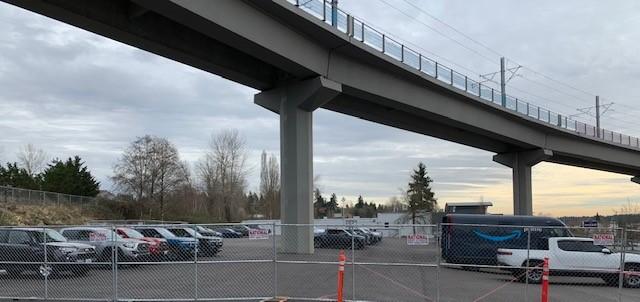
Drove by the Bellevue WA SC Friday - about 20 R1T's parked in the back lot - various stages of prep / delivery I assume

Last edited:
HappyCamperPNW
Member
- Joined
- Sep 19, 2021
- Threads
- 0
- Messages
- 19
- Reaction score
- 20
- Location
- Edmonds, WA
- Vehicles
- Nissan Leaf (2016), Mustang Mach E (2021)
Also drove by the Bellevue service center. Around 1:30pm, I counted at least 24 R1Ts plus 4 additional R1Ts that were being unloaded from a transport truck!
carcrazydoc
Well-Known Member
- First Name
- Sean
- Joined
- Oct 6, 2021
- Threads
- 18
- Messages
- 79
- Reaction score
- 53
- Location
- Indianapolis, IN
- Vehicles
- 2018 991.2 GTS, 2018 E63s wagon, 2016 Cayenne GTS
- Occupation
- emergency physician
Congratulations and thanks for the information about trade-ins. Anxiously awaiting my April/May delivery of a R1S. Looking to trade in a Cayenne GTS without mechanical issues and a single scratch in the cargo area. Your R1T is beautiful!
EarlyAdptr
Well-Known Member
HaHa - your count is better - I didn't even get out of my truckAlso drove by the Bellevue service center. Around 1:30pm, I counted at least 24 R1Ts plus 4 additional R1Ts that were being unloaded from a transport truck!
Sponsored
HappyCamperPNW
Member
- Joined
- Sep 19, 2021
- Threads
- 0
- Messages
- 19
- Reaction score
- 20
- Location
- Edmonds, WA
- Vehicles
- Nissan Leaf (2016), Mustang Mach E (2021)
It was a sunny day and I really wanted see the colors in the sunshine! I was shocked how many were there plus more being unloaded. I think there are far far more deliveries planned in this area than are being reported on this forum.
It looks like a nice facitility. I wish they would have an open house like they did in Denver!
It looks like a nice facitility. I wish they would have an open house like they did in Denver!
RivianSocial
Member
- Joined
- Mar 13, 2022
- Threads
- 2
- Messages
- 22
- Reaction score
- 16
- Location
- Seattle, WA
- Vehicles
- Model 3, Chevy Spark EV, HD Livewire, Rivian R1T
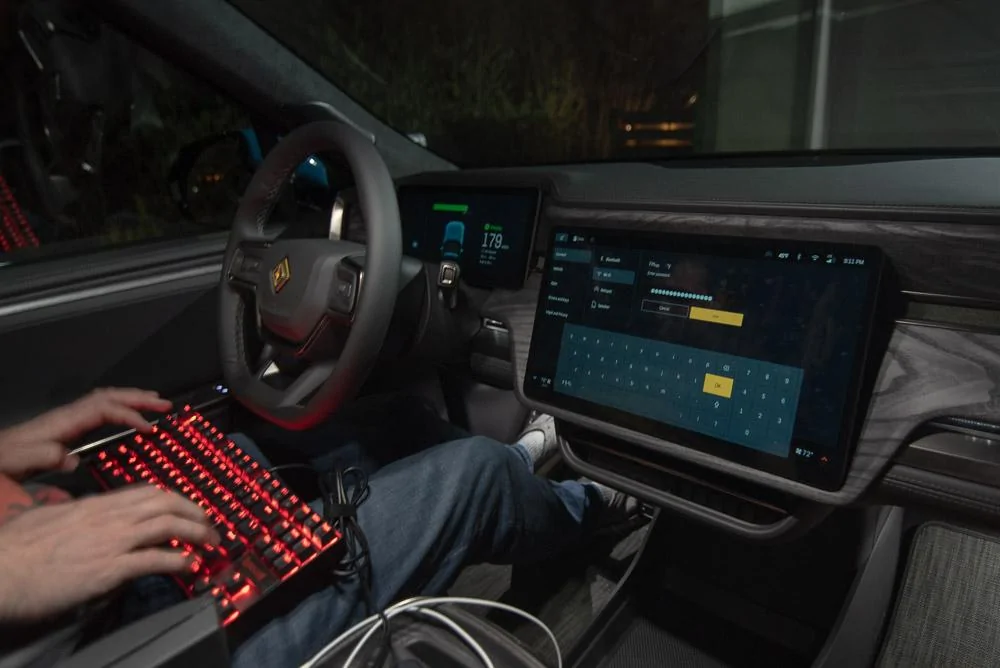
If it's any consolation, my Model 3 has the same issue. I ended up dumbing down my wifi a little so the Tesla keyboard would take it.It's burned me enough times setting up "smart" devices that I knew exactly what the problem was... You'd think I'd have changed it by now, but part of me kind of enjoys being the guy who finds the bug every time.
Craigins
Well-Known Member
- Joined
- Jun 10, 2021
- Threads
- 2
- Messages
- 1,571
- Reaction score
- 2,397
- Location
- Chicago Suburbs
- Vehicles
- Rivian R1T
- Occupation
- Software engineer
now someone needs to sideload Doom on to that.Workarounds...


godfodder0901
Well-Known Member
- First Name
- Jared
- Joined
- Mar 12, 2019
- Threads
- 27
- Messages
- 5,749
- Reaction score
- 10,139
- Location
- Washington
- Vehicles
- 2022 Rivian R1T LE
Never even thought to try that!Workarounds...
Bonus points for the socks and flip-flops look! (my go-to for short errands!)
Sponsored
Similar threads

- Replies
- 12
- Views
- 3,081
- Replies
- 17
- Views
- 1,998


- Replies
- 4
- Views
- 1,350
