Sponsored

I updated the software to 2023.46.0 and


  • Total voters
    290
  • Poll closed .

Tim-in-CA

Well-Known Member
Joined
Sep 30, 2021
Threads
46
Messages
1,792
Reaction score
3,429
Location
So Cal
Vehicles
Gen 1 R1S, Lucid Air, T-Bird

JayinNJ

Well-Known Member
First Name
Jason
Joined
Aug 19, 2021
Threads
3
Messages
285
Reaction score
217
Location
NJ
Vehicles
Tesla Model 3, R1S LE Canyon Red
Likely needs to be in sequences because most updates go off of the previous version ( many times to fix the previous version's bugs). Any software engineer wants to chime in on this?
It depends. All new software usually completely replaces the old software. That is the simplest and most reliable way to do a software update. However, they could just replace some of the images that changed and leave others untouched. To do that they would have to verify those untouched images are of a compatible version first.

However, if something like a new filesystem, software signing, or certificates or trust anchors need to be installed prior to accepting the new software, then yes there may need to be a specific version upgrade path, but that is rare.
 

emoore

Well-Known Member
Joined
Nov 29, 2020
Threads
4
Messages
3,815
Reaction score
4,240
Location
Colorado
Vehicles
2022 R1T
Just updated last night. Haven't driven the truck yet but the update didn't fix the window is open issue I have on the app. Says my drivers side window is open but it's not. Tried calibrating the window (open, hold switch down for 5 sec, close, hold switch up for 5 sec) and that didn't work. Not the end of the world just annoying to see everytime I look at the app.
 

Southern R1S

Well-Known Member
Joined
May 3, 2022
Threads
4
Messages
337
Reaction score
697
Location
USA
Vehicles
2023 R1S (LE/GW/OC/20"AT), Lexus GX 460 Luxury
Occupation
Builder
Question: can you skip an update (or multiple updates) and just upload the latest one as and when its out, or does it force you to upload the next in sequence?
Likely needs to be in sequences because most updates go off of the previous version ( many times to fix the previous version's bugs). Any software engineer wants to chime in on this?
At least with this update, you can skip versions - I went straight from .38 to .46 (skipped over the .41 update fiasco entirely) on my R1S.

In my case, .41 was downloaded for several weeks & I just dismissed the update prompt every time it appeared and then last week .41 was gone and I was prompted to go straight to .46.

I had no issues with the update nor have I had any issues since the update (knock on wood). PaaK seems more responsive / reliable, and the automatic resume for D+ after lane changes also works about as expected (though it does try to recenter in the new lane a little early on occasion -- expect that will be ironed out in a future update).

Still wish they would extend the time the turn signal stays on when you do a "short tap" for a lane change -- it's still entirely too short to be useful unless you hit it the moment you're changing lanes (which is dangerous). Seems like with this new update, it seems like they could have at least timed that to just disable once the lane change is completed if D+ is active / engaged.

As always, YMMV.
 

kewlasu

Well-Known Member
First Name
Chris
Joined
Apr 30, 2021
Threads
7
Messages
308
Reaction score
272
Location
Maine
Vehicles
2022 Rivian R1T LA Silver Adventure Large Pack 21"
Clubs
 
Just updated last night. Haven't driven the truck yet but the update didn't fix the window is open issue I have on the app. Says my drivers side window is open but it's not. Tried calibrating the window (open, hold switch down for 5 sec, close, hold switch up for 5 sec) and that didn't work. Not the end of the world just annoying to see everytime I look at the app.
My update was successful last night as well. Went from 42.02 to 46.0 with no issues driving this morning.

With regards to your open window error in the app, had that issue prior to v38. All my windows worked in the truck. None of the prior updates fixed the app notification error. When my mobile appt came to deliver my spare tires, I told him this issue. He plugged in his laptop through the odbc port and reset the window settings, then the app error went away. Been working since.
 

Sponsored

Count Orlok

Well-Known Member
Joined
May 17, 2022
Threads
185
Messages
2,550
Reaction score
5,329
Location
Wisconsin & New Mexico
Vehicles
2022 R1S/ 2024 INEOS Grenadier/ 1969 Ford / etc.
Occupation
retired
Clubs
 
Are you unable to charge? Could it be that the charge schedule needs resetting?
no schedule even set. hard reboot of R1S and taking faceplate off charger and replacing seems to have done something as now it is charging. so :unsure:????
 

Count Orlok

Well-Known Member
Joined
May 17, 2022
Threads
185
Messages
2,550
Reaction score
5,329
Location
Wisconsin & New Mexico
Vehicles
2022 R1S/ 2024 INEOS Grenadier/ 1969 Ford / etc.
Occupation
retired
Clubs
 
no schedule even set. hard reboot of R1S and taking faceplate off charger and replacing seems to have done something as now it is charging. so :unsure:????
whoops. spoke too soon. L2 FUBAR again. "vehicle error" and red light of death.
 

niranjanm81

Member
First Name
Niranjan
Joined
Nov 7, 2023
Threads
2
Messages
9
Reaction score
10
Location
cupertino CA
Vehicles
RIVIAN R1S
Occupation
Engineer
Hi Rivian owners, I have not received any notification for the latest update (2023.46.0) yet. Do I just wait?
 

kpx110

Well-Known Member
First Name
keith
Joined
Nov 18, 2021
Threads
7
Messages
100
Reaction score
77
Location
atlanta
Vehicles
Porsche
Occupation
developer

Sponsored

Dark-Fx

Well-Known Member
First Name
Brian
Joined
Jul 15, 2020
Threads
148
Messages
13,536
Reaction score
27,314
Location
Michigan
Vehicles
R1T, R1S, Livewire One, Sierra EV, R1S
Occupation
Engineering
Clubs
 
whoops. spoke too soon. L2 FUBAR again. "vehicle error" and red light of death.
Our R1S was prompted to update in the middle of the night so I kicked it off. No issues at all here. It was not plugged in at the time but charged fine this morning after swapping the charger onto it.
 

tomis916

Well-Known Member
First Name
Tom
Joined
Dec 26, 2019
Threads
2
Messages
86
Reaction score
151
Location
Boulder, Colorado
Vehicles
2023 Rivian R1S
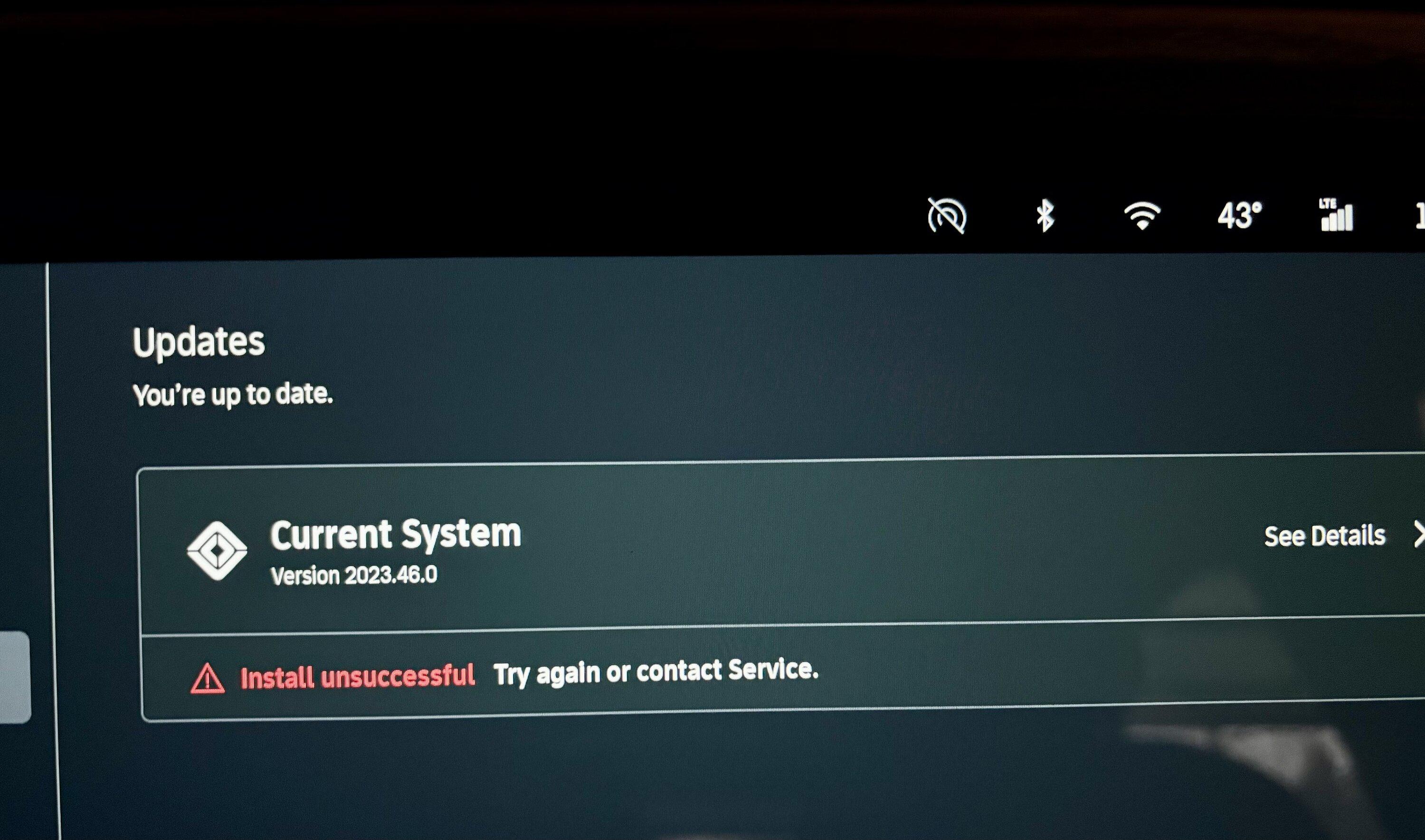
I started the update to 2023.46.0 last night and went to bed (plugged into Level 2 charger). I had a message this morning saying that the update failed and that I should try again or contact customer service. My R1s seems to still work and it appears it is on 2023.46.0. The warning disappeared from the app after I started the car this morning, but I still have the message on my screen.

I'm not sure how I would try again if I wanted to so I contacted Customer Service.
Rivian R1T R1S Software Update 2023.46.0 is rolling out IMG_0014
 
Last edited:

SDH

Well-Known Member
Joined
Dec 13, 2022
Threads
10
Messages
736
Reaction score
1,323
Location
NC
Vehicles
R1T LE; Jeep Rubicon
Hi Rivian owners, I have not received any notification for the latest update (2023.46.0) yet. Do I just wait?
Yes. Rolls out to different folks at different times. Don't read anything into it.
 

SANZC02

Well-Known Member
First Name
Bob
Joined
Feb 11, 2021
Threads
50
Messages
7,411
Reaction score
12,703
Location
California
Vehicles
Tesla Model S, LE - R1S
Occupation
Retired
I started the update to 2023.46.0 last night and went to bed (plugged into Level 2 charger). I had a message this morning saying that the update failed and that I should try again or contact customer service. My R1s seems to still work and it appears it is on 2023.46.0. The warning disappeared from the app after I started the car this morning, but I still have the message on my screen.

I'm not sure how I would try again if I wanted to so I contacted Customer Service.
IMG_0014.jpeg
Contact customer service, they can review the logs and push it again. I had this happen on my first OTA, one module was failing that required a hardware replacement but the rest of the vehicle was fine. Just could not get any other updates until they fixed the failing module.
 

srnyoung

Well-Known Member
First Name
Nate
Joined
Apr 23, 2022
Threads
12
Messages
424
Reaction score
487
Location
Portland, Oregon
Vehicles
'15 eGolf, '04 Suzuki Grand Vitara
Occupation
Teacher
Clubs
 
Completed the update last night - it seemed like it went through fine based on phone notification.

I'm not with our T today but wife just called to let me know it seems to be unlocking at home again. That setting was off but it's sitting in the driveway unlocked after not having been driven for ~24 hours and sitting locked when the update went through last night. I'll try [RE]setting proxy unlock to off at home again to see if that fixes it.

So, PAaK settings are spotty now? Do tech companies not have a sandbox any longer?
Sponsored


Top