
jeff76
Member
- First Name
- Jeff
- Joined
- Apr 22, 2024
- Threads
- 0
- Messages
- 5
- Reaction score
- 0
- Location
- New Orleans, LA
- Vehicles
- Jeep Wrangler (1986)
Impressive.
Sponsored

Also am I understanding this correctly that to use the sensor based unlock....Thar you have to have the PAAK proximity locking turned off? Meaning no auto locking as you walk away, if you want to use the sensor based unlock? That would be a deal killer for me if true....
But then you have to manually lock it when you leave? No auto lock? That is the part that would be the deal killer for me...not the unlock part.Awesome they're pushing this out already! Didn't think they'd push the lane change update so quickly to gen 2
I mean - makes sense to me? If you have to proximity lock turned on, by the time you're close enough to touch the sensor, it'll already be unlocked anyway?
Well I mean... What you're after is like... Half of proximity lock? Like it only locks for you but doesn't unlock?But then you have to manually lock it when you leave? No auto lock? That is the part that would be the deal killer for me...not the unlock part.
How does exiting and locking the truck now work with this capacitive approach? I get the entry part...walk up to truck...have PAAK enabled but proximity locking off....and touch door handle. I assume then it presents the door handles and unlocks.Well I mean... What you're after is like... Half of proximity lock? Like it only locks for you but doesn't unlock?
The only way I know that is an option is the "home" lock setting. And I'd be willing to bet that the sensor would work in that situation
I suppose that's how it works?How does exiting and locking the truck now work with this capacitive approach? I get the entry part...walk up to truck...have PAAK enabled but proximity locking off....and touch door handle. I assume then it presents the door handles and unlocks.
But then leaving....what is process to lock? I assume door handles would all be extended....so you then touch the door handle and then the handles all retract and it locks?
I guess what I am saying is I can't figure out when I would want to use that over proximity auto locking and unlocking?
True! I was hesitant about PAAK at first, but it improved with time and I learned the easy work around to the autolock and unlock when loading bed, etc... by just leaving a door slightly open...to point now I love PAAK and find it superior to carrying keys/fobs....hitting door handles on entry/exit to trigger lock/unlock seems last generation to me...but I can see how some would like it.I suppose that's how it works?
I mean I'm with you, I'd much rather use proximity. But probably a nice addition for when you're home if you have "lock only" mode turned on ?
I'm guessing this feature is for that, but also for people who get so tired of the constant locking and unlocking when you're nearby that they just turn off proximity all together
WHAAAAAT?! My Pentium can do things my 386 can’t?!Software Update 2024.23
Rivian Autonomy Platform
The premium driver assistance features are now called the Rivian Autonomy Platform.
The Rivian Autonomy Platform+ adds the new advanced feature, Lane Change on Command, which automatically performs lane changes in the direction of the turn signal while Highway Assist is engaged. For more information, choose Owner’s Guide at the bottom of the center display, and search for Lane Change on Command.
- A free trial of the Rivian Autonomy Platform+ is automatically included through 2024 and includes Lane Change on Command.
- More features will be added to the Rivian Autonomy Platform+ in future releases to enhance the driving experience.
Press to Unlock Your Vehicle
You can press the sensor on the driver-side door handle to unlock the vehicle if the following conditions apply:
- Proximity Locking is turned off.
- You have your phone key with you.
- You are close to the vehicle.
New Roadside Lighting
If you stop and park your vehicle on the side of the road, you can have your roadside lighting animate to direct traffic around your parked vehicle. To turn on roadside lighting, put your vehicle in Park, and open the quick controls panel. Go to Vehicle > Shortcuts > Roadside lighting from the status bar of the center display.
Additional Improvements
- Updated the exterior lighting charging animation. When the charge session reaches the charge limit you set, the center light bars stay green. The segments at full brightness indicate the changing level; any remaining segments are dimmed.
- Smoothed the exterior lighting welcome animation that plays as you approach the vehicle.
- The entry lights now gradually brighten when they turn on or gradually dim when they turn off.
- Fixed an issue that didn’t save a change to the brightness setting for the accent lights when no one is in the vehicle.
- The liftgate or hood now reverses if it encounters an obstacle when it is almost closed or if it cannot fully close after a period of time.
- Fixed an issue that prevented the windows from completely closing after calibration.
- Fixed an issue that inadvertently moved the side mirrors during Roomy entry and exit.
- The center console now locks if the Gear Guard alarm is triggered.
- Added a notification to inform you if the Camp Speaker or drawer is docked but unlocked while the vehicle isn’t in Park.
- If the center display indicates Pet Comfort is turned on, the open door buttons are disabled.
- Limited the maximum fan speed to reduce during certain cooling modes.
- Fixed an occasional issue that opened Apple Wallet when an iPhone was placed on the wireless charger.
- Fixed an occasional issue that kept the Gear Guard video recordings from including the location.
- Fixed a rare camera system stability issue that kept certain views from appearing.
- Fixed an issue that kept the trailer brake activation prompt from properly appearing on the driver display.
- Fixed an issue that kept the Rear Cross-Traffic Warning from appearing on the driver display.
- Fixed a rare issue that prevented the Highway Assist Available icon from appearing on the driver display when Highway Assist was available.
- Fixed an issue that kept the vehicle from navigating to faraway destinations when offline.
- Fixed an issue that prevented you from saving small seat position changes.
- Improved the charging session reliability for the Rivian Adventure Network.

Correct, just the key cards with the gen 2s.No key? I use my fob since the phone key works so poorly (have to open the app regularly to get it to function)

When I purchased the S, I don't think all these features were promised and I knew what I was getting. As someone who loves new technology, would love to get these features on my OG S. I'll just look at it from the glass half full perspective.
I've done two long distance road trips (5k total) this summer and have fallen even more fond of the S.
On a side note, I was pleasantly surprised when my S started to display km/hr and showed the speed limit in km/h when I crossed the Canadian border. Actually lectured my daughter that you needed math to figure out the conversation as the vehicle wouldn't do it for you.
You still had MPH, but above that on the screen it displayed the km/h. Also the speed limit on the screen showed as km/h. Figured I'd have to change some setting to be able to display (which I didn't want to bother with), but was cool to see it just change on the fly. It happened seconds after I crossed the border. Then when I crossed back, it was back to what it looked like originally. Related the highway assist coverage was pretty good.It auto-changed to Km/h? That’s really cool to know If true!
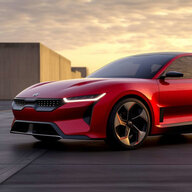
FWIW this is how it works on the Kia EV6How does exiting and locking the truck now work with this capacitive approach? I get the entry part...walk up to truck...have PAAK enabled but proximity locking off....and touch door handle. I assume then it presents the door handles and unlocks.
But then leaving....what is process to lock? I assume door handles would all be extended....so you then touch the door handle and then the handles all retract and it locks?
I guess what I am saying is I can't figure out when I would want to use that over proximity auto locking and unlocking?
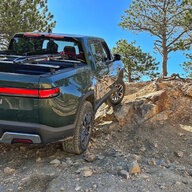
This is the only real annoyance about the RAP change for Gen2. Rivian from day 1 was advertising a system on Gen1 that was capable of hands-free driving. Yes, don't buy a vehicle for what it *may* do, only for what it *can* do today, etc, etc. But, they didn't really back off that claim until Gen2 came out...or really after they removed the driver monitoring camera sometime mid/late 2023 which really sealed Gen1's fate to never get hands-free driving in any capacity. Really, Gen1 doesn't even do a great job at identifying lane markings, so I have no doubt we'll also never get true lane-centering on unmapped highways either. Absolutely love my truck, but we were definitely sold a bill of goods on the autonomy platform for Gen1. Really, Rivian didn't know what they didn't know on that side of the house. But it even sounds like for Gen2 they're using an off-the-shelf autonomy platform while including extra hardware to build out an in-house system over time.It is not about being sore.. we all plopped quite a bit of money and it is understandable that people are upset that these new features that were promised are not being delivered. Lane change or staying in lane seems to be basic features that are incorporated in other cars and works everywhere. Driver+ in its current implementation on Gen 1s is not useful as it works only in freeways.


