Sponsored

Map in Night Mode / Dark Mode on center screen unusable - both with old MapBox map and update to Google Maps

riv-evah

Member
Joined
Jun 16, 2025
Threads
2
Messages
12
Reaction score
11
Location
NYC Metro
Vehicles
2025 R1S Dual Max
Clubs
 
I've been extremely disappointed of the clarity of the map, and only of the map, when in night/dark mode. I'm seeing the serious issue on my 2025 R1S's center display and on my Android phone.

[ I had posted something similar this in the large 2025.22 thread, but believe it deserves its own thread, especially since this isn't 2025.22 specific ]

I like dark mode. I use it on Android phones, I use it on Windows computers, and I use it on my AAOS Volvo XC90. Backgrounds are black (or dark), text is light, and everything is crisp and readable, even in bright sunlight. Unfortunately, that's not been my experience with Rivian.

The Rivian's maps in dark mode, both the previous Mapbox version and the Google Maps replacement, are really dark, almost like there is a black opaque layer on top of the map. Everything else is nice and sharp, just like I like it, but the maps are almost impossible to follow, faded/washed out. If I change to the light mode, everything's fine with maps, but then everything everywhere is on a white background, which just isn't for me. It's not a brightness question either, even with brightness all the way up the map itself is still entirely too dark and washed out when in dark mode.

Interestingly this problem also exists in the Android app on the phone. If I go to that middle tab with my phone in dark mode, even with the brightness turned all the way up, the planning map is just as dark, almost unreadable. @azbill confirmed that he's seeing the same thing in the iPhone app's center tab and, of course, on his Rivian's center screen too.

Anyone else bothered by this? If so, please send detailed feedback in the app to help make the developers aware of the issue. I've spoken to service about this, but I'm not convinced they understand what I'm seeing. Maybe we can get some traction here.

UPDATE: Aug 2025: It's as if they took the Google Maps rendering where there is a satellite background, then text and roads overlaid on that, and then put a big translucent black screen over all of that. That's not dark mode, that's severely dimmed.

Thanks
Sponsored

 
Last edited:
RivAW

Well-Known Member
First Name
Alex
Joined
Mar 9, 2023
Threads
1
Messages
864
Reaction score
839
Location
MA
Vehicles
R1T, Glacier White, Black Mountain, Black AT 20s,
Clubs
 
First, it is supposed to be set for dark mode at night. When it's "light outside" it is nearly impossible to see the map in dark mode in the Rivian. I happen to agree with you and prefer dark mode, but that's just how it is. With both modes, however, there is a sliding brightness scale in settings that you can adjust that you might (I don't) find useful.
 

Captblue

Well-Known Member
First Name
Carlos
Joined
Nov 2, 2021
Threads
10
Messages
240
Reaction score
180
Location
Florida
Vehicles
R1T
Hopefully, there is a future update, that allowed you t9 have dark mode, with daytime map.
 
OP
OP

riv-evah

Member
Joined
Jun 16, 2025
Threads
2
Messages
12
Reaction score
11
Location
NYC Metro
Vehicles
2025 R1S Dual Max
Clubs
 
First, it is supposed to be set for dark mode at night. When it's "light outside" it is nearly impossible to see the map in dark mode in the Rivian. I happen to agree with you and prefer dark mode, but that's just how it is. With both modes, however, there is a sliding brightness scale in settings that you can adjust that you might (I don't) find useful.
Even at night though, the dark overlay (and I say overlay because everything is darkened vs using white text on dark background) makes it nearly impossible to read. It is true in the Rivian app on smartphones too on the same phones that show maps in the Google Maps app is dark mode cleanly.
 
OP
OP

riv-evah

Member
Joined
Jun 16, 2025
Threads
2
Messages
12
Reaction score
11
Location
NYC Metro
Vehicles
2025 R1S Dual Max
Clubs
 
While driving yesterday afternoon (light out) while in dark mode, I had a revalation (don't get too excited, it's not that deep): : it's not just that the satellite imagery is too dark and washed out in dark mode, it's that the overlaid roads are ALSO too dark.

You can very clearly see the roads on the route you're supposed to take in a rich and bright blue, but the other roads that are needed to give the driver an understanding of relative location are so dark (a subtle semi-translucent gray) that they are not visible. I've never seen maps in another vehicle, not AAOS Google Maps nor AndroidAuto do this so terribly. If there's no route set, no roads are visible enough, let alone street names. It's as if they took the Google Maps rendering where there is a satellite background, then text and roads overlaid on that, and then put a big translucent black screen over all of that. That's not dark mode, that's severely dimmed.
 

Sponsored

Mellowyellow

Well-Known Member
Joined
Jan 27, 2024
Threads
13
Messages
977
Reaction score
1,489
Location
NY
Vehicles
R1S
Clubs
 
So, just increase the brightness of the screen?
 
OP
OP

riv-evah

Member
Joined
Jun 16, 2025
Threads
2
Messages
12
Reaction score
11
Location
NYC Metro
Vehicles
2025 R1S Dual Max
Clubs
 
So, just increase the brightness of the screen?
I hear you, and I previously tried that.

I find that AUTO brightness works as it generally should, though my preference would be for it to have the screen slightly darker than the default. (that's a separate rant - a vehicle of this caliber should have adjustable light sensitivity like what's been in other brands for 20+ years). However, brightness isn't the fix here.

Manually increasing the brightness just makes the backlighting brighter (which is especially bad at night), it makes the dashboard display and other areas of the larger display entirely too bright, bordering on unsafe to drive like that at night.

Worse, increasing the brightness doesn't improve the contrast between the map and the roads, nor does it remove what is essentially a black translucent overlay over the map portion of the screen. THAT is what Rivian needs to fix, but I can't even get a phone rep to understand what I'm seeing... Rivian needs to correct the colors following Google's map theming, not by darkening the display area and calling that dark mode.

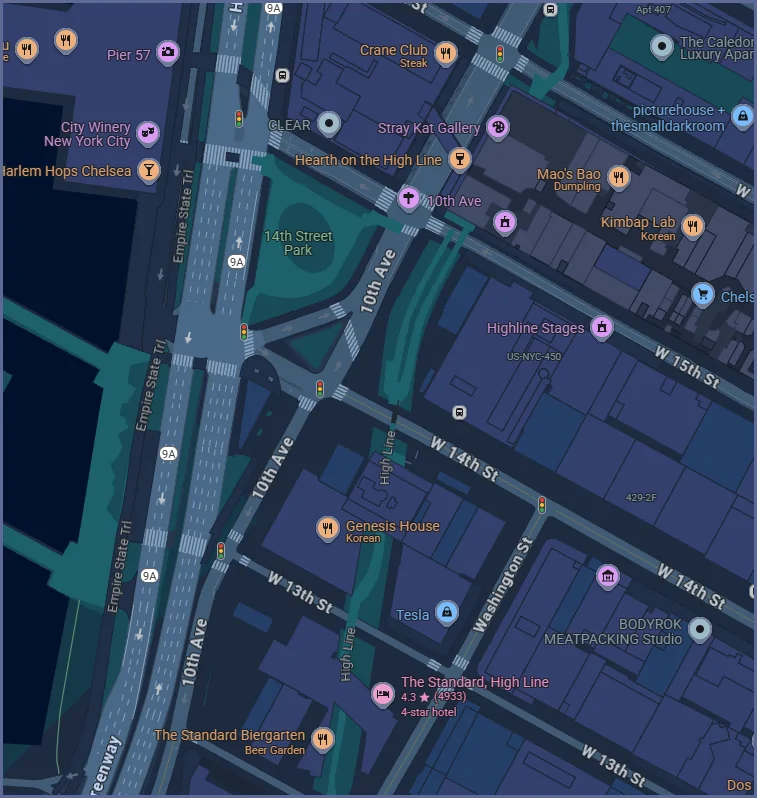
Look at this example right from Google's developer console. Look how clear that is with the default dark theming. There's distinct contrast making the roads clearly visible. Now compare that to your Rivian's dark display.

Rivian R1T R1S Map in  Night Mode / Dark Mode on center screen unusable - both with old MapBox map and update to Google Maps 1755882214608-


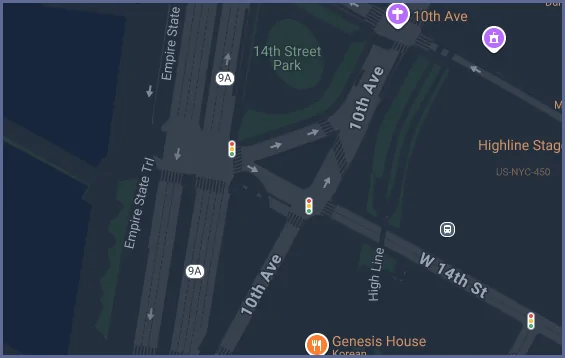
There's plenty of other styling too, with this base sample in dark mode being infinitely more readable than what Rivian has done to the display. See https://developers.google.com/maps/documentation/javascript/examples/style-array

Rivian R1T R1S Map in  Night Mode / Dark Mode on center screen unusable - both with old MapBox map and update to Google Maps 1755882595316-b8
 
OP
OP

riv-evah

Member
Joined
Jun 16, 2025
Threads
2
Messages
12
Reaction score
11
Location
NYC Metro
Vehicles
2025 R1S Dual Max
Clubs
 
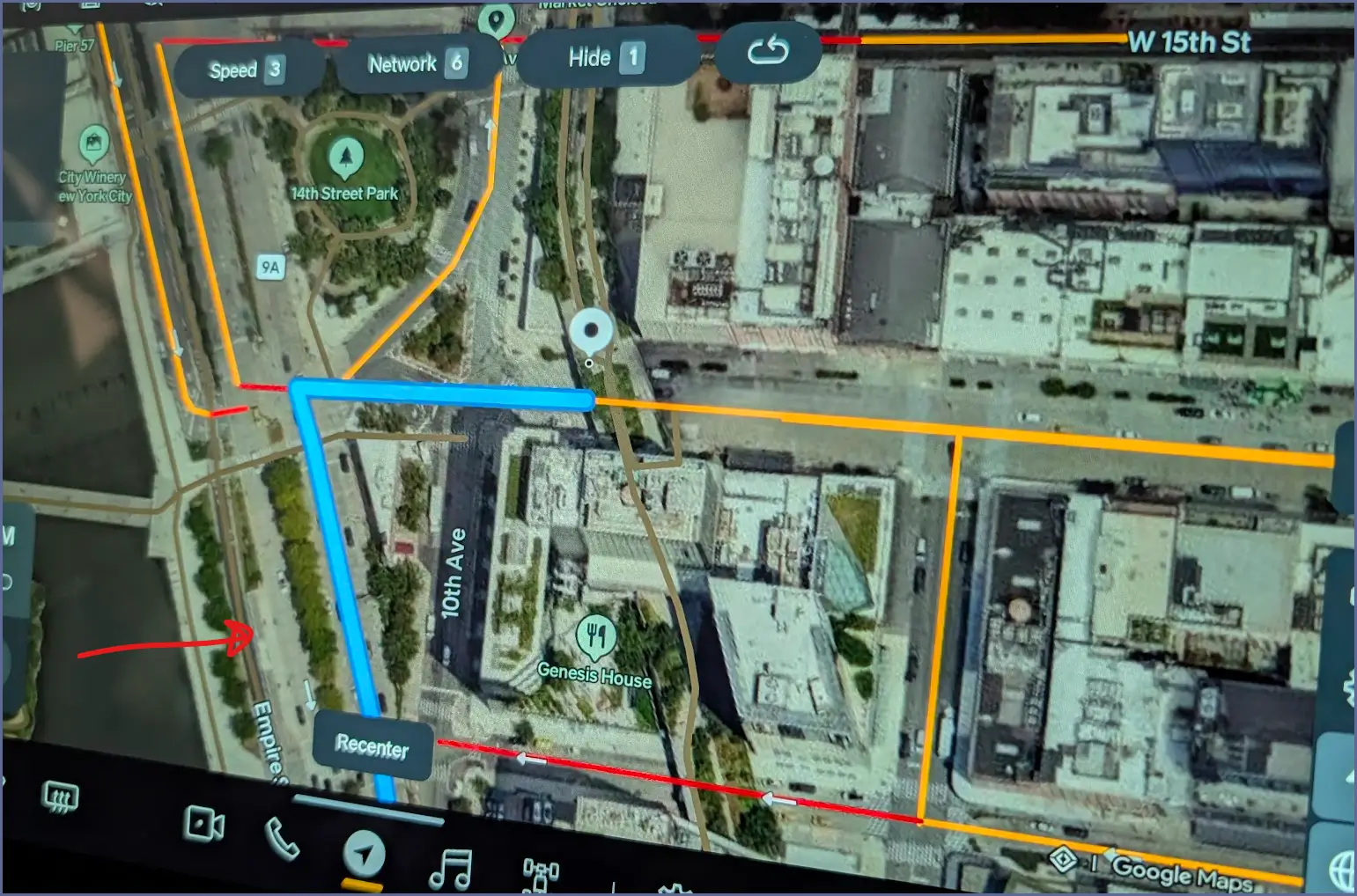
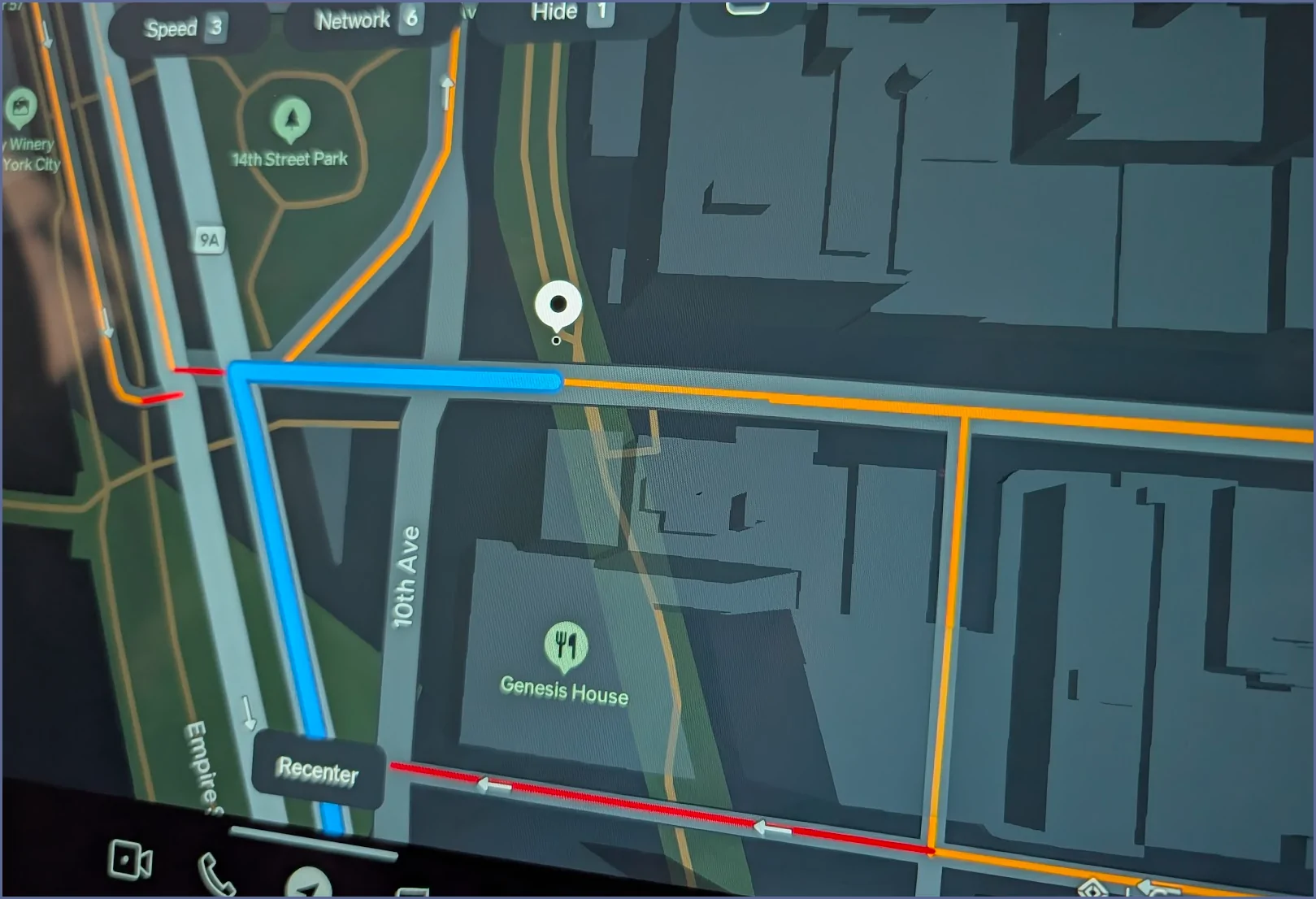
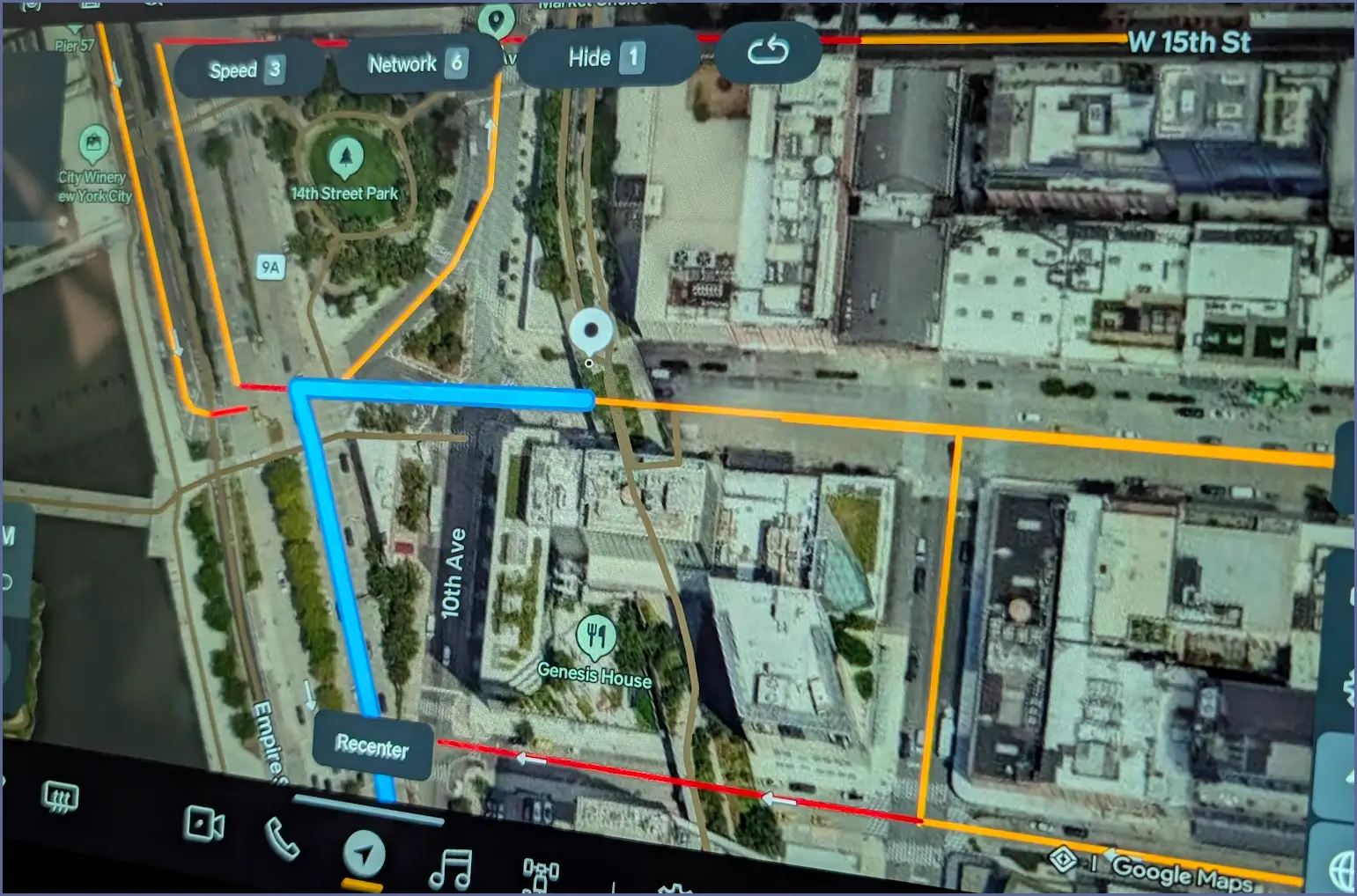
I just updated to 2025.26. I haven't driven yet but tried to simulate nav with dark mode, both with satellite and not. Could it be this is fixed (or improved) or is is just acceptable when in the garage without any sunlight??? I see nothing in the change log in any way referencing this.

Street names when zoomed in are missing on many/most roads still (unlike in Volvo with AAOS and vehicles that have AndroidAuto with real Google Maps), but at least I'm able to see the roads in non-satellite view. Now in satellite view, with navigation on, road outline/overlay is still missing (see the red arrow pointing to the 9A/West Side Highway). In non-satellite view, you can see 9A with a gray road outline. IN satellite view, the path of 9A isn't visible EXCEPT where there is traffic indicated or the nav path. North of the right hand turn onto 14th street (and 14th street isn't labled), 9A no longer shows, nor does it in the southbound lanes though there is an arrow just to the left of the recenter button.

Rivian R1T R1S Map in  Night Mode / Dark Mode on center screen unusable - both with old MapBox map and update to Google Maps 1755887621412-jy


Rivian R1T R1S Map in  Night Mode / Dark Mode on center screen unusable - both with old MapBox map and update to Google Maps 1755887461005-hl


Anyone else?

Rivian R1T R1S Map in  Night Mode / Dark Mode on center screen unusable - both with old MapBox map and update to Google Maps 1755887501733-df
 

Aardvark

Well-Known Member
Joined
Dec 29, 2021
Threads
6
Messages
652
Reaction score
1,336
Location
Colorado
Vehicles
R1S, Model 3
I'm still frustrated by this in the app (v 3.5.1) on a Galaxy S23. I continue to search for settings in the app to switch to light-mode, but with no luck. No luck either when going to the phone settings>Apps>Rivian.
Cranking up the phone brightness only provides marginal improvement on satellite or map modes.
It's just very difficult to read the map in the app. I will submit a suggestion through the app to Rivian.
Sponsored


Top