Sponsored

Many Missing Prime Charging Stations in NAV

Jtg11

Active Member
First Name
Jeff
Joined
Mar 12, 2019
Threads
5
Messages
34
Reaction score
27
Location
Dayton, OH
Vehicles
R1T, R1S, Mustang Mach E GT, Audi Q5,
Clubs
 
Sorry if this is already discussed. I did a quick search and could only find reference to Ionna missing from the Nav app.

I just completed a quick road trip from Dayton OH to Philadelphia and back. The Nav does not show Ionna (already discussed here), but it is also missing Pilot Flying J and Apple Green. These are significant charging networks and on this trip alone, had at least 8 prime, high speed, charging locations that were not listed in the Navigation. Those are just the ones I noticed. I ended up charging at several of them on the trip.

When traveling alone and adjusting your plan on the fly, it makes it a bit difficult when you have to go to a cell phone and review plugshare or other 3rd party apps to find prime charging locations when reviewing all this data would be super easy if the charging locations were simply showing in the Nav. I had to find these locations in a 3rd party app and then specifically search for these locations in the Nav to navigate to them. Also, I had to remember to manually precondition the battery about an hour out from the charger.

@Rivian Please get the all relevant charging station information populated to the Nav. Other than getting good directions, this is the next most important part of route plannIng needed in EVs.
Sponsored

 
Last edited:
Golfer04

Well-Known Member
First Name
Mike
Joined
Aug 21, 2023
Threads
11
Messages
568
Reaction score
599
Location
Illinois
Vehicles
R1T
Occupation
Finance
Don't switch to Plugshare. Some Tesla SC don't show up. Keeping up with the charger expansion is understandably difficult. Lots of the Circle K chargers don't show up on my Rivian either (Plugshare too).
 

Great Gatsby

Well-Known Member
First Name
Alex
Joined
Jan 15, 2025
Threads
15
Messages
745
Reaction score
1,425
Location
Atlanta
Vehicles
2018 BMW M240i
I've noticed the same. We actually were driving our ICE BMW on a recent roadtrip and at a surprising amount of gas stations we found some EV chargers nearby. I pulled up my Rivian App to see if it noticed them as well and it had no idea they were there. Which is honestly great news as chargers are becoming more prevalent, but kind of frustrating that it does not show up on the native nav. Really hoping that gets fixed in the next update.
 

azbill

Well-Known Member
First Name
Bill
Joined
Jun 8, 2020
Threads
17
Messages
1,696
Reaction score
1,978
Location
Arizona
Vehicles
Escalade IQ, Mach E, Hummer EV SUT
Occupation
Retired
If you have Google maps on your phone, plan your trip there and it will find those chargers. But you will have to manually select the chargers you want to use, it cannot automate stops for Rivian. Then send that trip plan to your Rivian, from Google maps.

My Rivian shows Pilot/Flying J stations, maybe you have EVGO deselected.

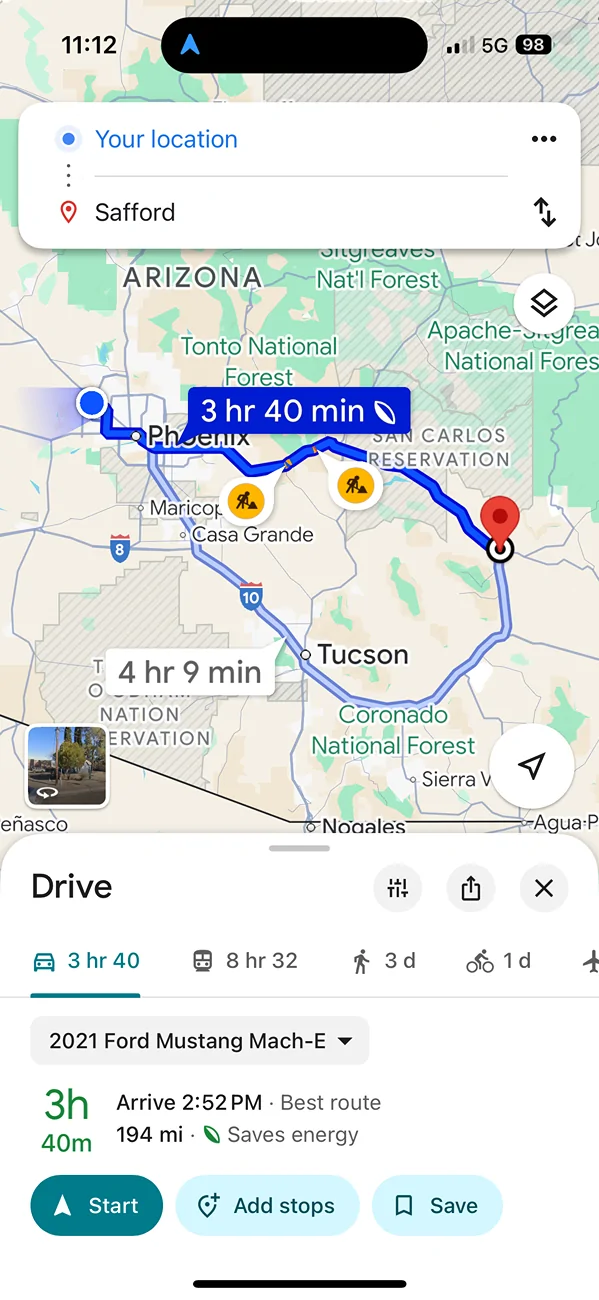
Here is an example, where I set up my Mach E as an electric vehicle in Google, but it is not connected to that car. Make sure in your setup to include NACS plugs, so that you get compatible Tesla chargers. I set up a destination as Safford AZ from Phoenix:

Rivian R1T R1S Many Missing Prime Charging Stations in NAV EVsetu


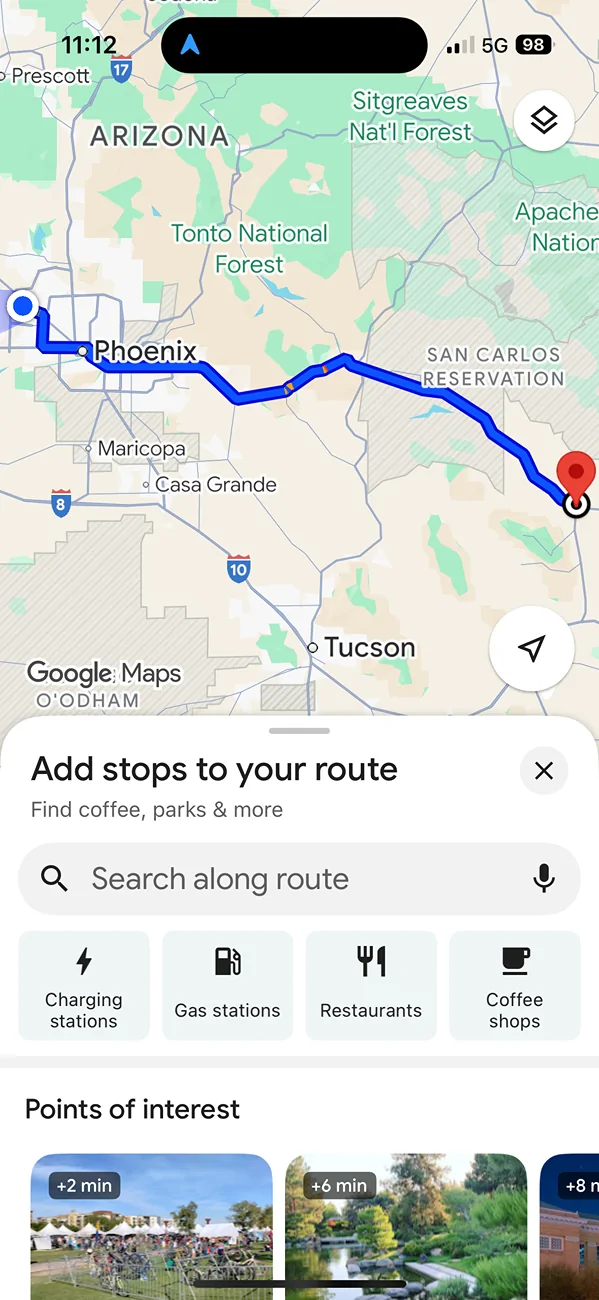
On that page select Add stops, then you get this:

Rivian R1T R1S Many Missing Prime Charging Stations in NAV EVcharging


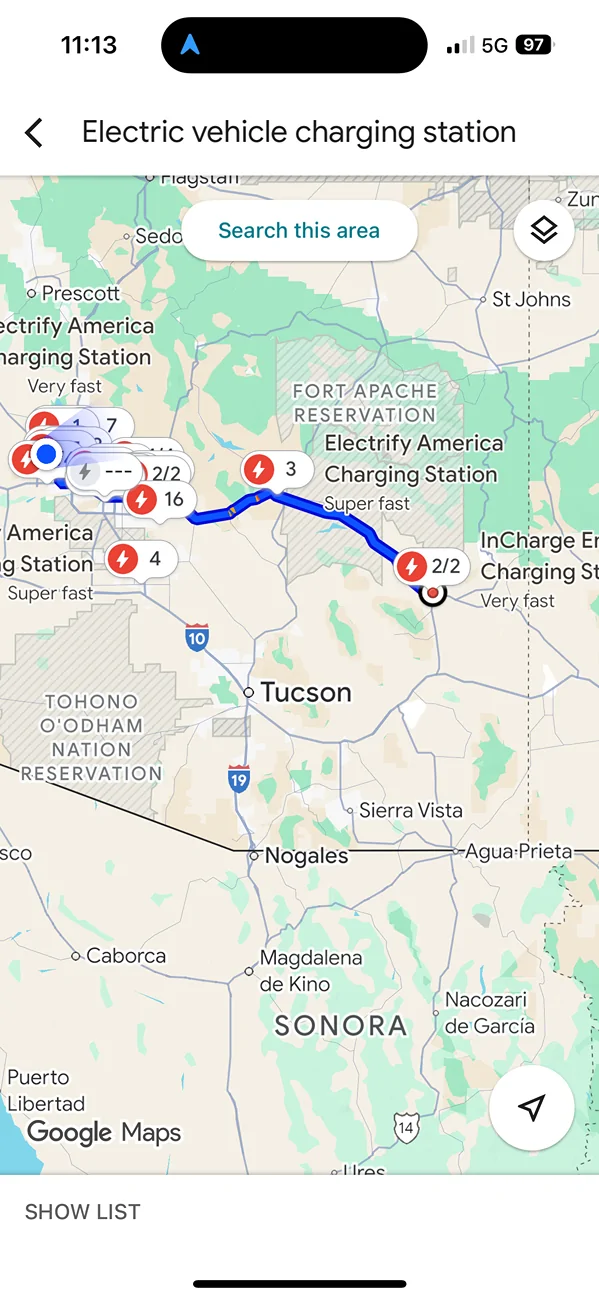
Then select Charging stations, you will get a list and map pins with all the chargers on the route:

Rivian R1T R1S Many Missing Prime Charging Stations in NAV ChargerPins


Select the desired charger, then add that stop. Repeat for additional chargers. Google keeps up with new chargers very quickly, Rivian is using there own limited database for chargers, unfortunately.
 

zefram47

Well-Known Member
First Name
Aaron
Joined
Feb 6, 2022
Threads
18
Messages
2,751
Reaction score
4,515
Location
Denver, CO
Vehicles
Rivian R1T, Alfa Romeo 4C
Occupation
Software Engineer
Kind of ridiculous that a lot of the Pilot/FlyingJ stations aren't in there yet and nothing for Ionna. I have one on a route I frequent that isn't there, so I wind up routing to a nearby Tesla station to get the preconditioning working but the Tesla site doesn't work well with trailers while the Pilot/FlyingJ does. I'm guessing the Walmart stations aren't there yet either and they're going like gangbusters with installs in a lot of areas.
 

Sponsored

electrictaco

Well-Known Member
Joined
Apr 2, 2021
Threads
0
Messages
267
Reaction score
468
Location
California
Vehicles
R1S
Kind of ridiculous that a lot of the Pilot/FlyingJ stations aren't in there yet and nothing for Ionna. I have one on a route I frequent that isn't there, so I wind up routing to a nearby Tesla station to get the preconditioning working but the Tesla site doesn't work well with trailers while the Pilot/FlyingJ does. I'm guessing the Walmart stations aren't there yet either and they're going like gangbusters with installs in a lot of areas.
All Pilot / Flying J stations are in there. They are under EVGo and so if you don't have that filter enabled you won't see them.
 
OP
OP
Jtg11

Jtg11

Active Member
First Name
Jeff
Joined
Mar 12, 2019
Threads
5
Messages
34
Reaction score
27
Location
Dayton, OH
Vehicles
R1T, R1S, Mustang Mach E GT, Audi Q5,
Clubs
 
Thanks for the tip on sharing from google maps. I have done that on occasion, but I am so comfortable traveling now that I really do not pre-plan. Just go and figure it out on the way. That is where having everything in the native Nav app is important. We are at a point now that we should not have to have a detailed charging plan determined before we leave. Having to go to multiple 3rd party apps and then manually search and add to native navigation is a PIA at best and a safety issue at worst. Also, I have almost never followed a pre-plan even when I have taken the time to develop one. Things change along the way. Someone has to use a rest room earlier than plan. The efficiency is different due to weather conditions. You get a late start and meal time is different. Therefore, adjusting along the way is the more real world.

With respect to Pilot Flying J, I have all the filters off so every charging station should show up. None of the Pilots, Ionna or Apple Green stations showed up on this particular route (I70/I76 through OH/PA). I suspect there are many other charging providers not showing as well. These are just the ones that I noticed as they were prime stop locations and MAJOR charging providers.

If you have Google maps on your phone, plan your trip there and it will find those chargers. But you will have to manually select the chargers you want to use, it cannot automate stops for Rivian. Then send that trip plan to your Rivian, from Google maps.

My Rivian shows Pilot/Flying J stations, maybe you have EVGO deselected.

Here is an example, where I set up my Mach E as an electric vehicle in Google, but it is not connected to that car. Make sure in your setup to include NACS plugs, so that you get compatible Tesla chargers. I set up a destination as Safford AZ from Phoenix:

EVsetup.webp


On that page select Add stops, then you get this:

EVcharging.webp


Then select Charging stations, you will get a list and map pins with all the chargers on the route:

ChargerPins.webp


Select the desired charger, then add that stop. Repeat for additional chargers. Google keeps up with new chargers very quickly, Rivian is using there own limited database for chargers, unfortunately.
 

CharonPDX

Well-Known Member
First Name
Charon
Joined
Jul 12, 2021
Threads
31
Messages
2,510
Reaction score
4,191
Location
Cascadia
Vehicles
'22 R1T LE, '16 Model S, '19 Arcimoto FUV
Occupation
InfoSec Geek
Clubs
 
Don't switch to Plugshare. Some Tesla SC don't show up. Keeping up with the charger expansion is understandably difficult. Lots of the Circle K chargers don't show up on my Rivian either (Plugshare too).
The thing about PlugShare is….

It's crowdsourced.

If a charge station doesn't show up - you can add it. (And you *SHOULD*.)
 
OP
OP
Jtg11

Jtg11

Active Member
First Name
Jeff
Joined
Mar 12, 2019
Threads
5
Messages
34
Reaction score
27
Location
Dayton, OH
Vehicles
R1T, R1S, Mustang Mach E GT, Audi Q5,
Clubs
 
All Pilot / Flying J stations are in there. They are under EVGo and so if you don't have that filter enabled you won't see them.
Nope, not in this route (I70/I76 though OH/PA). All filters are set correctly and no network preferences. Even if I select EVGO as the only preferred network, the Pilot Flying J locations do not show up. There is one in Eaton OH, London OH, Millersport OH, Belmont OH, and Smithton PA that do not show up. All right off exits of I70. Interesting, non Flying J EVGO station all show up.
 

azbill

Well-Known Member
First Name
Bill
Joined
Jun 8, 2020
Threads
17
Messages
1,696
Reaction score
1,978
Location
Arizona
Vehicles
Escalade IQ, Mach E, Hummer EV SUT
Occupation
Retired
Thanks for the tip on sharing from google maps. I have done that on occasion, but I am so comfortable traveling now that I really do not pre-plan. Just go and figure it out on the way. That is where having everything in the native Nav app is important. We are at a point now that we should not have to have a detailed charging plan determined before we leave. Having to go to multiple 3rd party apps and then manually search and add to native navigation is a PIA at best and a safety issue at worst. Also, I have almost never followed a pre-plan even when I have taken the time to develop one. Things change along the way. Someone has to use a rest room earlier than plan. The efficiency is different due to weather conditions. You get a late start and meal time is different. Therefore, adjusting along the way is the more real world.

With respect to Pilot Flying J, I have all the filters off so every charging station should show up. None of the Pilots, Ionna or Apple Green stations showed up on this particular route (I70/I76 through OH/PA). I suspect there are many other charging providers not showing as well. These are just the ones that I noticed as they were prime stop locations and MAJOR charging providers.
Rivian simply needs to switch over to use the Google database for chargers. My GM EV has Google natively and it does not miss all these other networks. When you do a charger search in the Rivian nav, it has a little text at the bottom "data provided by Rivian". And Google maps in my GM vehicle updates the database, without the need for an OTA in the vehicle, it is using live data. Not to mention that Google has the same crowdsourced data as Waze, for incidents and police.
 

Sponsored

waitingonanr1s

Well-Known Member
Joined
May 18, 2023
Threads
22
Messages
755
Reaction score
1,156
Location
Colorado
Vehicles
2025 Tri-Max R1S (CA Dune Edition), 2023 QM R1S (Traded in May 2025)
I just use ABRP for trip planning and my daily navigation - it's up to date on charging stations and has superior routing based on additional data not available to the nav system. I only use Rivian nav to program the next charging stop. You'd think Rivian would be harnessing all that ABRP offers, but they don't.
 

zefram47

Well-Known Member
First Name
Aaron
Joined
Feb 6, 2022
Threads
18
Messages
2,751
Reaction score
4,515
Location
Denver, CO
Vehicles
Rivian R1T, Alfa Romeo 4C
Occupation
Software Engineer
All Pilot / Flying J stations are in there. They are under EVGo and so if you don't have that filter enabled you won't see them.
I'm aware, and this station is not showing in the Rivian nav or the phone app despite being active since April 2025. I regularly use EVGo, so I don't filter it out.
 

azbill

Well-Known Member
First Name
Bill
Joined
Jun 8, 2020
Threads
17
Messages
1,696
Reaction score
1,978
Location
Arizona
Vehicles
Escalade IQ, Mach E, Hummer EV SUT
Occupation
Retired
I got in my truck today and made Winslow AZ a destination, it has a PFJ charger. Sure enough it does not show up, but the EA station there does.

If you do a search for "GM Energy" it will list the PFJ locations with chargers. FYI, you can also do a search for "Ionna" and it will list those chargers in the nav.

This is another example of Rivian software being pretty dumb. To be honest, I have 3 EVs and my Rivian has ended up being the one I least like to use on road trips. Between Driver+ poor performance, poor nav, and lack of satellite antenna for remote areas, it is lacking.
 

Patrick87

Well-Known Member
First Name
Patrick
Joined
Mar 22, 2024
Threads
2
Messages
96
Reaction score
115
Location
Knoxville, TN
Vehicles
2015 Jeep Grand Cherokee Limited, 2x Jeep XJ's
Occupation
Sales/Management
FWIW, I made a trip between Knoxville, TN to Nashville, TN two weeks ago and the EV Go chargers at a Pilot Flying J that used to show up in the Rivian nav (I've navigated to it nearly a dozen times) were no longer listed. Even with the the EV Go network selected.

I didn't "need" to charge, but it was a good stopping point for a bathroom break, so I stopped to check it out, figuring the chargers were undergoing maintenance or something.

Nope-- nothing wrong withe chargers. I put a dozen kwh's into my battery without any issue. And the charging site was always listed as "A" in the Rivian nav before this.

Odd that it was removed. Must be something going on internally between Rivian and EV Go, or, some sort of glitch when Rivian moved to Google Maps, since this is the first time I've tried to navigate there since that particular update.
 

electrictaco

Well-Known Member
Joined
Apr 2, 2021
Threads
0
Messages
267
Reaction score
468
Location
California
Vehicles
R1S
Nope, not in this route (I70/I76 though OH/PA). All filters are set correctly and no network preferences. Even if I select EVGO as the only preferred network, the Pilot Flying J locations do not show up. There is one in Eaton OH, London OH, Millersport OH, Belmont OH, and Smithton PA that do not show up. All right off exits of I70. Interesting, non Flying J EVGO station all show up.
i feel like these used to be here… so weird
Sponsored


Top