Sponsored

JoeK

Member
First Name
Joe
Joined
Jun 2, 2024
Threads
0
Messages
10
Reaction score
1
Location
South Pasadena, FL
Vehicles
2024 R1S, 2023 G550, 2020 RAM Rebel
Occupation
Sr. Network Eng.
As discussed in various other threads like Analyze your Rivian's data with ChatGPT AI there is a widely used home automation platform that is fully open source that can help collect and store your data: HomeAssistant

I have been using it for several years and was actually writing my own version of a platform right around the same time HomeAssistant was first started. HomeAssistant quickly got a lot of traction in the Open Source community and is now the most popular home automation platform out there. It regularly is #1 or #2 of all Open Source projects on github (that is an unbelievable feat in 100s of millions of OSS projects).

It used to be difficult to setup at first with lots of YAML files to edit by hand. Over the years it has become easier and easier and for 95% of use cases you set it up on a web browser and interact with it on your mobile phone app.

It is totally private and does not share any of your data with anybody else. This is a core differentiation to services like ElektraFi or similar who collect your private Rivian data for additional use-cases.

So how do you go about installing and running HomeAssistant?

I recommend you start by looking at: HomeAssistant Installation Options

Home Assistant Green is the simplest option. For one time $99 you get the full setup and you will be up and running in minutes. There are other alternatives like Raspberry PI or Intel NUC and it just depends on your level of skills. I personally run a rather powerful Intel NUC with 32GB of RAM and 2TB of storage, because I have integrated hundreds of other devices and keep a full year of detailed data history. So it just depends on your skills, budget and what you want to accomplish.

Within my family I run the predecessor of Home Assistant Green the Home Assistant Blue (no longer sold) for parts of the family and their households.

HomeAssistant is often used to combine the integrations of various platforms like Solar, Heating, Pool, Lights, Garage doors, Security Cameras and Cars/EV. But you can simply use it just for the Rivian. Chances are that you will add other things over time and the possibilities are almost endless.

Once you have decided on the right option, go ahead purchase and install it. Next you need to pick the integrations you want to enable. It will find various devices on your home network by itself. Thinks like Philips Hue, Sonos, Apple devices, Samsung TVs, various appliances from all the main manufacturers. Don't feel the need to turn on everything. Start simple. 1 or 2 things and get to know the platform.

HomeAssistant will NOT find your Rivian or Tesla by itself. To integrate those you will have to install a subsystem called HACS. Simply follow the instructions on its website and it will be up and running in minutes. HACS is the HomeAssistant Community Store. Think of it as an App store run by the community. Anyone can post and offer an integration for new devices. As with any community driven app stores, a word of caution. You will find 1000s of integrations of all kinds, with all kinds of quality (or lack of). Only got for those you have learned enough about that you feel you can trust them.

Once you have HACS up and running, search for Home Assistant integration for Rivian (Unofficial) and install it through HACS. It will then tell you to restart HomeAssistant and allow you to setup the integration. Simply follow the install and configuration steps as outlined. I specially recommend you read the recommendations for not sharing userids, especially if you opted to turn on the integration to control your Rivian. Its all explained really well at the link above.

Once you have that up and running HomeAssistant will collect the Rivian API data 24x7 without you doing anything. It will allow you to setup fancy dashboards, automate tasks and analyze the data even through the likes of ChatGPT.

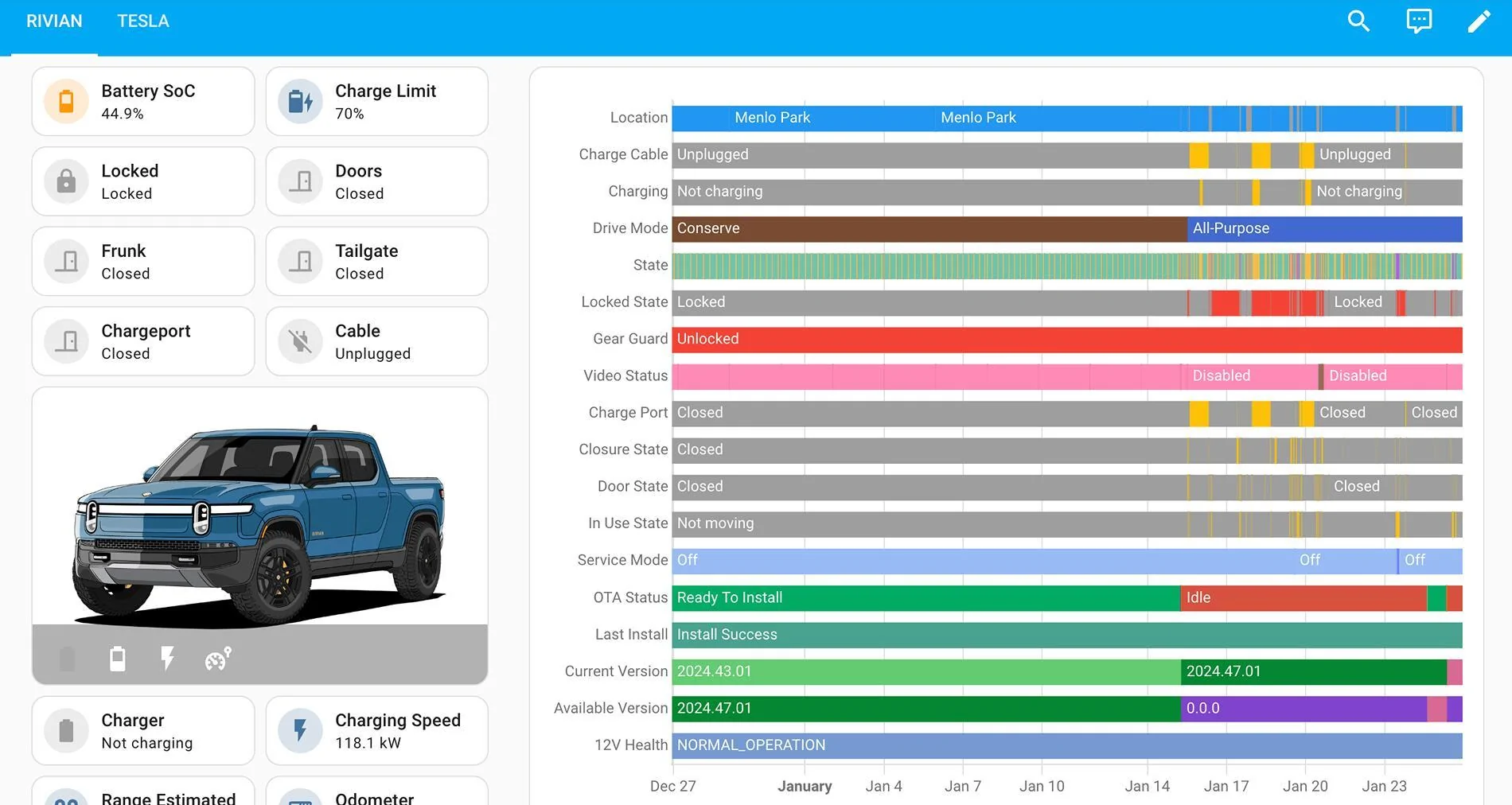
Here an example dashboard that I created in 2024 and shared a while back: Rivian Dashboard for Upcoming Longterm Phantom Drain Test

Screenshot 2025-01-25 at 10.58.40 PM.jpg
Would you share the dashboard yaml you are using? I am using the Ultra Vehicle Card for Home Assistant but like your right side graph display.
Sponsored


Janman

Member
Joined
Aug 18, 2025
Threads
2
Messages
11
Reaction score
8
Location
GA
Vehicles
2023 Rivian R1T Quad
I can vouch for Home Assistant as I've been running it for many years. I remember the old yaml days clearly because I sucked at coding but its so much better now! The fact that I am sitting on a plane and just remotely installed the Rivian integration via my Home Assistant app says a lot about how far its come.

For those of you that may not understand how great it is to have a platform that is fully local and not reliant on cloud services. Imagine turning on a smart device and it instantly turns on (no delay). Or imagine the power or internet going out and your devices still work as intended and you don't lose control of your house.

Better yet, the larger issue is you own your own data and aren't unknowingly sending it to large corporations and or law enforcement (by the way, the new thing as of late has been government security and law enforcement groups purchasing data on citizens - do your own research and don't trust me).

Granted, you can configure integrations into Home Assistant that use a cloud API connection but that is your choice. You can also set up innoveli light switches, and tasmota smart devices that run totally local.
 

Supratachophobia

Well-Known Member
Joined
Apr 8, 2023
Threads
9
Messages
1,780
Reaction score
2,122
Location
Ohio
Vehicles
S
Clubs
 
I can vouch for Home Assistant as I've been running it for many years. I remember the old yaml days clearly because I sucked at coding but its so much better now! The fact that I am sitting on a plane and just remotely installed the Rivian integration via my Home Assistant app says a lot about how far its come.

For those of you that may not understand how great it is to have a platform that is fully local and not reliant on cloud services. Imagine turning on a smart device and it instantly turns on (no delay). Or imagine the power or internet going out and your devices still work as intended and you don't lose control of your house.

Better yet, the larger issue is you own your own data and aren't unknowingly sending it to large corporations and or law enforcement (by the way, the new thing as of late has been government security and law enforcement groups purchasing data on citizens - do your own research and don't trust me).

Granted, you can configure integrations into Home Assistant that use a cloud API connection but that is your choice. You can also set up innoveli light switches, and tasmota smart devices that run totally local.
This guy gets it.
 

JoeK

Member
First Name
Joe
Joined
Jun 2, 2024
Threads
0
Messages
10
Reaction score
1
Location
South Pasadena, FL
Vehicles
2024 R1S, 2023 G550, 2020 RAM Rebel
Occupation
Sr. Network Eng.
I use Home Assistant and the Rivian (Unofficial) Integration but it only reads data AFAIK. I would love to crack the windows when the car temp goes above 120 and it's not raining. I have an automation that alerts me if my windows are down and it's raining, why not be able to close them too!
 

Supratachophobia

Well-Known Member
Joined
Apr 8, 2023
Threads
9
Messages
1,780
Reaction score
2,122
Location
Ohio
Vehicles
S
Clubs
 
I use Home Assistant and the Rivian (Unofficial) Integration but it only reads data AFAIK. I would love to crack the windows when the car temp goes above 120 and it's not raining. I have an automation that alerts me if my windows are down and it's raining, why not be able to close them too!
I WANT IT TO FOLD THE MIRRORS!!!!!
 

Sponsored

Gurule92

Well-Known Member
Joined
Jun 4, 2024
Threads
43
Messages
422
Reaction score
482
Location
Colorado
Vehicles
19 Tesla Model X Raven & 22 R1T, Adventure, QM, Glacier White.
Occupation
Cyber Stuff
I used home assistant to automate my Christmas lights show last year! Been thinking of how to incorporate EVplay with it. Once I get the gps module I think it'll be pretty fun .
 

technerd

Well-Known Member
Joined
Jan 23, 2022
Threads
5
Messages
296
Reaction score
351
Location
SE PA
Vehicles
2022 Bronco, 2022 R1T
Clubs
 
I use Home Assistant and the Rivian (Unofficial) Integration but it only reads data AFAIK. I would love to crack the windows when the car temp goes above 120 and it's not raining. I have an automation that alerts me if my windows are down and it's raining, why not be able to close them too!
You can add HA as a key, but you have to get the bluetooth dongle close enough to the car for it to see it, I think once you add it you would have control to the options listed in HA. I keep meaning to get a usb extender and try to do this, but haven't yet.
 

Jeff B.

Well-Known Member
First Name
Jeff
Joined
May 16, 2022
Threads
0
Messages
100
Reaction score
208
Location
Clermont, Florida
Vehicles
Rivian R1T, Limestone, 20" AT
Occupation
Engineer
I just found this thread. Home Assistant is by far the most versatile, well supported and easy to use open source home automation platform available. If you have any interest in Home Automation, it should absolutely be the base line to help you get started to control your home the way you want it to be controlled.

I have been running Home Assistant on a Mac mini using a VM for about 10 plus years. I have over 500 entities including the Rivian add-on through HACS. All of my entities start life in home assistant and then I use home assistant to port/control various devices through Apple HomeKit, so my wife and kids have an easy interface to control the things they need to control around our home. All while my automations happen behind the scenes in Home Assistant. I use a software based NVR to record my security cameras 24/7, but I use Scrypted to port those same cameras into Apple home for my wife and kids to use which simplifies the interface for them. HomeKit simply gives them a central place to see and control everything using the home app or Siri commands.

I use the Rivian add-on specifically to automate opening my gate and garage when I get home. I also use it to send me a notification when I am at home and my state of charge is below a certain percentage, so this reminds me if I am not already plugged in to plug-in. It also notifies me when there is an error in the charging session so I do not go all night without the vehicle charging because of an error.

Looking forward to sharing this home automation journey with the group.
 

mkhuffman

Well-Known Member
First Name
Mike
Joined
Nov 9, 2020
Threads
14
Messages
2,833
Reaction score
3,193
Location
Virginia
Vehicles
2025 R1T Tri-Max, Jeep GC-L, VW Jetta
I just found this thread. Home Assistant is by far the most versatile, well supported and easy to use open source home automation platform available. If you have any interest in Home Automation, it should absolutely be the base line to help you get started to control your home the way you want it to be controlled.

I have been running Home Assistant on a Mac mini using a VM for about 10 plus years. I have over 500 entities including the Rivian add-on through HACS. All of my entities start life in home assistant and then I use home assistant to port/control various devices through Apple HomeKit, so my wife and kids have an easy interface to control the things they need to control around our home. All while my automations happen behind the scenes in Home Assistant. I use a software based NVR to record my security cameras 24/7, but I use Scrypted to port those same cameras into Apple home for my wife and kids to use which simplifies the interface for them. HomeKit simply gives them a central place to see and control everything using the home app or Siri commands.

I use the Rivian add-on specifically to automate opening my gate and garage when I get home. I also use it to send me a notification when I am at home and my state of charge is below a certain percentage, so this reminds me if I am not already plugged in to plug-in. It also notifies me when there is an error in the charging session so I do not go all night without the vehicle charging because of an error.

Looking forward to sharing this home automation journey with the group.
I have a lot of sweat equity invested in my Hubitat system. I think I can integrate HA with Hubitat. I am following this thread because one day I may try to do that. I don't want to rebuild everything in HA, so for me it will be an add on to Hubitat.
 

bhopkins

Well-Known Member
First Name
Bryan
Joined
Mar 15, 2022
Threads
13
Messages
242
Reaction score
377
Location
Saginaw, MI
Vehicles
R1T
Ok, I'm feeling really stupid. I've got the Rivian (Unofficial) Integration installed in HACS on my HA Yellow box. Where do I enter my Rivian login credentials? I've setup a secondary driver just to provide the HA data.
 

Sponsored

Jeff B.

Well-Known Member
First Name
Jeff
Joined
May 16, 2022
Threads
0
Messages
100
Reaction score
208
Location
Clermont, Florida
Vehicles
Rivian R1T, Limestone, 20" AT
Occupation
Engineer
Ok, I'm feeling really stupid. I've got the Rivian (Unofficial) Integration installed in HACS on my HA Yellow box. Where do I enter my Rivian login credentials? I've setup a secondary driver just to provide the HA data.
Assuming you can see the Rivian integration in HACS, you should be able to go to settings, then devices and services and you can click add integration, you should see Rivian(Unofficial) in the list. Select it and you should be prompted during this step.
 

bhopkins

Well-Known Member
First Name
Bryan
Joined
Mar 15, 2022
Threads
13
Messages
242
Reaction score
377
Location
Saginaw, MI
Vehicles
R1T
Assuming you can see the Rivian integration in HACS, you should be able to go to settings, then devices and services and you can click add integration, you should see Rivian(Unofficial) in the list. Select it and you should be prompted during this step.
Thank you. I was not clicking the Add Integration button, doh!
 

kemxns

Well-Known Member
Joined
Apr 18, 2022
Threads
49
Messages
144
Reaction score
64
Location
SoCal
Vehicles
2019 F150 Raptor
Sort of a meta-level question here that I think is appropriate to add to the thread instead of starting a freshie: I wonder how long everyone's API tokens are lasting? I've been running the integration for a year or so and in the past few weeks I've found that HA is asking me to re-auth my Rivian account every few days, which is a bit frustrating.
 

Phatman113

Well-Known Member
First Name
Ryan
Joined
Feb 21, 2023
Threads
1
Messages
371
Reaction score
377
Location
Seattle
Vehicles
R1T
Occupation
IT
Clubs
 
Sort of a meta-level question here that I think is appropriate to add to the thread instead of starting a freshie: I wonder how long everyone's API tokens are lasting? I've been running the integration for a year or so and in the past few weeks I've found that HA is asking me to re-auth my Rivian account every few days, which is a bit frustrating.
Rivian had some API hiccups at the beginning of September that caused some re-auth requirements within about a week of each other. (2nd and the 9th i think) but I haven't seen any others since then
 

Supratachophobia

Well-Known Member
Joined
Apr 8, 2023
Threads
9
Messages
1,780
Reaction score
2,122
Location
Ohio
Vehicles
S
Clubs
 
My litmus test is how often the automation breaks that opens my garage door on approach. I would say I'm probably reauthorizing the integration maybe once every 2 or 3 months?
Sponsored


Top