Sponsored

Phone to vehicle routing

Indy300

Member
First Name
Mike
Joined
Dec 19, 2025
Threads
6
Messages
17
Reaction score
7
Location
Palmetto, FL
Vehicles
2022 R1T Quad
I had my first multi-stop trip to complete today in my R1T. I used the Rivian app to plan the trip. I pressed the button to send to the vehicle and it gave me the green check mark like all was well. I get in the R1T and the trip was not there. I did it again in the app and same outcome. Is this a known issue that route planning in the app is a waste of time?
Sponsored

 

shamoo

Well-Known Member
Joined
Jan 3, 2022
Threads
6
Messages
682
Reaction score
953
Location
SoCal
Vehicles
Rivian R1S, Porsche 911 GT3
Occupation
Cybersecurity
When you say you "pressed the button", what do you mean?

I've used this feature very rarely (maybe 5 times in the 3 years I've owned the vehicle) and I haven't had any issues. When I used it, I only used Google Maps to send it.

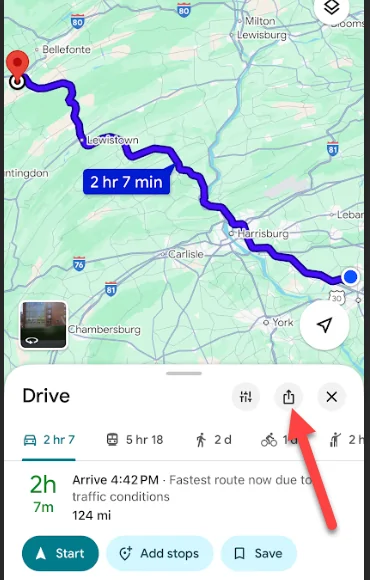
Type in the address
Click on the "send" button (square with arrow pointing up)
Rivian R1T R1S Phone to vehicle routing Screenshot 2026-01-15 112839

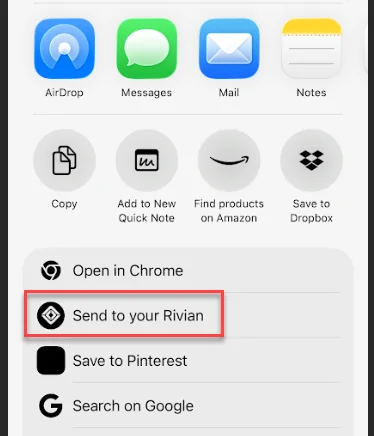
See the line of apps you can send it to. Scroll to the right until you see Rivian
Select it
Done

This is on an iPhone. I just did it and it worked.
 
OP
OP

Indy300

Member
First Name
Mike
Joined
Dec 19, 2025
Threads
6
Messages
17
Reaction score
7
Location
Palmetto, FL
Vehicles
2022 R1T Quad
I can build a route in Apple or Google Maps and successfully send it to the vehicle, but that does not include any charging stops.

In the Rivian app, you add your destination and it plans the route. You then press a button (vehicle with an arrow pointing to it) to send it to the vehicle...very similar to the Apple or Google Maps.
 

KBabione

Well-Known Member
First Name
Kevin
Joined
Sep 11, 2023
Threads
48
Messages
1,475
Reaction score
2,016
Location
Lititz, PA
Vehicles
2023 R1S Quad (8/23)
Occupation
Consultant
I didn't realize you could go to the "Location" tile in the Rivian app and plan a trip! We've just always done it through Google Maps directly. It looked like it would work from the app though (I did pick Google Maps as my choice). I just couldn't finish because my wife is out running errands right now and I know she'd be pissed if I overwrote what she was doing with a different destination.

We use Google Maps to send to the Rivian all of the time. Here's the first screen:
Rivian R1T R1S Phone to vehicle routing 1768505868449-9s


And then:
Rivian R1T R1S Phone to vehicle routing 1768505937971-k4
 

mkhuffman

Well-Known Member
First Name
Mike
Joined
Nov 9, 2020
Threads
14
Messages
2,873
Reaction score
3,224
Location
Virginia
Vehicles
2025 R1T Tri-Max, Jeep GC-L, VW Jetta
I can build a route in Apple or Google Maps and successfully send it to the vehicle, but that does not include any charging stops.

In the Rivian app, you add your destination and it plans the route. You then press a button (vehicle with an arrow pointing to it) to send it to the vehicle...very similar to the Apple or Google Maps.
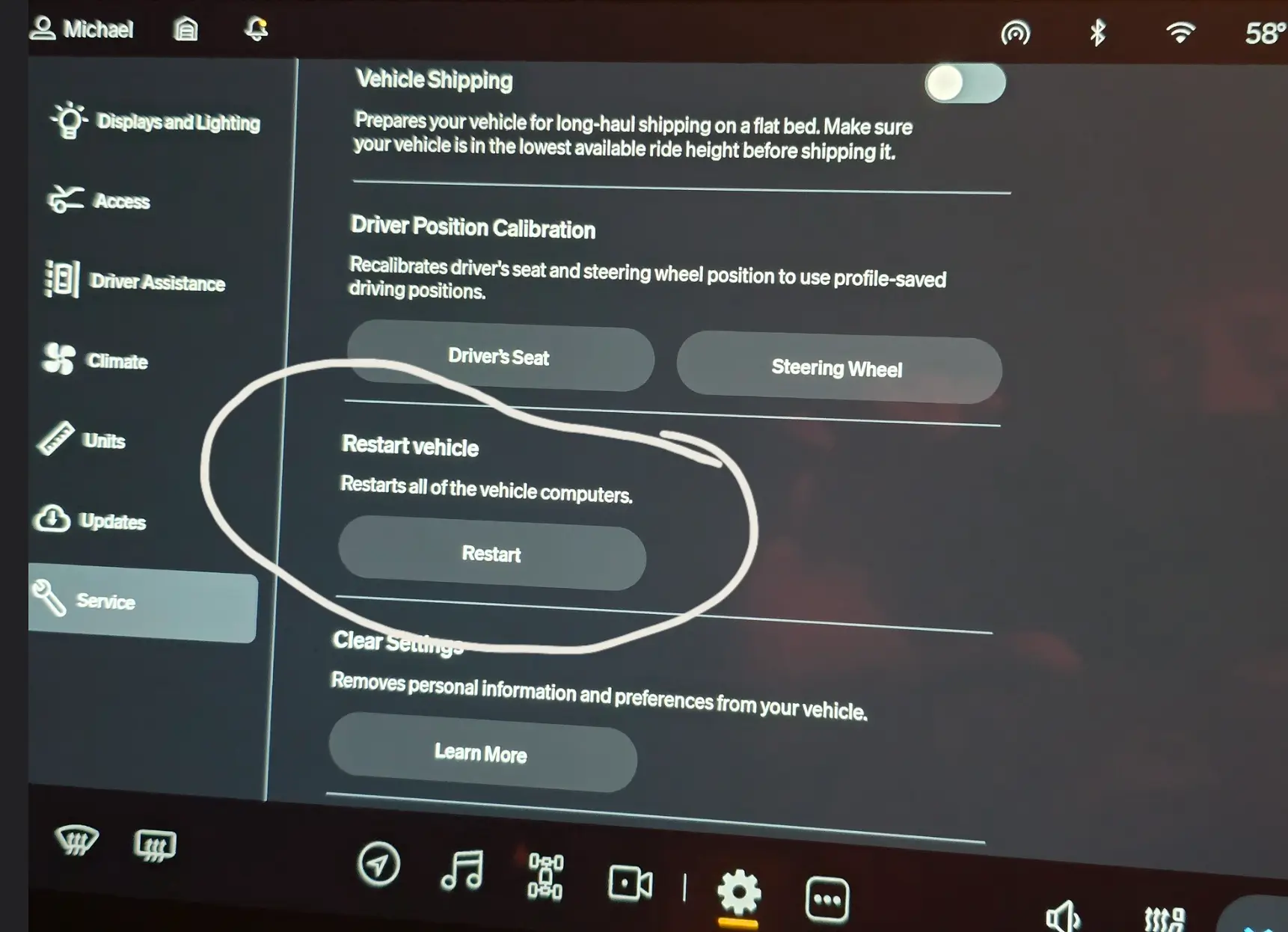
I have used it and it worked for me. The only suggestion I have is... yes, reboot the truck. :CWL:

Seriously. Rivian Roamer has reported data issues when connecting to the Rivian servers, and he recommends a reboot when that happens. Maybe this is a similar situation.

Yes, you are driving a Windows computer.
 

Sponsored

cwintermeyer

Well-Known Member
First Name
Chris
Joined
Feb 14, 2022
Threads
1
Messages
88
Reaction score
206
Location
SLC, UT
Vehicles
2023 R1S Adventure Quad, 2023 Wrangler 392 XR
Occupation
Software exec
Clubs
 
I’ve planned dozens of trips in the iOS Rivian app and I’ve never had a trip fail to show up in my Gen1 R1S.

FWIW I agree with the suggestion to reboot your truck, although I would suggest rebooting your phone first to see if that solves the problem.
 

Sponsored

mkhuffman

Well-Known Member
First Name
Mike
Joined
Nov 9, 2020
Threads
14
Messages
2,873
Reaction score
3,224
Location
Virginia
Vehicles
2025 R1T Tri-Max, Jeep GC-L, VW Jetta
I don’t have that button! I am on .46 software.
Maybe that is a Gen2 only feature. Sorry about that.

I am pretty sure the Gen1 full reboot works the same as the Gen2: press the left button on the steering wheel while at the same time pressing the hazard button. After a few seconds it should go into countdown for reboot. It takes a few minutes to complete the reboot so don't do it if you are in a hurry.
 
OP
OP

Indy300

Member
First Name
Mike
Joined
Dec 19, 2025
Threads
6
Messages
17
Reaction score
7
Location
Palmetto, FL
Vehicles
2022 R1T Quad
I held the outside steering wheel buttons for a few seconds to restart everything. The routing issue is gone now. Thanks for the help.
 

mkhuffman

Well-Known Member
First Name
Mike
Joined
Nov 9, 2020
Threads
14
Messages
2,873
Reaction score
3,224
Location
Virginia
Vehicles
2025 R1T Tri-Max, Jeep GC-L, VW Jetta
I held the outside steering wheel buttons for a few seconds to restart everything. The routing issue is gone now. Thanks for the help.
Using the left button with the hazard button reboots everything. Pressing the two outside buttons on the steering wheel only reboots the infotainment system. I call that a "soft" reboot, while the hazard and left steering wheel button is a "hard" reboot.

The soft reboot you did might be enough. If it does not work, try the hard reboot.
Sponsored


Top