Sponsored

Another Happy Team A2Z Member

Aardvark

Well-Known Member
Joined
Dec 29, 2021
Threads
6
Messages
654
Reaction score
1,339
Location
Colorado
Vehicles
R1S, Model 3
I did my first test with an @A2ZEV NACS-to-CCS adapter. But first a little context.

We just completed our fourth long cross country in the R1S. This one was 3900 miles from Colorado to the Philadelphia area. We've been driving EVs since 2012 and have seen vast improvements in DC charging infrastructure, and always had a philosophy of doing detailed "mission planning" and exercising patience. It's served us well.
Our A2Z adapter arrived 3 days AFTER we departed for this trip, but we've done it before using mostly EA and EVGo.
EA had shut down every other station on I70 from Kansas to Indiana to upgrade to all new chargers and "improve the customer experience". It didn't work. At Salina KS, 3 days after the station reopened, three different EVs all had problems. We had the typical ramp up to 218 kW, then fall offline a minute later. Restarted 3 times, then moved to another charger that throttled to 41 kW.
In one day on the return we hit EA stations in Springfield IL, Topeka Ks and Colby KS. Not one worked on the first attempt. Each required moving stalls due to throttling or charging failures.
I have for a long time given EA the benefit of the doubt, but this trip left me frustrated.
So, now back home, I open my new A2Z adapter. I followed forum tips of using a Q-Tip to apply a light coat of silicone, then used my home Tesla charger plug to ensure the fit was not too tight. Went to a SC, plugged in, and charging started almost immediately, ramping up to 218 kW at 46% SOC. The charging curve stayed excellent for the whole session. It was easily on par with my RAN experiences.
I may still use EA in the future if convenient to do so, but I will now definitely prioritize Tesla SC, and non-Tesla NACS stations.
Sponsored

 
Last edited:
WhidbeyIsland

Well-Known Member
First Name
Jon
Joined
Mar 16, 2022
Threads
2
Messages
198
Reaction score
171
Location
Langley, WA
Vehicles
2023 R1T & 2026 Lexus NX350
Occupation
Retired!
I just completed a trip from Seattle to LA and back (taking the grandkids to Disneyland...) I used RAN & Tesla charges exclusively using the A2Z adapter for Tesla plus the tesla App... Both worked great. I don't think i will use any other charger again. Especially EV America, they are cr@p. I did have a couple of issue
 
OP
OP
Aardvark

Aardvark

Well-Known Member
Joined
Dec 29, 2021
Threads
6
Messages
654
Reaction score
1,339
Location
Colorado
Vehicles
R1S, Model 3
I just completed a trip from Seattle to LA and back (taking the grandkids to Disneyland...) I used RAN & Tesla charges exclusively using the A2Z adapter for Tesla plus the tesla App... Both worked great. I don't think i will use any other charger again. Especially EV America, they are cr@p. I did have a couple of issue
@WhidbeyIsland , did you sign up for the Tesla premium account? If so, what is the sequence at the Supercharger? Since the Rivian account is plug-and-charge, I imagine that you have to activate first on the Tesla account to get the discounted price, before plugging in. Correct?
 

WhidbeyIsland

Well-Known Member
First Name
Jon
Joined
Mar 16, 2022
Threads
2
Messages
198
Reaction score
171
Location
Langley, WA
Vehicles
2023 R1T & 2026 Lexus NX350
Occupation
Retired!
Yes, I signed up for a Tesla account and paid the $12.99/mo. fee (at least I think it was about $12.99). I plan to cancel the premium acct this next week since I have no place for long travel in the near future.

The process is, when you arrive at the Tesla chargers (make sure they are the version that accepts Rivian...) you: 1) open the Tesla app, 2) locate the charger location you are at (this was problematic sometimes), 3) select the specific charger using its ID on the front of the charger, 4)(very important) Once it says ready to charge, press 'Start Charging". 5) Plug the cable into the adapter, then into the Rivian. 6) Charge.

If you plug the cable into the Rivian first, you will be charged the retail rate via Rivian.

When finished charging, disconnect and you'll get an emailed statement within about 5 minutes.

Note: There are 'Idle fees' if your Rivian sits over 5 minutes connected after it has stopped charging. My work around is to set my charge limit to 85%, knowing that the charge rate will slow down at 80% giving me time to return to the vehicle, if I am away, to manually disconnect before idle fees start.
 
OP
OP
Aardvark

Aardvark

Well-Known Member
Joined
Dec 29, 2021
Threads
6
Messages
654
Reaction score
1,339
Location
Colorado
Vehicles
R1S, Model 3
Yes, I signed up for a Tesla account and paid the $12.99/mo. fee (at least I think it was about $12.99). I plan to cancel the premium acct this next week since I have no place for long travel in the near future.

The process is, when you arrive at the Tesla chargers (make sure they are the version that accepts Rivian...) you: 1) open the Tesla app, 2) locate the charger location you are at (this was problematic sometimes), 3) select the specific charger using its ID on the front of the charger, 4)(very important) Once it says ready to charge, press 'Start Charging". 5) Plug the cable into the adapter, then into the Rivian. 6) Charge.

If you plug the cable into the Rivian first, you will be charged the retail rate via Rivian.

When finished charging, disconnect and you'll get an emailed statement within about 5 minutes.

Note: There are 'Idle fees' if your Rivian sits over 5 minutes connected after it has stopped charging. My work around is to set my charge limit to 85%, knowing that the charge rate will slow down at 80% giving me time to return to the vehicle, if I am away, to manually disconnect before idle fees start.
I appreciate the excellent procedure summary. Thank you.
 

Sponsored

TexasBob

Well-Known Member
First Name
Bob
Joined
Jan 15, 2022
Threads
49
Messages
1,207
Reaction score
2,667
Location
Houston
Vehicles
2024 R1T DM LRG, 2025 R1S Dune
Rivian needs to sort out plug & play with membership. I expect the way to do this will be for Rivian to collect the membership fees and remit to Tesla. There is a deal to be done between Rivian and Tesla on this. Until then, app is the workaround. So glad that this is functioning now. Long-distance trips no longer require planning. Just get in and go. Sooooo nice.
 

R.I.P.

Well-Known Member
First Name
Sean
Joined
Jan 2, 2023
Threads
13
Messages
1,217
Reaction score
1,681
Location
San Carlos, Mexico
Vehicles
Tesla Y, Cadillac ELR, Rivian R1T, Jeep TJ, F250
Occupation
Electrical Engineer
The nightmare that is EA/others is slowly fading from my memory. Now let's get GM authorized on the SCs... Soon please.
?
Rivian R1T R1S Another Happy Team A2Z Member 1000002492
 

JackRussellRacing

Well-Known Member
First Name
Daniel
Joined
Oct 23, 2023
Threads
4
Messages
151
Reaction score
386
Location
North Carolina
Vehicles
22 R1T
Occupation
Business Owner
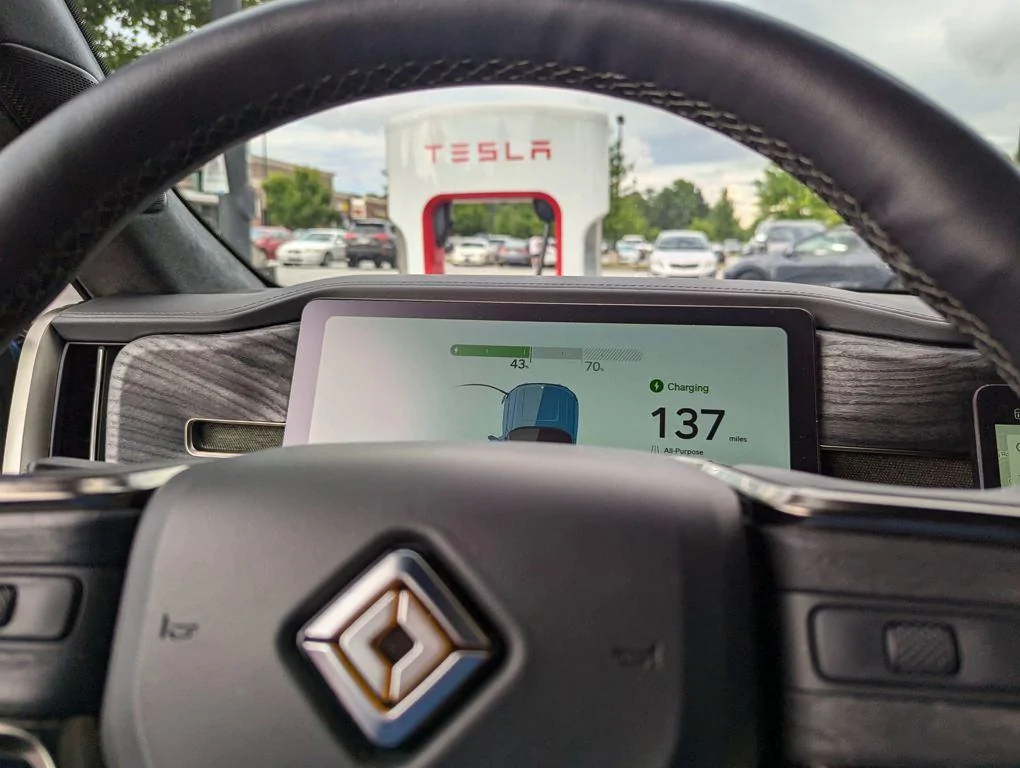
Got my A2Z adapter this afternoon and gave it a whirl, here in central North Carolina. First time plugging it in, took about 8 seconds. Truck immediately went to charge status, and it was a breeze. Rates (retail) aren't very good @ $0.41, but it's a great comfort to know the adapter and most Superchargers are compatible. Big kudos to A2Z. :like:


Rivian R1T R1S Another Happy Team A2Z Member PXL_20240712_220955867
Sponsored


Top