Sponsored

Gen2 - Key Issues (Phone, Card & Gen2 Keyfob)

perryinflight

Member
First Name
Perry
Joined
Dec 20, 2024
Threads
1
Messages
6
Reaction score
3
Location
Long Beach, CA
Vehicles
2025 R1S Dual Large+
Hit a new issue that call center service nor Customer Experience can resolve - wondering if anyone has had this happen too/has suggestions.

THE PROBLEMS
  1. Gen2 Keyfob will not associate with vehicle (shows as key in app, not in vehicle); doesn’t work at all
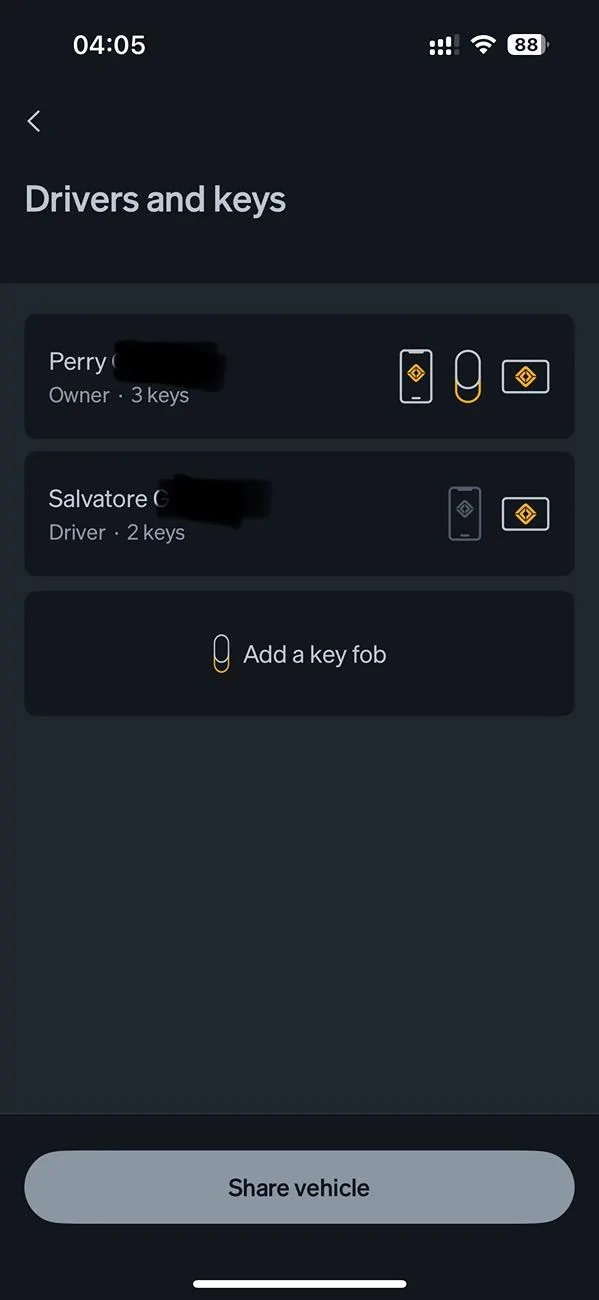
  2. Unable to reassign RFID Key Cards between drivers - app shows reassigned, vehicle does not
  3. Additional driver’s phone key randomly got disabled by vehicle; will not get past “connecting to Bluetooth step” when trying to re-setup

GEN2 Keyfob issue
  • Went through setup via the App as directed, app shows it was successful
  • Keyfob never stops flashing yellow; doesn’t appear in vehicle under Drivers & Keys
  • Reset Keyfob multiple times - holding trunk/lift gate buttons, removing battery etc
  • Removed and re-added Keyfob through app multiple times
  • Hard reset of vehicle (left+hazards)
  • 5+ calls with service & engineering, no resolution
RFID Key Card Reassign
  • Reassigned through my app, shows reassignment successful
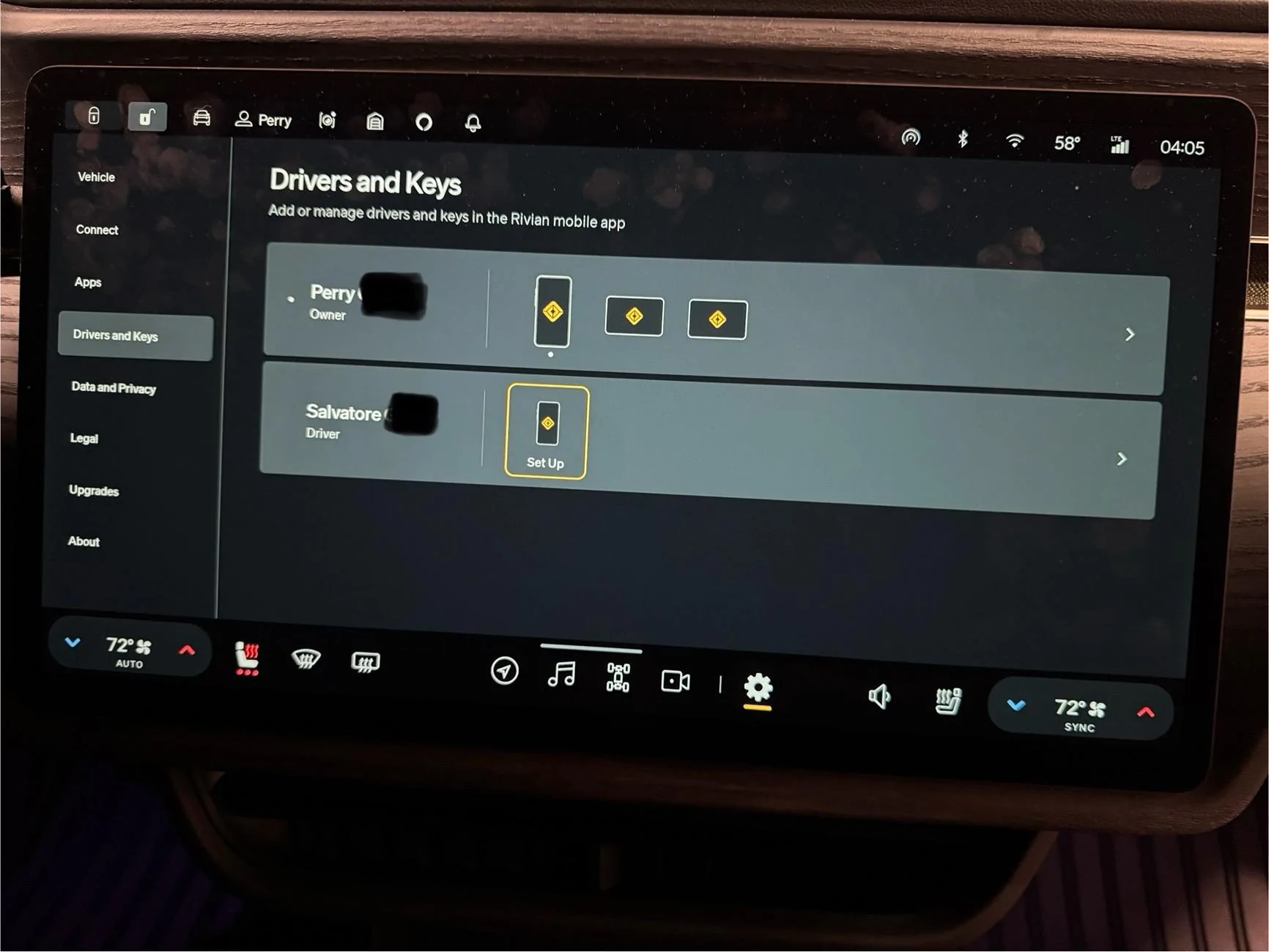
  • Reassignment does not reflect in vehicle’s Drivers & Keys
  • Multiple attempts to reassign back-and-forth; always works in app, never in vehicle

Additional Driver Phone Key (iPhone 15 Pro, current OS)
  • Flipped from working to “setup” when first trying to pair Keyfob - strange…
  • Setup through vehicle got stuck on the Bluetooth step - phone never prompted
  • Found Bluetooth on phone showed connection to vehicle already there (“Rivian######”)
  • Deleted Rivian app from phone
  • Performed network & settings, and full reset of iPhone (pain in the butt, but worth a shot) - force clearing
  • Redownloaded Rivian mobile app to phone
  • Hard reset of vehicle
  • Created entirely new driver account with different email, new invite, etc
  • Drivers app shows vehicle info - charge state etc - but key setup continues to not work

SERVICE SUPPORT STEPS TAKEN
  • Had CE/Engineering reset vehicle association with my account (6 days to do this)
  • Service confirms vehicle is online and visible in their system; tested live connection by opening and closing doors to see if they saw it happening; they did
  • Multiple vehicle hard resets
  • Service Center appointment
Oddly, my mobile app & key (as owner) continues to work without issue - thank god. But frustrating no other keys are working as they should. If anyone has additional thoughts on how to fix, I would be massively appreciative!

Rivian R1T R1S Gen2 - Key Issues (Phone, Card & Gen2 Keyfob) IMG_0021


Rivian R1T R1S Gen2 - Key Issues (Phone, Card & Gen2 Keyfob) IMG_0022
Sponsored


ElGuano

Well-Known Member
Joined
Oct 9, 2024
Threads
48
Messages
864
Reaction score
1,221
Location
Cali
Vehicles
R1T Trimax - Storm Blue, Driftwood, Sport Dark
Yep, I've seen this, reported it here and to Rivian, and my vehicle is currently in service for it (among other things).

Other associated issues:
1. Once a keycard is deactivated, it cannot be reactivated without remote assistance from Rivian.
2. Keys that are re-assigned are supposed to activate the assigned driver's profile upon using the key. Of course, this never happens because vehicle never gets the re-assign signal even if the app shows it.
3. In some cases, activated keycards that work on the vehicle do not show up in the vehicle's "Drivers and Keys" section at all.

I've also noticed that it affects a lot of other people who haven't noticed it. For example, RivianTrackr's recent "Gen2 keyfob unboxing" clearly shows that his app has keycards assigned between him and his wife, but his vehicle's "Drivers and keys" doesn't show the keys assigned to different profiles and I believe the keycards may not show up at all:


I think few people assign keys, or know that the driver profile is supposed to be activated by assigned keys, so few people realize they're running into the same issue as long as the key unlocks and starts the car.
 
OP
OP

perryinflight

Member
First Name
Perry
Joined
Dec 20, 2024
Threads
1
Messages
6
Reaction score
3
Location
Long Beach, CA
Vehicles
2025 R1S Dual Large+
Sounds like the exact same issue. Sorry to hear you’re facing it too. Pretty fundamental issue (keys) to have software bugs in!

My SC appt is next week and hoping they can address quickly; but if you get any intel on how to fix from your current SC appointment you can share - that would be awesome. Either for fixing ourselves, or to give my SC team some guidance on how it got fixed for you (assuming it does).
 

coney129

Well-Known Member
First Name
John
Joined
Jun 16, 2024
Threads
10
Messages
51
Reaction score
44
Location
Philadelphia
Vehicles
2025 Rivian R1S
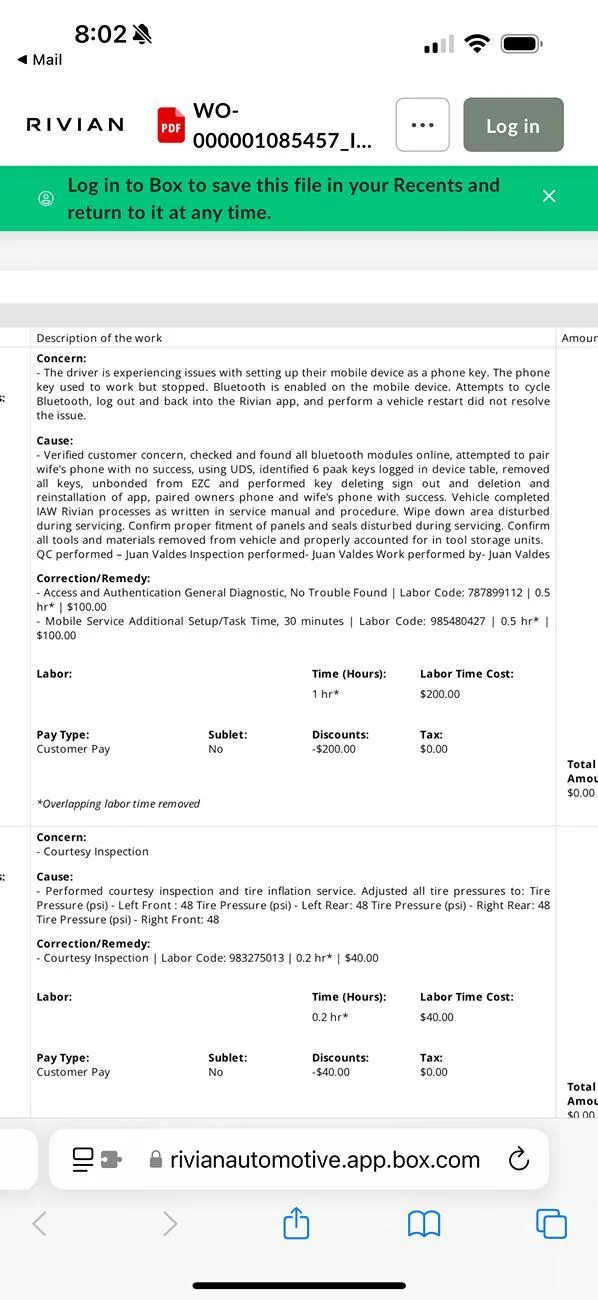
I just had this repaired by mobile service. I’ve attached the work order service recap so perhaps you can reference speaking with service. Basically there were 6 key profiles in the cloud from me trying to reconnect the phone. After Rivian deleted all on the back end. We deleted all keys on our phones. All from blue tooth. Deleted both apps. Reinstalled and re-paired which fixed it. Apparently next software update addresses this issue too.

Rivian R1T R1S Gen2 - Key Issues (Phone, Card & Gen2 Keyfob) IMG_0844


Top