Sponsored

Infotainment/Driver Displays Black When in Park

freshpow

Well-Known Member
Joined
Oct 28, 2021
Threads
8
Messages
664
Reaction score
1,453
Location
Colorado
Vehicles
R1T
Having an issue with my infotainment and driver displays. Note that I have not received/installed the latest update.

I got in my truck earlier today and both screens were completely black and unresponsive. After a couple minutes I tried shifting into drive and both screens came to life. Truck drove just fine and everything seemed normal for the most part but there were still a few issues:
  1. Battery showed 0% on truck display (could see the actual % using my phone)
  2. Tried multiple audio sources and none of them worked
  3. Unable to change drive mode. Got the "make sure key is present to change drive modes" even though I was able to change gears.
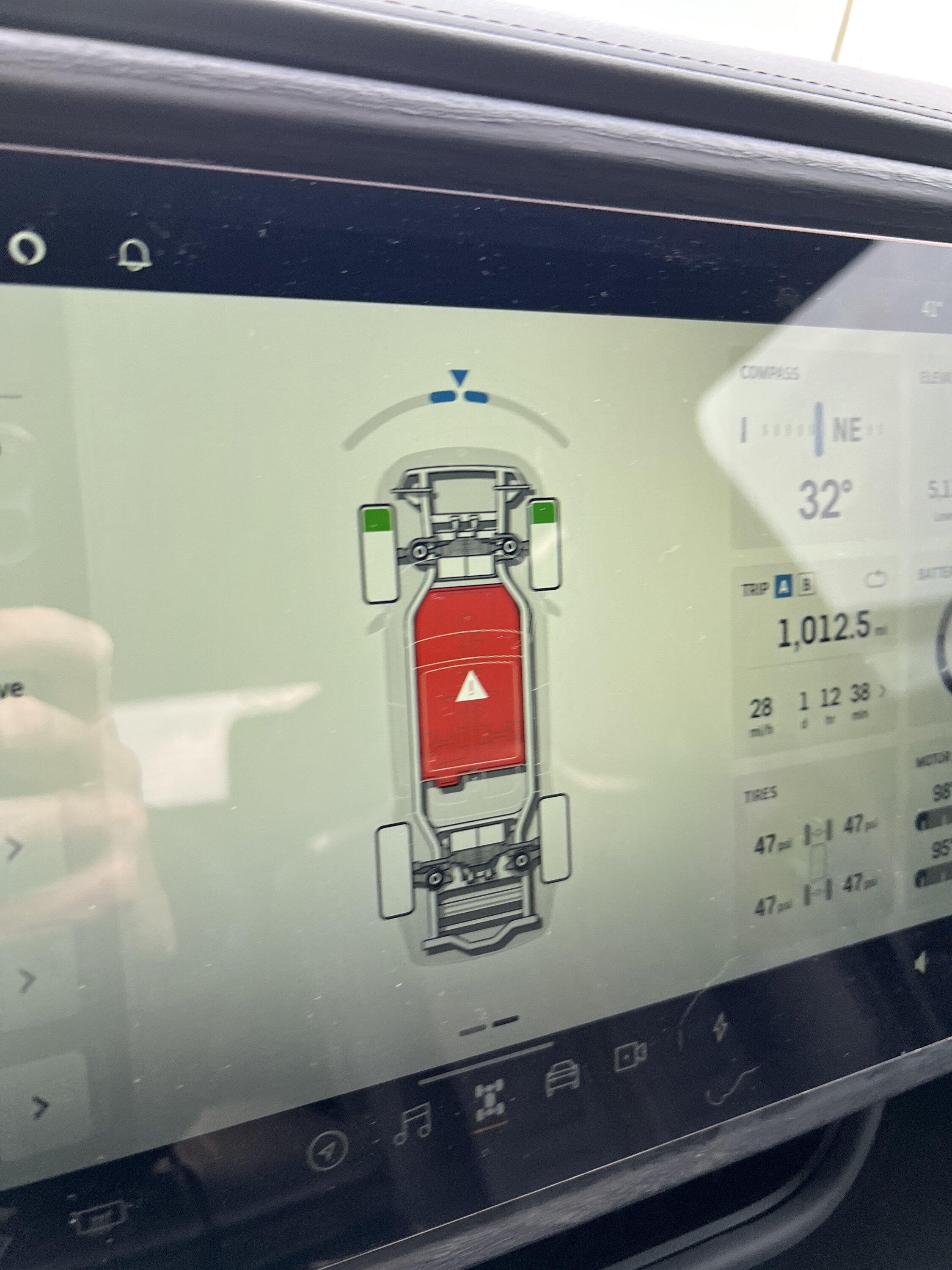
  4. Red warning light - this had me concerned but couldn't see any detail beyond the generic warning. Service advisor noted that it's probably just calling out the infotainment error/malfunction.
Screens stayed on as long as I was in gear, but as soon as I shifted to park everything would go dark again.

I've already been in touch with service and tried soft/hard resets + a sleep cycle and nothing changed. Seems like it's destined for a trip to the service center, but just wanted to see if anyone else has experienced something similar.

Rivian R1T R1S Infotainment/Driver Displays Black When in Park Make sure key is present.JPG


Rivian R1T R1S Infotainment/Driver Displays Black When in Park 0% Battery


Rivian R1T R1S Infotainment/Driver Displays Black When in Park Warning.JPG
Sponsored


R3 Customs

New Member
First Name
Ryan
Joined
Dec 9, 2023
Threads
0
Messages
2
Reaction score
0
Location
Dallas
Vehicles
R1T
I have an R1T in the shop for antenna module , but have an R1S that's behaving the same. SW version 2023.42.1
 

storytime

New Member
First Name
Matt
Joined
Dec 12, 2023
Threads
0
Messages
4
Reaction score
1
Location
Massachusettes
Vehicles
R1S, R1T
First post, here...

Have an R1S behaving the same way. Rivian suggested I update to fix but an able to do so. Wondering if it's because the battery appears as 0% (even though it's nearly 80% through the app)? Waiting on Rivian to reply...
 

R3 Customs

New Member
First Name
Ryan
Joined
Dec 9, 2023
Threads
0
Messages
2
Reaction score
0
Location
Dallas
Vehicles
R1T
First post, here...

Have an R1S behaving the same way. Rivian suggested I update to fix but an able to do so. Wondering if it's because the battery appears as 0% (even though it's nearly 80% through the app)? Waiting on Rivian to reply...
What software version? Call and ask for them to do a manual OTA push. It's handled by a separate team. I asked for the same, but due to timing (weekend) and when my scheduled appointment was, it was moot. It's currently at the SC. I'll post an update.
 

storytime

New Member
First Name
Matt
Joined
Dec 12, 2023
Threads
0
Messages
4
Reaction score
1
Location
Massachusettes
Vehicles
R1S, R1T
Thanks for the reply...

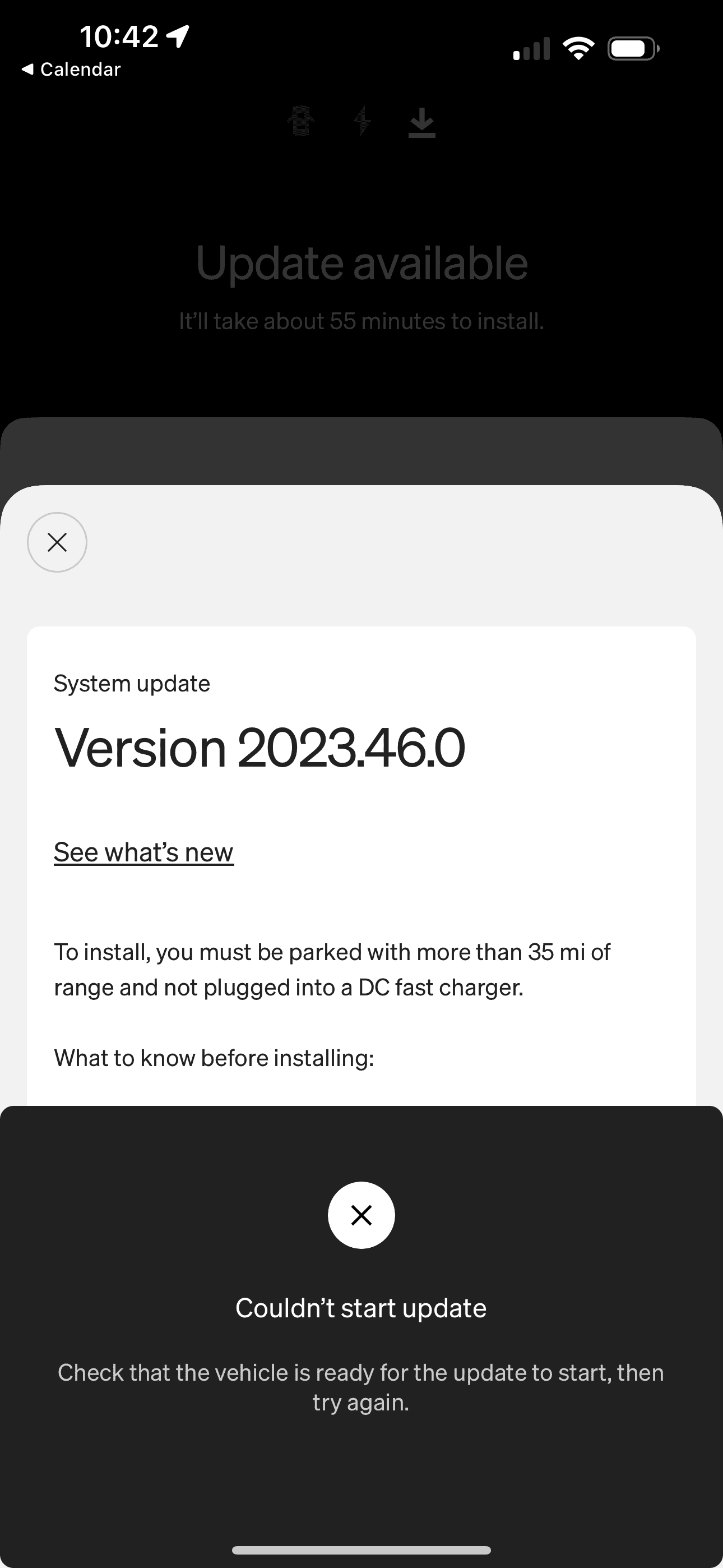
2023.42.02...the arc of the problem was exactly as freshpow explained, above. Rivian has pushed the OTA and told me that it said "currently updating" on their end, even when it said it failed on my end...this is the message I get when trying to update.

Rivian R1T R1S Infotainment/Driver Displays Black When in Park IMG_4195.PNG
 

Sponsored

OP
OP
freshpow

freshpow

Well-Known Member
Joined
Oct 28, 2021
Threads
8
Messages
664
Reaction score
1,453
Location
Colorado
Vehicles
R1T
Thanks for the reply...

2023.42.02...the arc of the problem was exactly as freshpow explained, above. Rivian has pushed the OTA and told me that it said "currently updating" on their end, even when it said it failed on my end...this is the message I get when trying to update.

IMG_4195.PNG
Same exact thing is happening for me. Service center here pushed the latest update to me but I get the same error message when I try to install. My guess is it's because the vehicle isn't registering as in park since everything shuts down and goes dark as soon as I shift into park. Anyways, I have a mobile service appointment set for early next week so hopefully they can resolve it then.
 

LivingInKaos

Well-Known Member
Joined
Jun 30, 2022
Threads
19
Messages
990
Reaction score
1,957
Location
Oregon
Vehicles
R1T Launch Green Forest Edge
Occupation
Own Fabrication Company / VP of Portland Rivian Club
Clubs
 
We just helped someone with the same exact issue yesterday. You need to do a 12V and HV reset. Then reapply the update. The reset is not terribly difficult if you want to try it. (IF YOU ARE UNCOMFORTABLE WITH ANY OF THIS- DO NOT ATTEMPT)

1. Remove the plastics to access the batteries and the HV disconnect loop.
2. Pull the HV loop first using a small screwdriver or something to release the clip. (do not cut it)
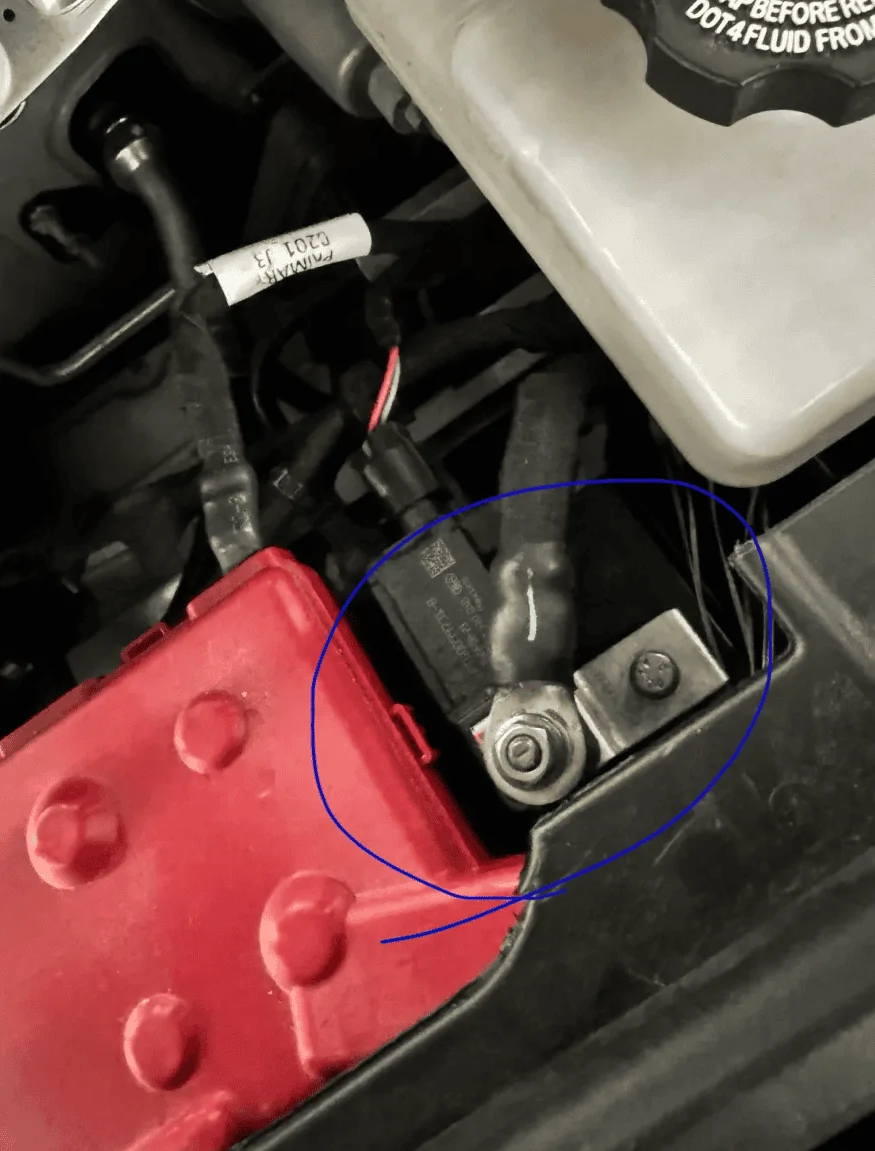
3. Then on the batteries find the negative. The positives connect to a buss and are covered with a red cover, so it should be fairly obvious, do not touch the positives.
4. Remove the ground from both batteries (if you have 2) and position so they touch nothing.
5. Wait a bit for everything to de-energize - go have a cup of coffee.
6. Reconnect the HV loop connector making sure it snaps in. (HV BEFORE 12V)
7. Reconnect the 12v grounds. The first one will likely give a quick "snap" - don't be alarmed.
8. Wait a good while for everything to boot up and register.

Just be sure in all this not to accidentally short anything.

9. You will likely find it takes a while for everything to come up. You will also likely see a string of errors - don't worry, that is because it takes a bit. You should see the update notification pop up along the way again too. Once it does and everything looks like nothing is changing - go ahead an apply the update.

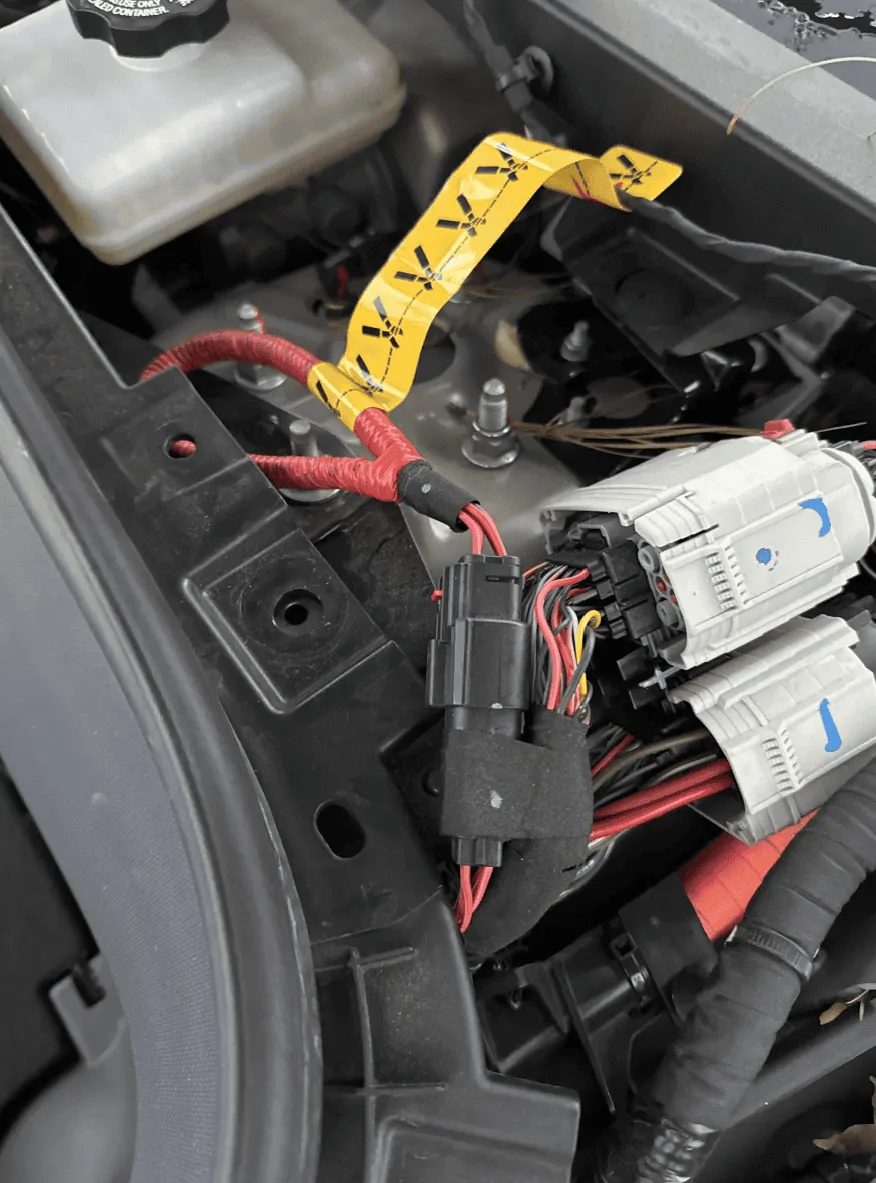
This is the HV loop with the yellow tag - Disconnect at the connector - DO NOT CUT !!!
Rivian R1T R1S Infotainment/Driver Displays Black When in Park 1702407072826


Ground on the 12V -
Rivian R1T R1S Infotainment/Driver Displays Black When in Park 1702407136767
 
Last edited:

storytime

New Member
First Name
Matt
Joined
Dec 12, 2023
Threads
0
Messages
4
Reaction score
1
Location
Massachusettes
Vehicles
R1S, R1T
Is it essential to reconnect the 12V quickly after the HV, or does the timing matter, at all?
 

LivingInKaos

Well-Known Member
Joined
Jun 30, 2022
Threads
19
Messages
990
Reaction score
1,957
Location
Oregon
Vehicles
R1T Launch Green Forest Edge
Occupation
Own Fabrication Company / VP of Portland Rivian Club
Clubs
 
Is it essential to reconnect the 12V quickly after the HV, or does the timing matter, at all?
Oh I wasn't really referring to timing, just the fact that there will be a discharge that occurs and the more quickly you connect it the less you experience.
 

Sponsored

Kunzene

Well-Known Member
First Name
Nathan
Joined
Mar 21, 2021
Threads
3
Messages
165
Reaction score
347
Location
Kentucky
Vehicles
2022 Rivian R1T, 2024 Kia EV9
Clubs
 
I would add, I was advised the two negative grounds must be reconnected at exactly the same time (within 1/2 second of each other).
And be careful with the nuts when taking them off/on the negative posts, if you drop one it’s gone. You’ll need a 10mm wrench.
 
Last edited:

Tr4ckD4ys

Well-Known Member
Joined
Oct 22, 2023
Threads
20
Messages
304
Reaction score
435
Location
Noneya, NY
Vehicles
2023 R1T
Clubs
 
Having an issue with my infotainment and driver displays. Note that I have not received/installed the latest update.

I got in my truck earlier today and both screens were completely black and unresponsive. After a couple minutes I tried shifting into drive and both screens came to life. Truck drove just fine and everything seemed normal for the most part but there were still a few issues:
  1. Battery showed 0% on truck display (could see the actual % using my phone)
  2. Tried multiple audio sources and none of them worked
  3. Unable to change drive mode. Got the "make sure key is present to change drive modes" even though I was able to change gears.
  4. Red warning light - this had me concerned but couldn't see any detail beyond the generic warning. Service advisor noted that it's probably just calling out the infotainment error/malfunction.
Screens stayed on as long as I was in gear, but as soon as I shifted to park everything would go dark again.

I've already been in touch with service and tried soft/hard resets + a sleep cycle and nothing changed. Seems like it's destined for a trip to the service center, but just wanted to see if anyone else has experienced something similar.
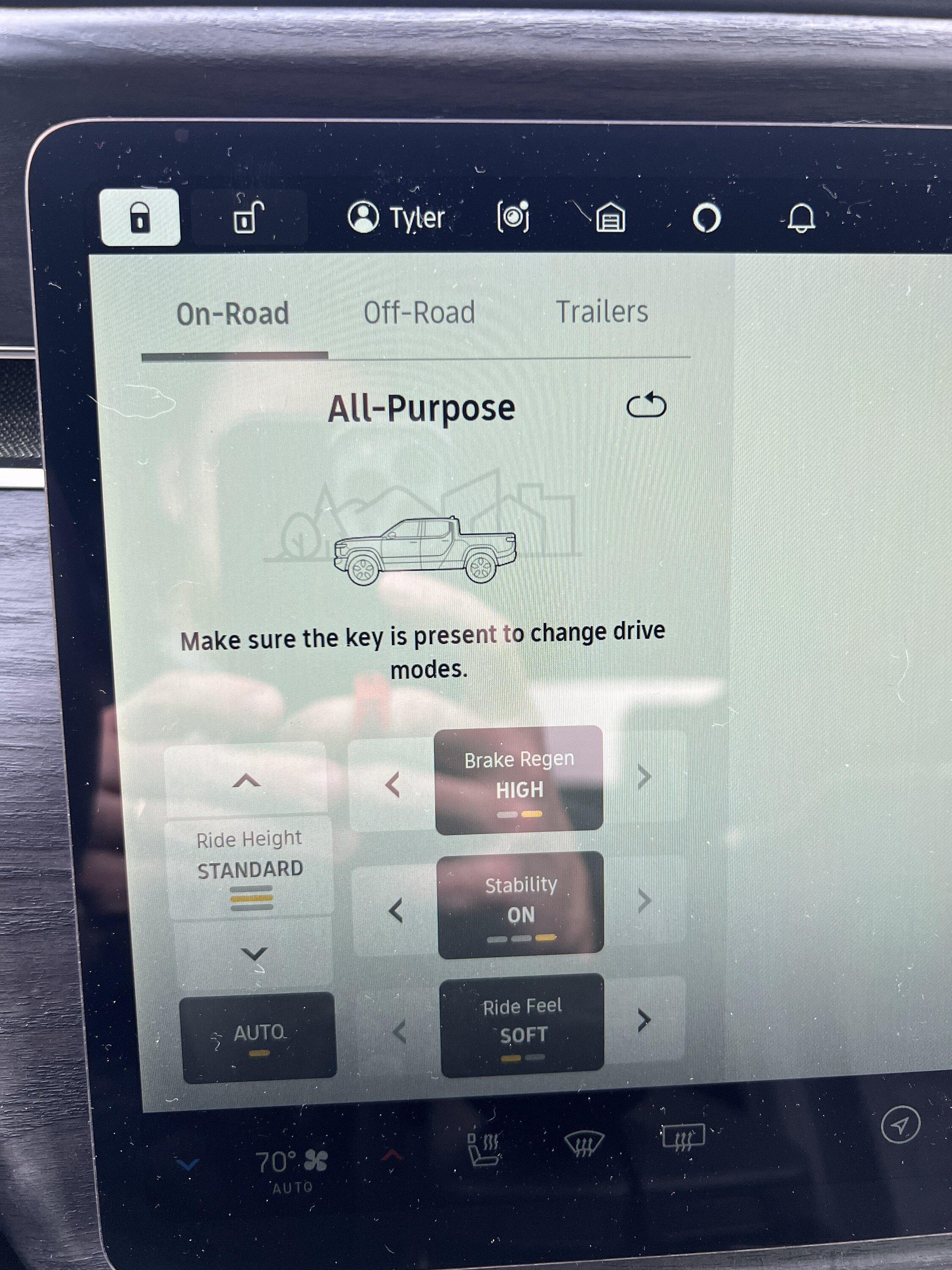
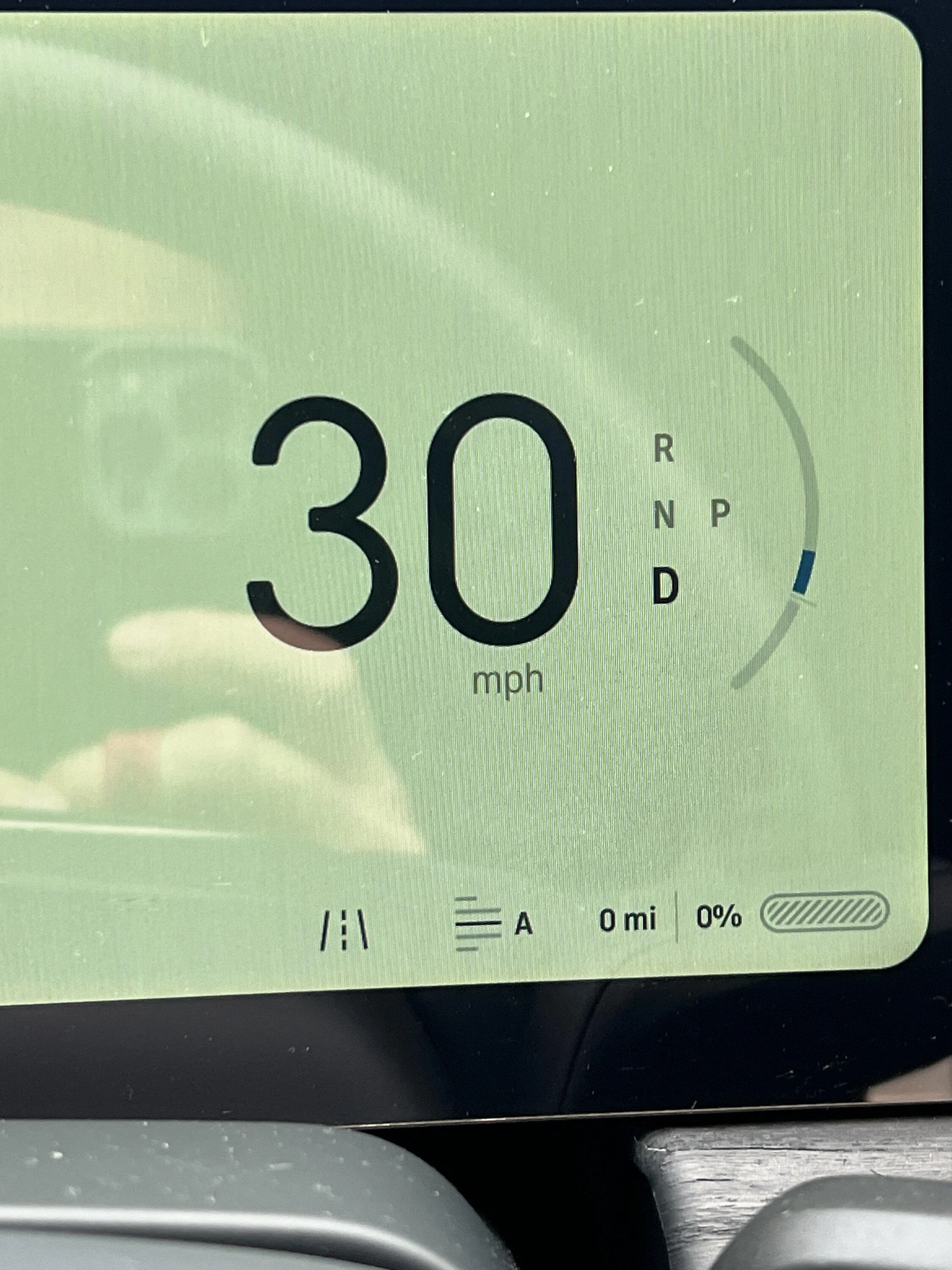
Make sure key is present.JPG


0% Battery.webp


Warning.JPG
@freshpow What ended up being the diagnosis here to this issue? You said you brought it in for service?

I’m having the same issue today on a ‘23 build.
 
Last edited:
OP
OP
freshpow

freshpow

Well-Known Member
Joined
Oct 28, 2021
Threads
8
Messages
664
Reaction score
1,453
Location
Colorado
Vehicles
R1T
@freshpow What ended up being the diagnosis here to this issue? You said you brought it in for service?

I’m having the same issue today on a ‘23 build.
I don't recall the exact issue/solution as it was explained to me but it was solved by a quick mobile service visit.
 

AMaier

Active Member
Joined
Jun 24, 2023
Threads
8
Messages
38
Reaction score
24
Location
Florida
Vehicles
R1T, Ioniq 5, MX-5 ND
I just had this issue today and was able to get it back into a normal state after talking with Rivian. I had soft reset it, followed by a hard reset (nether fixed it), and then they had me clear the error state by:
  1. Turning off gear guard in the app (so it doesn't keep the vehicle awake)
  2. Logging out of the app for anyone with the vehicle linked (so that doesn't ping it)
  3. Keeping the key far away (so it doesn't wake the car)
  4. Waiting 45 minutes (for the systems to shutdown due to inactivity and clear out their memory)
This returned the vehicle to a working state (as far as I can tell).
I'm worried about this issue now because the cause is unknown and it took a long time to fix. If this happens while away from home you could be stuck someplace for a while, if you even know how to recover the car. It is also odd that a hard reset wouldn't have the same result. Do we not have a manual way to clear errors and reboot on demand?
 

AMaier

Active Member
Joined
Jun 24, 2023
Threads
8
Messages
38
Reaction score
24
Location
Florida
Vehicles
R1T, Ioniq 5, MX-5 ND
My issue was the same as the original poster's, but I also couldn't drive without it putting itself back in park. It also wouldn't hard-reset until after the soft-reset, which was odd.
Sponsored


Top