Sponsored

Missing Charger Icons on Vehicle Nav

corradi_kidd

Member
First Name
Vince
Joined
Oct 15, 2024
Threads
2
Messages
22
Reaction score
8
Location
Sacramento, CA
Vehicles
23 Rivian R1S
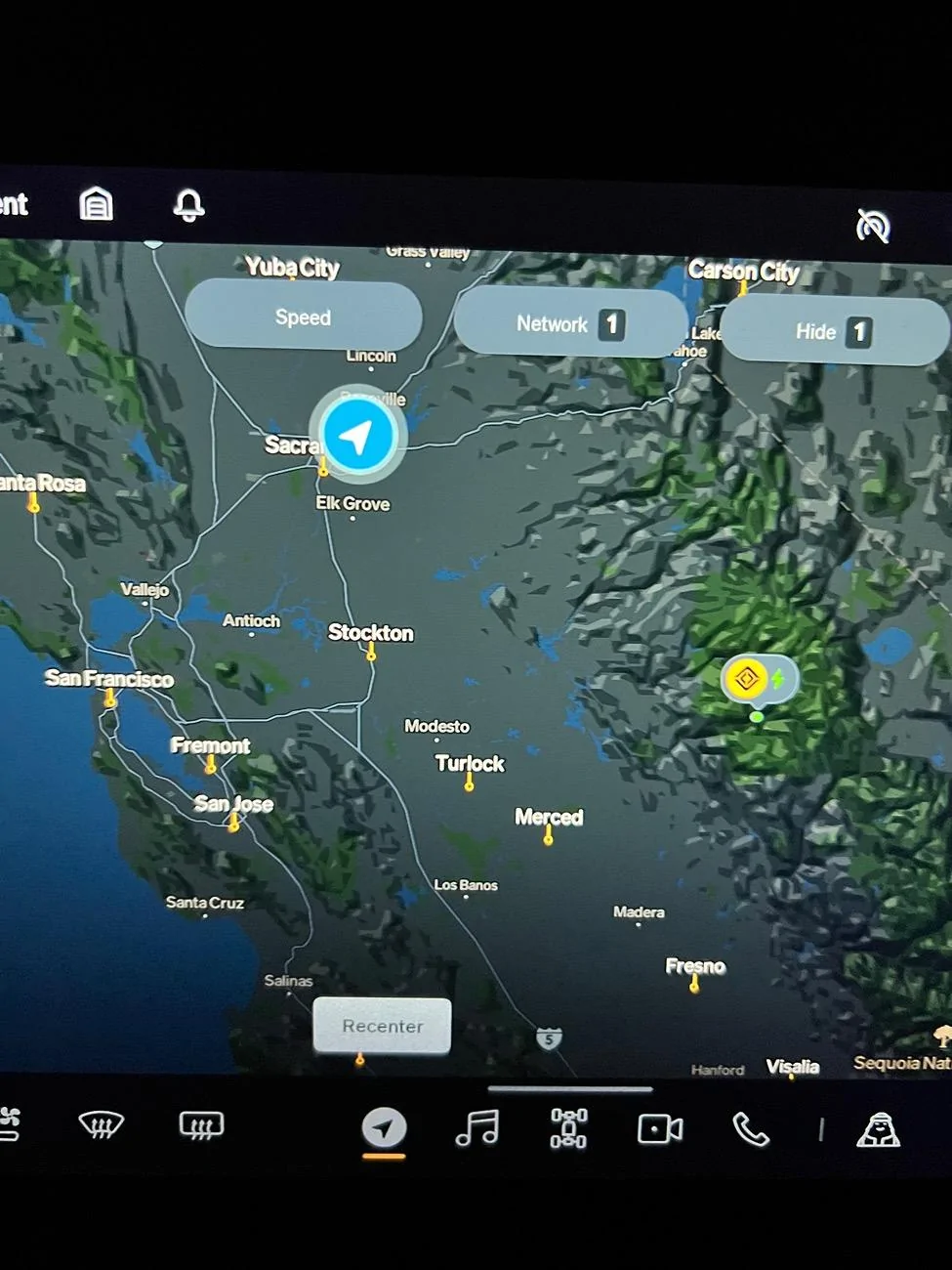
A few days ago, all RAN chargers icons disappeared off the nav screen. They show up when routing a trip as charging stops, and also display when using the “search” bar to look for chargers around me. A few other chargers are not showing as well specifically the ChargePoint that is at my work. Any idea what’s going on. Have turned all filters off then back on and done resets but it has not been resolved. When I zoom out of the map, RAN I cons show on the east coast but only Washington and an Arizona one show as the closest to me in Sacramento.

Rivian R1T R1S Missing Charger Icons on Vehicle Nav IMG_0004
Sponsored

 
OP
OP

corradi_kidd

Member
First Name
Vince
Joined
Oct 15, 2024
Threads
2
Messages
22
Reaction score
8
Location
Sacramento, CA
Vehicles
23 Rivian R1S
Still experiencing this even after the update tonight. No one else experiencing this?
 

josh0

Well-Known Member
First Name
Josh
Joined
Jan 4, 2024
Threads
26
Messages
362
Reaction score
509
Location
Abiquiu, NM / Baltimore, MD
Vehicles
2023 (Nov) R1T, 2014 Jeep Cherokee
A few days ago, all RAN chargers icons disappeared off the nav screen. They show up when routing a trip as charging stops, and also display when using the “search” bar to look for chargers around me. A few other chargers are not showing as well specifically the ChargePoint that is at my work. Any idea what’s going on. Have turned all filters off then back on and done resets but it has not been resolved. When I zoom out of the map, RAN I cons show on the east coast but only Washington and an Arizona one show as the closest to me in Sacramento.

IMG_0004.jpeg
How are your filters set? Looks like you’ve got a single charging network selected; if it’s not Rivian, then that would probably be the issue.

(Appologies if that seems insultingly obvious, but after decades working in IT, I’ve found it’s always worth asking the obvious questions.)
 

Sponsored

OP
OP

corradi_kidd

Member
First Name
Vince
Joined
Oct 15, 2024
Threads
2
Messages
22
Reaction score
8
Location
Sacramento, CA
Vehicles
23 Rivian R1S
Nope only filters set are Rivian network only and to hide incompatible. Have tuned all filters off and still nothing
 

Robin

Well-Known Member
First Name
Robin
Joined
Jan 20, 2023
Threads
0
Messages
869
Reaction score
328
Location
Petaluma
Vehicles
Bicycle
Occupation
Waitress
A few days ago, all RAN chargers icons disappeared off the nav screen. They show up when routing a trip as charging stops, and also display when using the “search” bar to look for chargers around me. A few other chargers are not showing as well specifically the ChargePoint that is at my work. Any idea what’s going on. Have turned all filters off then back on and done resets but it has not been resolved. When I zoom out of the map, RAN I cons show on the east coast but only Washington and an Arizona one show as the closest to me in Sacramento.

IMG_0004.jpeg
Had the same issue also..?
 

Brian-MS90D

Well-Known Member
First Name
Brian
Joined
Mar 19, 2024
Threads
3
Messages
130
Reaction score
141
Location
Cincinnati, OH
Vehicles
Rivian R1S (Dual Motor, Max pack, LA Silver)
What is your charge Speed filter setting?
 

UnsungZero_OldTimeAdMan

Well-Known Member
First Name
Barnum
Joined
Mar 20, 2023
Threads
68
Messages
8,730
Reaction score
11,971
Location
SoCal
Vehicles
'23 GW Quad-Large R1T "Ghost"
Occupation
Advertising Circus
If all filters are correct… Did you try the first thing to do when encountering software glitches? Soft reset.

There were some AT&T related outages. May have something to do with it also.
 

Sponsored

OP
OP

corradi_kidd

Member
First Name
Vince
Joined
Oct 15, 2024
Threads
2
Messages
22
Reaction score
8
Location
Sacramento, CA
Vehicles
23 Rivian R1S
Did you try the first thing to do when encountering software glitches? Soft reset.

There were some AT&T related outages. May have something to do with it also.
Yes I’ve done a soft reset, full reset, and have updated the software the other day. Still no luck.
 

akc5247

Well-Known Member
First Name
AKC
Joined
Dec 28, 2023
Threads
5
Messages
320
Reaction score
252
Location
NJ
Vehicles
2023 Subaru Ascent Touring, 2024 R1S dual motor
Occupation
Engineer
Clubs
 
Still experiencing this even after the update tonight. No one else experiencing this?
Yes, i had it (somewhat coincidentally) two days back as well.

It was fixed after i did the hard reset. To be precise, I did one hard reset before calling the Rivian Service Center number. And based on their recommendation, I did another hard reset about 1 hour later, and things were good.

Just reach out to the Rivian service center (via call), explain the issue and ask them to validate if they can send an SMS from their side to the vehicle (validates a 'handshake'). If that's good, then just do a hard reset, and you should be good.

My vehicle updated yesterday night to 2024.39.0. I do not see any issues today. (Mine is a Gen1 2024 R1S for reference)

[Edited to fix typos]
 
OP
OP

corradi_kidd

Member
First Name
Vince
Joined
Oct 15, 2024
Threads
2
Messages
22
Reaction score
8
Location
Sacramento, CA
Vehicles
23 Rivian R1S
Yes, i had it (somewhat coincidentally) two days back as well.

It was fixed after i did the hard reset. To be precise, I did one hard reset before calling the Rivian Service Center number. And based on their recommendation, I did another hard reset about 1 hour later, and things were good.

Just reach out to the Rivian service center (via call), explain the issue and ask them to validate if they can send an SMS from their side to the vehicle (validates a 'handshake'). If that's good, then just do a hard reset, and you should be good.

My vehicle updated yesterday night to 2024.39.0. I do not see any issues today. (Mine is a Gen1 2024 R1S for reference)

[Edited to fix typos]
Interesting. I’ve done it twice already but can try again. Tesla chargers all show up and their availability is updating correctly compared to the Tesla app so I know it’s receiving data.
And yes, all filters are off
Sponsored


Top