wolfsbane
Well-Known Member
- Joined
- Mar 1, 2024
- Threads
- 2
- Messages
- 137
- Reaction score
- 138
- Location
- Tejas, USA
- Vehicles
- R1T Adventure, Yukon Denali, Canyon SLT
- Thread starter
- #1
Forgive me. I'm a newb and have not done a lot of road trips or public charging in the +six months I've had my Rivian. A couple of inconveniences yesterday led me to a couple of questions about using the Rivian app for trip planning. Hoping when I finally get the NACS adapter and can un-filter "adapter needed", it will help alleviate some of this.
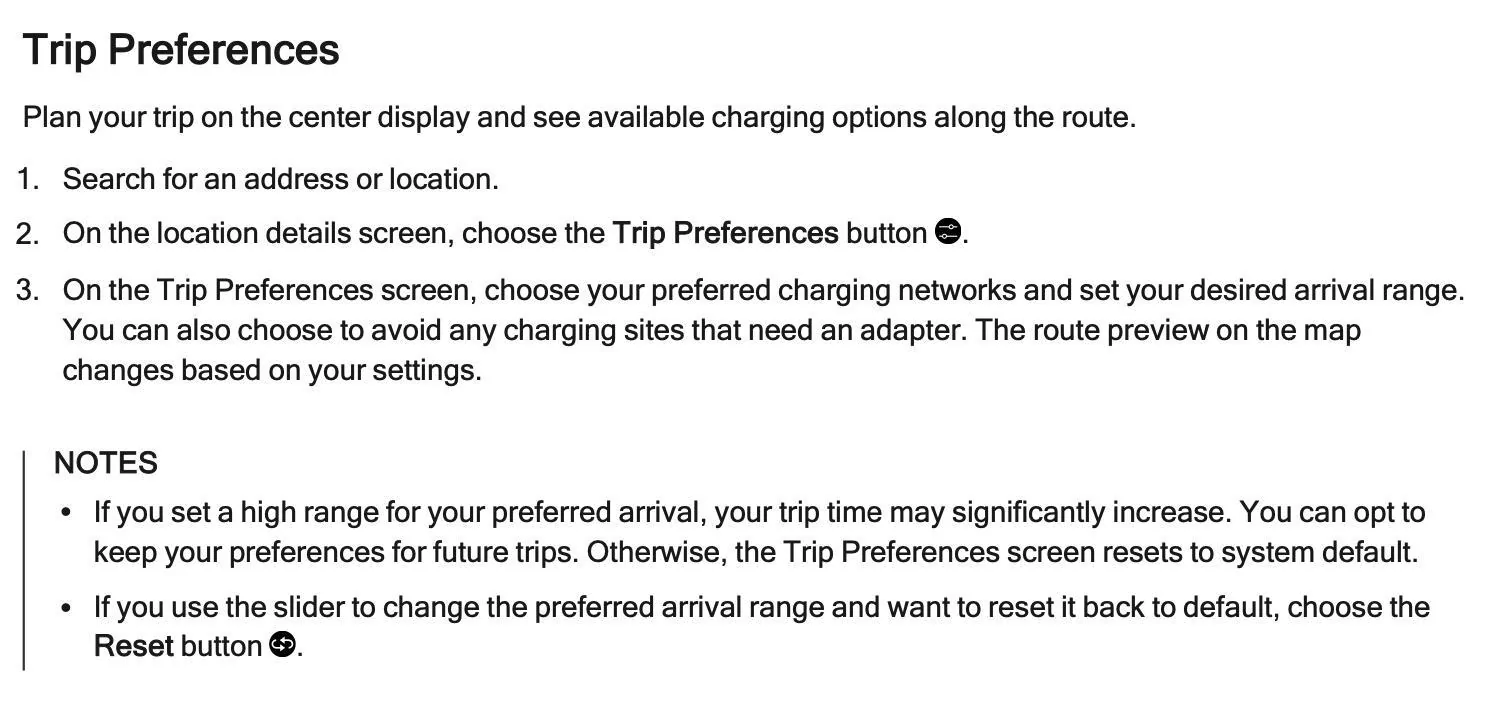
Is there a way to impact the charger score? Rivian mapped me to a location on a road trip yesterday that had a score of "B". The app said one 100kw charger was occupied, two 350kw chargers were out of order, and one 350 was available and working. I followed my trip plan in the nav, got there, and of course the one that was supposedly in order was in fact out of order. The gentleman using the only one that was working said he'd be about an hour, and there was a Bolt already waiting for it next. But how do I tell the app that so it knows? Feels dirty driving away from my planned trip in search of another charging location knowing it still has a high score and Rivian will continue mapping other people to it. Seems like there should be a button I can mash so no one else goes there, but didn't see that option anywhere in the vehicle or phone app. I realize if I had downloaded and installed the EvGo app and set up a profile, I might be able to tell them it's out of order, or maybe I could tell a community on another app like plug share, but can you not tell the Rivian app not to send anyone else there?
Second, nav finally stopped telling me to U-turn and go back to the broken one once I finally drove far enough away from it and rerouted me to another charging location in which all spots were occupied and only 1 of 6 was out of order. Waited about 40 minutes for a charging opportunity to charge for 24 minutes so I could then finally make it to a RAN location on the route home. I realized, if trip planner had only given me the option to charge at that RAN location on the way up the day before, I never would have had to go to any of these broken and occupied EvGo or EA locations at all. Where in the app can you say, "no, F that option, show me some other options"? I put the round trip in, and I guess because I left my house at ~95% charge, it had me skip the RAN location on the way up and preferred that I search for non-broken and available EvGo ones the next day at my destination. All in all, because of the broken down and occupied chargers, a less than 4 hour drive back from Dallas to north Houston suburbs took about 6 hours. Not the end of the world, but given the option to stop at the RAN charger on the way there and charge back up to a high % would have been a million times better than searching for all these broken places in Dallas.
I also noticed after being mapped to the first one that was out of order, I couldn't get the app to show me other options. I tried ending the trip and re-planning it, filtered out EvGo from the search, etc. and it kept trying to tell me to go to the same broken one I was sitting at. I finally just drove far enough way for it to reroute. Does the filter not work or does it intentionally not filter your filters if there are no other good options near by with your current range?
Is there a way to impact the charger score? Rivian mapped me to a location on a road trip yesterday that had a score of "B". The app said one 100kw charger was occupied, two 350kw chargers were out of order, and one 350 was available and working. I followed my trip plan in the nav, got there, and of course the one that was supposedly in order was in fact out of order. The gentleman using the only one that was working said he'd be about an hour, and there was a Bolt already waiting for it next. But how do I tell the app that so it knows? Feels dirty driving away from my planned trip in search of another charging location knowing it still has a high score and Rivian will continue mapping other people to it. Seems like there should be a button I can mash so no one else goes there, but didn't see that option anywhere in the vehicle or phone app. I realize if I had downloaded and installed the EvGo app and set up a profile, I might be able to tell them it's out of order, or maybe I could tell a community on another app like plug share, but can you not tell the Rivian app not to send anyone else there?
Second, nav finally stopped telling me to U-turn and go back to the broken one once I finally drove far enough away from it and rerouted me to another charging location in which all spots were occupied and only 1 of 6 was out of order. Waited about 40 minutes for a charging opportunity to charge for 24 minutes so I could then finally make it to a RAN location on the route home. I realized, if trip planner had only given me the option to charge at that RAN location on the way up the day before, I never would have had to go to any of these broken and occupied EvGo or EA locations at all. Where in the app can you say, "no, F that option, show me some other options"? I put the round trip in, and I guess because I left my house at ~95% charge, it had me skip the RAN location on the way up and preferred that I search for non-broken and available EvGo ones the next day at my destination. All in all, because of the broken down and occupied chargers, a less than 4 hour drive back from Dallas to north Houston suburbs took about 6 hours. Not the end of the world, but given the option to stop at the RAN charger on the way there and charge back up to a high % would have been a million times better than searching for all these broken places in Dallas.
I also noticed after being mapped to the first one that was out of order, I couldn't get the app to show me other options. I tried ending the trip and re-planning it, filtered out EvGo from the search, etc. and it kept trying to tell me to go to the same broken one I was sitting at. I finally just drove far enough way for it to reroute. Does the filter not work or does it intentionally not filter your filters if there are no other good options near by with your current range?
Sponsored