Sponsored

Truck will not sleep!

stormbreaker

Well-Known Member
First Name
Ettore
Joined
Sep 13, 2024
Threads
32
Messages
183
Reaction score
206
Location
Connecticut
Vehicles
23 R1T Dual/Large, 94 Z28
Occupation
SE
I could be wrong on the timing however since 2024.51.01 my truck will not sleep or sleep for long. I used a Pixel6 primarily, all the software is up to date.
Drove home from work on Monday and parked. You would think it would take a snoozes sometime later. I checked before bed and sure enough, app says still awake.

I always turn off my phone when its time to go to bed. So I would imagine it would be asleep all night, unclear how to validate. But following day, I checked, and still awake.

Any suggestions? Or if there are settings I should check?
Sponsored

 

shamoo

Well-Known Member
Joined
Jan 3, 2022
Threads
6
Messages
682
Reaction score
953
Location
SoCal
Vehicles
Rivian R1S, Porsche 911 GT3
Occupation
Cybersecurity
When you say "awake", what do you mean? Are the front screens on?

If you have your phone somewhat close to the vehicle, it will sometimes stay awake and "ready". Do you have your front seat belt plugged in? That will also keep the vehicle awake (and drain its battery).
 
OP
OP
stormbreaker

stormbreaker

Well-Known Member
First Name
Ettore
Joined
Sep 13, 2024
Threads
32
Messages
183
Reaction score
206
Location
Connecticut
Vehicles
23 R1T Dual/Large, 94 Z28
Occupation
SE
Hi Shamoo, I should have been more clear...my bad. The app reports the truck as not asleep with that little icon on the top tray.

Nope, none of the seatbelts are in use nor is any sorts of USBC are in use(other than my SSD)
 

Sponsored

godfodder0901

Well-Known Member
First Name
Jared
Joined
Mar 12, 2019
Threads
27
Messages
5,755
Reaction score
10,140
Location
Washington
Vehicles
2022 Rivian R1T LE
I could be wrong on the timing however since 2024.51.01 my truck will not sleep or sleep for long. I used a Pixel6 primarily, all the software is up to date.
Drove home from work on Monday and parked. You would think it would take a snoozes sometime later. I checked before bed and sure enough, app says still awake.

I always turn off my phone when its time to go to bed. So I would imagine it would be asleep all night, unclear how to validate. But following day, I checked, and still awake.

Any suggestions? Or if there are settings I should check?
The app may not be accurate, or you catch it while it is awake, but two different wake cycles. Use a 3rd party tool (electraFi, Home Assistant, etc...) to get more granularity/visibility into the sleep/wake habits.
 

COdogman

Well-Known Member
First Name
Brian
Joined
Jan 21, 2022
Threads
33
Messages
11,641
Reaction score
34,494
Location
CO
Vehicles
2023 R1T
Occupation
Cyber defender
Clubs
 
Rivian R1T R1S Truck will not sleep! 1738098357526-qf
 

Sponsored

Aardvark

Well-Known Member
Joined
Dec 29, 2021
Threads
6
Messages
653
Reaction score
1,338
Location
Colorado
Vehicles
R1S, Model 3
I could be wrong on the timing however since 2024.51.01 my truck will not sleep or sleep for long. I used a Pixel6 primarily, all the software is up to date.
Drove home from work on Monday and parked. You would think it would take a snoozes sometime later. I checked before bed and sure enough, app says still awake.

I always turn off my phone when its time to go to bed. So I would imagine it would be asleep all night, unclear how to validate. But following day, I checked, and still awake.

Any suggestions? Or if there are settings I should check?
@stormbreaker Rivian service might be able to tell you what specifically is causing your issue, because the culprits are numerous. As mentioned above, it might be an attached seatbelt or something heavy sitting in a seat. Or..
- the previously reported issues with the frunk latch not fully engaging and triggering the frunk closed sensor
- key card or FOB either in, or too close, to the vehicle
- if using a thrid-party data logger, it may not be set correctly
- some other door sensor that has malfunctioned

Please report back when you get to the bottom of this. Good luck!
 

UnsungZero_OldTimeAdMan

Well-Known Member
First Name
Barnum
Joined
Mar 20, 2023
Threads
67
Messages
8,608
Reaction score
11,812
Location
SoCal
Vehicles
'23 GW Quad-Large R1T "Ghost"
Occupation
Advertising Circus
I don’t see it or might have missed. Did you reset and retest? At this point, I’d go straight to a hard reset.

Always reset and retest, before escalating to Support or Service Request. More productive, but less entertaining, than inviting peanut gallery to be your service advisor.

Previous comment is correct: app and widgets aren’t always in sync. Verify visually, are the in-vehicle screens on? And if you leave any of your front belts buckled, that could keep vehicle awake (unless they changed that behavior).
 
Last edited:

DeanB1452

Well-Known Member
First Name
Dean
Joined
Jun 12, 2023
Threads
12
Messages
395
Reaction score
622
Location
Milpitas, CA
Vehicles
'22 R1T LE/LG/BM
Occupation
IT Administrator
Clubs
 

fxstein

Well-Known Member
First Name
Oliver
Joined
Sep 17, 2024
Threads
10
Messages
126
Reaction score
249
Location
California
Vehicles
2023 R1T Quad Adventure
Clubs
 
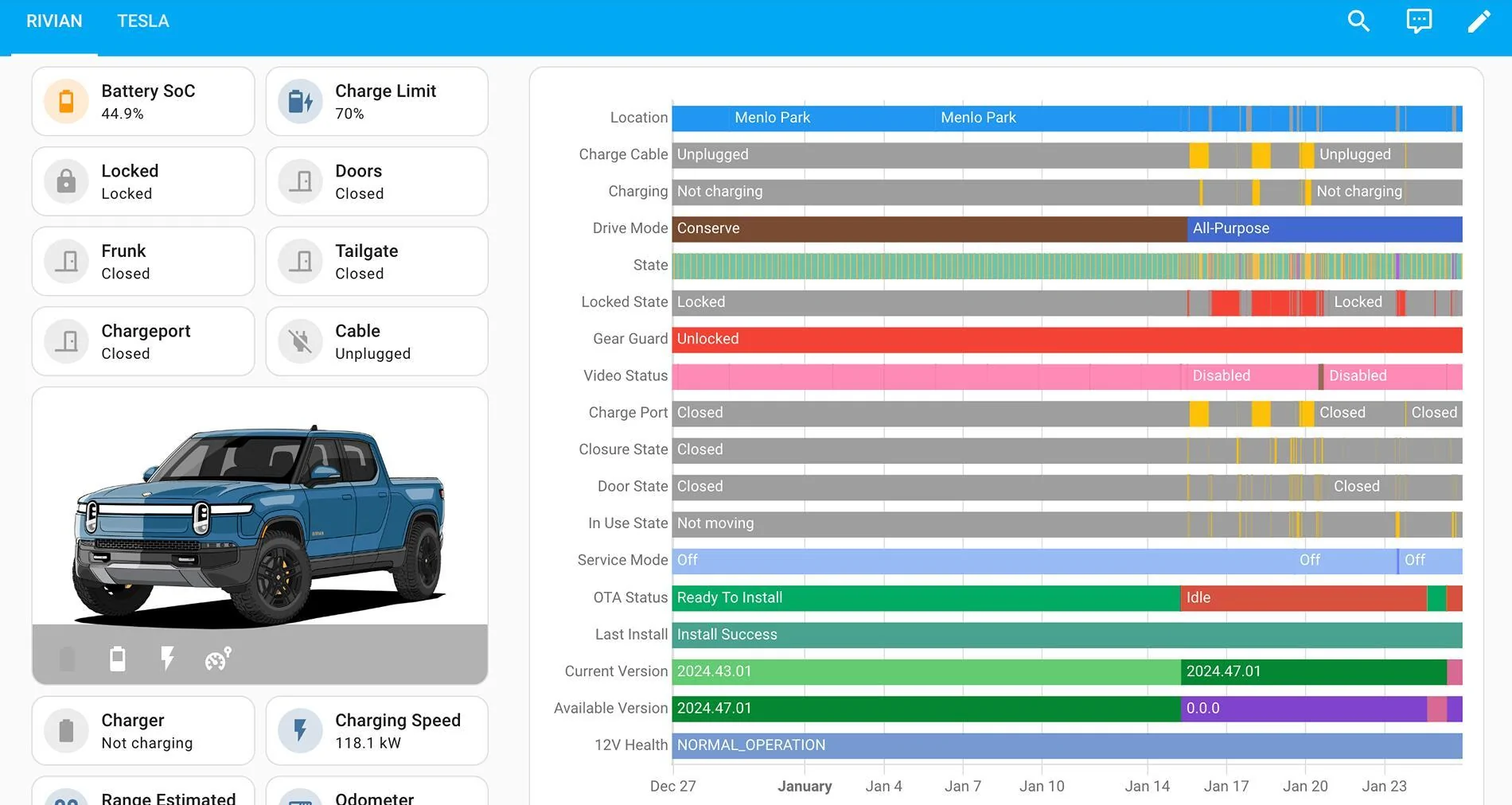
I can highly recommend Home Assistant. Great Rivian integration and all data stays private and can be used for any sort of calculation, automation and is easy to feed into ChatGPT for further advanced analysis.

Here is a dashboard that I put together for myself to see active/sleep and other behaviors over time:

Rivian R1T R1S Truck will not sleep! Screenshot 2025-01-25 at 10.58.40 PM
 
OP
OP
stormbreaker

stormbreaker

Well-Known Member
First Name
Ettore
Joined
Sep 13, 2024
Threads
32
Messages
183
Reaction score
206
Location
Connecticut
Vehicles
23 R1T Dual/Large, 94 Z28
Occupation
SE
I'm currently charging at the office. Once I get home I will do a full reset, which I haven't done in a couple months. If this and the other suggestions don't work out, I'm almost at 7500 miles, will make note during that checkup.
Sponsored


Top