Sponsored

How do you handle texts in your R1?

Jeep Addict

Well-Known Member
Joined
Apr 1, 2024
Threads
12
Messages
92
Reaction score
129
Location
NE Ohio
Vehicles
R1S
<DISCLAIMER> This is not intended to be inflammatory, nor a solicitation for rationales, theories, motives, etc. but it is a sincere question to learn how others handle text communication in there R1 as there's no voice text capability, send or receive, through the R1's infotainment system<?DISCLAIMER>

I searched the forums but didn't find an answer. I asked my guide, but the response was not helpful.

In my state, texting: holding the device and reading or composing text messages is prohibited. (https://www.transportation.ohio.gov/phonesdown)

How do you handle text communications in your R1. I'm struggling, I have a nifty phone mount with my Galaxy 24 Ultra stuck on it and it isn't working as well as I'd like. The phone sleeps, never announces or reads messages on it's own and Google assistant is hit or miss for voice texting.

Alexa refuses to text.

I saw an aftermarket addon screen thing, but that seems like a "bridge too far". How do you handle it?
Sponsored


 

godfodder0901

Well-Known Member
First Name
Jared
Joined
Mar 12, 2019
Threads
27
Messages
5,759
Reaction score
10,147
Location
Washington
Vehicles
2022 Rivian R1T LE
I know this is an honest question, and I would love a native solution as well. But to be honest, the best way to handle it right now is to simply wait until you park. Simple and safe.
 

KBabione

Well-Known Member
First Name
Kevin
Joined
Sep 11, 2023
Threads
48
Messages
1,480
Reaction score
2,018
Location
Lititz, PA
Vehicles
2023 R1S Quad (8/23)
Occupation
Consultant
iPhones here...My wife very successfully uses Siri to read incoming texts and send replies in our R1S. I just wait until I get to my destination. The iPhone also has something called "Driving Focus" which you can turn on and off (like Airplane Mode) and it alerts the sender of a text that you have notifications disabled so you won't see it right away. If the Samsung has something like that it might be an option for you.

My family long ago learned that if they text me and I don't reply right away then they need to call (even if the text shows as having been read). It works for us.
 

Sponsored

Al A Meda

Active Member
First Name
Ian
Joined
Jun 13, 2023
Threads
5
Messages
38
Reaction score
32
Location
Alameda, CA
Vehicles
2014 Traverse, 2011 Sportwagen
Occupation
Land Surveyor
I have an iphone and Siri works pretty well. With the phone connected to bluetooth I don't need to hold or speak into the phone directly. Siri does usually need the phone to be unlocked before she'll read me the text, which is kind of annoying, but not the end of the world.
 

RedRaiderRivian

Well-Known Member
Joined
Dec 23, 2022
Threads
0
Messages
358
Reaction score
535
Location
San Antonio
Vehicles
2022 Rivian R1T - Canyon Red, 2016 Nissan Leaf
Clubs
 
Agreed. To be honest, I like not seeing a text come through.
Its nice to just wait until I'm not driving, and a way to disconnect a bit.
My safe driving app that gets me a discount on my expensive insurance, dings me for using my phone including texts. It's a powerful incentive to wait until I stop.
 

Sponsored

jbssfelix

Well-Known Member
First Name
J
Joined
Apr 3, 2022
Threads
3
Messages
191
Reaction score
384
Location
Denver, CO
Vehicles
Tesla Model 3; Rivian R1S
Clubs
 
iPhones here...My wife very successfully uses Siri to read incoming texts and send replies in our R1S. I just wait until I get to my destination. The iPhone also has something called "Driving Focus" which you can turn on and off (like Airplane Mode) and it alerts the sender of a text that you have notifications disabled so you won't see it right away. If the Samsung has something like that it might be an option for you.

My family long ago learned that if they text me and I don't reply right away then they need to call (even if the text shows as having been read). It works for us.
Androids (at least our Pixels) have equivalent functionality (both driving/focus modes and a very good talk-to-text function)

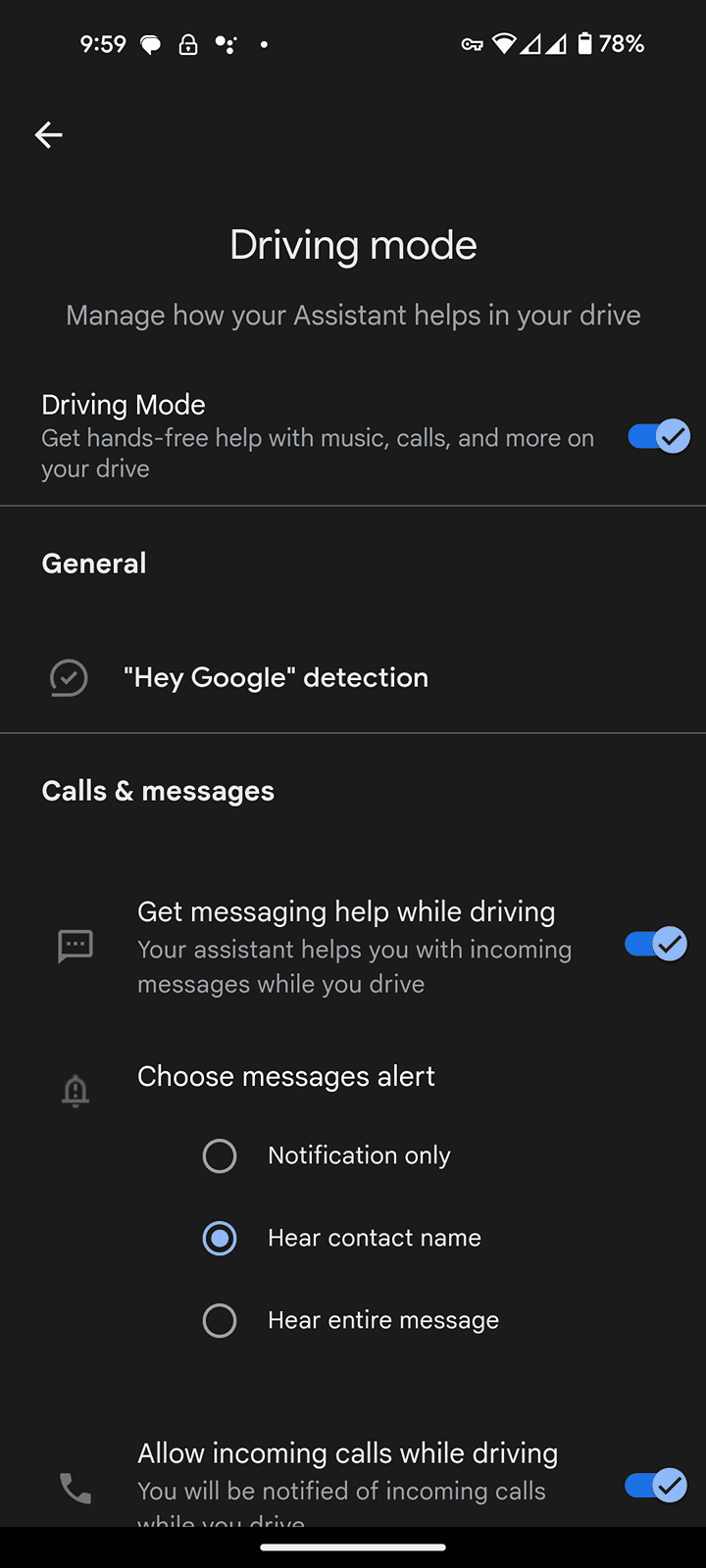
Rivian R1T R1S How do you handle texts in your R1? 1000003416
 

UnsungZero_OldTimeAdMan

Well-Known Member
First Name
Barnum
Joined
Mar 20, 2023
Threads
68
Messages
8,697
Reaction score
11,936
Location
SoCal
Vehicles
'23 GW Quad-Large R1T "Ghost"
Occupation
Advertising Circus
I don't. The integration isn't there yet. And if it's not urgent enough for them to call me, it's not urgent enough for me to reply in text while driving.
 

Pacblue22

Well-Known Member
Joined
May 19, 2023
Threads
3
Messages
47
Reaction score
54
Location
California
Vehicles
Rivian R1S
Its a huge hole in their system IMO, and a major use case of phone integration. I have often wondered why they have not prioritized such a useful feature, but my sense is the tech is non-trivial. Using Alexa, one would think a number of the pieces are already complete, but outside of Rivian who knows...

I really hope we see it at some point.

That all said, I am able to deal with only managing texts when I stop, so maybe not a huge porblem but still one of my major gripes...
 

jeeden

Well-Known Member
First Name
Jeremy
Joined
Oct 27, 2020
Threads
57
Messages
1,086
Reaction score
1,634
Location
Northern VA
Vehicles
Rivian R1S, 2016 Ford Escape, 2015 Ford Mustang GT
Occupation
Project Manager
Clubs
 
Androids (at least our Pixels) have equivalent functionality (both driving/focus modes and a very good talk-to-text function)

1000003416.png
This is the answer for Android. Just set it up so that it will read the texts. If you have it connected to the Bluetooth you will hear everything through the speakers. When you talk the phone microphone needs to pick up your voice, but that's it. I have vehicles without android auto and have had ones with Android Auto that integrate with the phone poorly (I'm looking at you Ford) and this is how I used it.

When you really think about the text integration in vehicles, what are they offering? They are making sure the microphone from the car is sending to the phone. Other than that, everything else is just the same as this feature asking if you want to play the texts and then sending the sound through the speakers.

I'm not sure about iPhone, but on Android you can also add the Rivian as a trusted Bluetooth device so when the phone is connected to the Rivian it will automatically unlock. Then you technically don't even need to touch the phone, you just say "google...." and speak.

Alexa will ALSO work, but you would have to add Alexa as your phone assistance instead of google or siri and it technically wouldn't be the Alexa through the Rivian, but the Alexa on your phone... it might get confused if you have them both setup and say her name, both devices (phone and Rivian) would try to interact with you.
Sponsored


Top