Sponsored

shap

Well-Known Member
Joined
Nov 18, 2021
Threads
16
Messages
870
Reaction score
765
Location
Austin,TX
Vehicles
BMW 45e, R1T
Clubs
 
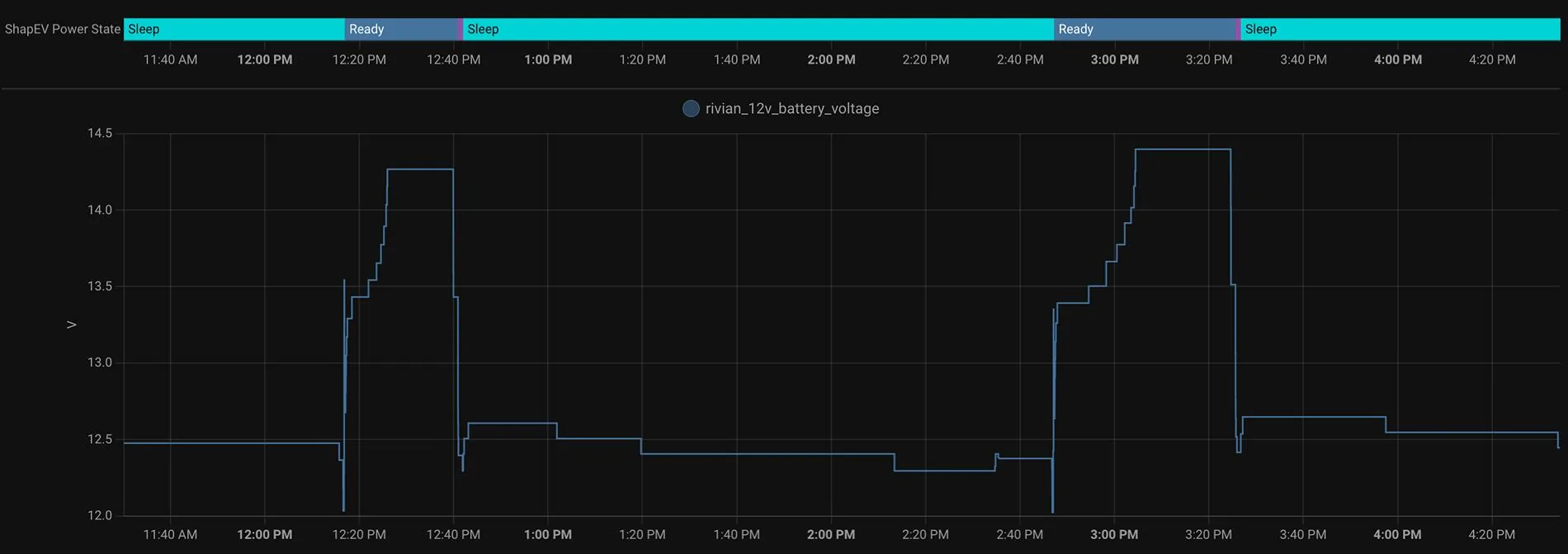
One more update:
Rivian R1T R1S Gen 1 Vampire Drain (Possibly) Solved (or Hacked) 1727300163814-y2


clear pattern. The big question and only Rivian can provide this info - who is consuming the power while sleeping? And Rivian decided to ignore this.
Sponsored

 

HaveBlue

Well-Known Member
Joined
Nov 22, 2022
Threads
41
Messages
2,928
Reaction score
2,235
Location
91107
Vehicles
R1S DMP Max, Lifted GX470, APR Audi A7, BMW 325Ci
Clubs
 
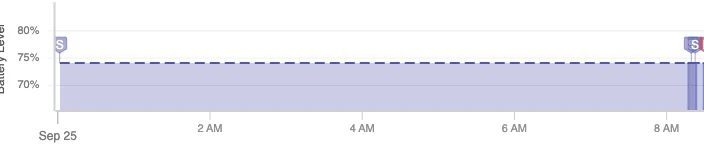
Okey, with BT Disabled in my phone, the R1T went to sleep yesterday at 8:30pm and only woke up this morning when I turned BT back on and approached my truck to get ready to drive it

1727277572340-yb.png


So it definitely looks like a brand-new 12V battery minimizes (Eliminates?) the constant Sleep/Wakes cycle?

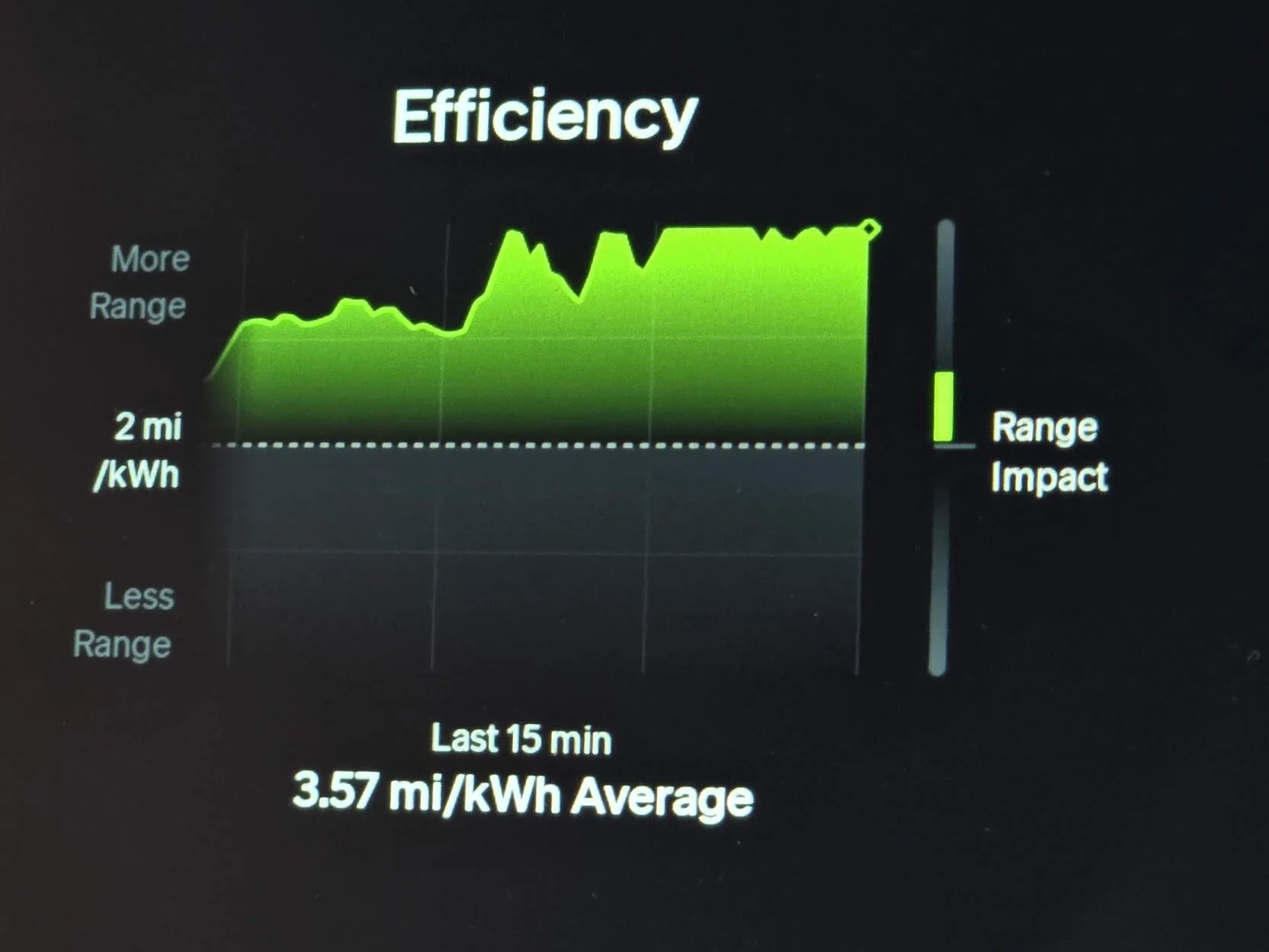
Also, I did notice that I was getting better range and efficiency, I did not know if it was just a placebo or real, so I did pay attention last night when driving back from a place that I frequent weekly and got this:

1727277906984-7w.jpg


(Conserve mode, and mind you, it's a bit downhill from this place to my garage). Normally, I was getting 2.50 to 2.85mi/kWh in that same stretch at the same speeds.

There's definitely less 12V charging happening in my vehicle and that's 100% impacting my range/efficiency and battery drain.
That's awesome. I too believe the BT is the big culprit waking the car. I think if the car is not paired to any phones or has them far away and proximity unlock completely disabled, it makes a big difference. Of course then you'd have to rely on NFC cards or unlock manually in the app. I also believe a bigger battery would prevent so many wakes and the car would be able to sleep until the next drive session and charge then when everything is on anyway.

I as well have noticed crazy good efficiency lately after the latest update. I often get better than the 2.7mpkw range estimate and sometimes pushing 3mpkw. I don't have an explanation.
 

josh0

Well-Known Member
First Name
Josh
Joined
Jan 4, 2024
Threads
26
Messages
362
Reaction score
509
Location
Abiquiu, NM / Baltimore, MD
Vehicles
2023 (Nov) R1T, 2014 Jeep Cherokee
Bluetooth is pretty low power, I’d be shocked if it is actually the Bluetooth radio that accounts for a significant amount of the drain. That said, I could totally see it being a bad system design where it’s say impossible to turn on the Bluetooth radio and other necessary systems without also turning on other systems. Cellular radios, for example, use significantly more power.
 

mudito

Well-Known Member
First Name
Aldo
Joined
Jul 30, 2024
Threads
18
Messages
1,011
Reaction score
1,414
Location
Texas
Vehicles
Rivian R1T
One more update:
1727300163814-y2.webp


clear pattern. The big question and only Rivian can provide this info - who is consuming the power while sleeping? And Rivian decided to ignore this.
So, your car is waking itself up every couple of hours to charge, that confirms one of my theories that mine (with brand-new 12V batteries) is having way less VD due to not waking up to charge the 12V. Now I wonder how long it will take for mine to start behaving like yours again...

Do you have Bluetooth turned OFF on your cell phone?

(just to make sure that's outside of the possibilities for the wakeup behavior) FYI, I have my truck with proximity Lock/Unlock ENABLED but I'm turning off BT as soon as I walk away from my garage for these tests (I created a shortcut so I can turn BT on/off with a double click on my phone w/o even unlocking it, thanks to @Riviot btw! :) )
 

Riviot

Well-Known Member
Joined
Mar 29, 2021
Threads
121
Messages
6,434
Reaction score
10,829
Location
Kitsap, WA
Vehicles
R1T
Clubs
 
So, your car is waking itself up every couple of hours to charge, that confirms one of my theories that mine (with brand-new 12V batteries) is having way less VD due to not waking up to charge the 12V. Now I wonder how long it will take for mine to start behaving like yours again...

Do you have Bluetooth turned OFF on your cell phone?

(just to make sure that's outside of the possibilities for the wakeup behavior) FYI, I have my truck with proximity Lock/Unlock ENABLED but I'm turning off BT as soon as I walk away from my garage for these tests (I created a shortcut so I can turn BT on/off with a double click on my phone w/o even unlocking it, thanks to @Riviot btw! :) )
Rivian R1T R1S Gen 1 Vampire Drain (Possibly) Solved (or Hacked) 1000000298


Happy to unknowingly help somehow!
 

Sponsored

godfodder0901

Well-Known Member
First Name
Jared
Joined
Mar 12, 2019
Threads
27
Messages
5,756
Reaction score
10,141
Location
Washington
Vehicles
2022 Rivian R1T LE
That is a bit strange as as much as charging a 12V battery takes per 24 hours (let's say 2kWh) - it should not affect driving efficiency in any visible way, IMHO.

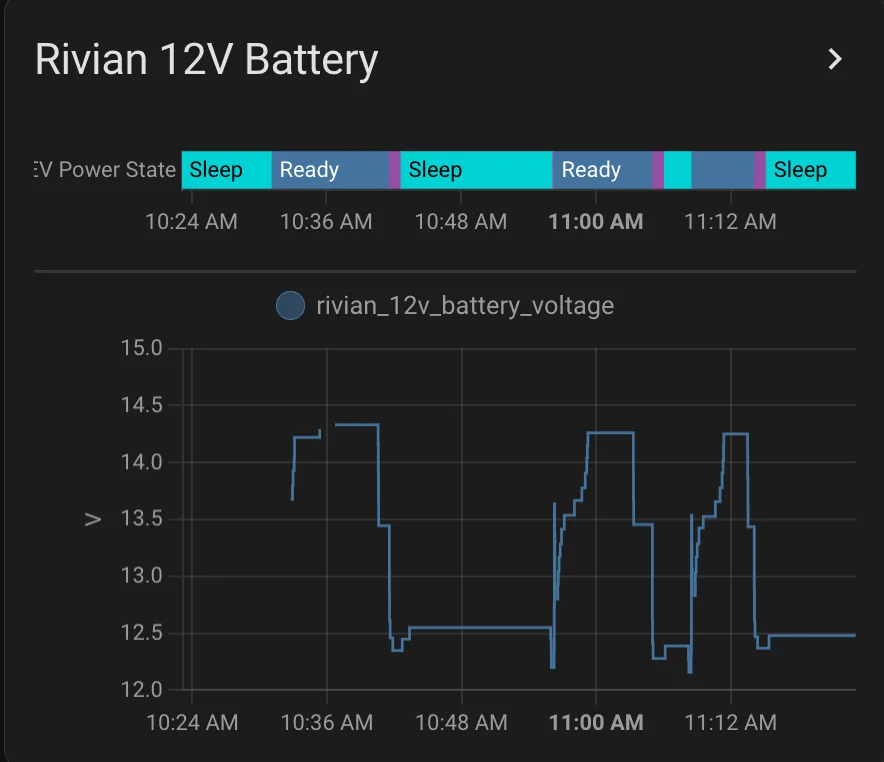
I installed 12V battery sensor that reports to my Home Assistant:
I will continue to monitor this. I took delivery in May 2023, the car production date is March 2023, 1 battery. 23k miles

1727281509167-lf.png
Which monitor did you get? I just picked up a Shelly Uni Plus for this exact reason.
 

mudito

Well-Known Member
First Name
Aldo
Joined
Jul 30, 2024
Threads
18
Messages
1,011
Reaction score
1,414
Location
Texas
Vehicles
Rivian R1T
1000000298.gif


Happy to unknowingly help somehow!
Hahaha
Miss-tagged you on that one :) It was @HaveBlue who helped here but thanks to you as well for... something :) I'm sure you did something cool for someone :cool:
 

shap

Well-Known Member
Joined
Nov 18, 2021
Threads
16
Messages
870
Reaction score
765
Location
Austin,TX
Vehicles
BMW 45e, R1T
Clubs
 
Which monitor did you get? I just picked up a Shelly Uni Plus for this exact reason.
I connected Shelly to home assistant (built-in in). And the rest was done in HA. If that what you asked.

In Shelly you need to add peripheral and choose voltmeter.

I also suggest to check the reported voltage by other tool and make an adjustment when calculating. In my case it was off by 5-10%
 

godfodder0901

Well-Known Member
First Name
Jared
Joined
Mar 12, 2019
Threads
27
Messages
5,756
Reaction score
10,141
Location
Washington
Vehicles
2022 Rivian R1T LE
I connected Shelly to home assistant (built-in in). And the rest was done in HA. If that what you asked.

In Shelly you need to add peripheral and choose voltmeter.

I also suggest to check the reported voltage by other tool and make an adjustment when calculating. In my case it was off by 5-10%
So you have a Plus Uni as well.
Wish we had have had this convo a few days ago... Not very intuitive. I ended up doing exactly what you said last weekend. FWIW, I ended up getting more precision (two decimal places) using Analog Input mode and Javascript to convert percentage to voltage (with the offset you mentioned).
 

HaveBlue

Well-Known Member
Joined
Nov 22, 2022
Threads
41
Messages
2,928
Reaction score
2,235
Location
91107
Vehicles
R1S DMP Max, Lifted GX470, APR Audi A7, BMW 325Ci
Clubs
 
Bluetooth is pretty low power, I’d be shocked if it is actually the Bluetooth radio that accounts for a significant amount of the drain. That said, I could totally see it being a bad system design where it’s say impossible to turn on the Bluetooth radio and other necessary systems without also turning on other systems. Cellular radios, for example, use significantly more power.
You are correct in that BT is very low power. The issue is that as soon as the car sees a paired BT device, it wakes up the rest of the systems regardless of whether it's going to unlock or proximity unlock is even enabled.
 

Sponsored

tate16t

Well-Known Member
First Name
Robert
Joined
Apr 7, 2022
Threads
64
Messages
1,401
Reaction score
1,181
Location
NY
Vehicles
2023 El Cap Granite R1S
Occupation
Car Enthusiast
You are correct in that BT is very low power. The issue is that as soon as the car sees a paired BT device, it wakes up the rest of the systems regardless of whether it's going to unlock or proximity unlock is even enabled.
I disable BT within the Rivian app on my iPhone and only turn it on when needed. Are you saying it keeps checking for a connected device and wakes up the rest of the sys when doing so?

I tested with proximity on/off, BT on/off and VD doesn’t change. I still experience 1-2% per day.
 
Last edited:

mudito

Well-Known Member
First Name
Aldo
Joined
Jul 30, 2024
Threads
18
Messages
1,011
Reaction score
1,414
Location
Texas
Vehicles
Rivian R1T
I disable BT within the Rivian app on my iPhone and only turn it on when needed. Are you saying it keeps checking for a connected device and wakes up the rest of the sys when doing so?

I tested with proximity on/off, BT on/off and VD doesn’t change. I still experience 1-2% per day.
I can confirm that in my case (I have an Android phone, I can NOT turn off BT per App), with or without Proximity Lock/Unlock enabled at home, the car will wake up when the Phone As A Key is within range.

Disabling bluetooth, or eliminating the phone as a key (in my case), avoids the wake/sleep triggers with my truck.
 

tate16t

Well-Known Member
First Name
Robert
Joined
Apr 7, 2022
Threads
64
Messages
1,401
Reaction score
1,181
Location
NY
Vehicles
2023 El Cap Granite R1S
Occupation
Car Enthusiast
I can confirm that in my case (I have an Android phone, I can NOT turn off BT per App), with or without Proximity Lock/Unlock enabled at home, the car will wake up when the Phone As A Key is within range.

Disabling bluetooth, or eliminating the phone as a key (in my case), avoids the wake/sleep triggers with my truck.
Interesting. I never tried disabling BT or eliminating phone as a key because I thought I accomplished this by disabling BT in the app. I definitely cannot approach the vehicle and unlock it without enabling BT via the app first. With this setup my vehicle wakes/sleeps throughout the day.
 

HyperionMark

Well-Known Member
First Name
Mark
Joined
Apr 22, 2022
Threads
14
Messages
416
Reaction score
358
Location
South Dakota
Vehicles
R1T and Model Y (previously a 3 and X)
I can confirm that in my case (I have an Android phone, I can NOT turn off BT per App), with or without Proximity Lock/Unlock enabled at home, the car will wake up when the Phone As A Key is within range.

Disabling bluetooth, or eliminating the phone as a key (in my case), avoids the wake/sleep triggers with my truck.
You can go into Rivian app settings (permissions) and not allow "nearby devices". This is equivalent to turning off Bluetooth for the Rivian communications only.
 

mudito

Well-Known Member
First Name
Aldo
Joined
Jul 30, 2024
Threads
18
Messages
1,011
Reaction score
1,414
Location
Texas
Vehicles
Rivian R1T
You can go into Rivian app settings (permissions) and not allow "nearby devices". This is equivalent to turning off Bluetooth for the Rivian communications only.
Tried that, but everything behaved erratically. The "routines" for turning off/on bluetooth with a double click on the volume keys worked perfectly for me to disable it while at home. We'll see long-term if I keep it or not. I might just not care about the drain caused by my phone be closer to the truck, but for now, I'm experimenting :)
Sponsored


Top