Sponsored

R1T gen 1 fails to lock

dduffey

Well-Known Member
First Name
David
Joined
Apr 1, 2022
Threads
19
Messages
424
Reaction score
409
Location
Texas
Vehicles
R1T, Tesla M3, Tesla MY
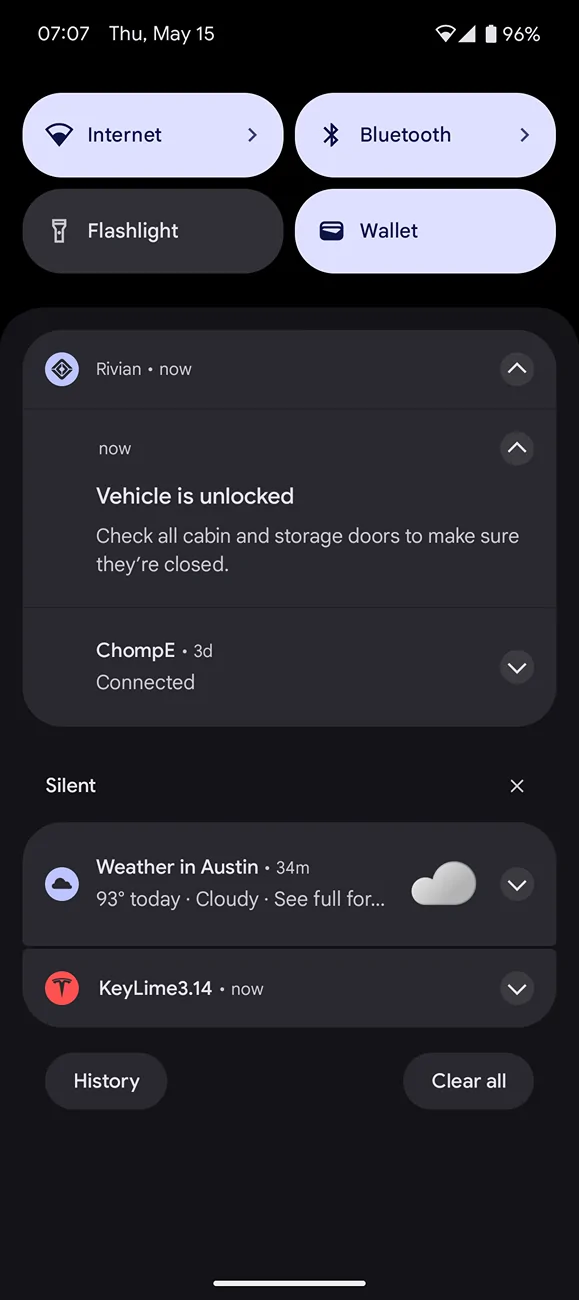
Every other day or so I get a message that the R1T is unlocked and to "check cabin and storage doors, etc.". But everything looks okay to me, nothing ajar in the app, the center screen, or visually, and just locking manually in the app works.

I can't find a rhyme or reason. I use PaaK. Sometimes it is at home, sometimes it is when I am away from home (which is always concerning), sometimes it happens when no one else is at home (i.e. no other PaaK or key fob).

Today I used my truck at 8am. Wife went out around noon (not the Rivian), May have unlocked via PaaK due to proximity. Then at 2:16 (hours later) I get a notification it is unlocked.

Sometimes I think it happens after my wife leaves and maybe the Rivian woke up and unlocked temporarily but then never locked for "reasons".

This is new behavior for a couple months.

Before I reach out to support wanted to see if anyone experienced this or advice in how to more pin point what the problem is (i.e. a wake/unlock history, which device unlocked it, and what is keeping it from locking again).
Sponsored

 

godfodder0901

Well-Known Member
First Name
Jared
Joined
Mar 12, 2019
Threads
27
Messages
5,771
Reaction score
10,163
Location
Washington
Vehicles
2022 Rivian R1T LE
Every other day or so I get a message that the R1T is unlocked and to "check cabin and storage doors, etc.". But everything looks okay to me, nothing ajar in the app, the center screen, or visually, and just locking manually in the app works.

I can't find a rhyme or reason. I use PaaK. Sometimes it is at home, sometimes it is when I am away from home (which is always concerning), sometimes it happens when no one else is at home (i.e. no other PaaK or key fob).

Today I used my truck at 8am. Wife went out around noon (not the Rivian), May have unlocked via PaaK due to proximity. Then at 2:16 (hours later) I get a notification it is unlocked.

Sometimes I think it happens after my wife leaves and maybe the Rivian woke up and unlocked temporarily but then never locked for "reasons".

This is new behavior for a couple months.

Before I reach out to support wanted to see if anyone experienced this or advice in how to more pin point what the problem is (i.e. a wake/unlock history, which device unlocked it, and what is keeping it from locking again).
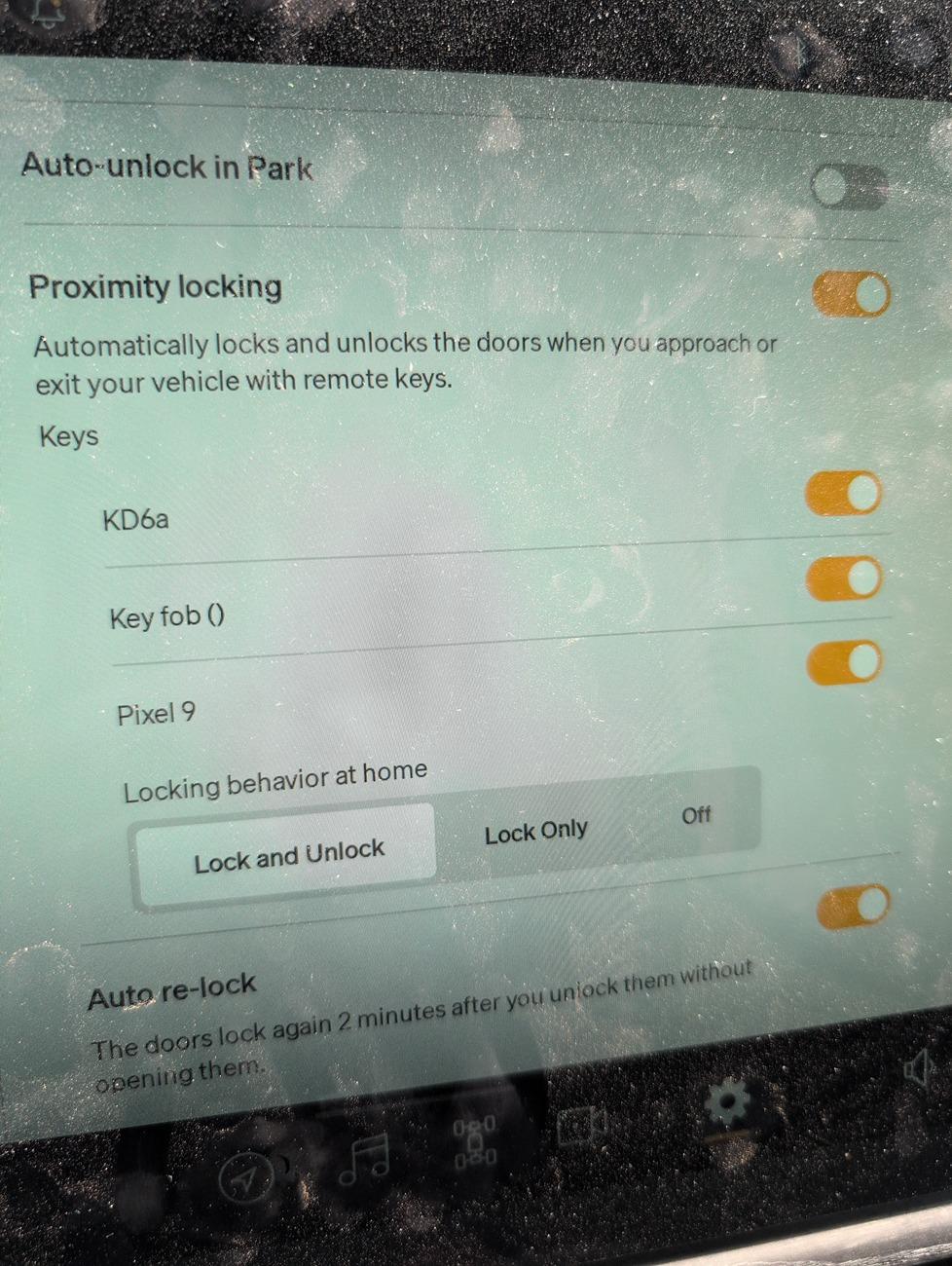
Sorry if this seems like a dumb question, but do you have proximity unlock off at home? Do you have auto-lock enabled?
 
OP
OP

dduffey

Well-Known Member
First Name
David
Joined
Apr 1, 2022
Threads
19
Messages
424
Reaction score
409
Location
Texas
Vehicles
R1T, Tesla M3, Tesla MY
Sorry if this seems like a dumb question, but do you have proximity unlock off at home? Do you have auto-lock enabled?
No, I appreciate your questions. But sometimes this also happens when not at home (i.e. getting a message the truck is unlocked when shopping, but there are no open storage/doors, etc).

Rivian R1T R1S R1T gen 1 fails to lock 17471703382818743579821426366469
 

godfodder0901

Well-Known Member
First Name
Jared
Joined
Mar 12, 2019
Threads
27
Messages
5,771
Reaction score
10,163
Location
Washington
Vehicles
2022 Rivian R1T LE
No, I appreciate your questions. But sometimes this also happens when not at home (i.e. getting a message the truck is unlocked when shopping, but there are no open storage/doors, etc).

17471703382818743579821426366469.jpg
I definitely recommend you turn off proximity at home, it should reduce most of the annoyances. It's also worth a software and/or vehicle restart. Likely both.
 
OP
OP

dduffey

Well-Known Member
First Name
David
Joined
Apr 1, 2022
Threads
19
Messages
424
Reaction score
409
Location
Texas
Vehicles
R1T, Tesla M3, Tesla MY
I guess the annoyance isn't that it unlocks (as my title suggests), but refuses to lock after unlocking. This happens also when not at home. My guess is that, for example when shopping, it takes some period of time to notify that the vehicle is left unlocked, but it's not clear why it decides not to lock except to "check cabin/storage doors".
 

Sponsored

OP
OP

dduffey

Well-Known Member
First Name
David
Joined
Apr 1, 2022
Threads
19
Messages
424
Reaction score
409
Location
Texas
Vehicles
R1T, Tesla M3, Tesla MY
Did a hard reset and then also got the latest update hoping that would resolve it.

But this morning the same thing happened (last drive 9pm, so ~10 hrs later) so I went out and did a vehicle diagnostics capture immediately after and did a service appointment request.

Walked away (had my PaaK with me) and it locked ... the only door opened and closed was the driver's door to take the capture.
 

tjrivian

Well-Known Member
Joined
Oct 4, 2024
Threads
9
Messages
211
Reaction score
184
Location
san diego
Vehicles
Tesla Model X
OP
OP

dduffey

Well-Known Member
First Name
David
Joined
Apr 1, 2022
Threads
19
Messages
424
Reaction score
409
Location
Texas
Vehicles
R1T, Tesla M3, Tesla MY
Good thread with lots of common issues. I like the idea of key card in a ring (or add to a watch strap). Also found that my location service was off for the Rivian app, so enabled that and might improve PaaK. Thank you for sharing.

But I suspect something else, since for example I will be away from home shopping, get a message the vehicle to failed to lock (in the parking lot) and to "check all cabin and storage doors". But the app shows all doors closed and hitting "lock" on the app while still in the store successfully locks when the auto lock didn't.

I searched the forums on variation of the app error, but it appears I may be hitting something uncommon like a failed door sensor or something. (hopefully the vehicle diagnostics can pinpoint what cabin/storage door is problematic).

Rivian R1T R1S R1T gen 1 fails to lock 1000000503
 

Dark-Fx

Well-Known Member
First Name
Brian
Joined
Jul 15, 2020
Threads
149
Messages
13,654
Reaction score
27,699
Location
Michigan
Vehicles
R1T, R1S, Livewire One, Sierra EV, R1S
Occupation
Engineering
Clubs
 
But I suspect something else, since for example I will be away from home shopping, get a message the vehicle to failed to lock (in the parking lot) and to "check all cabin and storage doors". But the app shows all doors closed and hitting "lock" on the app while still in the store successfully locks when the auto lock didn't.
I'll occasionally get the door left open warning if my gen2 door doesn't close all the way and I don't immediately re-close it. By the time I see the warning in those situations, it's always already been re-closed.
 

Rford71

Well-Known Member
First Name
Robert
Joined
May 18, 2020
Threads
0
Messages
45
Reaction score
44
Location
Maryland
Vehicles
Honda ridgeline, Audi TT
Occupation
Firefighter
I’m experiencing the same issue, it actually happened to me twice a day away from home. I have a service appointment scheduled for next month so I will add it to the list.
 

Sponsored

OP
OP

dduffey

Well-Known Member
First Name
David
Joined
Apr 1, 2022
Threads
19
Messages
424
Reaction score
409
Location
Texas
Vehicles
R1T, Tesla M3, Tesla MY
I’m experiencing the same issue, it actually happened to me twice a day away from home. I have a service appointment scheduled for next month so I will add it to the list.
I have one end of May, will let you know if they find anything.

You may already know, but long holding your driver name or a 10 second press of the hazard will do a vehicle diagnostics capture. Note the date/time and add that as a comment to the service request so they know to look for that capture.
 

ohseedee

Well-Known Member
Joined
Mar 1, 2022
Threads
15
Messages
735
Reaction score
1,728
Location
California
Vehicles
R1T
I started to get this issue a couple weeks ago too. Happens both at home and away from home. I’d say it’s about 50/50 now. I’m now looking back as I walk away and locking manually after it’s clear it won’t lock. Perhaps related to the latest update? I’m using an iPhone 16 pro max.
 
OP
OP

dduffey

Well-Known Member
First Name
David
Joined
Apr 1, 2022
Threads
19
Messages
424
Reaction score
409
Location
Texas
Vehicles
R1T, Tesla M3, Tesla MY
Yes, I was initially thinking it could be related to an update and so waited for another update cycle, but issue persists to the newest update as well (2025.14.01).
 
OP
OP

dduffey

Well-Known Member
First Name
David
Joined
Apr 1, 2022
Threads
19
Messages
424
Reaction score
409
Location
Texas
Vehicles
R1T, Tesla M3, Tesla MY
I know I said end of May, but I have another request still waiting parts so I have held off on taking it in (my choice).

I have had it continue to happen several times a week (Pixel 9).
 
OP
OP

dduffey

Well-Known Member
First Name
David
Joined
Apr 1, 2022
Threads
19
Messages
424
Reaction score
409
Location
Texas
Vehicles
R1T, Tesla M3, Tesla MY
Service center couldn't find a problem, but I think they effectively root caused it.

We can reproduce the behavior by turning off Bluetooth on the phone or taking out the battery in the key fob. When the vehicle suddenly loses Bluetooth it produces this "check all storage and doors" failed to lock message.

The logic is likely to keep the vehicle from locking if the phone battery dies, etc.

So in my case, the truck was suddenly not able to talk to the PaaK. This may be an issue with my phone. There have been times while driving that the truck reports "PaaK not detected", so this is a very likely case for me.

I also had a bluetooth whoop device that I am no longer using (and am doing another firmware update). Will live with the truck for a few weeks to see what happens with no whoop and newer firmware.

Hope that helps, maybe you also had sudden Bluetooth drops.

Edit: Although RJ uses a whoop, so probably not that :)

Sponsored


Top