Sponsored

sub

Well-Known Member
Joined
Jul 23, 2021
Threads
33
Messages
1,872
Reaction score
3,304
Location
USA
Vehicles
Rivian R1S, Tesla Model 3
That's crazy man, what part of this is confusing exactly?
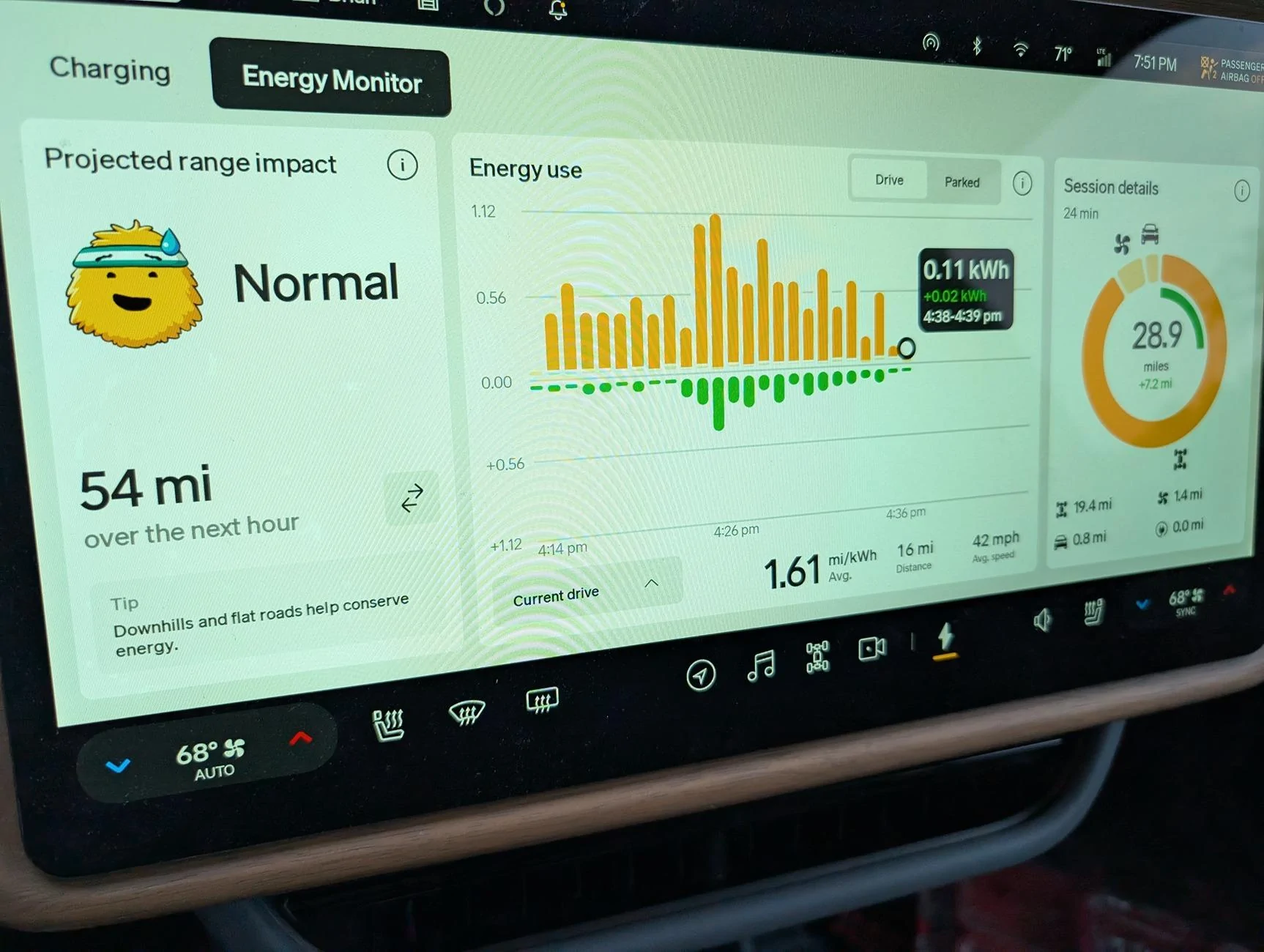
1000007106.webp
I find 0.11 kWh/min very confusing. 6.6 kW makes a lot more sense (and is mathematically identical). Why are the dividing the power by 60 minutes per hour? And to make it even more confusing if you change the current drive to last hour the units change to an even dumber unit: kWh/5min.

I also don't know how you could use the anything on that page to figure out if you are going to make it to the charger that is xx miles away which is the #1 concen of anyone driving an EV further than one charge.

Perhaps you can explain it to me. Based on that screen would you make it to a charger that is 200 miles away?

And if this isn't to help with range anxiety what is it for? What is a practical use of 0.11 kWh/min?

If I speed up and see my consumption goes up it still doesn't tell me anything useful. Without distance (or speed) on the chart there is no way of knowing if the portion of your drive where you got 0.5 kWh/min was more ore less efficient than the portion where you got 0.1 kWh/min. You used 1/5 the energy but if you traveled 1/10th the distance then that is actually worse.
Sponsored

 
Last edited:

Dark-Fx

Well-Known Member
First Name
Brian
Joined
Jul 15, 2020
Threads
147
Messages
13,521
Reaction score
27,288
Location
Michigan
Vehicles
R1T, R1S, Livewire One, Sierra EV, R1S
Occupation
Engineering
Clubs
 
I find 0.11 kWh/min very confusing. 6.6 kW makes a lot more sense (and is mathematically identical). Why are the dividing the power by 60 minutes per hour? And to make it even more confusing if you change the current drive to last hour the units change to an even dumber unit: kWh/5min.

I also don't know how you could use the anything on that page to figure out if you are going to make it to the charger that is xx miles away which is the #1 concen of anyone driving an EV further than one charge.

Perhaps you can explain it to me. Based on that screen would you make it to a charger that is 200 miles away?

And if this isn't to help with range anxiety what is it for? What is a practical use of 0.11 kWh/min?

If I speed up and see my consumption goes up it still doesn't tell me anything useful. Without distance (or speed) on the chart there is no way of knowing if the portion of your drive where you got 0.5 kWh/min was more ore less efficient than the portion where you got 0.1 kWh/min. You used 1/5 the energy but if you traveled 1/10th the distance then that is actually worse.
So this is a case of you getting confused over too much information, I got it. I'd agree that it's Rivian's biggest problem.
 

cwintermeyer

Well-Known Member
First Name
Chris
Joined
Feb 14, 2022
Threads
1
Messages
87
Reaction score
206
Location
SLC, UT
Vehicles
2023 R1S Adventure Quad, 2023 Wrangler 392 XR
Occupation
Software exec
Clubs
 
Go for a drive, turn on WiFi?
No WiFi in my apartment garage, unfortunately. Not sure how driving around expedites a software update but FWIW in the garage the LTE is four bars strong.
 

tate16t

Well-Known Member
First Name
Robert
Joined
Apr 7, 2022
Threads
64
Messages
1,396
Reaction score
1,181
Location
NY
Vehicles
2023 El Cap Granite R1S
Occupation
Car Enthusiast
No WiFi in my apartment garage, unfortunately. Not sure how driving around expedites a software update but FWIW in the garage the LTE is four bars strong.
Me neither but some have expressed it does and I have experienced it myself. Good Luck.
 

Marchin_MTB

Well-Known Member
First Name
Marcin
Joined
Jun 25, 2022
Threads
14
Messages
1,506
Reaction score
1,971
Location
Colorado
Vehicles
2015 i3, 2011 Honda CRV.
Occupation
Aerospace Engineer turned Space Physicist
Clubs
 
Updated earlier today. New energy screens look interesting and I can’t wait to nerd out with them. I like that some of the info is now in the app however it would be great if
1) the app would allow you to toggle the inverter on/off
2) the app would allow you to adjust the amperage without going into the scheduling screen
 

Sponsored

Marchin_MTB

Well-Known Member
First Name
Marcin
Joined
Jun 25, 2022
Threads
14
Messages
1,506
Reaction score
1,971
Location
Colorado
Vehicles
2015 i3, 2011 Honda CRV.
Occupation
Aerospace Engineer turned Space Physicist
Clubs
 
I find 0.11 kWh/min very confusing. 6.6 kW makes a lot more sense (and is mathematically identical). Why are the dividing the power by 60 minutes per hour? And to make it even more confusing if you change the current drive to last hour the units change to an even dumber unit: kWh/5min.

I also don't know how you could use the anything on that page to figure out if you are going to make it to the charger that is xx miles away which is the #1 concen of anyone driving an EV further than one charge.

Perhaps you can explain it to me. Based on that screen would you make it to a charger that is 200 miles away?

And if this isn't to help with range anxiety what is it for? What is a practical use of 0.11 kWh/min?

If I speed up and see my consumption goes up it still doesn't tell me anything useful. Without distance (or speed) on the chart there is no way of knowing if the portion of your drive where you got 0.5 kWh/min was more ore less efficient than the portion where you got 0.1 kWh/min. You used 1/5 the energy but if you traveled 1/10th the distance then that is actually worse.
But the driver display does give us energy/mile (or inverse thereof). So now we have both.

Also, if we’re not going to contemplate “train A left the station at 70mph…” type problems in our heads while we drive for several hours what else are we going to do?!? Make conversation with our families? Preposterous!

edited to add: the answer is (B) The trains efficiency is 103 hexakilowatthours per fortnight.
 
Last edited:

CoastalR1T

Well-Known Member
First Name
Curt
Joined
Jul 26, 2022
Threads
3
Messages
97
Reaction score
213
Location
CA
Vehicles
R1T Adventure Package, El Cap Granite
Occupation
Chief cook and bottle washer
Clubs
 
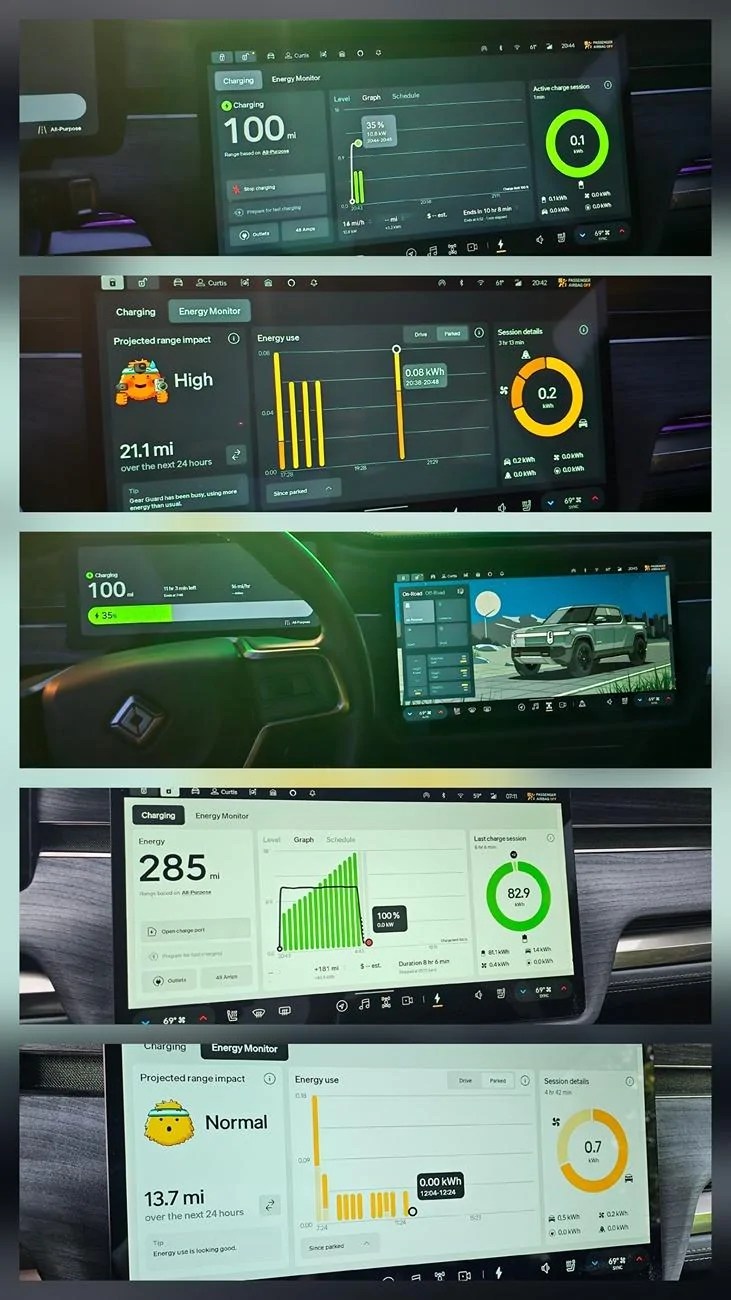
Dropped last night. Lots of info.

Rivian R1T R1S 2025.18.01 installing! Have you received the update? 20250606_213037
 
OP
OP
josh0

josh0

Well-Known Member
First Name
Josh
Joined
Jan 4, 2024
Threads
26
Messages
362
Reaction score
508
Location
Abiquiu, NM / Baltimore, MD
Vehicles
2023 (Nov) R1T, 2014 Jeep Cherokee
I find 0.11 kWh/min very confusing. 6.6 kW makes a lot more sense (and is mathematically identical). Why are the dividing the power by 60 minutes per hour? And to make it even more confusing if you change the current drive to last hour the units change to an even dumber unit: kWh/5min.

I also don't know how you could use the anything on that page to figure out if you are going to make it to the charger that is xx miles away which is the #1 concen of anyone driving an EV further than one charge.

Perhaps you can explain it to me. Based on that screen would you make it to a charger that is 200 miles away?

And if this isn't to help with range anxiety what is it for? What is a practical use of 0.11 kWh/min?

If I speed up and see my consumption goes up it still doesn't tell me anything useful. Without distance (or speed) on the chart there is no way of knowing if the portion of your drive where you got 0.5 kWh/min was more ore less efficient than the portion where you got 0.1 kWh/min. You used 1/5 the energy but if you traveled 1/10th the distance then that is actually worse.
Battery capacity is measured in kWh. kWh/minute gives you an easy to understand measure of how quickly you’re using up your charge. Yes, technically kW would give you the same information, but it adds complexity by changing the units involved from what you’re already using when looking at charging data and SoC.
 

hammick

Well-Known Member
First Name
Stormy
Joined
Sep 8, 2024
Threads
26
Messages
587
Reaction score
536
Location
Montana
Vehicles
25 R1S Tri; '22 F150 Lightning Lariat ER
Occupation
retired
Looking forward to seeing a 10%ish to 80%ish DC charging curve on a Tri after this update. I won't be able to provide one until the end of the month.
 
OP
OP
josh0

josh0

Well-Known Member
First Name
Josh
Joined
Jan 4, 2024
Threads
26
Messages
362
Reaction score
508
Location
Abiquiu, NM / Baltimore, MD
Vehicles
2023 (Nov) R1T, 2014 Jeep Cherokee
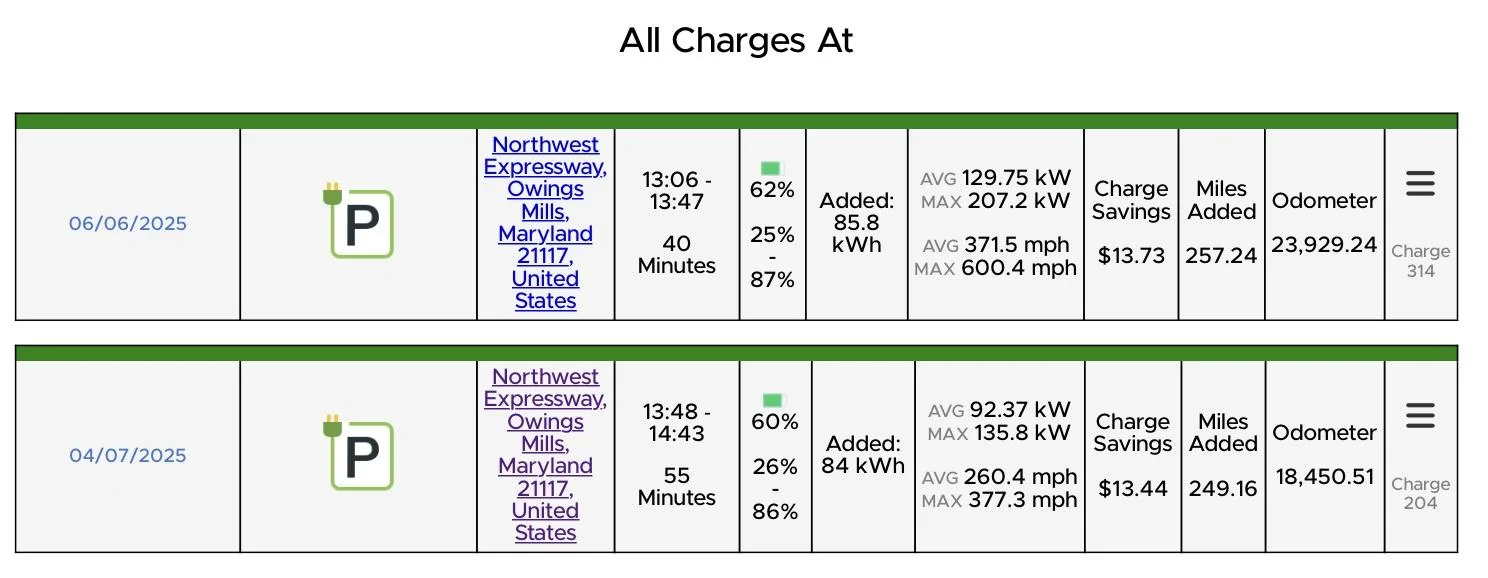
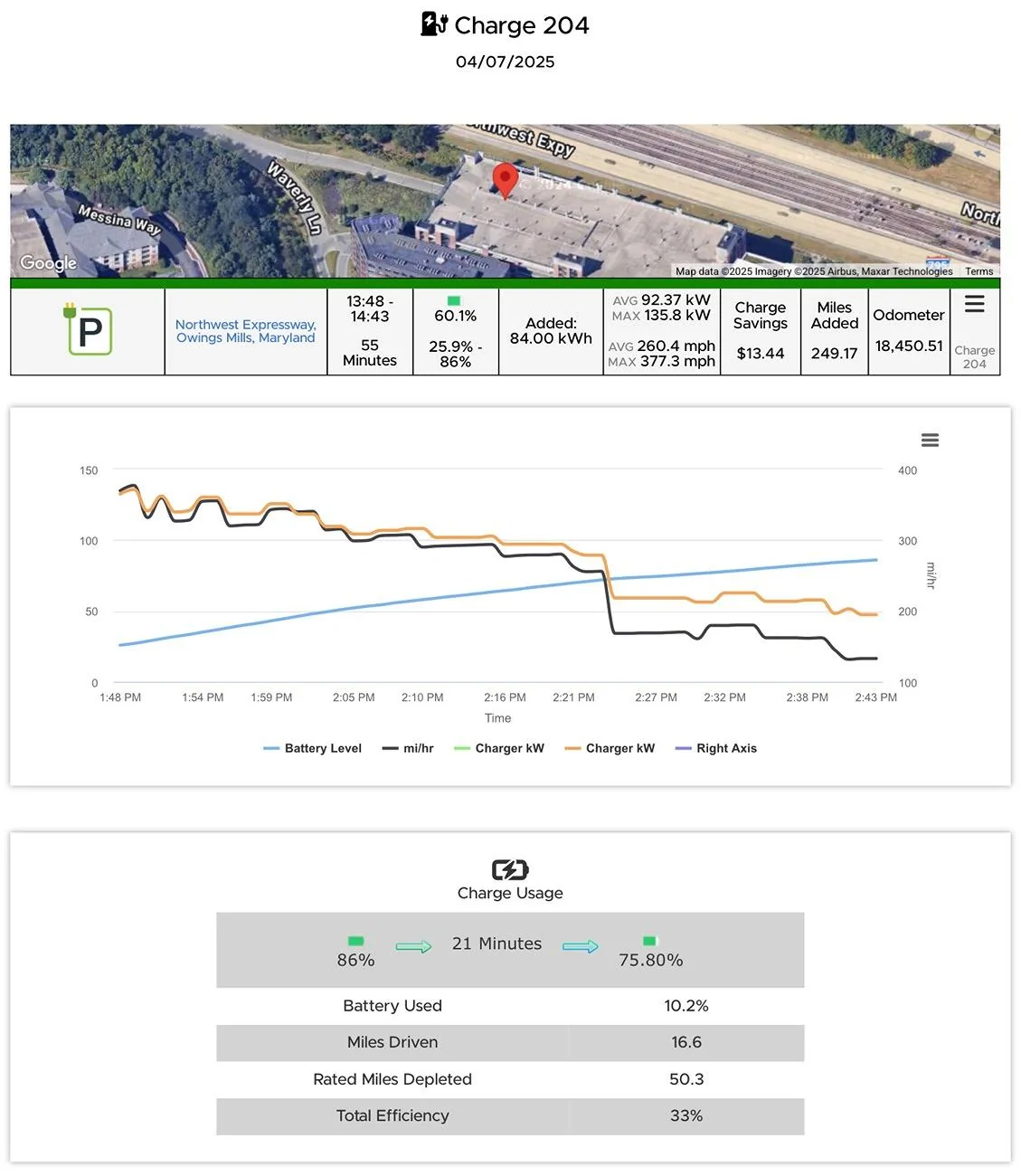
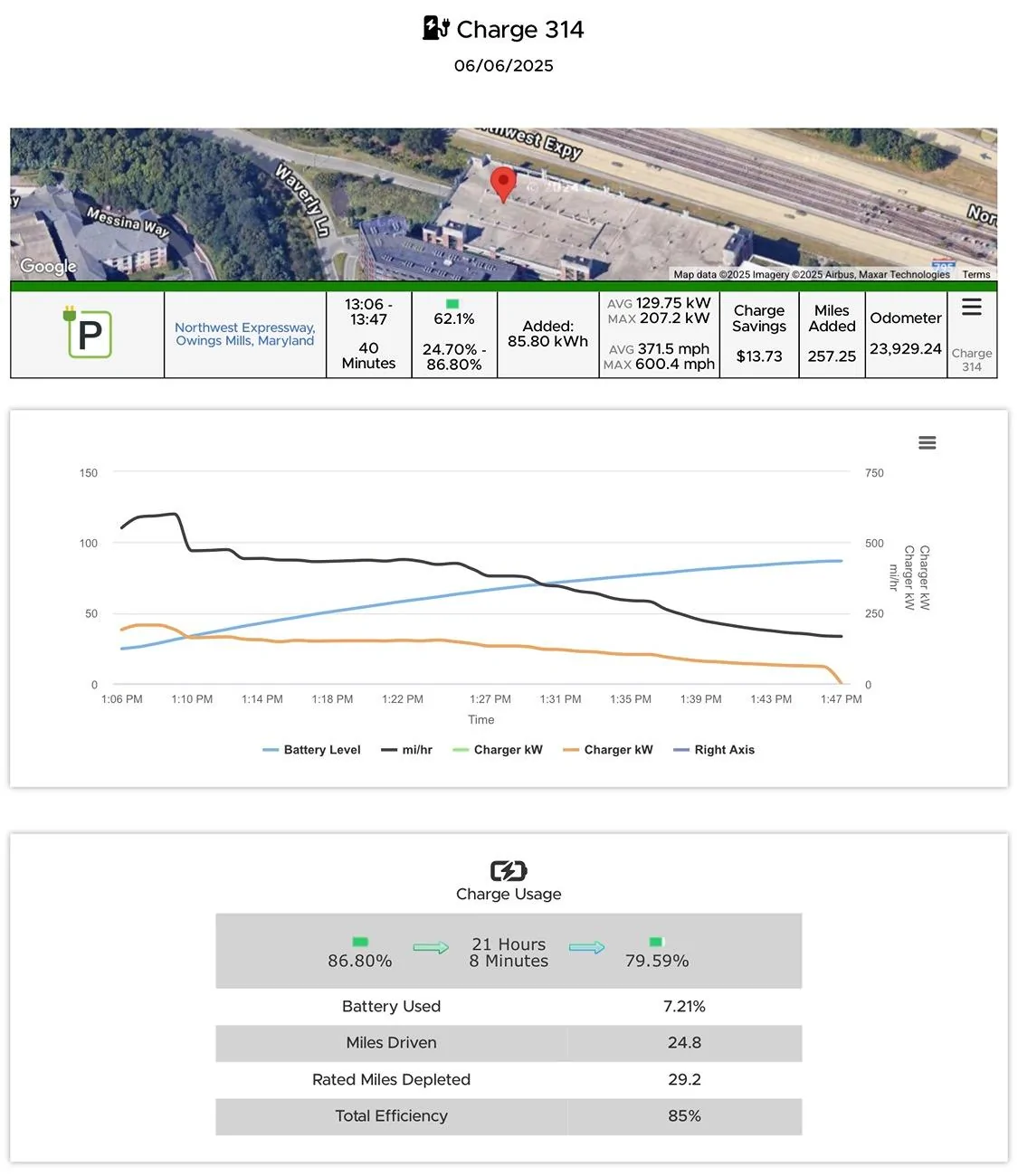
This is obviously not a perfect comparison, but I charged yesterday at a Supercharger I’ve used only once before. The charges are a little too far separated in time and weather conditions weren’t the same, but in terms of SoC and kWh added, they’re actually surprisingly close. Definitely saw a much better charge speed yesterday compared to two months ago when I used the same charger.

It‘s probably worth mentioning that not only was it warmer yesterday than before, but the station was significantly busier, with about 6 Teslas charging this time, compared to maybe two or three before.

Rivian R1T R1S 2025.18.01 installing! Have you received the update? IMG_0138
Rivian R1T R1S 2025.18.01 installing! Have you received the update? IMG_0140
Rivian R1T R1S 2025.18.01 installing! Have you received the update? IMG_0139
 
Last edited:

Sponsored

Wefty

Well-Known Member
First Name
Robert
Joined
Mar 3, 2022
Threads
5
Messages
168
Reaction score
153
Location
Chicago
Vehicles
R1T, 2008 Fit
I got it. Had to repair both phones and lost all saved addresses.
 

Killer95Stang

Well-Known Member
First Name
Dan
Joined
Dec 7, 2021
Threads
68
Messages
1,527
Reaction score
3,033
Location
Sunny Socal
Vehicles
Mustang, Falcon, F150, Flex and Explorer
Occupation
Engineer
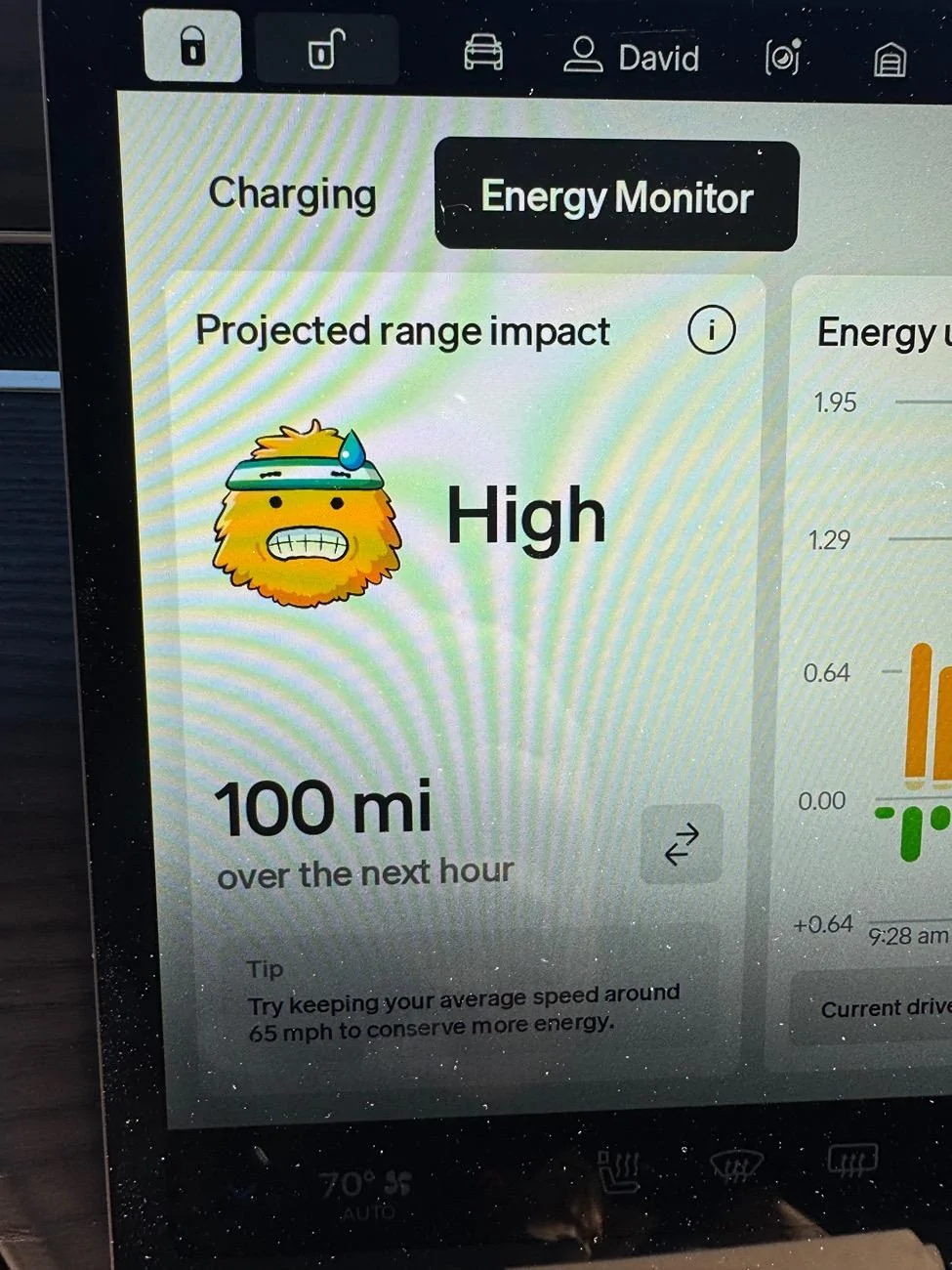
This made me laugh today
IMG_2488.jpeg
Can someone make a sticker of this Gary face, so I can put it my rear window. It pretty much is the same face I make every time I take off and see the angry look my wife gives me!!! Inside I'm smiling, but I can't help but remember the "Chancla" that often got thrown at me growing up....
Sponsored


Top