jimbones
Well-Known Member
- First Name
- James
- Joined
- Sep 27, 2021
- Threads
- 6
- Messages
- 61
- Reaction score
- 147
- Location
- Ottawa, ON
- Vehicles
- 2024 Rivian R1T
- Occupation
- Design Operations, Microsoft
- Thread starter
- #1
TL;DR: CarPlay is a flexible system designed to support a wide range of in-car experiences, from basic projection to full UI control, all depending on what automakers want to offer.
Rivian's position on Carplay is one of the hottest, constantly reoccurring topics on these forums, especially with next-gen CarPlay demos stirring up excitement and confusion. Its cool to see so much discussion, excitement, and debate about the capabilities, but it's apparent to me that there are still some misunderstandings and myths about Carplay, so I wanted to take a stab at setting a few facts straight.
Caveat, I’m not an expert. I'm just an Apple and Rivian enthusiast and someone who’s been following this closely (I've spent my career in tech), so it’s totally possible I’ve missed something or gotten a detail wrong. If that’s the case, feel free to jump in and correct me. I’ll happily update the post so we can keep the info accurate.
So let’s walk through some of the most common myths I’ve come across, from basic CarPlay to the deeply integrated stuff, and unpack what’s really going on behind the scenes.
 Myth #1: “It’s all or nothing — either full CarPlay takeover or just the old version.”
Not true. CarPlay supports a spectrum of integration levels, and automakers can choose how much to adopt based on their goals.
Some examples:
Myth #2: “CarPlay takes over the whole screen and automakers have no choice.”
Not true. CarPlay only takes over the full interface if the automaker wants it to.
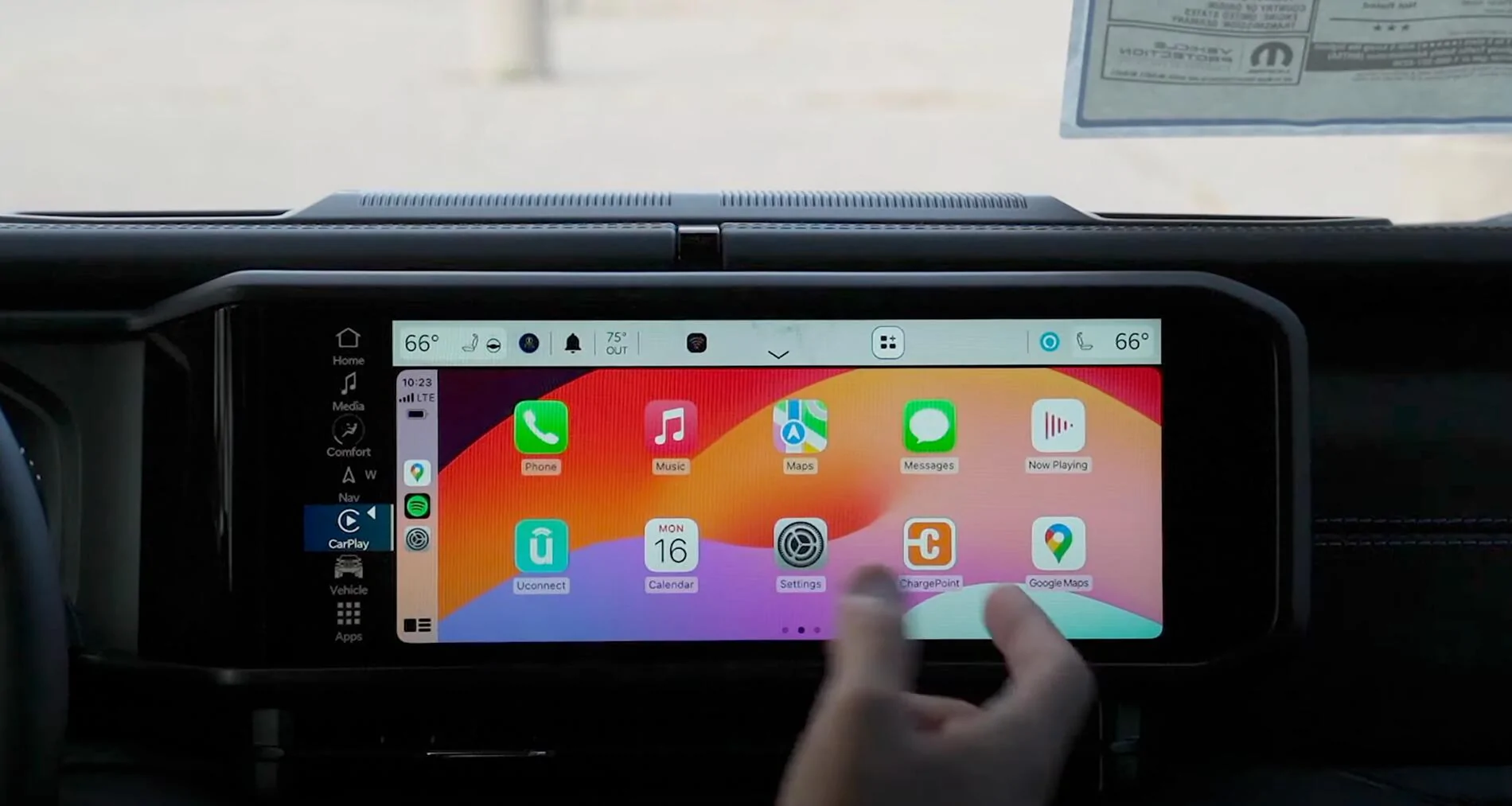
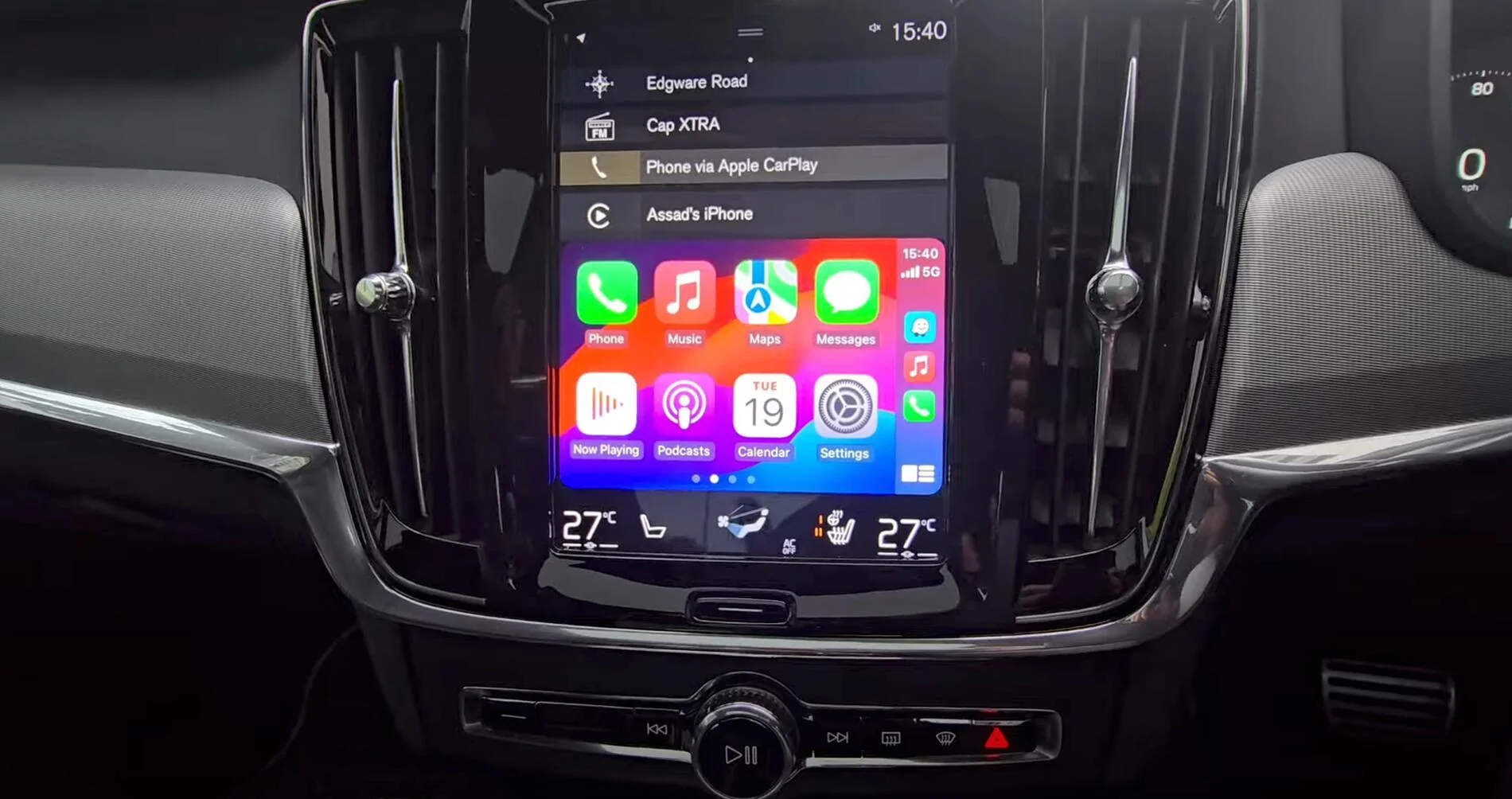
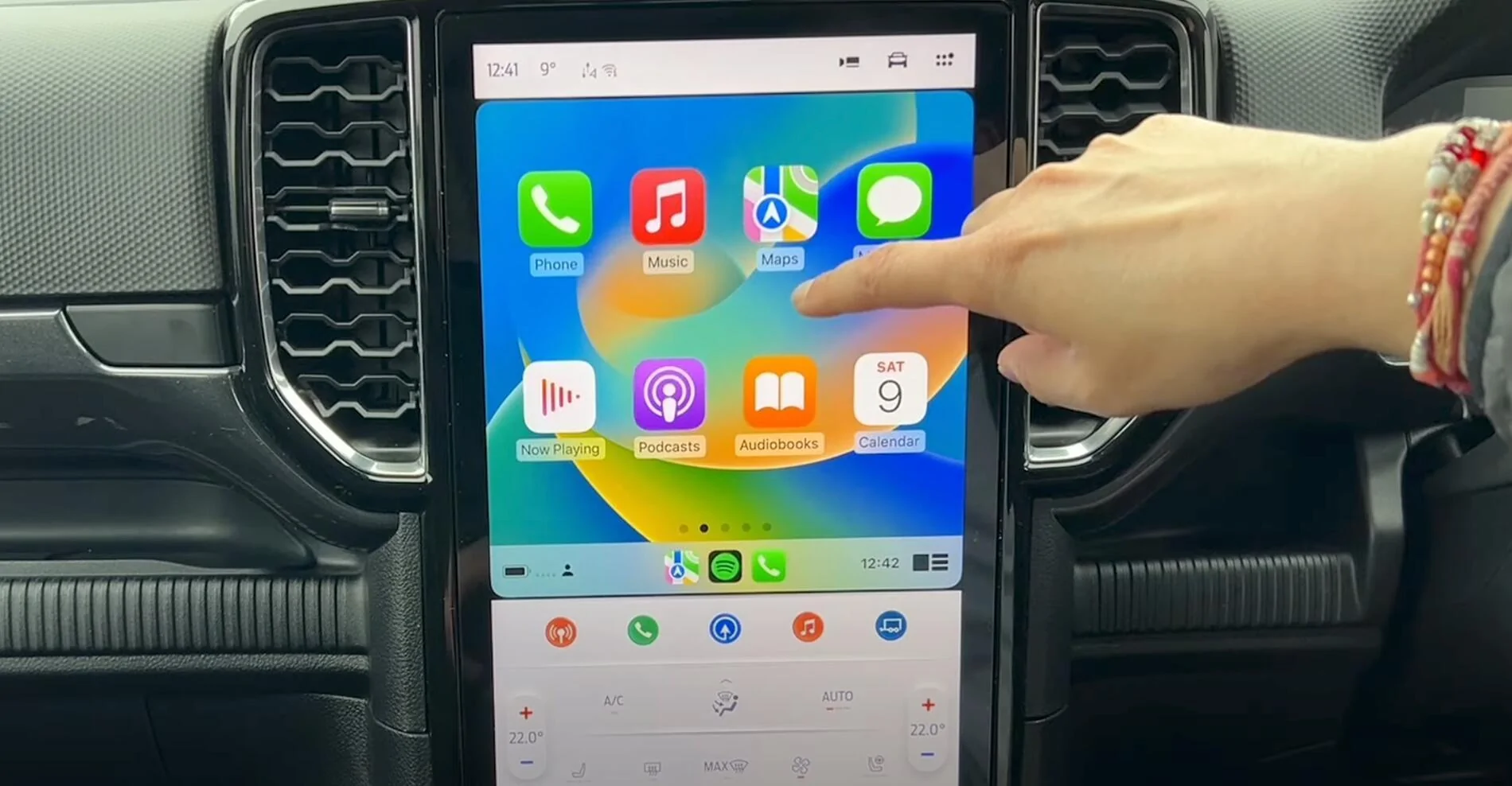
Some manufacturers (e.g. Jeep, Ford, Volvo, screenshots attached) intentionally run CarPlay in a constrained area of the screen, leaving native controls visible and accessible below or beside it. This preserves access to HVAC, seat controls, and other vehicle-specific features through the car’s own UI.
Apple gives automakers this flexibility. CarPlay can be sandboxed, layered, or full-screen. It’s entirely up to the OEM. Full takeover is optional, not mandatory.
Myth #3: “You can’t control HVAC or seats unless CarPlay is fully integrated.”
Not true. CarPlay can control HVAC and seat features, but only if the automaker exposes those systems.
To support in-CarPlay controls, the car must:
Myth #4: “Automakers don’t want to use CarPlay because Apple gets all their car data.”
Not true. This concern is understandable but based on a misunderstanding.
Apple does not get blanket access to your car’s internals. CarPlay uses secure APIs and data contracts, and automakers must explicitly choose what data to expose. That might include things like:
Automakers stay in full control of what’s shared and what’s not.
Myth #5: “CarPlay completely replaces the vehicle system.”
Not true. CarPlay doesn’t replace the car’s software, it overlays a new experience on top of the existing vehicle OS.
Think of it more like a custom theme for iPhone users. The underlying vehicle system is still fully operational in the background. CarPlay simply draws a new interface on top of it and takes over rendering and input handling, only if the automaker chooses to allow that level of control.
Automakers have full flexibility. They can:
Hope that clears up some of the confusion. Let me know if there’s anything I got wrong, can clarify, or want to dig deeper on. Cheers!


Rivian's position on Carplay is one of the hottest, constantly reoccurring topics on these forums, especially with next-gen CarPlay demos stirring up excitement and confusion. Its cool to see so much discussion, excitement, and debate about the capabilities, but it's apparent to me that there are still some misunderstandings and myths about Carplay, so I wanted to take a stab at setting a few facts straight.
Caveat, I’m not an expert. I'm just an Apple and Rivian enthusiast and someone who’s been following this closely (I've spent my career in tech), so it’s totally possible I’ve missed something or gotten a detail wrong. If that’s the case, feel free to jump in and correct me. I’ll happily update the post so we can keep the info accurate.
So let’s walk through some of the most common myths I’ve come across, from basic CarPlay to the deeply integrated stuff, and unpack what’s really going on behind the scenes.
Myth #1: “It’s all or nothing — either full CarPlay takeover or just the old version.”Not true. CarPlay supports a spectrum of integration levels, and automakers can choose how much to adopt based on their goals.
Some examples:
- Basic CarPlay: Standard CarPlay running in a fixed portion (or full screen) of the infotainment screen. It only projects apps (like Maps, Music, Messages), with no access to vehicle data or controls. All climate, seats, drive modes, etc. stay fully within the car’s native UI. This is the most common implementation today.
- Partial Integration: Still runs in a portion of the screen, but the automaker might enable light enhancements such as showing album art on the instrument cluster, mapping steering wheel buttons to skip tracks, or allowing the car’s voice assistant to trigger Siri. CarPlay stays sandboxed, but there's a bit more cross-talk between systems.
- Full Integration (CarPlay Ultra): The iPhone renders the entire interface including gauges, climate, seats, drive modes, and media — and projects it to multiple screens. CarPlay essentially skins the car’s UI, but only if the automaker shares the necessary vehicle data and input handling.
Myth #2: “CarPlay takes over the whole screen and automakers have no choice.”Not true. CarPlay only takes over the full interface if the automaker wants it to.
Some manufacturers (e.g. Jeep, Ford, Volvo, screenshots attached) intentionally run CarPlay in a constrained area of the screen, leaving native controls visible and accessible below or beside it. This preserves access to HVAC, seat controls, and other vehicle-specific features through the car’s own UI.
Apple gives automakers this flexibility. CarPlay can be sandboxed, layered, or full-screen. It’s entirely up to the OEM. Full takeover is optional, not mandatory.
Myth #3: “You can’t control HVAC or seats unless CarPlay is fully integrated.”Not true. CarPlay can control HVAC and seat features, but only if the automaker exposes those systems.
To support in-CarPlay controls, the car must:
- Share real-time system data (e.g. temp settings, fan state)
- Accept control messages from the iPhone
- Route physical controls (touch, knobs) to the iPhone for interpretation
Myth #4: “Automakers don’t want to use CarPlay because Apple gets all their car data.”Not true. This concern is understandable but based on a misunderstanding.
Apple does not get blanket access to your car’s internals. CarPlay uses secure APIs and data contracts, and automakers must explicitly choose what data to expose. That might include things like:
- Current speed or fuel level (for digital gauges)
- Climate system status
- Drive mode or battery charge
Automakers stay in full control of what’s shared and what’s not.
Myth #5: “CarPlay completely replaces the vehicle system.”Not true. CarPlay doesn’t replace the car’s software, it overlays a new experience on top of the existing vehicle OS.
Think of it more like a custom theme for iPhone users. The underlying vehicle system is still fully operational in the background. CarPlay simply draws a new interface on top of it and takes over rendering and input handling, only if the automaker chooses to allow that level of control.
Automakers have full flexibility. They can:
- Run CarPlay in a limited window
- Allow partial integration (e.g. custom layouts or controls)
- Enable full UI handoff with next-gen capabilities
Hope that clears up some of the confusion. Let me know if there’s anything I got wrong, can clarify, or want to dig deeper on. Cheers!
Sponsored