Sponsored

Tail lights keep blinking

Oldsmobile_Mike

Well-Known Member
First Name
Mike
Joined
Mar 24, 2022
Threads
62
Messages
2,406
Reaction score
3,866
Location
Manassas Park, VA
Vehicles
FG/FE R1T recv'd 3/31/2023
Occupation
I build stuff
Clubs
 
*Attention: This seems to be a widespread issue. Recommend keeping your vehicle plugged into L2 if you are affected by this*

So here's a new one. The past few days, my tail lights have been blinking like crazy when the truck is parked in my garage. Draining about 4% battery per day.

Things I've already done:

  • Infotainment reset x3
  • Hard reset (as suggested by the Rivian "AI assistant" in the app)
  • Erased and reset "home" location in Maps
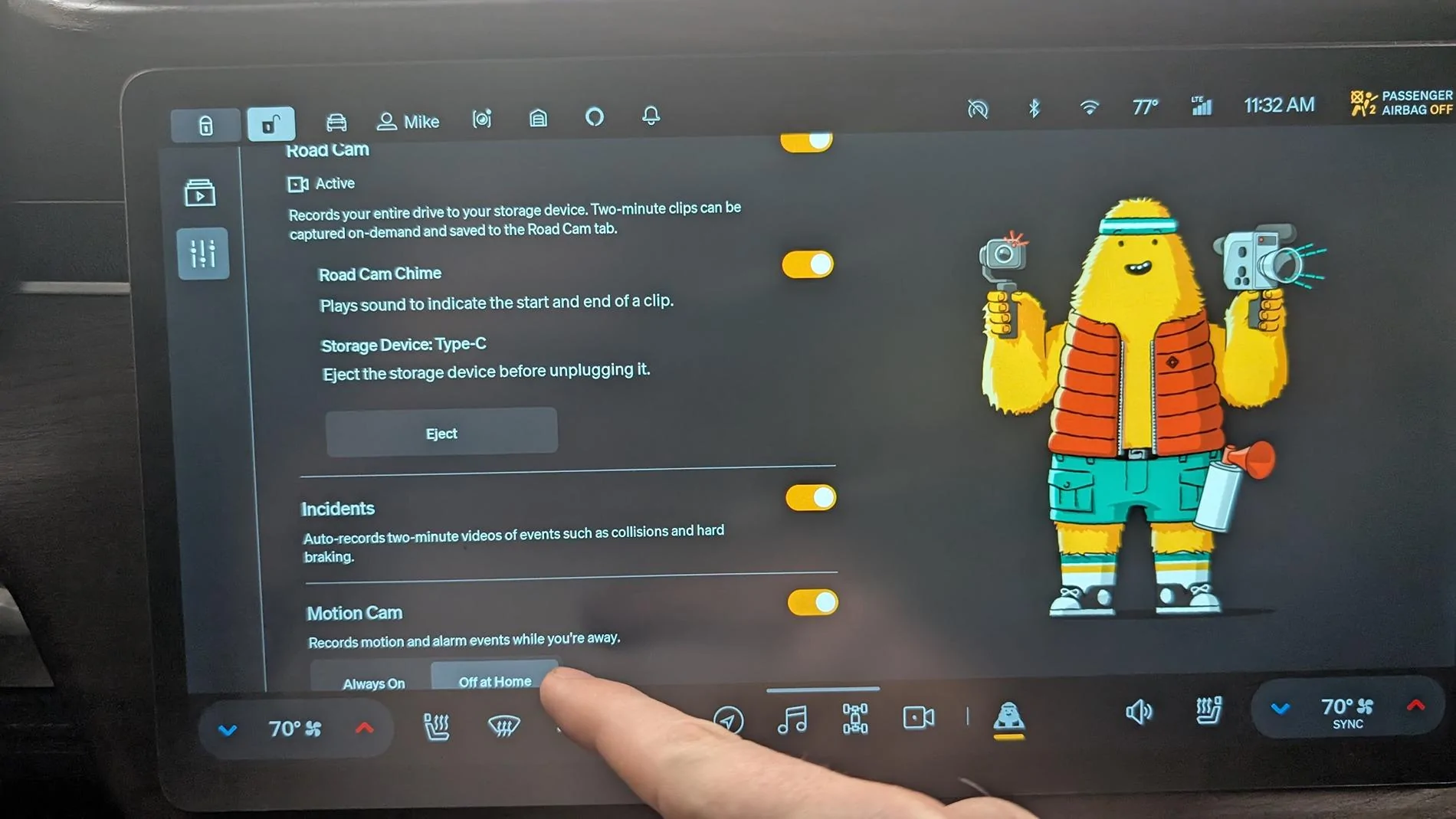
  • Turned Gear Guard off and back on, made sure all settings for "motion cam off at home" are enabled
  • Phone and fob are 50-100' away from the vehicle (I'm in the house, garage is a separate detached building). Proximity unlock settings are set to "off at home"
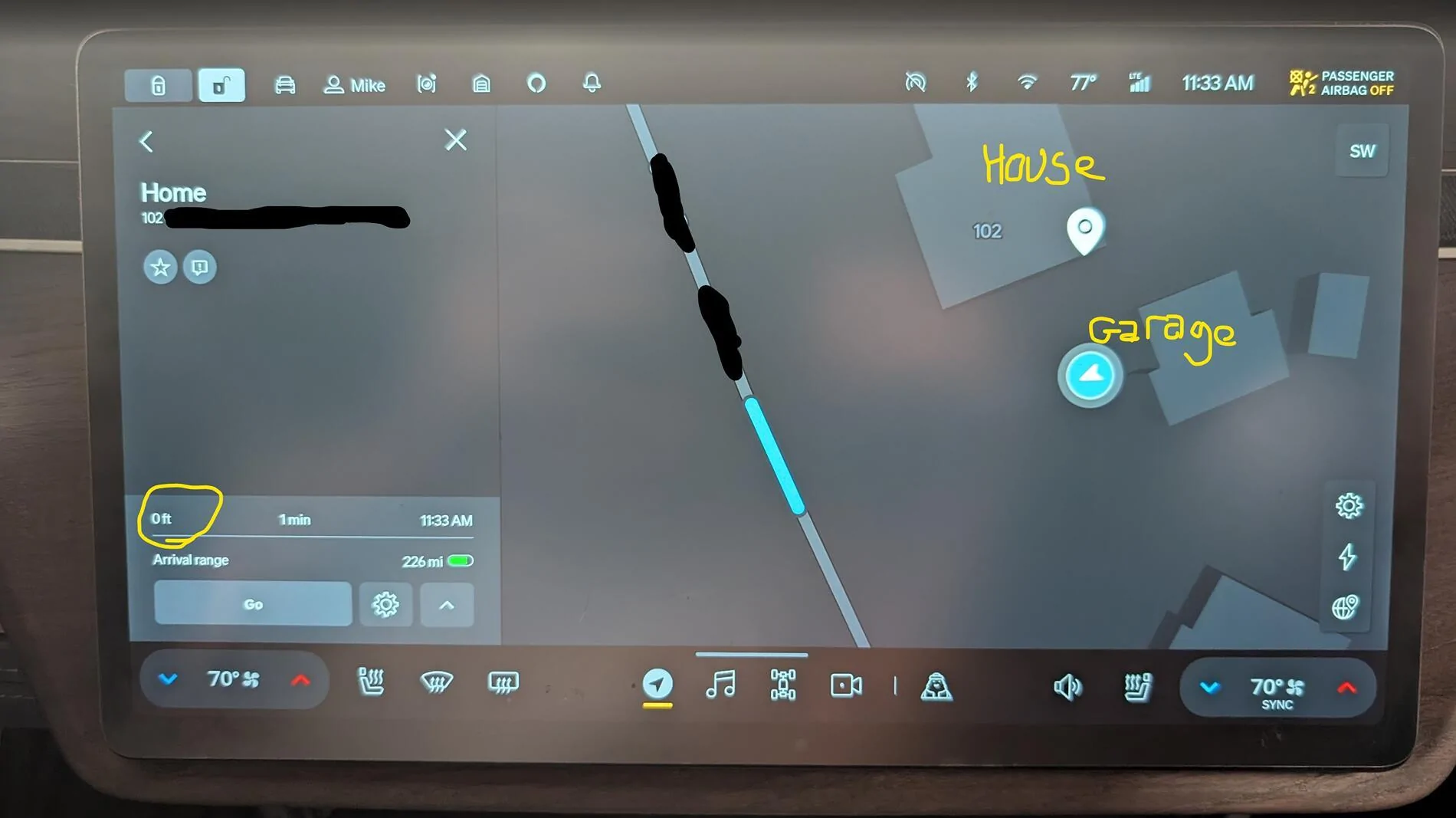
  • Verified that the GPS location of the vehicle and its actual location are accurate to within 25'. The app also confirms the vehicle is "parked at home"
  • No recorded events are showing up in the Motion Cam tab of Gear Guard

I do have cats in the garage and a TV on, but this has been the case for years. Regardless if they were jumping on it and triggering "motion cam", it should be respecting my settings for "off at home", right?

Any thoughts while I wait for Rivian to respond to my ticket? I'm sure @COdogman will come along and tell me I should write it down, in case it's trying to send a message in Morse code. 😆


Rivian R1T R1S Tail lights keep blinking 1752512577361-8j


Rivian R1T R1S Tail lights keep blinking 1752512782592-st
Sponsored

 
Last edited:

COdogman

Well-Known Member
First Name
Brian
Joined
Jan 21, 2022
Threads
33
Messages
11,641
Reaction score
34,494
Location
CO
Vehicles
2023 R1T
Occupation
Cyber defender
Clubs
 
So here's a new one. The past few days, my tail lights have been blinking like crazy when the truck is parked in my garage. Draining about 4% battery per day.

Things I've already done:

  • Infotainment reset x3
  • Hard reset (as suggested by the Rivian "AI assistant" in the app)
  • Erased and reset "home" location in Maps
  • Turned Gear Guard off and back on, made sure all settings for "motion cam off at home" are enabled
  • Phone and fob are 50-100' away from the vehicle (I'm in the house, garage is a separate detached building). Proximity unlock settings are set to "off at home"
  • Verified that the GPS location of the vehicle and its actual location are accurate to within 25'. The app also confirms the vehicle is "parked at home"

I do have cats in the garage and a TV on, but this has been the case for years. Regardless if they were jumping on it and triggering "motion cam", it should be respecting my settings for "off at home", right?

Any thoughts while I wait for Rivian to respond to my ticket? I'm sure @COdogman will come along and tell me I should write it down, in case it's trying to send a message in Morse code. 😆


Dark-Fx

Well-Known Member
First Name
Brian
Joined
Jul 15, 2020
Threads
147
Messages
13,517
Reaction score
27,280
Location
Michigan
Vehicles
R1T, R1S, Livewire One, Sierra EV, R1S
Occupation
Engineering
Clubs
 
Rivian's have proximity wake so they're more responsive to entry attempts. I'd wonder if your key is just in a very particular spot that makes the vehicle think you might be on your way to enter.
 

shamoo

Well-Known Member
Joined
Jan 3, 2022
Threads
6
Messages
681
Reaction score
953
Location
SoCal
Vehicles
Rivian R1S, Porsche 911 GT3
Occupation
Cybersecurity
Rivian's have proximity wake so they're more responsive to entry attempts. I'd wonder if your key is just in a very particular spot that makes the vehicle think you might be on your way to enter.
Could be that. I noticed somehow my R1S will flash its lights way on the other end of the parking lot if I exit the place I'm at and start walking toward it. It is farther than what I would think Bluetooth's range is. It doesn't unlock but seems to wake the car up.

Also in the video, I noticed the tailgate is down. Does that impact anything? Does it do the same if the tailgate is up?
 

UnsungZero_OldTimeAdMan

Well-Known Member
First Name
Barnum
Joined
Mar 20, 2023
Threads
66
Messages
8,536
Reaction score
11,723
Location
SoCal
Vehicles
'23 GW Quad-Large R1T "Ghost"
Occupation
Advertising Circus
I have proximity off at home also and have on occasion noticed the blink (the times I happen to notice). So it might be normal operation whenever a proximity key is within range of detection? a precursor to wake and better responsiveness? Just a blink, so I don' t think it does any harm.
 
Last edited:

Sponsored

IGR

Well-Known Member
Joined
Jul 7, 2023
Threads
8
Messages
360
Reaction score
506
Location
SoCal
Vehicles
Rivian R1S
Occupation
I make things
Clubs
 
I’ve read somewhere that that is a normal Operation. The vehicle acknowledged that the key or phone is in range.
why? Idk but maybe to speed up unlock.
 

Dark-Fx

Well-Known Member
First Name
Brian
Joined
Jul 15, 2020
Threads
147
Messages
13,517
Reaction score
27,280
Location
Michigan
Vehicles
R1T, R1S, Livewire One, Sierra EV, R1S
Occupation
Engineering
Clubs
 
Another thought, maybe your fob battery is close to dying and it keeps causing this? You might not notice if you don't use the fob regularly.
 
OP
OP
Oldsmobile_Mike

Oldsmobile_Mike

Well-Known Member
First Name
Mike
Joined
Mar 24, 2022
Threads
62
Messages
2,406
Reaction score
3,866
Location
Manassas Park, VA
Vehicles
FG/FE R1T recv'd 3/31/2023
Occupation
I build stuff
Clubs
 
I have proximity off at home also and have on occasion noticed the blink (the times I happen to notice). So it might be normal operation whenever a proximity key is within range of detection? a precursor to wake and better responsiveness? Just a blink, so I don' t think it does any harm.
Yes, except it's blinking non-stop. All day and night. Used 8% battery in the past two days. This is not typical at all.

Proximity is set to not unlock at home, but I'm going to toggle that setting again in a minute. Also (per the other comment) going to replace the fob battery (I carry the fob daily when I'm driving, and have noticed the battery is a bit low). Worth a shot, I suppose.

Shame we can't just review the logs ourselves. Feel like that would tell me real quick why it keeps blinking blinking blinking blinking. 🤷

Edit: Now up to 9% battery used in the past two days. I haven't even driven anywhere. Just pulled out of the garage and back in, in case the vehicle "got lost" and forgot where its home is. So annoying, LOL.
 
Last edited:

Dark-Fx

Well-Known Member
First Name
Brian
Joined
Jul 15, 2020
Threads
147
Messages
13,517
Reaction score
27,280
Location
Michigan
Vehicles
R1T, R1S, Livewire One, Sierra EV, R1S
Occupation
Engineering
Clubs
 
Yes, except it's blinking non-stop. All day and night. Used 8% battery in the past two days. This is not typical at all.

Proximity is set to not unlock at home, but I'm going to toggle that setting again in a minute. Also (per the other comment) going to replace the fob battery (I carry the fob daily when I'm driving, and have noticed the battery is a bit low). Worth a shot, I suppose.

Shame we can't just review the logs ourselves. Feel like that would tell me real quick why it keeps blinking blinking blinking blinking. 🤷

Edit: Now up to 9% battery used in the past two days. I haven't even driven anywhere. Just pulled out of the garage and back in, in case the vehicle "got lost" and forgot where its home is. So annoying, LOL.
I don't believe "Wake" is dependent on your proximity settings. You might be able to lower the usage sticking the truck into camping mode with the stay off setting.
 

technerd

Well-Known Member
Joined
Jan 23, 2022
Threads
5
Messages
296
Reaction score
351
Location
SE PA
Vehicles
2022 Bronco, 2022 R1T
Clubs
 
Yea I get the lights blinking when I walk near mine, but I think I am closer to mine and it definitely goes to sleep and only loses about 0.5% a day. As a test maybe try closing the Rivian app and see if it still does it?
 

Sponsored

mrimprov

Member
First Name
Nate
Joined
Oct 25, 2022
Threads
0
Messages
7
Reaction score
17
Location
Minneapolis, MN
Vehicles
R1S
Occupation
Etsy
I don’t have any answers for you, but I am experiencing the exact same issue. We first started noticing it on Friday night. This is new behavior, and I’ve opened a service ticket for it. The truck doesn’t seem to sleep and the tail lights flash intermittently. Vampire drain has gone way up.

Kneel mode stopped working for us as well even though it is enabled in the settings. No warnings or errors on the display. Annoying, but at least the vehicle is still drives.
 
OP
OP
Oldsmobile_Mike

Oldsmobile_Mike

Well-Known Member
First Name
Mike
Joined
Mar 24, 2022
Threads
62
Messages
2,406
Reaction score
3,866
Location
Manassas Park, VA
Vehicles
FG/FE R1T recv'd 3/31/2023
Occupation
I build stuff
Clubs
 
I don’t have any answers for you, but I am experiencing the exact same issue. We first started noticing it on Friday night. This is new behavior, and I’ve opened a service ticket for it. The truck doesn’t seem to sleep and the tail lights flash intermittently. Vampire drain has gone way up.

Kneel mode stopped working for us as well even though it is enabled in the settings. No warnings or errors on the display. Annoying, but at least the vehicle is still drives.
Interesting! Seems to be when mine started, as well. How bizarre. Let me know what you find out.

In the meantime: tailgate closed and key fob battery replaced (even though the fob is easily >50' away from the truck), as per previous suggestions. Still blinking away:


Wild speculation:

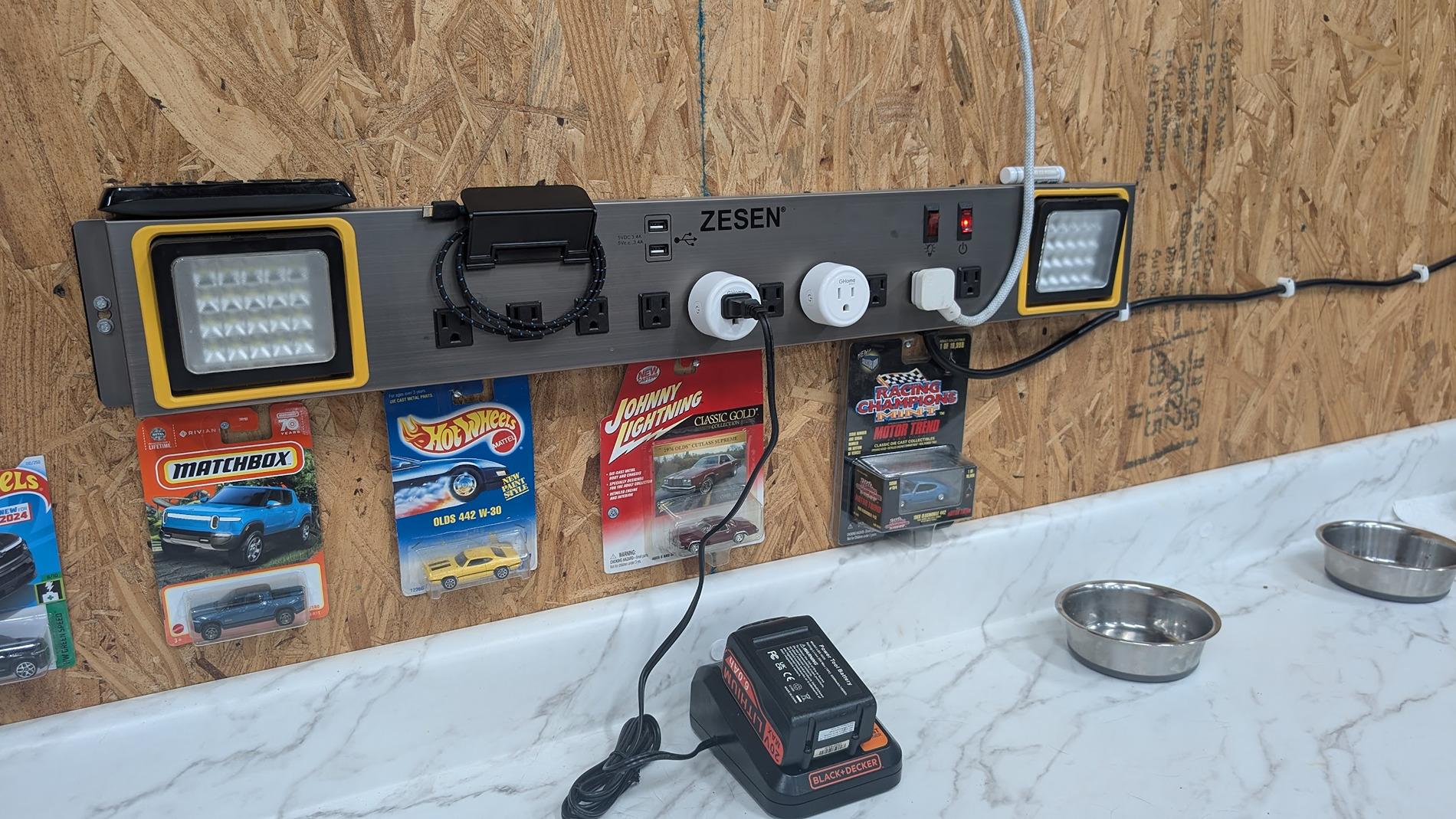
What's changed? The only thing I can think of that I have changed recently in the vicinity of the truck is to add these timers (the white 'pucks' in this picture, to control when my tools charge):

Rivian R1T R1S Tail lights keep blinking 1752530092381-m9


These timers have Bluetooth, and WiFi 2.4GHz & 5GHz. Could they be sending a signal that the truck interprets as... something? Will have to remove them. But the other comment from someone else also having this issue probably blows that guess out the window...
 
OP
OP
Oldsmobile_Mike

Oldsmobile_Mike

Well-Known Member
First Name
Mike
Joined
Mar 24, 2022
Threads
62
Messages
2,406
Reaction score
3,866
Location
Manassas Park, VA
Vehicles
FG/FE R1T recv'd 3/31/2023
Occupation
I build stuff
Clubs
 
Cats in the garage? my first instinct was there’s a mouse in the house that was chased into a hidey-hole and started chewing on your wiring harness. I hope not as it’s doesn’t seem too erratic.
That would be pretty wild. You can see a couple of my cats in the most recent vid (one licking her * behind the truck and one on the couch).

They don't seem too interested, if there was a mouse in the garage I think they'd be losing their minds. 🤷
 

mrimprov

Member
First Name
Nate
Joined
Oct 25, 2022
Threads
0
Messages
7
Reaction score
17
Location
Minneapolis, MN
Vehicles
R1S
Occupation
Etsy
Interesting! Seems to be when mine started, as well. How bizarre. Let me know what you find out.
I will definitely keep you posted! We were out camping far away WiFi, so I think it's unlikely to be related to a timer device, but who knows. 🤷‍♂️

One additional piece of information... I did a hard restart last night after dinner. The vehicle did eventually go to sleep, but it was exactly 12 hours after the restart (I can tell from the WiFi logs). I did have it plugged in an charging overnight, but that sleep after 12 hours seems very suspicious.

Once we drove the vehicle this morning, it is back to blinking tails lights and no sleep.
Sponsored


Top