Sponsored

Interior passenger-side fuse box

NY_Rob

Well-Known Member
First Name
Rob
Joined
Feb 9, 2022
Threads
23
Messages
5,397
Reaction score
7,970
Location
long island
Vehicles
Model 3 LR AWD, BMW i3 REX, 2024 Rubicon 4xe
Occupation
IT
^ is your Rivian a 1 battery or is it a 2 battery model?

My R1T is a Jan 2023 build and it's a 2 battery model.
Sponsored

 

wsaHarem

Active Member
First Name
Bill
Joined
Jul 2, 2024
Threads
4
Messages
27
Reaction score
20
Location
Texas
Vehicles
2023 R1S
^ is your Rivian a 1 battery or is it a 2 battery model?

My R1T is a Jan 2023 build and it's a 2 battery model.
1 battery model. It looks like 2 from the top cover, but when the tech came out to replace the failing one, he only replaced 1 battery and said the other is a regulator or controller? (I might be getting the words wrong)
 

Granolander

Active Member
Joined
Jun 14, 2024
Threads
0
Messages
27
Reaction score
2
Location
USA
Vehicles
Rivian R1S
Drivers side 2023 R1S
IMG_0363.jpeg

or after doing the picture maybe it was because my head was upside down? Looks really close when comparing the 2 pictures.
They look the same to me. Don’t focus the actual fuses because may not be in use (no fuse in them). However the slots are the same as far as I can see.
 

Granolander

Active Member
Joined
Jun 14, 2024
Threads
0
Messages
27
Reaction score
2
Location
USA
Vehicles
Rivian R1S
I tapped fuse 47 on the driver’s side fuse block.

For my dash cam which I did yesterday as well I tapped the mirror power feed.
I tried doing the same (dashcam to mirror power feed); but the dashcam stays on all the time (at least 40min after I locked and left).
Is this your case as well? Do you know if this mirror tap power is coming from the 12V battery?
 
Last edited:

Granolander

Active Member
Joined
Jun 14, 2024
Threads
0
Messages
27
Reaction score
2
Location
USA
Vehicles
Rivian R1S
Hey, I'm wondering if you were able to hardwire up a dash cam successfully? I got mine working in theory, I just need to route the wire and shave down a fuse tap to size (sigh)
Which fuse are you using for “Always On” ? I tried the “Horn” fuse (based on the fuse map) but I was surprised to find out that the horn was working even without the fuse in. ??‍♂
 

Sponsored

Granolander

Active Member
Joined
Jun 14, 2024
Threads
0
Messages
27
Reaction score
2
Location
USA
Vehicles
Rivian R1S
Has anyone found any always-on standard fuses either on the driver or passenger side? Dashcam has a parking mode, I know earlier trucks had problems with the 12V system completely draining but there's a safety shutoff in the hardwire kit, so thinking about moving forward with it.
Just checking if you were able to find an “Always On” fuse going directly to the 12V battery. I also have a dashcam with parking mode.
 

nick

Member
First Name
Kimbo
Joined
Sep 14, 2021
Threads
1
Messages
10
Reaction score
1
Location
Maryland
Vehicles
Rivian R1S
I ended up using driver's side fuse #46 for always on and driver's side fuse #62 as the accessory. My dash cam has been working for over a month without issue.
 

Granolander

Active Member
Joined
Jun 14, 2024
Threads
0
Messages
27
Reaction score
2
Location
USA
Vehicles
Rivian R1S
I ended up using driver's side fuse #46 for always on and driver's side fuse #62 as the accessory. My dash cam has been working for over a month without issue.
Thanks.

So the 12V and the Actuator?
Any reason why you picked the actuator’s fuse?

Also, have you ever found your dashcam off because it drained the 12v battery past the drain threshold?
 

nick

Member
First Name
Kimbo
Joined
Sep 14, 2021
Threads
1
Messages
10
Reaction score
1
Location
Maryland
Vehicles
Rivian R1S
Thanks.

So the 12V and the Actuator?
Any reason why you picked the actuator’s fuse?

Also, have you ever found your dashcam off because it drained the 12v battery past the drain threshold?
I picked the actuator fuse because it and fuse #48 are recommend to be used as accessory fuses by EV sport line while installing their magsafe charger. Link: https://evsportline.com/products/ri...5&_sid=665e468f6&_ss=r&variant=42935685087372

And I have noticed the dash cam shut off on rare occasions. The hardwire kit for mine has a voltage threshold shutoff.
 

Granolander

Active Member
Joined
Jun 14, 2024
Threads
0
Messages
27
Reaction score
2
Location
USA
Vehicles
Rivian R1S
I picked the actuator fuse because it and fuse #48 are recommend to be used as accessory fuses by EV sport line while installing their magsafe charger. Link: https://evsportline.com/products/ri...5&_sid=665e468f6&_ss=r&variant=42935685087372

And I have noticed the dash cam shut off on rare occasions. The hardwire kit for mine has a voltage threshold shutoff.
Thanks for sharing it. Mine also has a threshold shutoff, hence me looking for an “always on” to the 12V batt. I’l try your approach!
 

Sponsored

akc5247

Well-Known Member
First Name
AKC
Joined
Dec 28, 2023
Threads
5
Messages
320
Reaction score
252
Location
NJ
Vehicles
2023 Subaru Ascent Touring, 2024 R1S dual motor
Occupation
Engineer
Clubs
 

Granolander

Active Member
Joined
Jun 14, 2024
Threads
0
Messages
27
Reaction score
2
Location
USA
Vehicles
Rivian R1S
Echoing another comment from earlier, i have the AA screen from apple-carplay-smart-dash-screen-for-rivian-r1t-r1s

This video has the info they use where the fuse is shown.

Hope it helps.

Thanks, I’ve seen the video. It helps to an extent. For dashcam setups with Parking Mode (recording while parked) there is a third cable that needs to tap on an “Always On” fuse to the 12V battery. It’s not clear which fuses are “Always On”.
 

akc5247

Well-Known Member
First Name
AKC
Joined
Dec 28, 2023
Threads
5
Messages
320
Reaction score
252
Location
NJ
Vehicles
2023 Subaru Ascent Touring, 2024 R1S dual motor
Occupation
Engineer
Clubs
 
Thanks, I’ve seen the video. It helps to an extent. For dashcam setups with Parking Mode (recording while parked) there is a third cable that needs to tap on an “Always On” fuse to the 12V battery. It’s not clear which fuses are “Always On”.
Understood. I used the fuse in that video and i think it is always on, but you are' correct - hard to say.

I added a toggle switch to help turn that Android auto screen ON/OFF because it was always 'waking up' whenever the vehicle was woken up.

Here is the switch if you want to give that a try - https://www.amazon.com/gp/product/B0BKP9X3HK

Which seems to be not available, but you can find similar ones. Again, just my $0.02, hope it helps. Keep us posted.
 

VandalSibs

Well-Known Member
First Name
Andrew
Joined
Dec 27, 2023
Threads
15
Messages
1,381
Reaction score
2,399
Location
Eastern Washington State
Website
www.sibulskymusic.com
Vehicles
R1T Dual Motor Large Pack
Occupation
Composer, IT Service Desk Analyst
Clubs
 
Does anyone have a good set of pictures or instructions on how to remove the panel covering the passenger side fuse box? I'm a newbie to this sort of thing and would like as much guidance as possible before hooking up a monitor for my RV's rear camera via fuse tap.

I see the two screws that I believe should come out, but there's also a rubber cover that I can't seem to remove with a pry tool...

Thanks!
 

VandalSibs

Well-Known Member
First Name
Andrew
Joined
Dec 27, 2023
Threads
15
Messages
1,381
Reaction score
2,399
Location
Eastern Washington State
Website
www.sibulskymusic.com
Vehicles
R1T Dual Motor Large Pack
Occupation
Composer, IT Service Desk Analyst
Clubs
 
Well, I decided to just dive in...
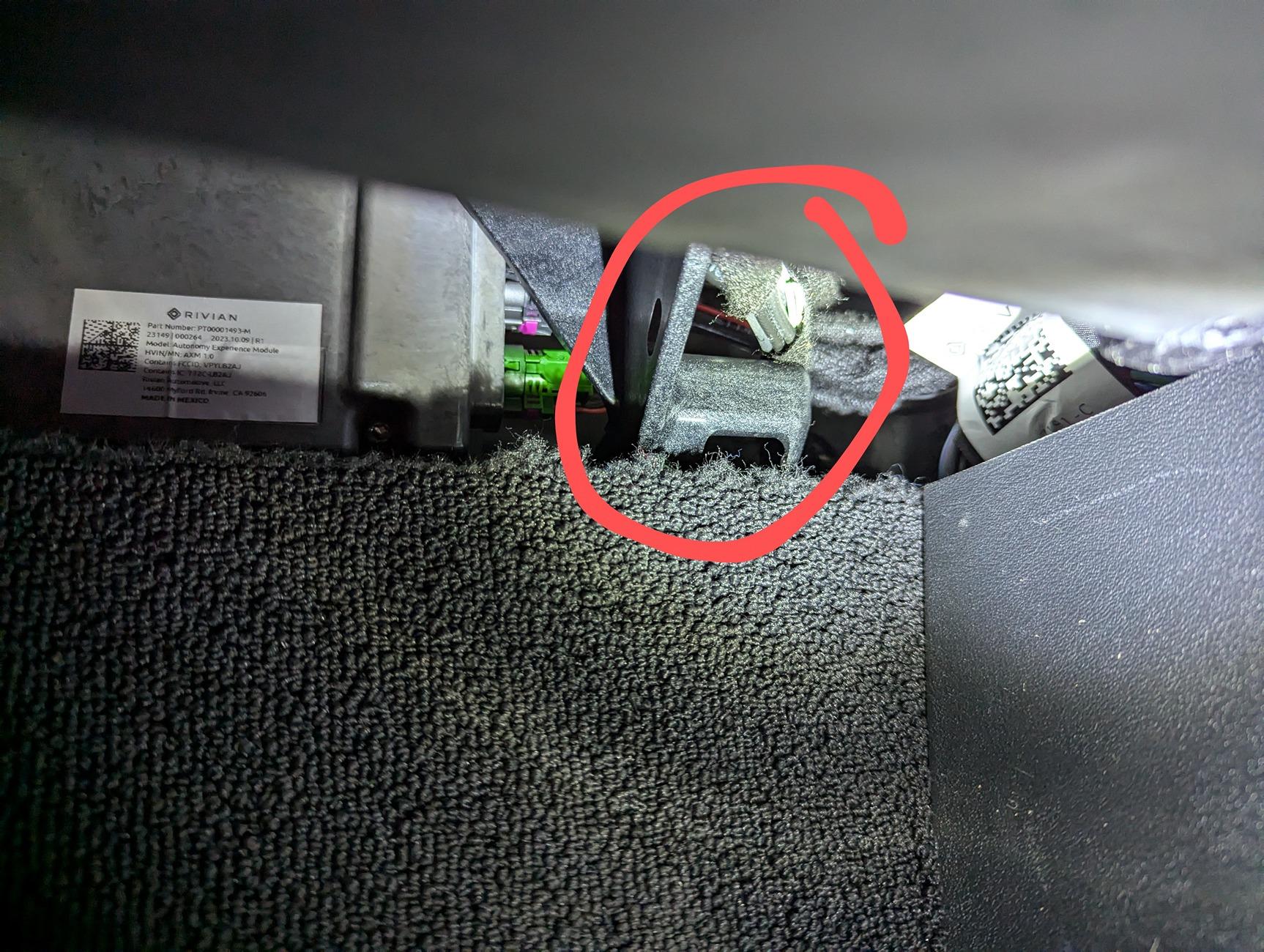
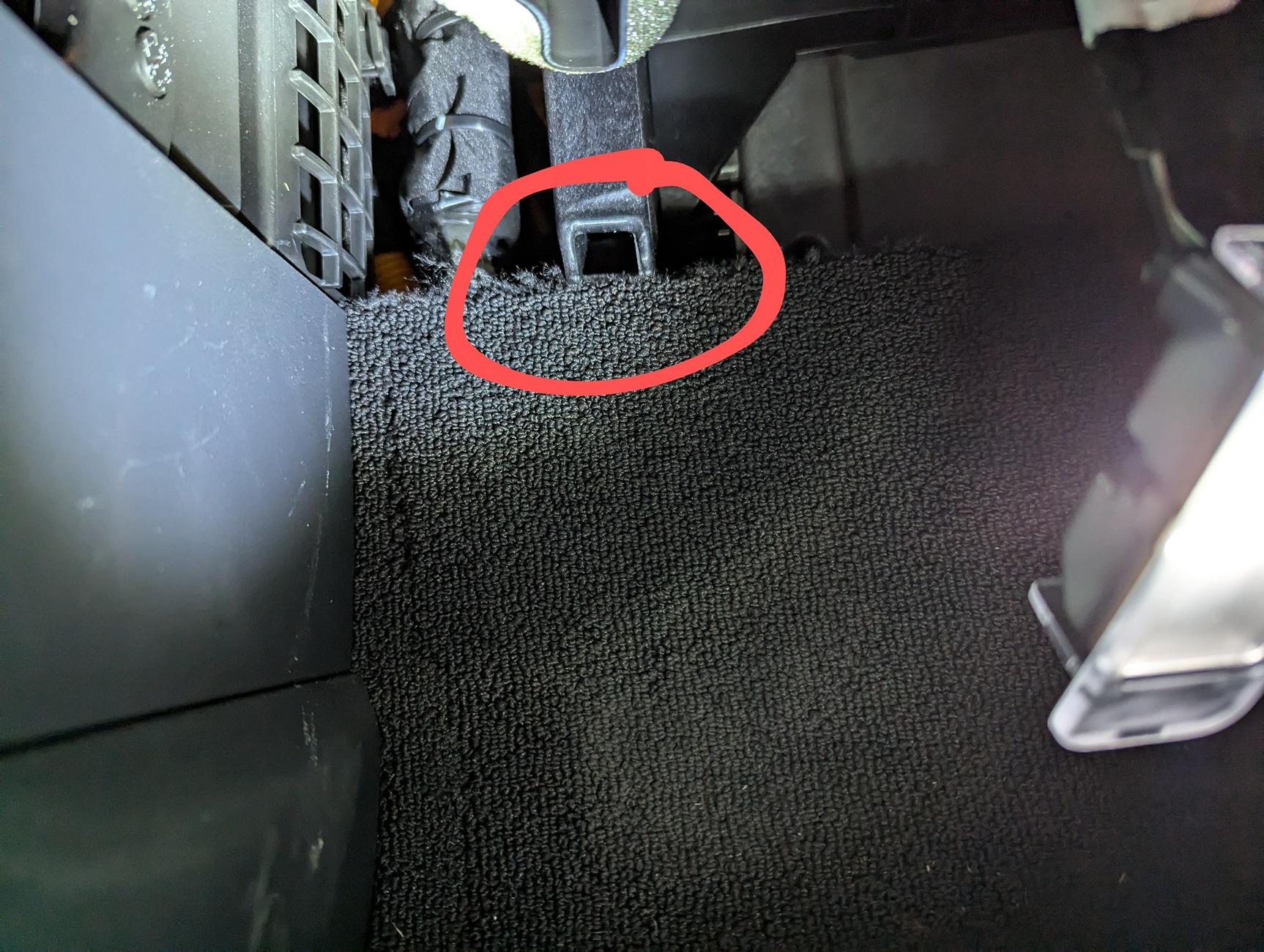
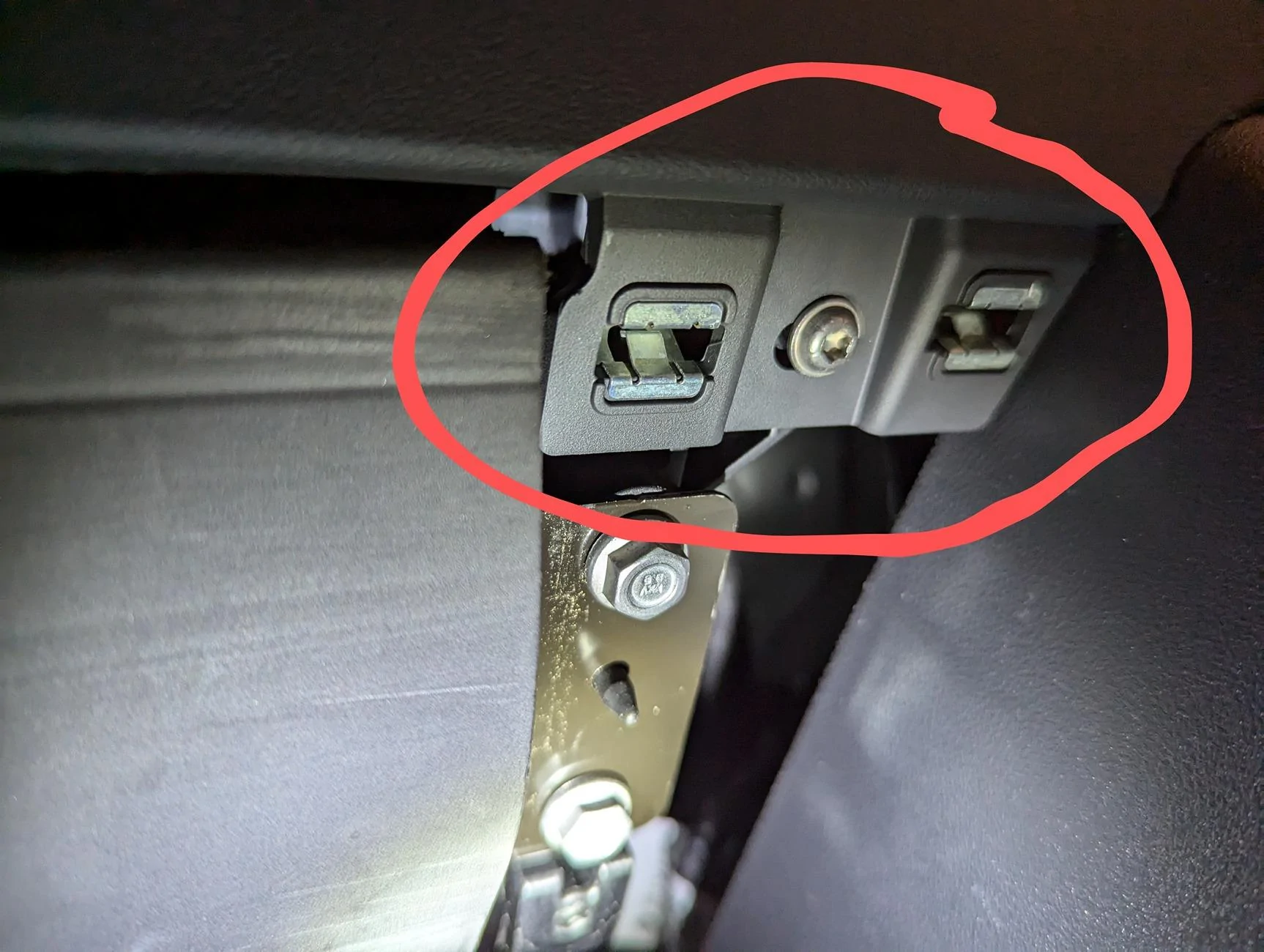
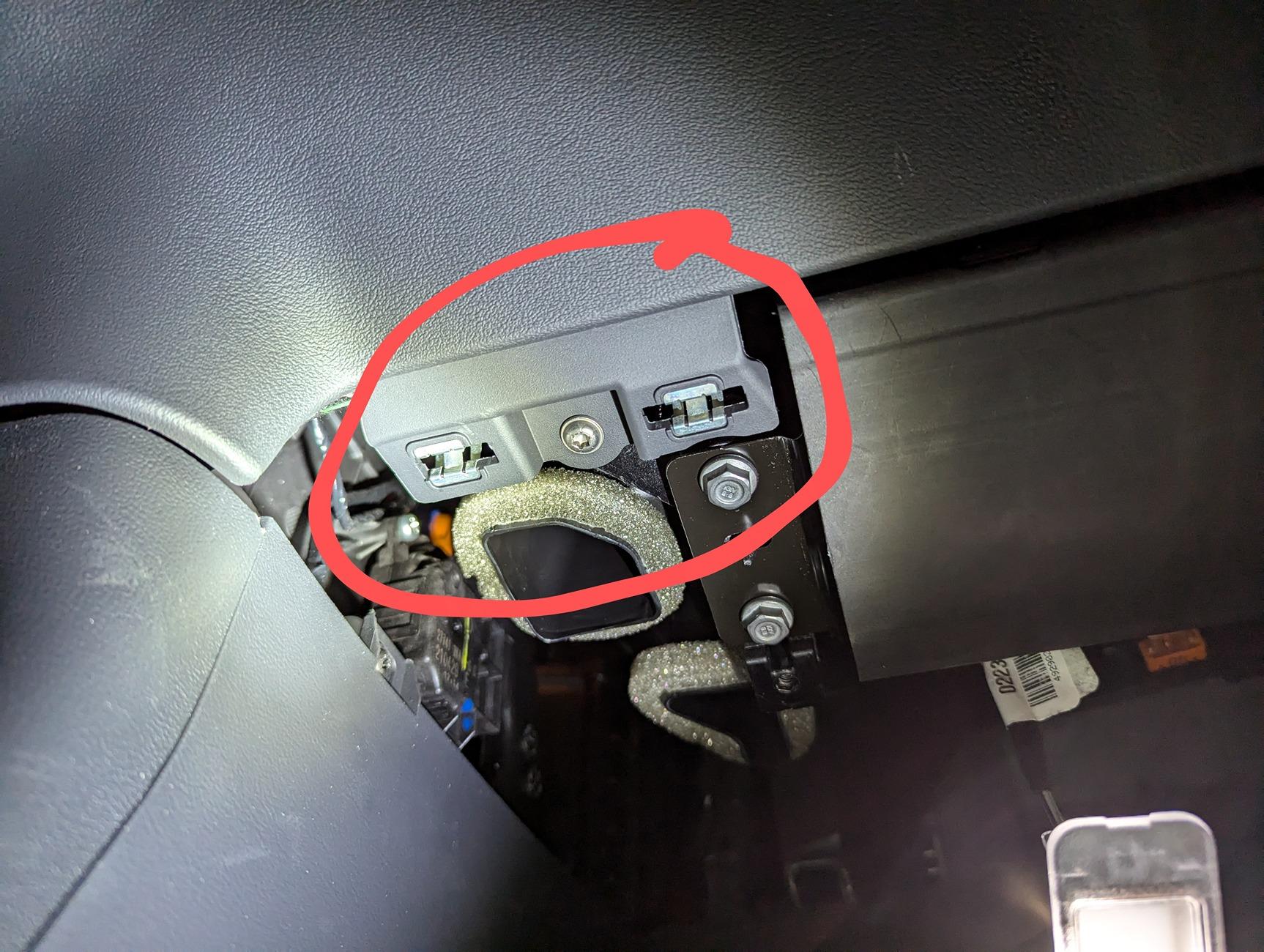
Here are the locations of the clips

Back side, towards the outside of the vehicle:
Rivian R1T R1S Interior passenger-side fuse box PXL_20240817_162235773~2


Back inside clip:
Rivian R1T R1S Interior passenger-side fuse box PXL_20240817_162239085~2


Front outside clips:
Rivian R1T R1S Interior passenger-side fuse box PXL_20240817_162222257~2


Front inside clips:
Rivian R1T R1S Interior passenger-side fuse box PXL_20240817_162229426~2


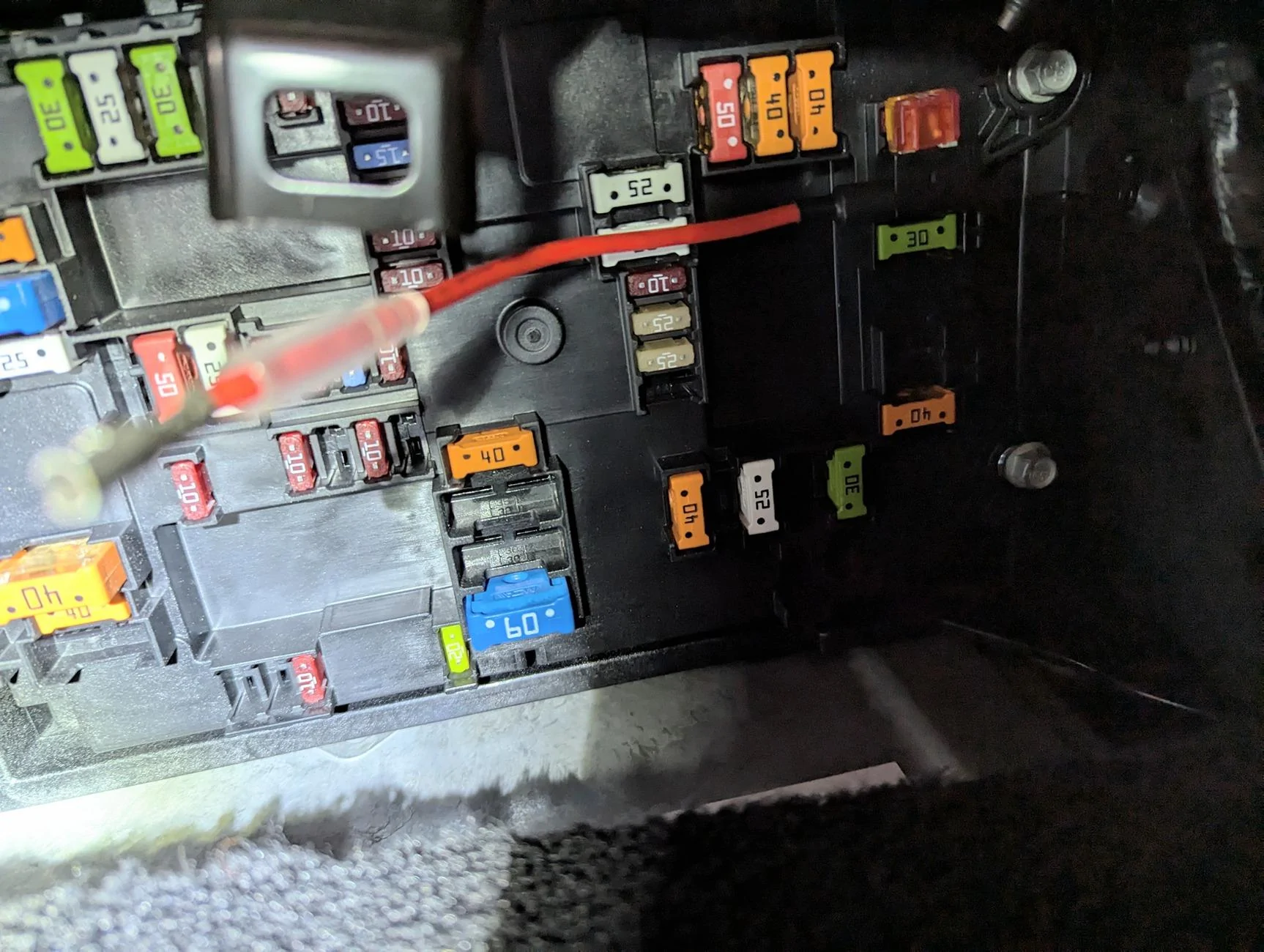
Fuse panel itself:
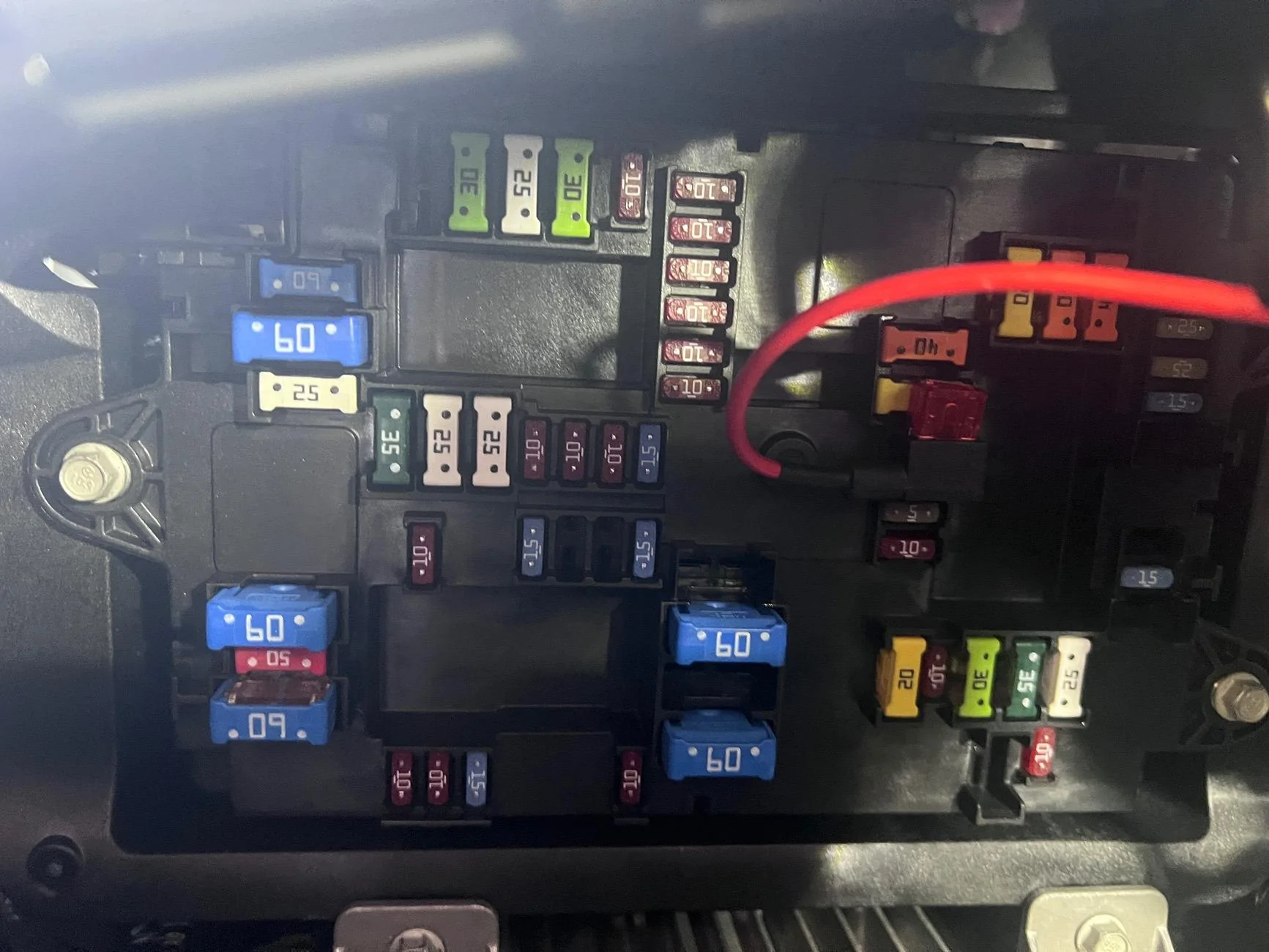
Rivian R1T R1S Interior passenger-side fuse box PXL_20240817_162249304~2


i started by taking out the screws, the popping the back clips out. I was able to do this just by pulling on the panel itself, then with a little more force I was able to take out the front clips. I never needed a trim tool, and none of the clips broke.

I did have to pop the whole foot well light out of the panel, as I couldn't get the cord itself out of the light without feeling like I was going to break it.

Was able to get to the panel and tried putting in my fuse tap (F64), but wasn't able to get it to power the screen I am installing. However, the USB-C ports next to the rear screen seems to be powering it just fine. Not sure what's up with that...
Sponsored


Top