Sponsored

Need help Charging Schedule not working.

PowerBugs

Well-Known Member
First Name
Dru
Joined
Jun 13, 2022
Threads
37
Messages
227
Reaction score
235
Location
SF Bay Area
Vehicles
Toyota
I have an upcoming trip and wanted to make sure my truck gets charge. I set it up this morning for the first time and it started charging right away when I plugged it in even though I set it to charge an hour later. I think I know the issue but not sure how to resolve it. On the dashboard, it says “Paused: Not at a save location” But on my app, under charging schedule location, it says “schedule will be connected at this location “. So I’m confused. Calling customer service as I’m writing this but still waiting for someone to pick up my call, been waiting for over 21 min.

Rivian R1T R1S Need help Charging Schedule not working. 73965491-CA02-486E-8AD8-5B733096CFEE
Rivian R1T R1S Need help Charging Schedule not working. 3CA2F427-7B1D-47D2-827C-9585F7A665FA
Sponsored


James

Well-Known Member
First Name
JAMES
Joined
Mar 11, 2020
Threads
2
Messages
68
Reaction score
53
Location
Syracuse
Vehicles
MDX, ACCORD
Occupation
Retired Teacher, Reading Coach
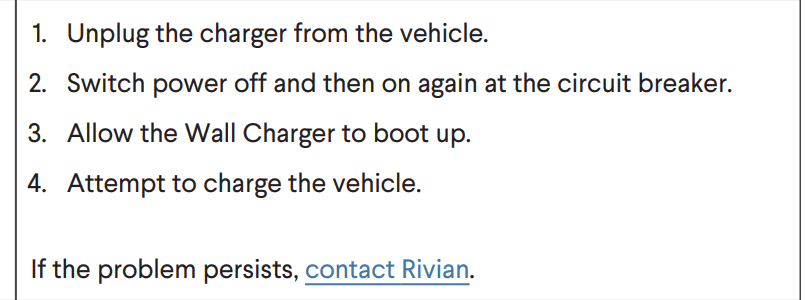
I have the same issue. I spoke to cs yesterday and I was told to restart this charger. The advisor was going to text me instructions, but hasn’t yet. I don’t see anywhere how it’s done. Maybe reset the vehicle itself. Let us know what you find out.
 

SANZC02

Well-Known Member
First Name
Bob
Joined
Feb 11, 2021
Threads
50
Messages
7,409
Reaction score
12,702
Location
California
Vehicles
Tesla Model S, LE - R1S
Occupation
Retired
I have an upcoming trip and wanted to make sure my truck gets charge. I set it up this morning for the first time and it started charging right away when I plugged it in even though I set it to charge an hour later. I think I know the issue but not sure how to resolve it. On the dashboard, it says “Paused: Not at a save location” But on my app, under charging schedule location, it says “schedule will be connected at this location “. So I’m confused. Calling customer service as I’m writing this but still waiting for someone to pick up my call, been waiting for over 21 min.
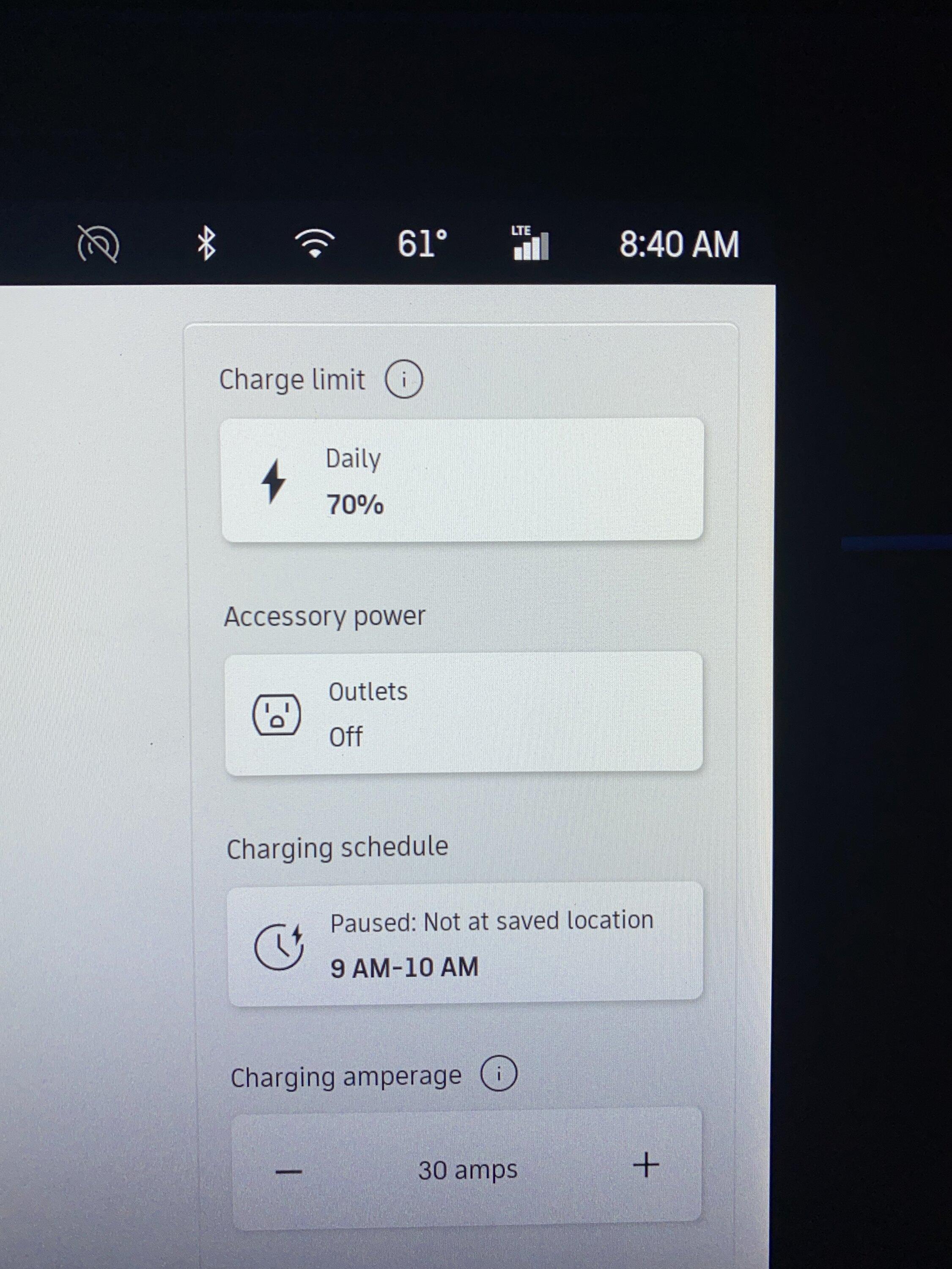
73965491-CA02-486E-8AD8-5B733096CFEE.jpeg
3CA2F427-7B1D-47D2-827C-9585F7A665FA.png
Just curious, where were you when you set the charge schedule? My understanding is it does not go by a home location but uses the geolocation where the schedule was created as the schedule location.
 

Friscorays

Well-Known Member
First Name
John
Joined
Mar 31, 2021
Threads
70
Messages
1,171
Reaction score
2,262
Location
Dallas
Vehicles
G35, V8 Vantage, 4C, F type
I have the same issue. I spoke to cs yesterday and I was told to restart this charger. The advisor was going to text me instructions, but hasn’t yet. I don’t see anywhere how it’s done. Maybe reset the vehicle itself. Let us know what you find out.
Maybe this?

Rivian R1T R1S Need help Charging Schedule not working. Screen Shot 2023-07-06 at 12.02.38 PM
 

Triangle

Well-Known Member
Joined
Jun 26, 2023
Threads
3
Messages
48
Reaction score
89
Location
Southern CA
Vehicles
R1S Launch Edition, 20" Brights, Ocean Breeze
Occupation
Cinematographer
Clubs
 
I had the same thing. Set a schedule at home (to only charge when sun was on solar panels), then plugged in. Started charging immediately, so I stopped it. Next morning it had not started at the scheduled time. I had to cancel the schedule, reboot the app and then unplugged and replugged several times before it started charging again. Definitely something whacky here. I'll try the breaker reset and try again.
 

Sponsored

James

Well-Known Member
First Name
JAMES
Joined
Mar 11, 2020
Threads
2
Messages
68
Reaction score
53
Location
Syracuse
Vehicles
MDX, ACCORD
Occupation
Retired Teacher, Reading Coach
I will reset the breaker and try again tonight. Charging is much cheaper for me between 11-6.
Thanks
 

Brewbud

Well-Known Member
Joined
Jun 18, 2019
Threads
5
Messages
482
Reaction score
409
Location
SoCal
Vehicles
R1T, 20 Cummins, 05 Jeep LJR, 22 Range Rover Sport
When mine did that it was because the truck thought it was 300 yards away from my house. A soft reset of the truck fixed it.
 

VSG

Well-Known Member
Joined
Oct 3, 2022
Threads
4
Messages
3,210
Reaction score
6,007
Location
WA
Vehicles
R1T LE/RB/OC/20
It doesn't look like you have a location set in your app. Your second image, where it shows the "Location" in your app, has a green circle, but there should be a map showing underneath that. The circle is intended to show the area on the map that is within the location you have set.

Try clicking on the "pin" with the clock face on it that appears in that green circle. That should bring you up a map an allow you to save a location. If there is a problem doing this, perhaps your app doesn't have permission to access location or something like that.

Also, if you set the charging schedule from the screen in your truck, it will know where you are and you won't have to set the location explicitly like this.
 

SoCal Rob

Well-Known Member
First Name
Rob
Joined
Apr 19, 2021
Threads
39
Messages
2,808
Reaction score
5,964
Location
Laguna Niguel / Palm Springs / Pioneertown
Vehicles
2025 Rivian R1S & 2021 VW ID.4 (2023 R1S sold)
Occupation
Information Technology
Clubs
 
I have an upcoming trip and wanted to make sure my truck gets charge. I set it up this morning for the first time and it started charging right away when I plugged it in even though I set it to charge an hour later. I think I know the issue but not sure how to resolve it. On the dashboard, it says “Paused: Not at a save location” But on my app, under charging schedule location, it says “schedule will be connected at this location “. So I’m confused. Calling customer service as I’m writing this but still waiting for someone to pick up my call, been waiting for over 21 min.
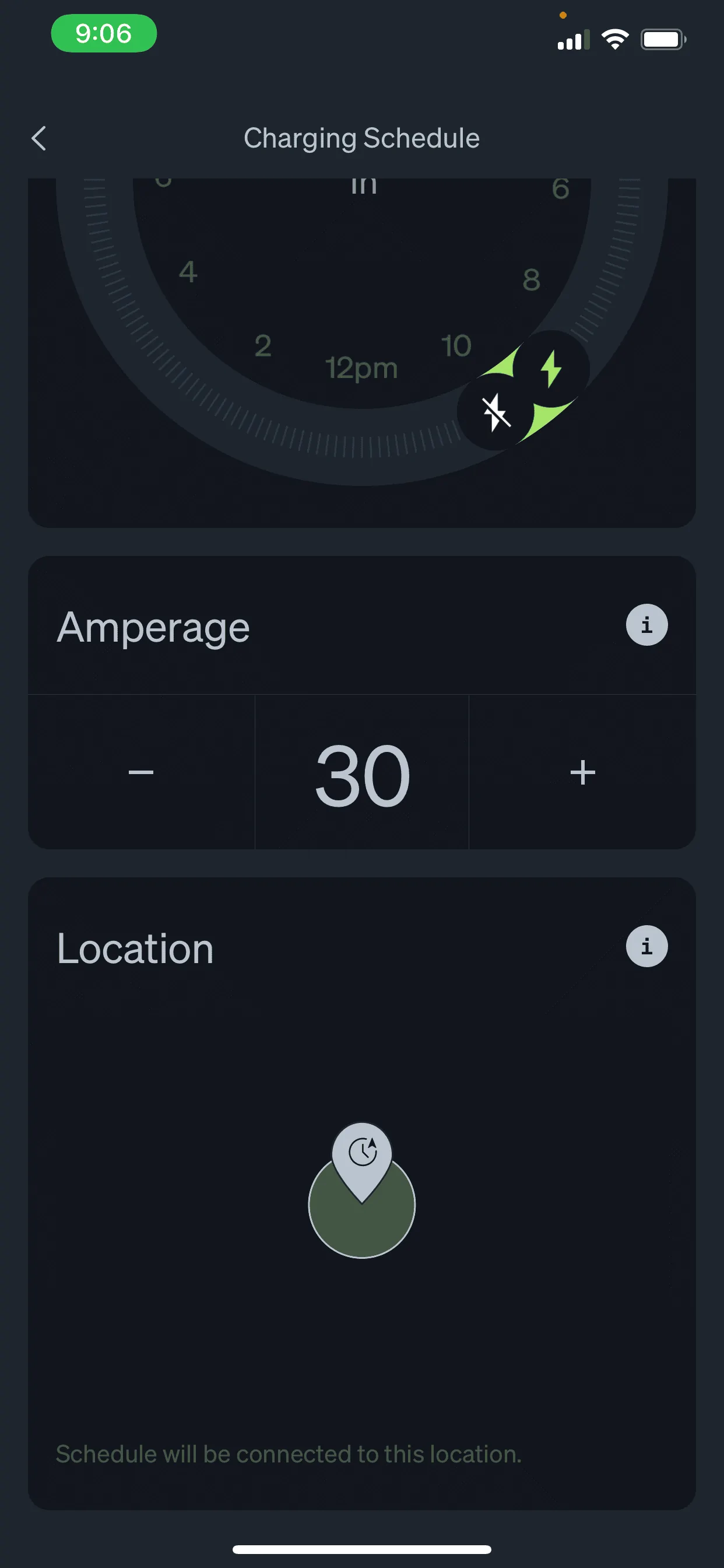
73965491-CA02-486E-8AD8-5B733096CFEE.jpeg
3CA2F427-7B1D-47D2-827C-9585F7A665FA.png
To build on what @VSG wrote, I had a similar issue at first, too. When I pinched to zoom out (many times) I eventually saw that my pin was in an ocean. Place the pin at your current location and the schedule should work.
 
OP
OP
PowerBugs

PowerBugs

Well-Known Member
First Name
Dru
Joined
Jun 13, 2022
Threads
37
Messages
227
Reaction score
235
Location
SF Bay Area
Vehicles
Toyota
@VSG @SoCal Rob Thank you all. I think I figure it out on the location. What I did initially was zooming in instead of zooming out. I will work on this again when I get home and see if this will resolve my issue.
So far, I made it to over 30min of waiting for someone from customer support to pick up my call but I had to hang up because I was getting late for work.
I will follow up on this tomorrow.
 

Sponsored

OP
OP
PowerBugs

PowerBugs

Well-Known Member
First Name
Dru
Joined
Jun 13, 2022
Threads
37
Messages
227
Reaction score
235
Location
SF Bay Area
Vehicles
Toyota
Update: It finally work! No reset bring done. It was just the location on the map in the app which I believe it doesn’t auto-locate where you are. You have to manually find yourself in the map as you zoom out.
Thanks again for the great Rivian community.
 

James

Well-Known Member
First Name
JAMES
Joined
Mar 11, 2020
Threads
2
Messages
68
Reaction score
53
Location
Syracuse
Vehicles
MDX, ACCORD
Occupation
Retired Teacher, Reading Coach
Well done.
I ended the by time session, then reopened it and it worked also!
 

Smithers7632

New Member
First Name
Kyle
Joined
Nov 16, 2022
Threads
0
Messages
4
Reaction score
1
Location
Chicago
Vehicles
R1S LE Rivian Blue OC 20"
Occupation
Financial Advisor
Clubs
 
Thanks everyone. I was having the same issue. When I went to the location in the timing schedule, it was set in Western Africa! Hopefully, it will work tonight.
 

hekhl00

Well-Known Member
Joined
Oct 24, 2022
Threads
7
Messages
172
Reaction score
382
Location
FL
Vehicles
R1T Rivian Blue Ocean Coast Adventure Package
Thanks all. Was having this exact same issue and zoomed out to discover that I too was in Africa. Love these forums. Much more helpful than Reddit.
Sponsored


Top