Sponsored

Phone as key issues

CodemanCMC

Active Member
First Name
Cody
Joined
Jul 5, 2023
Threads
2
Messages
27
Reaction score
25
Location
San Diego
Vehicles
2023 R1T Quad Adventure, 2016 Tesla MS FSD
Just took delivery of my Adventure Quad R1T and had all the same issues at delivery with delivery rep and even had the head of the service center try to pair two separate iPhone 12 Pro phones (iOS 16.5.1) to no avail. Pushed two updates to the car with full resets, delete key, log out, delete app, restart phone, reinstall app, log-in, add key, etc and never had a successful PAAK pairing. So far 1 hour at delivery with head service tech, 1 hour on phone with digital service team, and vehicle has been at SC for 6 hours and granted them access as a driver so they can troubleshoot with a known phone that works on other vehicles. SC says diagnostic passed so they're confused about it too.

Rivian needs to update the app so it's still usable even without the PAAK functioning (like Tesla's app can set charging, lock/unlock, vent windows, set climate control, turn on/off security features, etc even on non PAAK cars like my early MS).

Will update when I have a final resolution.
Sponsored

 

Tim-in-CA

Well-Known Member
Joined
Sep 30, 2021
Threads
46
Messages
1,791
Reaction score
3,429
Location
So Cal
Vehicles
Gen 1 R1S, Lucid Air, T-Bird
I'm actually having a weird issue with my iPad! I have my iPhone set up with PAAK, but I'll use my iPad if I want to check the status of charging. However, when I open the app on the iPad it is FORCING me to set up PAAK. I don't want to add a key for the iPad. This prevents me from seeing the current charging session as the Green bar that's on the iPhone app (View charging session) is not displayed! Has anyone else seen this?
 

GSGun

Active Member
First Name
G
Joined
Oct 1, 2019
Threads
4
Messages
38
Reaction score
22
Location
Eugene, Oregon
Vehicles
2023 R1S Quad, 2019 Prius Prime PHEV
Just took delivery of my Adventure Quad R1T and had all the same issues at delivery with delivery rep and even had the head of the service center try to pair two separate iPhone 12 Pro phones (iOS 16.5.1) to no avail. Pushed two updates to the car with full resets, delete key, log out, delete app, restart phone, reinstall app, log-in, add key, etc and never had a successful PAAK pairing. So far 1 hour at delivery with head service tech, 1 hour on phone with digital service team, and vehicle has been at SC for 6 hours and granted them access as a driver so they can troubleshoot with a known phone that works on other vehicles. SC says diagnostic passed so they're confused about it too.

Rivian needs to update the app so it's still usable even without the PAAK functioning (like Tesla's app can set charging, lock/unlock, vent windows, set climate control, turn on/off security features, etc even on non PAAK cars like my early MS).

Will update when I have a final resolution.
I have a similar issue when I took delivery 3 weeks ago. Tried on 3 different phones (Pixel 7 Pro, iPhone 14, and iPhone 7S), tried different BT profiles, multiple resets. I have a mobile service appointment on friday and on the invoice it says communications module, vehicle firmware upgrade. I don't have any other connectivity issues at the moment. Garage opener is janky, but I'm not sure what controls that.

My name was misspelled and they changed it prior to delivery. I wonder if it's something to do assigned token from factory.
 

jimmyb2

Well-Known Member
Joined
Jun 15, 2023
Threads
1
Messages
183
Reaction score
161
Location
IN
Vehicles
Chevy Express AWD, Lexus RX450h, Rivian R1S
My iPhone 13 Pro was easily paired at delivery, and as soon as I got home I turned off the phone feature that locks/unlocks the vehicle. I really dislike having my phone do that because it is so "uncertain". If the phone does that by itself then I don't really know if the vehicle is locked or unlocked when I walk into a store for example. I just do not trust it to always do what I think it "should" do.

I much prefer to press a button or turn a key or some similar physical thing. That way I KNOW whether it is locked or unlocked as I walk away. And I KNOW it did not unlock as I walked partway back to look at some other nearby vehicle or to talk to someone nearby.

I still use my Rivian phone app to do other things ... start/stop charging, change charging limits, turn on/off interior air conditioning, turn on/off security cam, etc. I just don't want my phone locking/unlocking without my knowledge just because I happen to be in the vicinity. But that's just me.
 

CodemanCMC

Active Member
First Name
Cody
Joined
Jul 5, 2023
Threads
2
Messages
27
Reaction score
25
Location
San Diego
Vehicles
2023 R1T Quad Adventure, 2016 Tesla MS FSD
Just took delivery of my Adventure Quad R1T and had all the same issues at delivery with delivery rep and even had the head of the service center try to pair two separate iPhone 12 Pro phones (iOS 16.5.1) to no avail. Pushed two updates to the car with full resets, delete key, log out, delete app, restart phone, reinstall app, log-in, add key, etc and never had a successful PAAK pairing. So far 1 hour at delivery with head service tech, 1 hour on phone with digital service team, and vehicle has been at SC for 6 hours and granted them access as a driver so they can troubleshoot with a known phone that works on other vehicles. SC says diagnostic passed so they're confused about it too.

Rivian needs to update the app so it's still usable even without the PAAK functioning (like Tesla's app can set charging, lock/unlock, vent windows, set climate control, turn on/off security features, etc even on non PAAK cars like my early MS).

Will update when I have a final resolution.
Brief Update: SC advised they identified the issue as related to a bad driver’s side Bluetooth module or possibly a bad fuse for that module. They stated they’ve not had this particular component issue before but that the part is on order and should resolve the problem tomorrow. Generally I’m nervous this could be a larger electrical system issue as I have had very similar component failing issues in my previous ICE vehicle that was ultimately deemed a lemon after the fourth or fifth component failed (probably related to a bad wire harness or it’s subsequent replacement) so I’m probably overly sensitive to stuff like this. Hoping this is all we have because even though I’m only 6 days since delivery I love the truck!

Will post another update if/when it’s resolved.
 

Sponsored

MIG

Well-Known Member
Joined
Apr 9, 2021
Threads
26
Messages
470
Reaction score
695
Location
Chicago
Vehicles
Prius; R1S
If the phone does that by itself then I don't really know if the vehicle is locked or unlocked when I walk into a store for example. I just do not trust it to always do what I think it "should" do.
I can understand personal preference but it locks reliably when i'm about 10-12 feet away. Consistently get a "chirp" confirming that it's locked and I'm never concerned about it being secure. Then, just as reliably, it unlocks as I approach. I find it to be a great feature.
 

ads75

Well-Known Member
Joined
Nov 9, 2021
Threads
9
Messages
1,583
Reaction score
2,993
Location
Reading, Pennsylvania
Vehicles
2019 Jeep Wrangler Rubicon 2DR, 2024 GMC Sierra 1500 AT4X
Occupation
Utilities
Clubs
 
I can understand personal preference but it locks reliably when i'm about 10-12 feet away. Consistently get a "chirp" confirming that it's locked and I'm never concerned about it being secure. Then, just as reliably, it unlocks as I approach. I find it to be a great feature.
It is a great feature, away from home. But for me, the truck will unlock in my driveway when I go into my kitchen. No audio chirp that it unlocked, not that I would hear it, if I am inside. And I can't see one side of my truck from my windows, no idea if someone is opening that side or not. Only clue I had it was unlocking was because I would see the handles in the open position from my window.
 

MIG

Well-Known Member
Joined
Apr 9, 2021
Threads
26
Messages
470
Reaction score
695
Location
Chicago
Vehicles
Prius; R1S
It is a great feature, away from home. But for me, the truck will unlock in my driveway when I go into my kitchen. No audio chirp that it unlocked, not that I would hear it, if I am inside. And I can't see one side of my truck from my windows, no idea if someone is opening that side or not. Only clue I had it was unlocking was because I would see the handles in the open position from my window.
Just set your proximity locking to "Off at Home." Set your home address in navigation then go to Settings>Vehicle>Access>Proximity Locking and set to "Off at Home" if it bothers you. Mine unlocks when I exit the side door to take out the garbage, but it's not a concern for me.
 

CodemanCMC

Active Member
First Name
Cody
Joined
Jul 5, 2023
Threads
2
Messages
27
Reaction score
25
Location
San Diego
Vehicles
2023 R1T Quad Adventure, 2016 Tesla MS FSD
Brief Update: SC advised they identified the issue as related to a bad driver’s side Bluetooth module or possibly a bad fuse for that module. They stated they’ve not had this particular component issue before but that the part is on order and should resolve the problem tomorrow. Generally I’m nervous this could be a larger electrical system issue as I have had very similar component failing issues in my previous ICE vehicle that was ultimately deemed a lemon after the fourth or fifth component failed (probably related to a bad wire harness or it’s subsequent replacement) so I’m probably overly sensitive to stuff like this. Hoping this is all we have because even though I’m only 6 days since delivery I love the truck!

Will post another update if/when it’s resolved.
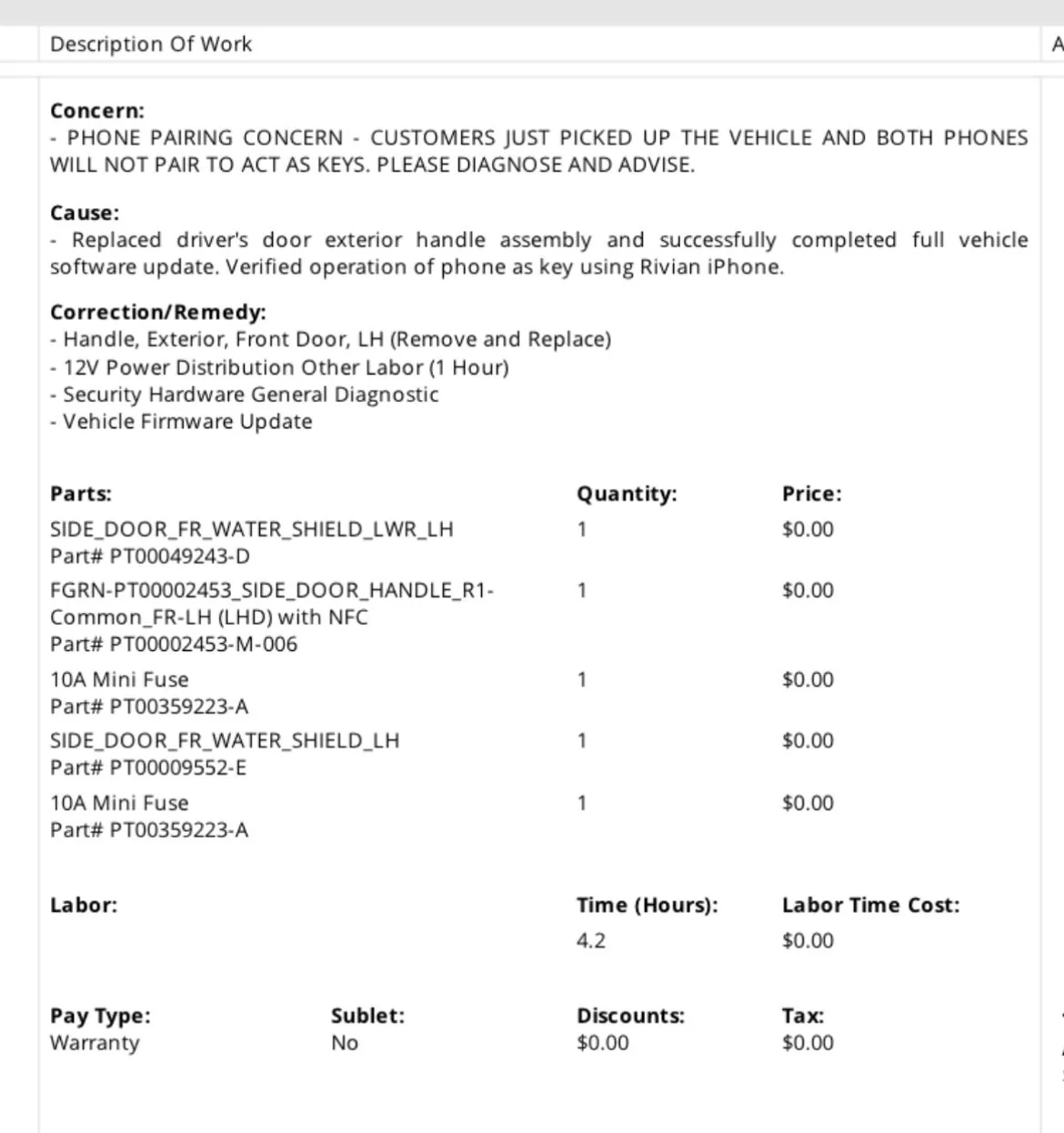
Final update: issue was resolved today by SC by replacing the driver’s side door handle assembly and it’s related fuse, and bringing the handle module’s software up to snuff. Final invoice with part numbers in attached image. PAAK pairing successful first time and vehicle recognizes my phone on approach 100% of the time so far (around 10/10 approaches). Have to say excellent service so far from Rivian.
Rivian R1T R1S Phone as key issues IMG_4999
 

GSGun

Active Member
First Name
G
Joined
Oct 1, 2019
Threads
4
Messages
38
Reaction score
22
Location
Eugene, Oregon
Vehicles
2023 R1S Quad, 2019 Prius Prime PHEV
Final update: issue was resolved today by SC by replacing the driver’s side door handle assembly and it’s related fuse, and bringing the handle module’s software up to snuff. Final invoice with part numbers in attached image. PAAK pairing successful first time and vehicle recognizes my phone on approach 100% of the time so far (around 10/10 approaches). Have to say excellent service so far from Rivian.
IMG_4999.jpeg
How long did they take to figure out and repair the issue?
 

Sponsored

CodemanCMC

Active Member
First Name
Cody
Joined
Jul 5, 2023
Threads
2
Messages
27
Reaction score
25
Location
San Diego
Vehicles
2023 R1T Quad Adventure, 2016 Tesla MS FSD
How long did they take to figure out and repair the issue?
The vehicle was at the SC for about 7 hours before the diagnosis was communicated to me. Part arrived overnight and vehicle was completed same day for early afternoon pickup. So about 30 hours in total. SC provided UBER credits initially and a rental once it was clear they were going to keep the car overnight.
 

Cycliste

Well-Known Member
First Name
Scott
Joined
Jul 7, 2023
Threads
11
Messages
1,191
Reaction score
1,671
Location
Solano County, California
Vehicles
2023 R1T/20AT Brights, BMC TMR01/SRAM AXS/454 NSW
Occupation
Amateur aero weenie
Clubs
 
I'm actually having a weird issue with my iPad! I have my iPhone set up with PAAK, but I'll use my iPad if I want to check the status of charging. However, when I open the app on the iPad it is FORCING me to set up PAAK. I don't want to add a key for the iPad. This prevents me from seeing the current charging session as the Green bar that's on the iPhone app (View charging session) is not displayed! Has anyone else seen this?
Same for me. I’m guessing the iPad and iPhone apps are the same code. I really want an Apple Watch Rivian app with a complication that shows battery charge status.
 

Tim-in-CA

Well-Known Member
Joined
Sep 30, 2021
Threads
46
Messages
1,791
Reaction score
3,429
Location
So Cal
Vehicles
Gen 1 R1S, Lucid Air, T-Bird
Same for me. I’m guessing the iPad and iPhone apps are the same code. I really want an Apple Watch Rivian app with a complication that shows battery charge status.
Yea, I was forced to setup a key for my iPad To get the app to work
 

txtravwill

Well-Known Member
First Name
Travis
Joined
Feb 18, 2021
Threads
11
Messages
343
Reaction score
397
Location
Marble Falls, TX
Vehicles
R1T, F150
Occupation
IT Software Director
Rivian has had my truck for going on 3 weeks now, waiting on a stupid bluetooth module/circuitry that goes in the door handle. That makes the PAAK/NFC cards and all work/pair - ridiculous! Seems like would be a small simple part to get.
 

trek96

Member
First Name
John
Joined
Apr 22, 2023
Threads
5
Messages
16
Reaction score
35
Location
Los Angeles
Vehicles
2023 Rivian R1T
Occupation
Television Producer
Jumping on this thread as I am now having the same issue. But reading above, I wonder if my last service had something to do with it.
Paak has worked well since I got the truck (May). The rear pass door handle was slightly misaligned and bound on deployment. After waiting 3 months, got the truck in and they adjusted the handle. Got the truck back 2 weeks ago and a few days later tried to valet it and the card did not work. Got home and checked, both key cards would not work. Called Rivian, they diagnosed something up with the module, but fob and phone should be unaffected. They made me a mobile appointment that is still a few weeks away. Since getting the truck back my Paak has gotten worse and worse. It would fail to unlock even after standing for minutes next to the truck. Today it would not even recognize my phone to start the truck (this is new). So I did the above procedure and am stuck in the loop of not being able to pair. Reading above that a door handle and module had to be replaced. Maybe something happened when my door handle was worked on?
In the many pairing loops I was stuck in, a few times randomly on my phones Bluetooth list, “Rivian sensor” 1, 2 and 4 would show up as connected. Maybe missing sensor 3 is my rear pass door they worked on? Odd they were even showing up.
And the cherry on this sundae is that when I took my truck in, my fob (which I’ve never used) was saying low battery. They changed the battery and updated software. Today it’s saying low battery again……. Good times Rivian.
Sponsored


Top