Sponsored

R1T Home Charging Woes

kirkSD

Member
First Name
Kirk
Joined
Apr 23, 2022
Threads
1
Messages
9
Reaction score
3
Location
San Diego
Vehicles
Tesla M3, R1T (FG/FE) 21"
Occupation
Engineer
I'm really struggling with getting my R1T to charge at home. First issue is that the truck doesn't seem to know it's home, even though my home address is correct. This means that the scheduled charging will not start (set to midnight). Whenever I plug in at home, it immediately tries to charge and I have to cancel the charging session.

To add insult to injury, I also can't simply wake up at midnight and start the charging session from the app (app doesn't seem to support manually controlling charging sessions.) So to get my midnight charging session going, I have to walk out to my driveway at midnight to get into the truck and start it.

Anyone know how to resolve this "don't know I'm home issue"? It's way too sensitive on the location.

Kirk
Sponsored

 

Cosmacelf

Well-Known Member
Joined
Nov 11, 2020
Threads
20
Messages
442
Reaction score
530
Location
San Diego, CA
Vehicles
Rivian R1S, Tesla Model X
Occupation
Software
I might be in the same boat. Maybe that's why my Rivian starts to charge right away when I plug it in? Did you figure out a fix?
 

CommodoreAmiga

Well-Known Member
Joined
Dec 30, 2020
Threads
39
Messages
4,104
Reaction score
7,729
Location
INACTIVE
Vehicles
INACTIVE
Did you install the phone app v1.8.0? It just came out in the last day or so. It added the ability to start/stop charging from your phone!

Rivian R1T R1S R1T Home Charging Woes 05166843-D156-41D2-8888-52A5BA79C267_1_101_o
 

Cosmacelf

Well-Known Member
Joined
Nov 11, 2020
Threads
20
Messages
442
Reaction score
530
Location
San Diego, CA
Vehicles
Rivian R1S, Tesla Model X
Occupation
Software
Thanks! I just updated the app. But there's still no way to set up a proper timed start at midnight, unless I want to get up then. People with long driveways or that live in rural area (ahem, like an adventure vehicle just might do), need to have the "at home" indication be adjustable, or have a larger radius or something so that timed charging works.
 

Cosmacelf

Well-Known Member
Joined
Nov 11, 2020
Threads
20
Messages
442
Reaction score
530
Location
San Diego, CA
Vehicles
Rivian R1S, Tesla Model X
Occupation
Software
OK, I figured it out. I guess it didn't have anything to do with it thinking I'm at "home". I changed the timed setting so that it starts at 12:00am and stops at 7:00am. (before I had it stopping at 12:00am). With those times, it will now schedule the charge (or at least it says it will, I'll find out tomorrow).
 

Sponsored

JoelD

Well-Known Member
First Name
Joel
Joined
Oct 4, 2020
Threads
30
Messages
211
Reaction score
419
Location
North Carolina
Website
idlethoughts.blog
Vehicles
Chevy Bolt, Rivian R1T LE (delivered 6/28/22)
Occupation
Retired
Did you install the phone app v1.8.0? It just came out in the last day or so. It added the ability to start/stop charging from your phone!

05166843-D156-41D2-8888-52A5BA79C267_1_101_o.jpeg
Is this only for the Rivian charger, and not for the vehicle settings? My app tells me it’s updated, but I sure don’t see how to manage charging…

I see the new Gear Guard control…

-Joel
 

JoelD

Well-Known Member
First Name
Joel
Joined
Oct 4, 2020
Threads
30
Messages
211
Reaction score
419
Location
North Carolina
Website
idlethoughts.blog
Vehicles
Chevy Bolt, Rivian R1T LE (delivered 6/28/22)
Occupation
Retired
Is this only for the Rivian charger, and not for the vehicle settings? My app tells me it’s updated, but I sure don’t see how to manage charging…

I see the new Gear Guard control…

-Joel
Ok, maybe I need to plug it in first…guess you can’t manage it unless it’s charging…
 

TxBeachRivian

Well-Known Member
First Name
Cory
Joined
Jun 3, 2022
Threads
12
Messages
201
Reaction score
218
Location
Texas
Vehicles
Acura
Clubs
 
I'm really struggling with getting my R1T to charge at home. First issue is that the truck doesn't seem to know it's home, even though my home address is correct. This means that the scheduled charging will not start (set to midnight). Whenever I plug in at home, it immediately tries to charge and I have to cancel the charging session.

To add insult to injury, I also can't simply wake up at midnight and start the charging session from the app (app doesn't seem to support manually controlling charging sessions.) So to get my midnight charging session going, I have to walk out to my driveway at midnight to get into the truck and start it.

Anyone know how to resolve this "don't know I'm home issue"? It's way too sensitive on the location.

Kirk
Yeah. Others have solved this issue by redoing the schedule from your home location. So turn it off, and then establish a different schedule and then maybe the same schedule. It should recognize the schedule and the location.
 

LTD in CBTS

Well-Known Member
First Name
Tim
Joined
Mar 9, 2022
Threads
8
Messages
195
Reaction score
240
Location
Cardiff-By-The-Sea
Vehicles
Tesla Model X, Tesla Model 3, Vespa 300, R1T
Occupation
Retired
Clubs
 
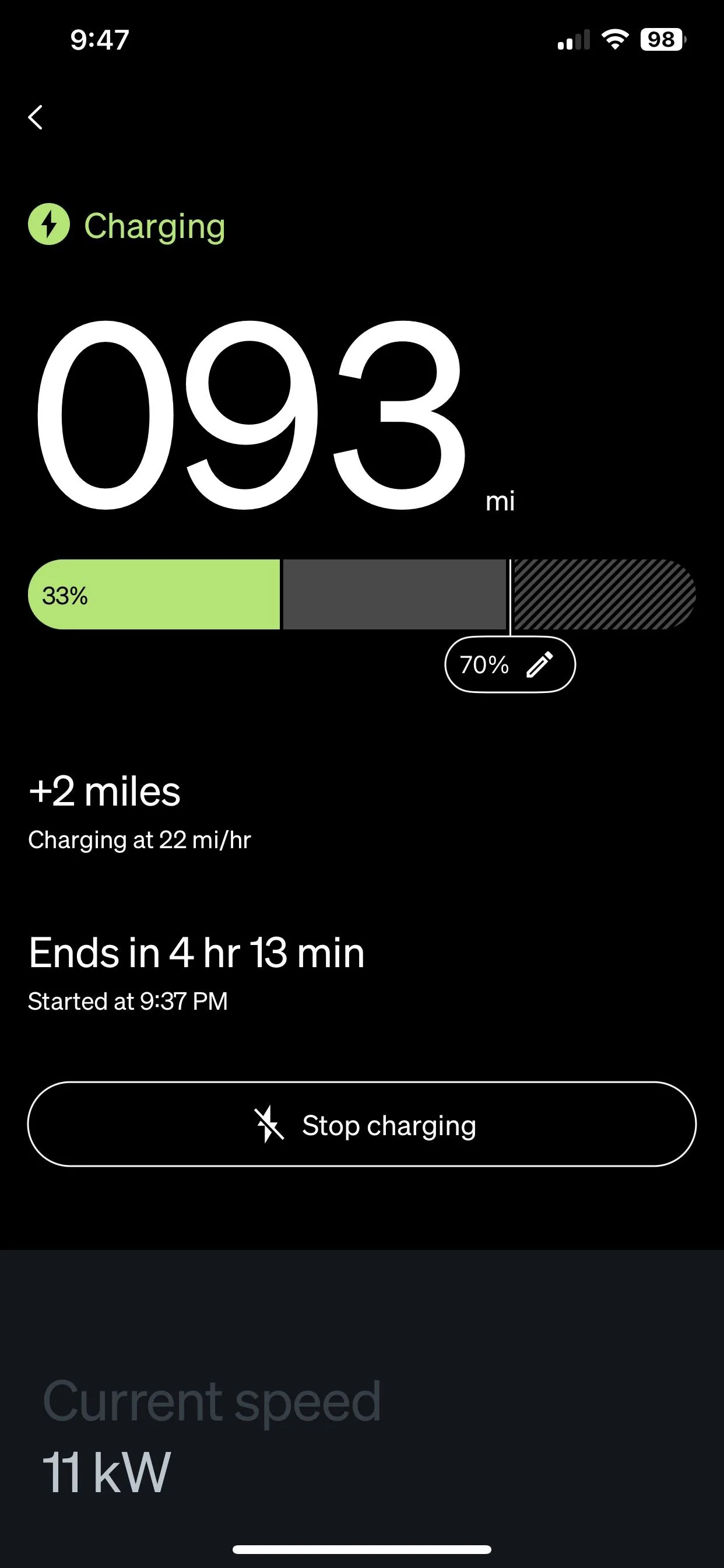
Also in San Diego with similar issues. Only had the truck for 3 days and tonight is my first charging session. We have a Tesla level 2 charger and a Lectron 60 Amp adaptor. I set the charge session for 12:00am-6:00am. Everything looked good. The charge port light was blue when I plugged in. I stayed up to midnight to check out what was happening. Charge port light switched to white at midnight, but no charging started. I went to the app and it told me to go to the truck. Went outside to the truck and unlocked it and told it to start charging from the main screen. Charging started and the front light bar started brightly and slowly flashing green. I then left the vehicle and locked the truck and all exterior lights turned off. Nothing on the light bar, nothing on charge port. Checked the app and it says that the vehicle is charging and will end in 4 hr 18 min and it seems to be adding hours to the range. I looked at the Tesla level 2 charger and it had the green light moving downward indicating active charging so it seems like it is working. However, I don't want to stay up until midnight every charging session. Will try again in a few days to see if it settles in to normalcy.
Sponsored


Top