Sponsored

SANZC02

Well-Known Member
First Name
Bob
Joined
Feb 11, 2021
Threads
50
Messages
7,409
Reaction score
12,702
Location
California
Vehicles
Tesla Model S, LE - R1S
Occupation
Retired
My Tesla does that sometimes. I find putting it down and up again would resolve it, you may try that if you have not.
Sponsored


R1SKY

Active Member
First Name
Kyle
Joined
Jul 14, 2023
Threads
9
Messages
42
Reaction score
73
Location
SF Bay Area
Vehicles
991.2 Turbo, 997.2 GT3, 1966 GT 289, Lucid Air GT
Clubs
 
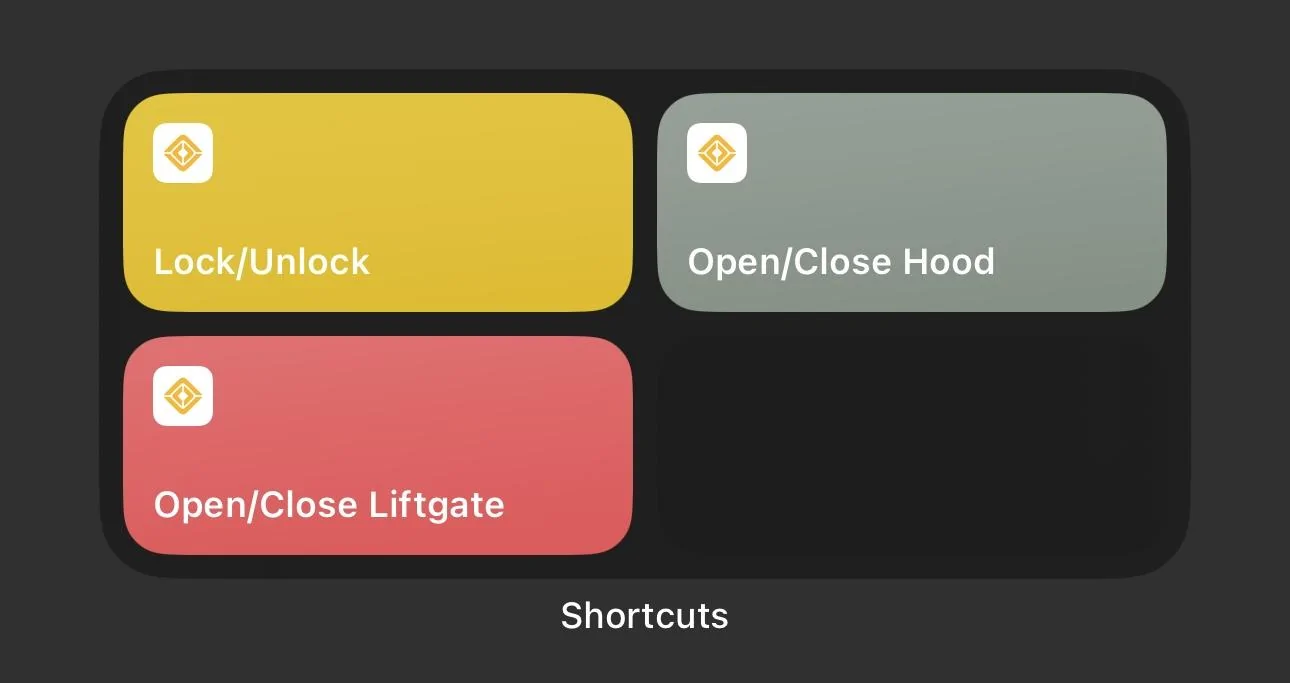
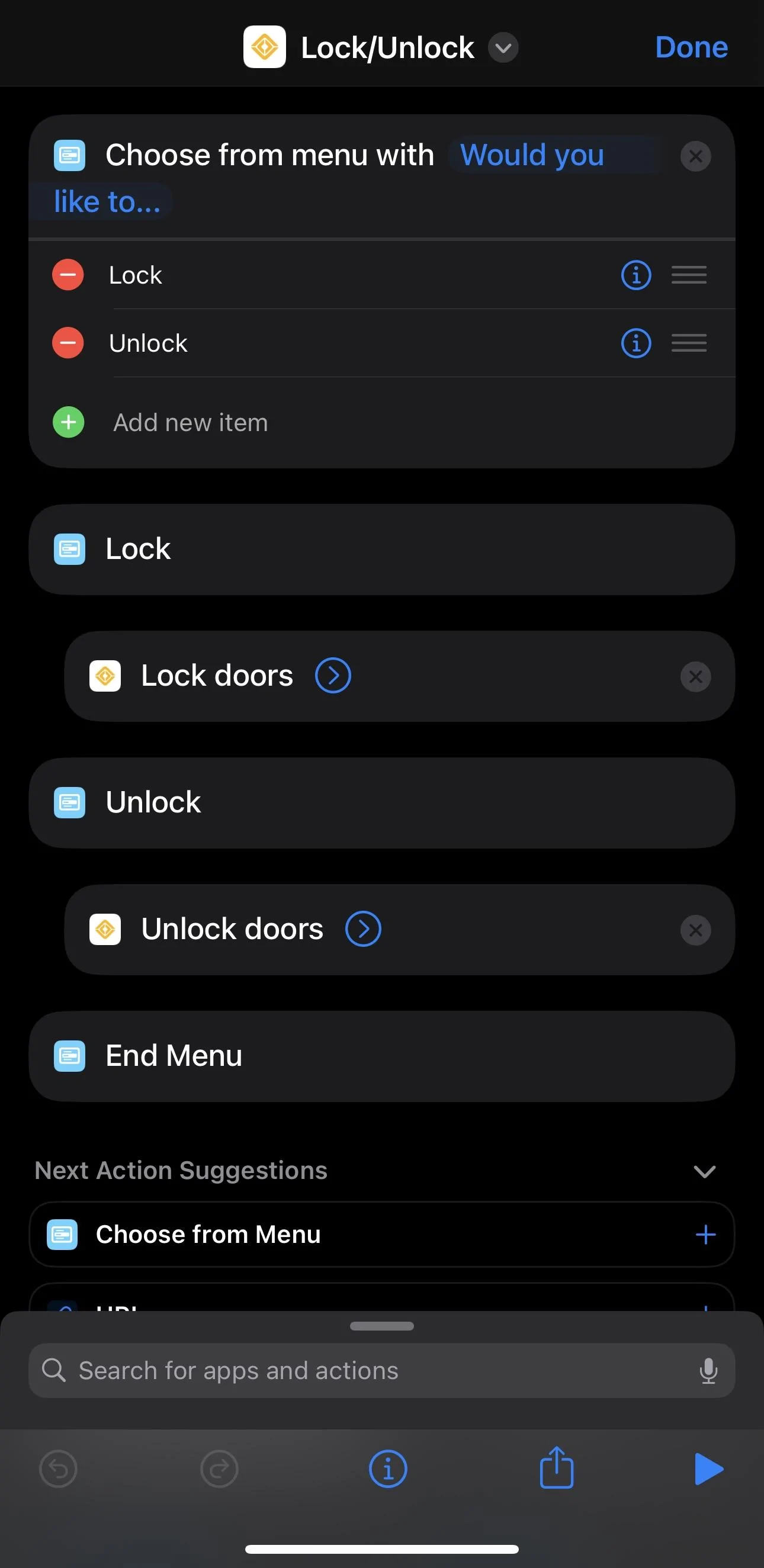
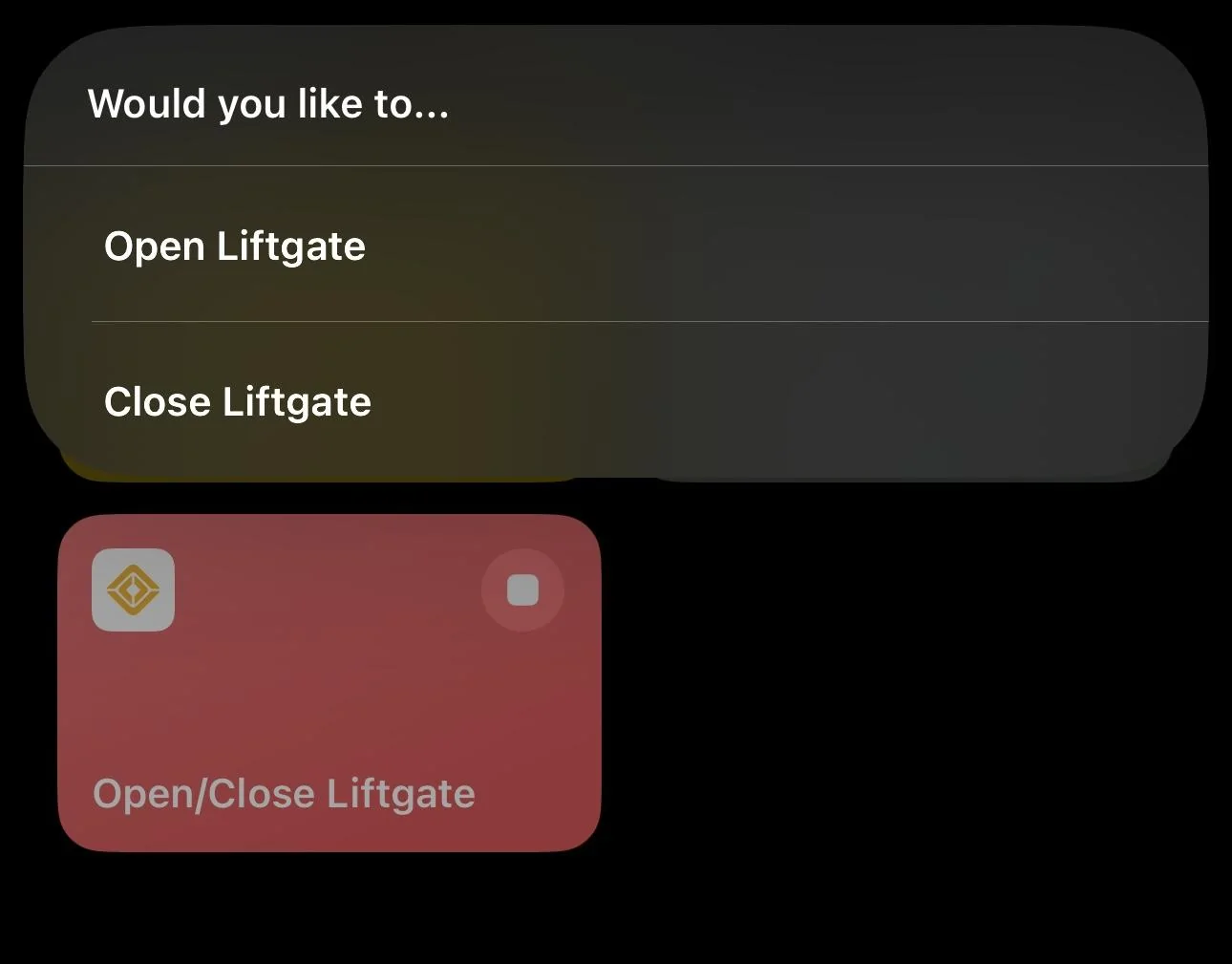
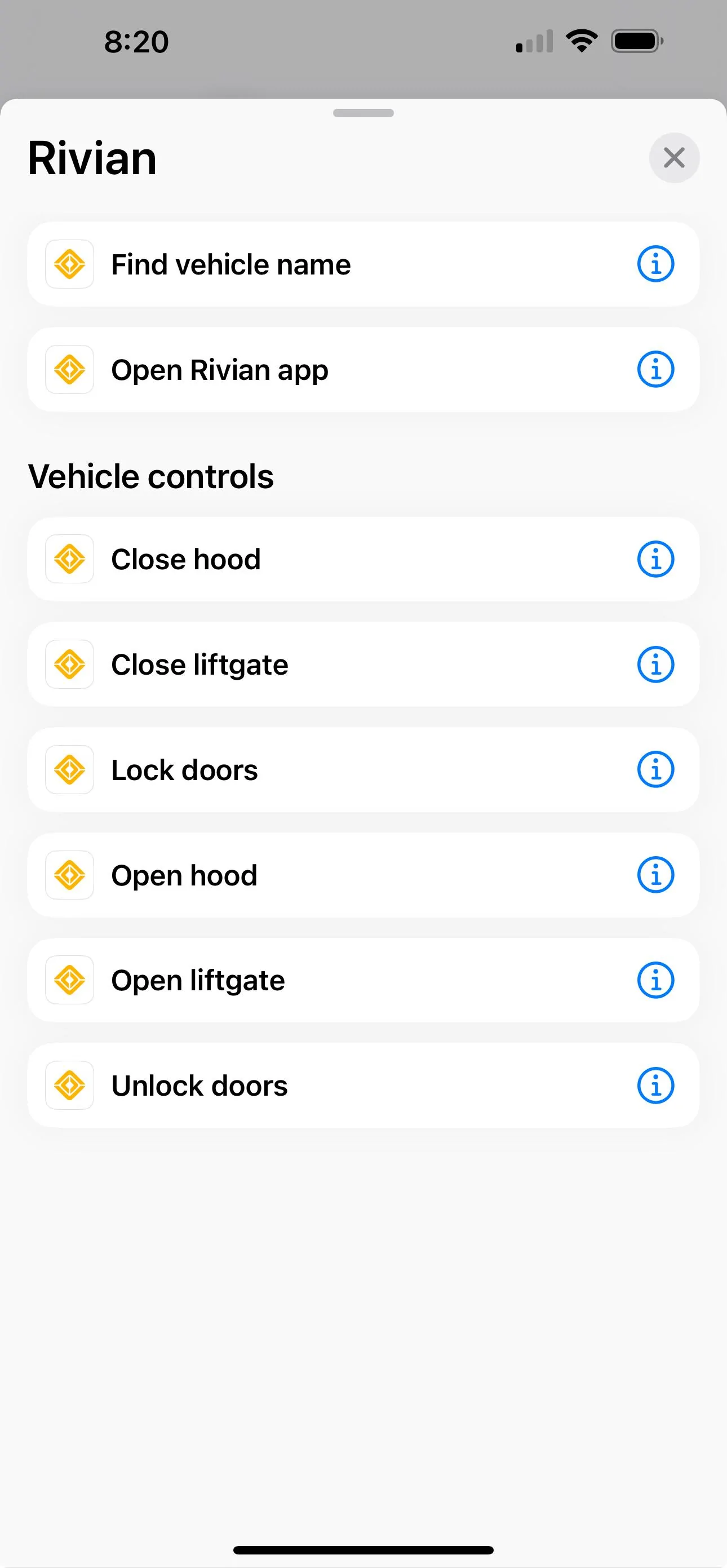
I've setup my shortcuts to open/close or unlock/lock rather than have a shortcut for each action. This way when I run the shortcut it will prompt a menu where I then choose the action. I prefer this way because it adds a safeguard for those times where I accidentally press a shortcut and run it.

I've got the unlock/lock shortcut on my action buttons for my watch and phone

Rivian R1T R1S Rivian App 2.4.0 available IMG_0205


Rivian R1T R1S Rivian App 2.4.0 available IMG_0204


Rivian R1T R1S Rivian App 2.4.0 available IMG_0206
 

Ngkgb

Well-Known Member
Joined
Feb 7, 2022
Threads
82
Messages
829
Reaction score
770
Location
United States
Vehicles
Rivian R1T
The update adds good functionality but has made PAAK responsiveness MUCH worse. It’s generally been pretty good for me in the past but I basically have to pull out my phone and open the app to get it to unlock. Even then, it is slow to recognize that I still have a key once I’m in the truck. Might be better to hold off updating. iPhone 14 pro.
I have a 13 and for some odd reason it stopped locking as I walked away. I deleted and reinstalled the app and now it works great.
 

Sponsored

Rivdog

Well-Known Member
First Name
Chris
Joined
Nov 14, 2022
Threads
12
Messages
632
Reaction score
1,616
Location
Oregon
Vehicles
2023 R1T
I have a 13 and for some odd reason it stopped locking as I walked away. I deleted and reinstalled the app and now it works great.
Thanks, I’ll give that a shot.
 

sherold

Well-Known Member
Joined
Jan 7, 2022
Threads
0
Messages
282
Reaction score
423
Location
Indiana
Vehicles
Audi S3, VW Atlas

wrightwood

Well-Known Member
Joined
Oct 13, 2023
Threads
6
Messages
54
Reaction score
66
Location
Los Angeles
Vehicles
Polestar, R1T
Which window is showing open for you?
I'm seeing this too on my brand new truck. Rear passenger side window is closed, but the app thinks it's open. Let me know if you find a solution. Not a big deal, but a minor annoyance.
 

jpmc86

Well-Known Member
First Name
Juan
Joined
Sep 10, 2022
Threads
5
Messages
250
Reaction score
129
Location
Miami, FL
Vehicles
2015 Mercedes GLK 250, 2009 Mercedes E63
Occupation
Engineer
Are the folks seeing a window open even though it’s not open always the same one? Passenger rear? I tried resetting windows and no go. I am thinking either a batch of defective motors or app issue.
 

SANZC02

Well-Known Member
First Name
Bob
Joined
Feb 11, 2021
Threads
50
Messages
7,409
Reaction score
12,702
Location
California
Vehicles
Tesla Model S, LE - R1S
Occupation
Retired
Hmmm... I don't see the same options in settings. What IOS version is this?
That screenshot is from an iPad, here is the screen shout from an iPhone 14 Pro Max running IOS 17.0.3

Rivian R1T R1S Rivian App 2.4.0 available IMG_9352
 

Sponsored

wrightwood

Well-Known Member
Joined
Oct 13, 2023
Threads
6
Messages
54
Reaction score
66
Location
Los Angeles
Vehicles
Polestar, R1T
Are the folks seeing a window open even though it’s not open always the same one? Passenger rear? I tried resetting windows and no go. I am thinking either a batch of defective motors or app issue.
I've discovered that actually the window doesn't go down at all.
 

cthelan

Well-Known Member
Joined
Mar 13, 2023
Threads
2
Messages
83
Reaction score
74
Location
Oregon
Vehicles
GEN 1 R1T QUAD, GEN 2 R1S STANDARD
Are the folks seeing a window open even though it’s not open always the same one? Passenger rear? I tried resetting windows and no go. I am thinking either a batch of defective motors or app issue.
Same. Showing rear driver side window not closed in app. Thinking its a bug.
 

Kelvn

Well-Known Member
Joined
Nov 1, 2023
Threads
15
Messages
310
Reaction score
501
Location
Irvine
Vehicles
R1S
Clubs
 
I've setup my shortcuts to open/close or unlock/lock rather than have a shortcut for each action. This way when I run the shortcut it will prompt a menu where I then choose the action. I prefer this way because it adds a safeguard for those times where I accidentally press a shortcut and run it.

I've got the unlock/lock shortcut on my action buttons for my watch and phone

IMG_0205.jpeg


IMG_0204.jpeg


IMG_0206.jpeg
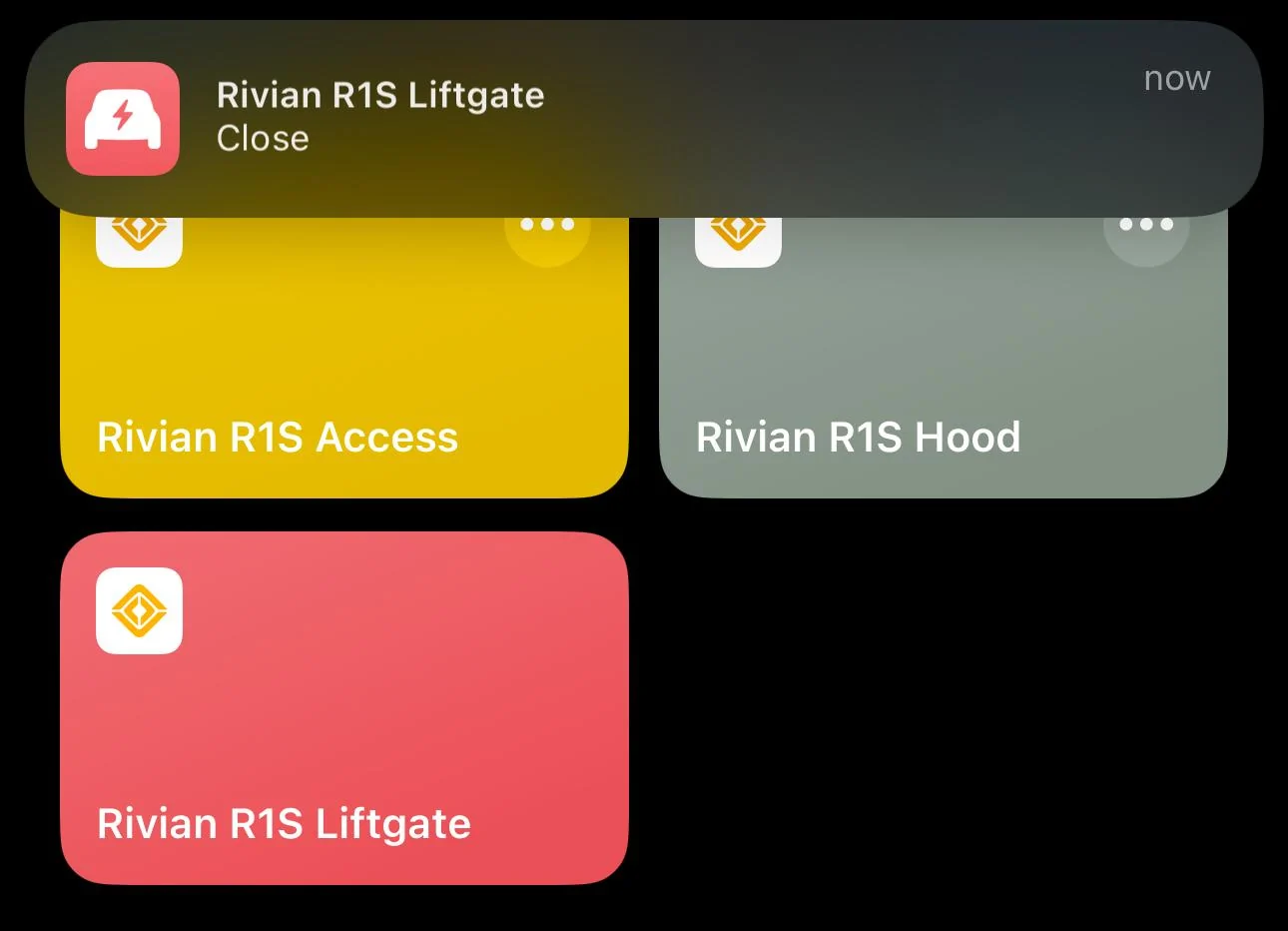
I like your idea, I initially made individual buttons that asked for confirmation, but this is more elegant. I did however add a "show notification" action. Now when an action occurs i get a notification that doors unlocked for example at time and date.
 

R1SKY

Active Member
First Name
Kyle
Joined
Jul 14, 2023
Threads
9
Messages
42
Reaction score
73
Location
SF Bay Area
Vehicles
991.2 Turbo, 997.2 GT3, 1966 GT 289, Lucid Air GT
Clubs
 
I like your idea, I initially made individual buttons that asked for confirmation, but this is more elegant. I did however add a "show notification" action. Now when an action occurs i get a notification that doors unlocked for example at time and date.
Ah yeah this is a good idea, it'll be nice to have a record/log of this as a notification. I'll add this as well
 

R1SKY

Active Member
First Name
Kyle
Joined
Jul 14, 2023
Threads
9
Messages
42
Reaction score
73
Location
SF Bay Area
Vehicles
991.2 Turbo, 997.2 GT3, 1966 GT 289, Lucid Air GT
Clubs


Top