Sponsored

Drive cam

irvineboy

Well-Known Member
Joined
Mar 13, 2021
Threads
110
Messages
470
Reaction score
121
Location
Orange County
Vehicles
R1S
I was in my vehicle with the car turned on, got a door ding but when vehicle is on, it gear guard doesn’t record. I think vehicle has to be locked.

Thinking of finally setting up drive cam. Do you have to manually hit record every single time? Are there any small 2TB thumb drives available as most I see are larger.
Has anyone tried using a splitter for one side so you can still charge two phones and use the other usb port for the thumb drive?
Sponsored


 

LivingInKaos

Well-Known Member
Joined
Jun 30, 2022
Threads
19
Messages
990
Reaction score
1,957
Location
Oregon
Vehicles
R1T Launch Green Forest Edge
Occupation
Own Fabrication Company / VP of Portland Rivian Club
Clubs
 
Drive cam will record as long as you are in Drive/Reverse. If you are in park, it doesn't record. I've gotten in the habit of locking my doors if sitting for any length of time. Having the door handles presented just invites someone to open if in sketchy areas.
 
OP
OP

irvineboy

Well-Known Member
Joined
Mar 13, 2021
Threads
110
Messages
470
Reaction score
121
Location
Orange County
Vehicles
R1S
So when the vehicle is locked but even if it is on and you’re sitting in the vehicle, gear guard will record?

I thought owners told me that gear guard only records when you are out of the vehicle and vehicle is off.
 

godfodder0901

Well-Known Member
First Name
Jared
Joined
Mar 12, 2019
Threads
27
Messages
5,771
Reaction score
10,163
Location
Washington
Vehicles
2022 Rivian R1T LE
Drive cam will record as long as you are in Drive/Reverse. If you are in park, it doesn't record. I've gotten in the habit of locking my doors if sitting for any length of time. Having the door handles presented just invites someone to open if in sketchy areas.
It will record in park. If you drive to a location, like a school pickup, put it in park but don't exit and lock it, it will keep recording.

Rivian R1T R1S Drive cam Screenshot_20240706_100301_Rivian
 

KBabione

Well-Known Member
First Name
Kevin
Joined
Sep 11, 2023
Threads
48
Messages
1,505
Reaction score
2,059
Location
Lititz, PA
Vehicles
2023 R1S Quad (8/23)
Occupation
Consultant
We bought the Twraps Dual Wireless Phone Charger and it charges two iPhones while using only one of the ports in the center console, leaving the other free for our DriveCam USB.

If you hit the incident button noted above it will save the previous 15 seconds and the next two minutes on all cameras. That will also happen if you hold down your horn for 2 seconds.

I hope your ding isn't too bad and can be corrected inexpensively by a good PDR person.
 

Sponsored

OP
OP

irvineboy

Well-Known Member
Joined
Mar 13, 2021
Threads
110
Messages
470
Reaction score
121
Location
Orange County
Vehicles
R1S
We bought the Twraps Dual Wireless Phone Charger and it charges two iPhones while using only one of the ports in the center console, leaving the other free for our DriveCam USB.

If you hit the incident button noted above it will save the previous 15 seconds and the next two minutes on all cameras. That will also happen if you hold down your horn for 2 seconds.

I hope your ding isn't too bad and can be corrected inexpensively by a good PDR person.
I called around and got quotes from $150 - $450. The higher priced PDR companies said aluminum doors are harder to work with that steel doors. Not sure if they are inexperienced but yeah, hope the repair will go well. Still have a little paint from the other car.
 

SwampNut

Well-Known Member
First Name
Carlos
Joined
Apr 22, 2024
Threads
52
Messages
3,566
Reaction score
3,789
Location
Peoria AZ
Vehicles
2022 R1T Launch Edition
Occupation
Geek
Clubs
 
You don't need terabytes of storage, that's a huge waste. In fact my 256GB is wasteful. That's still going to have more recordings that you'd ever need.

https://www.amazon.com/gp/product/B09WB2NL8W

The cameras record constantly, but leave them in a folder which is auto-pruned when the drive fills.

If there in "event" then it moves them to permanent storage. An event is something that the car figures is unusual, for example I get one when I slide it around a turn at full power and it self-corrects and launches. That's childish though and I only do it on days that end in a "y."

If you hit the save button it (very stupidly) saves the previous ten seconds and then several minutes forware. Idiotic. The Tesla goes BACK ten minutes, since if you hit the button, it's going to be after something happened.

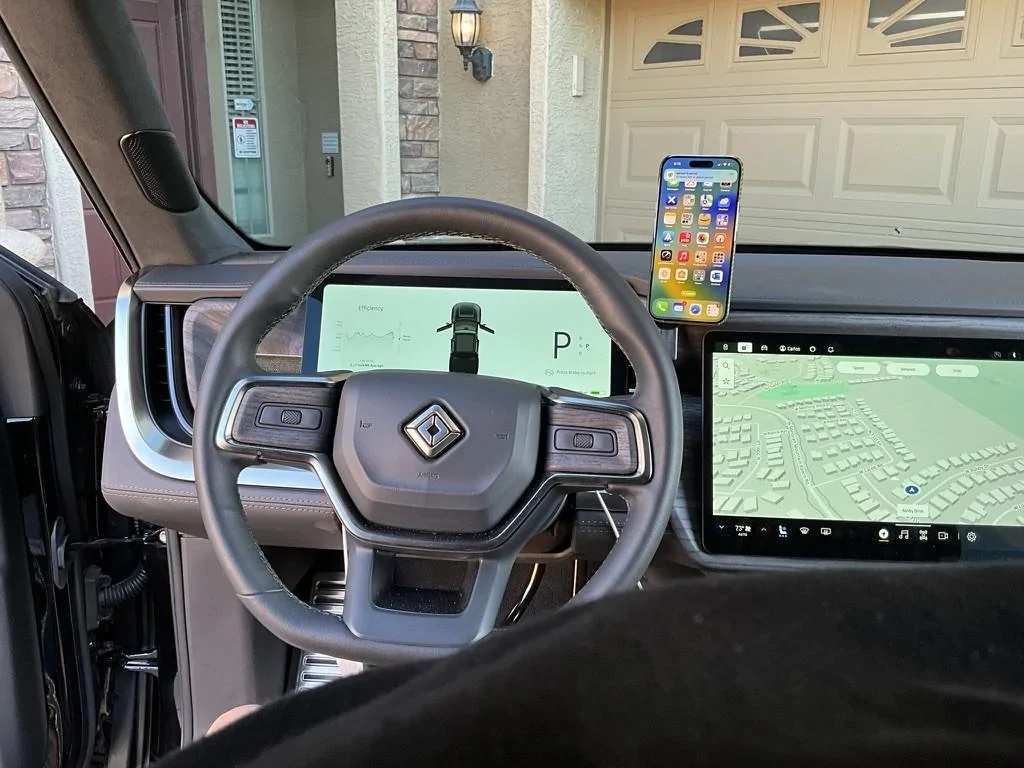
I mounted a wireless phone charger holder on the dash and abandoned the other charging. It gets high-power charging from the dash power. To your question however, those ports are very low powered. Just use the rear port to charge the second phone.

Rivian R1T R1S Drive cam 1720362701907-3v
 
OP
OP

irvineboy

Well-Known Member
Joined
Mar 13, 2021
Threads
110
Messages
470
Reaction score
121
Location
Orange County
Vehicles
R1S
It will record in park. If you drive to a location, like a school pickup, put it in park but don't exit and lock it, it will keep recording.

Screenshot_20240706_100301_Rivian.jpg
@godfodder0901 how long after you park and lock does it take for the motion cam recording to show up? My latest one shows an hour ago. Haven’t got the latest one yet.
 

godfodder0901

Well-Known Member
First Name
Jared
Joined
Mar 12, 2019
Threads
27
Messages
5,771
Reaction score
10,163
Location
Washington
Vehicles
2022 Rivian R1T LE
@godfodder0901 how long after you park and lock does it take for the motion cam recording to show up? My latest one shows an hour ago. Haven’t got the latest one yet.
If you are still in the vehicle, then they won't. They'll be part of Drive Cam.
 
OP
OP

irvineboy

Well-Known Member
Joined
Mar 13, 2021
Threads
110
Messages
470
Reaction score
121
Location
Orange County
Vehicles
R1S
Interesting. I thought once you park and lock, it will be part of motion cam.

I don’t have an external hard drive yet. I thought drive cam is only when you are driving. Does it automatically record when you drive or do you have to press a button prior to driving every single time for drive cam to record?
 

Sponsored

godfodder0901

Well-Known Member
First Name
Jared
Joined
Mar 12, 2019
Threads
27
Messages
5,771
Reaction score
10,163
Location
Washington
Vehicles
2022 Rivian R1T LE
Interesting. I thought once you park and lock, it will be part of motion cam.

I don’t have an external hard drive yet. I thought drive cam is only when you are driving. Does it automatically record when you drive or do you have to press a button prior to driving every single time for drive cam to record?
If you have it enabled it just records. You can press the icon on the center screen to record clips that are viewable in the vehicle. All other Drive Can videos are only viewable on a separate device.
 
OP
OP

irvineboy

Well-Known Member
Joined
Mar 13, 2021
Threads
110
Messages
470
Reaction score
121
Location
Orange County
Vehicles
R1S
Can you clarify what you mean when you say press the icon for the clips to be viewable in the center console? Does it mean you have to do this every single time to record the driving clip into the center console? Otherwise it will go to the external HD and not be viewable unless you hook it up to a laptop?
 

godfodder0901

Well-Known Member
First Name
Jared
Joined
Mar 12, 2019
Threads
27
Messages
5,771
Reaction score
10,163
Location
Washington
Vehicles
2022 Rivian R1T LE
Can you clarify what you mean when you say press the icon for the clips to be viewable in the center console? Does it mean you have to do this every single time to record the driving clip into the center console? Otherwise it will go to the external HD and not be viewable unless you hook it up to a laptop?
I know it's confusing, but most (if not all) of this information is in the manual.

For clarity, here is a little breakdown on the recording modes:

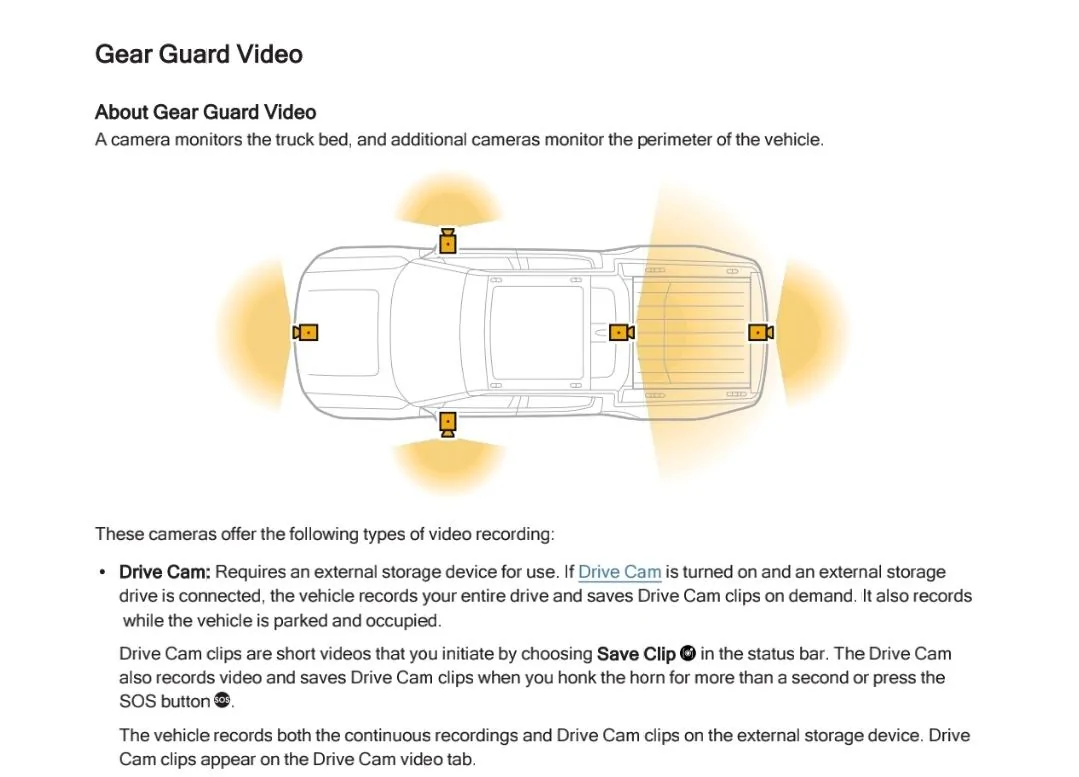
Gear Guard (Motion Cam): records when parked, locked, and unoccupied (as long as you have it on for the current location). These videos are stored to the internal vehicle storage by default (but can go to copied to an external drive) and are viewable in the vehicle.

Incident Cam: short clips recorded when driving and an "incident: is detected (hard braking, long horn press, hard impact etc...). These videos are stored to the internal vehicle storage and are viewable in the vehicle.

Drive Cam: records continuously when driving and when parked and occupied during/after a drive. These videos are only stored to external storage and cannot be viewed in the vehicle.

Drive Cam Clip: short Drive Cam clip that is manually triggered by pressing the
Rivian R1T R1S Drive cam 1720628385466-n

button in the status bar. These videos are stored to external storage and are viewable in the vehicle.
 
OP
OP

irvineboy

Well-Known Member
Joined
Mar 13, 2021
Threads
110
Messages
470
Reaction score
121
Location
Orange County
Vehicles
R1S
I just connected my external hard drive. So the short clips when I click the record button only shows 2 minutes on the center console. But if my drive is let’s say 60 minutes, will the entire 60 minutes be recorded on the external hard drive but only show the first 2 minutes on the center console?

what’s the difference between “delete video” and “delete event”? When I click “delete video” I still see the 2 minute clip on the center console for some reason but when I click “delete event” then the 2 minute clip will disappear from the center console.
 

jerseyff

Well-Known Member
First Name
Darren
Joined
Aug 3, 2020
Threads
17
Messages
736
Reaction score
986
Location
McDonald, TN
Vehicles
R1T; Model 3 Highland
Occupation
IT
I was in my vehicle with the car turned on, got a door ding but when vehicle is on, it gear guard doesn’t record. I think vehicle has to be locked.

Thinking of finally setting up drive cam. Do you have to manually hit record every single time? Are there any small 2TB thumb drives available as most I see are larger.
Has anyone tried using a splitter for one side so you can still charge two phones and use the other usb port for the thumb drive?
I charge my phone with a USB cable plugged in the bottom of the rear display. That provides power only and I dont get the constant USB option for storage on my phone.
Sponsored


Top