Sponsored

Charging at Tesla charges

irfan

Well-Known Member
Joined
Sep 29, 2021
Threads
0
Messages
56
Reaction score
58
Location
Ohio
Vehicles
Range Rover
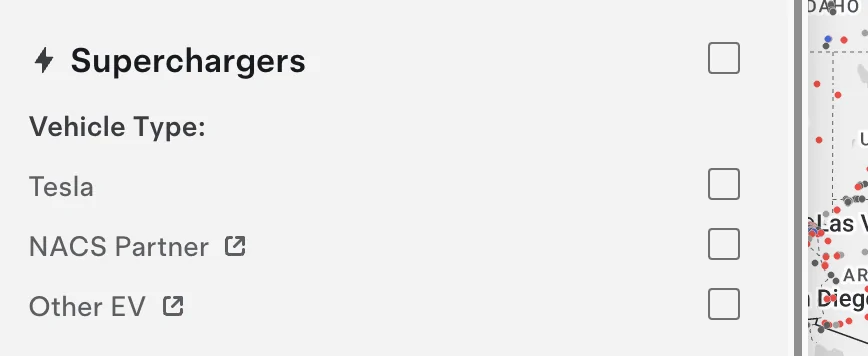
Some of the verbiage here is confusing. Shouldn’t we simply say it’s just not open to non-Teslas? Saying it’s not NACS doesn’t seem accurate since teslas themselves use nacs and the actual connectors on the stations are in fact NACS, aren’t they?
Sponsored

 

schiles

New Member
First Name
Steve
Joined
Dec 7, 2024
Threads
0
Messages
4
Reaction score
4
Location
Akron, OH
Vehicles
Rivian Trimax
Occupation
exec
I just finished my first 2k road trip and used both Rivian app at TSC's and the Tesla app at TSC's. I routinely got better pricing through the Tesla app. You need to initiate the Tesla app before plugging in, in order to not have the Rivian app take over. I saw a 7 to 10 cent difference.
 

TexasBob

Well-Known Member
First Name
Bob
Joined
Jan 15, 2022
Threads
49
Messages
1,190
Reaction score
2,634
Location
Houston
Vehicles
2024 R1T DM LRG, 2025 R1S Dune
Some of the verbiage here is confusing. Shouldn’t we simply say it’s just not open to non-Teslas? Saying it’s not NACS doesn’t seem accurate since teslas themselves use nacs and the actual connectors on the stations are in fact NACS, aren’t they?
Tesla refers to these as NACS Partner or NACS sites. It is Tesla, NACS Partner, Other EV (magic dock).


Rivian R1T R1S Charging at Tesla charges Screenshot 2025-03-24 at 08.35.36
 

smokeybear32

Member
First Name
Sean
Joined
Jan 20, 2025
Threads
1
Messages
20
Reaction score
18
Location
Fredericksburg, VA
Vehicles
Rivian R1T 2022
Occupation
engineer
A lot of times this is a result of either the plug not being completely seated into the adapter or the adapter not being completely seated into your receptacle. I had this problem three or four times with the A2Z adapter until it got a little broken in.
 

BCondrey

Well-Known Member
First Name
Barry
Joined
Dec 12, 2021
Threads
0
Messages
694
Reaction score
695
Location
Richmond, VA
Vehicles
R1T
Occupation
IT
The Supercharger was in Meredith, NH. The problem I had was that I was charged $25. for each of the four attempts to charge my R1T.
As others have said, that was just a hold on your credit card. Not unlike when you pay at a restaurant and the original amount falls off and is replaced later by the amount with the tip included.

Not all SCs support Rivian charging, as I am sure you have found out by now.
 

Sponsored

irfan

Well-Known Member
Joined
Sep 29, 2021
Threads
0
Messages
56
Reaction score
58
Location
Ohio
Vehicles
Range Rover
Tesla refers to these as NACS Partner or NACS sites. It is Tesla, NACS Partner, Other EV (magic dock).


Screenshot 2025-03-24 at 08.35.36.png
Aha thank you. Was confusing without the “partner” part of it. Makes sense now.
 

bfilippo

Well-Known Member
First Name
Benjamin
Joined
Sep 16, 2024
Threads
39
Messages
682
Reaction score
694
Location
Downeast Maine
Vehicles
2022 Launch Edition R1S Limestone, 2026 Gen2 R1T Tri Max AT, Storm Blue
Occupation
Consultant
I just finished my first 2k road trip and used both Rivian app at TSC's and the Tesla app at TSC's. I routinely got better pricing through the Tesla app. You need to initiate the Tesla app before plugging in, in order to not have the Rivian app take over. I saw a 7 to 10 cent difference.
How do you "start" the charge via the Tesla app? I feel like a moron because I had a Model Y that I just traded for our S, but since I never have to initiate anything with the Tesla from the app to supercharge, I cannot see where I would "start" the process with the Rivian at a supercharger from within the Tesla app. Do I need to close the Rivian app as well? Thanks!
 

bsaik

Well-Known Member
First Name
Barry
Joined
Apr 29, 2020
Threads
2
Messages
65
Reaction score
122
Location
SF Bay Area
Vehicles
2006 Land Rover RR Sport, R1T reservation holder
How do you "start" the charge via the Tesla app? I feel like a moron because I had a Model Y that I just traded for our S, but since I never have to initiate anything with the Tesla from the app to supercharge, I cannot see where I would "start" the process with the Rivian at a supercharger from within the Tesla app. Do I need to close the Rivian app as well? Thanks!
I am also interested in learning how to pay with the Tesla app. We have a Tesla and a Rivian, would love to pay less if possible when charging the Rivian with Tesla superchargers. In CA when I've charged my R1T at a Tesla supercharger the rate is often over $0.65 / kwH.
 

UnsungZero_OldTimeAdMan

Well-Known Member
First Name
Barnum
Joined
Mar 20, 2023
Threads
66
Messages
8,538
Reaction score
11,727
Location
SoCal
Vehicles
'23 GW Quad-Large R1T "Ghost"
Occupation
Advertising Circus
How do you "start" the charge via the Tesla app?
Easy. Setup the Tesla app with correct user profile: for us it’s Rivian + adapter. Once this is done, the app shows you sites that you, as a non-Tesla owner, can charge at. Similarly, if you’ve set you Rivian’s nav correctly, it too will only show you sites that are applicable. Navigating to a site will automatically initiate preconditioning, which optimize charging performance, only if your Rivian's software deem it neccessary.

Once at the dispenser:
  1. Launch Tesla mobile app
  2. Locate and tap on pin of site you are at
  3. Read. Pricing and terms are clearly written. Some locations are based on time of use. Some are fixed.
  4. Tap on “charge here”
  5. Look at dispenser for its identifying code; 1A, 3B, 4C, etc.
  6. Let Tesla know which dispenser to activate by tapping the matching code in Tesla mobile app.
  7. Wait for and follow instructions to plug-in.

Additional points:
  • If you do not have Tesla Supercharger membership, your price is higher by about 20%. If you don't use the Tesla app, plug-and-charge sessions will cost about this much too.
  • Plug-and-charge is billed through Rivian, to credit card you have on-file with your Rivian account. At end of plug-and-charge session, expect to receive email receipt from Rivian.
  • If initiated through Tesla app, your session summary/receipt is in the Tesla app.
  • If you have membership, you must initiate sessions through the Tesla app. There is no other way to let the dispensers know that you are a member and entitled to pay ~20% less. The $13 monthly membership takes about 100-150 kWh to break even. Given our pack sizes, it's clear it would only take one or two sessions to break even.

Tips regarding adapter use:
  • Insert plug into adapter, and adapter into port, like you mean it, in one swift motion—to enure all are fully seated and all latches engaged.
  • Listen and feel for the latches to engage. These latches are safety devices to prevent premature separation during a live session and high voltage arcing. If not latched and locked, your session will not start.
  • Brute force is not necessary. However, hesitation, shyness and second guessing will likely result in failure.

If anyone needs more info:
  • There are multiple threads on this topic; forum search. Its been discussed and repeated at length.
  • There are also multiple YouTube videos with step-by-step demo (like State of Charge channel). It’s no more complicated than charging at home. The Tesla app is also well written. It's probably less ambiguous than the Rivian app.
  • Tesla's own FAQ for non-Tesla customers is another resource: https://www.tesla.com/support/charging/supercharging-other-evs

And, not to you specifically, but somehow there are people who still have wrong idea about Supercharger access:

Not all Supercharger locations are open to non-Teslas. Which ones are, are the sole result of Tesla’s prerogative (and hardware compatibility). Estimated total of available sites is over 15,000.

[edited for sake of clarity and thoroughness]
 
Last edited:

Gen(R3)Xer

Well-Known Member
Joined
Mar 10, 2024
Threads
37
Messages
1,224
Reaction score
1,160
Location
Ohio
Vehicles
Leasing Model 3 until R3X comes out, but now I have an R2 reservation as well.
I am also interested in learning how to pay with the Tesla app. We have a Tesla and a Rivian, would love to pay less if possible when charging the Rivian with Tesla superchargers. In CA when I've charged my R1T at a Tesla supercharger the rate is often over $0.65 / kwH.
Here you go. I believe if you sign up for a monthly charging subscription you get a discount as well.

https://www.tesla.com/app/landing?product=nontesla
 

Sponsored

Foobar

Well-Known Member
Joined
Jun 5, 2022
Threads
8
Messages
441
Reaction score
510
Location
Out and about
Vehicles
R1T, Model 3P, Eva Ribelle
Occupation
IT Exec
From the Tesla app, upper right corner (Hamburger Menu) select charge your other EV. It should default to your current gps located SC station and you can click Charge Here. Otherwise, select the correct location. Then select the pedestal that you are going to use and click Start Charging.
Plug the charger into your adapter and your adapter into your Rivian. Easy peasy.
If you see a price on your dash then it’s charging through Rivian - no bueno. If no price is shown on the dash, you are good to go.
 

schiles

New Member
First Name
Steve
Joined
Dec 7, 2024
Threads
0
Messages
4
Reaction score
4
Location
Akron, OH
Vehicles
Rivian Trimax
Occupation
exec
I am also interested in learning how to pay with the Tesla app. We have a Tesla and a Rivian, would love to pay less if possible when charging the Rivian with Tesla superchargers. In CA when I've charged my R1T at a Tesla supercharger the rate is often over $0.65 / kwH.
Open the Telsa app BEFORE you plug in. Find the charging location and it will ask for which charger you're going to connect with (eg., 1A, 1B, 1C, 2A...). Once initiated, just plug into your Riv. I was getting 55-60 cents in NC last week with payment through Riv. When I used the Tesla app, it was about 46 cents.
 

theonetruestripes

Well-Known Member
First Name
Josh
Joined
Mar 19, 2025
Threads
7
Messages
167
Reaction score
169
Location
VT - North Eastern Kingdom
Vehicles
Tesla Model Y, for a few days before I “swap” it for an R1S
Occupation
Programmer
Clubs
 
Some of the verbiage here is confusing. Shouldn’t we simply say it’s just not open to non-Teslas? Saying it’s not NACS doesn’t seem accurate since teslas themselves use nacs and the actual connectors on the stations are in fact NACS, aren’t they?
NACS (aka J3400) isn’t exactly the same thing Tesla has always used.

It is physically identical, but the electrical signals used in J3400 are basically J1772’s electrical signals and higher level protocols (i.e. how they say “are you there” and “hey can you do 400V?” as well as “My billing ID is (some number here)”). Tesla’s original signaling isn’t exactly the same. Electrically I’m not quite sure how different it is. The higher level protocol is very different in part because while it and J1772 cover the same ground Tesla forged that path before the J1772 got around to seeing any ground there.

Sometimes that means J1772 did a better job because they took more time and considered problem space in more detail. Sometimes Tesla’s team did a better job (sometimes because the didn’t add complexity solving problems that nobody is having).

It also means what a V2/V1 Tesla charger toys to tell a EV that gets plugged in doesn’t “smell right”, and what the EV tells the charger is also “off”. Like a Frenchman and English speaker conversing...”well I know that is language, and I can guess what they want, but I sure can’t understand it!"

I’m not sure if Tesla is making all their older cars talk J3400, or if they are making all the chargers do a handshake to tell if the car is doing J3400, or whatever they internally call the Old School Tesla wire protocol.
 

Birdowin

Well-Known Member
First Name
Matt
Joined
Mar 14, 2022
Threads
16
Messages
277
Reaction score
220
Location
Portland OR
Vehicles
Rivian R1T / Tesla model S
Occupation
Retired from construction.
The charger will show on your Rivian screen if it is approved for Rivian charging. If it does not show on the screen you can't use it. When I had a diesel truck and filled up they put a $200.00 hold on my card. It always disappeared later.
 

BTOR

Well-Known Member
First Name
Brad
Joined
Dec 2, 2024
Threads
14
Messages
211
Reaction score
133
Location
Oregon
Vehicles
2023 Bolt, 2025 R1S
On a recent long trip I took, I found the Rivian App routed me only to NACS approved Tesla chargers. The Tesla App will also tell you if it is approved for your vehicle assuming you have your Rivian listed in your profile. I had one CS where the Tesla App didn’t work correctly and it was processed through Rivian. I didn’t get the less expensive Tesla member rate. I also had one CS where my Rivian said “charging” but at 0 kW. It eventually timed out. I just unplugged and started it again without issue. If the CS isn’t crowded, you can always try another charger if you are having issues with a particular one.

I’m sure you are planning to do this but just in case you‘re not. I highly recommend getting a Tesla Account for your trip. It pays for itself after the first charge or two. Then you can cancel it at the end of the month if you don’t plan to use it Going forward.
Sponsored


Top