Sponsored

Tail lights keep blinking

ER1T

Well-Known Member
First Name
Er
Joined
Mar 4, 2023
Threads
1
Messages
75
Reaction score
130
Location
San Diego
Vehicles
2007 Mustang GT
Occupation
IT
Interesting! Seems to be when mine started, as well. How bizarre. Let me know what you find out.

In the meantime: tailgate closed and key fob battery replaced (even though the fob is easily >50' away from the truck), as per previous suggestions. Still blinking away:


Wild speculation:

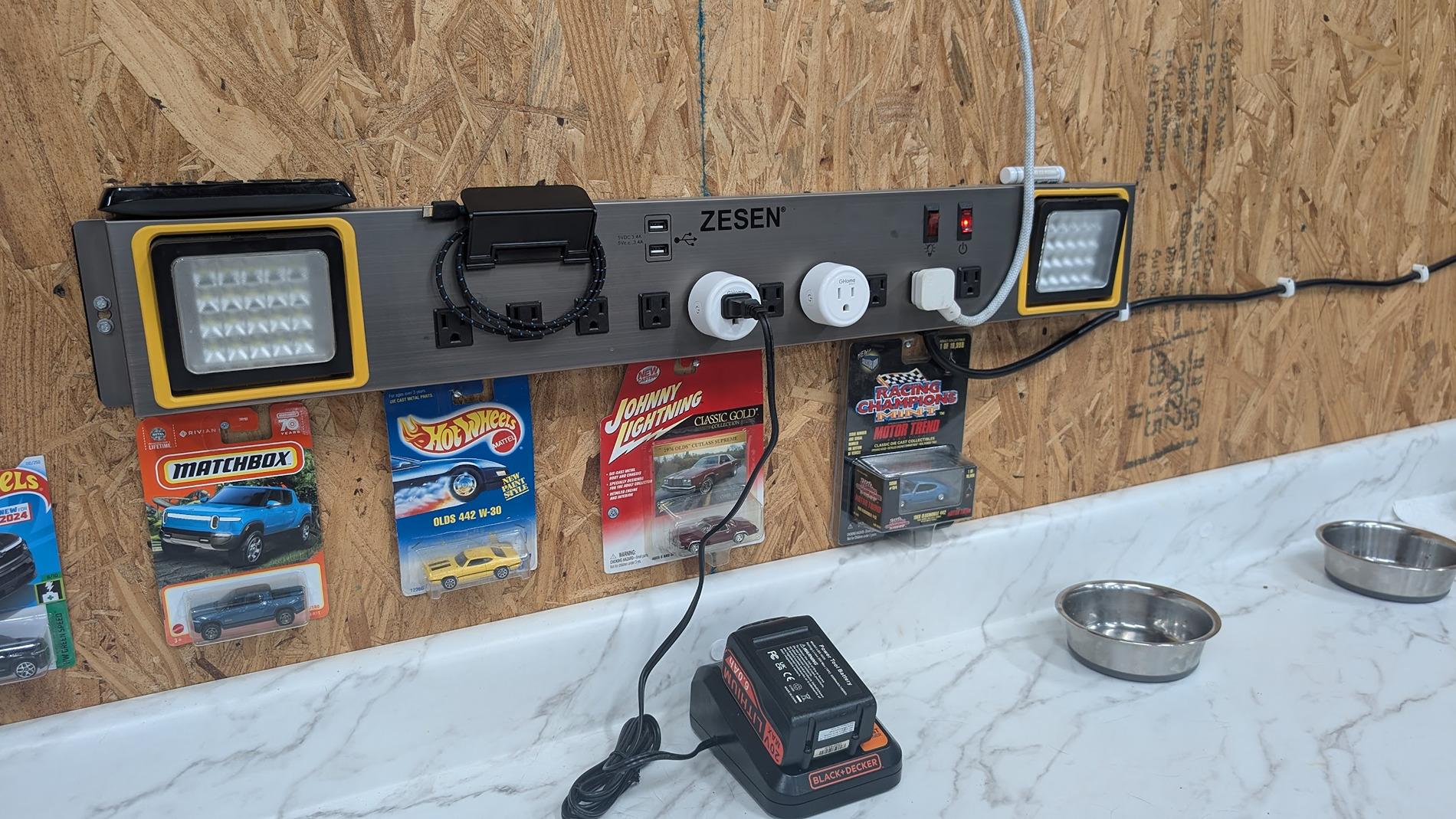
What's changed? The only thing I can think of that I have changed recently in the vicinity of the truck is to add these timers (the white 'pucks' in this picture, to control when my tools charge):

1752530092381-m9.jpg


These timers have Bluetooth, and WiFi 2.4GHz & 5GHz. Could they be sending a signal that the truck interprets as... something? Will have to remove them. But the other comment from someone else also having this issue probably blows that guess out the window...
Wow…I’m experiencing the same issue that started Friday evening. I’ll get a short flash, followed by a longer flash of the tail lights. The truck never goes to sleep. Service ticket already in, but no service appointments in San Diego until September.
Sponsored


PappaBolt

Well-Known Member
First Name
Don
Joined
Aug 20, 2022
Threads
44
Messages
1,165
Reaction score
1,681
Location
Bainbridge Island, WA
Vehicles
R1S, Corvette, 911
Occupation
Tech
Clubs
 
That would be pretty wild. You can see a couple of my cats in the most recent vid (one licking her * behind the truck and one on the couch).

They don't seem too interested, if there was a mouse in the garage I think they'd be losing their minds. 🤷
No worries. It was top of mind as that was the first thing brought up when diagnosing a misfire on the Corvette. Just turned out to be a fouled plug.

Yours sounds more like a cat proximity problem. Perhaps your R1T developed some sensitivity and needs a little therapy.
 
OP
OP
Oldsmobile_Mike

Oldsmobile_Mike

Well-Known Member
First Name
Mike
Joined
Mar 24, 2022
Threads
62
Messages
2,406
Reaction score
3,866
Location
Manassas Park, VA
Vehicles
FG/FE R1T recv'd 3/31/2023
Occupation
I build stuff
Clubs
 
Wow…I’m experiencing the same issue that started Friday evening. I’ll get a short flash, followed by a longer flash of the tail lights. The truck never goes to sleep.
The truck doesn’t seem to sleep and the tail lights flash intermittently. Vampire drain has gone way up.
Hey, so dumb question, but how are you guys determining the truck is never going to sleep? I think I let my ElectriFi subscription, or whatever it is, lapse a while ago. 😉

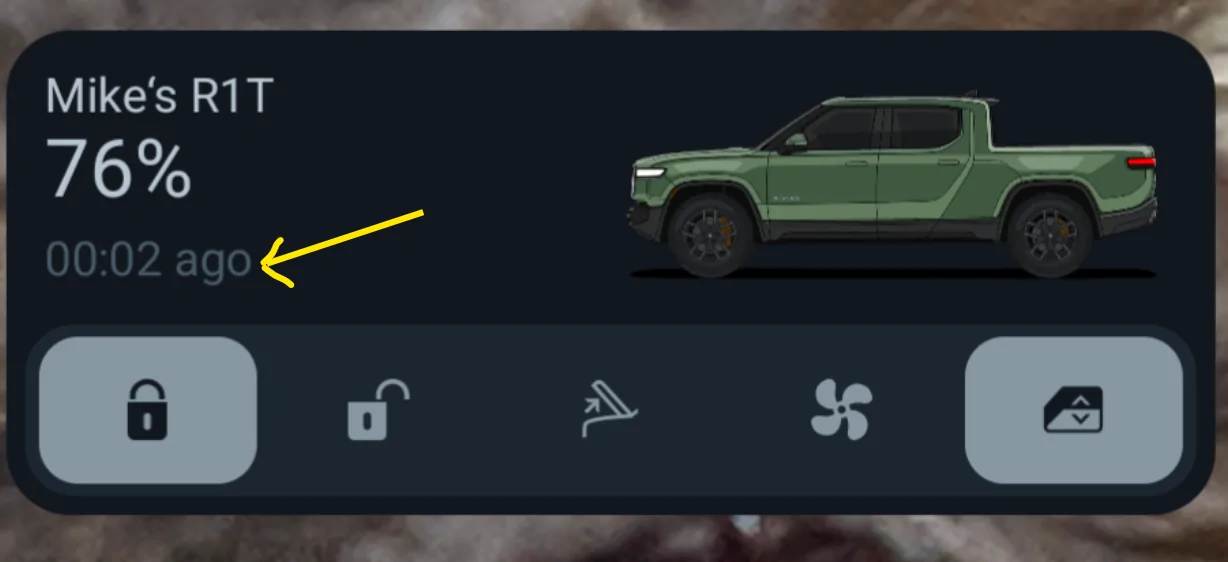
However I did notice this on the widget: The timer on the Android app counts from 00:00, then it gets to about 00:04, then it resets again back to 00:00. That doesn't seem right, does it? Like it keeps pinging and waking itself back up...

Rivian R1T R1S Tail lights keep blinking 1752532375503-es
 

Mathme

Well-Known Member
First Name
Matt
Joined
Jul 25, 2022
Threads
3
Messages
1,375
Reaction score
1,808
Location
Los Altos, CA
Vehicles
R1T: El Cap, OC, 20AT, Off road package
Occupation
High Tech
Have you tried quitting the app on all phones it is installed in and removing the battery from the Fob. This would essentially remove all keys from being able to talk to the truck and see if the truck is still doing it. I'm not sure how it'd help but may provide more of an overall picture.
 

ER1T

Well-Known Member
First Name
Er
Joined
Mar 4, 2023
Threads
1
Messages
75
Reaction score
130
Location
San Diego
Vehicles
2007 Mustang GT
Occupation
IT
Hey, so dumb question, but how are you guys determining the truck is never going to sleep? I think I let my ElectriFi subscription, or whatever it is, lapse a while ago. 😉

However I did notice this on the widget: The timer on the Android app counts from 00:00, then it gets to about 00:04, then it resets again back to 00:00. That doesn't seem right, does it? Like it keeps pinging and waking itself back up...

1752532375503-es.webp
Same with the widget. I can tell the truck isn’t sleeping when the door handle lights are on almost constantly, and when I open the door, the screens turn on without delay. In addition to the excessive vampire drain.
 

Sponsored

ER1T

Well-Known Member
First Name
Er
Joined
Mar 4, 2023
Threads
1
Messages
75
Reaction score
130
Location
San Diego
Vehicles
2007 Mustang GT
Occupation
IT
Have you tried quitting the app on all phones it is installed in and removing the battery from the Fob. This would essentially remove all keys from being able to talk to the truck and see if the truck is still doing it. I'm not sure how it'd help but may provide more of an overall picture.
I’ve tried disabling bluetooth, and completely turning off my phone for 30 minutes. Zero change, so I’m assuming PAAK is unrelated.
 
OP
OP
Oldsmobile_Mike

Oldsmobile_Mike

Well-Known Member
First Name
Mike
Joined
Mar 24, 2022
Threads
62
Messages
2,406
Reaction score
3,866
Location
Manassas Park, VA
Vehicles
FG/FE R1T recv'd 3/31/2023
Occupation
I build stuff
Clubs
 
Hey, so at a quick check, there's at least two threads and a half-dozen people commenting on the "RIVIAN Electric Vehicles Discussion" group on Facebook that they've also started having the same problem in about the past 48 hours.

Link to group page for reference:

https://www.facebook.com/groups/354388531985101
 

UnsungZero_OldTimeAdMan

Well-Known Member
First Name
Barnum
Joined
Mar 20, 2023
Threads
66
Messages
8,536
Reaction score
11,723
Location
SoCal
Vehicles
'23 GW Quad-Large R1T "Ghost"
Occupation
Advertising Circus
Yes, except it's blinking non-stop. All day and night. Used 8% battery in the past two days. This is not typical at all.

Proximity is set to not unlock at home, but I'm going to toggle that setting again in a minute. Also (per the other comment) going to replace the fob battery (I carry the fob daily when I'm driving, and have noticed the battery is a bit low). Worth a shot, I suppose.

Shame we can't just review the logs ourselves. Feel like that would tell me real quick why it keeps blinking blinking blinking blinking. 🤷

Edit: Now up to 9% battery used in the past two days. I haven't even driven anywhere. Just pulled out of the garage and back in, in case the vehicle "got lost" and forgot where its home is. So annoying, LOL.
Only other explanation I can think off... your home security cam has been hacked and this is what's been happening every night:

Rivian Tail lights keep blinking {filename}
 
OP
OP
Oldsmobile_Mike

Oldsmobile_Mike

Well-Known Member
First Name
Mike
Joined
Mar 24, 2022
Threads
62
Messages
2,406
Reaction score
3,866
Location
Manassas Park, VA
Vehicles
FG/FE R1T recv'd 3/31/2023
Occupation
I build stuff
Clubs
 

Nachyomama

Well-Known Member
First Name
Samuel
Joined
Mar 14, 2023
Threads
2
Messages
67
Reaction score
64
Location
Denver
Vehicles
R1T
Clubs
 
Started googling this issue and it was top on the forum lol. I too have this issue. I also noticed I’m getting an “ac charging performance reduced for this session” if I go step on the brake. It’s 91 in my garage but I’ve never gotten that before.
 

Sponsored

mrimprov

Member
First Name
Nate
Joined
Oct 25, 2022
Threads
0
Messages
7
Reaction score
17
Location
Minneapolis, MN
Vehicles
R1S
Occupation
Etsy
Hey, so dumb question, but how are you guys determining the truck is never going to sleep? I think I let my ElectriFi subscription, or whatever it is, lapse a while ago. 😉

However I did notice this on the widget: The timer on the Android app counts from 00:00, then it gets to about 00:04, then it resets again back to 00:00. That doesn't seem right, does it? Like it keeps pinging and waking itself back up...
I run UniFi access points at home and the controller software gives pretty good visibility into when clients are connecting/disconnecting from WiFi. Previously, when the R1S was sleeping properly, I saw that it would connect to and drop off from the wireless many time per day. This corresponded with when I would see a sleep icon in the phone app. With this new blinking tail light behavior, the vehicle connects to WiFi and doesn't disconnect unless you drive the car away (or exactly 12 hours after a hard restart like I mentioned earlier). The app does not show a sleep icon when the tail lights remain blinking.

I don't think the phone widget timestamp corresponds to sleep. I think it's just the amount of time that has passed since the widget was updated. I could be wrong, though.
 
OP
OP
Oldsmobile_Mike

Oldsmobile_Mike

Well-Known Member
First Name
Mike
Joined
Mar 24, 2022
Threads
62
Messages
2,406
Reaction score
3,866
Location
Manassas Park, VA
Vehicles
FG/FE R1T recv'd 3/31/2023
Occupation
I build stuff
Clubs
 
Started googling this issue and it was top on the forum lol. I too have this issue. I also noticed I’m getting an “ac charging performance reduced for this session” if I go step on the brake. It’s 91 in my garage but I’ve never gotten that before.
I have a separate mini-split and multiple thermostats (including Google Nest) in my garage. It's not too far-fetched to say that I think the garage has been a bit warmer, because the truck is awake and doing whatever it's doing the past few days.
 

mudito

Well-Known Member
First Name
Aldo
Joined
Jul 30, 2024
Threads
18
Messages
1,010
Reaction score
1,413
Location
Texas
Vehicles
Rivian R1T
Okey @Oldsmobile_Mike We have something a bit more than isolated here (not sure widespread is the right word). There's at least a handful of people at the Facebook Groups reporting the same AND I have my own reporting here:

Yesterday I used my truck as normal, arrived home, plugged in, scheduled charging started at 8pm as scheduled and finished at 1:21am.

I woke up today and went for a coffee at 7:30am (yeah, I shower and brushed my teeth, I'm not a freak!) and found all door's handle lights on and the blinkers blink once... Thought to myself "that's odd"... Just in case and since it's being a while (months?, so basically since last update) that I did not reset my truck, I did a full reset, and then I went for my coffee.

3.5mi later I was back at home, parked in my garage as usual (I have GearGuard and Proximity both lock disabled at home) and about one hour later came back for my laptop which I left in my R1T. Again, door's handle lights on and AGAIN it blinked.

I thought I had a door ajar or something, checked everything and all was OK. Then Problem #1: occured: Opened my tonneau cover and paused to close it while it was half open but instead it kept trying to open... Let it open it the entire way and that's it, never closed back.

Tried another hard reset, tonneau reset etc, etc and nothing. Came back home inside to do some work thinking "Ok, I'll run a service ticket" and that's when I logged into electrafi.com and found that might truck did not sleep for a single minute last night.

Like I said, finished charging at 1:21am, and never went to sleep. Waited for like an hour refreshing electrafi.com and still no sleep.I did a few short drivers and tried a few things in order to let it go to sleep and NOTHING (see graph at the bottom)

As I'm taking a trip early next week and I have to tow my other car back, I panicked and called Rivian Customer Service, lucky boy I am I got Nicole on the phone who was AWESOME, shout out to her. She walked me through some troubleshooting but in the end nothing else we can do about it. I can record my truck every 10-15 sec flashing it lights with my security camera (video attached).

Nicole booked me for an early appt on my local service center tomorrow 8am, hopefully this is something that can be troubleshooted quickly.

Initially I thought It was realted to my tonneau. My logic was "The truck don't see it fully open/closed and stays awake", but now seeing this and the facebook post, I think we are onto something else and my tonneau just happned to fail at the same time.

I don't care about the cover, but I'm concerned about my 12V system being over-stressed and the Rivian shutting itself down to protect the battery, hence why I plugged in my truck charging at a very slow rate with my Rivian Charger (I would encourage you to do the same)


ElectraFi data from last night until now:
Rivian R1T R1S Tail lights keep blinking 1752535022227-pv


Video of the truck with the lights on the doors on and blinking:
 

mudito

Well-Known Member
First Name
Aldo
Joined
Jul 30, 2024
Threads
18
Messages
1,010
Reaction score
1,413
Location
Texas
Vehicles
Rivian R1T
BTW:
I tried:
  • Disabling gear guard completely
  • Disabling ALL proximity keys
  • Disabling Bluetooth on both phones
  • Even Enabling Shipping mode.
Same result.
 

Ready4Rivian

Active Member
First Name
Mark
Joined
Apr 3, 2022
Threads
1
Messages
30
Reaction score
36
Location
Austin
Vehicles
23 R1S, 22 Bronco Badlands
Occupation
Plastics Engineer
Clubs
 
My R1S has been doing this also, it’s like a short flash followed by a long flash every 8-10 seconds. I added it to my upcoming service ticket I have for moisture in the rear light bar.
Sponsored


Top