Sponsored

gerrylum

Well-Known Member
First Name
Gerald
Joined
Apr 25, 2023
Threads
5
Messages
534
Reaction score
763
Location
Providence Village
Vehicles
R1T
Occupation
Director of Marketing
Clubs
 
I have a 3X and am running "release.sunnypilot.ai". Once the Panda-over-USB deprecation change is merged in, will I need to run a data blocker or will there be a change to SunnyPilot to fix it?
The fix will be integrated into sunnypilot, which will automatically flash updated firmware to the longitudinal upgrade. Once the new firmware is installed, the upgrade no longer needs to be connected to the Comma’s secondary port for data. It will still require power, though. You can leave it connected to the secondary port simply to supply power, or power it from another source. The Janka hub works well for this, but you will need to use a data blocker so it only provides power.
Sponsored


dekeen

Well-Known Member
First Name
David
Joined
May 30, 2022
Threads
4
Messages
111
Reaction score
79
Location
Raleigh, NC
Vehicles
Launch Edition R1S
Occupation
Consultant
The fix will be integrated into sunnypilot, which will automatically flash updated firmware to the longitudinal upgrade. Once the new firmware is installed, the upgrade no longer needs to be connected to the Comma’s secondary port for data. It will still require power, though. You can leave it connected to the secondary port simply to supply power, or power it from another source. The Janka hub works well for this, but you will need to use a data blocker so it only provides power.
Perfect. Appreciate all that you do!
 

ChitownRivianFan

Active Member
Joined
Jan 2, 2023
Threads
16
Messages
38
Reaction score
19
Location
Chicago
Vehicles
R1s
Occupation
work
Clubs
 
guess I should have posted here vs. creating a new thread...here's my original message any help would be great.


Hello everyone,

I have a Gen1 R1S. On a recent visit to service center I was given R1s Gen2 as a loner, I was impressed with its ‘self-drive’ capabilities. I tried to do a trade-in and Gen2 but the offer was not good and dropped the idea. Other than for this self drive capabilities I like Gen1 and want to keep it so.

I have been reading on Comma 4 and watched couple of videos. I want to get expert opinion on few things

1. Is Comma 4 the only 3rd party option or do we have other companies as well, if so please provide them
2. If I get Comma 4, does it come with everything, or do I need to buy any additional harnesses/devices? If so, what are those
3. Does installing this device create any issues for the car? I read that some users had error codes and Rivian wouldn’t fix them.
4. Installation: I think I can do most but might need help, are there any body shops/car mechanics who install this?
5. Feedback: can one of you please share your real-life feedback on this device – does it provide similar to Gen2’s capabilities?

Thanks for all your help 👏
 

SwampNut

Well-Known Member
First Name
Carlos
Joined
Apr 22, 2024
Threads
50
Messages
3,377
Reaction score
3,572
Location
Peoria AZ
Vehicles
2022 R1T Launch Edition
Occupation
Geek
Clubs
 
The thread is full of most of your answers. No other device available, you need 1-2 harnesses and only one comes from Comma, if you follow the install guide no, probably not, and I've never heard of anyone having experience with both G2 and this device.
 

dekeen

Well-Known Member
First Name
David
Joined
May 30, 2022
Threads
4
Messages
111
Reaction score
79
Location
Raleigh, NC
Vehicles
Launch Edition R1S
Occupation
Consultant
guess I should have posted here vs. creating a new thread...here's my original message any help would be great.


Hello everyone,

I have a Gen1 R1S. On a recent visit to service center I was given R1s Gen2 as a loner, I was impressed with its ‘self-drive’ capabilities. I tried to do a trade-in and Gen2 but the offer was not good and dropped the idea. Other than for this self drive capabilities I like Gen1 and want to keep it so.

I have been reading on Comma 4 and watched couple of videos. I want to get expert opinion on few things

1. Is Comma 4 the only 3rd party option or do we have other companies as well, if so please provide them
2. If I get Comma 4, does it come with everything, or do I need to buy any additional harnesses/devices? If so, what are those
3. Does installing this device create any issues for the car? I read that some users had error codes and Rivian wouldn’t fix them.
4. Installation: I think I can do most but might need help, are there any body shops/car mechanics who install this?
5. Feedback: can one of you please share your real-life feedback on this device – does it provide similar to Gen2’s capabilities?

Thanks for all your help 👏
I'll take a shot:
1) There may be other 3rd party options, but I'm pretty sure the Comma is the most developed at about 6 years. It is also open source so the software is constantly evolving. I have had a 3X for about a year on my Launch Edition Gen 1 R1S. Have been extremely happy with it and would do it again in a heart beat. It is so much better than the standard drive assist that came with it.
2) It does come with all you need. However, if you want to take advantage of the Comma longitudinal support, which I would highly suggest, you will need an additional harness from Lukas. See the install manual linked below for more info.
3) I have not had a single issue with my installation. There is some current issues with the longitudinal upgrade using the developmental version of Sunny Pilot. But they are close to working this out.
4) Now this is where it can get a bit interesting. The installation can be difficult, especially if you are not very patient or have big fingers. There is a good installation manual that will show you how to do it and you can get a lot of help on Discord or here if you have trouble. I believe most are successful with installing themselves. Some go to a stereo shop to have it done. I did it myself without much trouble.
5) I've not driven a Gen2 so can't compare. But I can tell you that the experience, while not full self driving, makes driving a lot less stressful, esp on long trips.

Link for the install manual:
https://docs.google.com/document/d/1clodGRssTx-dSPSUrQITq_vqumgWcpSUw83zdcAZR-A/edit?usp=sharing
 

Sponsored

OP
OP
LivingInKaos

LivingInKaos

Well-Known Member
Joined
Jun 30, 2022
Threads
19
Messages
970
Reaction score
1,909
Location
Oregon
Vehicles
R1T Launch Green Forest Edge
Occupation
Own Fabrication Company / VP of Portland Rivian Club
Clubs
 
guess I should have posted here vs. creating a new thread...here's my original message any help would be great.


Hello everyone,

I have a Gen1 R1S. On a recent visit to service center I was given R1s Gen2 as a loner, I was impressed with its ‘self-drive’ capabilities. I tried to do a trade-in and Gen2 but the offer was not good and dropped the idea. Other than for this self drive capabilities I like Gen1 and want to keep it so.

I have been reading on Comma 4 and watched couple of videos. I want to get expert opinion on few things

1. Is Comma 4 the only 3rd party option or do we have other companies as well, if so please provide them
2. If I get Comma 4, does it come with everything, or do I need to buy any additional harnesses/devices? If so, what are those
3. Does installing this device create any issues for the car? I read that some users had error codes and Rivian wouldn’t fix them.
4. Installation: I think I can do most but might need help, are there any body shops/car mechanics who install this?
5. Feedback: can one of you please share your real-life feedback on this device – does it provide similar to Gen2’s capabilities?

Thanks for all your help 👏
1. Comma AI is not the only device, there is a clone konik.ai , but they will both will need to run the same software.

2. Ordering from comma, you will get a standard harness that will allow for lateral (steering only) control. For full function you will need to add the longitudinal adapter from Lukas at xnor.shop . You will have to make sure to select the proper version for the comma version harness (Lukas has his own main harness too)

3. Error issues are rare and are minimized with a small power modification.

4. This thread is meant to connect you with other users for assistance as well as demo drive. It's likely there is someone nearby that can lend a hand (which plugging the harness in is the hardest part so small hands help)

5. Just search comma Rivian. There's tons of user feedback.
 

gerrylum

Well-Known Member
First Name
Gerald
Joined
Apr 25, 2023
Threads
5
Messages
534
Reaction score
763
Location
Providence Village
Vehicles
R1T
Occupation
Director of Marketing
Clubs
 
I've driven both Gen 2 and Gen 1 with Comma. I my opinion, Gen 1 with Comma is the better, superior implementation of hands free AT THIS POINT. This may change as both systems continue to evolve and develop, but this is how I feel currently with both systems as they stand right now.

Keep in mind that both systems are being actively worked on and developed so where we are a year or two from now is going to be completely different.
 
Last edited:

SwampNut

Well-Known Member
First Name
Carlos
Joined
Apr 22, 2024
Threads
50
Messages
3,377
Reaction score
3,572
Location
Peoria AZ
Vehicles
2022 R1T Launch Edition
Occupation
Geek
Clubs
 
Thanks SwampNut, dekeen and LivingInKaos, appreciate quick response.
I will go with the purchase. coming to Lukas Harness, should I be getting the module?
I have the longitudinal harness and wouldn't buy it again. The Rivian speed control is better in most cases. My Comma failed, and in the few weeks I've been back to the Rivian system, I'm so much happier with the speed control.

Steering control, obviously, no.
 

Singletracker

Well-Known Member
Joined
Mar 10, 2022
Threads
39
Messages
1,303
Reaction score
1,274
Location
NV
Vehicles
2023 R1T QM w/20” A/T’s
4. I think I can do most but might need help, are there any body shops/car mechanics who install this?
Most of the install is pretty straight forward, nothing too technical, but does take some time. The hard part is connecting to the AXM. For this installation, I found a few things that helped me. I spent multiple hours trying to get the darn harness plug inserted into the AXM slot. My left hand is showing the evidence of the battle. I finally gave up for the day, committed to fight another day. I knew it could be done. Having said that, I think there are some ways to make the job easier, especially one that I discovered way too late in the process. So, here ya go. Read the instructions that are online. The biggest problem is the restricted access. But, there is more.

1 - Get a 2x6 or wider board. This will be your bed. I used a 2x6 and it was great. Prop one end up outside the door at roughly door sill level. I stacked two mounted tires, but it could be anything. Lay the board across your support and into the footwell.

2 - Get the necessary tools, mainly a nice longish flathead screw driver.

3 - Get light!! A headlamp will make all the difference in the world.

4 - After removing the under dash panel, identify the exact location of the connector you will be removing and replacing. I would take a picture, just to refer back to. The connector comes out very easily using a screw driver. Unfortunately, the socket for the connector sits behind a ridge in the AXM, so you won’t be able to see that socket. After you remove the original harness connector, you can easily stick your finger back in there and feel the slot.

5- Now, the fun begins. You have to get the Comma connector pugged back into a socket that you can’t see or feel during the connection process, in a space that many hands just don’t work so well, while trying to get the connector to find the socket, at a nice right angle, so that it will slide in. Whew 🥴

6 - In order to maximize my access, I did as some have suggested. I remove the nut on the stud that secures a bracket for the fuse box. This bracket can the be pulled off the stud and moved a wee bit to the left. I also removed the smaller white AXM connector that sits on the left side of the AXM. Every little bit helps.

7 - Here’s where I had a huge problem. I did as many have suggested and bent the wires entering the connector as far as I could - maybe about a 120 degree angle. Then I stuck the connector back over the previously mentioned ridge and tried with my finger to manipulate it into where I thought the socket was. The problem I had, and this was a biggie, is that by the time I got connector back in there, with my hand, that nice 120 degrees bend was starting to flatten out so much that even if I was close to the socket, the connector was no longer sitting perpendicular to the socket.

8 - After giving up and sleeping on it over night, I realized this issue. So, I cut back a little of the black sheathing that encases the wires. This allowed me to bend the wires back a lot further AND on a longer arc, giving me a lot more room to play regarding getting connector to approach the socket at a perpendicular angle. This time, I held the caples back much further from connector, fed the connector to an area where I thought the socket was located. I never put a finger back there so as not to distort the created wiring angle any more than necessary. I had a good visual on what was going on, as my hand was not in the way. When I thought the connector was about right, I took the flathead screw driver, reach back in there and lightly pressed on the connector. To my utter amazement and joy, the connector slid very smoothly into place. Easy, peasy.

After spending literally hours lying on my makeshift , 2x6 bed the previous day, it only took me about 10 minutes the second day. The absolute key was getting a lot more and longer bend in the cables by removing a bit of the otherwise restrictive sheathing. In this crude attachment, I had success with a cable bend more like the one on the right, than the one on the left. This simply gave me more wiggle room to approach the socket straight at a perpendicular angle, and I could manipulate some of the angle out of the cables, if I needed, without losing all the angle.

Sorry for the long post.


.
Rivian R1T R1S Comma AI Owner Demo Drive Connect Thread IMG_2135
 
Last edited:

Sponsored

Labj

New Member
First Name
Kenneth
Joined
Feb 25, 2024
Threads
0
Messages
1
Reaction score
1
Location
97210
Vehicles
Tesla Model $
Clubs
 
Hi all - I'm in Portland OR and I'm picking up a '22 R1T on Tuesday. Interested in seeing a Comma 3X/4 + Longitudinal setup in person before buying. Anyone in the PDX area willing to show me their setup?
 

gerrylum

Well-Known Member
First Name
Gerald
Joined
Apr 25, 2023
Threads
5
Messages
534
Reaction score
763
Location
Providence Village
Vehicles
R1T
Occupation
Director of Marketing
Clubs
 
Hi all - I'm in Portland OR and I'm picking up a '22 R1T on Tuesday. Interested in seeing a Comma 3X/4 + Longitudinal setup in person before buying. Anyone in the PDX area willing to show me their setup?
@LivingInKaos to the rescue?
 
OP
OP
LivingInKaos

LivingInKaos

Well-Known Member
Joined
Jun 30, 2022
Threads
19
Messages
970
Reaction score
1,909
Location
Oregon
Vehicles
R1T Launch Green Forest Edge
Occupation
Own Fabrication Company / VP of Portland Rivian Club
Clubs
 
Hi all - I'm in Portland OR and I'm picking up a '22 R1T on Tuesday. Interested in seeing a Comma 3X/4 + Longitudinal setup in person before buying. Anyone in the PDX area willing to show me their setup?
I'm actually in Portland right now over off Mississippi. I need to head back home soon, but if you aren't too far away I can swing by on the way?

Turns out I have the floor panel off right now too!
 

jrmbadger

Well-Known Member
Joined
Jul 16, 2025
Threads
7
Messages
153
Reaction score
258
Location
USA
Vehicles
R1S (Gen 1)
5- Now, the fun begins. You have to get the Comma connector pugged back into a socket that you can’t see or feel during the connection process, in a space that many hands just don’t work so well, while trying to get the connector to find the socket, at a nice right angle, so that it will slide in. Whew 🥴

6 - In order to maximize my access, I did as some have suggested. I remove the nut on the stud that secures a bracket for the fuse box. This bracket can the be pulled off the stud and moved a wee bit to the left. I also removed the smaller white AXM connector that sits on the left side of the AXM. Every little bit helps.

7 - Here’s where I had a huge problem. I did as many have suggested and bent the wires entering the connector as far as I could - maybe about a 120 degree angle. Then I stuck the connector back over the previously mentioned ridge and tried with my finger to manipulate it into where I thought the socket was. The problem I had, and this was a biggie, is that by the time I got connector back in there, with my hand, that nice 120 degrees bend was starting to flatten out so much that even if I was close to the socket, the connector was no longer sitting perpendicular to the socket.

8 - After giving up and sleeping on it over night, I realized this issue. So, I cut back a little of the black sheathing that encases the wires. This allowed me to bend the wires back a lot further AND on a longer arc, giving me a lot more room to play regarding getting connector to approach the socket at a perpendicular angle. This time, I held the caples back much further from connector, fed the connector to an area where I thought the socket was located. I never put a finger back there so as not to distort the created wiring angle any more than necessary. I had a good visual on what was going on, as my hand was not in the way. When I thought the connector was about right, I took the flathead screw driver, reach back in there and lightly pressed on the connector. To my utter amazement and joy, the connector slid very smoothly into place. Easy, peasy.

After spending literally hours lying on my makeshift , 2x6 bed the previous day, it only took me about 10 minutes the second day. The absolute key was getting a lot more and longer bend in the cables by removing a bit of the otherwise restrictive sheathing. In this crude attachment, I had success with a cable bend more like the one on the right, than the one on the left. This simply gave me more wiggle room to approach the socket straight at a perpendicular angle, and I could manipulate some of the angle out of the cables, if I needed, without losing all the angle.

Sorry for the long post.
I'd be willing to volunteer to demo for anyone in the Twin Cities area.

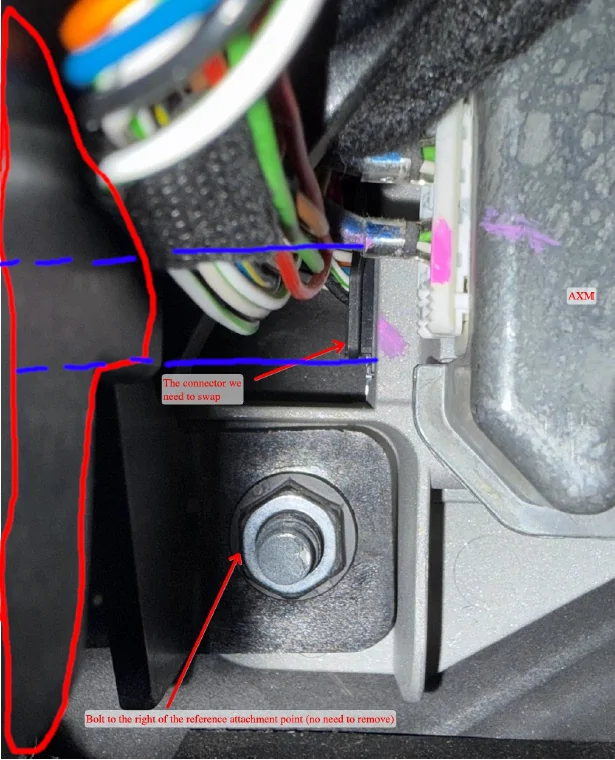
I installed it this weekend and found a slightly easier way than bending the cable. I couldn't figure out how to remove the white plastic connector with the two cables going in (and was afraid of breaking it), so it really was a pain to try and fit the connector in-between the fuse mount (the red outlined structure in the image below) and the AXM. Additionally, the old cable that I needed to plug into the comma harness didn't have a lot of slack so I didn't think it would reach.

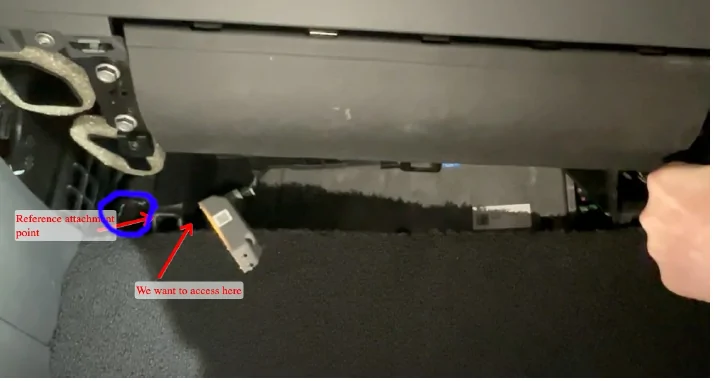
So instead, I threaded the old connector to the left of the fuse mount and threaded the new harness from the left of the fuse mount and behind the fuse mount. I've attached an annotated pic from Lukas' directions that show this. The red is the fuse mount. The blue is how I connected it. The dotted lines represent where I went behind the red circled fuse mount.

This allowed me to connect the new harness without bending it as once you get it threaded behind the fuse mount its a straight shot into the connector.

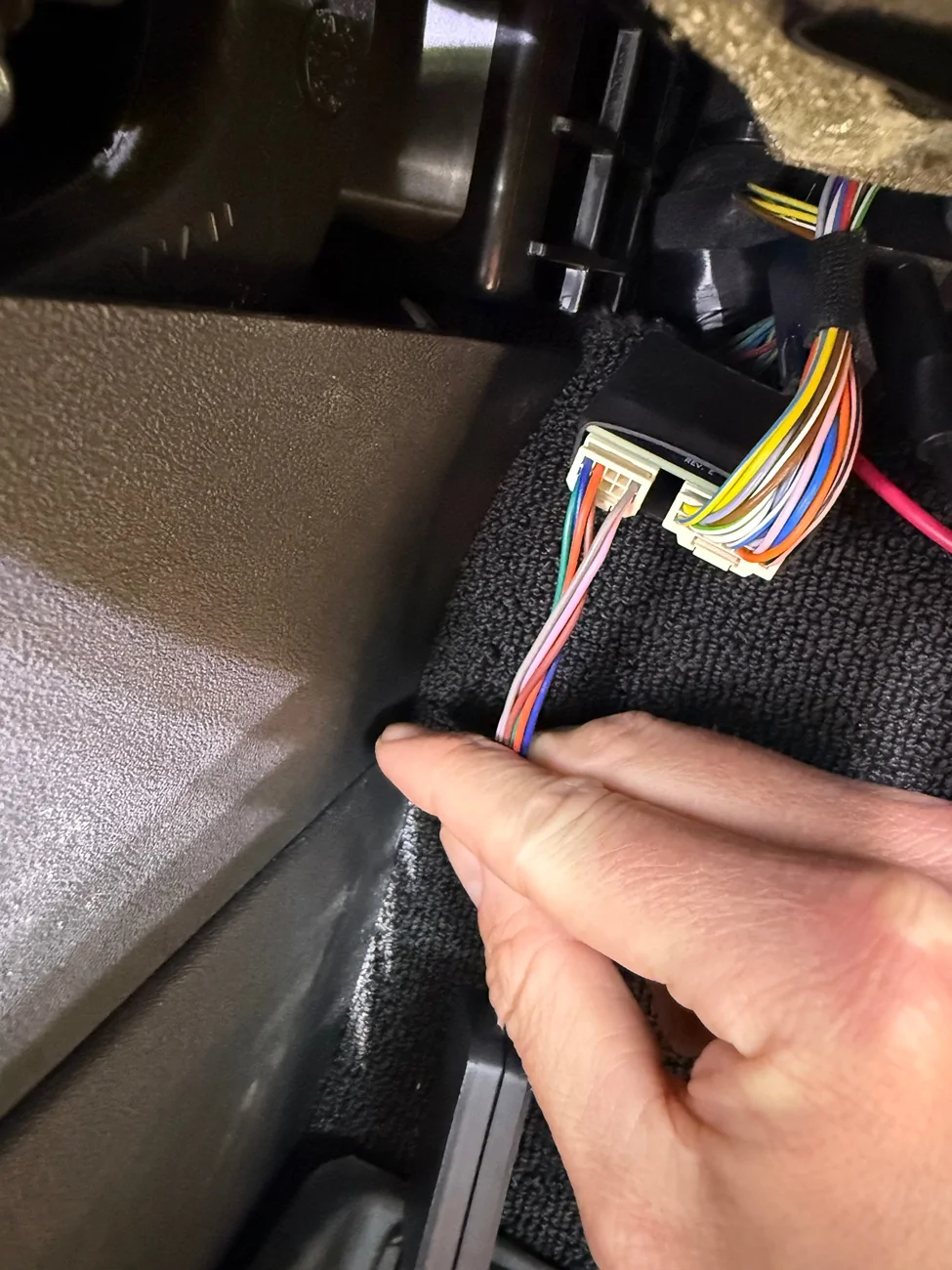
The only issue is that the harness could have been about a 1/2" longer - so the various dongles and other things do get squeezed a little between the left edge of the fuse mount (as you face it) and whatever is on the other side so definitely connect everything (e.g., the longitudinal kit, etc...) before threading it back there. The second picture shows where I threaded things in blue circle.

Rivian R1T R1S Comma AI Owner Demo Drive Connect Thread Comma
Rivian R1T R1S Comma AI Owner Demo Drive Connect Thread comma2


I really like the comma and if anyone is on the fence, it's a pain to install, but worth it.

Thanks again to @gerrylum for his assistance with some settings issues!

edit, found a pic of where i threaded it.

Rivian R1T R1S Comma AI Owner Demo Drive Connect Thread IMG_9614
Sponsored


Top