
Sponsored
Finally charged at a Tesla Magic Dock Supercharger
- Thread starter Sgt Beavis
- Start date
- Watchers 3


WorldComposting
Well-Known Member
- Joined
- Oct 27, 2022
- Threads
- 4
- Messages
- 299
- Reaction score
- 283
- Location
- Maryland
- Website
- www.worldcomposting.com
- Vehicles
- Rivian R1S, Subaru Ascent
- Occupation
- Project Manager
This is great news as the lower charging rate added more time with less power delivered on my trip last time. Combine that with all the locations it will hopefully make travel a bit smoother as the non-tesla EV charging stations typically have lines it seems.Looks like its a system-wide change within the last week based on plugshare reviews. This makes the V3 magic docks much more useful for R1's!
agentfive
Well-Known Member
How do you find the Magic Docks that allow for Rivian? Also - is there a credit card reader or something on the dock? I'm in the Boston area - would love to know how to find any if available.

zefram47
Well-Known Member
- First Name
- Aaron
- Joined
- Feb 6, 2022
- Threads
- 18
- Messages
- 2,752
- Reaction score
- 4,515
- Location
- Denver, CO
- Vehicles
- Rivian R1T, Alfa Romeo 4C
- Occupation
- Software Engineer
To use one you'd need to download the Tesla app and use the Charge Your Non-Tesla option.How do you find the Magic Docks that allow for Rivian? Also - is there a credit card reader or something on the dock? I'm in the Boston area - would love to know how to find any if available.
https://www.tesla.com/findus?v=2&bo...5826,-126.00861380918563&zoom=6&filters=party
Ironcitijc
Well-Known Member
- First Name
- John
- Joined
- Sep 23, 2022
- Threads
- 11
- Messages
- 133
- Reaction score
- 147
- Location
- New Hampshire
- Vehicles
- 2023 Performance DM R1T Max Pack, Porsche Macan 4S
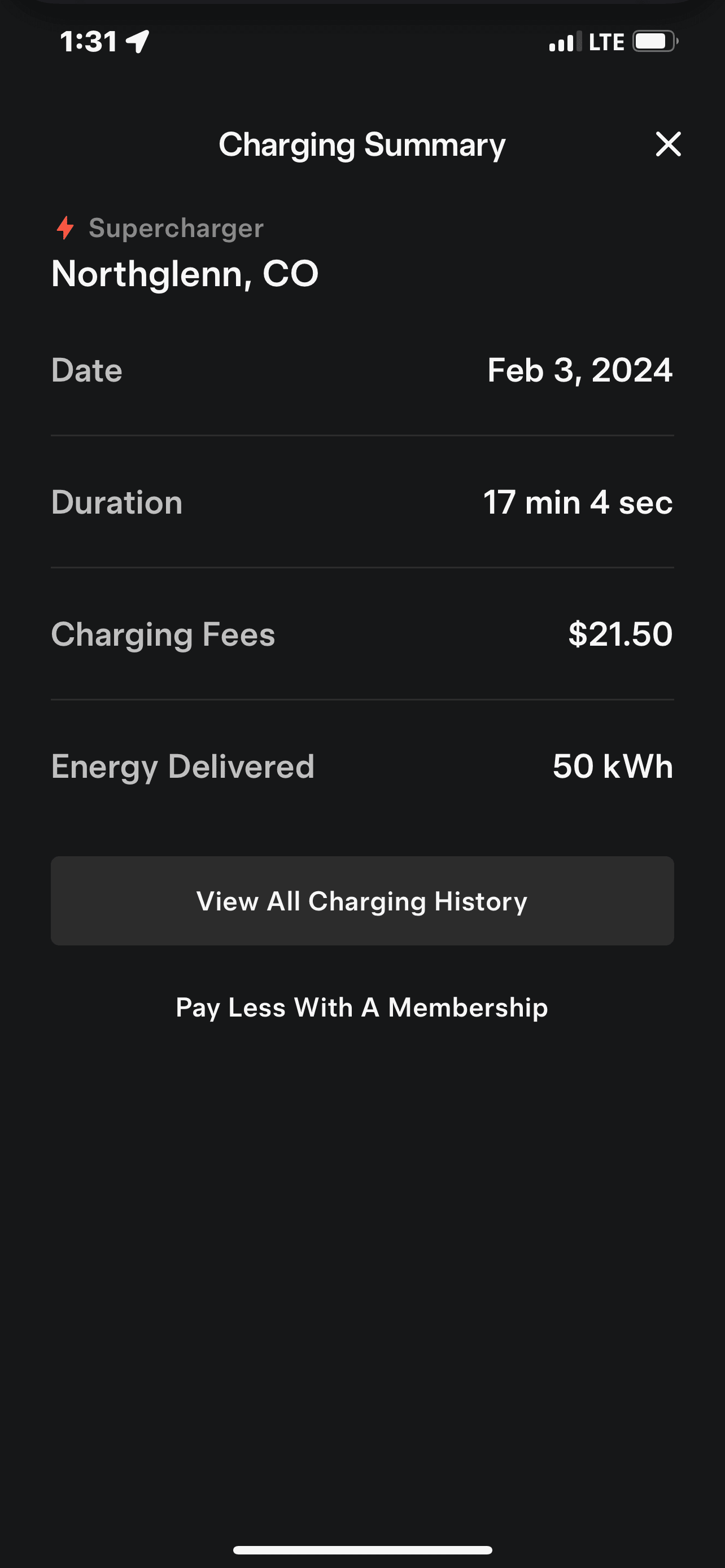
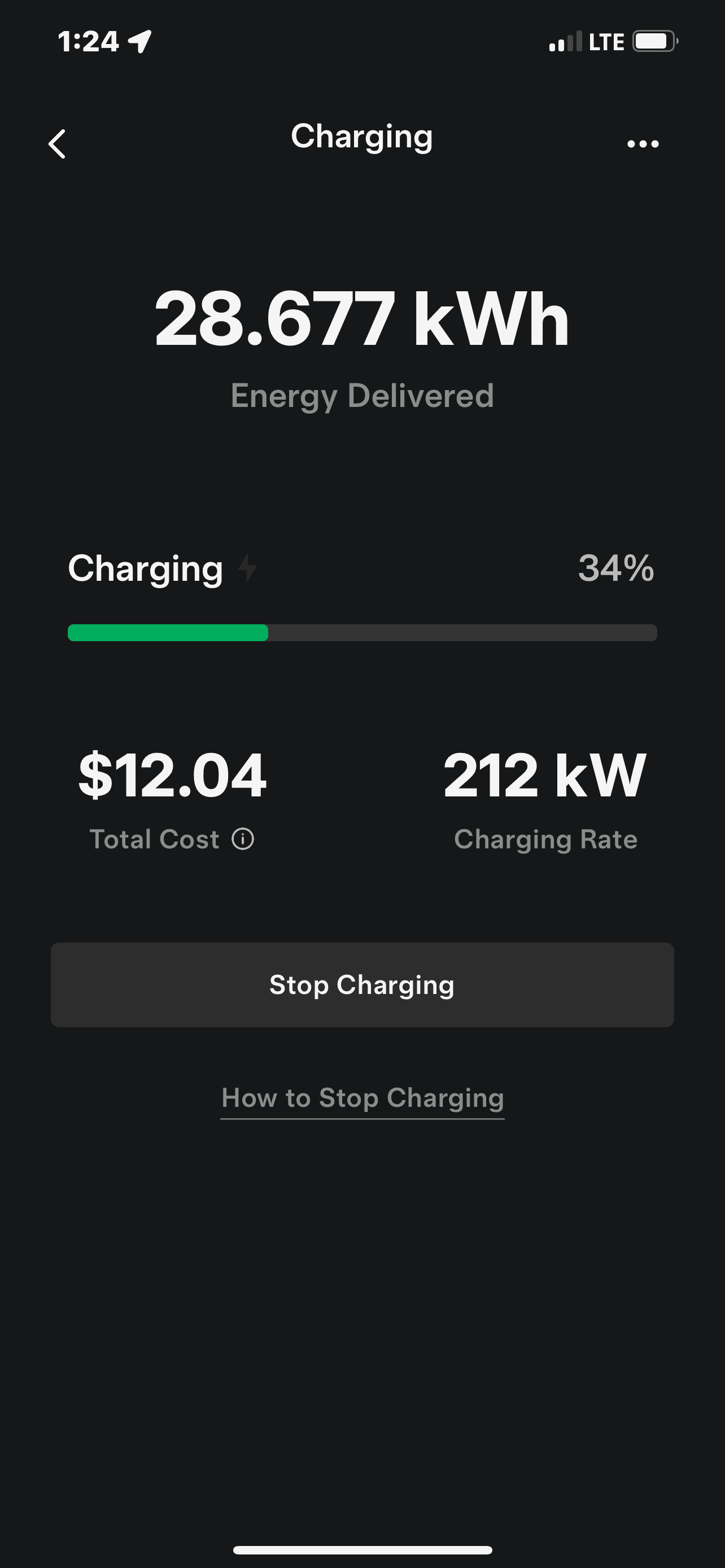
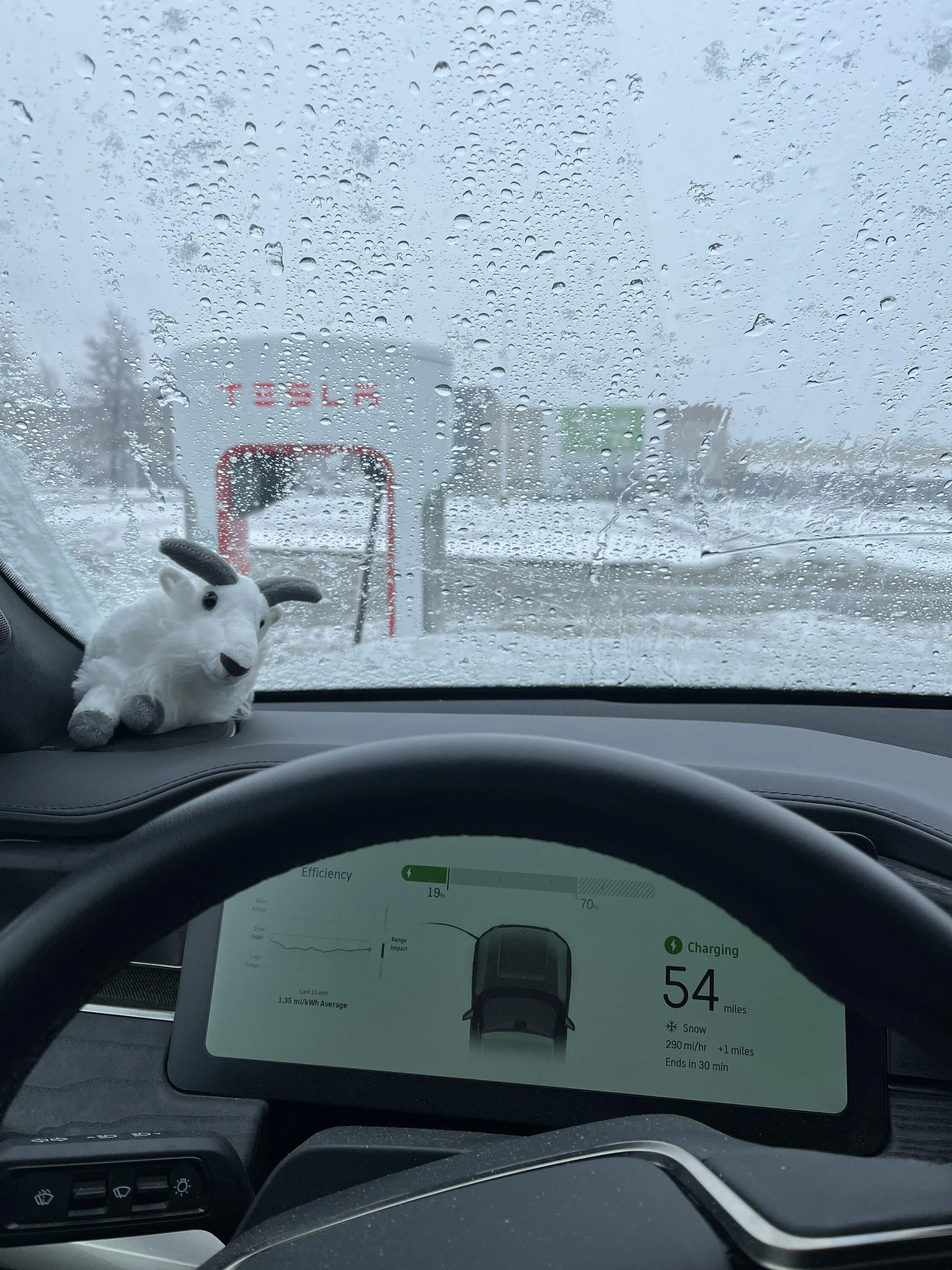
Do you happen to know the price difference for “pay as you go” vs. the $12.99/month membership plan price Tesla offers?Yesterday I was out for my son’s birthday. Drove all over the place and found my truck at 19% SoC with a decent distance left to drive home. Fortunately there was a relatively new Tesla Supercharger, at nearby Northglenn, CO, with a Magic Dock. So I set it on my nav to begin preconditioning and headed that way.
The biggest PITA was setting up payment. It showed that ApplePay was setup but it wouldn’t take it so I had to manually enter in my card info. After that, everything go easy. I just entered the charging unit number, unplugged the cable and adapter from the magic dock and plugged it into my truck.
I went from 19 to 50% SoC in 17 minutes. No technical issues at all. At it’s best, the charger was putting out 212kW of power. The price was a whopping $0.43 per kWH. Very pricey compared to charging at home but I was impressed with the speed.
All in all, I want more Tesla Supercharger access YESTERDAY. I’m tired of Electrify America’s horse crap.


Sponsored

vandy1981
Well-Known Member
Click on the location in the 'Charge your non-Tesla' section of the Tesla appDo you happen to know the price difference for “pay as you go” vs. the $12.99/month membership plan price Tesla offers?
It will give you a link for membership pricing.
It's about a 10 cent difference at the locations near me but it depends on the specific location.
OP
OP

Sgt Beavis
Well-Known Member
- Thread starter
- #22
I know it exists, but I don't know the numbers. There aren't enough available Tesla chargers available to my Rivian to bother with a subscription. I'll very likely subscribe once Tesla's network is fully opened to Rivian vehicles.Do you happen to know the price difference for “pay as you go” vs. the $12.99/month membership plan price Tesla offers?
KootenayEV
Well-Known Member
- First Name
- Andrew
- Joined
- Sep 22, 2021
- Threads
- 28
- Messages
- 614
- Reaction score
- 589
- Location
- Nelson, BC
- Vehicles
- R1T, Tesla Model 3
- Occupation
- Environmental Engineer
That's not actually the case, each cabinet has a limit that is much less than 250kW x 4 stalls, but the cabinets can share power via DC bus to a point.That is not the case on V3 & higher SCs; they no longer share power.
In practice the user won't notice this very often since the odds of several cars able to charge at 250kW at once is small. This may happen more often as the network opens up to vehicles that can sustain >200kW rates longer than Model 3/Y can.
See here for more details: https://teslamotorsclub.com/tmc/thr...ercharger-cabinets.158697/page-2#post-5508897

shamoo
Well-Known Member
Same here. I knew Tesla would price theirs similarly. With their network alone, that makes the Tesla option better. If it is the same price as competitors, it is a no brainer who to use.I'd gladly pay that DC fast charging rate here in So.Cal.
Lately EA and EVGo have been charging $0.48-0.60 per kWh
People outside of CA are shocked at even our home electricity costs. Peak at 55 cents and lowest being in the 23-29 cent range.
Mjl
Well-Known Member
- Joined
- Apr 4, 2022
- Threads
- 4
- Messages
- 67
- Reaction score
- 138
- Location
- Birmingham, AL
- Vehicles
- R1T
- Occupation
- software engineer
I'm honestly OK with charging prices being high if it means better site reliability. If rivian needs to increase energy costs for RAN to be more widespread I'm all for it. We need better infrastructure FAST.
Sponsored
not_a_car_guy
Well-Known Member
- Joined
- Oct 23, 2023
- Threads
- 4
- Messages
- 141
- Reaction score
- 224
- Location
- Massachusetts
- Vehicles
- R1T Perf Dual Motor
- Occupation
- Engineer
I found it is not enough to add your credit card to Account—>Wallet, in the Tesla App (at least in the iOS app).
Once you add your card there, then you also have to go to Account—>Charging—>Manage Payment, and then select the card you added to the wallet.
Notice ApplePay isn’t an option you can select in the charging payment settings.
Once you add your card there, then you also have to go to Account—>Charging—>Manage Payment, and then select the card you added to the wallet.
Notice ApplePay isn’t an option you can select in the charging payment settings.
Crudestmass
Member
- First Name
- Michael
- Joined
- Mar 5, 2021
- Threads
- 0
- Messages
- 10
- Reaction score
- 6
- Location
- Portland, OR
- Vehicles
- 2013 Chevy Volt
- Occupation
- Firefighter
Download the Tesla app and create an account. When you open the app, it will say "Charge Your Non-Tesla". Right below that, there is a "Find Us" button. When you click that, it will take you to a map which will show all the magic dock location with a red bubble.How do you find the Magic Docks that allow for Rivian? Also - is there a credit card reader or something on the dock? I'm in the Boston area - would love to know how to find any if available.
Bradley
Member
- First Name
- Bradley
- Joined
- Dec 19, 2023
- Threads
- 0
- Messages
- 5
- Reaction score
- 3
- Location
- Savannah, GA
- Vehicles
- R1T
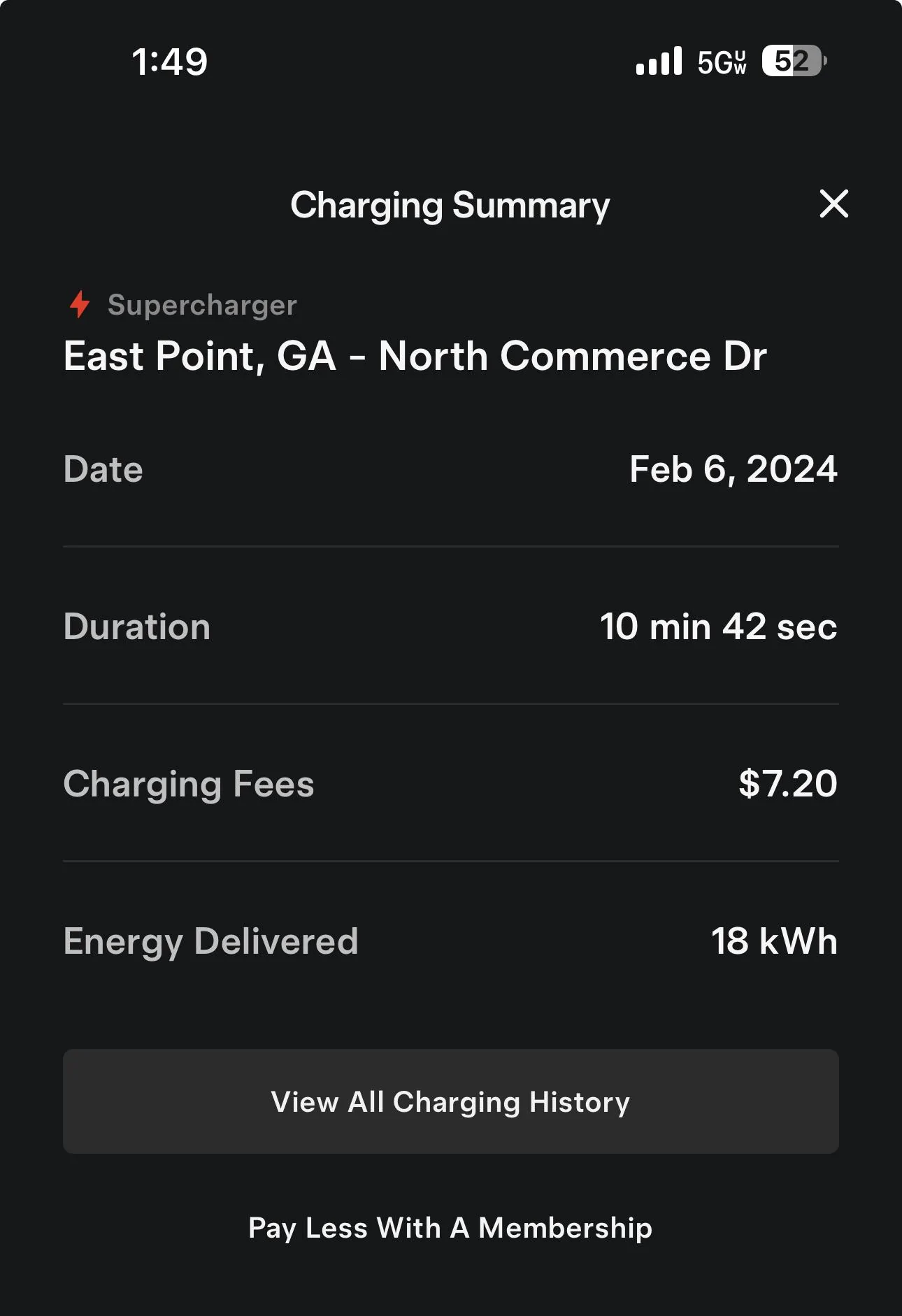
So I charged at the East Point (Atlanta Airport), GA Magic Dock station today— also my first time at a Tesla Supercharger. This was mainly a test, as I had plenty of charge on my way to the Macon, GA RAN. The experience was mixed to be honest. It was Version 4 pedestals and several units were marked offline in the app, which is fine, except the letters are really hard to see when you are pulling in, and it was relatively busy. Further, I had to try multiple units before I found one where the magic dock would “unlock“ and come out with the NACS connector. They did have a pull through spot, but I didn’t try it since I didn’t have a trailer. I look forward to having my own adapter, as the magic dock receptacle seems like it could be a fail point with heavy use. I was able to get the cable to reach and park the “correct” way. Luckily, this was a 16 bay station, so 4 stations down, plus a few docks stuck didn’t set me back more than a few minutes and I didn’t have to wait on anyone to finish charging. I look forward to more large stations with 12+ ports available, so a few issues doesn’t prevent a charge. I’ll likely be at the Columbia location in a few weeks, I will let y’all know if the docks seem to have the same issue.
Also, was not able to test charging rate as my SOC was over 60% when I arrived. I started at 115KW.

Also, was not able to test charging rate as my SOC was over 60% when I arrived. I started at 115KW.
Jeff.O.Taylor
Member
Chiming in to say I used the Ft Worth area magic dock Supercharger and it was great. Got over 200kwh for a bit. Parking spots on both sides of the stalls, so no worries about taking up two spots from teslas. Oddly in a Lowe’s parking lot and nothing else. Crossed the street to do some Walmart shopping and look at food options.

azbill
Well-Known Member
Oddly enough the Glendale AZ magic dock site is in a parking lot between Lowes, a bank and a Taco Bell. The chargers are very CCS friendly with two pull throughs as well.Chiming in to say I used the Ft Worth area magic dock Supercharger and it was great. Got over 200kwh for a bit. Parking spots on both sides of the stalls, so no worries about taking up two spots from teslas. Oddly in a Lowe’s parking lot and nothing else. Crossed the street to do some Walmart shopping and look at food options.
Sponsored
Similar threads
- Replies
- 11
- Views
- 857
- Replies
- 15
- Views
- 4,477

- Replies
- 51
- Views
- 4,880


- Replies
- 19
- Views
- 3,627
