Sponsored

In search for a true ignition 12v trigger

azbill

Well-Known Member
First Name
Bill
Joined
Jun 8, 2020
Threads
17
Messages
1,696
Reaction score
1,978
Location
Arizona
Vehicles
Escalade IQ, Mach E, Hummer EV SUT
Occupation
Retired
No offense, but I'd much rather you be forced to add an on-off button for your accessories than me and every other owner be forced to use an on-off button so you don't have to add one.

I'd much prefer Rivian solve this problem with built-in switched accessory power that integrates with the UI (and sure, optional overhead buttons or something if you're into that kind of thing). The lack of accessory power is kind of a miss for an adventure vehicle, but I definitely don't want to compromise the simplicity and aesthetics of the current inputs & software.
I do not care how they implement it, but at least provide an option preference. Different people have different preferences and use cases.
Sponsored


R1Thor

Well-Known Member
First Name
Joe
Joined
Aug 9, 2023
Threads
8
Messages
1,536
Reaction score
2,421
Location
Lancaster, PA
Vehicles
23QM R1T, Limestone + Ocean Coast, 21" & UBS
Occupation
Mechanical Engineering Lead
Clubs
 
Have you looked into software solutions?

On an Android phone you could use the Tasker app to tell your phone to not connect to the EV sportline device until after it has connected to the OEM Rivian bluetooth audio. That would prevent unwanted connections to the EV sportline device.

Based on your use of the word Carplay, I assume you are an apple user, but perhaps there is a way to do something similar with an Apple phone?
I have (and use) Tasker, and I had no idea this was an option.

Looking at it, I'm having trouble figuring out how to tell it NOT to connect Android Auto unless the BT connection is to the truck (*the phone wants to connect to AA all the time). Can you post your settings?
 

sub

Well-Known Member
Joined
Jul 23, 2021
Threads
34
Messages
1,873
Reaction score
3,306
Location
USA
Vehicles
Rivian R1S, Tesla Model 3
I have (and use) Tasker, and I had no idea this was an option.

Looking at it, I'm having trouble figuring out how to tell it NOT to connect Android Auto unless the BT connection is to the truck (*the phone wants to connect to AA all the time). Can you post your settings?
I don't have any Android auto devices so I can't test this But I think in general if you manually disconnect a Bluetooth device it won't automatically reconnect untill you manually ask it to connect.

So these two rules should do it.

Event: Disconnect ( Rivian Audio)
Action: Disconnect, (Android Auto)

Event: Connect ( Rivian Audio)
Action: Connect, (Android Auto)

And then just in case Android auto does try to reconnect.

Event: Connect ( Android Auto)
If (not connected to Rivian Audio)
Action: Disconnect (Android Auto)

But I'm assuming the Android Auto connection looks just like any other Bluetooth connection. If Android Auto isn't connecting over Bluetooth, I would expect there would still be a way to do it, but I'm even further from being able to test it.

Edit: Doing some googling. I see suggestions to have Tasker open and close the Android Auto app instead of closing the connection. And within the Android Auto app you can disable auto launch
 
Last edited:

R1Thor

Well-Known Member
First Name
Joe
Joined
Aug 9, 2023
Threads
8
Messages
1,536
Reaction score
2,421
Location
Lancaster, PA
Vehicles
23QM R1T, Limestone + Ocean Coast, 21" & UBS
Occupation
Mechanical Engineering Lead
Clubs
 
I don't have any Android auto devices so I can't test this But I think in general if you manually disconnect a Bluetooth device it won't automatically reconnect untill you manually ask it to connect.

So these two rules should do it.

Event: Disconnect ( Rivian Audio)
Action: Disconnect, (Android Auto)

Event: Connect ( Rivian Audio)
Action: Connect, (Android Auto)

And then just in case Android auto does try to reconnect.

Event: Connect ( Android Auto)
If (not connected to Rivian Audio)
Action: Disconnect (Android Auto)

But I'm assuming the Android Auto connection looks just like any other Bluetooth connection. If Android Auto isn't connecting over Bluetooth, I would expect there would still be a way to do it, but I'm even further from being able to test it.

Edit: Doing some googling. I see suggestions to have Tasker open and close the Android Auto app instead of closing the connection. And within the Android Auto app you can disable auto launch
I'll have to try it. I always get pretty bound up creating tasker tasks, because it's not intuitive to me.

But that said, with how often this phone tries to auto connect, I am not foreseeing this going well--best case, I'm thinking it's going to bind up my phone and kill the battery quickly.

But more likely case is I'm just foreseeing a ton of connection issues.
 

racekarl

Well-Known Member
Joined
Jan 5, 2023
Threads
9
Messages
561
Reaction score
845
Location
MA
Vehicles
2023 R1T
But I'm assuming the Android Auto connection looks just like any other Bluetooth connection. If Android Auto isn't connecting over Bluetooth, I would expect there would still be a way to do it, but I'm even further from being able to test it.
IF AA is like CarPlay, it's using Wifi for the data connection. So maybe removing the device as a saved wifi network could work? That's one the things that (at least on Apple) makes this issue so annoying: it's not just that the phone is connecting to CarPlay, but that doing so also disrupts the connection to your home wifi.
 

Sponsored

OP
OP
Spaceball1

Spaceball1

Well-Known Member
First Name
Danny
Joined
Feb 1, 2023
Threads
12
Messages
368
Reaction score
371
Location
Colorado Springs, CO
Vehicles
22 R1T, 23 Kia EV6, 15 Mustang GT Vert
Occupation
Mechanical Engineer
IF AA is like CarPlay, it's using Wifi for the data connection. So maybe removing the device as a saved wifi network could work? That's one the things that (at least on Apple) makes this issue so annoying: it's not just that the phone is connecting to CarPlay, but that doing so also disrupts the connection to your home wifi.
Yes CP uses Wifi as well. It handshakes first with Bluetooth then uses the wifi connection for CarPlay. It doesn't show as a conventional Wifi connection, though. It is a connection in the CarPlay settings, but I wouldn't want to delete that every time because you lose all your preferences of apps etc.

Yeah I've also had this issue of losing home Wifi in my other cars that have wireless carplay (via adapters). Sucks because my LTE in my garage is pretty rubbish so I have to remember to set my destination before I enter the car or it takes a hot minute to find it on Google Maps :D
 

usulio

Well-Known Member
Joined
Jun 2, 2023
Threads
8
Messages
1,035
Reaction score
1,251
Location
CO
Vehicles
R1S
Clubs
 
No offense, but I'd much rather you be forced to add an on-off button for your accessories than me and every other owner be forced to use an on-off button so you don't have to add one.

I'd much prefer Rivian solve this problem with built-in switched accessory power that integrates with the UI (and sure, optional overhead buttons or something if you're into that kind of thing). The lack of accessory power is kind of a miss for an adventure vehicle, but I definitely don't want to compromise the simplicity and aesthetics of the current inputs & software.
It's totally fine for different people to have different preferences, but another vote for a power button here, and these are some reasons why...
* Random wakeups and weird phone connecting things happening
* Phantom drain
* Podcasts/audiobooks randomly stop/start playing or turn themselves back on when I am doing stuff around the car like loading/unloading, etc
* Climate control stays on when I want it off or vice versa
* Interior lights don't stay on when cleaning the car
* Air compressor randomly shuts off when in use
* No way to "leave the car running" except Pet Mode

Currently, thanks to the "convenience" of not having a power button, when I start and stop the car I'd have to go into a couple different menus to turn the things I want on and off.
 

zefram47

Well-Known Member
First Name
Aaron
Joined
Feb 6, 2022
Threads
18
Messages
2,751
Reaction score
4,515
Location
Denver, CO
Vehicles
Rivian R1T, Alfa Romeo 4C
Occupation
Software Engineer
EDIT: That said, this problem could theoretically go away on its own should Rivian continue to improve the random waking-events (I know it's gotten 'better,' but there's still quite a bit of room for improvement, in my opinion)
It's actually gotten A LOT worse since Rivian made the last round of proximity key updates. I have to turn bluetooth off on my phone to get the truck to go to sleep when I'm at work. If I don't, it constantly wakes and sleeps practically a hundred times a day and I park more than 50 ft from my office.
 

kylealden

Well-Known Member
First Name
Kyle
Joined
Feb 25, 2021
Threads
20
Messages
1,458
Reaction score
4,461
Location
Seattle
Vehicles
2022 Rivian R1T LE (QM/L), 2024 Zero DSR/X
Occupation
Product Management
Currently, thanks to the "convenience" of not having a power button, when I start and stop the car I'd have to go into a couple different menus to turn the things I want on and off.
It's actually gotten A LOT worse since Rivian made the last round of proximity key updates. I have to turn bluetooth off on my phone to get the truck to go to sleep when I'm at work. If I don't, it constantly wakes and sleeps practically a hundred times a day and I park more than 50 ft from my office.
Out of curiosity, have y'all tried turning off the proximity key? I'm very happy with my keyfob life choices and don't miss the proximity key at all, and have never experienced any of the symptoms you're describing.
 

usulio

Well-Known Member
Joined
Jun 2, 2023
Threads
8
Messages
1,035
Reaction score
1,251
Location
CO
Vehicles
R1S
Clubs
 
Out of curiosity, have y'all tried turning off the proximity key? I'm very happy with my keyfob life choices and don't miss the proximity key at all, and have never experienced any of the symptoms you're describing.
Good to know. I have proximity key on only for the fob, not for our phones, but the vehicle still seems to recognize and connect to the phones intermittently when we're nearby. I think it's the bluetooth for the entertainment system and things like "Rivian Sensor 3".

Proximity is only one of my list of complaints, though.
 

Sponsored

R1Thor

Well-Known Member
First Name
Joe
Joined
Aug 9, 2023
Threads
8
Messages
1,536
Reaction score
2,421
Location
Lancaster, PA
Vehicles
23QM R1T, Limestone + Ocean Coast, 21" & UBS
Occupation
Mechanical Engineering Lead
Clubs
 
Out of curiosity, have y'all tried turning off the proximity key? I'm very happy with my keyfob life choices and don't miss the proximity key at all, and have never experienced any of the symptoms you're describing.
I don't carry the fob at all. Only time I ever use it is when turning it over to service (or a local garage for whatever service they're performing).
 

azbill

Well-Known Member
First Name
Bill
Joined
Jun 8, 2020
Threads
17
Messages
1,696
Reaction score
1,978
Location
Arizona
Vehicles
Escalade IQ, Mach E, Hummer EV SUT
Occupation
Retired
Today my truck stayed turned on in my garage for several hours. All displays were on and the HVAC was running. All doors were closed, no seatbelts latched, etc. I took my fob out to the garage and locked the truck and walked away. Came back with no phone or fob and it was still running. I had plugged the truck in this morning and left home for a few hours when this situation started. The truck is in a detached garage far from the fob and my phone was with me.

I got in the truck and did a soft reset, walked away, then came back and it finally turned off. Nothing else seemed to work.
 
First Name
Alan
Joined
Oct 4, 2022
Threads
3
Messages
16
Reaction score
49
Location
Colorado
Vehicles
R1T
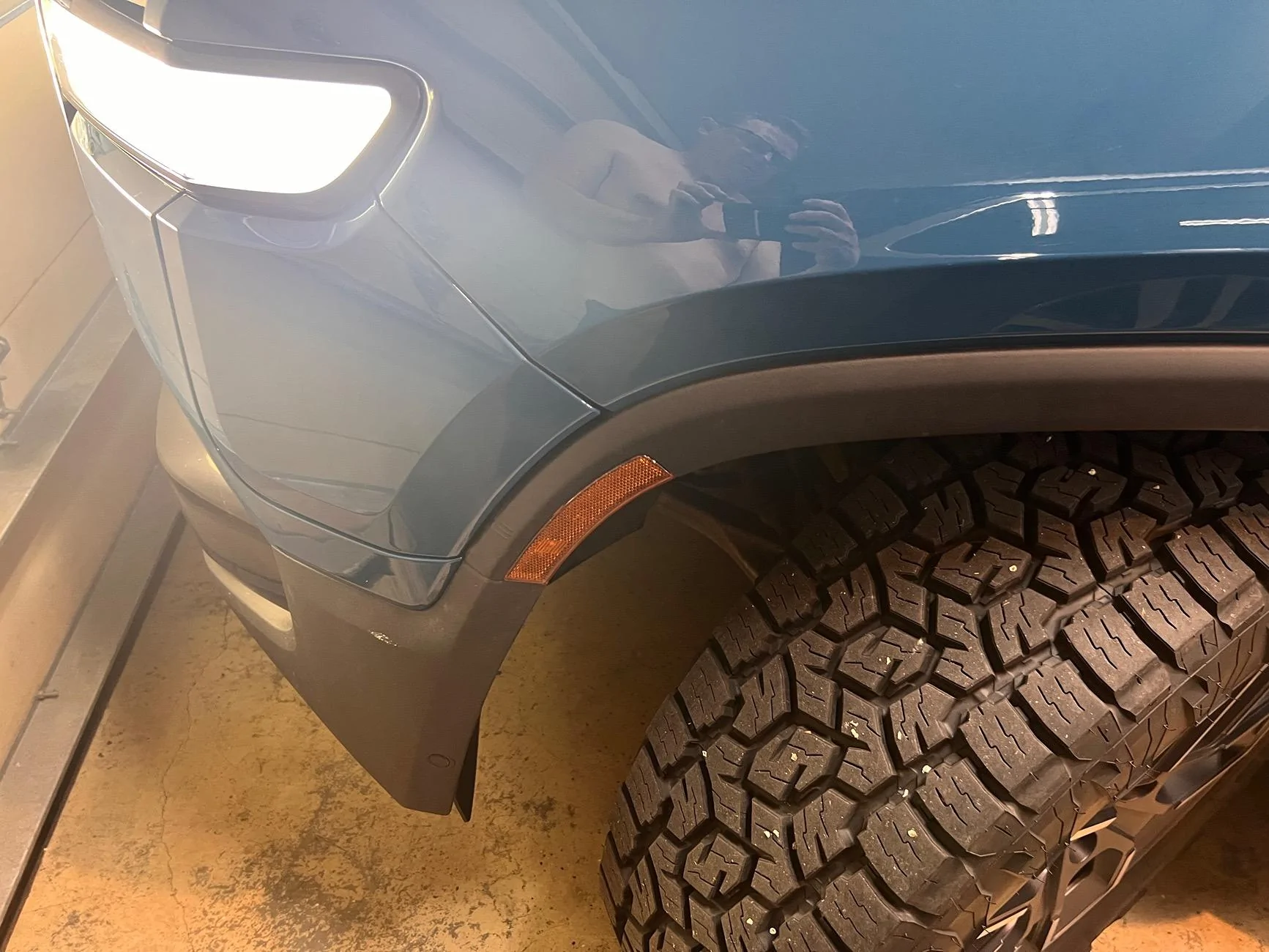
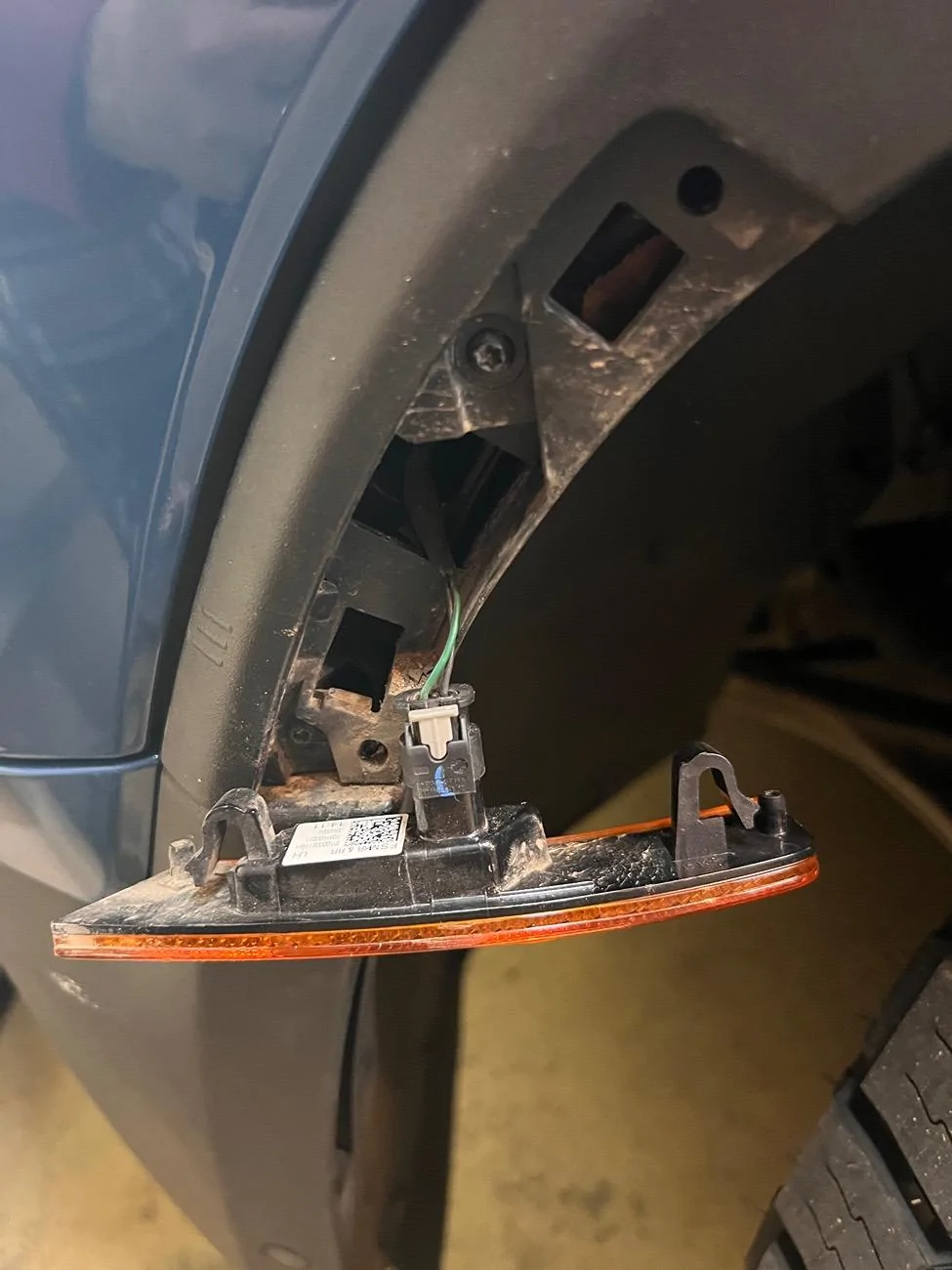
I'm going to use the amber marker light on the front wheel well as an ignition trigger. It doesn't come on when the truck wakes or unlocks. It first comes on when I press the break. The only time it doesn't look like it comes on is if you have the headlights/running lights/et al completely turned off (which I never do).

I was able to pop the light out with a trim tool. I plan to splice into the power line near the plug and then fish the trigger wire back up into the frunk area.

Rivian R1T R1S In search for a true ignition 12v trigger IMG_5918
Rivian R1T R1S In search for a true ignition 12v trigger IMG_5920
 
OP
OP
Spaceball1

Spaceball1

Well-Known Member
First Name
Danny
Joined
Feb 1, 2023
Threads
12
Messages
368
Reaction score
371
Location
Colorado Springs, CO
Vehicles
22 R1T, 23 Kia EV6, 15 Mustang GT Vert
Occupation
Mechanical Engineer
I'm going to use the amber marker light on the front wheel well as an ignition trigger. It doesn't come on when the truck wakes or unlocks. It first comes on when I press the break. The only time it doesn't look like it comes on is if you have the headlights/running lights/et al completely turned off (which I never do).

I was able to pop the light out with a trim tool. I plan to splice into the power line near the plug and then fish the trigger wire back up into the frunk area.

IMG_5918.webp
IMG_5920.webp
Great idea! Give us updates on how it goes and works! Assuming you’ll put a relay on the circuit to make sure not to overload?
 
First Name
Alan
Joined
Oct 4, 2022
Threads
3
Messages
16
Reaction score
49
Location
Colorado
Vehicles
R1T
The Switch Pro is essentially a relay. Main power for devices is straight off the 12v battery. The lead off the marker light connects to a trigger/sensor connection on the Switch Pro and the Switch Pro pulls a couple mA at most. I plan to throw a 1 Amp fuse on the trigger input just to be safe. Will post pics and some more details when I get it wired up.
Sponsored


Top