Sponsored

Take Control NOW!!

EdwardM2005

Well-Known Member
First Name
Edward
Joined
Jan 8, 2024
Threads
9
Messages
96
Reaction score
36
Location
Colorado
Vehicles
Rivian R1S
Occupation
IT Guy
What does that mean??

Scenario -
Driving in very light traffic on I70 east, Grand Junction to Glenwood Springs, CO. With the cruise control engaged at 80 MPH, a tone and red warning flashes on the driver's screen, for about 2 seconds.

Take Control NOW!!!

Yeah, no problem - I am the driver and I am paying attention. I tap the brakes to dis-engage cruise and continue down the road.
  • What does this error mean?
  • Why was it triggered?
  • Are there logs I can access?
Traffic was light, vehicles maybe 1/4 mile apart or more. Lane departure not in use. I can see the white lane lines in both mirrors. Screen mimics, I am in the between the stripes of the lane. No wildlife to be seen on either side of the Interstate, opposing traffic is 200 plus feet on the other side of the median. Fairly straight stretch, no curves, guard rails or other objects near the road edge. Environmental factors, Clear, dry roads, late afternoon, Sun behind us 4 PM-ish, no glare, no wind...

Has anyone else experienced this? The balance of the trip was without the cruise on, no other incidents.

Weird!?!?!
Sponsored

 

NY_Rob

Well-Known Member
First Name
Rob
Joined
Feb 9, 2022
Threads
23
Messages
5,394
Reaction score
7,965
Location
long island
Vehicles
Model 3 LR AWD, BMW i3 REX, 2024 Rubicon 4xe
Occupation
IT
Did you have Driver+ engaged? Maybe your vehicle briefly exceeded the 80mph CC limit?
 

Electrified Outdoors

Well-Known Member
First Name
Ken
Joined
Jan 30, 2023
Threads
63
Messages
3,683
Reaction score
3,980
Location
Mount Airy, Maryland
Website
EVoutdoors.org
Vehicles
2024 Rivian R1S Quad, 2024 Silverado EV RST First Edition
Occupation
Real Estate
Clubs
 
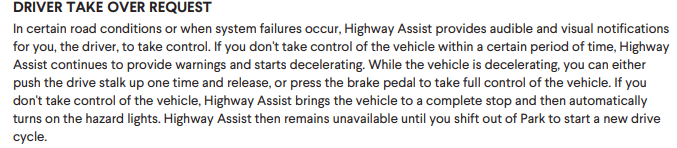
Take control now means that Driver+ is disengaging. Information on Driver+ can be found in the owners guide on the Rivian website. This is from page 177.
Rivian R1T R1S Take Control NOW!! 1708883849485
 
Last edited:

Polar

Well-Known Member
First Name
Scott
Joined
Feb 16, 2022
Threads
33
Messages
1,098
Reaction score
2,039
Location
WA
Vehicles
C40, LE CY R1S
Occupation
IT
Clubs
 
You don’t even need to tap the brakes you just lift the stalk up (the same one you used to engage by pressing down) and it disables it for you.

If it was a perfectly straight stretch of highway, the system may have thought you weren’t touching the steering wheel since it didn’t sense any movement or motion on it. It’s supposed to be capacitive mine doesn’t always work that way; I’ll need to I have some torque on the wheel. ** But as noted above the 80 mile an hour limit may have been a factor as well.
 

Zoidz

Well-Known Member
First Name
Gil
Joined
Feb 28, 2021
Threads
226
Messages
5,185
Reaction score
11,687
Location
PA
Vehicles
23 R1S Adv, Avalanche, BMWs-X3,330cic,K1200RS bike
Occupation
Engineer
I’ve seen similar with Driver + engaged and I approach a particular toll booth area. I’m in the high speed EZPass lanes, but Driver+ drops out with that message because of the toll booths.
 

Sponsored

Aardvark

Well-Known Member
Joined
Dec 29, 2021
Threads
6
Messages
652
Reaction score
1,336
Location
Colorado
Vehicles
R1S, Model 3
This same thing happens on a stretch of I-25 north of C-Springs when using Driver+. It means either
1. The cameras are temporarily blinded by low sun, or can't detect lane lines, or
2. That section of highway is not properly mapped.

It will usually let you reengage Driver+ after a short time. The issue on I25 is worn paint on the lane lines. When combined with low sun and wet road, Driver+ can't detect them.
 

VSG

Well-Known Member
Joined
Oct 3, 2022
Threads
4
Messages
3,205
Reaction score
5,991
Location
WA
Vehicles
R1T LE/RB/OC/20
Take control now means that Driver+ is disengaging.
Did you have Driver+ engaged?
I’ve seen similar with Driver +
This same thing happens on a stretch of I-25 north of C-Springs when using Driver+
Can we please all use the correct name? The feature you are all talking about is called Highway Assist, not Driver+.

Driver+ is the entire package of driver helper tools, and it include Adaptive Cruse Control, Lane Keeping Assist, Backup Cross-Traffic Warning, Automatic Emergency Braking, Blind Spot Warning, etc. And also Highway Assist. Some of which can be enabled/disabled, some of which cannot.

In this case, for example, the OP said that "cruise control" was being used. The OP did NOT say Driver+ or Highway Assist, yet everyone is a assuming that this is a problem with Highway Assist.

And while it might well be that the OP really meant Highway Assist instead of "cruise control", this just illustrates why we should try to use the proper names for things to help with communication.
 

kozak79

Well-Known Member
Joined
Nov 11, 2022
Threads
84
Messages
751
Reaction score
1,385
Location
New Jersey
Website
www.youtube.com
Vehicles
R1T
Occupation
Visual Effects
Clubs
 
I've seen this happen only when I have been ignoring the warning to take hold of the steering with Highway Assit active. Then it puts you in time out and you can't enable it again for the remainder of the drive :( Tesla does the same.
 

Electrified Outdoors

Well-Known Member
First Name
Ken
Joined
Jan 30, 2023
Threads
63
Messages
3,683
Reaction score
3,980
Location
Mount Airy, Maryland
Website
EVoutdoors.org
Vehicles
2024 Rivian R1S Quad, 2024 Silverado EV RST First Edition
Occupation
Real Estate
Clubs
 
Can we please all use the correct name? The feature you are all talking about is called Highway Assist, not Driver+.

Driver+ is the entire package of driver helper tools, and it include Adaptive Cruse Control, Lane Keeping Assist, Backup Cross-Traffic Warning, Automatic Emergency Braking, Blind Spot Warning, etc. And also Highway Assist. Some of which can be enabled/disabled, some of which cannot.

In this case, for example, the OP said that "cruise control" was being used. The OP did NOT say Driver+ or Highway Assist, yet everyone is a assuming that this is a problem with Highway Assist.

And while it might well be that the OP really meant Highway Assist instead of "cruise control", this just illustrates why we should try to use the proper names for things to help with communication.
That's fair and noted. Here is a link to the features. These fall under the category of driving assist. Adaptive Cruise, Lane Change Assist, and Highway assist.

https://rivian.com/support/article/what-features-are-included-in-rivian-driver

I am referencing highway assist where auto steer is enabled. I have seen this message a couple of times and I have only seen it when auto steer was enabled.
 

Sponsored

zefram47

Well-Known Member
First Name
Aaron
Joined
Feb 6, 2022
Threads
18
Messages
2,749
Reaction score
4,511
Location
Denver, CO
Vehicles
Rivian R1T, Alfa Romeo 4C
Occupation
Software Engineer
Could be anything. I had it happen a few times between Denver and Glenwood this weekend where it randomly had road info drop out and asked me to take over. Other than that it was actually pretty solid unless the lane lines were indistinct or missing. Only real problem I have with HWA at this point is that I *HATE* the auto slowdown for curves "feature". It over slows and slows for curves where it's completely unnecessary...I'd rather have the option to disable that.
 

NDIrish

Well-Known Member
First Name
Chris
Joined
Jul 16, 2023
Threads
7
Messages
156
Reaction score
186
Location
Gilbert, AZ
Vehicles
R1T
Occupation
Engineering Operations Manager
Clubs
 
Could be anything. I had it happen a few times between Denver and Glenwood this weekend where it randomly had road info drop out and asked me to take over. Other than that it was actually pretty solid unless the lane lines were indistinct or missing. Only real problem I have with HWA at this point is that I *HATE* the auto slowdown for curves "feature". It over slows and slows for curves where it's completely unnecessary...I'd rather have the option to disable that.
Agree, it slows way way down, driving through the mountains I have to disengage, and can do the curves much better myself. I was wondering how it determines to slow? is it G-force based or just visually calculated; because I found on some it started the slow down way to late and actually took the curve faster than I would have and then accelerated way to slow out of it. but others it slowed way to early and no matter what the acceleration is always too slow out of any slow down
 

brancky3

Well-Known Member
First Name
Brandon
Joined
Feb 11, 2022
Threads
7
Messages
727
Reaction score
858
Location
Greenville, SC
Vehicles
22 CY R1T, 21 MachE GT
Occupation
IT
I've seen this happen only when I have been ignoring the warning to take hold of the steering with Highway Assit active. Then it puts you in time out and you can't enable it again for the remainder of the drive :( Tesla does the same.
I was going to say the same. I've only ever received this 'TAKE CONTROL NOW' message if I ignore the 'assistance ending' messages for more than a few seconds (eg if it's an unmapped section coming up, construction, exit ramps, etc)
 

EVTrukHog

Well-Known Member
First Name
Matt
Joined
Aug 31, 2021
Threads
37
Messages
666
Reaction score
1,018
Location
USA
Vehicles
R1T, C6 Corvette, Ford Explorer
In my experience, it usually flashes a brief message telling me why it is disengaging... I've seen messages for:
1. Exceeding 85 mph
2. Glare on cameras
3. Tunnel Ahead
4. Hands not on wheel
Sponsored


Top